A site built ahead of time on Cloudflare, Netlify or Vercel goes stale when its content changes in LyEve. After these steps, saving a post in LyEve starts a new build of the site. A small receiver checks that each request came from LyEve and turns a burst of saves into one build.
Webhooks are free on every install, up to 25 per tenant. The LyEve steps work in LyEve Console or with the engine's API, and the deliveries are the same either way. Both were run on November 11, 2026, on the LyEve engine v0.62.0 and admin console v0.28.0 with no license key.
What you need
Console v0.28.0
- A running LyEve install with its console, and an account with the
super_adminrole, which creating a webhook takes. Self-host a headless CMS on a VPS sets one up. opensslwhere you generate the secret.
Engine API v0.62.0
- A running LyEve install and an account with the
super_adminrole, which creating a webhook takes. Self-host a headless CMS on a VPS sets one up. curl,jqandopensslwhere you run the commands.
Either way, you also need:
- A content type your site reads. The steps use
post. - A site on Cloudflare, Netlify or Vercel that builds from a Git repository.
- Node.js on a server LyEve can reach. The receiver needs no packages. We ran it on Node.js 26.12.1.
The install may run on PostgreSQL, MySQL or SQL Server, as Supported databases lists.
1. Create a deploy hook on your host
A deploy hook is a URL that starts a build of one branch when it receives a POST. Each host keeps its hooks in the project settings. We checked each host's documentation on the day of the run.
Cloudflare. Open Workers & Pages, select the project, then Settings and Builds. A Pages project has Add deploy hook there, and a Worker connected to Git has a Deploy Hooks section. Each hook takes a name and the branch to build. A Worker's hook has the form https://api.cloudflare.com/client/v4/workers/builds/deploy_hooks/<id>. A second POST that arrives while the build it started is still queued or initializing gets that build back instead of a new one.
Netlify. Open Project configuration, then Developer settings, Continuous deployment and Build hooks, and choose Add build hook. Give it a name and the branch to build. The hook has the form https://api.netlify.com/build_hooks/<id>, and an optional trigger_title query parameter replaces the default deploy message.
Vercel. Open the project's Settings, then Git. Under Deploy Hooks, choose a name and a branch. The hook has the form https://api.vercel.com/v1/integrations/deploy/<project id>/<hook id> and takes a GET or a POST. Vercel allows 60 hook calls per hour per project, across all of its hooks.
None of the three asks for anything beyond the URL. Anyone who has it can start a build. Keep it secret.
Each hook starts a build on a plain POST and could go straight into LyEve as the webhook's address. The receiver below adds what a hook cannot do. It refuses any request LyEve did not sign, and it waits for a quiet moment, so five saves in a row start one build instead of five.
2. Run the receiver
Save this as receiver.mjs on the server:
import http from "node:http";
import crypto from "node:crypto";

const SECRET = process.env.WEBHOOK_SECRET;
const DEPLOY_HOOK_URL = process.env.DEPLOY_HOOK_URL;
const PORT = Number(process.env.PORT ?? 8787);
const QUIET_SECONDS = Number(process.env.QUIET_SECONDS ?? 30);
const MAX_AGE_SECONDS = 300;

const seenNonces = new Map(); // nonce -> time it may be forgotten
let buildTimer = null;
let changes = 0;

function verify(headers, rawBody) {
  const timestamp = headers["x-webhook-timestamp"];
  const nonce = headers["x-webhook-nonce"];
  const signature = headers["x-webhook-signature"];
  if (!timestamp || !nonce || !signature) return "unsigned request";

  const now = Date.now() / 1000;
  if (Math.abs(now - Number(timestamp)) > MAX_AGE_SECONDS) return "stale timestamp";

  for (const [seen, forgetAt] of seenNonces) if (forgetAt < now) seenNonces.delete(seen);
  if (seenNonces.has(nonce)) return "nonce already used";

  const expected = "sha256=" + crypto
    .createHmac("sha256", SECRET)
    .update(`${timestamp}.${nonce}.`)
    .update(rawBody)
    .digest("hex");
  const a = Buffer.from(signature);
  const b = Buffer.from(expected);
  if (a.length !== b.length || !crypto.timingSafeEqual(a, b)) return "bad signature";

  seenNonces.set(nonce, now + 2 * MAX_AGE_SECONDS);
  return null;
}

async function build() {
  const count = changes;
  buildTimer = null;
  changes = 0;
  try {
    const res = await fetch(DEPLOY_HOOK_URL, { method: "POST" });
    const what = count === 1 ? "1 delivery" : `${count} deliveries`;
    console.log(`build requested after ${what}, deploy hook answered ${res.status}`);
  } catch (err) {
    console.log(`build request failed: ${err.message}`);
  }
}

http.createServer((req, res) => {
  const chunks = [];
  req.on("data", (chunk) => chunks.push(chunk));
  req.on("end", () => {
    const rawBody = Buffer.concat(chunks);
    const problem = verify(req.headers, rawBody);
    if (problem) {
      console.log("refused:", problem);
      res.writeHead(401).end(problem);
      return;
    }
    res.writeHead(204).end();

    const delivery = JSON.parse(rawBody);
    console.log("accepted:", delivery.event, delivery.schema, delivery.data?.title ?? "");
    changes += 1;
    clearTimeout(buildTimer);
    buildTimer = setTimeout(build, QUIET_SECONDS * 1000);
  });
}).listen(PORT, () => console.log(`listening on port ${PORT}`));
What it does with each request:
- It recomputes LyEve's signature and refuses a request that does not match. The signature is an HMAC-SHA256, keyed with your secret, over the timestamp, the nonce and the raw body.
- It refuses a timestamp more than five minutes off and a nonce it has already seen, so a captured request cannot be sent again.
- It answers
204at once. LyEve waits 10 seconds for an answer. - It calls the deploy hook 30 seconds after the last delivery.
QUIET_SECONDSchanges the wait.
Generate a secret for the signature:
openssl rand -hex 32It prints 64 hexadecimal characters. Keep them, because LyEve needs the same value in step 3. Then start the receiver with the secret and your deploy hook:
export WEBHOOK_SECRET='paste-the-64-characters'
export DEPLOY_HOOK_URL='paste-your-deploy-hook-url'
node receiver.mjs
listening on port 8787Put it behind the HTTPS proxy that serves your other sites, at an address such as https://hooks.example.com/rebuild. LyEve checks the address when you save the webhook and again when it sends. A host that resolves to a private address is refused with invalid input, unless the engine's WEBHOOK_ALLOWED_PRIVATE_NETWORKS setting lists it. Set that when the receiver runs on the same server or network as LyEve. In our run the receiver ran on the Docker host with PORT=18601, at http://hooks.example.com:18601/rebuild, so the engine listed the host's address on its Docker network. The console run used port 18611, which the screenshots show.
3. Register the webhook in LyEve
Console v0.28.0
Sign in to the console. Open Delivery, then Webhooks, and choose New webhook. Fill in the form:
- Name:
Rebuild site - URL: the receiver's address, such as
https://hooks.example.com/rebuild - Signing secret: the 64 characters from step 2, the same value the receiver holds
- Events: tick
after_create,after_updateandafter_delete - Content types: choose
post
Leave Enabled on and every field under Delivery options empty. Choose Create. The form closes, and Rebuild site appears in the list.
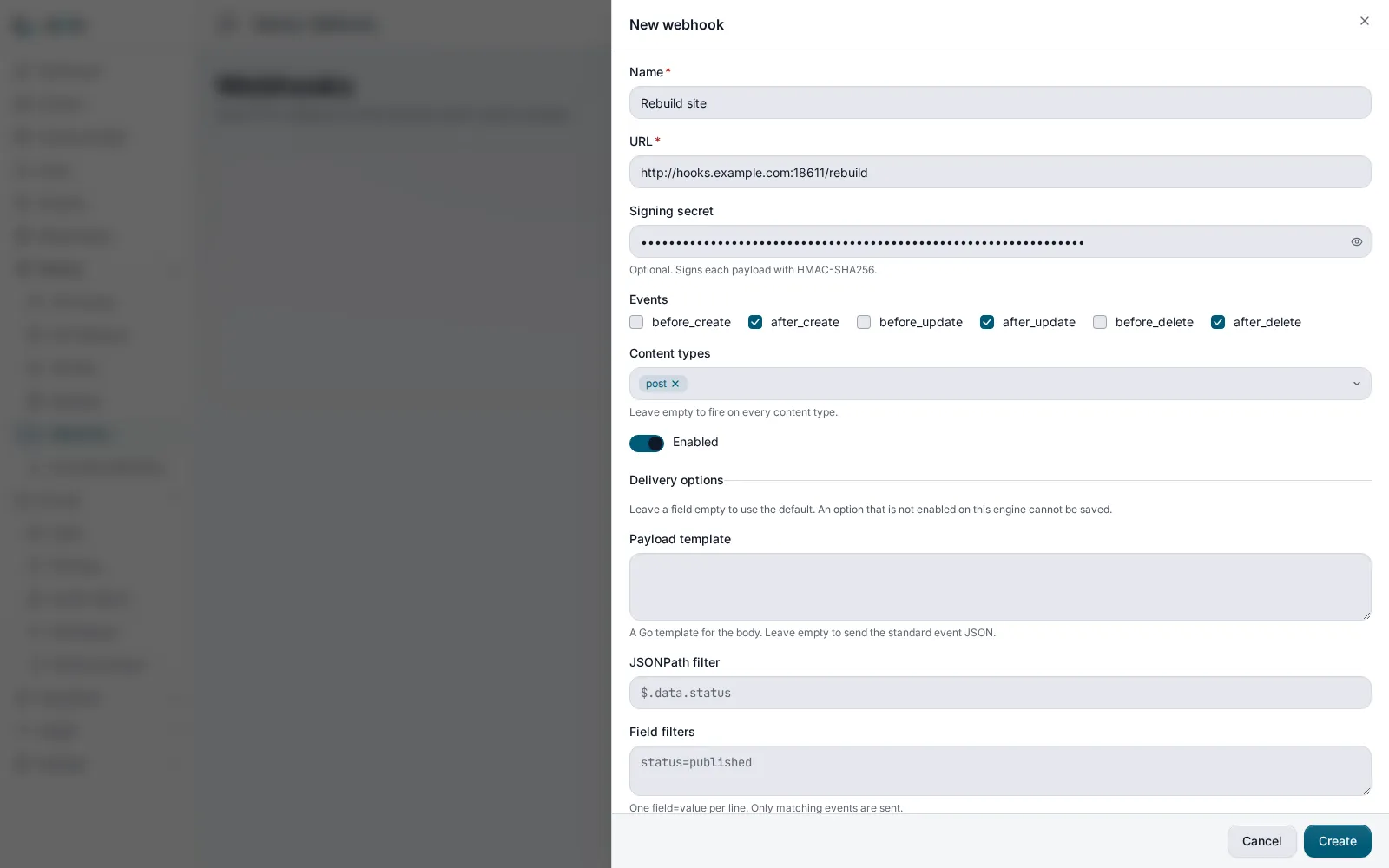 The New webhook form, filled in before Create.
Engine API v0.62.0
Set WEBHOOK_SECRET to the 64 characters from step 2, in the shell you run these commands in. Set LYEVE to the address you open the console at, and sign in for a token:
export WEBHOOK_SECRET='paste-the-64-characters'
export LYEVE=https://admin.example.org
export TOKEN=$(curl -s -X POST $LYEVE/api/admin/auth/login \
  -H "Content-Type: application/json" \
  -d '{"email": "you@example.com", "password": "your-password"}' | jq -r .token)
Use your own address, email and password. The token lasts 15 minutes. Then create the webhook, with the same secret the receiver holds:
curl -s -X POST $LYEVE/api/admin/webhooks \
  -H "Authorization: Bearer $TOKEN" \
  -H "Content-Type: application/json" \
  -d '{
        "name": "Rebuild site",
        "url": "https://hooks.example.com/rebuild",
        "events": ["after_create", "after_update", "after_delete"],
        "schemas": ["post"],
        "secret": "'"$WEBHOOK_SECRET"'"
}' | jq '{id, name, events, schemas, enabled}'{
"id": "405d7d91-573c-477a-a051-20bb3c777c72",
"name": "Rebuild site",
"events": [
"after_create",
"after_update",
"after_delete"
],
"schemas": [
"post"
],
"enabled": true
}Keep the id for the next commands:
export WEBHOOK_ID=405d7d91-573c-477a-a051-20bb3c777c72Your id will be different. The answer never shows the secret.
The three events fire when a post is created, saved or deleted, from the console or the API. Publishing and unpublishing are saves and send after_update. A draft's save sends a delivery too, with "_status": "draft" in its data. The events before_create, before_update and before_delete never send a delivery. Tick the after_ events.
4. Send a test delivery
Console v0.28.0
On the webhook's row, choose Test webhook, the first of the row's buttons. The answer appears under the buttons:
HTTP 204: No Content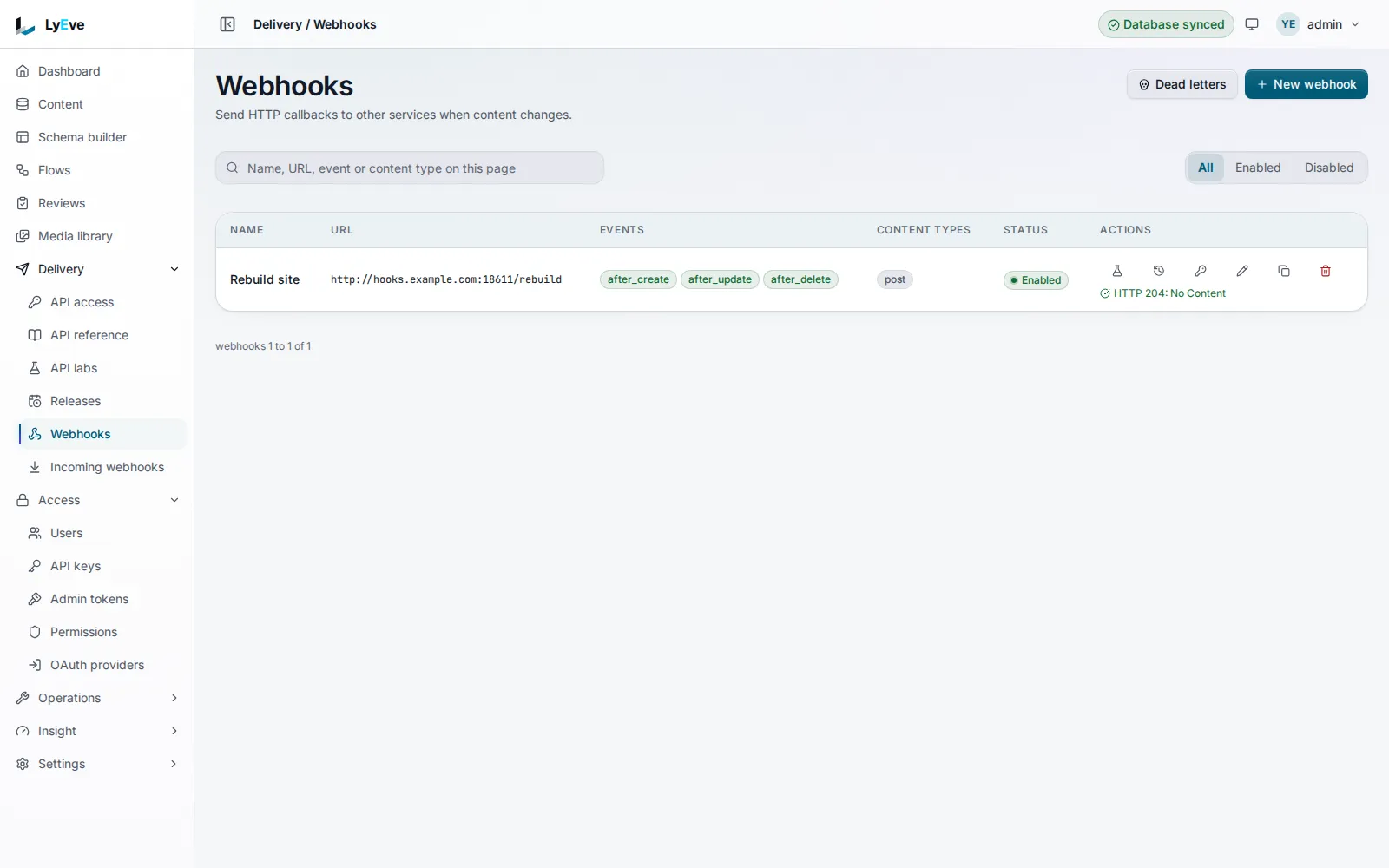 Delivery, then Webhooks, after the Test webhook button.
Engine API v0.62.0
Ask LyEve to send a test delivery:
curl -s -X POST $LYEVE/api/admin/webhooks/$WEBHOOK_ID/test \
-H "Authorization: Bearer $TOKEN"{"success":true,"status_code":204,"message":"No Content"}The receiver prints the delivery at once and asks for a build 30 seconds later:
accepted: test *
build requested after 1 delivery, deploy hook answered 200
The number at the end is the status your host answered. The 200 here is the stand-in's, because we ran the receiver against a stand-in that answers like a deploy hook.
5. Change a post and watch the build start
Console v0.28.0
Open Content, then Post, and open an entry. Edit a field and choose Save. The console saves the entry and returns to the list.
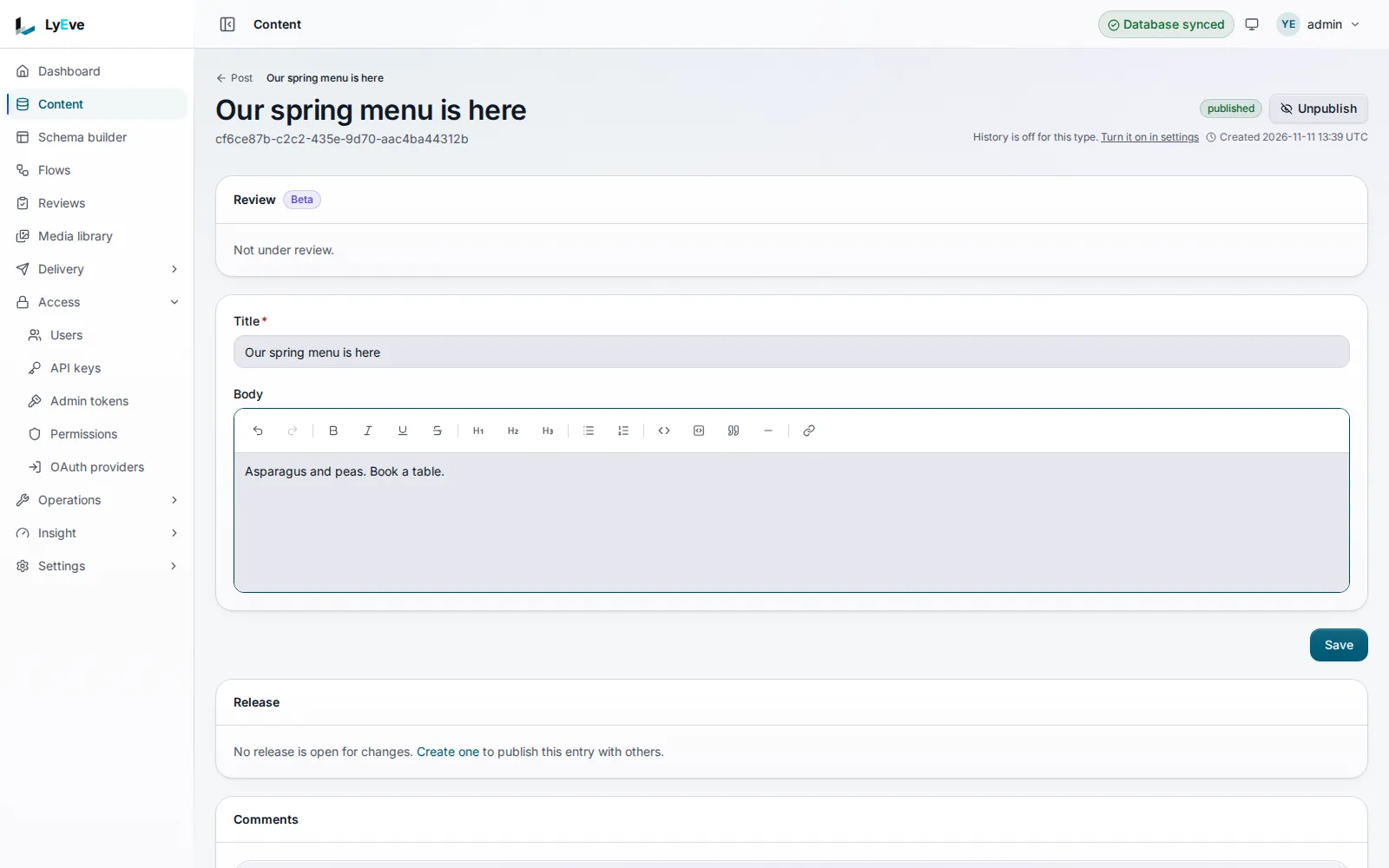 An entry open in the editor, edited and ready to save.
Engine API v0.62.0
List the posts to find the id of the one to change:
curl -s $LYEVE/api/v1/content/post \
-H "Authorization: Bearer $TOKEN" | jq -c '.[] | {id, title: .data.title}'{"id":"78822ba9-baa3-49c4-b04b-c522c80555b9","title":"Our spring menu is here"}Keep its id, then change its body. A PUT writes only the fields its body carries:
export POST_ID=78822ba9-baa3-49c4-b04b-c522c80555b9
curl -s -X PUT $LYEVE/api/v1/content/post/$POST_ID \
  -H "Authorization: Bearer $TOKEN" \
  -H "Content-Type: application/json" \
  -d '{"data": {"body": "<p>Asparagus, peas and the first strawberries. Book a table.</p>"}}' \
| jq -c '{id, title: .data.title}'{"id":"78822ba9-baa3-49c4-b04b-c522c80555b9","title":"Our spring menu is here"}We saved once, then twice more within two seconds. The receiver printed the same lines on both paths:
accepted: after_update post Our spring menu is here
build requested after 1 delivery, deploy hook answered 200
accepted: after_update post Our spring menu is here
accepted: after_update post Our spring menu is here
build requested after 2 deliveries, deploy hook answered 200
Each save made a delivery. The two quick saves made one build request.
Check that it worked
Console v0.28.0
On the webhook's row, choose Delivery history, the second of the row's buttons. The panel lists each delivery, newest first, with its event, status, duration and result. A failed delivery shows its error in the result.
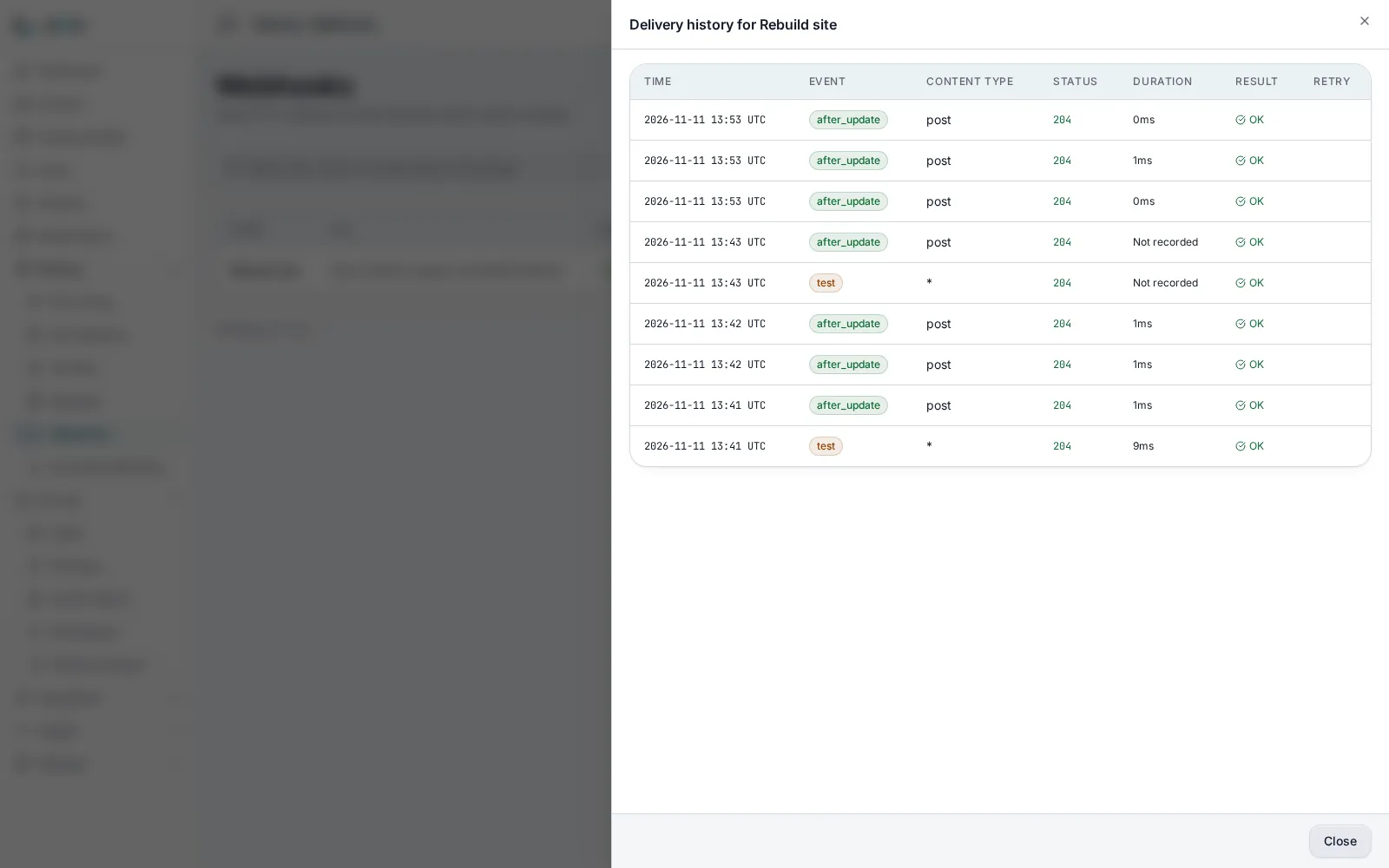 Delivery history for Rebuild site. The two deliveries whose duration reads Not recorded got through once the receiver was back.
Engine API v0.62.0
Read the webhook's latest deliveries:
curl -s "$LYEVE/api/admin/webhooks/$WEBHOOK_ID/deliveries?limit=5" \
  -H "Authorization: Bearer $TOKEN" | jq -c '.[] | {event_type, status_code, success, attempted_at}'
{"event_type":"after_update","status_code":204,"success":true,"attempted_at":"2026-11-11T13:41:37.508616Z"}
{"event_type":"after_update","status_code":204,"success":true,"attempted_at":"2026-11-11T13:41:37.490771Z"}
{"event_type":"after_update","status_code":204,"success":true,"attempted_at":"2026-11-11T13:41:05.465975Z"}
{"event_type":"test","status_code":204,"success":true,"attempted_at":"2026-11-11T13:40:32.403069Z"}A failed delivery has "success":false, and its error field says why.
On the host, the deploy list marks each deploy that a hook started.
When a delivery fails
A delivery fails when the receiver is down, answers outside 2xx or takes longer than 10 seconds. LyEve records it in the delivery history with the error and sends it again on its own. The default policy makes up to five attempts, with a wait that starts at 30 seconds and doubles.
A test sent while the receiver is down fails at once.
Console v0.28.0
Test webhook shows this under the row's buttons:
HTTP 0: webhook test failedEngine API v0.62.0
The test request answers:
{"success":false,"status_code":0,"message":"webhook test failed"}We stopped the receiver, then saved a post and sent a test, once on each path. LyEve tried each failed delivery again on its own schedule. On the API path we started the receiver after four and a half minutes. Both deliveries reached it on their fourth attempt, the test 4 minutes 47 seconds after it was sent and the save 30 seconds later, and made one build:
accepted: test *
accepted: after_update post Our spring menu is here
build requested after 2 deliveries, deploy hook answered 200
On the console path the receiver was back after five minutes. Both deliveries reached it on their fifth and last attempt, 8 minutes 38 seconds and 9 minutes 3 seconds after they were sent, and made one build.
Once a resend gets through, the delivery history shows that delivery with status 204 and OK. In the API its retry_count says how many times it was sent again, and the console shows its duration as Not recorded.
If the receiver stays down past the last attempt, start it and send a test. One test build covers whatever the failed delivery missed, because a build reads all of your content.
With Webhooks Pro you control resends in three more ways:
- a retry policy per webhook
- a button that resends one delivery from the history
- replay from the dead-letter queue
The free limit gives its price. A free install refuses the first two:
Console v0.28.0
Two controls answer "Not enabled on this engine" with "This is not enabled on this engine. Nothing was changed.":
- the Retry button beside a failed delivery in Delivery history
- the Retries and Retry delay (seconds) fields of the webhook's form, when you save
Engine API v0.62.0
Resending the latest delivery answers 402, and so does setting the retry policy:
export DELIVERY_ID=$(curl -s "$LYEVE/api/admin/webhooks/$WEBHOOK_ID/deliveries?limit=1" \
  -H "Authorization: Bearer $TOKEN" | jq -r '.[0].id')
curl -s -X POST $LYEVE/api/admin/webhooks/$WEBHOOK_ID/deliveries/$DELIVERY_ID/retry \
  -H "Authorization: Bearer $TOKEN"
curl -s -X PUT $LYEVE/api/admin/webhooks/$WEBHOOK_ID/retry-config \
  -H "Authorization: Bearer $TOKEN" \
  -H "Content-Type: application/json" \
  -d '{"max_attempts": 3}'
Each request prints:
{"error":"payment_required","feature":"feature:webhook-pro","plugin":"webhook","upgrade_url":""}For the other failures, find what you see and open it for the fix.
invalid input when you save the webhook
The address does not resolve, or it resolves to a private address. Use the public address, or list the receiver's address in WEBHOOK_ALLOWED_PRIVATE_NETWORKS on the engine.
Console v0.28.0
The test answers HTTP 401: webhook test failed and the receiver prints refused: bad signature
The secret in LyEve and WEBHOOK_SECRET differ. Choose Edit on the webhook's row, paste the receiver's secret into Signing secret and choose Save.
The test answers HTTP 401: webhook test failed and the receiver prints refused: unsigned request
The webhook has no secret, because Signing secret was left empty, so LyEve sends its deliveries unsigned. Choose Edit on the webhook's row, paste the receiver's secret into Signing secret and choose Save.
The test answers HTTP 0: webhook test failed
LyEve could not reach the receiver. Delivery history shows the error. Check that the receiver runs at that address.
"No more endpoints on this engine" when you create a webhook
The tenant already holds 25 webhooks. Delete one, or add Webhooks Pro.
Engine API v0.62.0
The test answers HTTP 401: webhook test failed and the receiver prints refused: bad signature
The secret in LyEve and the receiver's WEBHOOK_SECRET differ. Give the webhook the receiver's secret, the 64 characters from step 2:
export WEBHOOK_SECRET='paste-the-64-characters'
curl -s -X POST $LYEVE/api/admin/webhooks/$WEBHOOK_ID/rotate-secret \
  -H "Authorization: Bearer $TOKEN" \
  -H "Content-Type: application/json" \
-d '{"new_secret": "'"$WEBHOOK_SECRET"'"}' | jq -c '{name: .webhook.name}'{"name":"Rebuild site"}Send the test again.
The test answers HTTP 401: webhook test failed and the receiver prints refused: unsigned request
The webhook has no secret, so LyEve sends its deliveries unsigned. It happens when WEBHOOK_SECRET was empty in the shell that created the webhook, because LyEve accepts a webhook without a secret. Give the webhook the receiver's secret, the 64 characters from step 2:
export WEBHOOK_SECRET='paste-the-64-characters'
curl -s -X POST $LYEVE/api/admin/webhooks/$WEBHOOK_ID/rotate-secret \
  -H "Authorization: Bearer $TOKEN" \
  -H "Content-Type: application/json" \
-d '{"new_secret": "'"$WEBHOOK_SECRET"'"}' | jq -c '{name: .webhook.name}'{"name":"Rebuild site"}Send the test again.
The test answers "status_code":0 and webhook test failed
LyEve could not reach the receiver. The delivery history shows the error. Check that the receiver runs at that address.
402 cap_exceeded when you create a webhook
The tenant already holds 25 webhooks. Delete one, or add Webhooks Pro.
The receiver prints refused: stale timestamp
The receiver's clock is more than five minutes off. Sync it with NTP.
The receiver prints build request failed: fetch failed
DEPLOY_HOOK_URL is wrong or the host cannot be reached. Copy the hook again from the host.
The free limit
A tenant holds 25 webhooks for free, enabled or not. The 26th is refused:
Console v0.28.0
The form answers "No more endpoints on this engine" and "You're using 25 of 25 endpoints, the most this engine allows." Under them, links lead to the add-on and the license.
Engine API v0.62.0
It answers 402:
{"cap":"webhook.endpoints","current":25,"error":"cap_exceeded","limit":25,"upgrade_url":"https://app.lyeve.com/pricing?skus=plugin-webhook-pro\u0026utm_campaign=webhook.endpoints\u0026utm_medium=product\u0026utm_source=admin"}Add Webhooks Pro to go past it. It is $2 a month on its own and included in Starter, at $4 a month, and every plan above it. Those are the prices on the day of the run. The pricing page has today's.
Next step
Webhooks in the docs lists every field, header and route. Add a webhook has a Python receiver that checks the same signature.