Start
Install LyEve
LyEve runs from two container images, the engine and LyEve Console, against a database you provide. These images are the supported install. See Source code for what is published.
This page covers the choices: which database, how to run the console beside the engine, what production refuses, and how to start before you have every setting. To try LyEve on your laptop first, the Quickstart starts a database and the engine for you.
Choose a database
Link to the section Choose a databaseThe engine stores everything in one database:
| Database | DATABASE_URL starts with |
|---|---|
| PostgreSQL 15 to 18 | postgres:// |
| MySQL 8.0.14 or later, or 8.4 | mysql:// |
| SQL Server and Azure SQL | sqlserver:// |
The engine picks the database from that scheme and creates its tables on first start. If you need a managed database, Deployment covers Supabase and Neon.
Use a dedicated database user. A production engine refuses to start as the database's
default superuser (postgres on PostgreSQL, root on MySQL, sa on SQL Server). On
PostgreSQL, use sslmode=require unless the database is on a private network. A production
engine logs a warning on every start when the connection can run without TLS.
What the engine sets on MySQL
Link to the section What the engine sets on MySQLLyEve needs MySQL 8.0.14 or later and is tested on MySQL 8.0 and 8.4. MySQL 9 is not supported yet.
The engine's tables need the utf8mb4_unicode_ci collation. MySQL gives a new database
utf8mb4_0900_ai_ci when the statement names no collation, and so does the official
container image. On its first start the engine switches the default collation of a database
that holds none of its tables yet, so a stock server or container works as it is. The
database user needs the ALTER privilege on the database for that. Without it the engine
stops and names the statement to run. You can also create the database with the collation
yourself:
CREATE DATABASE lyeve CHARACTER SET utf8mb4 COLLATE utf8mb4_unicode_ci;On a database that already holds the engine's tables, the engine never changes the
collation, because that would leave its existing tables and its new ones on different
collations. When the default differs, it starts and logs the warning "database default
collation differs from the engine's tables", with the current collation and the one it
wants. The fix the warning names is a database created with utf8mb4_unicode_ci.
The engine also adds parseTime=true to a MySQL URL, and replaces parseTime=false, so
the URL needs no options:
mysql://lyeve:password@tcp(db:3306)/lyeveSQL Server needs one setting first
Link to the section SQL Server needs one setting firstOn SQL Server, turn on read committed snapshot isolation before you take traffic:
ALTER DATABASE [your_db] SET READ_COMMITTED_SNAPSHOT ON WITH ROLLBACK IMMEDIATE;ALTER DATABASE [model] SET READ_COMMITTED_SNAPSHOT ON;Without it, a read can lose a deadlock against a concurrent write, and the request fails.
The engine checks the setting at start and logs these exact statements when it is off. It
does not run them, because the first one disconnects every other session on the database,
so pick a maintenance window. Setting it on model means a database created later already
has it.
Run the engine
Link to the section Run the enginedocker run -d --name lyeve-engine \ -e APP_ENV=development \ -e DATABASE_URL="postgres://lyeve:secret@db.example.com:5432/lyeve?sslmode=require" \ -e JWT_SECRET="$(openssl rand -hex 32)" \ -e ENCRYPTION_KEY="$(openssl rand -hex 32)" \ -p 3001:3001 \ -p 3002:3002 \ ghcr.io/lyeve-labs/lyeve-core:latestPort 3001 serves the Admin API and port 3002 the Content API. The engine refuses to start
without DATABASE_URL, JWT_SECRET and ENCRYPTION_KEY, in every environment. APP_ENV defaults to production, which refuses a
weak configuration, so the command above sets development for a first run.
The image pulls from GitHub's container registry with no login. If a pull fails, Pull the LyEve images from ghcr.io on the blog gives the fix for each error, and how to pin a tag or a digest.
| Variable | Default | Purpose |
|---|---|---|
DATABASE_URL | required | Connection string for PostgreSQL, MySQL or SQL Server |
JWT_SECRET | required | Fallback signing secret, at least 16 characters. Sessions are signed with an Ed25519 key the engine creates on first start and keeps at JWT_KEY_PATH. Outside production, an engine that cannot write that key signs with this secret instead |
ENCRYPTION_KEY | required | Key for encrypting stored secrets. At least 32 characters and different from JWT_SECRET |
APP_ENV | production | development or production |
ADMIN_LISTEN_ADDR | 0.0.0.0:3001 | Address of the Admin API |
API_LISTEN_ADDR | 0.0.0.0:3002 | Address of the Content API |
LYEVE_LICENSE_KEY | empty | Your license token or key. Empty runs the free tier. See Licensing and tiers |
LYEVE_PLUGINS | empty | Comma-separated list of features to start. Empty starts every feature your license covers |
LYEVE_SETUP_TOKEN | empty | A setup token you choose, 16 characters or more. Set it when more than one replica runs. The Quickstart explains why |
Configuration lists every variable.
Production settings
Link to the section Production settingsWith APP_ENV unset or production, the engine also requires:
| Variable | Requirement |
|---|---|
SECURE_COOKIE | true, so session cookies are only sent over HTTPS |
RATE_LIMIT_RPS | A per-client request ceiling above zero. Unset turns the limiter off, which production refuses |
LYEVE_AUDIT_HMAC_KEY | Exactly 64 hex characters. Generate one with openssl rand -hex 32 |
JWT_EXPIRY_SECS | 3600 or less |
LYEVE_CONSOLE_URL | An https address when set |
A refused start prints every problem at once. The Production checklist covers the rest of a production setup.
Run the console
Link to the section Run the consoledocker run -d --name lyeve-console \ -e CORE_INTERNAL_URL=http://<engine-host>:3001 \ -e CORE_API_INTERNAL_URL=http://<engine-host>:3002 \ -e ORIGIN=http://localhost:3000 \ -e PORT=3000 \ -p 3000:3000 \ ghcr.io/lyeve-labs/lyeve-console:latest| Variable | Purpose |
|---|---|
CORE_INTERNAL_URL | Where the console reaches the engine. It sends both /api/admin and /api/v1 calls to this one address, so put a proxy in front of the two engine ports |
CORE_API_INTERNAL_URL | Where the console sends the /api/v1 calls it makes itself, such as the ones the API reference page runs: the engine's port 3002 or the proxy in front of it. The console refuses to start without it, because its fallback is the console's own port |
ORIGIN | The URL you open in the browser. It has to match exactly, or sign-in fails its CSRF check |
PORT | The port the console listens on. The default is 3002, which collides with the Content API on a shared host |
LYEVE_CONSOLE_KEY | Optional. The same value, at least 32 characters, on the engine and the console. The console then signs each call with the browser's address, so sign-in limits count each person rather than the console |
Docker Compose runs both images with the proxy already configured, and is the shortest path to a working console.
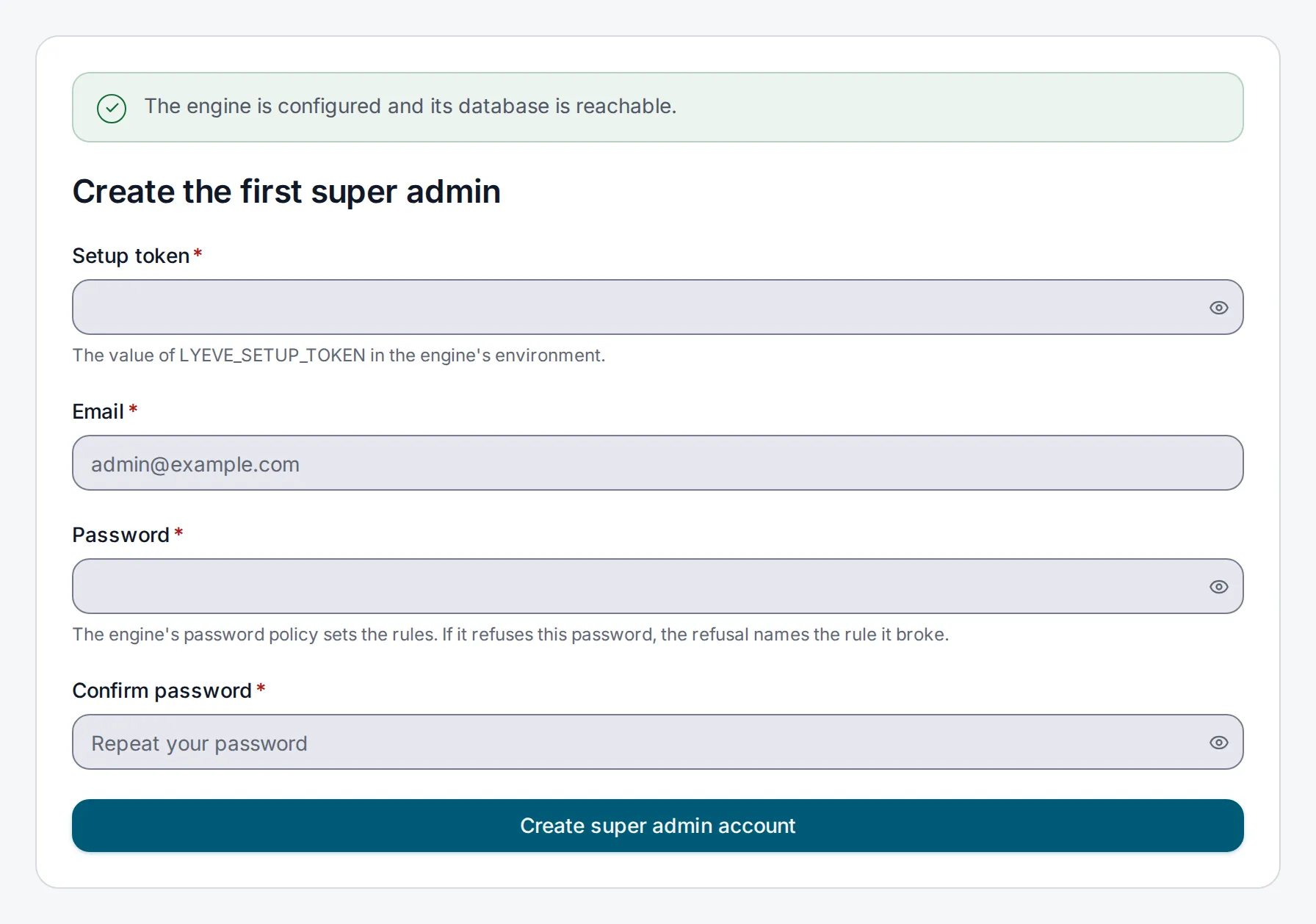
Open http://localhost:3000. A new install redirects to /setup, which asks for the setup
token, then an email address and a password for the first administrator. Step 2 of the
Quickstart says where the token is.
Run the engine and the console together does all of this on your computer with one Compose file, then walks through the console's screens.
Setup mode
Link to the section Setup modeYou can start the engine before you have decided on its database and secrets. With
LYEVE_SETUP_MODE=true, a missing DATABASE_URL, JWT_SECRET or ENCRYPTION_KEY no
longer stops the start:
docker run -d --name lyeve-engine \ -e LYEVE_SETUP_MODE=true \ -p 3001:3001 -p 3002:3002 \ ghcr.io/lyeve-labs/lyeve-core:latestIn setup mode the engine connects to no database and serves only setup:
| Request | Answer |
|---|---|
GET /healthz, GET /startup | 200, so an orchestrator keeps the container running |
GET /readyz | 503 with "mode":"setup", so a load balancer sends it no traffic |
GET /api/admin/setup | 200 with "setup_required":true and "mode":"setup" |
GET /api/admin/setup/status | What is missing, with the X-Setup-Token header |
| Anything else | 503 with the code SETUP_REQUIRED |
To see what is missing, you need the setup token: the one the engine writes to its standard
error, or LYEVE_SETUP_TOKEN when you set it.
Console v0.28.0
Open the console. The setup page says the engine is missing settings. Paste the token
into Setup token and choose Show what to set. The console lists what is missing, with
the environment lines and a lyeve.yaml snippet to paste.
Engine API v0.62.0
curl -H "X-Setup-Token: <token>" http://localhost:3001/api/admin/setup/statusThe answer lists each missing setting under missing, with its variable and its YAML key, and
carries the lines to paste under env and yaml.
A missing secret comes with a value the engine generated for this start, shown once. Set the
values where your deployment keeps them and restart the engine. The setup page then moves on
to creating the first administrator, and over the API GET /api/admin/setup reports
"setup_required":true without "mode":"setup".
Setup mode covers those three settings only. A production engine still refuses to start on the other checks above, and the error names them. The engine never writes the values anywhere and cannot restart its own container.
Your engine is running. Continue with step 1 of the Quickstart to create the first administrator, get a token and write your first entry.