Features
Webhooks
Included free on every install, up to 25 outbound webhooks per tenant with signed delivery and the default retry policy. More webhooks, payload templates, filters, retry policies, dead-letter replay, delivery search and incoming webhooks need a license with the
webhook-profeature. See pricing.
A webhook calls a URL you choose each time an entry is created, updated or deleted, so a build, a cache purge or a sync starts on its own. Each request is signed with your secret and recorded, and a failed one can be retried. Incoming webhooks work the other way: another service posts to LyEve and an entry is created.
In the console
Link to the section In the consoleOpen Delivery > Webhooks. The table lists each webhook with its URL, Events, Content types and Status, and the All, Enabled and Disabled filter narrows it. Each row has buttons to test the webhook, open its Delivery history, rotate its signing secret, edit, duplicate or delete it. Dead letters opens the Dead letter queue, which holds the deliveries that ran out of attempts.
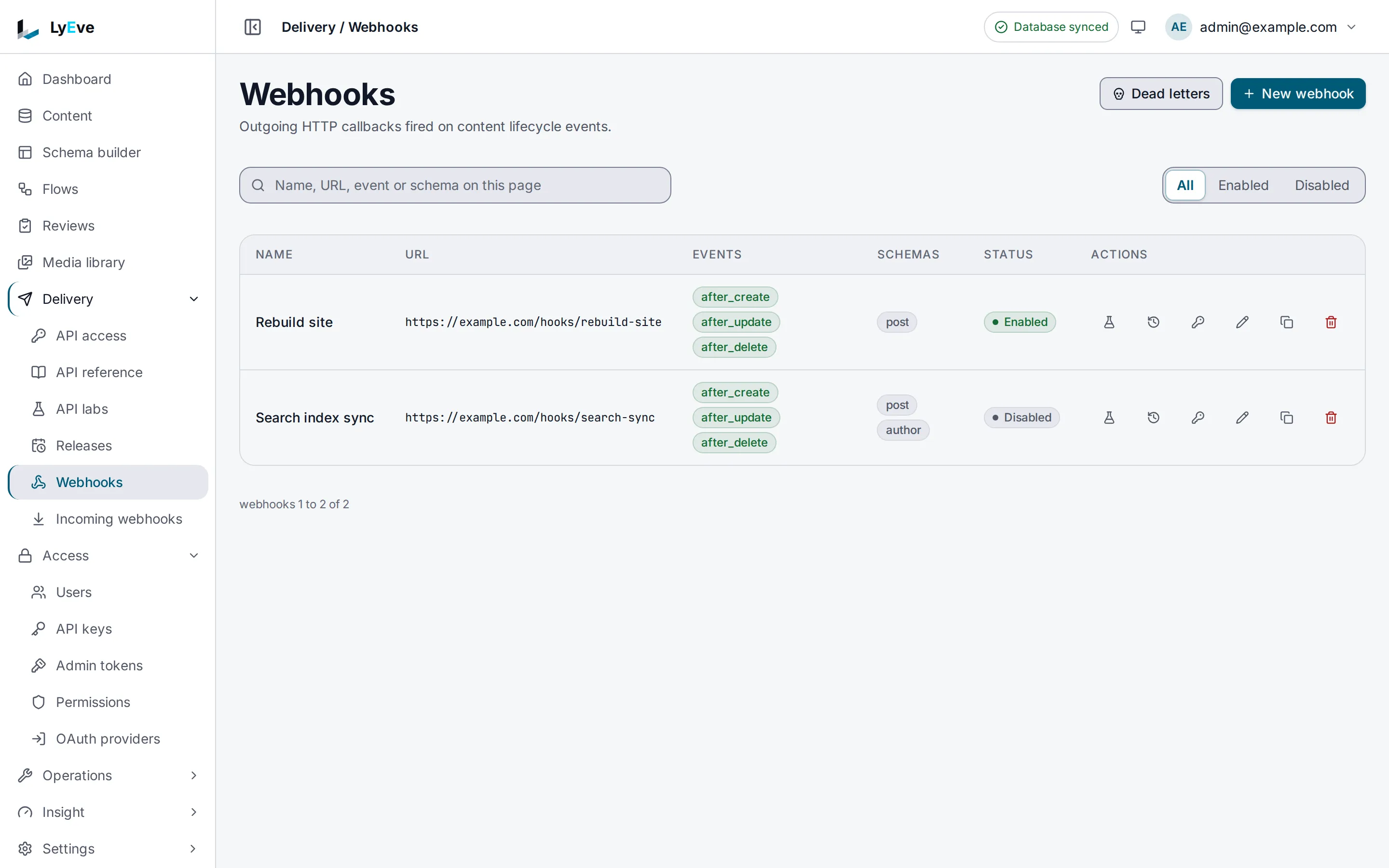
New webhook asks for a Name, a URL, a Signing secret, the
Events and the Content types, with the template and filters under
Delivery options. The Events list also offers before_create,
before_update and before_delete, which never send a delivery, so tick the
after_ events.
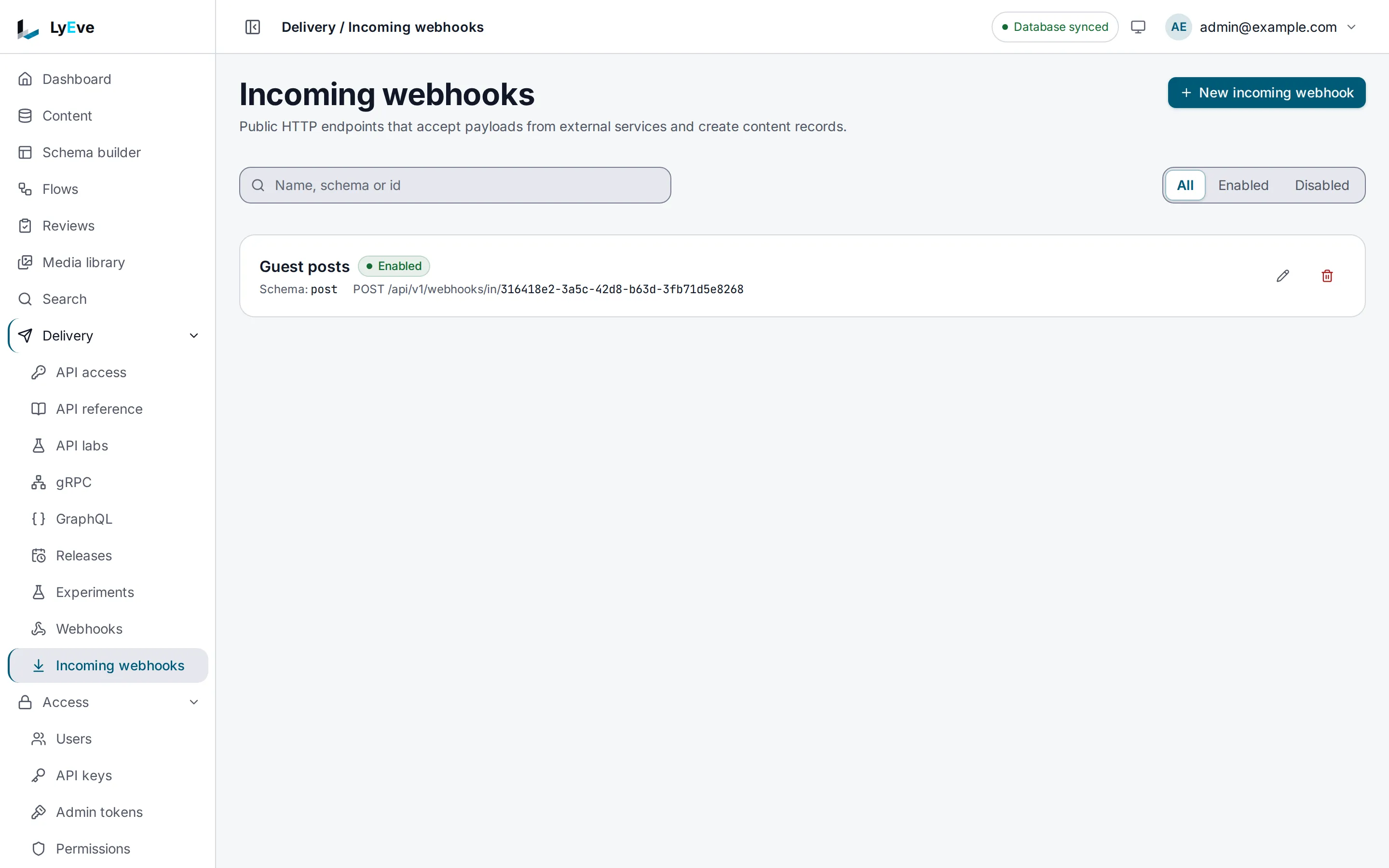
Open Delivery > Incoming webhooks for the endpoints other services post to. Each one shows its content type, the address to post to and whether it is enabled. New incoming webhook adds one.
The sections below cover the same tasks over the Admin API, with the payload your endpoint receives and the retry policy.
How it works
Link to the section How it works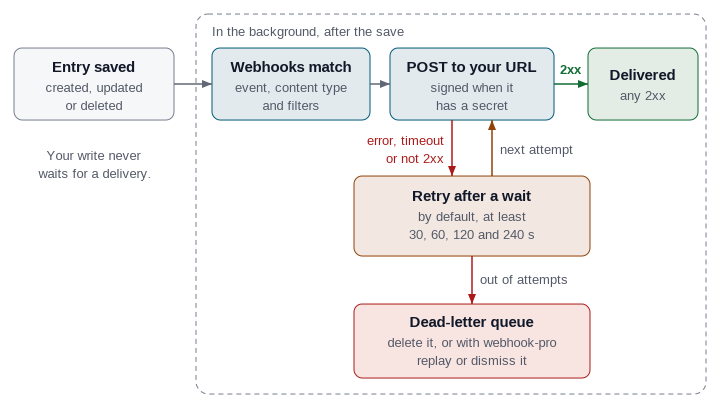
| Step | What happens |
|---|---|
| Change | An entry is created, updated or deleted, and the write is saved. |
| Match | Each enabled webhook of the tenant checks the event, the content type and its filters. |
| Deliver | A POST goes to the URL, signed when the webhook has a secret, with 10 seconds to answer. Any 2xx is a success. |
| Retry | A failure is retried in the background by the webhook's retry policy. A retry, like a replay from the dead-letter queue, has 30 seconds to answer. |
| Dead letter | A delivery that runs out of attempts waits in the dead-letter queue, where you can read or delete it. With webhook-pro you can also replay or dismiss it. |
A webhook fires after the change is saved, so a slow or failing endpoint never delays or blocks a write. A tenant's webhooks see only that tenant's content.
For the console steps, you are signed in to LyEve Console. For the API
steps, you need an admin token in TOKEN. The
quickstart shows how to get one.
Creating a webhook needs the super_admin role. The example assumes a content
type named post, such as the one in
Create your first content type.
1. Create a webhook. Use an HTTPS address you control. Its host must resolve to a public address when you save.
Console v0.28.0
- Open Delivery > Webhooks and choose New webhook.
- Enter
Rebuild sitein Name and your address in URL. Enter a long random value in Signing secret. - Under Events, tick
after_create,after_updateandafter_delete. - In Content types, which reads Every content type, pick
post. - Choose Create.
The form in console v0.25.0 has no field list, so this webhook sends every field of the entry. An entry saved in the console arrives in the shape What your endpoint receives shows for it.
Engine API v0.62.0
The placeholder URL below answers 400 invalid input until you change it:
curl -X POST http://localhost:3001/api/admin/webhooks \ -H "Authorization: Bearer $TOKEN" \ -H "Content-Type: application/json" \ -d '{ "name": "Rebuild site", "url": "https://build.example.com/hooks/lyeve", "events": ["after_create", "after_update", "after_delete"], "schemas": ["post"], "include_fields": ["id", "title", "slug"], "secret": "replace-with-a-long-random-secret" }'The answer is 201 with the webhook, which never shows the secret. Copy its
id into WEBHOOK_ID.
2. Send a test delivery to your endpoint.
Console v0.28.0
Choose Test, the flask icon, on the webhook's row. The outcome shows under the row, such as
HTTP 204: No Content.
Engine API v0.62.0
curl -X POST http://localhost:3001/api/admin/webhooks/$WEBHOOK_ID/test \ -H "Authorization: Bearer $TOKEN"{ "success": true, "status_code": 200, "message": "OK" }When your endpoint refuses it, success is false and message names the
status, such as HTTP 405: webhook test failed.
The test body carries "event": "test", "schema": "*" and
"data": {"message": "webhook test from LyEve"}, trimmed by the field lists,
so with the include_fields of the API example data arrives empty.
3. Read how deliveries have gone.
Console v0.28.0
Choose Delivery history, the clock icon, on the webhook's row. The dialog lists each delivery with its time, event, content type, status, duration, result and retry count. Console v0.25.0 shows no totals.
Engine API v0.62.0
curl http://localhost:3001/api/admin/webhooks/$WEBHOOK_ID/deliveries/stats \ -H "Authorization: Bearer $TOKEN"{ "total": 1, "success_count": 1, "failure_count": 0, "success_rate": 100, "avg_latency_ms": 111, "last_24h": 1 }To write the receiver that checks the signature, follow Add a webhook.
Free and webhook-pro
Link to the section Free and webhook-pro| Free | With webhook-pro | |
|---|---|---|
| Outbound webhooks per tenant | 25, enabled or not | Unlimited |
| Each webhook | Create, update, delete, test, rotate the secret, schemas, events, headers and the field lists | Also payload_template, field_filters, jsonpath_filter and its own retry numbers |
| Retries | The default retry policy | A policy of your own per webhook |
| Dead letters | List, read and delete | Also replay and dismiss |
| History | Deliveries, stats, attempts and health | Also delivery search, the payload preview and retrying one delivery |
| Incoming webhooks | List, read, delete, and receive on the ones you hold | Also create and update |
The license is read on every request. A webhook set up with webhook-pro keeps
delivering with its template, filters and retry policy after a license lapses,
incoming webhooks keep receiving, and an update that resends what it already
stores is accepted. The 26th webhook is refused:
{"error": "cap_exceeded", "cap": "webhook.endpoints", "limit": 25, "current": 25, "upgrade_url": "https://app.lyeve.com/pricing?skus=plugin-webhook-pro&utm_campaign=webhook.endpoints&utm_medium=product&utm_source=admin"}upgrade_url opens the pricing page on the webhook-pro add-on, and the
X-Upgrade-URL header carries the same link.
A paid option on a free install answers
402 with {"error": "payment_required", "plugin": "webhook", "feature": "feature:webhook-pro", "upgrade_url": ""}.
What your endpoint receives
Link to the section What your endpoint receivesWithout a payload template, the body is this envelope:
{ "event": "after_update", "schema": "post", "data": { "id": "8f14e45f-ea2c-4b1d-9f3a-2c1b0e7d6a55", "slug": "pricing", "title": "Pricing update" }, "old_data": { "slug": "pricing", "title": "Pricing" }, "timestamp": "2026-10-01T10:00:00Z"}data is the entry as its content type's table holds it: its id, each
field under its own name, and _status when the content type has drafts. A
relation to one entry arrives under its key column, such as author_id. An
entry saved in the console arrives in the same shape as one saved with
the API, and a field saved there with no value arrives as its default, or as
null when it has none. This is a post created in the console with Hello as its body:
{ "event": "after_create", "schema": "post", "data": { "_status": "draft", "author_id": null, "body": "<p>Hello</p>", "id": "8371ea04-24e5-49a8-93b0-0bb8b7d4baff", "slug": null, "title": "Webhook check" }, "timestamp": "2026-10-23T16:31:35Z"}On engine v0.56.1 and earlier, an entry saved in the console arrived in
another shape. Its fields sat in an object under data.body, and data also
carried the entry's slug, status, title, its timestamps and the accounts
that wrote it. A receiver written for that shape now reads data.title where
it read data.body.title, the status from data._status, and the time of the
change from timestamp. A field filter or a JSONPath filter written for
it changes the same way: $.data.body.total > 100 becomes
$.data.total > 100.
event is after_create, after_update, after_delete, or test for a test
delivery. On after_delete, data is the entry as it was. On after_update,
old_data carries every value the entry had before the change, and it is left
out on the other events. The field lists trim data only, so old_data
arrives whole. timestamp is RFC 3339 in UTC.
| Header | When | Value |
|---|---|---|
Content-Type | always | application/json |
X-Webhook-Event | always | The event, such as after_create |
X-Webhook-Schema | always | The content type |
X-Webhook-Timestamp | with a secret | Unix seconds when the request was signed |
X-Webhook-Nonce | with a secret | A random UUID, new for every request |
X-Webhook-Algorithm | with a secret | sha256 |
X-Webhook-Signature | with a secret | sha256= and the HMAC described below |
X-Webhook-Retry | on a retry | true |
X-Webhook-Replay | on a dead-letter replay | true |
The signature is HMAC-SHA256, keyed with the secret's bytes as you typed
it, over the string <timestamp>.<nonce>.<raw body>: the
X-Webhook-Timestamp value, a period, the X-Webhook-Nonce value, a period,
and the body bytes exactly as received. The header carries sha256= followed
by the lowercase hex digest. Every attempt, retry and replay is signed again
with a fresh timestamp and nonce. Add a webhook
has receivers in Node.js and Python that check it.
Your endpoint has 10 seconds to answer, so reply first and do slow work
afterward. At most 3 redirects are followed.
Delivery is at least once, so deduplicate on a stable key in data, such as
id with the event and timestamp.
Webhook fields
Link to the section Webhook fieldsPOST /api/admin/webhooks creates a webhook and PUT /api/admin/webhooks/{id}
replaces it with the same body. A field the API does not know is refused with
400 invalid JSON.
Every field
| Field | Meaning | Default |
|---|---|---|
name | A label. | required |
url | http:// or https://. The host must resolve to a public address, checked on save and again before every send. | required |
events | Any of after_create, after_update and after_delete. A webhook with no events never fires. | none |
schemas | Content types to fire for. Left empty, the webhook also fires when a content type itself changes, with "schema": "sys_schemas", the type's name and an action in data. A deleted type sends after_delete, and every other change after_create. | every content type |
secret | Signing secret, at least 16 characters. Encrypted at rest and never returned. | none, so unsigned |
enabled | Whether it fires. | true |
headers | Extra request headers. Values are templates, like payload_template. A header whose name contains auth, token, secret, key, signature, password, session or cookie reads back as [redacted]. Send [redacted] back on update to keep the stored value. | none |
payload_template | A template that replaces the envelope. It must render JSON. Needs webhook-pro. | the envelope |
field_filters | Fire only when each named field equals the given string, such as {"featured": "true"}. Needs webhook-pro. | none |
jsonpath_filter | Fire only when an expression on the envelope holds, such as $.data.total > 100. Needs webhook-pro. | none |
include_fields, exclude_fields | Fields to keep in, or drop from, data. Use one or the other. | all fields |
max_response_size | Bytes of your endpoint's answer to read. | 1 MiB |
max_retries, retry_delay_seconds | The number of retries after the first delivery, and the wait in seconds before the first retry. They apply while the webhook has no retry policy of its own, and a policy wins once you set one. Needs webhook-pro. | the default policy |
An admin token sees every header value as [redacted], and a URL with a path or
query as its scheme and host followed by /[redacted].
Send only what matters
Link to the section Send only what mattersNarrow which changes fire, and shape what is sent. The filters, the template
and the preview need webhook-pro, and the rest is free:
schemasandeventspick the content types and the kinds of change.field_filterscompares field values as text, so{"featured": "true"}fires only for featured entries.jsonpath_filtertakes one comparison on the envelope:==,!=,>,>=,<or<=, after a path that starts with$.event,$.schema,$.data,$.old_dataor$.timestamp. A path alone fires when its value is set and notfalseor0.include_fieldsorexclude_fieldstrimsdata. Only the API sets them: the New webhook form in console v0.25.0 has no field lists. Its Delivery options hold the payload template, the JSONPath filter, the field filters, the retries and the retry delay.
A payload_template replaces the envelope with your own JSON. It sees the
entry as .Data and the previous values as .OldData, and it has the helpers
toJSON, defaultVal, ifSet, ifCond, ifEq, ifNeq and dict.
For example, a webhook that posts a chat message for one title only:
Console v0.28.0
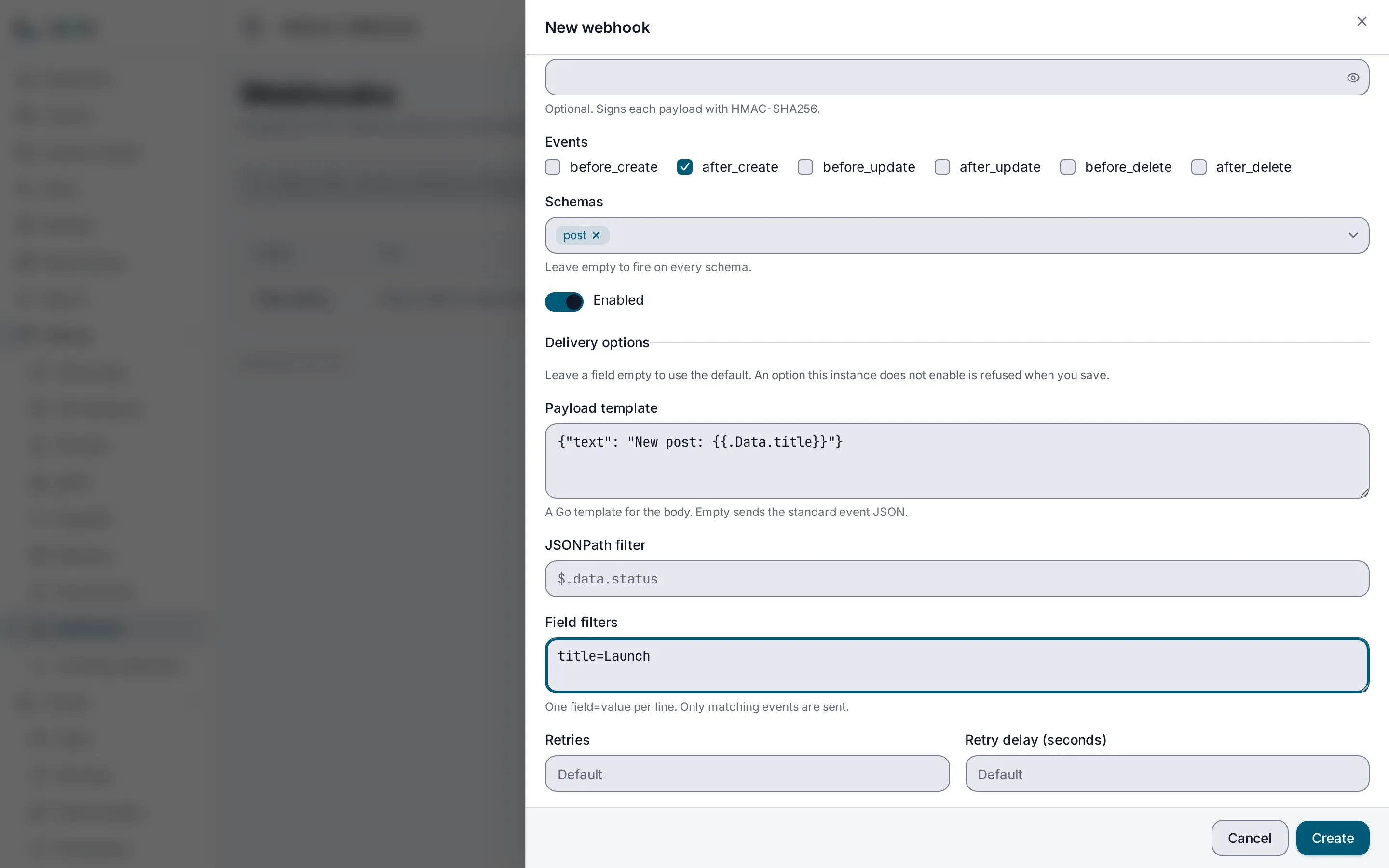
- On Delivery > Webhooks, choose New webhook. Enter
Chat noticein Name and the chat service's address in URL, tickafter_createunder Events, and pickpostin Content types. - Open Delivery options. Enter
{"text": "New post: {{.Data.title}}"}in Payload template andtitle=Launchin Field filters, onefield=valueper line. A condition such as$.data.title == "Launch"goes in JSONPath filter instead. - Choose Create.
A post titled Launch now sends {"text":"New post: Launch"}, and a post
with any other title sends nothing.
Engine API v0.62.0
Put the chat service's address in place of the example URL, which does not resolve:
curl -X POST http://localhost:3001/api/admin/webhooks \ -H "Authorization: Bearer $TOKEN" \ -H "Content-Type: application/json" \ -d '{"name": "Chat notice", "url": "https://chat.example.com/hooks/lyeve", "events": ["after_create"], "schemas": ["post"], "payload_template": "{\"text\": \"New post: {{.Data.title}}\"}", "field_filters": {"title": "Launch"}}'The answer is 201 with the new webhook. Copy its id into CHAT_ID. A
post titled Launch now sends {"text":"New post: Launch"}, and a post with
any other title sends nothing.
An update replaces the whole record, so send every writable field. A field
you leave out is cleared, and only secret keeps its stored value when left
out. This update swaps the field filter for a JSONPath condition, and its
retry and size values are the defaults:
curl -X PUT http://localhost:3001/api/admin/webhooks/$CHAT_ID \ -H "Authorization: Bearer $TOKEN" \ -H "Content-Type: application/json" \ -d '{ "name": "Chat notice", "url": "https://chat.example.com/hooks/lyeve", "events": ["after_create"], "schemas": ["post"], "enabled": true, "headers": {}, "payload_template": "{\"text\": \"New post: {{.Data.title}}\"}", "field_filters": {}, "jsonpath_filter": "$.data.title == \"Release\"", "include_fields": [], "exclude_fields": [], "max_retries": 4, "retry_delay_seconds": 30, "max_response_size": 1048576 }'The answer is 200. A post titled Release now sends
{"text":"New post: Release"}, and a post titled Launch sends nothing.
The console has no preview, so preview a template over the API with
POST /api/admin/webhooks/{id}/preview, which renders the template and the
headers against the event, schema, data and old_data you send. Send
{} to use sample values. An empty request answers 400 invalid JSON. The
preview applies the field lists but not the filters:
curl -X POST http://localhost:3001/api/admin/webhooks/$CHAT_ID/preview \ -H "Authorization: Bearer $TOKEN" \ -H "Content-Type: application/json" \ -d '{"event": "after_create", "schema": "post", "data": {"title": "Release"}}'{"payload": "{\"text\": \"New post: Release\"}", "fields_used": ["title"]}Retry policy
Link to the section Retry policyA failed delivery (an error, a timeout, or a status outside 2xx) is retried
in the background. The worker looks for due retries every 30 seconds. With
webhook-pro, set the policy per webhook. Without it the defaults below apply.
In the console, Delivery options on the webhook's form sets the webhook's
own Retries and Retry delay (seconds), the max_retries and
retry_delay_seconds fields. The policy itself is set over the API, and it
wins once a webhook has one:
curl -X PUT http://localhost:3001/api/admin/webhooks/$WEBHOOK_ID/retry-config \ -H "Authorization: Bearer $TOKEN" \ -H "Content-Type: application/json" \ -d '{"max_attempts": 5, "base_delay_ms": 5000, "max_delay_ms": 20000, "strategy": "exponential", "enabled": true}'| Field | Meaning | Default | Range |
|---|---|---|---|
max_attempts | Attempts before the delivery moves to the dead-letter queue | 5 | 1 to 100 |
base_delay_ms | The wait before the first retry, which the strategy grows from there | 30000 | up to 3600000 |
max_delay_ms | Longest single wait | 600000 | up to 86400000 |
strategy | exponential doubles the wait each time, linear adds base_delay_ms each time, fixed keeps it. No wait passes max_delay_ms. | exponential | |
enabled | Whether failed deliveries are retried | true |
A 0 or a missing number takes the default. A value above its range answers
400 invalid input, and a negative one a validation failed error. GET on
the same path reads the policy the webhook stores, or the defaults when it
stores none, so it does not show a webhook's own max_retries and
retry_delay_seconds. A retry is sent at the first check
after its wait ends, so the times in the history are rounded up to those
checks.
With the defaults, a failed delivery is retried 30, 60, 120 and 240 seconds after each failed attempt before it. When the fifth attempt fails, the delivery moves to the dead-letter queue.
Replay or dismiss a dead letter
Link to the section Replay or dismiss a dead letterA delivery that runs out of attempts lands in the dead-letter queue.
Console v0.28.0
On Delivery > Webhooks, choose Dead letters. The Dead letter queue dialog lists the entries, or says No dead letters.
Engine API v0.62.0
curl "http://localhost:3001/api/admin/webhook-dead-letters?status=pending" \ -H "Authorization: Bearer $TOKEN"Each entry carries the webhook, the event, the body that was sent, the last
status code and error, and total_attempts. status is pending, replayed
or dismissed.
Replaying and dismissing need webhook-pro. Reading and deleting an entry are
free.
Console v0.28.0
In the Dead letter queue, each pending entry has three buttons:
- Replay sends the same body again. The row reads Delivered (HTTP 200) when the endpoint takes it.
- Dismiss marks the entry handled without sending. The row reads Dismissed.
- Delete removes the entry for good.
Neither Replay nor Dismiss asks for confirmation. Without the license, the queue says that replaying and dismissing need it, and deleting stays open.
Engine API v0.62.0
POST /api/admin/webhook-dead-letters/{id}/replaysends the same body again, signed afresh. The answer is{"id": "...", "status": "replayed", "http_status": 200}. Readhttp_status: the entry is marked replayed only when it is2xx, and stays pending otherwise.POST /api/admin/webhook-dead-letters/{id}/dismissmarks it handled without sending, and answers{"id": "...", "status": "dismissed"}.- Either answers
409 dead letter entry is not pendingonce the entry has leftpending.
Read the history
Link to the section Read the historyEvery attempt is recorded with its status code, duration, request body, retry count and error.
In the console, Delivery history on a webhook's row lists its deliveries,
and Retry this delivery, on a failed one, sends it again and shows the
result, such as OK. Retrying needs webhook-pro. Delivery search and the
payload preview have no screen in console v0.25.0.
History and health routes
| Route | Returns |
|---|---|
GET /api/admin/webhooks/{id}/deliveries | The latest deliveries as a list, newest first. limit defaults to 50, at most 500. With offset, it answers {"data", "total_count", "limit", "offset"} and limit is at most 200. |
GET /api/admin/webhooks/{id}/deliveries/search | Needs webhook-pro. {"total", "limit", "offset", "items"}, filtered by event, schema, q, success, since, until (RFC 3339), limit (at most 200) and offset. |
GET /api/admin/webhooks/{id}/deliveries/stats | total, success_count, failure_count, success_rate, avg_latency_ms and last_24h. since narrows it. |
GET /api/admin/webhooks/{id}/attempts | Each attempt of a failed delivery's retry chain, with attempt_num and status, paginated. |
GET /api/admin/webhooks/{id}/health | Attempts, successes, failures, exhausted retries, dlq_pending, the average duration and healthy. |
GET /api/admin/webhooks/health | Healthy and unhealthy webhooks, pending retries, and dead letters in total and pending. |
POST /api/admin/webhooks/{id}/deliveries/{delivery_id}/retry | Needs webhook-pro. Sends one delivery again now and answers {"success", "status_code", "message", "delivery_id"}. Refused with 400 on a disabled webhook. |
healthy is false once a webhook has five or more recorded attempts and
fewer than 90% of them succeeded. Only failed deliveries start attempts, so a
webhook whose deliveries all succeed stays healthy.
Get told when a delivery fails
Link to the section Get told when a delivery failsWhen a delivery moves to the dead-letter queue, the instance publishes a
webhook.delivery_failed event. A flow starts on it with an event
trigger:
{ "type": "trigger.event", "config": { "kind": "system", "name": "webhook.delivery_failed" } }The event carries webhook_id, webhook_name, dead_letter_id, event_type,
schema, total_attempts and, when there was one, last_status_code. Read
the error text from the dead letter itself.
Rotate the secret
Link to the section Rotate the secretRotating needs the super_admin role.
Console v0.28.0
Choose Rotate the signing secret, the key icon, on the webhook's row. The webhook gets a new secret at once, with no confirmation, and a dialog shows it with Copy. It is shown once, so save it before you choose Close.
Engine API v0.62.0
curl -X POST http://localhost:3001/api/admin/webhooks/$WEBHOOK_ID/rotate-secret \ -H "Authorization: Bearer $TOKEN" \ -H "Content-Type: application/json" \ -d '{}'{} generates a new secret. {"new_secret": "..."} sets one of at least 16
characters. The answer carries new_secret once, so save it then. The body is
required: an empty request answers 400 invalid JSON.
Take in webhooks from other services
Link to the section Take in webhooks from other servicesAn incoming webhook turns a JSON payload from another service into a new entry.
Creating or changing one needs the super_admin role and webhook-pro.
Console v0.28.0
- Open Delivery > Incoming webhooks and choose New incoming webhook.
- Enter
Guest notesin Name and pickpostin Target content type. - Enter a long random secret in Signing secret, and give it to the other service.
- In Field map, enter
{"headline": "title", "text": "body"}, which maps the payload'sheadlineto the entry'stitleandtexttobody. - Leave IP allowlist empty to take requests from any address, or enter one address or CIDR range per line. Choose Create.
The list shows the webhook as Enabled, with Content type: post and the
address the other service posts to, POST /api/v1/webhooks/in/ and its id.
Engine API v0.62.0
curl -X POST http://localhost:3001/api/admin/incoming-webhooks \ -H "Authorization: Bearer $TOKEN" \ -H "Content-Type: application/json" \ -d '{ "name": "Shop orders", "secret": "replace-with-a-long-random-secret", "schema_name": "order", "field_map": {"order_number": "number", "total_cents": "total"}, "allowed_ips": ["198.51.100.0/24"] }'The answer is 201 with the webhook and its id, and without the secret.
field_map maps a key of the incoming JSON to a field of the content type, and
it cannot be empty. Keys you do not map are ignored. allowed_ips takes
addresses and CIDR ranges. The other service posts to
POST /api/v1/webhooks/in/{id} on the Content API, with no credential. With a
secret, it signs the request the way LyEve signs outbound deliveries:
BODY='{"order_number": "1042", "total_cents": 4900}'TS=$(date +%s)NONCE=$(openssl rand -hex 16)SIG=$(printf '%s.%s.%s' "$TS" "$NONCE" "$BODY" | openssl dgst -sha256 -hmac "$SECRET" | sed 's/^.* //')
curl -X POST "http://localhost:3002/api/v1/webhooks/in/$INCOMING_ID" \  -H "Content-Type: application/json" \  -H "X-Webhook-Timestamp: $TS" \  -H "X-Webhook-Nonce: $NONCE" \  -H "X-Webhook-Signature: sha256=$SIG" \  -d "$BODY"
A good request answers 201 with {"status": "accepted"}. A field map target
the content type does not define, or one the engine sets itself such as
created_at, is left out of the entry, and the rest is stored. The answer then
names those targets in a left_out list, such as
{"status": "accepted", "left_out": ["created_at"]}.
- With a secret,
X-Webhook-TimestampandX-Webhook-Nonceare required. The signature may also come inX-Hub-Signature-256, and asha384=orsha512=prefix picks that hash. - The timestamp may be at most 5 minutes old and 30 seconds ahead. A nonce is accepted once.
- With
allowed_ips, any other address is refused. - Only the first 1 MiB of the body is read, and each address may send 50 requests a second, with bursts of 100.
- The request's host decides the tenant, as on every public route, so post to the owning tenant's own domain. See Tenants.
- An unknown or disabled id answers
404.
Without a secret the endpoint accepts anyone who knows its id, so always set one. An entry created this way is published at once and does not fire outbound webhooks.
Use it in flows
Link to the section Use it in flowsThe webhook.deliver node posts a payload to one of the tenant's webhooks, by
id or name, with an event name you choose. The webhook's template, headers,
field lists, signing, history and retries apply. A disabled webhook is refused,
and a test run sends nothing. It needs flow-pro, because it sends a payload
of your own outside the instance. See
Flows.
Settings
Link to the section Settings| Variable | What it does | Default |
|---|---|---|
WEBHOOK_ALLOWED_PRIVATE_NETWORKS | Comma-separated CIDR ranges or addresses that webhooks may reach although they are private, such as an internal event sink. Checked on save and on every send. | none |
ENCRYPTION_KEY | Encrypts signing secrets at rest, with the other stored credentials. Set it in production. | none |
If you set LYEVE_PLUGINS to choose which features start, include webhook.
See Licensing and tiers.
Reads take the admin role, and changing a webhook or its secret takes
super_admin. An admin token with webhooks:read can call the read routes,
and with webhooks:write the test, retry, retry policy and dead-letter routes.
See Admin tokens.
Every webhook route
| Method | Path | Role |
|---|---|---|
GET | /api/admin/webhooks, /api/admin/webhooks/{id} | admin |
POST | /api/admin/webhooks | super_admin |
PUT, DELETE | /api/admin/webhooks/{id} | super_admin |
POST | /api/admin/webhooks/{id}/rotate-secret | super_admin |
POST | /api/admin/webhooks/{id}/test, /api/admin/webhooks/{id}/preview | admin |
GET | /api/admin/webhooks/{id}/deliveries, .../deliveries/search, .../deliveries/stats | admin |
POST | /api/admin/webhooks/{id}/deliveries/{delivery_id}/retry | admin |
GET, PUT | /api/admin/webhooks/{id}/retry-config | admin |
GET | /api/admin/webhooks/{id}/attempts | admin |
GET | /api/admin/webhooks/health, /api/admin/webhooks/{id}/health | admin |
GET | /api/admin/webhook-dead-letters, /api/admin/webhook-dead-letters/{id} | admin |
POST | /api/admin/webhook-dead-letters/{id}/replay, .../dismiss | admin |
DELETE | /api/admin/webhook-dead-letters/{id} | admin |
GET | /api/admin/incoming-webhooks, /api/admin/incoming-webhooks/{id} | admin |
POST | /api/admin/incoming-webhooks | super_admin |
PUT, DELETE | /api/admin/incoming-webhooks/{id} | super_admin |
POST | /api/v1/webhooks/in/{id} | public |
| Status | Message | Cause |
|---|---|---|
400 | invalid input | The URL is refused, or a retry policy value is out of range. |
400 | validation failed on field "secret": failed on 'min=16' | The secret is shorter than 16 characters. |
401 | invalid signature | An incoming request's signature did not verify. |
402 | cap_exceeded | The tenant already holds 25 webhooks and the license does not carry webhook-pro. |
402 | payment_required | The write sets an option that needs webhook-pro. |
Every other error
| Status | Message | Cause |
|---|---|---|
400 | invalid JSON | The body is empty, malformed or has a field the API does not know. |
400 | cannot retry: webhook is disabled | A manual retry on a disabled webhook. |
400 | webhook destination is not an allowed address | A dead-letter replay to a URL that is no longer allowed. |
400 | X-Webhook-Timestamp header is required, X-Webhook-Nonce header is required | A signed incoming webhook got a request without them. |
400 | timestamp outside tolerance window | An incoming timestamp is too old or too far ahead. |
403 | ip not allowed | An incoming request came from an address not in allowed_ips. |
404 | not found | An incoming webhook that does not exist, is disabled or belongs to another tenant. |
409 | dead letter entry is not pending | The entry was already replayed or dismissed. |
409 | replayed request | An incoming request reused a nonce. |
422 | failed to create content record | An incoming payload left out a required field, or a value did not fit its field. |
422 | <field>: the related entry does not exist | An incoming payload links a relation to an entry the webhook's tenant does not hold. |
422 | <field>: the field map names this field twice | The field map sends two values to one field, such as targets that differ only in case, or a relation and its key column. |
422 | the webhook's content type is not defined | The incoming webhook's content type does not exist in its tenant. |
Related
Link to the section Related- Add a webhook: a receiver that checks the signature, end to end.
- Event replay: send a missed window of changes again.
- Message broker events: one stream for many consumers.
- Flows: logic, custom events and alerts around deliveries.
- Rebuild a static site when content changes: a guide on the blog that starts one build on Cloudflare, Netlify or Vercel after each burst of edits.