Editor roles, reviewed drafts and a database server mark the edges of PocketBase as a CMS. A Go developer who has reached one of them can read here how LyEve handles it, and what moving the records across takes.
One of the two tools here is ours: we build LyEve.
PocketBase and LyEve, line by line
| LyEve | PocketBase | |
|---|---|---|
| What it is | A headless CMS for editors and the apps that read their content | An app backend: database, auth, files and realtime |
| License | MIT engine and console, with commercial parts | MIT |
| Databases | PostgreSQL, MySQL, SQL Server | Embedded SQLite |
| Running it | Two images: the engine and LyEve Console | One executable, about 12 MB zipped |
| Editors | Console accounts with roles and access rules per content type | A dashboard for superusers, who skip every API rule |
| Drafts and history | Draft, published and archived, with revisions, free | A status field you add yourself |
| Review before publish | One review workflow per tenant, free | None in its documentation |
| App user sign-in | Built for the team in the console | Password, one-time codes, OAuth2 and MFA for your app's users |
| Realtime | Add-on at $8 a month, included from Pro | Free, over Server-Sent Events |
| Custom code | Flows inside LyEve, and signed webhooks to your service | Go or JavaScript hooks in your own executable |
| Price | Free, or plans at $4, $15, $39 and $119 a month | Free |
Where PocketBase is the better choice
- Your app's users sign in to it. An auth collection holds your users, with password, one-time code, OAuth2 and multi-factor sign-in. Its FAQ counts more than 15 OAuth2 providers, and the JavaScript and Dart SDKs do the client side.
- One file to deploy. Its production guide says it "doesn't require any external dependency and could be deployed by just uploading the executable on your server". It manages TLS with Let's Encrypt itself.
- It is a Go framework. You import PocketBase as a library, add routes and hooks in Go, and build one executable that holds your backend. JavaScript hooks work in the prebuilt binary.
- Realtime costs nothing. Clients subscribe to a record or a whole collection over Server-Sent Events. Its FAQ reports more than 10,000 realtime connections on a $4 Hetzner server with 2 vCPUs and 4 GB.
- SQLite in one directory. Data and uploads live in
pb_databeside the executable, and its FAQ says SQLite in WAL mode outperforms server databases for most queries. - All of it is MIT. No PocketBase feature sits behind a license key. In LyEve, 20 of the 52 plugins need one.
Where LyEve fits an editorial team better
- Editors are not superusers. In PocketBase, the dashboard is the superusers dashboard, and a superuser skips every API rule. The console gives each person a role, and access rules decide what each role does.
- Drafts, history and review are built in. Entries are draft, published or archived. History keeps earlier versions, and a review workflow signs entries off before they go live. PocketBase's documentation has no page on any of the three.
- A database server you already run. LyEve runs on PostgreSQL, MySQL or SQL Server, and several engine replicas can share one database. PocketBase's FAQ answers "Does it scale?" with "Only on a single server".
- Imports with a dry run. Bulk import reads CSV, JSON, NDJSON, YAML and Excel, checks every row before writing, and rolls back a finished import. PocketBase's FAQ says it has no built-in import or export helpers.
- Tenants when you need them. One install serves several clients, each with its own content and users. One tenant is free. More take the Tenant Provisioning add-on, $18 a month and in beta, or Enterprise.
Editors, drafts and roles
A PocketBase collection has five API rules, one each for list, view, create, update and delete. They apply to every caller except a superuser. Editing in the dashboard takes a superuser, and its docs say "superusers can access everything". A draft is a field you add, such as a select field with the statuses you choose, and a rule that hides the drafts.
LyEve treats editors as the people the product is for:
- Roles and access rules. A rule names a role, a content type, the actions it allows and the fields it hides. Three roles are free, and more take the Roles Pro add-on, included in every plan from Starter.
- Statuses. A content type with drafts gives each entry a status. The Content API returns published entries to readers, and drafts only to callers allowed to edit them.
- History. Off on a fresh install, then on for every content type or the ones you choose. The last 30 days are readable for free, and older history needs Content Releases.
- Review. A review workflow is an ordered list of stages, each with the role that approves it and an optional deadline. The last approval can publish the entry. One workflow per tenant is free, and more take Review Pro, $3 a month and in beta, included from Pro.
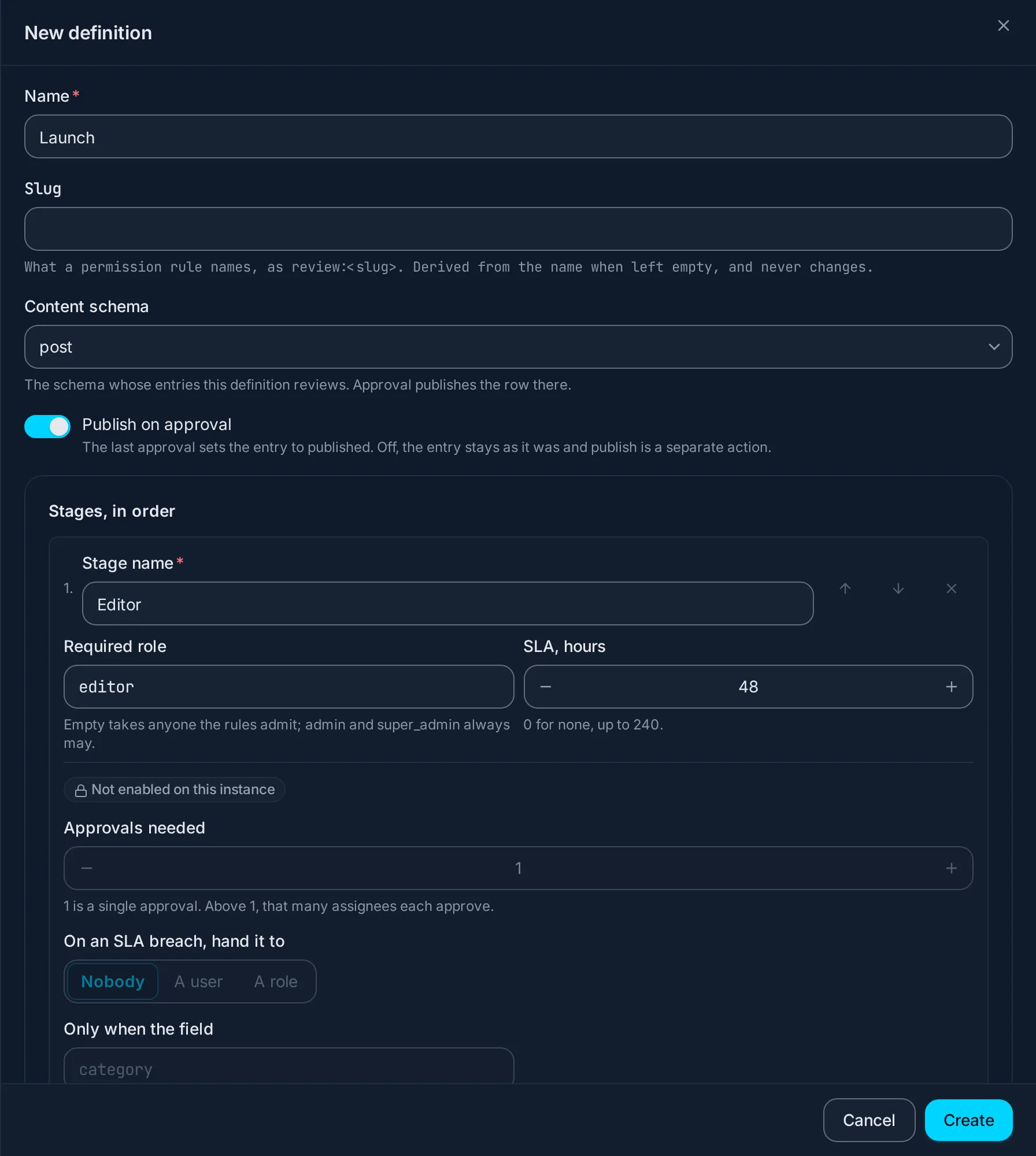 A review workflow with one stage. The dimmed settings below it need Review Pro.
Editing in the console takes an admin account. A free install holds three, and any license removes the limit.
What five editors cost on each
PocketBase costs nothing. You pay for the server and your time.
LyEve's free tier runs one tenant with three roles and three admin accounts, one review workflow, drafts and history. The plans are $4, $15, $39 and $119 a month, and a year costs the price of ten months.
Take a team of five editors with one review step, and then a live preview:
| Option | Per month | Per year |
|---|---|---|
| PocketBase | $0 | $0 |
| LyEve free, up to three editors | $0 | $0 |
| LyEve Starter, five editors | $4 | $40 |
| LyEve Pro, adding realtime and more review workflows | $15 | $150 |
A single add-on is a license as well, which covers five editors: Roles Pro alone is $2 a month, and realtime alone is $8. Pro also includes GraphQL, full-text search, content releases and email support. Hosting is left out, because both need a server. The pricing page lists every plan and add-on.
Two MIT codebases, one with commercial parts
PocketBase is MIT, copyright Gani Georgiev. You can use, change and redistribute all of it, and its README says you may even offer it as a paid service.
LyEve's engine and the console are MIT. These parts are commercial:
- the license verification in the engine image
- the visual flow and schema editors in the admin image
- every plugin, under the Plugin EULA, the free ones included
- any other LyEve code in the images whose source is not public, under the same EULA
A free plugin costs nothing, and it is not open source. 32 of the 52 plugins run with no license key, and 20 need one. The source code page goes through each part.
Embedded SQLite or a database server
PocketBase's FAQ says it "uses embedded SQLite (in WAL mode) and there are no plans for supporting other databases". For replication it suggests Litestream.
LyEve runs on PostgreSQL, MySQL 8.0 or 8.4, or SQL Server 2019 or later, Azure SQL included. The engine reads which one from the scheme of DATABASE_URL. LyEve does not run on SQLite.
One executable or two images
PocketBase is one download. Unzip it, run ./pocketbase serve, and open the dashboard at /_/. Backups are a copy of pb_data, or a ZIP from Settings, kept on disk or in S3-compatible storage. In October 2026 its repository moved from GitHub to ganigeorgiev.com, and GitHub keeps the old releases. Its current release is v0.41.1, published on the new host on October 28, 2026.
LyEve runs from two images beside your database: ghcr.io/lyeve-labs/lyeve-core for the engine and ghcr.io/lyeve-labs/lyeve-console for the console. The engine applies its own migrations when it starts. The post on Go shows what the engine image holds. The Docker Compose guide puts the engine, the console, PostgreSQL and TLS on one server. Scaling says what more than one replica needs.
Moving content from PocketBase to LyEve
LyEve has no converter for a PocketBase schema. You write the model by hand. The records move as JSON files.
-
Write the model. Describe each base collection as a content type in a YAML file:
PocketBase field LyEve field texttexteditorrich_text, which also holds HTMLnumbernumberboolbooleanemail,urlemail,urldate,autodatedatetimeselecttextwith anenumrule, orjsonfor several valuesjsonjsonfilemediarelationrelationA view collection holds no data of its own. Users in an auth collection keep signing in to PocketBase.
-
Read the plan, then apply it. Send the file to the running instance as a super admin. Without
apply=true, nothing is written:Shellcurl -X POST "$ADMIN_URL/api/admin/schemas/import" \ -H "Authorization: Bearer $TOKEN" \ -H "Content-Type: application/yaml" \ --data-binary @schemas.yamlThe answer lists the SQL each content type would run. Send the same file with
?apply=trueto apply it. -
Export the records. Read each collection through PocketBase's records API, with the JavaScript SDK's
getFullListfor example, and save the records as a JSON array. -
Import them. In the console, open Insight, then Imports, and choose New import. Map the fields, and the Check step runs a dry run before anything is written.
-
Move the files. A PocketBase file field stores only the file name, and the file sits in
pb_dataor in S3. Upload each file to the media library and set the entry'smediafield to its link. -
Reconnect relations. Every entry gets a new id. Keep each PocketBase id in a text field during the import, then set each relation from it.
Migrate existing content shows each request and its response.
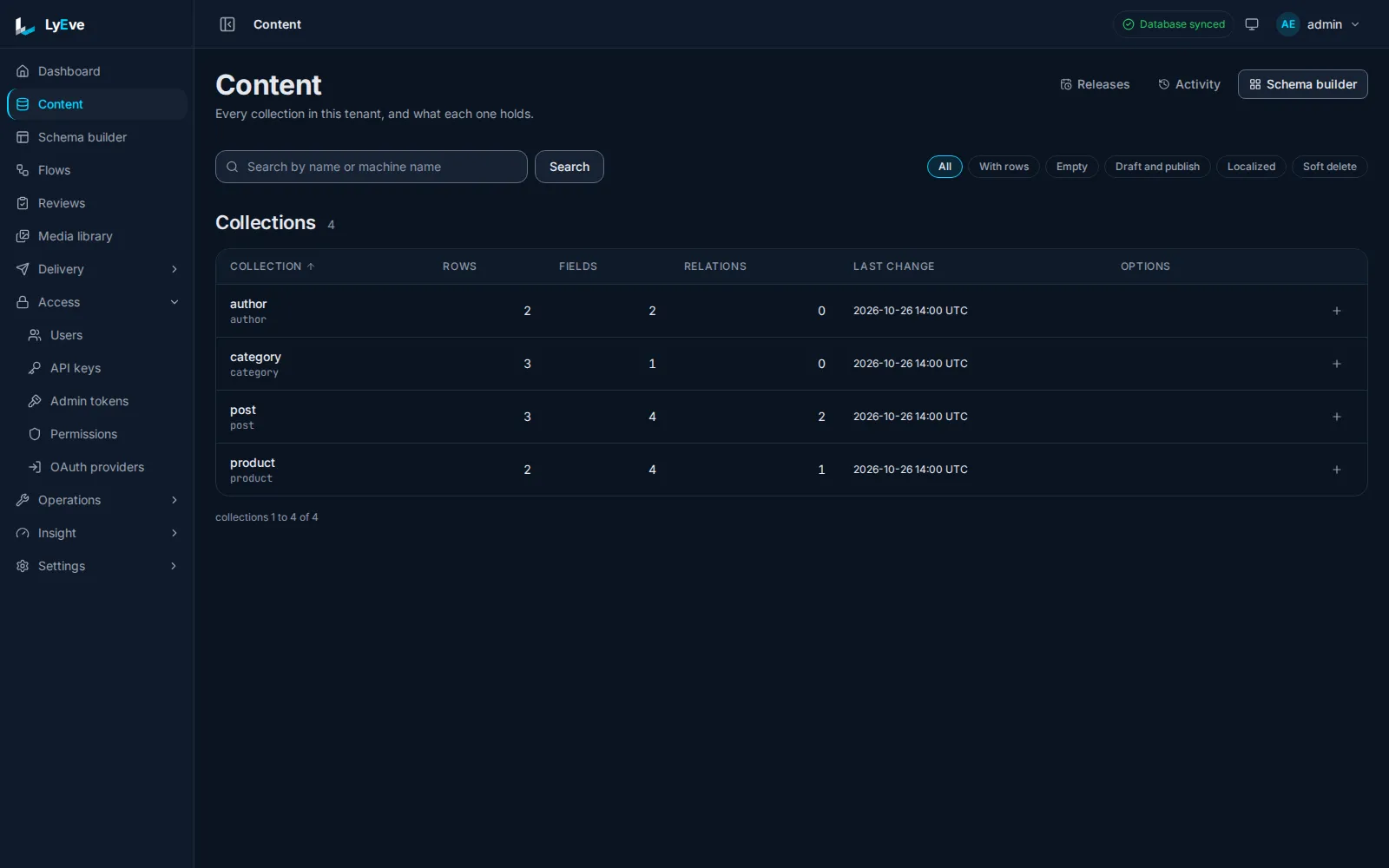 The Content page, with each content type and how many entries it holds.
Questions from PocketBase users
Can I run both?
Yes. PocketBase keeps your app's users and their data, and LyEve keeps the content your editors write. Your front end reads both. A LyEve webhook can call a route you add to PocketBase in Go when content changes.
Can LyEve use SQLite, as PocketBase does?
No. LyEve runs on PostgreSQL, MySQL or SQL Server. For local work, the quickstart starts PostgreSQL in Docker beside the engine.
Who maintains each?
PocketBase's FAQ calls it "a personal open source project" developed "entirely on volunteer basis". LyEve is built by one founder at LyEve Labs. The engine and console stay MIT, and your content stays in your own database.
Is realtime free in LyEve?
No. Realtime is an add-on at $8 a month, included from Pro. Webhooks are free, with 25 endpoints per tenant.
Which parts of LyEve are open source?
The engine and the console are MIT, and the license section lists the commercial parts.
Start LyEve on your database
LyEve runs on PostgreSQL, MySQL 8.0 or 8.4, and SQL Server 2019 or later, Azure SQL included. On SQL Server, turn on read committed snapshot isolation before the engine starts: Installation shows how.
Create a database and a user for LyEve. Then keep only your database's DATABASE_URL line uncommented, fill in its host and password, and start the engine on the free tier:
DATABASE_URL="postgres://lyeve:<password>@db.example.com:5432/lyeve?sslmode=require"
# DATABASE_URL="mysql://lyeve:<password>@tcp(db.example.com:3306)/lyeve?parseTime=true"
# DATABASE_URL="sqlserver://lyeve:<password>@db.example.com:1433?database=lyeve"

docker run -d --name lyeve-engine \
  -e APP_ENV=development \
  -e DATABASE_URL="$DATABASE_URL" \
  -e JWT_SECRET="$(openssl rand -hex 32)" \
  -e ENCRYPTION_KEY="$(openssl rand -hex 32)" \
  -p 3001:3001 -p 3002:3002 \
  ghcr.io/lyeve-labs/lyeve-core:latest
The engine reads which database it talks to from the scheme and creates its tables on first start.
With no database yet, the quickstart starts PostgreSQL and the engine together. The pricing page lists every plan and add-on, from Starter at $4 a month.
Sources
- PocketBase homepage
- PocketBase FAQ
- PocketBase docs: introduction
- PocketBase docs: collections
- PocketBase docs: API rules and filters
- PocketBase docs: authentication
- PocketBase docs: realtime API
- PocketBase docs: records API
- PocketBase docs: files
- PocketBase docs: extending PocketBase
- PocketBase docs: going to production
- PocketBase README and license
- PocketBase releases, on the host the project moved to in October 2026
- The 41 pages of the PocketBase docs, searched for "draft", "revision", "workflow" and "tenant" with no results