A headless CMS answers a request with data, not with a web page. One content type, one entry and the JSON a single request returns show what that means, for anyone who has met the term. A comparison with WordPress and a test of when a site needs one follow.
What a headless CMS stores and serves
A content management system, or CMS, is where people write and keep a site's content. A traditional CMS also builds the pages visitors see, from templates on the same server.
A headless CMS leaves that last part out. The head is the front end that turns content into pages, and a headless CMS ships without one. What remains is storage and an API.
It stores content as structured entries. You define content types, such as a recipe with a title and a cooking time, and editors write entries of each type.
It serves those entries over an HTTP API, as JSON. An API is a set of web addresses a program can request. JSON is a plain-text data format that every programming language reads. Your website, your app or a script asks for an entry and decides how to show it.
The sections below show both with LyEve, a self-hosted headless CMS. We ran every request on October 30, 2026, against a free install with no license key, on PostgreSQL.
A content type is the shape of the content
A content type names a kind of content and lists its fields. This one is a recipe with four fields:
{
  "name": "recipe",
  "display_name": "Recipe",
  "fields": [
    { "name": "title", "field_type": "text", "required": true },
    { "name": "minutes", "field_type": "number" },
    { "name": "ingredients", "field_type": "json" },
    { "name": "method", "field_type": "rich_text" }
  ]
}
Each field has a type:
titleistext, and every recipe needs one.minutesis anumber.ingredientsisjson, which holds any JSON value. Here it holds a list.methodisrich_text, formatted text stored as HTML.
In LyEve, an administrator builds this in the Schema builder of LyEve Console, or sends it to the Admin API. We sent it, and the engine answered with the stored definition and 200, the HTTP status code for success. The data model lists every field type.
Nothing in the definition says how a recipe looks or at which URL it appears.
An entry is one piece of content in that shape
Editors write entries in the console, and a script can write them through the Content API. This is the entry we wrote, with the field values under data:
{
  "data": {
    "title": "Tomato soup",
    "minutes": 30,
    "ingredients": ["1 kg tomatoes", "1 onion", "500 ml stock"],
    "method": "<p>Soften the onion, add the tomatoes and stock, simmer for 20 minutes, then blend.</p>"
  }
}
The engine answered 201 and gave the new entry its id, 80281110-7494-4bc4-a7c6-6154df8c1a82. The entry is stored once, in your database.
The request, and what it returns
A site reads content with an API key. We created a key that may only read, and gave its role read access to recipes. A free install holds up to five active API keys, and API keys shows how to make one.
This is the request:
curl http://localhost:3002/api/v1/content/recipe/80281110-7494-4bc4-a7c6-6154df8c1a82 \
  -H "X-API-Key: $KEY"
The engine answered 200 OK with Content-Type: application/json. This is the body, formatted for reading:
{
  "id": "80281110-7494-4bc4-a7c6-6154df8c1a82",
  "schema_name": "recipe",
  "data": {
    "ingredients": [
      "1 kg tomatoes",
      "1 onion",
      "500 ml stock"
    ],
    "method": "<p>Soften the onion, add the tomatoes and stock, simmer for 20 minutes, then blend.</p>",
    "minutes": 30,
    "title": "Tomato soup"
  },
  "created_at": "2026-10-30T07:42:36.695538Z",
  "updated_at": "2026-10-30T07:42:36.695538Z"
}
What the answer holds:
idandschema_namesay which entry this is and what type it has.dataholds the four fields, as they were written.created_atandupdated_atsay when the entry was written and last changed.
The answer carries no page, no menu and no stylesheet. The only markup is the HTML inside method, and that is part of the content. Whatever reads this JSON decides how a recipe looks.
The key reads and does nothing else. A write with it was refused with 403 and the message insufficient scope. The same GET with no key was refused with 401, because it carried no credential.
One entry, two readers
Anything that can send an HTTP request can use plain JSON. Here the same recipe is read by two different front ends.
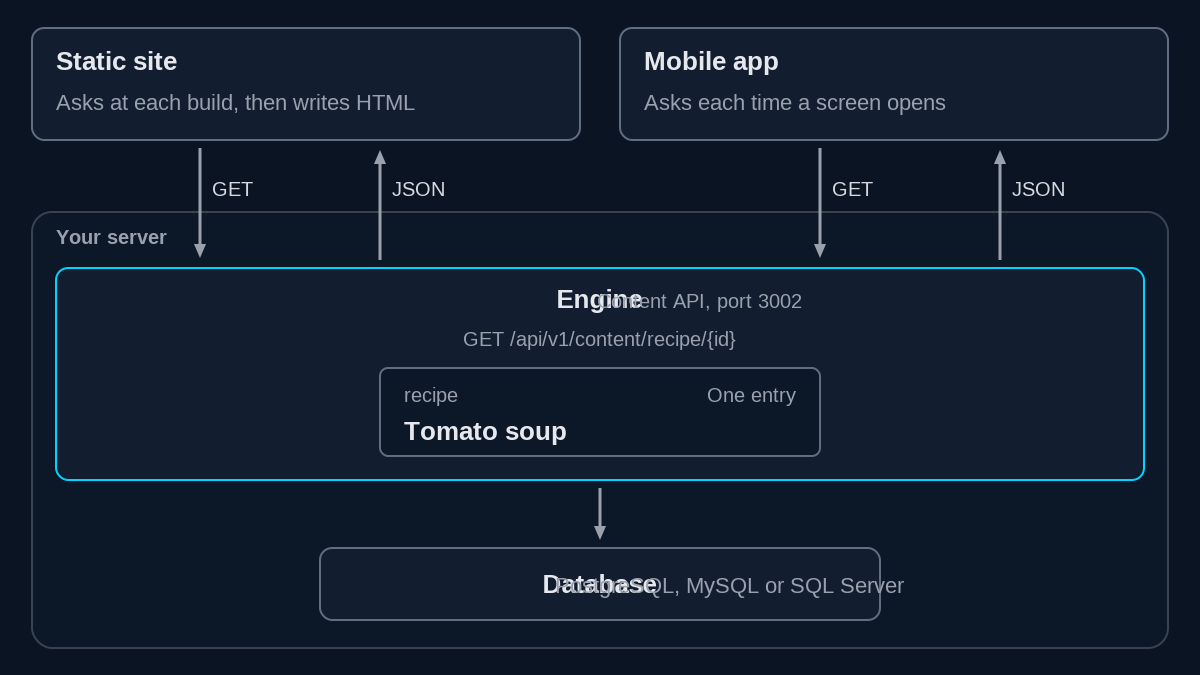 Both readers send the same request and get the same JSON back.
- A static site asks at build time. It writes an HTML page for each recipe, and visitors get those files from a web host or a content delivery network (CDN). Visitors never reach the CMS. A webhook is a request the CMS sends when content changes. When an editor saves a change, a webhook can start the next build, as Rebuild a static site when headless CMS content changes shows.
- A mobile app asks when a screen opens. It draws the recipe with its own controls, from the same fields.
LyEve's REST, React, Svelte and Vue client libraries wrap the same request for code that would rather not build it by hand.
How it differs from WordPress serving its own pages
WordPress, with a theme, is a traditional CMS in this sense. Its theme handbook in October 2026 says template files are "used to generate the web pages on your WordPress site". The content and the page come from one install, and a visitor gets a finished HTML page from it.
| Traditional CMS with a theme | Headless CMS | |
|---|---|---|
| A request returns | An HTML page | JSON |
| The page is built by | The CMS, from its templates | Your front end |
| The front end runs | Inside the CMS | Wherever you deploy it |
WordPress also has a REST API. Its handbook says the API lets applications work with a site "by sending and receiving data as JSON", and some teams run WordPress headless that way. A headless CMS differs in that it never has to make a page at all.
To move a WordPress site's content into a headless CMS, Migrate WordPress posts and pages to LyEve walks through it.
When a site needs one
A headless CMS fits when:
- More than one front end shows the same content. A website and an app, or several sites, read one store instead of keeping copies.
- Your team builds the front end in a framework it chose. Next.js, SvelteKit, Astro and a native app can each read JSON.
- The site is built ahead as static files. The CMS feeds the build and stays off the path visitors take.
- The content should outlive the design. A redesign replaces the front end, and the entries stay as they are.
It is the wrong tool when nobody on the team writes front-end code, because someone has to build the pages. A single site that a theme already serves well gains little from the split.
Where LyEve fits
LyEve is a self-hosted headless CMS in Go. The engine is MIT licensed and free to run on your own servers. It runs on PostgreSQL, MySQL or SQL Server.
The console is MIT too. These parts are commercial:
- the license verification in the engine image
- the visual flow and schema editors in the admin image
- every plugin, under the Plugin EULA, the free ones included
- any other LyEve code in the images whose source is not public, under the same EULA
Of the 52 plugins in the engine image, 32 start with no license key. A free plugin costs nothing, and it is not open source.
To read more before you start:
- What LyEve is, in one page covers what is free and what is paid.
- The self-hosted headless CMS options in 2026 compares ten of them.
- A headless CMS on PostgreSQL runs LyEve on the database this article used.
- Self-host a headless CMS on a VPS with Docker Compose puts it on a server with the console.
Start LyEve on your database
LyEve runs on PostgreSQL, MySQL 8.0 or 8.4, and SQL Server 2019 or later, Azure SQL included. On SQL Server, turn on read committed snapshot isolation before the engine starts: Installation shows how.
Create a database and a user for LyEve. Then keep only your database's DATABASE_URL line uncommented, fill in its host and password, and start the engine on the free tier:
DATABASE_URL="postgres://lyeve:<password>@db.example.com:5432/lyeve?sslmode=require"
# DATABASE_URL="mysql://lyeve:<password>@tcp(db.example.com:3306)/lyeve?parseTime=true"
# DATABASE_URL="sqlserver://lyeve:<password>@db.example.com:1433?database=lyeve"

docker run -d --name lyeve-engine \
  -e APP_ENV=development \
  -e DATABASE_URL="$DATABASE_URL" \
  -e JWT_SECRET="$(openssl rand -hex 32)" \
  -e ENCRYPTION_KEY="$(openssl rand -hex 32)" \
  -p 3001:3001 -p 3002:3002 \
  ghcr.io/lyeve-labs/lyeve-core:latest
The engine reads which database it talks to from the scheme and creates its tables on first start.
With no database yet, the quickstart starts PostgreSQL and the engine together, then writes a content type and an entry like the ones above.