Keystone changes a content model through code and a Prisma migration, and LyEve changes it on the running instance after showing the SQL. The choice starts with where a team wants its schema to live: in its code, or in the CMS.
We build LyEve. Read this page as a vendor's account, with every Keystone fact taken from a Keystone page listed under Sources, each checked on October 30, 2026.
Keystone and LyEve, side by side
| LyEve | Keystone | |
|---|---|---|
| License | MIT engine and console, with commercial parts | MIT |
| How it runs | Two containers: the Go engine, and LyEve Console on Node | A Node.js app that you build, with Prisma for the database |
| Databases | PostgreSQL, MySQL, SQL Server | PostgreSQL, MySQL, SQLite |
| Where the model lives | A YAML or JSON file, the Schema builder, or both | TypeScript or JavaScript in your app |
| Changing the model | On the running instance, after you read the SQL it plans | Change the code, create a Prisma migration, deploy |
| Custom logic | Flows inside LyEve, and signed webhooks that call your own service | Hooks and access control written in your code |
| APIs | REST, free. GraphQL is an add-on at $3 a month, included from Pro | GraphQL, free |
| Several sites in one install | One tenant free, then the Tenant Provisioning add-on at $18 a month, in beta, or Enterprise | None in its documentation |
| Hosting | You run it. We sell no hosting | You run it. Keystone has no hosted plan |
| Price | Free, or plans at $4, $15, $39 and $119 a month | Free |
| Paid help | Email support from Pro, priority support from Growth | Engineering services from Thinkmill, the company behind Keystone |
Where Keystone is the better choice
- Your schema and your logic are code. A Keystone list is TypeScript or JavaScript, type-checked with the rest of your app. Hooks run your code at each stage of a write, and access control sits in the same files. LyEve's model file is data. Logic that reacts to content runs in a flow inside LyEve, or in your own service when a webhook calls it.
- GraphQL is the core API, and it costs nothing. Keystone builds a GraphQL API from your lists, with filtering, sorting and pagination. LyEve's free API is REST, and GraphQL is a paid add-on.
- SQLite for local work. Keystone runs on SQLite as well as PostgreSQL and MySQL. LyEve needs a database server, even on a laptop.
- All of it is MIT. No Keystone feature sits behind a license key. LyEve's free plugins are free of charge, not open source, and 20 of its 52 plugins need a key.
- The admin UI takes your React components. Keystone generates its Admin UI from your schema, and you can bring your own components into it.
- A longer record. The Keystone repository dates from April 2018, and Thinkmill sells engineering help to teams that build on it.
When LyEve is the better pick over Keystone
- The model changes without a deploy. You send the model file to the running instance, and it answers with the SQL it would run, written for your database, before anything changes. A removed field waits in a queue until a super admin applies the removal. Its data stays until someone decides. In Keystone, a model change is a code change and a Prisma migration that runs as its own release step.
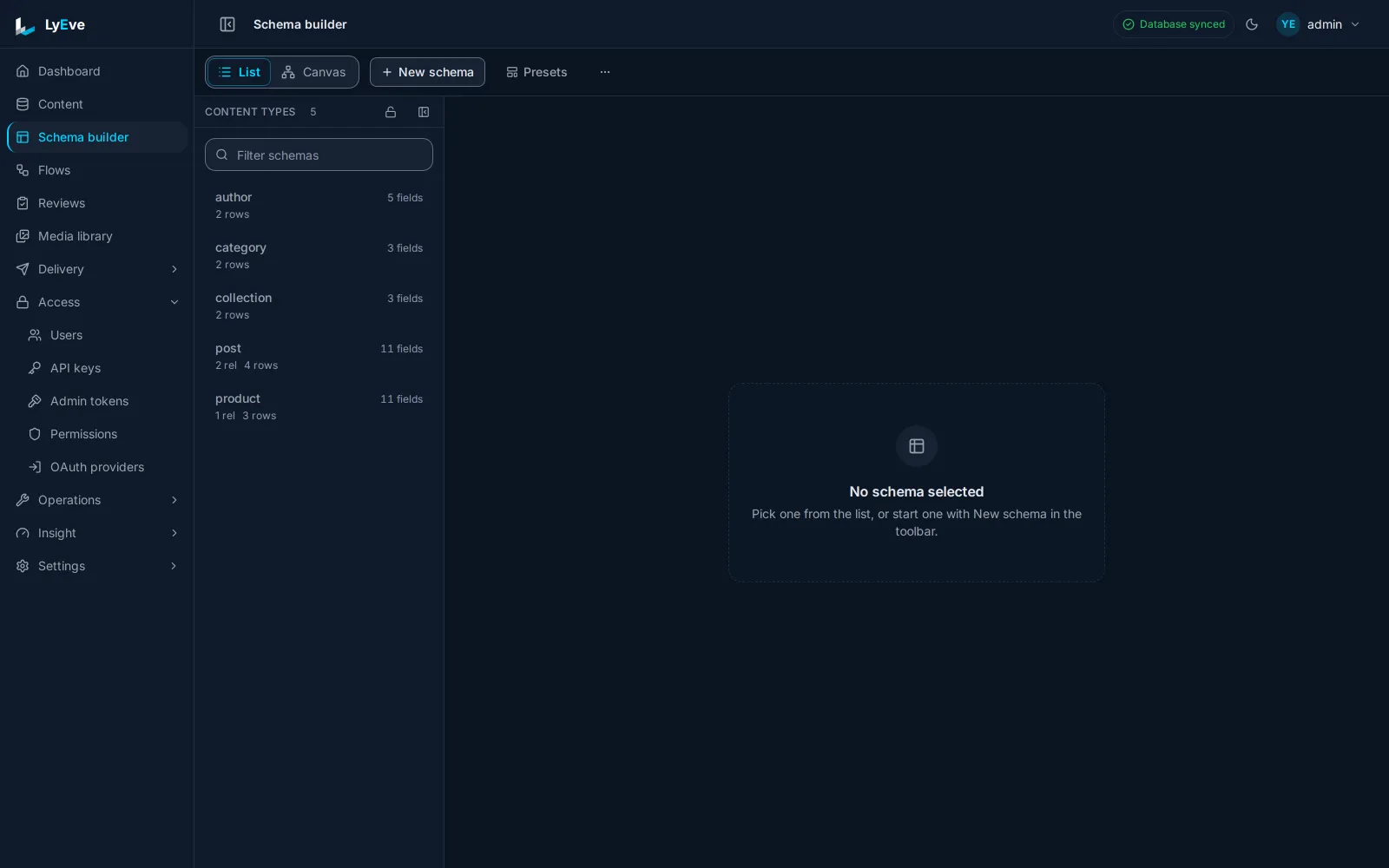 The Schema builder's list view, with the content types of a demo project.
- One image for the engine. There is no build step and no runtime to install beside it. The console runs as a second image. The post on Go shows what the engine image holds.
- SQL Server as well. LyEve runs on PostgreSQL, MySQL or SQL Server. Keystone supports PostgreSQL, MySQL and SQLite.
- More arrives working. Every install has these, and none of them needs a license key:
- a media library
- bulk import with a dry run and a rollback
- scheduled publishing
- two-factor sign-in
- signed webhooks, with 25 endpoints per tenant
- twenty flows per tenant, on the nodes that stay inside the instance
- Tenants when you need them. One install can serve several clients, each with its own content, users and settings. One tenant is free. More take the Tenant Provisioning add-on, $18 a month and in beta, or Enterprise, $119 a month.
- Support with a response target. Pro includes email support with a 48-hour target. Growth and Enterprise include priority support with a 24-hour target.
Deploying Keystone and LyEve
Keystone is a Node.js app that you build and deploy yourself, to a platform such as Render or Heroku or to your own servers. Its documentation asks you to run prisma migrate deploy as a separate release step before new instances start.
LyEve runs from two images beside your database: ghcr.io/lyeve-labs/lyeve-core for the engine and ghcr.io/lyeve-labs/lyeve-console for the console. The engine applies its own migrations when it starts. The Docker Compose guide puts the engine, the console, PostgreSQL and TLS on one server.
Prisma's three databases and LyEve's three
Keystone supports PostgreSQL, MySQL and SQLite through Prisma's database providers. Its guide to choosing a database does not recommend SQLite in production.
LyEve runs on PostgreSQL, MySQL or SQL Server. Keystone does not run on SQL Server, and LyEve does not run on SQLite.
MIT on both sides, with LyEve's exceptions
Keystone is MIT, copyright Thinkmill Labs. You can use, change and redistribute all of it.
LyEve's engine and the console are MIT. These parts are commercial:
- the license verification in the engine image
- the visual flow and schema editors in the admin image
- every plugin, under the Plugin EULA, the free ones included
- any other LyEve code in the images whose source is not public, under the same EULA
A free plugin costs nothing, and it is not open source. 32 of the 52 plugins run with no license key, and 20 need one. The source code page in the docs goes through each part.
GraphQL and search, priced
Keystone costs nothing. You pay for the servers and for your time.
LyEve's free tier runs the engine and the 32 free plugins, with one tenant, three roles and three admin accounts. Any license removes the limit on admin accounts. The plans are $4, $15, $39 and $119 a month, and a year paid up front costs the price of ten months. Add-ons can also be bought one at a time.
Take a team that wants GraphQL and full-text search:
| Option | Per month | Per year |
|---|---|---|
| Keystone | $0 | $0 |
| LyEve with GraphQL ($3) and Full-text Search ($8) as add-ons | $3 + $8 = $11 | 12 times $11 = $132 |
| LyEve Pro, paid for the year | 10 times $15 = $150 |
Pro also includes realtime, content releases (beta), the audit log, data export and email support. Hosting is left out of the table because both products need a server and a database. The pricing page lists every plan and add-on.
Moving from Keystone to LyEve
LyEve has no converter for a Keystone schema. You rewrite the model by hand. The content moves as files.
-
Write the model. Describe each Keystone list as a content type in a YAML file. Most fields map directly:
Keystone field LyEve field texttextinteger,float,decimalnumbercheckboxbooleantimestampdatetimecalendarDaydateselecttext, with anenumrule for the allowed valuesjson,multiselectjsonrelationshiprelationimage,filemediadocumentrich_text, after rendering it to HTML, orjsonA
virtualfield holds no data, andpasswordvalues do not move. Each person gets a new account in LyEve. -
Read the plan, then apply it. Send the file to the running instance, signed in as a super admin. Without
apply=true, nothing is written:Shellcurl -X POST "$ADMIN_URL/api/admin/schemas/import" \ -H "Authorization: Bearer $TOKEN" \ -H "Content-Type: application/yaml" \ --data-binary @schemas.yamlThe answer lists each content type with the SQL it would run. Send the same file with
?apply=trueto apply it. -
Export the items. Keystone keeps them in your own database. Export each list as CSV with your database's tools, or as JSON through Keystone's GraphQL API.
-
Import them with a dry run. In the console, open Insight, then Imports, and choose New import. Bulk import reads CSV, JSON, NDJSON, YAML and Excel files. The dry run checks every row and writes nothing, and a finished import can be rolled back.
-
Reconnect relationships. Every entry gets a new id in LyEve. Keep each Keystone id in a text field during the import, then set each relation from it.
-
Convert documents. Keystone's document field stores JSON, and LyEve's rich text field holds HTML. Render each document to HTML before the import, or keep it in a
jsonfield and render it in your front end as you do today.
Migrate existing content shows each request and its response.
What Keystone developers ask
Can I keep the content model in Git?
Yes. Export the model as a YAML file, change it in pull requests, run the dry run in CI and apply it on release. You can also declare content types in lyeve.yaml, and the engine creates or updates them when it starts. Keep the content model and flows in Git has the commands. The file is YAML or JSON, not TypeScript.
Can I run my own code when content changes?
Not inside LyEve. A webhook calls your service with a signed request when content changes, and 25 endpoints per tenant are free. A flow runs inside LyEve on content events, and twenty per tenant are free on the nodes that stay inside the instance. A flow that calls another service needs Flow Pro, in beta and included from Pro.
Is there a GraphQL API?
Yes, as an add-on at $3 a month, or included from Pro. It builds its schema from your content types. The REST Content API is free.
Can LyEve use SQLite on a laptop, as Keystone can?
No. LyEve runs on PostgreSQL, MySQL or SQL Server. For local work, the quickstart starts PostgreSQL in Docker beside the engine.
Which parts of LyEve are MIT, as all of Keystone is?
The engine and the console are MIT, and the license section lists the commercial parts. A free plugin costs nothing, and it is not open source.
Start LyEve on your database
LyEve runs on PostgreSQL, MySQL 8.0 or 8.4, and SQL Server 2019 or later, Azure SQL included. On SQL Server, turn on read committed snapshot isolation before the engine starts: Installation shows how.
Create a database and a user for LyEve. Then keep only your database's DATABASE_URL line uncommented, fill in its host and password, and start the engine on the free tier:
DATABASE_URL="postgres://lyeve:<password>@db.example.com:5432/lyeve?sslmode=require"
# DATABASE_URL="mysql://lyeve:<password>@tcp(db.example.com:3306)/lyeve?parseTime=true"
# DATABASE_URL="sqlserver://lyeve:<password>@db.example.com:1433?database=lyeve"

docker run -d --name lyeve-engine \
  -e APP_ENV=development \
  -e DATABASE_URL="$DATABASE_URL" \
  -e JWT_SECRET="$(openssl rand -hex 32)" \
  -e ENCRYPTION_KEY="$(openssl rand -hex 32)" \
  -p 3001:3001 -p 3002:3002 \
  ghcr.io/lyeve-labs/lyeve-core:latest
The engine reads which database it talks to from the scheme and creates its tables on first start.
With no database yet, the quickstart starts PostgreSQL and the engine together. The pricing page lists every plan and add-on, from Starter at $4 a month.
Sources
- Keystone homepage
- Keystone config: db
- Keystone: choosing a database
- Keystone: database migration
- Keystone fields overview
- Keystone document fields
- Keystone license
- Keystone repository, searched for "tenant" and "tenancy" with no results
- Thinkmill Keystone services