A team that already runs SQL Server can keep LyEve's content in a database on it, with one setting turned on before the engine starts. Once the engine is up, it waits for you to create your admin account.
Steps 1 to 3 run in SQL Server and Docker. From step 4 on, each step has a tab for LyEve Console and one for the engine's API from a terminal, and your choice carries across the page.
Docker, SQL Server and an admin login
- Docker, to run the engine image.
- SQL Server 2019 or later, reachable from the engine's container. We ran every step below on SQL Server 2019, 2022 and 2025 on November 11, 2026, with the LyEve engine v0.62.0 and admin console v0.28.0.
- A login that may create a database and change database options, such as
sa. You use it once, to prepare the database. The engine signs in with a login of its own. sqlcmdor SQL Server Management Studio, to run the statements.
The LyEve docs list Azure SQL beside SQL Server, with the same sqlserver:// connection string. The steps below were run on SQL Server, not on Azure SQL.
1. Create the database and a login
Run these statements as your admin login:
CREATE DATABASE lyeve;
CREATE LOGIN lyeve WITH PASSWORD = '<password>';
Then run these two inside the new lyeve database:
CREATE USER lyeve FOR LOGIN lyeve;
ALTER ROLE db_owner ADD MEMBER lyeve;
Its user needs the right to create tables, because the engine creates them when it starts. db_owner gives that right in this one database. Choose a password that meets your server's password policy.
2. Turn on read committed snapshot isolation
ALTER DATABASE [lyeve] SET READ_COMMITTED_SNAPSHOT ON WITH ROLLBACK IMMEDIATE;
ALTER DATABASE [model] SET READ_COMMITTED_SNAPSHOT ON;
On a new database sqlcmd prints nothing. When other sessions are connected to lyeve, it reports their rollback in two lines, from 0% to 100%, as expected.
Without this setting, a read can lose a deadlock against a concurrent write, and the request fails. Turning it on for lyeve disconnects every other session on that database, so do it before the database takes traffic. Setting it on model means a database created later already has it. The engine checks both settings each time it starts and never changes them itself.
3. Start the engine
docker run -d --name lyeve-engine \
  -e APP_ENV=development \
  -e DATABASE_URL="sqlserver://lyeve:<password>@db.example.com:1433?database=lyeve" \
  -e JWT_SECRET="$(openssl rand -hex 32)" \
  -e ENCRYPTION_KEY="$(openssl rand -hex 32)" \
  -p 3001:3001 -p 3002:3002 \
  ghcr.io/lyeve-labs/lyeve-core:latest
Replace db.example.com with your server's host name. The sqlserver:// scheme tells the engine which database it is talking to, and database=lyeve names the database from step 1. Docker prints the new container's id.
Port 3001 serves the Admin API and port 3002 the Content API. APP_ENV=development lets a test install start without the production settings. Before you go live, remove it and work through the production checklist.
4. Check that it worked
Console v0.28.0
The console is a second image. A small proxy in front puts the console and the engine's two APIs on one address. Give the engine a network that the proxy and the console share:
docker network create lyeve-console
docker network connect lyeve-console lyeve-engine
Save this as Caddyfile in the current directory:
:8080 {
  handle /api/admin/* {
    reverse_proxy lyeve-engine:3001
  }
  handle /api/* {
    reverse_proxy lyeve-engine:3002
  }
  handle /.well-known/* {
    reverse_proxy lyeve-engine:3002
  }
  handle {
    reverse_proxy lyeve-console:3002
  }
}
Start the proxy and the console:
docker run -d --name lyeve-proxy --network lyeve-console \
  -p 8080:8080 -v "$PWD/Caddyfile:/etc/caddy/Caddyfile:ro" \
  caddy:2

docker run -d --name lyeve-console --network lyeve-console \
  -e ORIGIN=http://localhost:8080 \
  -e CORE_INTERNAL_URL=http://lyeve-proxy:8080 \
  -e CORE_API_INTERNAL_URL=http://lyeve-proxy:8080 \
  ghcr.io/lyeve-labs/lyeve-console:latest
ORIGIN is the address you open in the browser. The two CORE_ addresses are where the console's own server reaches the engine, through the proxy. Run the engine and the console together explains the rest of the wiring.
Open http://localhost:8080. A new install sends you to the setup page. Its form opens with The engine is configured and its database is reachable. The engine has created its tables in SQL Server and waits for its first administrator.
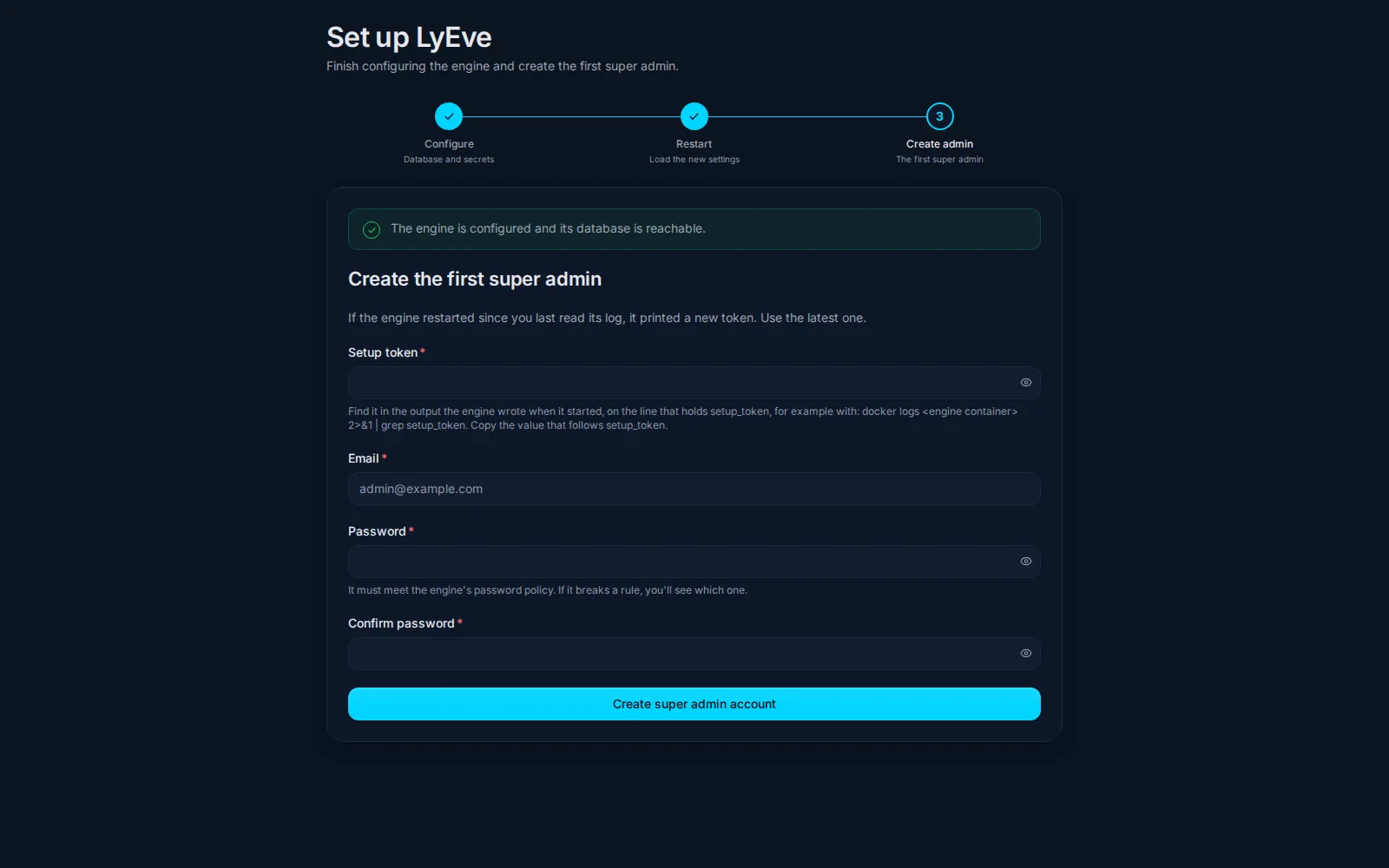 The setup page on a new install.
When this path fails:
The setup page says Could not reach the engine
The engine is still creating its tables, or the proxy cannot find it. The page checks again every few seconds and goes on once the engine answers. If the message stays, check that the engine is running, then run the docker network connect line above again:
docker ps --filter name=lyeve-engine
docker network connect lyeve-console lyeve-engine
When the engine is already on that network, Docker answers that the endpoint already exists, and the network is not the problem. docker logs lyeve-engine then shows what the engine is doing.
Setup answers Cross-site POST form submissions are forbidden
The address in the browser differs from ORIGIN. Open http://localhost:8080 exactly. 127.0.0.1 is a different address to the console, even on the same machine.
Engine API v0.62.0
Ask the engine whether it is ready for its admin account:
curl http://localhost:3001/api/admin/setup{"setup_required":true,"token_source":"log"}If curl cannot connect yet, the engine is still creating its tables. Wait and run it again.
On either path, confirm that the engine found the setting from step 2:
docker logs lyeve-engine 2>&1 | grep -c READ_COMMITTED_SNAPSHOT0 means both databases have it on.
When the engine stops on SQL Server
These happen when the engine starts, whichever way you check it.
Cannot open database "lyeve" that was requested by the login
No database by that name exists on the server. Create it as in step 1, or correct database= in the URL.
The log warns that SQL Server is serving reads with shared locks
Step 2 was skipped on lyeve or on model. The warning carries the statements to run. Run them when the database can drop its connections, and the warning is gone at the next start.
A production engine refuses to start as sa
Without APP_ENV=development, the engine refuses the server's default superuser, and the log says the URL uses default credentials. Use the login from step 1.
What behaves the same on PostgreSQL, MySQL and SQL Server
We sent the same ten requests to the engine on PostgreSQL 16, 17 and 18, MySQL 8.0 and 8.4, and SQL Server 2019, 2022 and 2025. Every database gave every request the same answer:
| Request | Answer |
|---|---|
| Setup check | 200 |
| Create the admin account | 201 |
| Define a content type | 200 |
| Write an entry | 201 |
| List the entries | 200 |
| Ask whether this install may create tenants | 200, with "enabled":false on a free install |
| Create a second tenant on a free install | 402 |
An admin account lists the tenants |
403 |
An admin account creates a tenant |
403 |
An admin account creates a user |
403 |
Content types, entries and the API do not change with the database, so code written against LyEve on SQL Server sends the same requests on PostgreSQL or MySQL. The same install runs on PostgreSQL and on MySQL 8.0 or 8.4, and Supported databases gives the address for each. The feature pages note where a database changes an answer, and two of those notes matter on SQL Server.
Full-text Search is an add-on, $8 a month, and every plan from Pro includes it. On SQL Server it matches titles and bodies. On PostgreSQL it searches tags as well. See search.
For slow-query analysis, the Query Monitor add-on, which Enterprise includes, reads SQL Server's own ranking of its most expensive queries with nothing to set up. PostgreSQL needs an extension for it, and MySQL needs performance_schema turned on. See slow-query analysis.
GraphQL and gRPC, which the schema builder below lists beside REST, are add-ons, each included from Pro.
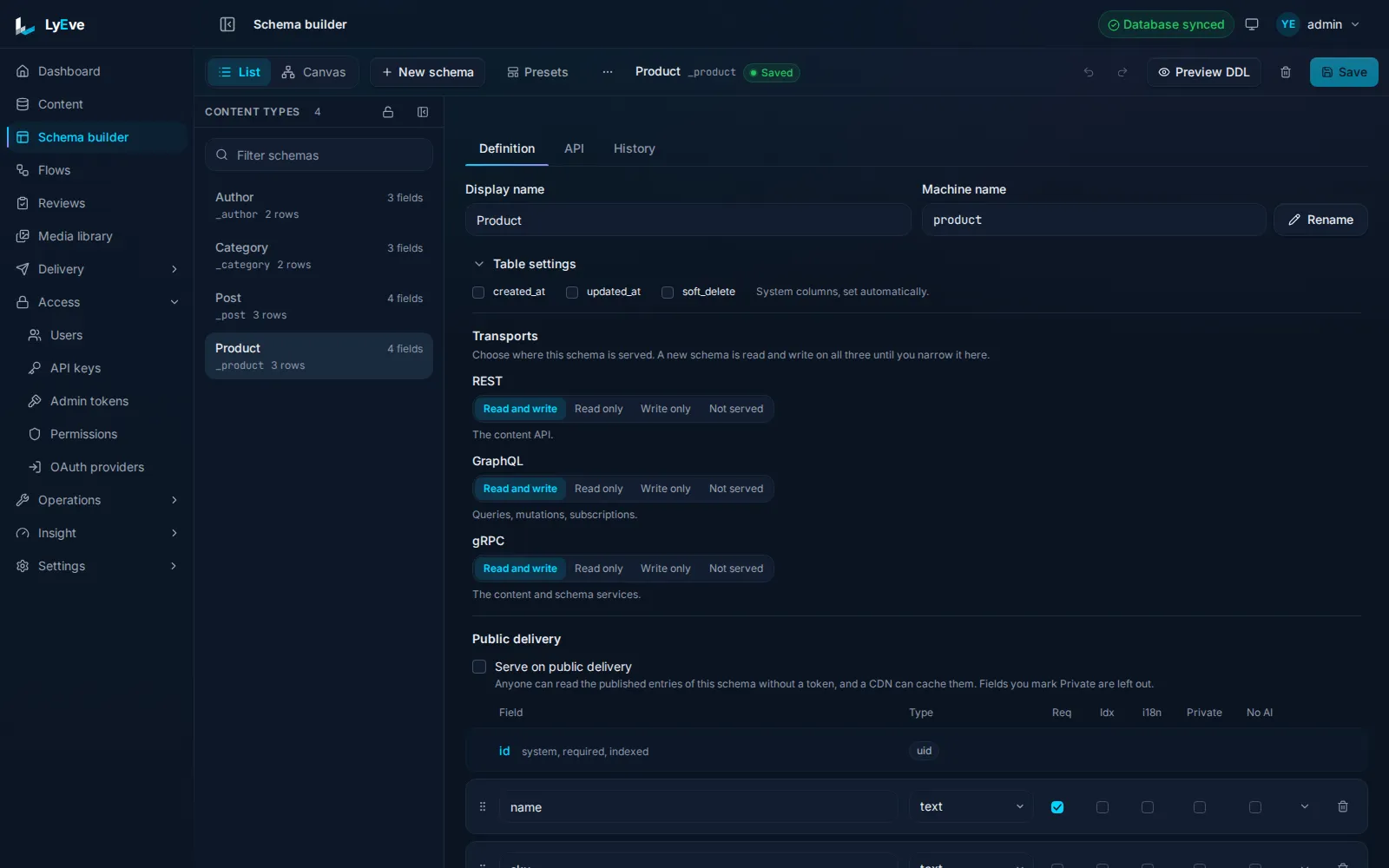 The schema builder with a content type open, and the REST, GraphQL and gRPC transports that serve it.
Other CMSs that run on SQL Server
Several content management systems run on SQL Server. Their own pages, read in October 2026, say this about three of them:
- Directus lists SQL Server among its databases, beside PostgreSQL, MySQL, Oracle, SQLite and CockroachDB. It is distributed as a Docker image, under its own license, the Monospace Sustainable Core License. LyEve vs Directus compares the two in full.
- Umbraco is a .NET CMS under the MIT license. It runs on SQL Server 2016 or later, or on SQLite, and needs .NET 10 or later.
- Orchard Core is a multi-tenant application framework and CMS for ASP.NET Core, under the BSD-3-Clause license. It runs on SQL Server, MySQL, MariaDB, PostgreSQL and SQLite.
Three support dates matter to a team on Umbraco 13 or Kentico Xperience 13. Umbraco 13 is a long-term support release, and it reaches its end of life on December 14, 2026. Umbraco offers Extended Long-term Support past that date, and Umbraco 17 is its current long-term support release. An Umbraco 13 site needs .NET 8.0 or later. Microsoft supports .NET 8 until November 10, 2026, and recommends moving to a newer .NET version. Kentico supports Kentico Xperience 13 until December 31, 2026, and names Xperience by Kentico as the upgrade path.
What LyEve offers a SQL Server team
-
One Go binary. The engine is a single Go binary in one container image, with no .NET runtime beside it. The console is a second image. The post on Go shows what one binary gives the person who runs it.
-
The license. The engine and the console are MIT. These parts are commercial:
- the license verification in the engine image
- the visual flow and schema editors in the admin image
- every plugin, under the Plugin EULA, the free ones included
- any other LyEve code in the images whose source is not public, under the same EULA
A free plugin costs nothing, and it is not open source. Source code lists each part.
-
The price. The core CMS runs on SQL Server with no license key: content types and entries, drafts and revisions, users and roles, sign-in, and both APIs. Paid plans are $4, $15, $39 and $119 a month, and the pricing page lists every add-on.
Next: your admin account and first entry
Console v0.28.0
Create your admin account on the setup page from step 4. The engine prints the setup token to its standard error, outside its log, and docker logs shows it:
docker logs lyeve-engine 2>&1 | grep -oE 'setup_token=[0-9a-f]+' | tail -n 1It prints setup_token= and the token. Paste the part after setup_token=, enter an email and a password, and select Create super admin account. The console opens its dashboard. Run the engine and the console together goes on from there to a first content type and entry.
Engine API v0.62.0
Create your admin account and write an entry with step 2 of the quickstart.
Sources
- Directus: database configuration
- Directus: self-hosting requirements
- Directus license
- Umbraco: requirements
- Umbraco 13: requirements
- Umbraco: long-term support and end-of-life
- Umbraco CMS on GitHub
- Orchard Core documentation
- Orchard Core on GitHub
- Microsoft: .NET support policy
- Kentico: product support lifecycle
- Kentico Xperience 13: system requirements