Features
Search
Requires a license with the
searchfeature. See pricing.
Search finds entries by the words in them, ranks the best matches first and marks where each match is. It runs in your database with nothing else to install, and can move to Elasticsearch or Meilisearch for large catalogs. You choose which content types your public site may search, and you can see what readers look for.
How it works
Link to the section How it works| Part | What it does |
|---|---|
| Index | Every entry's title, body and tags, kept up to date as entries change. On PostgreSQL the tags are searched too. On MySQL and SQL Server only the title and the body are, matched with LIKE and no full-text index, so each search reads every entry and takes longer as entries grow. An external search engine keeps its own index. On SQL Server the instance logs this once at start. |
| Full-text search | Ranks entries by how well they match, with filters, facets and marked snippets. Admins search every status. |
| Instant search | Titles that match what the reader has typed so far, published entries only. |
| Public search | Published entries of the content types you list, for anyone, on your tenant's own host. |
| Synonyms and weights | Widen a search to other words, and count a title match above a body match. |
| Analytics | Each search's text, result count and time. |
This needs at least one published entry, such as the one the
content lifecycle steps create, published again after its
rollback. For the console steps, you are signed in to LyEve Console as an admin or
super_admin. For the API steps, you need a token in TOKEN for one. The
quickstart shows how to get one.
1. Search for a word in the entry.
Console v0.28.0
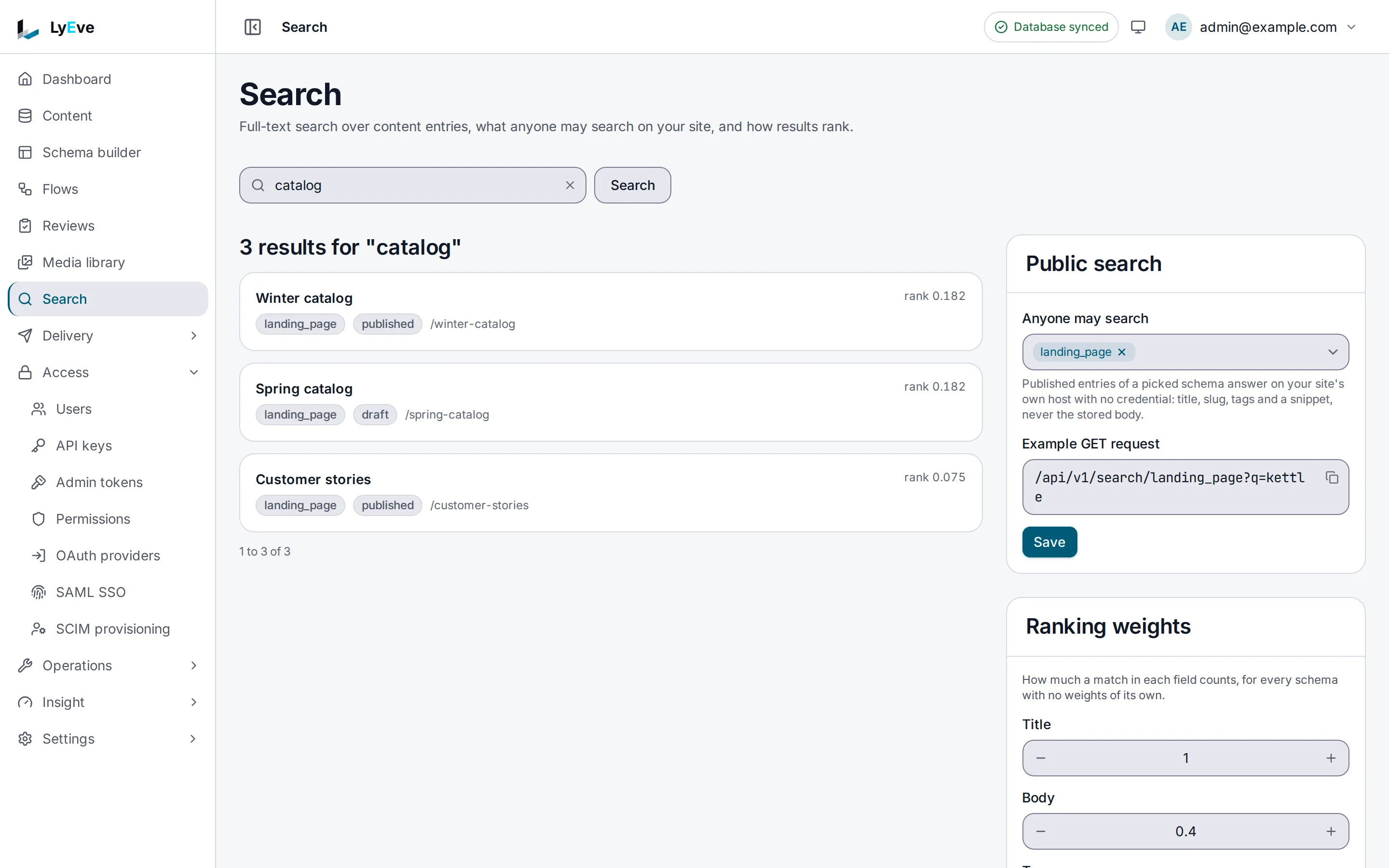
Open Search, type hello in Search content and choose Search. Each result shows
its title, rank, content type, status and slug. The console searches every entry, drafts
included.
Engine API v0.62.0
curl -X POST http://localhost:3001/api/admin/search \ -H "Authorization: Bearer $TOKEN" \ -H "Content-Type: application/json" \ -d '{"q": "hello", "highlight": true, "facets": ["tags"], "limit": 10}'The answer lists results with each entry's rank and snippets, the total, and the
facets you asked for.
2. Try autocomplete with the first letters. Autocomplete is API only. The console's Search page runs a full search:
curl "http://localhost:3001/api/admin/search/instant?q=hel&limit=5" \ -H "Authorization: Bearer $TOKEN"{ "results": [{ "entry_id": "9585eff4-7423-45a0-a82f-ea246bf7cdfd", "title": "Hello", "slug": "hello", "schema": "story" }], "query": "hel", "took_ms": 0 }3. Add a synonym group, then search for it.
Console v0.28.0
Under Synonyms, choose New synonym. Enter hi in Term and hello in Also
matches, then choose Create. Search for hi as in step 1. The entry is found.
Engine API v0.62.0
curl -X POST http://localhost:3001/api/admin/search/synonyms \ -H "Authorization: Bearer $TOKEN" \ -H "Content-Type: application/json" \ -d '{"name": "Greetings", "base_term": "hi", "synonyms": ["hello"]}'The answer is 201 with the group. Search for hi as in step 1, with "q": "hi". The entry
is found.
4. Read the analytics.
Console v0.28.0
The Last 30 days card on Search counts the Searches and the share with No
results, and lists the top queries: hello and hi, once each.
Engine API v0.62.0
curl http://localhost:3001/api/admin/search/analytics \ -H "Authorization: Bearer $TOKEN"{ "total_searches": 2, "unique_queries": 2, "avg_result_count": 1, "avg_duration_ms": 10.5, "top_queries": [{ "query_text": "hello", "count": 1 }, { "query_text": "hi", "count": 1 }], "zero_result_pct": 0 }The autocomplete in step 2 is not counted. Each search you run in the console is.
Search and organization walks through searching from the console step by step.
Search as an admin
Link to the section Search as an adminPOST /api/admin/search takes these fields. GET /api/admin/search takes the same ones as
query parameters, with tags and facets comma-separated and highlight=true.
| Field | Meaning | Default |
|---|---|---|
q | The search text | none |
schema | Limit to one content type | all |
status | Limit to draft, published or another status | all |
tags | Entries with any of these tags | none |
published_after, published_before | RFC 3339 times | none |
facets | Up to three of schema, status and tags to count | none |
highlight | Return snippets with matches marked | false |
limit, offset | Paging. limit is at most 200 | 20, 0 |
At least one of q, schema, status or tags is required.
A full answer
{ "results": [ { "entry_id": "8f14e45f-ea2c-4b1d-9f3a-2c1b0e7d6a55", "schema": "article", "tenant_id": "default", "slug": "pricing-update-2026", "title": "Pricing update for 2026", "body": { "text": "Our prices change on 1 November." }, "meta": {}, "status": "published", "tags": ["news"], "published_at": "2026-09-30T08:00:00Z", "created_by": "12dd433d-c110-4809-b476-12ef360afe7f", "created_at": "2026-09-29T15:00:00Z", "updated_at": "2026-09-30T08:00:00Z", "rank": 0.61, "snippets": { "title": "<mark>Pricing</mark> update for 2026" } } ], "total": 1, "limit": 10, "offset": 0, "facets": { "tags": [{ "value": "news", "count": 1 }] }, "query": "pricing"}Facet counts follow q alone, not the other filters, and are kept for 30 seconds. They are
left out when nothing matched.
GET /api/admin/search/instant takes q, an optional schema and limit, which is 10 by
default and at most 50.
Let anyone search your site
Link to the section Let anyone search your siteList the content types anyone may search. A public search matches every field of their published entries, and its snippets can quote any of them, so list only the types whose fields may all be public.
Console v0.28.0
On Search, pick the content types under Searchable by anyone in the Public search card and choose Save. Each one shows as a chip, and the card shows an Example GET request to copy.
Engine API v0.62.0
curl -X PUT http://localhost:3001/api/admin/search/public-schemas \ -H "Authorization: Bearer $TOKEN" \ -H "Content-Type: application/json" \ -d '{"schemas": ["article", "product"]}'The answer repeats the list. Send an empty list to make search admin only again.
Your site then calls the public route with no credential, on the tenant's own host:
curl "https://acme.example.com/api/v1/search/article?q=pricing&limit=10"{ "hits": [ { "id": "8f14e45f-ea2c-4b1d-9f3a-2c1b0e7d6a55", "schema": "article", "slug": "pricing-update-2026", "title": "Pricing update for 2026", "tags": ["news"], "published_at": "2026-09-30T08:00:00Z", "snippets": { "title": "<mark>Pricing</mark> update for 2026" } } ], "total": 1, "limit": 10, "offset": 0, "query": "pricing", "took_ms": 4}- Public search returns published entries only, and only the fields a result needs: no body and no author. Snippets are always on.
- A snippet, here and in the admin search, is HTML in which the text is escaped and each match
is wrapped in
<mark>tags, so it is safe to render as HTML, while every other field in a hit is plain text. On v0.58.0 abodysnippet holds the body's text only, with its markup dropped, such asSpring <mark>pricing</mark> notes. qis required and at most 256 characters.tagsfilters by up to 10 comma-separated tags, and any beyond 10 are dropped.limitis 10 by default and at most 50, andoffsetis at most 1000.- A content type that is not public answers
404, the same as one that does not exist. - Browsers and caches in front of your site may keep a result for 30 seconds. A response cache rule can keep it on the instance as well, and a search answered from that cache is not counted in the analytics.
Match other words with synonyms
Link to the section Match other words with synonymsConsole v0.28.0
On Search, choose New synonym under Synonyms. Enter laptop in Term and
notebook, ultrabook in Also matches, then choose Create. The console names the group
after its term. The delete button on a group's row asks Delete the synonyms of laptop?,
and Delete removes the group.
Engine API v0.62.0
curl -X POST http://localhost:3001/api/admin/search/synonyms \ -H "Authorization: Bearer $TOKEN" \ -H "Content-Type: application/json" \ -d '{"name": "Computers", "base_term": "laptop", "synonyms": ["notebook", "ultrabook"]}'PUT and DELETE on /api/admin/search/synonyms/{id} change or remove a group.
A search whose whole text is the base term also matches its synonyms. It works one way: a
search for notebook does not match laptop. A search uses the text and the first 7 synonyms
of the group.
The text is looked up as typed, then in lower case, so Laptop finds a group stored as
laptop but laptop does not find one stored as Laptop. Store base terms in lower case.
Synonyms apply on the database backend and on Elasticsearch. On Meilisearch, set synonyms in
the index settings.
Weigh title, body and tags
Link to the section Weigh title, body and tagsConsole v0.28.0
On Search, set Title, Body and Tags in the Ranking weights card and choose
Save. The card saves the weights under *, for every content type with no weights of its
own. The card reads saved weights back at full float precision, so 0.3 shows as
0.30000001192092896.
Engine API v0.62.0
Name a content type, or * for every content type with no weights of its own:
curl -X PUT http://localhost:3001/api/admin/search/ranking \ -H "Authorization: Bearer $TOKEN" \ -H "Content-Type: application/json" \ -d '{"schema_name": "article", "title_weight": 1.0, "body_weight": 0.3, "tag_weight": 0.5}'Weights for one content type are API only. The console in v0.25.0 sets the * row.
A search uses the weights saved for its content type, then the ones saved under schema_name
*, then the defaults: title 1.0, body 0.4, tags 0.2. A negative weight counts as 0, and all
three at 0 count as the defaults. GET /api/admin/search/ranking?schema=article answers the
weights saved under that exact name, or the defaults when none are, even if a * row exists.
| Backend | How weights apply |
|---|---|
| PostgreSQL | Title, body and tags are weighted separately. |
| MySQL and SQL Server | A title match adds the title weight and a body match the body weight. Tags are not searched, so tag_weight has no effect. |
| Elasticsearch | Field boosts on title, body and tags. |
| Meilisearch | Not applied. Meilisearch uses its own ranking rules. |
boost_rules are saved and returned, but no backend applies them.
See what readers search for
Link to the section See what readers search forThe Last 30 days card on Search shows the searches, the share that found nothing and
the top ten queries. GET /api/admin/search/analytics answers the total searches, unique queries, average result
count and time, the top 20 queries and the share that found nothing. By default it covers the
last month, and ?since= sets the start.
Reporting searches and clicks is API only. Your front end can report a search it ran with POST /api/admin/search/analytics/log and a
result the reader clicked with POST /api/admin/search/analytics/click. Both answer 202. A
click is kept only when it matches a logged search with the same query_text and
session_id, and the summary does not count clicks.
Use Elasticsearch or Meilisearch
Link to the section Use Elasticsearch or MeilisearchSet SEARCH_PROVIDER and the settings for that backend below, restart, then rebuild the index
once. A rebuild needs super_admin. The instance refuses to
call a private, loopback or link-local address unless you list it, so a search engine on your
own network or on the same machine needs its network in SEARCH_ALLOWED_PRIVATE_NETWORKS, such
as 10.0.0.0/8 or 127.0.0.1. The list opens that network to search and to nothing else.
Console v0.28.0
On Search, choose Rebuild index in the Index card. It runs at once, with no confirmation, and the card shows what was indexed.
Engine API v0.62.0
curl -X POST http://localhost:3001/api/admin/search/reindex \ -H "Authorization: Bearer $TOKEN"The answer reports what was indexed, such as
"message": "elasticsearch: 1840 indexed, 0 skipped, 0 errors". After that, creates, updates
and deletes reach the external index within about five seconds. A person's
erasure reaches it too: the
document of an erased comment or form submission is removed, or indexed again
as its row now reads. On the database backend a
rebuild is rarely needed, and answers rebuilt: <n> indexed, ... on PostgreSQL.
Settings
Link to the section Settings| Variable | What it does | Default |
|---|---|---|
SEARCH_PROVIDER | native, elasticsearch or meilisearch. | native |
SEARCH_ES_URLS | Elasticsearch node URLs, comma-separated. | http://localhost:9200 |
SEARCH_ES_INDEX_PREFIX | Prefix for Elasticsearch index names. | lyeve |
SEARCH_ES_API_KEY | Elasticsearch API key. | unset |
SEARCH_ES_USERNAME, SEARCH_ES_PASSWORD | Elasticsearch basic auth. | unset |
SEARCH_MEILI_URL | Meilisearch URL. | http://localhost:7700 |
SEARCH_MEILI_INDEX_PREFIX | Prefix for Meilisearch index names. | lyeve |
SEARCH_MEILI_API_KEY | Meilisearch API key. | unset |
SEARCH_REINDEX_BATCH_SIZE | Changes sent to the external index per batch. | 200 |
SEARCH_ALLOWED_PRIVATE_NETWORKS | Private, loopback or link-local networks the search engine may be reached on, as CIDRs or addresses, comma-separated. | unset |
Search needs a license with search. If you set LYEVE_PLUGINS to choose which features
start, include search in it. See licensing and tiers.
The admin routes take a signed-in session. An admin token cannot call them.
Search routes
| Method | Path | Role | Purpose |
|---|---|---|---|
GET | /api/v1/search/{schema} | public | Search a public content type. |
POST, GET | /api/admin/search | admin | Full-text search. |
GET | /api/admin/search/instant | admin | Autocomplete. |
GET, PUT | /api/admin/search/public-schemas | admin | Read or set the public content types. |
GET, POST | /api/admin/search/synonyms | admin | List or add synonym groups. |
PUT, DELETE | /api/admin/search/synonyms/{id} | admin | Change or remove a synonym group. |
GET, PUT | /api/admin/search/ranking | admin | Read or set ranking weights. |
DELETE | /api/admin/search/ranking/{id} | admin | Remove saved weights. |
POST | /api/admin/search/analytics/log | admin | Report a search. |
POST | /api/admin/search/analytics/click | admin | Report a click. |
GET | /api/admin/search/analytics | admin | Analytics summary. |
POST | /api/admin/search/reindex | super_admin | Rebuild the index. |
Without a license that carries search, the routes answer 404. A license that lapses while
the instance runs makes them answer 402 payment_required.
Every error these routes return
| Status | Message | Cause |
|---|---|---|
400 | at least one search criterion is required (q, schema, status, or tags) | POST with no q, schema, status or tags. GET answers the short form. |
400 | q is required | A public search had no text. |
400 | q is too long or contains invalid characters | A public search over 256 characters. |
400 | limit must be a positive number, offset must be zero or more | Bad paging on a public search. |
400 | base_term is required, at least one synonym is required, invalid synonym ID | A synonym request is incomplete. |
400 | schema_name is required | Ranking weights named no content type. |
400 | entry_id is required, query_text is required | An analytics report is incomplete. |
402 | payment_required | The license lapsed while the instance ran. |
403 | reindex requires super_admin role | A reindex by someone else. |
404 | not found | The content type is not public. |
404 | synonym not found, ranking config not found | Unknown id. |
422 | "<name>" is not a schema name | A public content type name is not valid. |
Related
Link to the section Related- Search and organization: finding entries in the console.
- Content lifecycle: statuses and the entries search reads.
- Localization: translated entries.