

API keys
Included free on every install, up to five active keys per tenant and the last thirty days of each key's request history. A license with the
apikey-profeature lifts both and lets you set or raise a key's monthly request limit. See pricing.
An API key lets a program call the Content API (/api/v1/*) without a person
signing in. Each key carries scopes that say what it may read and write, an
optional expiry and an optional monthly request limit. Every request a key
makes is recorded against it, refused ones included.
In the admin console
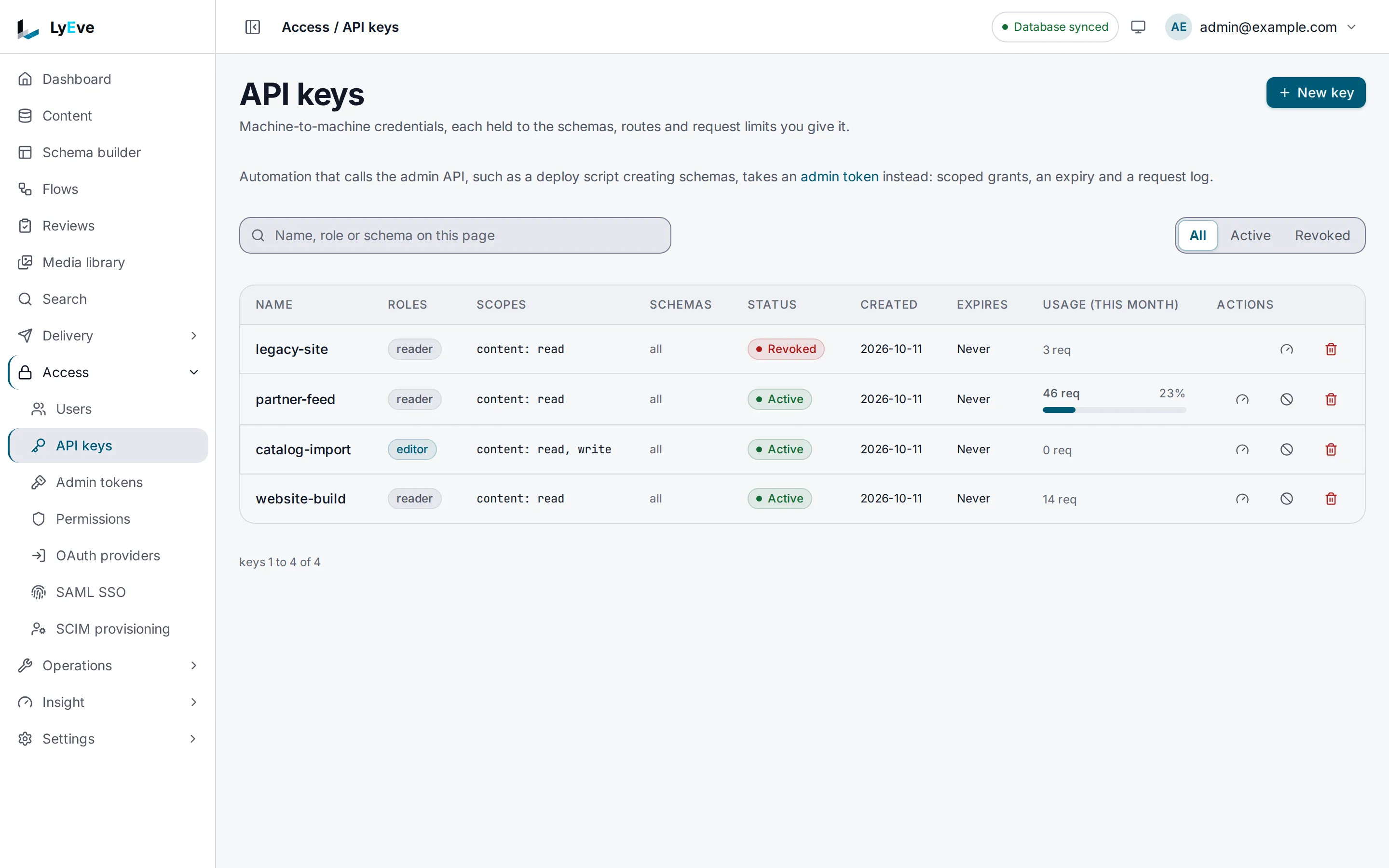
Section titled “In the admin console”Open Access > API keys. A super admin sees every key in the tenant with its roles, scopes, status, expiry and Usage (this month). All, Active and Revoked narrow the list.
- Choose New key. Give it a Name, pick its Roles, and choose under Access what it may reach on each part of the Content API. The form lists the scopes it will grant.
- Set Expires and the Request limits if the key needs them, then choose Create.
- Copy the key from API key created. It is not shown again.
Each row has buttons to set the key's request limits, revoke it and delete it.
How a key is checked
Section titled “How a key is checked”| Check | What passes |
|---|---|
| The key | Sent in X-API-Key, enabled and not expired. Anything else answers 401. |
| The scope | The scope the method and path need is one the key holds. |
| The content types | A key with a schemas list reaches only those content types. |
| The role | A write to content needs the editor, admin or super_admin role on the key. |
| The access rules | The key's roles go through access rules, the same rules as a person's. A read needs a rule that allows read on the content type, and a write one that allows the action. A field mask on a role hides those fields from the key too. |
| The monthly limit | The key has requests left this calendar month (UTC). |
A scope is <resource>:<action>. The resource is the first path segment after
/api/v1/, so /api/v1/content/post is content. The action comes from the
method:
| Method | Action |
|---|---|
GET, HEAD, OPTIONS | read |
POST, PUT, PATCH | write |
DELETE | delete |
content:read reads content. content:* allows every action on content,
*:read reads everything, and *:* allows everything. Scopes ignore case. A
key with no scopes is refused everywhere.
A key with the admin or super_admin role skips the scope check and reaches
every Content API route the role reaches. It must expire within 90 days, and
the Admin API refuses it.
Try it
Section titled “Try it”You need an admin token in TOKEN. The
quickstart shows how to get one, and
creates the post content type used here.
-
Give a role read access to
post. A key reads only what its roles may read, and a key with no role reads nothing:Terminal window curl -X POST http://localhost:3001/api/admin/permissions \-H "Authorization: Bearer $TOKEN" \-H "Content-Type: application/json" \-d '{"role": "site-reader", "schema_name": "post", "actions": ["read"]}'The answer is
200with the rule. Access rules covers the rest of what a rule holds. -
Create a key with that role that may only read content:
Terminal window curl -X POST http://localhost:3001/api/admin/api-keys \-H "Authorization: Bearer $TOKEN" \-H "Content-Type: application/json" \-d '{"name": "website-build", "roles": ["site-reader"], "scopes": ["content:read"]}'{"id": "8c2e4f1a-3b6d-4a9e-b0c7-1d5f2e8a6b94","name": "website-build","roles": ["site-reader"],"schemas": [],"scopes": ["content:read"],"tenant_id": "default","enabled": true,"monthly_limit": 0,"created_at": "2026-10-01T09:30:00Z","raw_key": "ly_3f9a..."}The answer is
201. Copyraw_keyintoKEYandidintoKEY_ID.raw_keyis shown once. Only a hash is kept, so a lost key cannot be recovered. -
Read content with the key:
Terminal window curl http://localhost:3002/api/v1/content/post \-H "X-API-Key: $KEY"The answer is the list of posts. Reading a content type no rule opens to
site-readeranswers403withpermission denied. -
Try to write with it:
Terminal window curl -X POST http://localhost:3002/api/v1/content/post \-H "X-API-Key: $KEY" \-H "Content-Type: application/json" \-d '{"data": {"title": "From a key"}}'{ "error": "insufficient scope" } -
See what the key did:
Terminal window curl "http://localhost:3001/api/admin/api-keys/$KEY_ID/audit?limit=10" \-H "Authorization: Bearer $TOKEN"[{ "id": "f3bc4e46-...", "api_key_id": "8c2e4f1a-...", "method": "POST", "path": "/api/v1/content/post", "status": 403, "ip": "203.0.113.7", "ts": "2026-10-01T09:31:02Z" },{ "id": "fcf64173-...", "api_key_id": "8c2e4f1a-...", "method": "GET", "path": "/api/v1/content/post", "status": 200, "ip": "203.0.113.7", "ts": "2026-10-01T09:31:00Z" }] -
See this month's usage:
Terminal window curl http://localhost:3001/api/admin/usage/api-key/$KEY_ID \-H "Authorization: Bearer $TOKEN"The answer holds
billing_period,requests,bytes_inandbytes_out. -
Revoke the key:
Terminal window curl -X POST http://localhost:3001/api/admin/api-keys/$KEY_ID/revoke \-H "Authorization: Bearer $TOKEN"The answer is
204. From then on the key answers401withauthentication required.
Cap a key's monthly requests
Section titled “Cap a key's monthly requests”A tenant holds five active keys without apikey-pro. A revoked key does not
count. If a license with apikey-pro ends while a tenant holds more than five,
every key keeps working, and the tenant creates no new one until it is under
five again. The request history is not shortened when a license ends: the
console reads the last thirty days, and the rest returns with apikey-pro.
A key can carry a monthly request limit, and past it the key answers 429.
Setting a first limit or raising one needs a license with apikey-pro, while
lowering or clearing one is free. See
API key request limits.
Let a key write content
Section titled “Let a key write content”Give it the editor role and the write scope, and give editor an access rule
that lets it create entries of that content type. Only roles you hold can be
granted, unless you are a super admin:
curl -X POST http://localhost:3001/api/admin/permissions \ -H "Authorization: Bearer $TOKEN" \ -H "Content-Type: application/json" \ -d '{"role": "editor", "schema_name": "post", "actions": ["read", "create"]}'{ "name": "catalog-import", "roles": ["editor"], "scopes": ["content:read", "content:write"] }A write is checked in this order:
| Missing | Answer |
|---|---|
| The write scope | 403 with insufficient scope |
The editor, admin or super_admin role | 403 with insufficient permissions |
| A rule that allows the action on the content type | 403 with permission denied |
A schemas list on the key narrows it further. A key with
"schemas": ["post"] answers 403 with schema not allowed for this credential on any other content type, whatever its roles allow.
Manage keys
Section titled “Manage keys”Keys are managed from a signed-in session by an admin or super_admin, in
the admin console or over the routes below. A request made with an API key or
an admin token cannot create, revoke or delete keys.
Revoking turns a key off and keeps its history. Deleting removes the key and its history. To replace a leaked key, create a new one, move the program to it, then revoke the old one.
Key routes
| Method | Path | Result |
|---|---|---|
GET | /api/admin/api-keys | Your tenant's keys, paginated with limit and offset. The secret is never shown. |
POST | /api/admin/api-keys | Creates a key. 201. Without apikey-pro, a tenant that already holds five active keys gets 402 with "error": "cap_exceeded" and "cap": "apikey.keys". Revoke a key to free its place. |
POST | /api/admin/api-keys/{id}/revoke | Turns the key off. 204. |
DELETE | /api/admin/api-keys/{id} | Deletes the key and its history. 204. |
GET | /api/admin/api-keys/{id}/audit | The key's requests, newest first, with limit (default 50) and offset. Without apikey-pro, the last thirty days. |
PATCH | /api/admin/api-keys/{id}/monthly-limit | Sets {"monthly_limit": 50000}. 0 removes the limit. See API key request limits. |
GET | /api/admin/usage/api-key/{id} | Requests and bytes this month. |
Fields of a new key
| Field | Default | Meaning |
|---|---|---|
name | required | A label for the key. |
scopes | [] | What the key may do. |
roles | [] | Roles the key acts with. |
schemas | [] | Stored and shown, not enforced. |
expires_at | none | When the key stops working. Required within 90 days for an admin or super_admin key. |
monthly_limit | 0 | Requests per calendar month in UTC. 0 means no limit. Any other value needs apikey-pro. See API key request limits. |
Settings
Section titled “Settings”| Variable | What it does | Default |
|---|---|---|
APIKEY_RETENTION_DAYS | Days a history entry, with its client address, is kept. 0 or less keeps it forever. A value that is not a whole number uses the default. | 365 |
API_KEY_PEPPER | A server secret mixed into every stored key hash, so a copy of the database alone cannot check or forge keys. | unset |
ENFORCE_API_KEY_PEPPER | true stops the instance from starting unless API_KEY_PEPPER is set. | false |
API keys run on every install. If you set LYEVE_PLUGINS, include apikey,
and usage, which counts each key's requests and enforces its monthly limit.
See
licensing and tiers.
Errors
Section titled “Errors”| Status | Message | Cause |
|---|---|---|
401 | authentication required | The key is unknown, revoked or expired. |
403 | insufficient scope | The key's scopes do not cover the route. |
403 | schema not allowed for this credential | The content type is outside the key's schemas list. |
403 | permission denied | No access rule lets the key's roles do this on the content type. |
429 | monthly request limit (100000) exceeded | The key used its monthly limit. The answer carries X-RateLimit-Exceeded: true. |
Errors from the key routes
| Status | Message | Cause |
|---|---|---|
400 | invalid JSON, name is required | The body is malformed or has no name. |
402 | payment_required | Setting a first monthly limit or raising one without apikey-pro. |
401 | API keys with an admin role are not accepted on the admin API. Use an admin token. | An admin-role key called the Admin API. |
403 | insufficient permissions | The key lacks the role a write needs. |
403 | API keys are managed by a signed-in user, not by another key | A key called a key management route. |
403 | This route needs a signed-in session. | An admin token called a key management route. |
403 | cannot grant roles you do not possess | The new key asks for a role you lack. |
404 | api key not found | No key with that id in your tenant. |
422 | a key with the admin or super_admin role needs an expiry, at most 90 days away | An admin-role key has no expires_at. |
422 | a key with the admin or super_admin role expires at most 90 days away | An admin-role key expires too late. |
Related
Section titled “Related”- Admin tokens: the credential for scripts on the Admin API.
- Roles and permissions: which credential fits which job.
- Usage and quotas: request counts per key and tenant.
- Harden your instance: the pepper and the rules every install enforces.