LyEve Core
Data model
Everything you store in LyEve is an entry of a content type. The content type is the
shape: a name, a list of fields and a few switches. An entry is one item written in that
shape, such as one blog post. This page builds a small blog, a post that belongs to an
author, and uses it to explain each piece.
| Term | What it is | In the blog |
|---|---|---|
| Content type | The shape of one kind of content | author and post |
| Field | One value in that shape, with a type | title, body, published_on |
| Relation | A field that links to an entry of another content type | a post's author |
| Entry | One item written against a content type | the post "Hello, world" |
| Status | Whether an entry is a draft, published or archived | draft |
| Revision | A kept earlier version of an entry, when history is on for its type | the post before its last edit |
Content types
Link to the section Content typesBuild a content type in LyEve Console's Schema builder, or send its definition to
POST /api/admin/schemas. The blog needs two. The author comes first, because the post
points at it:
{ "name": "author", "display_name": "Author", "fields": [ { "name": "name", "field_type": "text", "required": true }, { "name": "email", "field_type": "email", "unique": true } ]}{ "name": "post", "display_name": "Post", "with_draft_publish": true, "with_soft_delete": true, "fields": [ { "name": "title", "field_type": "text", "required": true, "indexed": true }, { "name": "body", "field_type": "rich_text" }, { "name": "published_on", "field_type": "date" }, { "name": "author", "field_type": "relation", "relation_to": "author", "relation_type": "belongs_to" } ]}| Key | Meaning |
|---|---|
name | Letters, digits and _, starting with a letter or _, at most 63 characters. Any other name answers 422 and changes nothing. |
display_name | The label the console shows. |
fields | The fields, described in the next section. |
with_draft_publish | Each entry carries a status. See Statuses. |
with_soft_delete | A delete hides the entry instead of removing it. See Soft delete. |
with_created_at, with_updated_at | Lists that timestamp among the fields. The console shows an entry's Updated time only when with_updated_at is set. |
Every entry gets an id, a created_at and an updated_at whether or not you list them.
Leave out with_localization: a content type that sets it reads back with a deprecations
list, and Localization translates entries field by field
instead.
Content types belong to a tenant. Two tenants can each define a post with different
fields, and neither sees the other's. Reading content types takes any signed-in role.
Creating, changing and deleting them takes admin or super_admin.
| Key | Meaning |
|---|---|
name | The field's name, with the same rules as the content type's name. |
field_type | The kind of value, from the table below. Required: a field without one answers 422. |
required | A write without a value answers 422. |
unique | A value another entry of the same content type already holds in your tenant answers 409. |
indexed | Filtering and sorting on the field is fast. It changes nothing about what you write. |
default | Filled in when a write leaves the field out. |
validation | Rules checked on every write, described below. |
field_type | What it holds | What you send |
|---|---|---|
text | Plain text | A string |
rich_text | Formatted text | A string of HTML. The console removes unsafe markup when it saves. The Content API stores the string as sent, so sanitize it where you render it. |
email | An email address | A string. One that is not an address answers 422. |
url | A link | A string. Add the url rule below to refuse one that is not a URL. |
number | A number | A JSON number |
integer | A whole number up to 64 bits, from -9223372036854775808 to 9223372036854775807 | A JSON number. Answers return a JSON number. |
decimal | An exact number with a declared precision and scale | A string, such as "19.9", or a JSON number. Answers return a string with exactly scale digits after the point, such as "19.90". |
boolean | Yes or no | true or false. Anything else answers 422. |
date | A calendar date | "2026-10-01" |
datetime | A moment in time | An RFC 3339 timestamp, such as "2026-10-01T09:00:00Z" |
json | Structured data | Any JSON value |
media | A file | A string that locates the file. The console stores the file's public link from the media library. |
relation | A link to another entry | See Relations. |
uid | A unique identifier | A UUID string |
number is unchanged. A decimal field takes precision, the number of digits it holds, from 1
to 38, and scale, how many of those digits follow the point, from 0 to 30 and no more than
precision. A field that sets neither holds 18 digits, 2 of them after the point. A value with
more digits than the field holds answers 422. It is never rounded.
JavaScript's JSON.parse rounds an integer past 9007199254740991, so a browser reads a larger
integer value wrong. When a browser client needs larger values exactly, use a decimal field
with scale 0, which arrives as a string.
validation is a list of rules. Each names a rule and its params:
| Rule | Params | Refuses |
|---|---|---|
email, url | none | A value that is not an address or a URL |
regex | pattern | A value the pattern does not match |
enum | values | A value not in the list |
min, max | min or max | A number below or above it, or a string shorter or longer than it |
range | min and max | Anything outside both bounds |
A post summary limited to 160 characters would be
{ "name": "summary", "field_type": "text", "validation": [{ "rule": "max", "params": { "max": 160 } }] }.
A content type can also carry cross_field_validation rules that name two fields in
targets. required_with refuses a write that fills the second field and leaves the first
empty. lt_field, gt_field, lte_field and gte_field compare two number fields, such as
a max_age that must be at least the min_age. A write that breaks any rule answers 422
with an errors list naming each field, and nothing is stored.
Relations
Link to the section RelationsA relation field takes relation_to, the content type it points at, and a
relation_type. In the blog, post.author is a belongs_to.
relation_type | Where the link is stored | When the other entry is deleted |
|---|---|---|
belongs_to | On this entry. It points at one entry of the other type. | This entry is deleted too when the field is required. Otherwise the link is cleared. |
many_to_many | Beside both entries. Any number on each side. | Only the pairing goes. The entry it was paired with stays. |
has_one, has_many | On the other side, in a belongs_to field there that points back here. | Follows that belongs_to. |
- A
belongs_tois the only kind whererequiredmeans anything. - A value sent for a
has_oneorhas_manyis ignored. Set the link on the other entry. To list an author's posts, giveauthorahas_manyfield withrelation_to: "post". - A
has_oneorhas_manyfinds the other side through abelongs_tonamed after this content type. The blog's works because the post's field is calledauthor. A field calledwriterwould leave the author's list empty. - Nothing enforces the "one" of a
has_one. When several entries point here, the first is read. uniqueandindexedare ignored on a relation.
On the Content API, a belongs_to reads back as the linked entry's id under
<field>_id, such as author_id. Add ?populate=author to a read to get the author's
fields in its place. populate takes a comma-separated list, and a dot path such as
author.team follows a relation of the related entry. ?depth=2 follows every relation two
levels down. A many_to_many is
read with GET /api/v1/content/{type}/{id}/relations/{field} and replaced with PUT on the
same path and {"ids": ["<id>", "<id>"]}.
Relations behave the same on PostgreSQL, MySQL and SQL Server.
Entries
Link to the section EntriesYour site or app writes entries through the Content API, with the field values under
data. You need a token in TOKEN. The
quickstart shows how to get one.
curl -X POST http://localhost:3002/api/v1/content/author \ -H "Authorization: Bearer $TOKEN" \ -H "Content-Type: application/json" \ -d '{"data": {"name": "Ada Lovelace", "email": "ada@example.com"}}'{ "id": "ce7168fd-648d-4fee-830f-db1a65b8e2af", "data": { "id": "ce7168fd-648d-4fee-830f-db1a65b8e2af", "name": "Ada Lovelace", "email": "ada@example.com" }, "created_at": "2026-10-02T05:05:16.951534Z", "updated_at": "2026-10-02T05:05:16.951534Z"}A post sends the author's id in its author field:
curl -X POST http://localhost:3002/api/v1/content/post \ -H "Authorization: Bearer $TOKEN" \ -H "Content-Type: application/json" \ -d '{"data": {"title": "Hello, world", "body": "<p>First post.</p>", "published_on": "2026-10-01", "author": "ce7168fd-648d-4fee-830f-db1a65b8e2af"}}'Reading it with ?populate=author returns the author inside the post:
curl "http://localhost:3002/api/v1/content/post/$POST_ID?populate=author" \ -H "Authorization: Bearer $TOKEN"{ "id": "909f3fb8-64ca-4a5e-a724-d60dd332e0b7", "data": { "title": "Hello, world", "body": "<p>First post.</p>", "published_on": "2026-10-01", "author_id": "ce7168fd-648d-4fee-830f-db1a65b8e2af", "author": { "id": "ce7168fd-648d-4fee-830f-db1a65b8e2af", "name": "Ada Lovelace", "email": "ada@example.com", "created_at": "2026-10-02T05:05:16.951534Z", "updated_at": "2026-10-02T05:05:16.951534Z" }, "_status": "published", "deleted_at": null }, "created_at": "2026-10-02T05:05:20.792407Z", "updated_at": "2026-10-02T05:05:20.792407Z"}A list is GET /api/v1/content/{type}, newest first, 25 entries at a time by default and at
most 200, with limit and offset. ?filters[<field>]=<value> keeps the entries whose field
equals the value.
The console writes entries through the Admin API instead, at /api/admin/content.
There an entry also carries a title, a slug and a status, and its field values
travel under body. Both write the same entries, and an entry written through the Admin API
is served by the Content API under the same id.
Content API, /api/v1/content/{type} | Admin API, /api/admin/content | |
|---|---|---|
| Used by | Your site, your app, your scripts | The console, admin scripts |
| Field values | Under data | Under body, beside title, slug and status |
| Who may write | editor, admin, super_admin | admin, super_admin |
| Unsafe HTML | Stored as sent | Removed on save |
| Revisions, when history is on | A copy before every update | Numbered, from 1 |
On the Admin API the title and the slug are required. A slug is unique across the whole
tenant, not only within one content type, so a second entry with the same slug answers 409
and names the content type that holds it.
Content lifecycle covers that API in full.
Statuses
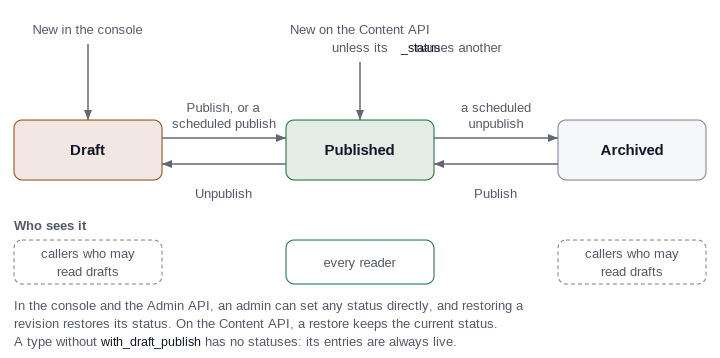
Link to the section StatusesA content type with with_draft_publish gives each entry a status. The blog's post has
one. The author does not, so every author is live.
| Status | Meaning |
|---|---|
draft | Work in progress. A new entry in the console starts here. |
published | Live. published_at holds the time of a publish. A publish in the console or with the Admin API sets it each time. A publish with the Content API or in a release sets it only when the entry has none, and a rollback leaves it as it was. |
archived | Retired, but kept. |
On the Content API:
- An entry created there takes the
_statusitsdatanames, and is published when it names none. PUT /api/v1/content/{type}/{id}/unpublishmakes it a draft andPUT /api/v1/content/{type}/{id}/publishpublishes it again. Both answer204.- A list returns published entries only. Add
?filters[_status]=draftto list the drafts. - Drafts and archived entries reach only a caller who may read drafts: one that holds both the
read and the update permission on the content type. An API key with no
adminorsuper_adminrole also needs the read and the update scope on it, such ascontent:readwithcontent:write. See access rules. - Any other caller gets published entries only. A read by id of an entry that is not published
answers
404, a status filter other thanpublishedanswers403, and revisions and related entries leave unpublished ones out. - A response that can carry drafts is served with
Cache-Control: private, no-store, so no shared cache keeps it.
A status set in the console or through /api/admin/content holds on the Content API too.
The console and the Admin API set the status directly and can schedule a publish. See Drafts and publishing for the console and Content lifecycle for the API.
Soft delete
Link to the section Soft deleteA content type with with_soft_delete keeps a deleted entry and hides it from every read: a
list leaves it out and a read by id answers 404. Without the switch, a delete removes the
entry. The blog's posts are soft deleted, so a post deleted by mistake is still in your
database.
Revisions
Link to the section RevisionsLyEve keeps earlier versions of an entry when content history is on for its content type. History is off on a new install. An administrator turns it on for every content type, for the ones they choose, or for one. Each API keeps versions its own way.
- Admin API and console. Every write that changes something keeps a numbered
revision: the title, the body, the metadata, the status and a change note. A save that
changes nothing keeps none. Revisions start at
1, never change once written, and can be compared two at a time. Restoring one writes a new revision with the old content. - Content API. Every update first keeps a copy of the entry as it was.
GET /api/v1/content/{type}/{id}/revisionslists the copies, newest first, andPUT /api/v1/content/{type}/{id}/revisions/{revision_id}/restorewrites one back. The restore keeps a copy of what it replaced.
Revisions are kept for as long as the tenant's retention
says, and forever when it sets none. A free install reads the last 30 days of them and each
entry's newest revision, and a license with content-pro reads them all. See
Content lifecycle.
Changing a content type
Link to the section Changing a content typeSend the definition again and the content type changes to match. Only what differs changes, and existing entries keep their values. Removing a field keeps its data until a super admin applies the removal, so a mistaken edit loses nothing. Schema changes covers previewing, renaming and applying those changes.
Where to go next
Link to the section Where to go next- Your first content type: build and write one, step by step.
- Schema changes: change a content type safely.
- Schema presets: start from ready-made content types.
- Content lifecycle: statuses, revisions and scheduling on the Admin API.
- API endpoints: every route that reads and writes entries.