LyEve Core
Core concepts
LyEve is a headless CMS you run yourself. Six ideas cover almost everything you do with it, and the rest of these docs assume them. Each one gets a few sentences here and a link to the page that covers it in full.
| Idea | In one line | Home page |
|---|---|---|
| Content types and entries | You define the shape, then write items of that shape | The data model |
| Drafts and publishing | An entry is live only once it is published | The data model |
| Users, roles and credentials | People sign in, programs use keys and tokens | Roles and permissions |
| Tenants | One install can hold several separate sets of content | Tenants |
| Features and licenses | Free features always run, a license adds the paid ones | Licensing and tiers |
| The two APIs | One API to manage the instance, one to read and write content | This page |
Content types and entries
Link to the section Content types and entriesLyEve ships with no fixed content types. You define your own.
A content type describes one kind of content: an article, a product, a page. It has a name and a list of fields, and each field has a type, such as text, number, date or a relation to another content type, plus flags such as required or unique. You create content types in LyEve Console's Schema builder or over the Admin API, while the engine runs. A change needs no code change and no deploy.
An entry is one item of a content type. If you define a post content type with title
and body fields, each post you write is an entry with values for those fields. Your site,
app or service fetches entries as JSON and renders them however it likes, which is what makes
LyEve headless. The data model covers fields, relations and entries in
detail, and Your first content type builds one.
Drafts, publishing and revisions
Link to the section Drafts, publishing and revisionsA content type can turn on draft and publish. Its entries then carry a status: draft,
published or archived, and a list on the Content API holds published entries unless the
request filters on the status. A new entry in the console starts as a draft, and
publishing is a separate step that can also be scheduled. An entry created on the Content API
takes the status its body names, and is published when it names none. Only a caller who may
both read and update the content type sees its drafts. Everyone else, such as a site reading
with a content:read key, gets published entries only.
When content history is on for a content type, every change to its entries is kept as a numbered revision. You can compare two revisions and restore an earlier one, and a restore adds a new revision rather than rewriting history. History is off until an administrator turns it on, for every type or the ones they choose. The data model covers statuses and revisions, and Drafts and publishing walks through them in the console.
Users, roles and credentials
Link to the section Users, roles and credentialsPeople sign in with an email and a password, or through single sign-on when that is set up.
Every account holds roles. Three are built in: super_admin runs the whole instance,
admin runs one tenant, and editor writes content. A new user gets editor when no role
is given, and you can add role names of your own. Access rules say what a role may do
with each content type, flow and review, down to which fields a read hides.
Roles and permissions says what each role may do,
and Access rules covers the rules.
Programs get credentials of their own instead of a person's login:
- An API key calls the Content API, limited to the roles and scopes you grant it. See API keys.
- An admin token calls the Admin API from a script or a CI job, limited to the grants you pick and expiring within 90 days. See Admin tokens.
Tenants
Link to the section TenantsOne installation can serve several tenants: separate customers, brands or environments that must never see each other's data. Each tenant has its own content types, entries, media, users and settings. A single-tenant install has one default tenant and never needs to name it.
A request always runs in exactly one tenant, the one its credential belongs to. A person who
belongs to several tenants names one in the tenant field when they sign in, and can be an
editor in one tenant and an admin in another. Only a super_admin may act in another tenant,
by sending the X-Tenant-ID header with the tenant's slug.
Running tenants is free. Creating tenants beyond the default one needs a license with the
multitenant-provisioning feature, and a free install answers 402 to a create.
Tenants covers creating them, domains and moving content between
them.
Features and licenses
Link to the section Features and licensesEverything LyEve does beyond the core CMS is a feature: media, flows, search, single sign-on, webhooks and so on. Every feature ships in the same engine image, so there is nothing extra to install. Whether a feature runs depends on two things:
- Your license. Free features run on every install with no license key, with no time
limit. A paid feature runs when your license names it. Some free features have a ceiling or
a paid part: flows are free up to twenty per tenant and the
flow-profeature lifts that, webhooks are free up to 25 per tenant andwebhook-prolifts that, and rate limiting is free while custom rules are therate-limit-profeature. Email, localization, OAuth sign-in, multi-factor authentication and synthetic monitoring work the same way, each with a-profeature. - Your configuration.
LYEVE_PLUGINScan limit which features start. Left empty, every feature your license covers starts.
You apply a license by setting LYEVE_LICENSE_KEY, or a super admin pastes it into
Settings > License in the console. An expired license never takes a free feature
away. Licensing and tiers lists what is free, what a license adds
and what happens when one expires, and Features lists every feature
with its tier. Prices are at lyeve.com/pricing.
The two APIs
Link to the section The two APIs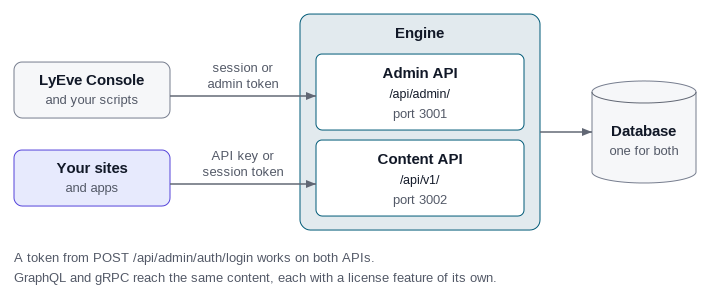
The engine serves two HTTP APIs, each on its own port:
| API | Default port | Base path | Used for | Credential |
|---|---|---|---|---|
| Admin API | 3001 | /api/admin/ | Sign-in, content types, users, permissions, media, settings and most console screens | A session token or an admin token |
| Content API | 3002 | /api/v1/ | Reading and writing entries from your own sites, apps and services, and the console's Delivery > API access, API labs and GraphQL pages | A session token or an API key in X-API-Key |
ADMIN_LISTEN_ADDR and API_LISTEN_ADDR move them. The token from
POST /api/admin/auth/login works on both, and the
Quickstart gets one.
The running engine documents its own routes. In the console, Delivery > API
reference lists them and API labs sends a real request. An admin can download the
OpenAPI document at GET /api/admin/openapi/public.json, and a super admin the full one at
GET /api/admin/openapi/admin.json. A route of a feature that is not running answers 404
with {"error": "The requested endpoint does not exist."}.
GraphQL and gRPC are other ways to reach the same content, each with a license feature of its own: see the GraphQL API and the gRPC API. The TypeScript packages on npm wrap both HTTP APIs: see the SDK overview. API endpoints lists every route.
Keep reading
Link to the section Keep reading- The data model: fields, relations, statuses and revisions.
- Licensing and tiers: what is free, what a license adds, and how to apply one.
- Features: every feature, what it is best for and where it lives in the console.
- Glossary: short definitions of the terms these pages use.