How-to guides
Harden your instance
Included free on every install. The web application firewall and trusted devices require a license with the
wafanddevice-fingerprintfeatures, and passkey enrollment needsmfa-pro. See pricing.
Walk these steps before you expose an instance to the internet. Each one says what to set, why, and how to check that it worked. Every setting is an environment variable read at start, so restart the instance after you change one.
Before you start
Link to the section Before you startAPP_ENVisproduction, which is the default. In production the instance refuses to start on a weak configuration and names the setting that is wrong.APP_ENV=developmentrelaxes those checks for local work. Never run it on a public address.- You can read the instance's log, where a refused start explains itself.
- You have a super admin token in
TOKENfor the checks. The quickstart shows how to get one.
Production also refuses a database URL that signs in as the database's
default superuser (postgres on PostgreSQL, root on MySQL, sa on SQL
Server), and a LYEVE_CONSOLE_URL that does not use https.
1. Set strong, separate secrets
Link to the section 1. Set strong, separate secretsopenssl rand -base64 48 # JWT_SECRETopenssl rand -base64 48 # ENCRYPTION_KEYJWT_SECRET=<generated>ENCRYPTION_KEY=<generated>Why: separate keys mean a leaked signing secret does not also expose the data stored encrypted, such as MFA secrets and OAuth client secrets.
JWT_SECRETis required. The instance does not start without it, and refuses a value shorter than 16 characters or one that looks like a placeholder (change-me,example,secretand the like).ENCRYPTION_KEYmust be at least 32 characters and different fromJWT_SECRET. An empty value stops the start in every environment, because it falls back toJWT_SECRET, which that rule refuses.
Keep both in your secret manager and inject them at runtime.
Check: the instance starts. A refused value stops the start with a line
such as JWT_SECRET too short (12 chars) - must be at least 16 characters.
2. Sign tokens with Ed25519
Link to the section 2. Sign tokens with Ed25519JWT_KEY_PATH=/var/lib/lyeve/jwt_key.jsonWhy: with an Ed25519 key, other services verify your tokens against the public key without holding any secret.
Ed25519 is the default (JWT_ALG=EdDSA). The instance creates the key pair at
JWT_KEY_PATH on first start and reuses it after, so keep that path on
persistent storage, or every restart signs everyone out. The key alone does not
keep sessions through a restart: refresh tokens live in the engine's memory
unless CACHE_DRIVER=redis and REDIS_URL point at a Redis. In production the
file must be readable by its owner only (0600), and a key file the instance
cannot create stops the start.
If you run with JWT_ALG=HS256 instead, JWT_SECRET signs and every secret
in JWT_SECRETS verifies. To rotate without signing everyone out, set
JWT_SECRET to the new secret and JWT_SECRETS=<new secret>,<old secret>. Each entry is at
least 16 characters and no placeholder, or the instance does not start.
Check:
curl http://localhost:3002/.well-known/jwks.jsonThe answer holds one key with "alg": "EdDSA". An empty keys list means the
instance signs with HMAC. See
validate tokens with JWKS.
3. Keep token lifetimes short
Link to the section 3. Keep token lifetimes shortJWT_EXPIRY_SECS=900REFRESH_TOKEN_TTL_SECS=2592000Why: a short-lived token limits how long a stolen one is useful.
Session tokens last 900 seconds by default and production refuses more than
3600. Refresh tokens last 30 days by default. Signing out, or a password
reset, ends every token already issued to that account.
Check: decode a fresh token's payload. exp minus iat equals
JWT_EXPIRY_SECS.
4. Serve over TLS and lock cookies
Link to the section 4. Serve over TLS and lock cookiesSECURE_COOKIE=trueWhy: it keeps session cookies and tokens off plain HTTP.
SECURE_COOKIE=true marks the session cookies Secure, sends
Strict-Transport-Security: max-age=63072000; includeSubDomains; preload, and
redirects a plain HTTP request to HTTPS unless the proxy in front says
X-Forwarded-Proto: https. Production refuses to start without it. The other
security headers (X-Content-Type-Options: nosniff, X-Frame-Options: DENY,
Referrer-Policy and a Content Security Policy) are sent on every install.
Check:
curl -sI https://admin.example.com/api/admin/auth/me | grep -i strict-transportThe header is present.
5. Constrain CORS
Link to the section 5. Constrain CORSCORS_ORIGINS=https://admin.example.comCORS_ALLOWED_DOMAINS=example.comWhy: only the origins you list may call the APIs from a browser with the visitor's session.
The default origin is http://localhost:5173, so replace it with your real
LyEve Console origin. A wildcard * in CORS_ORIGINS is refused on every install.
CORS_ALLOWED_DOMAINS limits the origins a feature may add while the instance
runs, and empty refuses them all.
Check: a preflight from another origin gets no
Access-Control-Allow-Origin header:
curl -s -D - -o /dev/null -X OPTIONS https://api.example.com/api/v1/schemas \ -H "Origin: https://other.example.net" -H "Access-Control-Request-Method: GET"6. Pin the Host header and trust proxies on purpose
Link to the section 6. Pin the Host header and trust proxies on purposeALLOWED_HOSTS=api.example.com,admin.example.comTRUSTED_PROXIES=10.0.0.0/8Why: a forged Host header cannot steer a redirect or a link, and a
forged X-Forwarded-For cannot change the address that rate limits, audit
entries and admin token address lists see.
ALLOWED_HOSTS: a request whoseHostis not listed is refused with421 Misdirected Requestbefore anything is built from it. Empty lets every host through.TRUSTED_PROXIES: the ranges whoseX-Forwarded-Foryou trust. The header is read only when the connecting peer is in one of these ranges. Empty trusts no proxy, so behind a load balancer every request appears to come from it.IP_ALLOWLIST(optional): comma-separated addresses or ranges allowed to reach the APIs at all. Others get403. Empty allows everyone. An entry that is not an address or a range stops the start and names the entry.
Check:
curl -s -o /dev/null -w "%{http_code}\n" https://api.example.com/api/v1/schemas -H "Host: evil.example"The answer is 421.
7. Turn on rate limiting
Link to the section 7. Turn on rate limitingRATE_LIMIT_RPS=20RATE_LIMIT_BURST=40Why: one client cannot crowd out the others or hammer an expensive route.
RATE_LIMIT_RPS is a per-address ceiling on every request. 0 or unset
turns it off, which production refuses. RATE_LIMIT_BURST defaults to twice
the rate, and RATE_LIMIT_PER_TENANT=true counts per tenant and address.
Every install also limits sign-in to 5 attempts per address every 15 minutes.
See rate limiting.
Check: responses carry RateLimit-Limit and RateLimit-Remaining
headers.
8. Harden API keys
Link to the section 8. Harden API keysAPI_KEY_PEPPER=<openssl rand -hex 32>ENFORCE_API_KEY_PEPPER=trueWhy: with a pepper, a copy of the database alone cannot check or forge keys.
With ENFORCE_API_KEY_PEPPER=true the instance does not start without a
pepper. Keys created before the pepper keep working and are upgraded on first
use. Every install also holds these rules:
- A key with the
adminorsuper_adminrole must expire within 90 days, and the Admin API refuses it. Give automation on the Admin API an admin token instead, with an address list. - Only a signed-in person manages keys, and every request a key makes is recorded against it.
- A key's roles go through the same access rules as a person's, and a key
with a
schemaslist reaches only those content types. Give each key only the roles, scopes and content types its job needs. See API keys.
Check: the instance starts with ENFORCE_API_KEY_PEPPER=true. Without
the pepper, it stops with a line naming API_KEY_PEPPER.
9. Tighten the password policy
Link to the section 9. Tighten the password policyPASSWORD_MIN_LENGTH=12PASSWORD_REQUIRE_COMPLEXITY=truePASSWORD_CHECK_COMMON=truePASSWORD_HASH_ALGO=argon2idWhy: long, uncommon passwords resist guessing, and the hash decides how costly a stolen password table is to crack.
The values above are the defaults, except PASSWORD_HASH_ALGO, which defaults
to bcrypt and also takes argon2id. Any other value stops the start.
Complexity asks for an upper-case letter, a lower-case letter and a digit.
PASSWORD_CHECK_COMMON refuses passwords on a common-password list.
Check: creating a user with the password password1234 answers 422.
10. Protect audit, metrics and debug routes
Link to the section 10. Protect audit, metrics and debug routesLYEVE_AUDIT_HMAC_KEY=<openssl rand -hex 32>METRICS_TOKEN=<openssl rand -hex 32>Why: tampering with the audit log becomes detectable, and a metrics scraper gets its own credential instead of an admin account.
LYEVE_AUDIT_HMAC_KEYkeys the audit log's hash chain. It must be exactly 64 hex characters, and production does not start without it.METRICS_TOKENlets a scraper readGET /api/admin/metricswith a static bearer token of at least 32 characters. Once it is set, any other bearer token is refused there, a super admin's included. Unset, the route answers any super admin session.- The profiling routes under
/api/admin/debug/pprof/take a super admin, and the latency ranking at/api/admin/debug/latencytakes one too. Treat every super admin account as full access to them.
Check:
curl -s -o /dev/null -w "%{http_code}\n" http://localhost:3001/api/admin/metrics \ -H "Authorization: Bearer $METRICS_TOKEN"The answer is 200, and a wrong token answers 401.
11. Add the security features
Link to the section 11. Add the security featuresSettings > Security in the console shows which of these controls are enforcing on the running engine, and what turns on the rest:
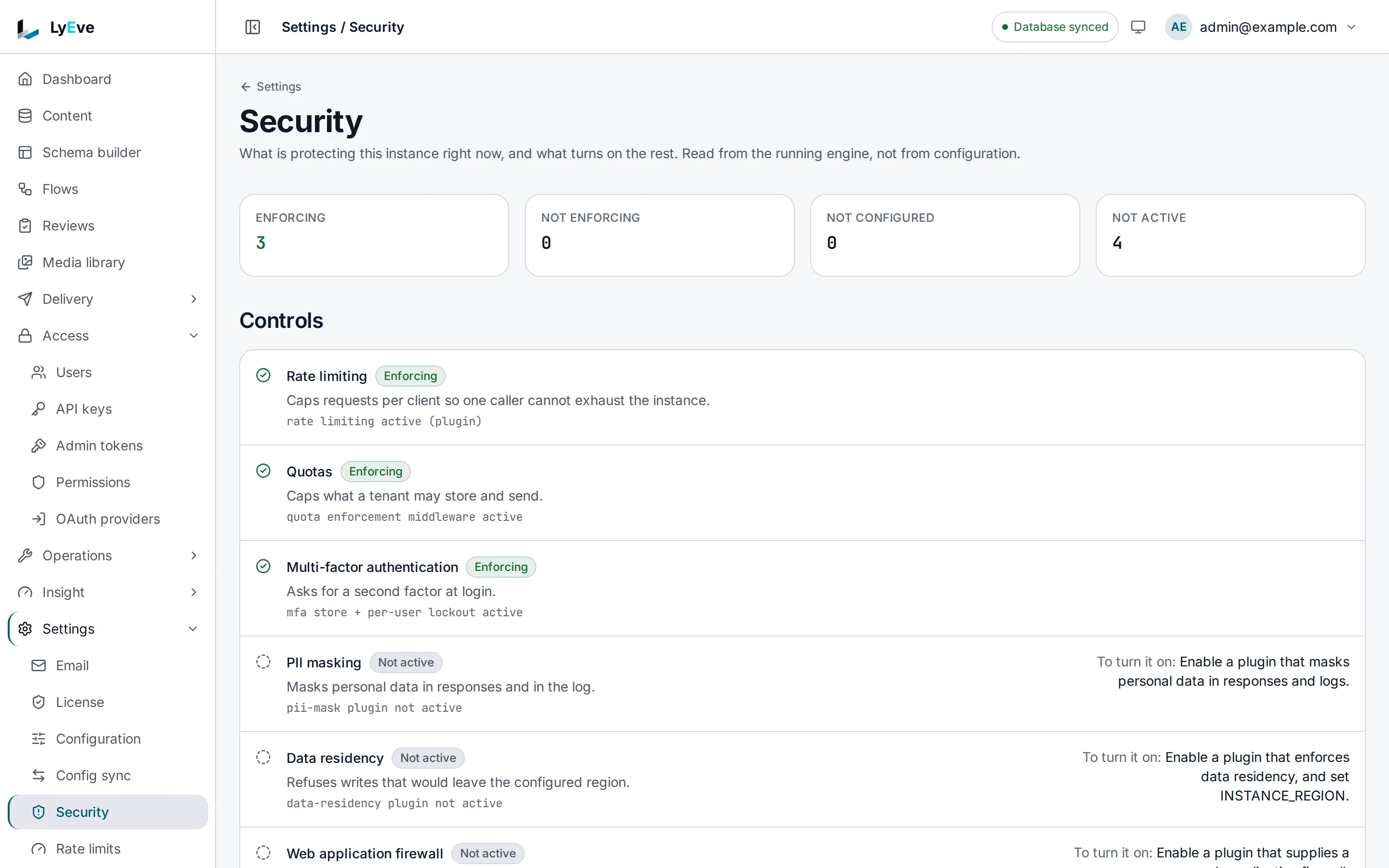
| Feature | License | What it does |
|---|---|---|
| Rate limiting | Free. Custom rules need rate-limit-pro. | The global limit and the sign-in protections. Custom rules per endpoint, tenant or role. |
| Captcha | Free | A challenge after repeated failed sign-ins. |
| Multi-factor authentication | Free. Enrolling a passkey needs mfa-pro. | A second step at sign-in, and passkeys. |
| Web application firewall | waf | Blocks SQL injection, XSS, path traversal, command injection and SSRF on both APIs. A blocked request answers 403 with X-WAF-Block: true. |
| Trusted devices | device-fingerprint | Scores each sign-in for risk, asks for the second factor when it looks risky, and blocks brute force on every sign-in route. |
Register firewall exceptions for false positives instead of turning rules off. See licensing and tiers for how a license reaches the instance.
- Production checklist: everything to confirm before you go live.
- Admin tokens: credentials for automation on the Admin API.
- Tenants: if you run more than one tenant.