Features
Recommendations
Requires a license with the
recommendationsfeature. See pricing.
Recommendations learns from what signed-in readers do with your entries: what they view, like, share and bookmark. From that it answers three questions: which entries are similar to this one, which are trending, and what this reader should see next. Scores are recomputed when you ask, from LyEve Console or from your own scheduler.
How it works
Link to the section How it works| Step | What happens |
|---|---|
| Record | Your front end reports each action a reader takes on an entry, with the reader's own token. |
| Recompute | A super admin runs a recompute. It pairs entries the same readers acted on in the last 30 days and ranks the last seven days' activity for trending. |
| Read | Your front end asks for similar entries, trending entries or the reader's feed, and gets entry ids back. Read the entries through the Content API to show them. |
Each action counts toward a reader's feed with its own weight:
| Action | Weight |
|---|---|
view | 1 |
like | 2 |
share | 3 |
bookmark | 5 |
You need a token in TOKEN for a super_admin, which also counts as a reader here. The
quickstart shows how to get one. For the console steps,
you are also signed in to the console as a super_admin. Put the ids of two published
entries in A and B.
1. Record that you liked both entries. Recording is API only, because your front end sends it with the reader's own token:
curl -X POST http://localhost:3002/api/v1/recommendations/behavior \  -H "Authorization: Bearer $TOKEN" \  -H "Content-Type: application/json" \  -d "{\"content_id\": \"$A\", \"action\": \"like\"}"
curl -X POST http://localhost:3002/api/v1/recommendations/behavior \  -H "Authorization: Bearer $TOKEN" \  -H "Content-Type: application/json" \  -d "{\"content_id\": \"$B\", \"action\": \"like\"}"
Each answers 201 with the recorded id, user_id, content_id, action and created_at.
2. Recompute the scores.
Console v0.28.0
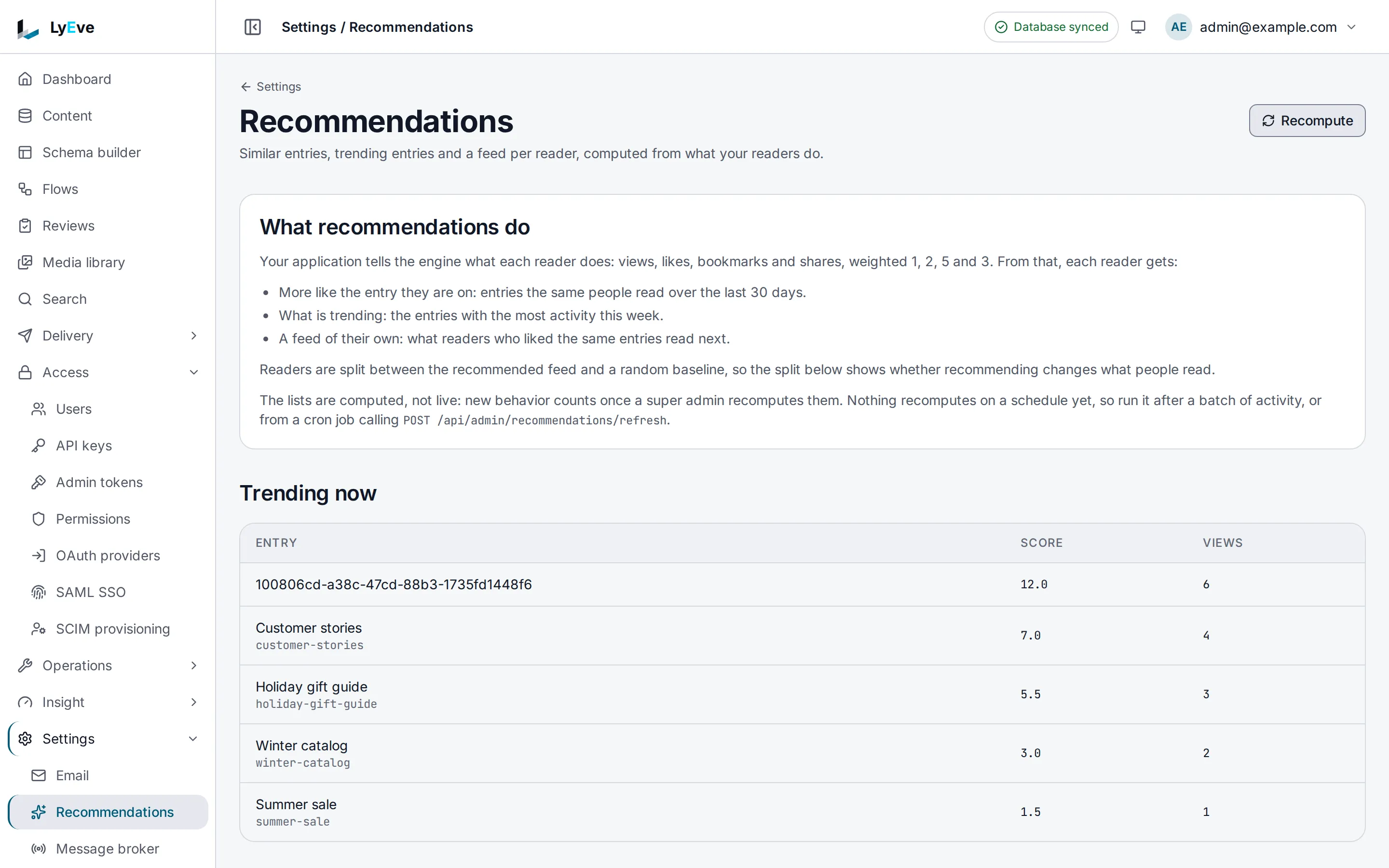
Open Settings > Recommendations and choose Recompute. It runs at once, with no confirmation, and the page reports how long it took and what it computed.
Engine API v0.62.0
curl -X POST http://localhost:3001/api/admin/recommendations/refresh \ -H "Authorization: Bearer $TOKEN"{ "similarity_pairs_computed": 1, "trending_items_computed": 2, "feeds_generated": 0, "duration_ms": 19 }3. Ask what is similar to the first entry. Similar entries are API only, since your front end asks for them:
curl "http://localhost:3002/api/v1/recommendations/similar?content_id=$A&limit=5" \ -H "Authorization: Bearer $TOKEN"{ "similar": ["<B>"] }4. Read the trending list.
Console v0.28.0
Trending now on Settings > Recommendations lists both entries by title and slug, with each one's Score and Views. An entry that is not published shows its id.
Engine API v0.62.0
curl "http://localhost:3002/api/v1/recommendations/trending?limit=10" \ -H "Authorization: Bearer $TOKEN"The answer is {"items": [...]}, each with content_id, title, slug, score and
view_count.
Record what readers do
Link to the section Record what readers doPOST /api/v1/recommendations/behavior takes content_id, an entry's id, and action, one of
view, like, share or bookmark. Send it with the reader's own token, so the action is
recorded against them. Any signed-in caller may record.
Show recommendations
Link to the section Show recommendationsEvery route under /api/v1/recommendations needs a signed-in caller. Each answers entry ids.
| To show | Call | Answer |
|---|---|---|
| Entries similar to one entry | GET /api/v1/recommendations/similar?content_id=<id> | {"similar": ["<id>", ...]}. limit is 10 by default, at most 100. |
| What is trending | GET /api/v1/recommendations/trending | {"items": [{"content_id", "title", "slug", "score", "view_count"}]}, up to the top 100. limit is 20 by default. title and slug name a published entry, and are empty for an entry that is not published or was deleted. |
| The caller's feed | GET /api/v1/recommendations/feed | {"entries": [{"content_id", "score", "source", ...}], "total": n}. limit is 20 by default, at most 100, and offset at most 10000. |
Two entries are similar when the same readers acted on both in the last 30 days, with any
action, a view included. A feed entry's source
is similar, for an entry close to one the reader acted on, or collaborative, for one other
readers with the same taste liked. The feed is built when it is requested, from the scores of
the last recompute. A limit or offset above its maximum is lowered, not refused.
A super admin can see the feed one reader would get. A reader's id is the user_id each
behavior call answers, as in step 1 of Try it:
Console v0.28.0
On Settings > Recommendations, under What one reader would see, find the reader with Find a reader or enter their User id, then choose Generate.
Engine API v0.62.0
curl -X POST http://localhost:3001/api/admin/recommendations/generate-feed/$USER_ID \ -H "Authorization: Bearer $TOKEN"The answer has the same shape as the feed: {"entries": [...], "total": n}.
Recompute scores
Link to the section Recompute scoresRecompute after a batch of activity with Recompute on Settings > Recommendations, or
call the refresh route on a timetable from your own tooling, signed in as a super admin. Only one recompute runs at a time, and a second answers
409.
Show recommendations to half your readers
Link to the section Show recommendations to half your readersEach reader is put in the recommendation group or the random group, at random, the first
time they call GET /api/v1/recommendations/ab-test, and stays there:
{ "bucket": "recommendation", "recommendation_pct": 50.4, "random_pct": 49.6, "total_users": 1250 }The group is a label your front end reads. LyEve serves the same answers to both groups, so
show recommendation blocks only to readers in recommendation, and compare how the two groups
engage. A reader who never calls ab-test is in neither group. To see how readers divide:
Console v0.28.0
The split on Settings > Recommendations reports how readers divide between the two groups, once a reader is in one.
Engine API v0.62.0
GET /api/admin/recommendations/ab-stats returns recommendation_count, random_count,
total_users, recommendation_pct and random_pct.
Settings
Link to the section SettingsRecommendations have no settings of their own. If you set LYEVE_PLUGINS to choose which
features start, include recommendations in it. See
licensing and tiers.
The admin routes take a signed-in session. An admin token cannot call them.
Recommendation routes
| Method | Path | Role | Purpose |
|---|---|---|---|
POST | /api/v1/recommendations/behavior | signed in | Record a view, like, share or bookmark. |
GET | /api/v1/recommendations/similar | signed in | Entries similar to content_id. |
GET | /api/v1/recommendations/trending | signed in | Trending entries. |
GET | /api/v1/recommendations/feed | signed in | The caller's feed. |
GET | /api/v1/recommendations/ab-test | signed in | The caller's group and the split. |
GET | /api/admin/recommendations/ab-stats | admin | Group counts and percentages. |
POST | /api/admin/recommendations/refresh | super_admin | Recompute every score. |
POST | /api/admin/recommendations/generate-feed/{userID} | super_admin | Build and return one user's feed. |
Without a license that carries recommendations, the routes answer 404. A license that lapses
while the instance runs makes them answer 402 payment_required.
Every error these routes return
| Status | Message | Cause |
|---|---|---|
400 | content_id is required, action is required | A field is missing. |
400 | invalid action | The action is not view, like, share or bookmark. |
400 | invalid JSON body | The body is not JSON, or content_id is not a UUID on behavior. |
400 | invalid content_id | content_id is not a UUID on similar. |
400 | invalid user ID | The id in generate-feed is not a UUID. |
401 | authentication required | The caller is not signed in. |
402 | payment_required | The license lapsed while the instance ran. |
409 | a refresh is already in progress | A recompute is still running. |
503 | recommendations is not available | The feature is not ready. |
Related
Link to the section Related- A/B testing: test your own variants and measure conversions.
- Analytics: views and visitors.
- Content lifecycle: the entries recommendations point at.