How-to guides
Automate the Admin API with admin tokens
Included free on every install.
An admin token is the credential for a machine that calls the Admin API
(/api/admin/*): a CI job that pulls the content model, a script that
publishes entries, an integration that reads logs. It keeps automation off a
person's password. A token is narrower than the person who created it: it acts
in one tenant, reaches only the routes its grants open, stops working on a date
at most 90 days out, can be limited to a list of addresses, and logs every call
it makes, refused calls included.
Before you start
Link to the section Before you start- You hold
adminorsuper_adminin the tenant the token will act in. - You can sign in, and you know your password, or your authenticator code if your account has MFA. Creating and rotating a token asks for it again.
1. Create the token
Link to the section 1. Create the tokenConsole v0.28.0
Open Access > Admin tokens and choose New token.
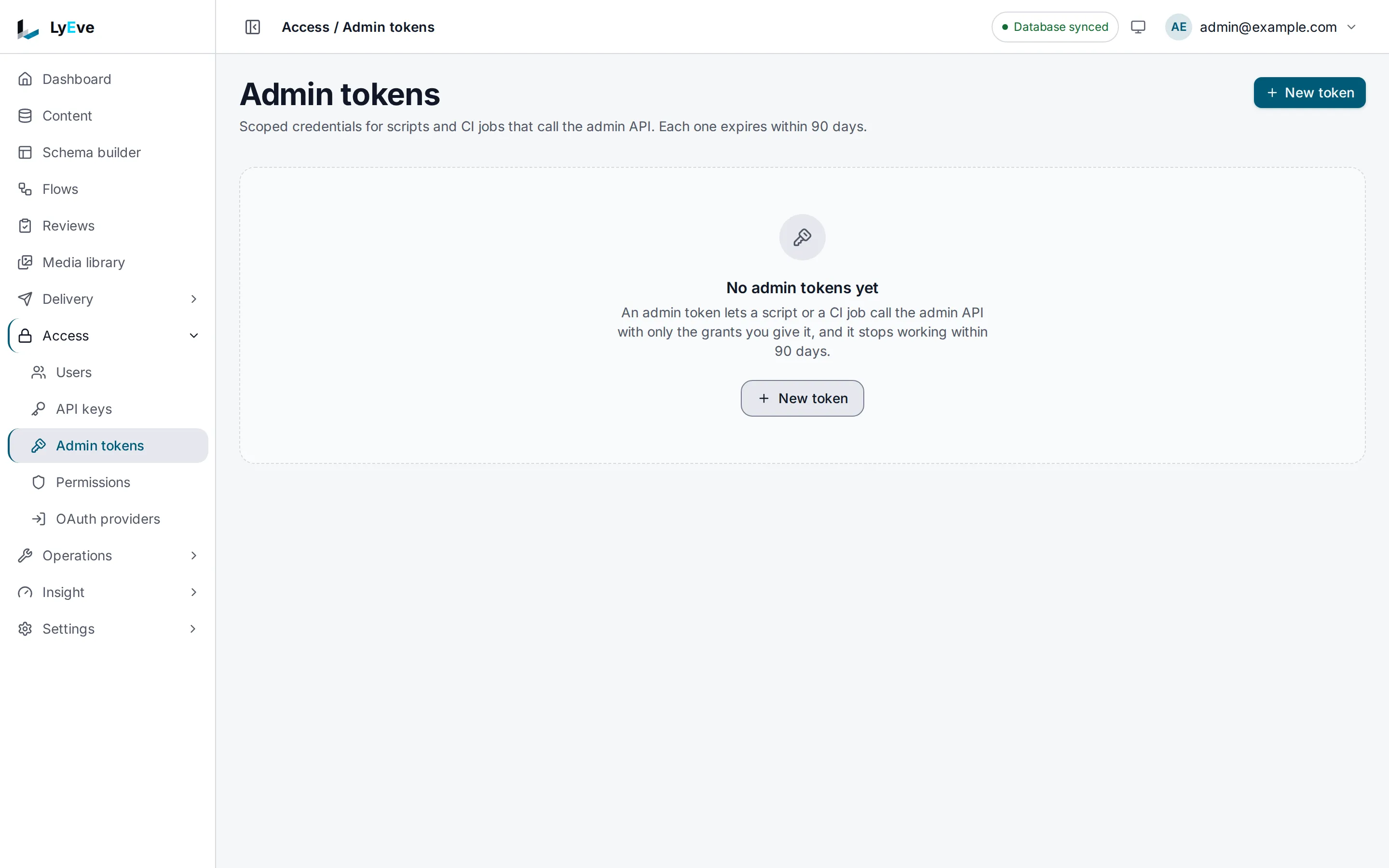
- Name the job, such as
ci-schema-pull. - Grants. Pick only what the job calls. Each group lists the routes its grants open on your instance.
- Expires. Choose 7, 30 or 90 days, or Pick a day. The form starts on 30 days.
- Allowed addresses (optional). One address or CIDR range per line.
- Tenant, when you are a super admin and more than one tenant exists.
- Your password, or Authentication code when your account has MFA.
Choose Create. The dialog Token ci-schema-pull issued shows the token
once. Copy it into ADMIN_TOKEN.
Engine API v0.62.0
You need a session token in TOKEN. The
quickstart shows how to get one.
curl -X POST http://localhost:3001/api/admin/admin-tokens \ -H "Authorization: Bearer $TOKEN" \ -H "Content-Type: application/json" \ -d '{ "name": "ci-schema-pull", "grants": ["schemas:read"], "expires_at": "2026-12-01T00:00:00Z", "allowed_ips": ["203.0.113.0/24"], "password": "<your password>" }'An account with MFA sends "mfa_code": "123456" in place of password. The
answer is 201:
{ "id": "5d70664a-99fd-4139-88f4-33bd8c4a7305", "tenant_id": "default", "owner_user_id": "12dd433d-c110-4809-b476-12ef360afe7f", "owner_email": "ops@example.com", "name": "ci-schema-pull", "display_prefix": "17drForW", "grants": ["schemas:read"], "allowed_ips": ["203.0.113.0/24"], "expires_at": "2026-12-01T00:00:00Z", "created_at": "2026-10-01T09:30:00Z", "last_used_at": null, "revoked_at": null, "rotated_from": null, "replaced_by": null, "token": "lyat_17drForW..."}Copy token into ADMIN_TOKEN and id into TOKEN_ID.
Only a hash and the short display prefix are kept, so a lost token cannot be shown again.
2. Use it
Link to the section 2. Use itSend the token as a bearer token:
curl http://localhost:3001/api/admin/schemas/export \ -H "Authorization: Bearer $ADMIN_TOKEN" > schemas.yamlThe answer is 200 with the content model as YAML.
In a CI job, keep the token in the CI system's secret store:
- name: Pull the content model env: ADMIN_URL: ${{ vars.ADMIN_URL }} ADMIN_TOKEN: ${{ secrets.LYEVE_ADMIN_TOKEN }} run: | curl -sf "$ADMIN_URL/api/admin/schemas/export" \ -H "Authorization: Bearer $ADMIN_TOKEN" > schemas.yaml3. See what it may not do
Link to the section 3. See what it may not docurl http://localhost:3001/api/admin/flows \ -H "Authorization: Bearer $ADMIN_TOKEN"{ "code": "forbidden", "error": "This token is not granted flows:read." }A route that takes no grant, such as /api/admin/users, answers
403 This route needs a signed-in session., and the Content API answers
401 Admin tokens are accepted on the admin API only.
4. Read its request log
Link to the section 4. Read its request logConsole v0.28.0
On Access > Admin tokens, choose the request log link on the token's row. Request log lists each call with its time, method, route, status and address, newest first.
Engine API v0.62.0
curl "http://localhost:3001/api/admin/admin-tokens/$TOKEN_ID/requests?limit=50" \ -H "Authorization: Bearer $TOKEN"{ "data": [ { "id": "9f4d45ce-...", "token_id": "5d70664a-...", "tenant_id": "default", "method": "GET", "route_pattern": "/api/admin/flows", "status": 403, "client_ip": "203.0.113.7", "created_at": "2026-10-01T09:31:02Z" }, { "id": "38c1bb90-...", "token_id": "5d70664a-...", "tenant_id": "default", "method": "GET", "route_pattern": "/api/admin/schemas/export", "status": 200, "client_ip": "203.0.113.7", "created_at": "2026-10-01T09:31:00Z" } ], "limit": 50, "offset": 0, "total_count": 2}Each row records the route pattern, such as /api/admin/schemas/{name}, not
the path with its values.
5. Rotate it before it expires
Link to the section 5. Rotate it before it expiresRotation issues a successor with the same name, grants, tenant and address list, and a new expiry. Only the owner can rotate a token, with the same password or MFA confirmation as creation.
Console v0.28.0
On Access > Admin tokens, choose the rotate button on the token's row. The Rotate ci-schema-pull dialog says until when the old token keeps working. Pick Expires, enter Your password and choose Rotate. Copy the new token from the dialog that follows. The old token's status turns to Replaced.
Engine API v0.62.0
curl -X POST http://localhost:3001/api/admin/admin-tokens/$TOKEN_ID/rotate \ -H "Authorization: Bearer $TOKEN" \ -H "Content-Type: application/json" \ -d '{"expires_at": "2027-02-01T00:00:00Z", "password": "<your password>"}'The answer is 201 with the new token, once, and rotated_from naming the
old one.
The old token keeps working for seven days or until its own expiry, whichever
comes first, so a job can switch without a gap. A revoked or expired token
cannot be rotated: that answers 409.
6. Revoke it
Link to the section 6. Revoke itConsole v0.28.0
On Access > Admin tokens, choose the revoke button on the token's row. The dialog asks Revoke token ci-schema-pull with the token's prefix. Choose Revoke.
Engine API v0.62.0
curl -X DELETE http://localhost:3001/api/admin/admin-tokens/$TOKEN_ID \ -H "Authorization: Bearer $TOKEN"The answer is 204, or 409 This admin token is already revoked.
From then on the token answers 401 This admin token has been revoked. A
revoked token stays in the list with its request log. The owner or a super
admin can revoke a token.
How a token is checked
Link to the section How a token is checked- It acts for its owner. On every request the owner is read again. The
token answers
401when the owner is deleted, disabled, past their account expiry, erased, or no longer holdsadminorsuper_adminin the token's tenant. Signing out or changing the owner's password does not end a token. - It never carries
super_admin. An owner who is a super admin acts through the token as an admin of its tenant. Routes that needsuper_adminrefuse every token. - It is bound to one tenant. A request whose
X-Tenant-IDnames another tenant is refused with403, whoever the owner is. Sending noX-Tenant-IDis the normal case. - Addresses. A bare address is stored as a one-address range
(
127.0.0.1becomes127.0.0.1/32), and a list holds at most 100 entries. An empty list allows any address. The address checked is the connection's peer, or the forwarded address when the peer is inTRUSTED_PROXIES. Behind a load balancer, setTRUSTED_PROXIESor every request appears to come from the balancer. - Logging. Every request made with a token writes one row, refused ones
included. Under heavy load some rows can be dropped, and they are counted: a
row with status
0, an empty method and the route patterndropped:<n>recordsnrequests that were not logged. Rows older than 90 days are deleted. Last used is updated at most once a minute. The audit log records each creation, rotation and revocation asadmin_token.create,admin_token.rotateandadmin_token.revoke.
A grant names one kind of work. The catalog is closed: a token asking for a name outside it is refused at creation.
| Grant | What it opens |
|---|---|
content:read | Read content entries, their revisions, the content activity log and what content history stores. Changing the history settings takes a signed-in session. |
content:write | Create, update, publish and delete content entries. |
media:read | List and download media files. |
media:write | Upload, replace and delete media files. |
schemas:read | Read content type definitions, their row counts and the schema export. |
flows:read | Read flows and their runs. |
flows:write | Create, change, activate and delete flows. |
webhooks:read | Read webhooks and their deliveries. |
webhooks:write | Send a test delivery, retry a delivery, change a webhook's retry settings, and replay, dismiss and delete dead letters. Creating, changing and deleting a webhook take a super admin, so no token can. |
jobs:read | Read scheduled jobs and their runs. |
jobs:write | Create, change, trigger and delete scheduled jobs. |
logs:read | Read and export the instance logs. |
audit:read | Read and export the audit log. |
Each grant opens routes of one feature, so it opens nothing where that feature
is not running: webhooks:read does nothing without
webhooks, and audit:read does nothing without a
license that carries the audit log. In the
console, a group that opens nothing says No routes use these grants
yet. GET /api/admin/admin-tokens/grants
lists the routes each grant opens on your instance, and the admin OpenAPI
document marks each one with an x-admin-grant extension.
What never takes a token
Link to the section What never takes a tokenWhatever grants a token holds, a route that declares no grant is served to a
signed-in person only, and so is every route that needs super_admin. That
covers:
- Who can get in. Users and their roles, tenant memberships, access rules, API keys, admin tokens themselves, MFA, account links, and the OAuth, SAML and SCIM providers.
- What the install is. The license, the configuration and a feature's configuration.
- Destruction across tenants. Schema import, and deleting, archiving and restoring a tenant.
- Personal data in bulk. Privacy export and erasure.
- Process internals. The profiling routes and the garbage collector settings.
Run those as a signed-in person, in the console or with a session token. See keep the content model and flows in git for schema import.
Refusals
Link to the section RefusalsA 401 means the token itself is not usable. A 403 means the token is fine
and this request is not one it may make.
Every refusal a token can meet
| Status | Message | Meaning |
|---|---|---|
401 | This admin token is not valid. | No such token: mistyped, or never issued here. |
401 | This admin token has expired. | Past its expiry. Rotate before it lapses. |
401 | This admin token has been revoked. | Revoked in the console or through the API. |
401 | The owner of this admin token can no longer use it. | The owner is deleted, disabled, expired or erased, or no longer an admin of the token's tenant. |
401 | Admin tokens are accepted on the admin API only. | Sent to the Content API or a public route. |
403 | This route needs a signed-in session. | The route declares no grant. |
403 | This token is not granted <grant>. | The route needs a grant the token does not hold. |
403 | An admin token acts only in the tenant it was issued for. | X-Tenant-ID names another tenant. |
403 | This admin token is not allowed from this address. | The client address is outside the token's list. |
404 | not found | No route matches the path. |
Why creating or rotating can fail
| Status | When |
|---|---|
403 | The password or MFA code is missing or wrong, the MFA code was already used once, or you are not an admin of the token's tenant. |
429 | Too many wrong passwords or codes: the account's sign-in lockout applies here too. |
422 | No name, no grants, a grant outside the catalog, no expiry, an expiry more than 90 days away, more than 100 addresses, or an address entry that is not an IP address or CIDR range. |
API keys with an admin role
Link to the section API keys with an admin roleThe Admin API refuses an API key that holds admin or super_admin with
401 API keys with an admin role are not accepted on the admin API. Use an admin token.
and a Link header with rel="deprecation" pointing at this page. The
instance logs the key's id, its tenant and the route at most once an hour per
key, so the automation still sending one can be found. Move it to an admin
token.
- Harden your instance: the settings a production instance needs.
- Roles and permissions: which credential fits which job.
- API keys: the credential for the Content API.