Features
Captcha
Included free on every install, with one captcha provider for the instance. A provider and keys of a tenant's own need a license with the
multitenant-customizationfeature. See pricing.
Captcha slows down password guessing on the admin sign-in. After a few failed attempts, the next attempt must carry a token from Cloudflare Turnstile, hCaptcha or Google reCAPTCHA v3, and the token is checked with the provider before the password is. A successful sign-in resets the count.
How it works
Link to the section How it worksFailed attempts on POST /api/admin/auth/login are counted three ways, and
any one of them can trigger the challenge:
- one address trying one email
- one address trying many emails
- one email tried from many addresses
Emails are compared without case or surrounding spaces. Once a count passes
CAPTCHA_THRESHOLD, a failed sign-in answers 401 with three extra fields:
{ "error": "Invalid email or password.", "code": "AUTH_INVALID_CREDENTIALS", "captcha_required": true, "captcha_site_key": "0x4AAAAAAA...", "captcha_provider": "turnstile", "request_id": "..." }captcha_provider names the widget that captcha_site_key belongs to. LyEve Console's sign-in page shows that widget, keeps the email address you
typed, holds Sign in until the widget has issued a token, and shows a
fresh widget after each refused attempt.
The counts are kept for the whole instance and for each tenant. A failed
admin sign-in that arrives on a tenant's own domain counts in both, and the
admin sign-in is challenged on the instance count alone, because it looks
accounts up across every tenant. A tenant's own forms use the
captcha.attempt flow node, which checks, records a failure or clears the
count for the caller on the tenant's own count and answers required and
threshold. A failure there also counts for the instance. With
multitenant-customization, a tenant can save its own failure_threshold,
from 1 to 1000, with its captcha settings. Without one, the tenant's count is
read against CAPTCHA_THRESHOLD.
In the console
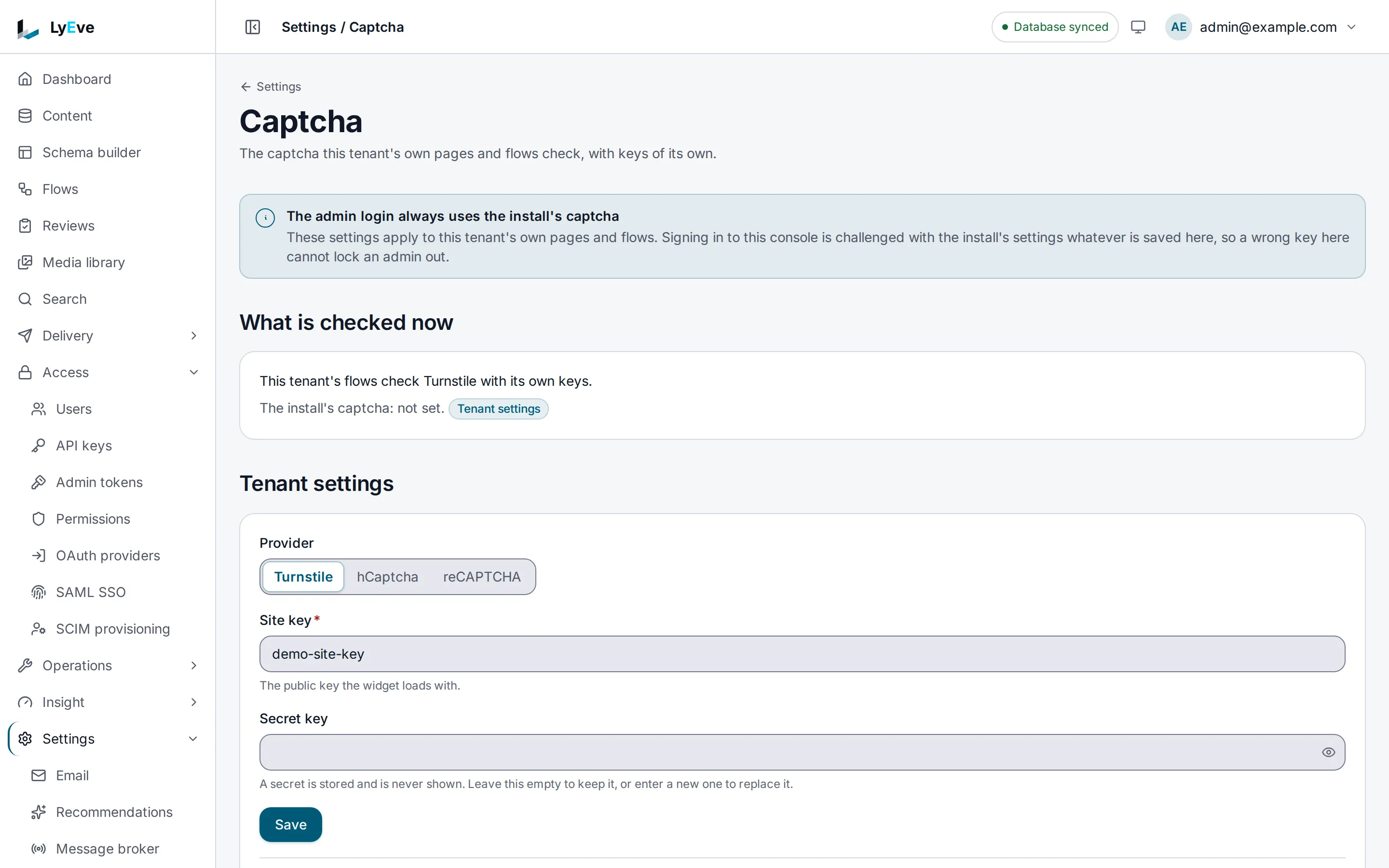
Link to the section In the consoleOpen Settings > Captcha. The page holds the tenant's own captcha, which its flows and pages check. A note at the top says the admin sign-in always uses the instance captcha, so nothing saved here can lock an admin out. What is checked now names the captcha the tenant's flows use and says whether the instance has one set. Under Tenant settings, pick a Provider, enter the Site key and Secret key, and choose Save. Clear tenant settings puts the tenant back on the instance captcha.
Saving tenant settings needs multitenant-customization. The instance captcha
comes from the settings in Turn it on.
Turn it on
Link to the section Turn it onCaptcha runs on every install and does nothing until both keys are set:
CAPTCHA_PROVIDER=turnstileCAPTCHA_SITE_KEY=<site key from the provider>CAPTCHA_SECRET_KEY=<secret key from the provider>With either key missing, no attempt is counted and no sign-in is challenged. A change to these settings applies without a restart.
This needs a site key and a secret key from your provider. Set the three variables in Turn it on first.
Console v0.28.0
- Open the console's sign-in page and sign in with a wrong password three times. After the third, the page says Complete the security check to try again. and shows the widget above Sign in, with your email still filled in.
- Complete the widget, enter the right password and choose Sign in. You are signed in, and the counts reset.
Engine API v0.62.0
-
Sign in with a wrong password three times:
Shell curl -X POST http://localhost:3001/api/admin/auth/login \-H "Content-Type: application/json" \-d '{"email": "you@example.com", "password": "wrong-password"}'Once the failures reach the threshold, the answer is the
401above, with"captcha_required": true. -
Try again without a token:
Shell curl -X POST http://localhost:3001/api/admin/auth/login \-H "Content-Type: application/json" \-d '{"email": "you@example.com", "password": "<password>"}'JSON { "code": "captcha_verification_failed", "captcha_required": true, "captcha_site_key": "0x4AAAAAAA...", "captcha_provider": "turnstile" }The status is
400. -
Show the widget with the site key, then send its token with the attempt:
Shell curl -X POST http://localhost:3001/api/admin/auth/login \-H "Content-Type: application/json" \-d '{"email": "you@example.com", "password": "<password>", "captcha_token": "<token from the widget>"}'A correct password now signs in and resets the counts.
Check a token in a flow
Link to the section Check a token in a flowThe captcha.verify node checks a token with the configured provider, the
same way the sign-in does. Use it on a public form handled by a
flow.
| Setting | Required | Meaning |
|---|---|---|
token | yes | The widget's token, such as {{ trigger.body.captcha_token }}. |
ip | no | The client address, passed to the provider. |
action | no | The action the token must carry, for providers that label tokens. |
The node's out has ok, provider, score (null when the provider sends
none), action and error_codes. A refused token does not fail the step: ok
is false and error_codes says why, so the flow can branch on it. The step
fails when no secret key is set, neither the tenant's nor the instance's.
Give a tenant its own captcha
Link to the section Give a tenant its own captchaWith multitenant-customization, a tenant admin saves a provider and keys for
the tenant's own surfaces: the captcha.verify node in its flows, such as a
sign-up form, and the widget on its own pages.
Console v0.28.0
- Open Settings > Captcha.
- Under Tenant settings, pick
hCaptchain Provider, and enter the keys from your hCaptcha account in Site key and Secret key. - Choose Save. The page says Captcha settings saved., and What is checked now reads This tenant's flows check hCaptcha with its own keys.
Clear tenant settings asks Clear the tenant captcha settings?, and Clear puts the tenant back on the instance captcha. Without the license, the form says that saving or changing tenant captcha settings needs a license this install does not hold.
Engine API v0.62.0
curl -X PUT http://localhost:3001/api/admin/captcha/settings \ -H "Authorization: Bearer $TOKEN" \ -H "Content-Type: application/json" \ -d '{"provider": "hcaptcha", "site_key": "<site key>", "secret_key": "<secret key>"}'The answer is 200 with "source": "tenant", described below the table.
DELETE on the same path answers 204.
| Field | Meaning |
|---|---|
provider | turnstile, hcaptcha or recaptcha. |
site_key | The public key the widget shows. |
secret_key | The private key tokens are checked with. Never returned. Leave it empty on a later save to keep the stored one. |
score_floor | For reCAPTCHA only, the lowest score accepted, from 0 to 1. |
The answer, like GET on the same path, carries the tenant's settings with
has_secret in place of the secret, the instance's public settings, source
(tenant or instance, which settings the tenant's flows verify with) and
licensed. DELETE clears the tenant's settings, so its flows use the
instance's again. Storing a secret needs ENCRYPTION_KEY or the JWT secret.
A page that shows the widget before anyone signs in reads
GET /api/admin/captcha/site-key, which needs no credential. Its top-level
provider, site_key and enabled are the instance settings. Its tenant
carries the same three for the tenant the request reached, when that tenant
saved its own, and is null otherwise. No secret is ever in it.
If the license lapses, the saved settings keep verifying. A new or changed
save answers 402, and resending what is stored and clearing stay free.
Settings
Link to the section Settings| Variable | What it does | Default |
|---|---|---|
CAPTCHA_PROVIDER | turnstile, hcaptcha or recaptcha. | turnstile |
CAPTCHA_SITE_KEY | The public key the sign-in page shows the widget with. It is returned to clients. | empty |
CAPTCHA_SECRET_KEY | The private key used to check tokens. It is never returned. | empty |
CAPTCHA_THRESHOLD | Failed attempts before a challenge. Raise it when many people share one address, such as behind an office NAT. | 3 |
TRUSTED_PROXIES | Comma-separated CIDRs of your reverse proxies. Only these may set X-Forwarded-For. Without it, the connecting address is used. | empty |
If you set LYEVE_PLUGINS, include captcha in it.
| Method | Path | Who | Result |
|---|---|---|---|
GET | /api/admin/captcha/settings | Admin | The tenant's settings, the instance's public settings, source and licensed. |
PUT | /api/admin/captcha/settings | Admin | Save the tenant's provider and keys. Needs multitenant-customization. |
DELETE | /api/admin/captcha/settings | Admin | Clear the tenant's settings. 204. |
GET | /api/admin/captcha/site-key | Anyone | The public keys a page needs to show the widget. |
| Status | Message | Cause |
|---|---|---|
400 | invalid request body | The body is not JSON. |
402 | payment_required, naming feature:multitenant_customization | A new or changed save without the license. |
422 | secret_key is required, or a message naming the field | The settings are not valid, or the instance has no key to encrypt the secret. |
Related
Link to the section Related- Rate limiting: the sign-in protections.
- Trusted devices: block brute force and score each sign-in.
- Flows: handle a public form with a captcha check.