Features
Data residency
Requires a license with the
data-residencyfeature. See pricing.
Data residency records where each tenant's data must live and holds every engine to it. You define the regions you run in, assign each tenant to one, and start each engine with the region it serves. A write from a tenant that belongs in another region is refused and told where to go.
How enforcement works
Link to the section How enforcement worksWhen an engine starts with INSTANCE_REGION set, the Content API checks every
write (any method except GET, HEAD and OPTIONS):
| Tenant | Result |
|---|---|
| No region assigned | Writes anywhere. |
| Assigned to this engine's region | Writes as usual. |
| Assigned to another region | 421 Misdirected Request. |
| Region cannot be read | 503 with cannot determine the tenant's data region. The write is never let through. |
HTTP/1.1 421 Misdirected RequestX-CMS-Region: us-east-1X-CMS-Region-Target: eu-west-1X-CMS-Region-Reason: data-residency-enforced
{"error":"write routed to wrong region","target_region":"eu-west-1"}
Route the request to an engine in X-CMS-Region-Target. Reads are not checked,
and neither is the Admin API. Without INSTANCE_REGION, nothing is enforced.
With it, every Content API response carries X-CMS-Region with this engine's
region, so a load balancer can route on it.
Residency decides where a tenant's writes land. It does not look at where a
client connects from.
Uploads follow the same assignment. A tenant's files go only to storage
providers in its region, and an upload whose region cannot be read answers
503 rather than land elsewhere. See
object storage.
In the console
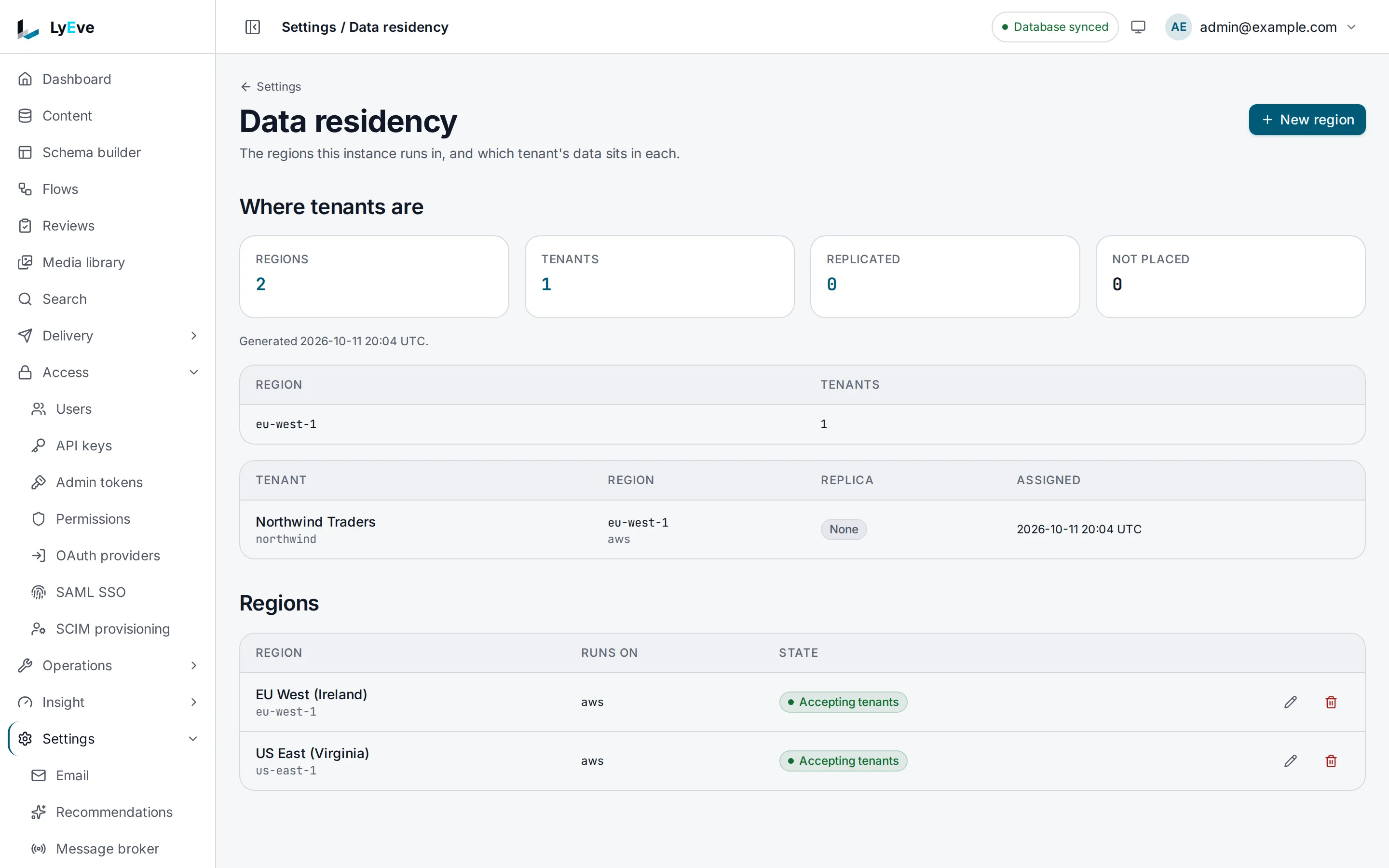
Link to the section In the consoleOpen Settings > Data residency. Where tenants are counts the regions, the tenants, the replicated tenants and the tenants not placed. Below the counts it lists how many tenants each region holds, and each tenant's region, replica and assignment date. Regions lists every region with where it runs and whether it accepts tenants. New region opens a form with Slug, Name, Runs on, Latitude, Longitude, Accepting new tenants and Default for new tenants.
LyEve Console does not assign a tenant to a region on this release. Do that over the API, as Try it shows.
This defines a region, assigns a tenant to it and reads the report. Sign in as
a super admin. The tenant here is northwind, made on
Tenants. A new install lists no tenant until you make one.
Create a region:
Console v0.28.0
- Open Settings > Data residency and choose New region.
- Enter
eu-west-1in Slug andEU West (Ireland)in Name. Leave Runs on asaws. - Enter
53.35in Latitude and-6.26in Longitude. Leave Accepting new tenants on. - Choose Create. The page says Created EU West (Ireland), and the region is listed under Regions as Accepting tenants.
Engine API v0.62.0
You need a super admin token in TOKEN. The
quickstart shows how to get one.
curl -X POST http://localhost:3001/api/admin/regions \ -H "Authorization: Bearer $TOKEN" \ -H "Content-Type: application/json" \ -d '{"slug": "eu-west-1", "display_name": "EU West (Ireland)", "provider": "aws", "coordinates": {"lat": 53.35, "long": -6.26}}'The answer is 201 with the region. Copy its id into REGION.
Assign the tenant. Only the API does this on this release. If you work in the
console, sign in over the API to get a token, as
Turn on drafts and publishing
shows, and keep it in TOKEN.
-
Find the region's id and the tenant's id. A tenant is assigned by its id, not its slug:
Shell REGION=$(curl -s http://localhost:3001/api/admin/regions \-H "Authorization: Bearer $TOKEN" \| jq -r '.data[] | select(.slug == "eu-west-1") | .id')TENANT=$(curl -s http://localhost:3001/api/admin/tenants \-H "Authorization: Bearer $TOKEN" \| jq -r '.data[] | select(.slug == "northwind") | .id') -
Assign it:
Shell curl -X POST http://localhost:3001/api/admin/tenants/$TENANT/region \-H "Authorization: Bearer $TOKEN" \-H "Content-Type: application/json" \-d "{\"region_id\": \"$REGION\"}"JSON {"id": "909c7ca6-f9ed-4445-82bb-51f62b836bd7","tenant_id": "3f64a521-1146-481c-aaf8-a3334f505aa3","region_id": "76e7b309-80f4-4341-a958-2b15dacbbe44","region_slug": "eu-west-1","assigned_at": "2026-10-02T09:14:56Z"}
Read the report:
Console v0.28.0
Open Settings > Data residency. Where tenants are reads 1 under Regions, Tenants and the region's count, and 0 under Replicated and Not placed. The table below lists Northwind Traders in eu-west-1 with no replica and when it was assigned.
Engine API v0.62.0
curl http://localhost:3001/api/admin/residency/report \ -H "Authorization: Bearer $TOKEN"It lists regions, every tenant's assignment under tenant_regions, and a
summary:
{ "total_regions": 1, "total_tenants": 1, "tenants_per_region": {"eu-west-1": 1}, "replicating_count": 0, "unassigned_count": 0}Ask for the nearest region the way a sign-up page would, with no credentials. This is a public Content API route, the same on both paths:
curl -X POST http://localhost:3002/api/v1/regions/nearest \ -H "Content-Type: application/json" \ -d '{"lat": 48.85, "long": 2.35}'The answer is the region with distance_km, about 781 from Paris to
Dublin.
Turn it on
Link to the section Turn it on- Run with a license that includes
data-residency. If you setLYEVE_PLUGINS, includedata-residencyin it. See Licensing and tiers. - On each engine, set
INSTANCE_REGIONto the slug of the region it serves. - Create regions in the console or over the API, and assign tenants over the API.
Without the license the feature does not start, and its routes answer 404.
Manage regions
Link to the section Manage regionsRegions need a super admin. slug and display_name are required, and
provider defaults to aws. coordinates lets the nearest-region lookup use
the region. is_default marks the default region, and marking one clears the
mark from the others. PUT also takes enabled. Only enabled regions are
listed publicly.
A region with enabled: false is closed to new tenants. Assigning a tenant to
it answers 409 with the code data_residency.region_closed, even for a
tenant already there. Tenants already assigned to it keep their assignment. A
closed region cannot be the default: marking a closed region is_default, or
closing the default region, answers 400. Make another region the default
first.
An admin can read and set their own tenant's region. A super admin can do it for
any tenant. GET /api/admin/tenants/{id}/region returns the assignment, or 404
with no region assigned.
Record replicas and planned moves
Link to the section Record replicas and planned movesThese record your disaster-recovery setup and planned moves between regions. The engine stores them and shows them in the report. Copying the data is up to you.
POST /api/admin/tenants/{id}/replicationtakesreplica_region_id,target_rpo_secs(default3600) andtarget_rto_secs(default1800), and answers201with a record in statussyncing.PUT /api/admin/tenants/{id}/replication/{rid}updatesstatus, one ofsyncing,synced,failedorpaused, and the lag.POST /api/admin/tenants/{id}/migratetakesto_region_idand an optionalrequested_by, and answers202with a migration record in statusestimating.
Public region lookup
Link to the section Public region lookupTwo Content API routes need no credentials:
GET /api/v1/regionslists enabled regions, paginated (limitdefault 50,offset). 30 requests a second per address, bursts of 50.POST /api/v1/regions/nearesttakes{"lat": ..., "long": ...}and answers{"region": {...}, "distance_km": ...}. 10 requests a second per address, bursts of 20.
Settings
Link to the section Settings| Variable | What it does | Default |
|---|---|---|
INSTANCE_REGION | The region slug this engine serves. Set, it turns on write enforcement. | unset |
Regions, assignments and records
| Method | Path | Who |
|---|---|---|
GET, POST | /api/admin/regions | super admin |
GET, PUT, DELETE | /api/admin/regions/{id} | super admin |
GET, POST | /api/admin/tenants/{id}/region | admin of that tenant |
GET, POST | /api/admin/tenants/{id}/replication | admin of that tenant |
PUT, DELETE | /api/admin/tenants/{id}/replication/{rid} | admin of that tenant |
POST | /api/admin/tenants/{id}/migrate | admin of that tenant |
GET | /api/admin/tenants/{id}/migrations | admin of that tenant |
GET | /api/admin/tenants/{id}/migrations/{mid} | admin of that tenant |
GET | /api/admin/residency/report | super admin |
GET | /api/v1/regions | anyone |
POST | /api/v1/regions/nearest | anyone |
| Status | Message | Cause |
|---|---|---|
421 | write routed to wrong region | The tenant belongs in another region. |
403 | forbidden: super_admin required | A tenant admin called a region or report route. |
403 | forbidden: cannot access another tenant's data | A tenant admin named another tenant. |
Every error
| Status | Message | Cause |
|---|---|---|
400 | slug is required, display_name is required | Region created without them. |
400 | a closed region cannot be the default | A closed region marked is_default, or the default region closed. |
400 | region_id is required, to_region_id is required | Assignment or migration without a region. |
400 | invalid status: must be one of syncing, synced, failed, paused | Unknown replication status. |
404 | region not found, no region assigned, replication not found, migration not found | Wrong id. |
409 | region with slug "<slug>" already exists | Duplicate slug. |
409 | This region is closed to new tenants., with the code data_residency.region_closed | The region is not enabled. |
503 | cannot determine the tenant's data region | The tenant's region could not be read during a write. |
Related
Link to the section Related- Tenants: what a tenant is and how a request picks one.
- PII masking: keep personal data out of responses and logs.
- Data protection: how residency fits a vendor review.