Features
SCIM provisioning
Requires a license with the
scimfeature. See pricing.
SCIM provisioning lets your identity provider manage LyEve users for you. When someone joins, changes or leaves in Azure AD, Okta or another SCIM 2.0 directory, the directory calls LyEve and the change arrives without anyone opening LyEve Console. SCIM signs nobody in. Pair it with SAML single sign-on, so the people your directory provisions are the people who can sign in.
In the console
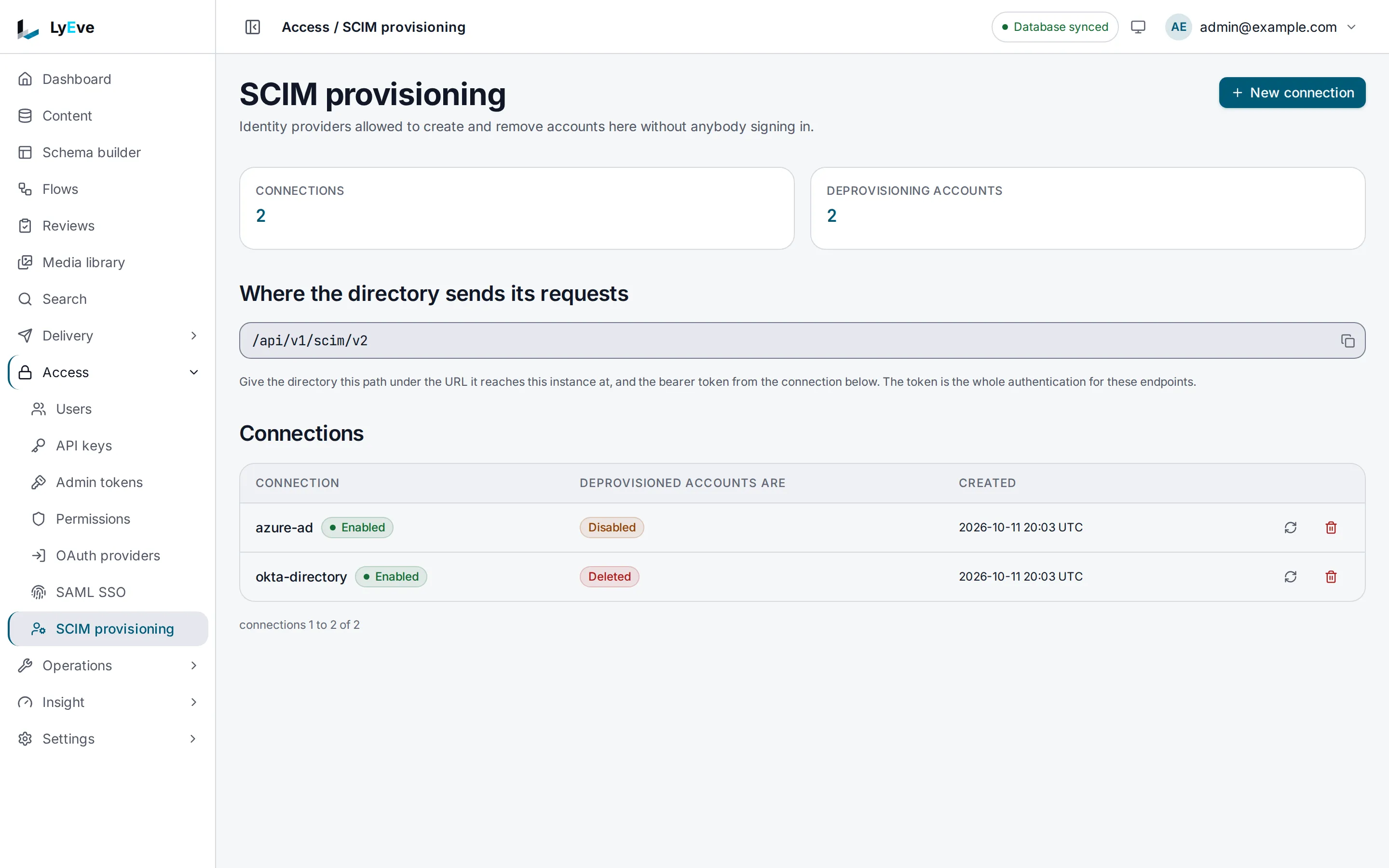
Link to the section In the consoleOpen Access > SCIM provisioning. The page shows the base path to give your
directory, /api/v1/scim/v2, with Copy base path, and each connection
with what happens to an account the directory removes. The refresh button on a
connection replaces its token, and the trash button removes the connection.
A connection is linked to a SAML provider when it is created, as Link a connection to SAML shows. No route changes the link later, so to change it, create a new connection and remove the old one.
How it works
Link to the section How it works| Part | What it is |
|---|---|
| Connection | A name, a bearer token and what a delete does. A super admin creates it in LyEve. |
| SCIM base URL | https://<your instance>/api/v1/scim/v2 on the Content API. The directory calls it with the token. |
| Account | A provisioned user gets a LyEve account at their first SAML sign-in through the linked provider, with editor when no other role is given. |
| Group | Stored with its members, so the directory can read it back. A group does not grant a role in LyEve. |
What you can rely on:
- Each connection authenticates with its own bearer token, and sees only the users and groups it created.
- A connection belongs to the tenant it was created in, and everything it provisions lands in that tenant. An account it creates belongs to that tenant alone, so an address another tenant holds is a separate account there. See accounts a tenant's provider creates.
- Deactivating a user (
"active": false) or removing one disables the account and ends its sessions at once, whatever the tenant's sign-in window says. This is the way to remove access immediately. Reactivating the user enables the account again. - A SAML sign-in through a connection never signs in an account that holds
super_admin. - LyEve stores a hash of each token, never the token.
- A SCIM
passwordattribute is never stored. - A user whose address already has an account is linked to that account, unless the account holds
adminorsuper_adminin any tenant. Then the create answers409withscimTypeuniqueness, the same answer as any duplicate, and nothing is stored. An account is linked to one directory user at most. - The directory never deactivates, reactivates or deletes an account that
holds
adminorsuper_admin, including one promoted after it was linked. A change toactive, or a delete on a connection with"deprovision_action": "delete", answers409before the directory's copy of the user changes.
Turn it on
Link to the section Turn it on- Run with a license that carries
scim. See licensing and tiers. - Restart the instance.
- Create a connection in the console or with the API below.
- In your identity provider, set the SCIM base URL to
https://lyeve.example.com/api/v1/scim/v2and the token to the one you chose.
Sign in as a super admin. Make a long random token first, in the shell that runs the directory calls below:
SCIM_TOKEN=$(openssl rand -hex 32)echo "$SCIM_TOKEN"Create a connection with that token:
Console v0.28.0
- Open Access > SCIM provisioning and choose New connection.
- Enter
azure-adin Name and paste the token into Bearer token. It is stored as a hash, so this is the only time it can be read. - Under When the directory removes somebody, leave Disable the account, then choose Create. The page says Created azure-ad.
Engine API v0.62.0
You need a super admin token in TOKEN. The
quickstart shows how to get one.
curl -X POST http://localhost:3001/api/admin/scim/providers \ -H "Authorization: Bearer $TOKEN" \ -H "Content-Type: application/json" \ -d '{"name": "azure-ad", "bearer_token": "'"$SCIM_TOKEN"'"}'{ "bearer_token": "4dc4c30c8bb6...", "provider": { "id": "47fe92cc-de5c-4c56-9b56-4e45fea8061c", "name": "azure-ad", "enabled": true, "tenant_id": "default", "attribute_map": { "userName": "userName", "displayName": "displayName", "externalId": "externalId", "active": "active", "groups": "groups" }, "deprovision_on_delete": true, "deprovision_action": "disable", "created_at": "2026-10-01T09:30:00Z", "updated_at": "2026-10-01T09:30:00Z" }}The answer is 201. This is the only time the token is returned. Copy
provider.id into PROVIDER_ID.
The next steps are the calls your directory makes. They are the same on both paths.
-
Read what the server supports. Discovery needs no token:
Shell curl http://localhost:3002/api/v1/scim/v2/ServiceProviderConfigThe answer uses
application/scim+jsonand says patch and filters are supported, with at most 200 results, and bulk, sort and password changes are not. -
Create a user the way a directory does:
Shell curl -X POST http://localhost:3002/api/v1/scim/v2/Users \-H "Authorization: Bearer $SCIM_TOKEN" \-H "Content-Type: application/json" \-d '{"schemas": ["urn:ietf:params:scim:schemas:core:2.0:User"],"userName": "ada@example.com","active": true,"emails": [{"value": "ada@example.com", "primary": true}]}'The answer is
201with the SCIM user, itsidandmeta. A directory that sendsapplication/scim+jsongets the same answer. -
Find the user by name:
Shell curl "http://localhost:3002/api/v1/scim/v2/Users?filter=userName%20eq%20%22ada%40example.com%22" \-H "Authorization: Bearer $SCIM_TOKEN"JSON {"schemas": ["urn:ietf:params:scim:api:messages:2.0:ListResponse"],"totalResults": 1,"startIndex": 1,"itemsPerPage": 100,"Resources": [{"schemas": ["urn:ietf:params:scim:schemas:core:2.0:User"],"id": "2ed58a06-1876-45d8-8eaf-a280ad86c9e3","userName": "ada@example.com","active": true}]} -
Call with the wrong token to see the refusal:
Shell curl http://localhost:3002/api/v1/scim/v2/Users \-H "Authorization: Bearer wrong"JSON { "schemas": ["urn:ietf:params:scim:api:messages:2.0:Error"], "detail": "invalid provider credentials", "status": 401, "scimType": "sensitive" }
Connection settings
Link to the section Connection settings| Field | Meaning | Default |
|---|---|---|
name | A name for the connection | required |
bearer_token | The token the directory sends as Authorization: Bearer <token>, at least 32 characters | required |
saml_provider_id | The SAML provider the same directory signs users in through | none |
attribute_map | Which SCIM attributes feed userName, displayName, externalId, active and groups | each attribute maps to itself |
deprovision_action | What a SCIM delete does: disable disables the account and ends its sessions, and keeps its roles so reactivating the user restores them. delete removes the LyEve account. Any other value answers 400 | disable |
With saml_provider_id set, the first SAML sign-in of a provisioned user
creates their LyEve account.
Link a connection to SAML
Link to the section Link a connection to SAMLThe link is set only when the connection is created. To link a connection that exists, create a new one with the link and remove the old one.
Console v0.28.0
On Access > SCIM provisioning, choose New connection. Fill in Name and Bearer token, choose the provider under SAML provider and choose Create. The field shows only while SAML SSO is turned on. The page says Created azure-ad.
Engine API v0.62.0
You need a super admin token in TOKEN and the directory's token in
SCIM_TOKEN.
-
Find the SAML provider's id and copy it into
SAML_ID. Here the provider is namedokta:Shell SAML_ID=$(curl -s http://localhost:3001/api/admin/saml-providers \-H "Authorization: Bearer $TOKEN" \| jq -r '.data[] | select(.name == "okta") | .id') -
Create the connection with the link:
Shell curl -X POST http://localhost:3001/api/admin/scim/providers \-H "Authorization: Bearer $TOKEN" \-H "Content-Type: application/json" \-d '{"name": "azure-ad", "bearer_token": "'"$SCIM_TOKEN"'", "saml_provider_id": "'"$SAML_ID"'"}'
The answer is 201, and provider.saml_provider_id holds the id.
A user the directory then creates has no LyEve account until they first sign
in through that provider. That sign-in creates the account with editor.
Rotate the token
Link to the section Rotate the tokenConsole v0.28.0
On Access > SCIM provisioning, choose the refresh button on the connection. Paste a new token of at least 32 characters into New bearer token and choose Save. The page says Rotated the token for azure-ad.
Engine API v0.62.0
curl -X POST http://localhost:3001/api/admin/scim/providers/$PROVIDER_ID/rotate \ -H "Authorization: Bearer $TOKEN" \ -H "Content-Type: application/json" \ -d '{"new_token": "'"$(openssl rand -hex 32)"'"}'The new token needs at least 32 characters, as a new connection's does. The
answer is {"bearer_token": "<the new token>"}.
The old token stops working at once, so update the identity provider right after.
Remove a connection
Link to the section Remove a connectionConsole v0.28.0
Choose the trash button on the connection. The dialog asks Delete SCIM connection azure-ad. Choose Delete. Accounts it already created are left as they are.
Engine API v0.62.0
curl -X DELETE http://localhost:3001/api/admin/scim/providers/$PROVIDER_ID \ -H "Authorization: Bearer $TOKEN"The answer is 204. Accounts it already created are left as they are.
From then on the directory's calls with that token answer 401.
What the directory calls
Link to the section What the directory callsThe directory authenticates every call except discovery with its bearer
token. Responses use the application/scim+json content type and the SCIM 2.0
shapes. Lists take filter, startIndex and count. count defaults to 100
and is capped at 200. Filters accept eq, ne, co, sw, ew, gt, ge,
lt, le and pr.
SCIM routes
| Method | Path | Purpose |
|---|---|---|
GET | /api/v1/scim/v2/ServiceProviderConfig | What this server supports. No token |
GET | /api/v1/scim/v2/Schemas | The resource schemas. No token |
GET | /api/v1/scim/v2/ResourceTypes | The resource types. No token |
GET | /api/v1/scim/v2/Users | List users |
POST | /api/v1/scim/v2/Users | Create a user. 201 |
GET | /api/v1/scim/v2/Users/{id} | Read a user |
PUT | /api/v1/scim/v2/Users/{id} | Replace a user |
PATCH | /api/v1/scim/v2/Users/{id} | Change part of a user |
DELETE | /api/v1/scim/v2/Users/{id} | Remove a user. 204 |
GET | /api/v1/scim/v2/Groups | List groups |
POST | /api/v1/scim/v2/Groups | Create a group |
GET | /api/v1/scim/v2/Groups/{id} | Read a group |
PUT | /api/v1/scim/v2/Groups/{id} | Replace a group |
PATCH | /api/v1/scim/v2/Groups/{id} | Add or remove members |
DELETE | /api/v1/scim/v2/Groups/{id} | Delete a group |
Manage connections
Link to the section Manage connectionsThese routes take a signed-in session. An admin token is refused on them with
403.
Connection routes
| Method | Path | Role | Purpose |
|---|---|---|---|
GET | /api/admin/scim/providers | admin | List connections, paginated |
POST | /api/admin/scim/providers | super_admin | Create a connection. 201 |
GET | /api/admin/scim/providers/{id} | admin | Read a connection |
DELETE | /api/admin/scim/providers/{id} | super_admin | Remove a connection. 204 |
POST | /api/admin/scim/providers/{id}/rotate | super_admin | Replace the token |
If you set LYEVE_PLUGINS, include scim in it.
Errors on the SCIM routes come back in the SCIM error shape, with status and
detail. The 415 comes back as {"error": "..."}, because it is refused
before SCIM reads the request.
| Status | Message | Cause |
|---|---|---|
401 | invalid provider credentials | The directory sent no token or an unknown one. |
404 | user not found | The user does not exist, or another connection created it. |
409 | user already exists | Another user holds the same identity, the address belongs to an account that holds admin or super_admin, or another directory user already links that account. |
409 | the user's account is one the directory cannot manage | The change would deactivate, reactivate or delete an account that holds admin or super_admin. |
415 | unsupported media type, expected application/json or multipart/form-data | The body is not application/json, multipart/form-data or application/scim+json, such as text/plain. |
Errors from the connection routes
| Status | Message | Cause |
|---|---|---|
400 | name is required or bearer_token is required | A connection field is missing. |
400 | new_token is required | A rotation had no new token. |
400 | bearer_token must be at least 32 characters | A new connection's token is shorter than 32 characters. |
400 | new_token must be at least 32 characters | A rotation's new token is shorter than 32 characters. |
400 | invalid saml_provider_id | The id is not a UUID. |
400 | deprovision_action must be disable or delete | A connection named another action. |
404 | provider not found | No connection with that id in the tenant. |
404 | The requested endpoint does not exist. | The instance started without a license that carries scim. |
402 | payment_required | The license stopped carrying scim while the instance was running. |
Related
Link to the section Related- Sign-in options: every way to sign in, side by side.
- SAML single sign-on: sign provisioned users in.
- Roles and permissions: what the
editorrole a new account gets may do.