Features
Data export
Requires a license with the
data-exportfeature. See pricing.
Data export turns your content into a file. Pick the content types, the statuses and the format, and the export is built in the background. When it finishes you download the file or find it in your S3 bucket, and a schedule runs the same export on a timetable.
How it works
Link to the section How it works| Step | What happens |
|---|---|
| Start | You send the format and a filter. The answer is a job, at once. |
| Build | The job moves through the stages queued, reading, writing, packaging (building a ZIP), storing and done. |
| Collect | A finished job downloads from the Admin API, or lands in the S3 bucket you named. |
| Repeat | A schedule starts the same export on a cron timetable, in UTC. |
You need a content type post with a few entries. For the console steps, you are signed in to
LyEve Console as an admin or super_admin. For the API steps, you need a token in
TOKEN for one. The quickstart shows how to get one.
1. Start a CSV export of post.
Console v0.28.0
- Open Insight > Data export and choose New export.
- Enter
posts-csvin Name, pickpostunder Content types and pick CSV in Format. - Choose Start.
The page confirms that the export started and runs in the background.
Engine API v0.62.0
curl -X POST http://localhost:3001/api/admin/data-export/start \ -H "Authorization: Bearer $TOKEN" \ -H "Content-Type: application/json" \ -d '{"name": "posts-csv", "format": "csv", "filter": {"schemas": ["post"]}}'The answer is 202 with the job, "status": "pending" and "stage": "queued". Copy its id
into JOB.
2. Check it.
Console v0.28.0
Exports lists the job with its format, what it holds, its status, the entries written and its size. The list follows the job until it finishes, and Refresh reads it again.
Engine API v0.62.0
curl http://localhost:3001/api/admin/data-export/jobs/$JOB \ -H "Authorization: Bearer $TOKEN"Within a moment it shows "status": "completed", "stage": "done" and rows_written.
3. Download it.
Console v0.28.0
Choose the download button on the job's row.
Engine API v0.62.0
curl http://localhost:3001/api/admin/data-export/jobs/$JOB/download \ -H "Authorization: Bearer $TOKEN" -OJYou get posts-csv.csv.
4. Schedule a nightly JSON export.
Console v0.28.0
- Choose New schedule.
- Enter
Nightlyin Name, pick JSON in Format and turn on Include the content type definitions. - Pick Every day at 02:00 UTC in When, keep Run on the timetable on, and choose Create.
Schedules lists it with its next run, 02:00 UTC tonight.
Engine API v0.62.0
curl -X POST http://localhost:3001/api/admin/data-export/schedules \ -H "Authorization: Bearer $TOKEN" \ -H "Content-Type: application/json" \ -d '{"name": "Nightly", "cron_expression": "0 2 * * *", "enabled": true, "export_config": {"format": "json", "include_schemas": true}}'The answer is 201 with the schedule and its next_run_at, 02:00 UTC tonight. Copy its id
into SCHEDULE.
5. Pause it, and delete it when you are done.
Console v0.28.0
Choose the pause button on the schedule's row, and it becomes a resume button. Then choose the delete button on the row and confirm Delete schedule Nightly.
Engine API v0.62.0
curl -X PUT http://localhost:3001/api/admin/data-export/schedules/$SCHEDULE \  -H "Authorization: Bearer $TOKEN" \  -H "Content-Type: application/json" \  -d '{"enabled": false}'
curl -X DELETE http://localhost:3001/api/admin/data-export/schedules/$SCHEDULE \  -H "Authorization: Bearer $TOKEN"
The pause answers 200 without a next_run_at, and the delete answers 204.
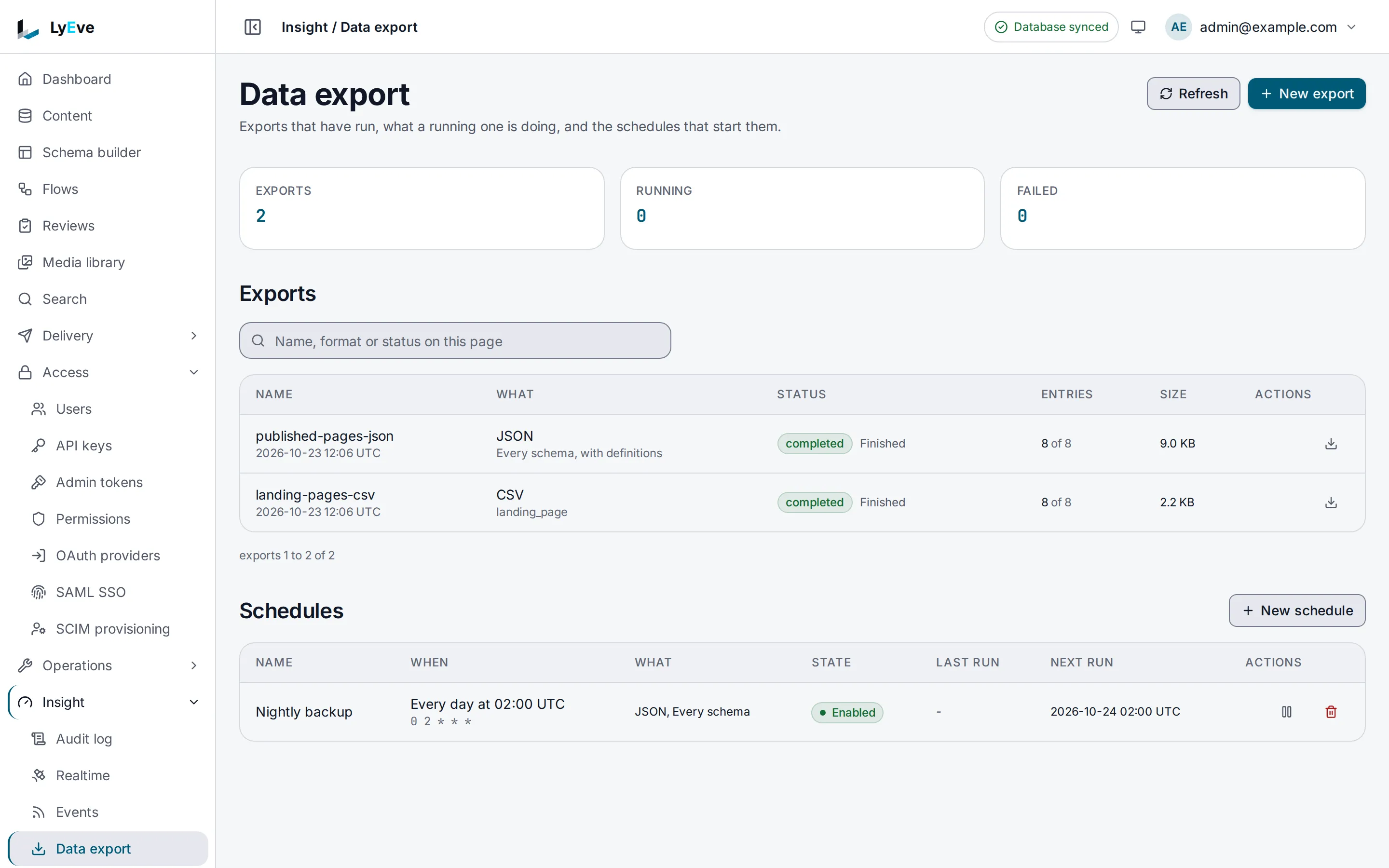
The console's New export and New schedule also take the Statuses, Include the content type definitions and Bundle referenced media. When offers Every hour, Every day at 02:00 UTC, Every Monday at 02:00 UTC, On the first of each month at 02:00 UTC and Custom cron expression. Sending an export to S3, and the options below that the console does not list, are API only.
Formats
Link to the section Formats| Format | What you get |
|---|---|
json | One document: {"lyeve_export": 1, "exported_at": "...", "schemas": [...], "entries": [...]}. schemas appears only with include_schemas. |
ndjson | One entry per line. |
yaml | The json document as YAML. |
csv | One file per content type, <schema>.csv, with the entry columns (slug, title, status, published_at, created_at, updated_at, id) and then one column per field. A field named like an entry column, such as title, takes that column. Several content types download as a ZIP. |
markdown | Each entry as a heading and its body. |
hugo | Markdown with TOML front matter. |
template | Your own Go text/template, rendered once per entry. Send it in template. |
In json, ndjson and yaml, an entry has id, schema, slug, title, status,
published_at, created_at, updated_at, its fields under body, and meta when it has any.
Tenant and author ids are left out.
In csv, numbers and booleans are written as they are and nested values as JSON. Text a
spreadsheet would run as a formula gets a leading '.
Bulk import reads json, ndjson, yaml and csv exports back as they
are, one content type at a time.
Options
Link to the section Options| Field | Meaning | Default |
|---|---|---|
format | Required. One of the formats above. | |
name | A label for the job. | export-<format> |
filter.schemas | Content types to include. Every name must be a content type of the tenant. | all |
filter.statuses | draft, published, archived. | all |
filter.from, filter.to | Entries updated at or after from and before to. RFC 3339. | none |
filter.slug | One entry by slug. | none |
filter.search | Entries whose title contains this text. | none |
filter.fields | Body fields to keep. | all |
filter.order_by | updated_at, created_at or title. | updated_at |
filter.order_asc | Oldest or A to Z first. | false |
filter.limit | Most entries. 0 means the default cap. | 10000 |
include_schemas | Add each content type's definition. Inside the document for json and yaml, as schemas.json beside the data otherwise, which makes the download a ZIP. | false |
include_media | Bundle the media files entries reference. The download becomes a ZIP. One file may be up to 5 GiB. | false |
flatten_json | Write a nested CSV value as key=value; key=value in its cell instead of JSON. | false |
s3 | {"bucket", "key", "region"}. Upload the result instead of keeping it for download. The file lands at data-exports/<tenant>/<key>.<ext>, so key names only the part after the tenant's prefix and tenants that share a bucket cannot write over each other's exports. | none |
An export that already ran keeps its S3 key when a person's data is erased. Keep personal
data such as a name or an email address out of a key, and use a ticket number or an opaque id
instead.
Follow, download and cancel an export
Link to the section Follow, download and cancel an exportGET /api/admin/data-export/jobs/{id} answers the job with its progress: status, stage,
rows_processed, rows_total, rows_written and file_size. status is pending,
running, completed, failed or canceled. A job that fails or is canceled keeps the stage
it stopped at, and error says why it failed.
Once status is completed, GET .../jobs/{id}/download answers the file as an attachment
named after the job. An export sent to S3 downloads the same way: the instance reads the object
from the bucket with its own credentials and answers the file, so a browser or curl needs no
S3 access. If the object is gone from the bucket, the download answers 404.
POST .../jobs/{id}/cancel stops a job that is still running.
Schedules
Link to the section SchedulesA schedule holds an export's options under export_config, an optional s3 target and a
cron_expression. It runs in UTC.
curl -X POST http://localhost:3001/api/admin/data-export/schedules \ -H "Authorization: Bearer $TOKEN" -H "Content-Type: application/json" \ -d '{ "name": "Nightly backup", "cron_expression": "0 2 * * *", "enabled": true, "export_config": {"format": "json", "include_schemas": true}, "s3": {"bucket": "lyeve-exports", "key": "nightly/content", "region": "eu-west-1"} }'cron_expressionhas five fields (minute, hour, day of month, month, day of week) or is@hourly,@daily,@weekly,@monthly,@yearlyor@every <duration>. At most 128 characters.- Due schedules are checked every 30 seconds. With several replicas, each run starts exactly once.
- A schedule that fell behind runs once and moves to its next time. Missed runs are not replayed.
next_run_atshows when it runs next andlast_run_atwhen it last ran. Disabling a schedule clearsnext_run_at.PUTchanges only the fields you send.
Every route takes an admin or super_admin and a signed-in session. An admin token cannot
call them.
Export and schedule routes
| Method | Path | Purpose |
|---|---|---|
POST | /api/admin/data-export/start | Start an export. Answers 202 with the job. |
GET | /api/admin/data-export/jobs | List jobs. Takes status, limit (default 50, max 500) and offset. Answers {"jobs", "total", "count"}. |
GET | /api/admin/data-export/jobs/{id} | One job with its progress. |
POST | /api/admin/data-export/jobs/{id}/cancel | Cancel a running job. Answers {"status": "canceled"}. |
GET | /api/admin/data-export/jobs/{id}/download | Download a completed export. |
GET | /api/admin/data-export/schedules | List schedules. Answers {"schedules", "total", "count"}. |
POST | /api/admin/data-export/schedules | Create a schedule. Answers 201. |
GET | /api/admin/data-export/schedules/{id} | One schedule. |
PUT | /api/admin/data-export/schedules/{id} | Update a schedule. |
DELETE | /api/admin/data-export/schedules/{id} | Delete a schedule. Answers 204. |
Settings
Link to the section Settings| Variable | What it does | Default |
|---|---|---|
DATA_EXPORT_S3_ALLOWED_BUCKETS | Comma-separated buckets an export may upload to. my-org-* matches by prefix and * matches every bucket. | empty, so every S3 export is refused |
DATA_EXPORT_S3_ALLOWED_REGIONS | Comma-separated regions an upload may use. | empty, so any region |
DATA_EXPORT_MAX_CONCURRENT | Exports that may run at once. | 3 |
A schedule's S3 target is checked against the allowlist again every time it runs. If you set
LYEVE_PLUGINS to choose which features start, include data-export in it. See
licensing and tiers.
Flow nodes
Link to the section Flow nodesFlows can use data_export.start, which starts an export and returns the job, and
data_export.status, which reads a job and, once it completes, its download route. A test run
starts no export.
Without a license that carries data-export, the routes answer 404. A license that lapses
while the instance runs makes them answer 402 payment_required.
Every error these routes return
| Status | Message | Cause |
|---|---|---|
400 | invalid JSON body | The body is not JSON. |
400 | format must be json, ndjson, yaml, csv, markdown, hugo, or template | Missing or unknown format. |
400 | template is required for format=template | Template format without a template. |
400 | filter.schemas names a schema this tenant does not define: <name> | A content type name is wrong. |
400 | S3 exports are not configured: ... | DATA_EXPORT_S3_ALLOWED_BUCKETS is empty. |
400 | S3 bucket "<name>" is not in the allowed list | The bucket is not allowed. |
400 | S3 region "<name>" is not in the allowed list | The region is not allowed. |
400 | name is required, cron_expression is required | Schedule created without them. |
400 | cron_expression must be five fields or a descriptor such as @daily | The expression does not parse. |
409 | job already in terminal state: <status> | Cancel on a finished job. |
409 | export not yet completed (status: <status>) | Download before the job completes. |
404 | export object not found | The file is gone from storage. |
503 | too many concurrent exports running, try again later | DATA_EXPORT_MAX_CONCURRENT exports are already running. |
400 | S3 bucket is not a valid bucket name | The bucket name breaks S3's rules. |
400 | S3 key must not contain a .. segment | The key tries to leave the tenant's prefix. |
402 | payment_required | The license lapsed while the instance ran. |
404 | database error | No job or schedule has that id. |
Related
Link to the section Related- Bulk import: read an export back.
- Object storage: where downloads are kept.
- Flows: start an export from a flow with
data_export.start.