Features
Flows
Included free on every install, up to twenty flows per tenant on the free triggers and nodes. More flows, custom endpoint paths, webhooks, other protocols, outbound nodes and datasources need a license with the
flow-profeature. See pricing.
A flow does a job for you when something happens. You draw it in LyEve Console as a few connected boxes: one thing starts it, the next boxes do the work, and the last one answers the caller or finishes. There is no code to write and no server to deploy, and you can run every step against a real payload before anything goes live.
In the console
Link to the section In the consoleOpen Flows. The list shows each flow's Slug, Status, Trigger, Version and Last run, with New flow, Import, Datasources and Variables above it. Choose a flow to open its editor: the Palette of node types on the left, the canvas in the middle and the Inspector for the selected node on the right. Save keeps the draft and Publish makes it a new version. Below the canvas, the Test tab runs the draft on a trigger payload you edit, and Runs lists every run with its status, kind and duration.
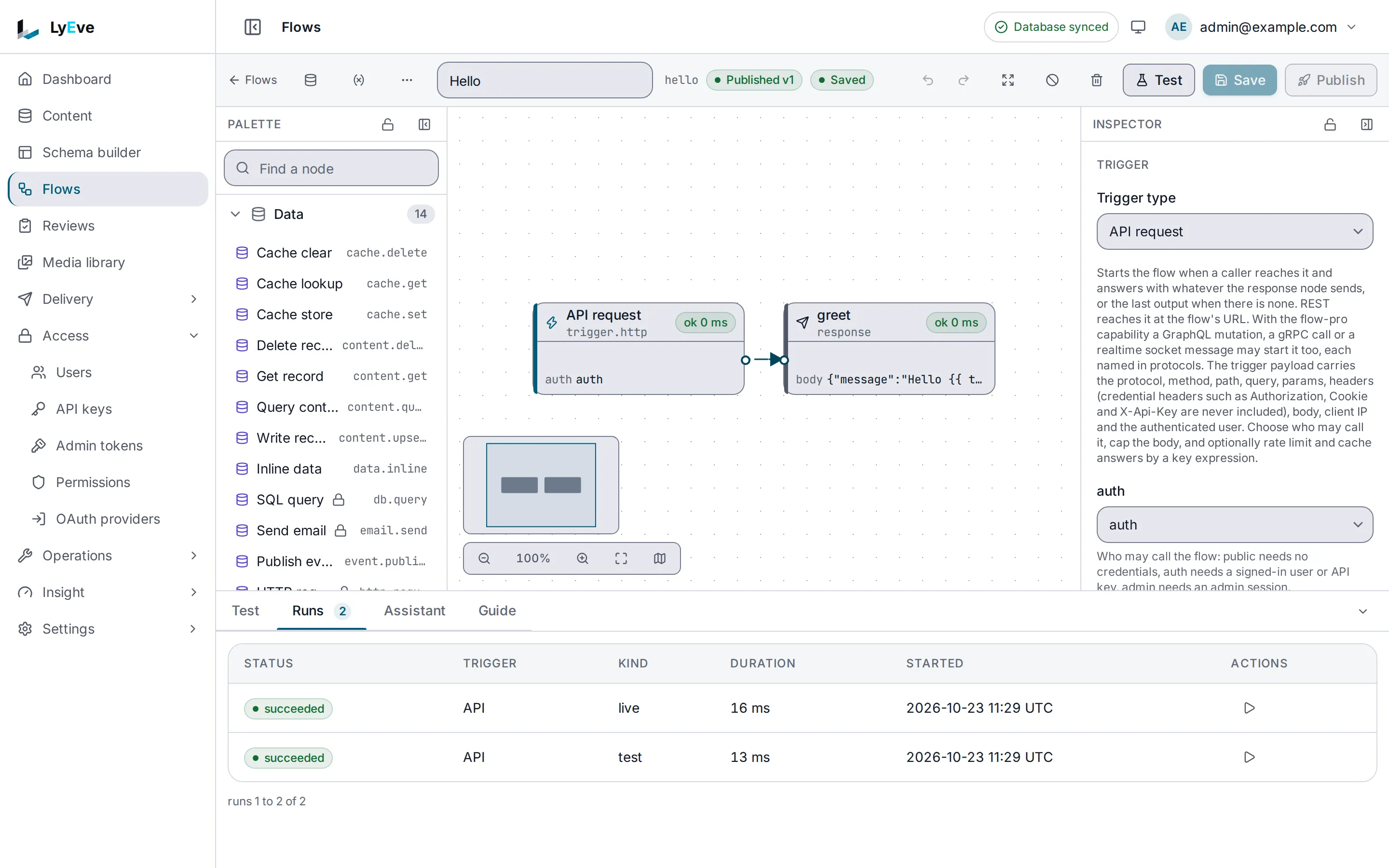
Build a custom API with flows builds one on the canvas step by step.
How a flow works
Link to the section How a flow worksEvery flow has the same three parts.
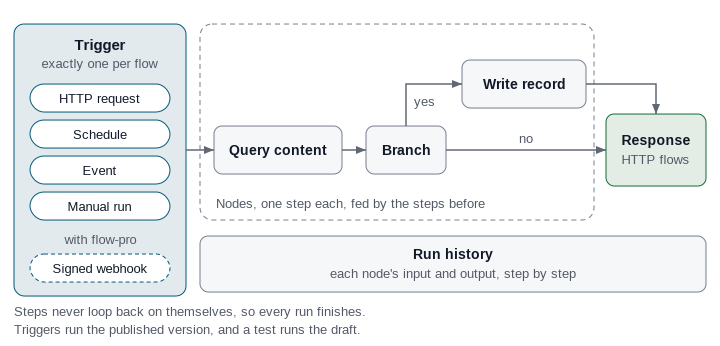
| Part | What it does | Examples |
|---|---|---|
| Trigger | Starts the flow. A flow has exactly one. | An HTTP request, a signed webhook, a cron schedule, an event such as an entry being created, or a manual run. |
| Nodes | Do the work, one step each. A node receives what the steps before it produced. | Query content, join two lists, branch, loop, call an outside API, run SQL against your own database, append to a Google Sheet, send an email, call another flow. |
| Response | Answers the caller of an HTTP flow. | A status, headers and a JSON body. |
The steps never loop back on themselves, so every run finishes. Each run is recorded step by step, so you can always see what a node received and what it returned.
This builds a small endpoint that greets whoever calls it. It uses only free
nodes, so it runs on any install. For the console steps, you are signed in to
the console. For the API steps, you need an admin token in TOKEN. The
quickstart shows how to get one.
1. Create the flow as a draft.
Console v0.28.0
- Open Flows and choose New flow.
- Enter
Helloin Name. Slug fills in ashello. - Choose Create.
The editor opens on the new draft, which already holds an API request
trigger that answers GET calls from a signed-in user or an API key.
Engine API v0.62.0
The definition has an HTTP trigger and one response node:
curl -X POST http://localhost:3001/api/admin/flows \ -H "Authorization: Bearer $TOKEN" \ -H "Content-Type: application/json" \ -d '{ "name": "Hello", "slug": "hello", "definition": { "version": 1, "name": "Hello", "slug": "hello", "trigger": { "type": "trigger.http", "config": { "method": "GET", "auth": "auth" } }, "nodes": [ { "id": "greet", "type": "response", "config": { "status": 200, "body": { "message": "Hello {{ trigger.query.name ?? '\''world'\'' }}" } } } ], "edges": [] } }'The answer is 201 with the new flow. Copy its id into FLOW_ID.
2. Test the draft with a payload of your own. Nothing is published yet.
Console v0.28.0
- In the Palette, under Output, choose Response. The node joins the trigger on the canvas.
- In the Inspector, set body to
{"message": "Hello {{ trigger.query.name ?? 'world' }}"}, then choose Save. - On the Test tab below the canvas, add
"query": {"name": "Ada"}to the JSON in Trigger and choose Run test.
The run reads succeeded. Choose the response step to see its output, the
message Hello Ada.
Engine API v0.62.0
curl -X POST http://localhost:3001/api/admin/flows/$FLOW_ID/test \ -H "Authorization: Bearer $TOKEN" \ -H "Content-Type: application/json" \ -d '{"trigger": {"query": {"name": "Ada"}}}'The answer's output is {"message": "Hello Ada"}, and steps lists
every node with its input, output and timing.
3. Publish it.
Console v0.28.0
Choose Publish. The badge beside the slug reads Published v1.
Engine API v0.62.0
curl -X POST http://localhost:3001/api/admin/flows/$FLOW_ID/publish \ -H "Authorization: Bearer $TOKEN"4. Call your new endpoint on the Content API. This step is an HTTP call on
both paths. From the console path, get a token for your console account as
Sign in shows, and keep it in
TOKEN:
curl "http://localhost:3002/api/v1/flows/hello?name=Ada" \ -H "Authorization: Bearer $TOKEN"{ "message": "Hello Ada" }Four ways to build one
Link to the section Four ways to build one| Start from | Best when | Guide |
|---|---|---|
| A template | One of the eighteen starter flows is close to what you need. | Flow templates |
| The canvas | You want to see the steps as you build them. | Build a custom API with flows |
| The assistant | You would rather describe the flow in plain words and edit the draft. Needs the AI feature. | Build a flow with the assistant |
| A file in your repository | Flows should be reviewed and promoted like code. | Schema and flows as code |
Every option produces the same definition. The flow definition format lists every trigger, node and setting.
Test, publish and roll back
Link to the section Test, publish and roll backA flow has one draft and any number of published versions. Saving changes the draft only, so you can edit freely while the published version keeps serving. Publishing checks the draft, stores it as a new version and starts the trigger. A draft with no nodes cannot be published. Every version is kept, and rolling back republishes an earlier one.
A test run executes the draft against a payload you give it and returns every step with its input, output, timing and error.
- Steps that change something only report what they would do: content, cache
and database writes,
http.requestcalls other thanGETandHEAD, everyapi.callandflow.call, sheet appends, events, chat messages and email. Add"live": trueto the test to run them for real. - Add
"until_node": "<id>"to stop after one node while you work on the steps before it.
On the editor's Test tab, Allow side effects and Stop after node do the same.
A flow's status tells you whether it runs:
| Status | Meaning |
|---|---|
draft | Never published. Nothing starts it. |
active | Published. The trigger starts it. |
disabled | You stopped it. Its versions are kept. |
blocked | A node type it uses is not available, because the feature that adds it is not running. It runs again on its own when the type returns. |
Call a flow over HTTP
Link to the section Call a flow over HTTPAn HTTP-triggered flow answers on one or more URLs, depending on the trigger's
auth setting:
| URL | Who can call it | Answers when auth is |
|---|---|---|
/api/v1/flows/{slug} | A signed-in user or an API key. The tenant comes from the caller. | auth or public |
/api/v1/flows/p/{flow_id} | Anyone. The tenant comes from the flow. | public |
/api/admin/flows/{id}/invoke | A signed-in admin with activate on the flow. | admin, auth or public |
A flow with a trigger.webhook trigger answers only on
POST /api/v1/flows/hooks/{flow_id}, for a sender that signs the body. It
needs flow-pro.
An API key needs a scope on flows for the method it calls, such as
flows:read for GET and flows:write for POST. A flow that is not
published, is disabled or has a different trigger answers 404, so a caller
learns nothing about what exists. The public and webhook URLs also allow at
most 10 requests per second per client address, with a burst of 20.
Status codes a caller can get
| Status | When |
|---|---|
401 | A webhook signature is missing or wrong. The signature is the hex HMAC-SHA256 of the raw body, sent as X-Flow-Signature. |
402 | The flow uses a paid element and the license no longer grants flow-pro. |
404 | The flow is not published, is disabled, or has another trigger type. |
405 | The trigger does not accept this method. The Allow header lists the one it does. |
413 | The body is larger than the trigger's body_limit, which is at most 1 MiB. |
429 | The trigger's own rate limit refused the call. Retry-After says when to try again. |
503 | The flow is blocked. |
Limit and cache an endpoint
Link to the section Limit and cache an endpointAn HTTP trigger can set its own rate limit and response cache, which is how you put a flow in front of real traffic.
- Rate limit. Counts per tenant, flow, URL or protocol the call arrived
on, signed-in user and key, where the key defaults to the client address.
Every answer carries
RateLimit-Limit,RateLimit-RemainingandRateLimit-Reset. - Cache. Stores a successful answer for its TTL, per version, URL or
protocol, user and key, where the key defaults to the full request URI.
Answers carry
X-Flow-Cache: hitormiss. Publishing clears it.
Both are kept per replica, or shared across replicas when the instance has
Redis at REDIS_URL. The
custom API guide adds both to a
real endpoint.
Your own endpoint path
Link to the section Your own endpoint pathWith flow-pro, a public REST trigger or a webhook can answer on a path you
choose:
{ "type": "trigger.http", "config": { "method": "POST", "auth": "public", "path": "/api/v1/orders/sync" } }The path starts with /api/, is unique on the instance, has no parameters and
no trailing slash, and is not under /api/admin. A path that a built-in route
already serves, such as /api/v1/content/..., is refused. A built-in route
always wins, even one added after you published the flow.
Other protocols
Link to the section Other protocolsprotocols on the trigger names how the flow may be started. The default is
["rest"]. Every protocol except REST needs flow-pro and that protocol's own
feature.
| Value | How to start the flow |
|---|---|
rest | The URLs above, and your own path. |
graphql | The runFlow(slug, input) mutation. See the GraphQL API. |
grpc | lyeve.core.v1.FlowService/Run. See the gRPC API. |
realtime | A flow.run message on a socket at /api/v1/ws/connect. See realtime. |
Flows with auth: public or auth: auth answer on every protocol they list.
Flows with auth: admin answer on none of them. The trigger payload's
protocol field says which one started the run.
Free and flow-pro
Link to the section Free and flow-pro| Free | With flow-pro | |
|---|---|---|
| Flows per tenant | 20, counting every status | Unlimited |
| Triggers | Event, cron, manual, and HTTP over REST at the standard URLs | Also webhooks and your own HTTP paths |
| Nodes | Control, data, content and cache nodes, event.publish, flow.call, log, note, response, and the nodes of free features except the ones listed opposite | Also http.request, api.call, db.query, sheets.read, sheets.append, email.send, email.send_template, email.render, chat.notify, webhook.deliver, and the nodes of licensed features |
| Datasources | None | HTTP APIs, Google Sheets, PostgreSQL, MySQL and SQL Server |
| Protocols | REST | Also GraphQL, gRPC and realtime, where those features are licensed |
The license is read on every request, so a new license applies without a restart. If a license lapses, a stored flow that uses a paid element stops running until the license returns.
The flow editor marks paid nodes for you. Over the API, a create, save,
validate, test, publish or import that uses a paid element answers 402 and
names each one, so you can find it on the canvas.
What the 402 answer looks like
{ "error": "payment_required", "plugin": "flow", "feature": "feature:flow-pro", "upgrade_url": "", "ok": false, "errors": [ { "node_id": "fetch", "path": "/type", "message": "http.request needs the flow-pro capability" } ]}A refusal that no node causes, such as a datasource route, carries the first
four fields alone. The 21st flow is refused with the body every ceiling
answers with, where current is the number of flows the tenant holds:
{"error": "cap_exceeded", "cap": "flow.flows", "limit": 20, "current": 20, "upgrade_url": ""}GET /api/admin/flows/catalog marks every node and trigger with tier
(free or pro) and enabled, and says whether this instance has
flow_pro.
Who may do what
Link to the section Who may do whatFlows use the same permission rules as content, set on the Permissions
page. A rule names either flows, which covers every flow in the tenant, or
flow:<slug>, which covers one.
| Action | Lets a role |
|---|---|
read | See flows, versions, runs and exports. Read on any one flow also opens the catalog, the event types and the templates. |
create | Create, import with mode=create, and save a template. These need the rule on flows. |
update | Save, validate, and import with mode=replace. |
delete | Delete a flow, or a saved template with the rule on flows. |
activate | Publish, disable, roll back, run, test, invoke and cancel a run. |
- A rule for one flow wins over the rule for
flows. A rule for one flow that grants nothing hides that flow. The list shows only the flows the caller may read. - A super admin can always do everything. An admin can until a rule names
adminfor the resource. Every other role needs a rule. - The wildcard
*covers content types, not flows. - A refusal answers
403and names the action and the resource.
Content nodes read and write as the account that published the flow, and a test
run as the account that runs it, so that account's access rules apply to every
content type the flow touches. The first administrator, the one setup creates,
belongs to no tenant. A flow it publishes or tests acts as that super admin in
the tenant the flow runs in, for as long as the account is an active super
admin. Any other publisher that is not an active account in the run's tenant
stops the flow at its first content node with
the flow's publisher is not an active account in this tenant. No access rule
limits a super admin, so to hold a flow to the rules, publish it as an admin of
the tenant who may read the content types involved. Build a custom API with flows
sets one up.
Datasources and variables can hold credentials, so only the admin and
super_admin roles can manage them. See
access rules for how rules combine.
Connect outside systems
Link to the section Connect outside systemsWith flow-pro, a datasource is a saved connection that nodes refer to by
name, so a credential lives in one place:
- An outside PostgreSQL, MySQL or SQL Server database.
- An HTTP API with a base URL, headers, and bearer, basic or OAuth2 client credentials auth.
- A Google service account for Sheets.
Secrets are stored encrypted and never returned. A datasource read lists
secret_headers, the names of its secret headers without their values. An
update keeps every secret part it leaves out: "secret": {} keeps them all
and "secret": null clears them. When the stored secret can no longer be
decrypted, an update answers 409 with
the stored secret cannot be read and must be entered again unless it clears
the secret or sends a complete new one. A datasource can never point
at the instance's own database, and private network addresses are refused
unless the datasource sets allow_private. Only a super admin can set
allow_private, or allow_writes, which lets a db.query node commit.
Test checks the connection, and for a database, the console lists its
tables and columns.
A variable is a key and value for the tenant, read in a node as
{{ vars.<key> }}. Mark it secret to make it write-only. Before a run is
stored, any text equal to a secret, and a secret of eight characters or more
inside longer text, is replaced by ***.
Variables are free. To set one:
Console v0.28.0
Open Flows, choose Variables, then New variable. Enter the Key
and the Value, tick Secret to make it write-only, and choose
Create. The list shows it as vars.<key>.
Engine API v0.62.0
curl -X PUT http://localhost:3001/api/admin/flows/variables \ -H "Authorization: Bearer $TOKEN" \ -H "Content-Type: application/json" \ -d '{"key": "site_url", "value": "https://example.com", "is_secret": false}'GET /api/admin/flows/variables lists them, and a secret shows no value.
Move flows between tenants and instances
Link to the section Move flows between tenants and instancesEvery flow exports as JSON or YAML and imports into any tenant. An export keeps
the canvas layout and notes, and never carries a secret. Datasources travel by
name, and the import lists the names the target tenant does not have in
unresolved_datasources.
Console v0.28.0
- Open the flow, choose More actions (the
...button beside Flows) and then Export. - Pick JSON or YAML and choose Download JSON or Download YAML. The file holds the saved draft, secrets stripped.
- To bring a file in, open Flows and choose Import. Upload it under Definition file, or paste it under Or paste the definition.
- Under Mode, pick Create a new flow or Replace the draft of an existing flow, and choose Import.
The dialog has no slug field. A new flow takes the slug in the file, so edit
the slug line before you import a copy into a tenant that already has the
flow. A slug that is taken shows failed to import flow.
Engine API v0.62.0
curl "http://localhost:3001/api/admin/flows/$FLOW_ID/export?format=yaml" \  -H "Authorization: Bearer $TOKEN" -o hello.yaml
curl -X POST "http://localhost:3001/api/admin/flows/import?mode=replace&slug=hello" \ -H "Authorization: Bearer $TOKEN" \ -F "file=@hello.yaml"?mode=create, the default, makes a new draft flow and answers 201, or
409 when the slug is taken. ?mode=replace replaces the draft of the flow
with that slug and answers 200, or 404 when there is none. &slug= picks
the slug.
An imported flow runs only after you publish it. To keep flows in your repository and promote them from
staging to production, see schema and flows as code.
To move every flow together with the content types, access rules and webhooks in one bundle,
a license with config-sync adds Promote configuration.
Renaming. Saving a flow with a new slug moves /api/v1/flows/{slug} and
its name on GraphQL, gRPC and realtime at once, and the old slug stops
answering. The public, webhook and custom URLs do not change. A slug matches
[a-z][a-z0-9_-]{0,39}, and a taken one answers 409. Permission rules that
name the flow move to the new slug with it, so a rename needs only update on
the flow.
Get told when a flow fails
Link to the section Get told when a flow failsWhen a run fails, the instance publishes a flow.run_failed event. Another
flow can start on it with an event trigger of kind: system and that name. The
notify-on-failure template is such a flow: it
emails the operator.
The event's schema is the failed flow's slug, so a subscriber can watch one
flow or all of them. A run started by flow.run_failed never fires it again,
so a failing alert flow cannot loop, and test runs and canceled runs fire
nothing.
Fields of the flow.run_failed event
| Field | Value |
|---|---|
flow_id, flow_slug, flow_name, version | The flow and version that ran. |
run_id | The run. GET /api/admin/flows/runs/{run_id} returns it with its steps. |
parent_run_id | The run whose flow.call started this one, or empty. |
trigger_type | trigger.manual, trigger.cron, trigger.http, trigger.webhook or trigger.event. |
node_id, node_type | The node the run stopped on. |
error | The error message. |
started_at, finished_at | RFC 3339 times. |
GET /api/admin/flows/event-types lists every event this instance can deliver
to a trigger.
Nodes from other features
Link to the section Nodes from other featuresOther features add nodes of their own, named <feature>.<verb>, such as
ai.classify or review.transition. Each feature's page documents its nodes,
and the editor's palette lists every node this instance can run. A node from a
free feature is free, except the ones that send data out of the instance
(webhook.deliver and the email nodes), which need flow-pro. A node from a
licensed feature needs that feature and flow-pro.
A node exists only where its feature runs. Saving a flow that names a node this
instance does not have answers 422 and says which feature it needs. If a
feature's license lapses while the instance runs, a run that reaches its node
fails that step with feature not licensed. A published flow whose node type
is gone because its feature is not running becomes blocked.
Settings
Link to the section Settings| Variable | What it does | Default |
|---|---|---|
FLOW_RUN_RETENTION | How long finished runs are kept, such as 720h. Values under 1h are ignored. Set it as flow_run_retention through PUT /api/admin/config and a change applies without a restart. | 720h (30 days) |
REDIS_URL | Shares trigger rate limits, response caches and the cache.* nodes' store across replicas. When no Redis answers there, each replica keeps its own. | redis://localhost:6379/0 |
FLOW_CRON_ENABLED | In stateless mode, false stops this replica firing cron flows. Ignored otherwise. | true |
Timeouts, the step limit, the error policy, the body limit, the rate limit and
the cache TTL are set per flow in its definition. Flows run on every install.
If you set LYEVE_PLUGINS to choose which features start, include flow in it.
Deleting a tenant deletes its flows, versions, runs, saved templates, datasources and variables. A privacy request exports and redacts the flows and runs that name the person.
Every flow route takes a signed-in caller and checks the permission in the last
column. An admin token with the flows:read or flows:write grant can call
them too, except invoke and the datasource and variable routes. Bodies are limited to 2 MiB, imports to 4 MiB. Lists answer
{"data": [...], "total_count": n, "limit": l, "offset": o} and errors answer
{"error": "message"}.
Flows, versions and runs
| Method | Path | Purpose | Needs |
|---|---|---|---|
GET | /api/admin/flows | List flows. ?status=, ?q=, limit (default 50, at most 200), offset. | read |
POST | /api/admin/flows | Create a draft: name, slug, optional description and definition. | create |
GET | /api/admin/flows/{id} | One flow with its draft, published version number and last run. | read |
PUT | /api/admin/flows/{id} | Save the draft: name, slug, description, definition. | update |
DELETE | /api/admin/flows/{id} | Delete a flow and its versions and runs. | delete |
POST | /api/admin/flows/{id}/publish | Publish the draft. | activate |
POST | /api/admin/flows/{id}/disable | Stop the trigger. | activate |
POST | /api/admin/flows/{id}/rollback | Republish {"version": n}. | activate |
GET | /api/admin/flows/{id}/versions | Published versions. | read |
GET | /api/admin/flows/{id}/versions/{n} | One version. | read |
POST | /api/admin/flows/{id}/validate | Check a definition without saving. | update |
POST | /api/admin/flows/{id}/test | Test run: trigger, optional definition, live, until_node. | activate |
POST | /api/admin/flows/{id}/run | Run the published version with trigger. | activate |
| any | /api/admin/flows/{id}/invoke | Call an HTTP-triggered flow as an admin. | activate |
GET | /api/admin/flows/{id}/runs | Runs, with ?status=, ?is_test=, limit, offset. | read |
GET | /api/admin/flows/runs/{run_id} | One run with its steps. | read |
POST | /api/admin/flows/runs/{run_id}/cancel | Cancel a running run. | activate |
GET | /api/admin/flows/{id}/export | Download the definition, ?format=json or yaml. | read |
POST | /api/admin/flows/import | Import a definition: JSON, {"content": "<text>", "format": "yaml"}, or a multipart file. Anything else answers 415. | create, or update with mode=replace |
Catalog, templates, datasources and variables
| Method | Path | Purpose | Needs |
|---|---|---|---|
GET | /api/admin/flows/catalog | Every node and trigger type with ports, settings and an example. | read |
GET | /api/admin/flows/catalog/llm | The catalog as one Markdown document for a language model. See the published copy. | read |
GET | /api/admin/flows/event-types | The content and system events a trigger can subscribe to. | read |
GET | /api/admin/flows/templates | Starter flows and your saved templates. | read |
POST | /api/admin/flows/templates | Save a template from a definition or a URL, up to 1 MiB. | create |
DELETE | /api/admin/flows/templates/{id} | Delete a saved template. | delete |
GET, POST | /api/admin/flows/datasources | List or create datasources. Creating, changing, testing and introspecting need flow-pro. | admin |
GET, PUT, DELETE | /api/admin/flows/datasources/{id} | One datasource. | admin |
POST | /api/admin/flows/datasources/{id}/test | Check the connection: {"ok", "latency_ms", "error"}. | admin |
GET | /api/admin/flows/datasources/{id}/introspect | Tables and columns of a database datasource, up to 500 tables. | admin |
GET | /api/admin/flows/variables | Every variable. Secrets show no value. | admin |
PUT | /api/admin/flows/variables | Set one: key (same shape as a slug), value, is_secret. | admin |
DELETE | /api/admin/flows/variables/{key} | Delete one. | admin |
Related
Link to the section Related- Flow templates: eighteen starter flows.
- Build a custom API with flows: join three content types into one cached, rate-limited endpoint.
- Flow definition format: every trigger, node, setting and expression.
- Scheduled jobs and webhooks, for jobs that need no flow.