Features
Audit log streaming
Requires a license with the
audit-profeature. See pricing.
A stream sends every new audit log entry to a destination you choose, so your security team reads it in the tools they already use. Entries arrive in order, usually 10 to 30 seconds after they are written, and a stream only moves on once your receiver has accepted a batch. Each tenant can have up to ten streams.
How it works
Link to the section How it workskind | Destination | Format | Authentication |
|---|---|---|---|
https | Any HTTPS endpoint you run | JSON lines, one entry per line (application/x-ndjson) | An HMAC-SHA256 signature in X-Lyeve-Signature |
splunk | Splunk HTTP Event Collector | HEC events with source lyeve and sourcetype lyeve:audit | Your HEC token |
datadog | Datadog logs intake | Logs with ddsource lyeve, the entry as JSON in message | Your Datadog API key |
- Each entry carries its
id,sequenceandchain_hash, so your receiver can see that nothing between two entries is missing. IP addresses and user agents are masked as in an export, and the before and after snapshots arrive as JSON. - Entries go out in
sequenceorder, up to 500 in one request. - A stream moves past a batch only once your receiver answers
2xx. - A batch that gets no answer, or an answer of
408,429or5xx, is tried three times. Any batch that still fails is sent again on later passes, with a wait that doubles after each failure, up to 15 minutes. - Delivery is at least once. A receiver that stored a batch but failed to
answer gets that batch again, so deduplicate on the entry
id. - A stream may not point at a private, loopback or link-local address, and redirects are not followed. To reach a collector inside your network, put a public HTTPS endpoint in front of it.
In the console
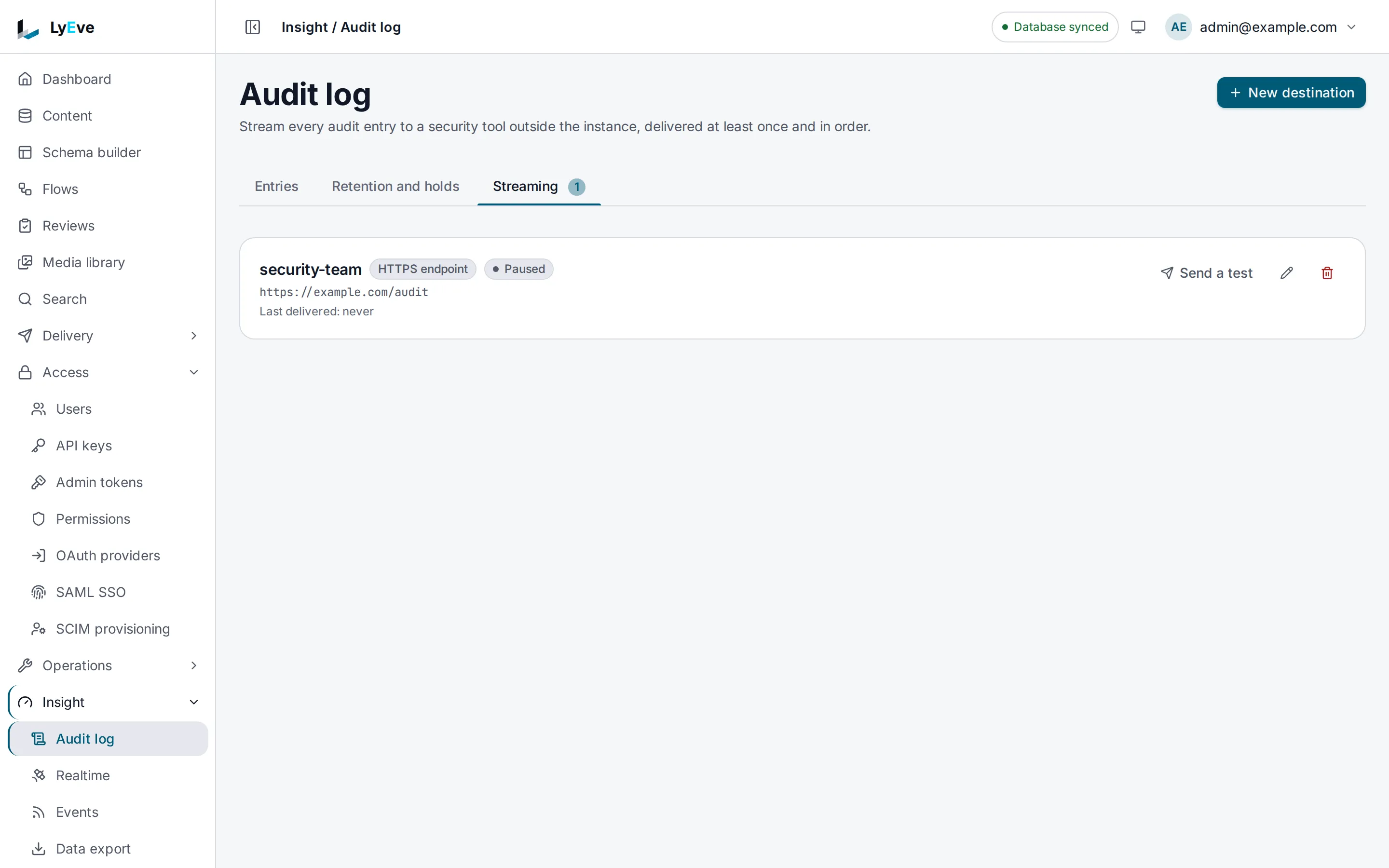
Link to the section In the consoleOpen Insight > Audit log and choose the Streaming tab. Each stream shows its name, its kind, its URL, how far behind it is, such as Up to date or 1 entry waiting, and when it last delivered. A stream that is turned off is marked Paused. Send a test sends one test event, and the edit and delete buttons on the row change or remove the stream. New destination opens a form with Name, Destination, URL, Signing secret, Enabled and Send the existing log too.
Run this on an install whose license carries audit and audit-pro, signed in
as an admin or super_admin. Point the stream at a request inspector of
yours. The URL has to be https:// and resolve to a public address.
Create an https stream:
Console v0.28.0
- Open Insight > Audit log, choose the Streaming tab, then New destination.
- Enter
try-itin Name. Leave Destination on HTTPS endpoint, and enter your inspector's address in URL, such ashttps://bin.example.com/audit. - Leave Signing secret blank, so one is generated, and leave Enabled on. Choose Create.
- The page says try-it is streaming the audit log. and shows the Signing secret once. Copy it to your receiver, then choose Close.
Engine API v0.62.0
You need a token in TOKEN. The
quickstart shows how to get one.
curl -X POST http://localhost:3001/api/admin/audit-log/sinks \ -H "Authorization: Bearer $TOKEN" \ -H "Content-Type: application/json" \ -d '{"name": "try-it", "kind": "https", "url": "https://bin.example.com/audit"}'The answer is 201 with the stream and a generated secret, shown this
once. Copy its id into SINK_ID.
Send one test event:
Console v0.28.0
On the try-it row, choose Send a test. The page says The test entry was delivered.
Engine API v0.62.0
curl -X POST http://localhost:3001/api/admin/audit-log/sinks/$SINK_ID/test \ -H "Authorization: Bearer $TOKEN"{ "delivered": true }A receiver that refuses answers, for example,
{"delivered": false, "error": "receiver answered HTTP 405"}.
Your receiver gets one line with "action": "audit.sink.test". The test does
not move the stream.
Within about 30 seconds the entry that records the new stream,
audit.sink.create, reaches your receiver too, and every entry written after
it follows. Watch the stream's progress:
Console v0.28.0
On the Streaming tab, the row reads 1 entry waiting while an entry is on its way, then Up to date, with the time under Last delivered.
Engine API v0.62.0
curl http://localhost:3001/api/admin/audit-log/sinks \ -H "Authorization: Bearer $TOKEN"The answer is {"data": [...]}, and each stream reports
cursor_sequence, pending_entries, lag_seconds and last_shipped_at.
Delete the test stream when you are done:
Console v0.28.0
Choose the delete button on the try-it row. The dialog asks Delete destination try-it. Choose Delete. Entries already sent stay in your receiver.
Engine API v0.62.0
curl -X DELETE http://localhost:3001/api/admin/audit-log/sinks/$SINK_ID \ -H "Authorization: Bearer $TOKEN"The answer is 204.
Create a stream
Link to the section Create a streamConsole v0.28.0
On the Streaming tab, choose New destination. Pick Splunk HEC or
Datadog logs under Destination for those services. The form asks for
the same fields as the API below, and Send the existing log too is
backfill. LyEve Console's URL field is required for every kind, so for
Datadog enter the intake URL of your site, which the API lets you leave out.
Engine API v0.62.0
curl -X POST http://localhost:3001/api/admin/audit-log/sinks \ -H "Authorization: Bearer $TOKEN" \ -H "Content-Type: application/json" \ -d '{ "name": "splunk-prod", "kind": "splunk", "url": "https://splunk.example.com:8088/services/collector/event", "secret": "<HEC token>", "splunk_index": "audit" }'| Field | Meaning | Default |
|---|---|---|
name | Unique within your tenant. | required |
kind | https, splunk or datadog. It cannot change later. | required |
url | An https:// URL that resolves to a public address. | required, except Datadog |
secret | The HEC token, the Datadog API key, or the signing secret of an https stream. Leave it out of a PUT to keep it. | required for Splunk and Datadog |
splunk_index | The Splunk index. | the token's default |
datadog_service | The Datadog service tag. | lyeve-audit |
datadog_tags | A comma-separated list, added after tenant:<your tenant>. | none |
enabled | Whether the stream ships. | true |
backfill | Start from the beginning of your log. | false |
- A Datadog stream with no
urluses the US1 intake,https://http-intake.logs.datadoghq.com/api/v2/logs. Name your site's intake if you are on another one. - Leave
secretout of anhttpsstream and one is generated and returned once, in the answer to the create. A later read reports onlyhas_secret. - Without
backfill, a new stream starts at the current end of the log and sends only what is written afterward. - Secrets are stored encrypted with
ENCRYPTION_KEY, and an instance without it refuses to store one.
Verify an HTTPS delivery
Link to the section Verify an HTTPS deliveryEvery request to an https stream carries three headers:
| Header | Value |
|---|---|
X-Lyeve-Timestamp | Unix seconds |
X-Lyeve-Sink-Id | The stream's id |
X-Lyeve-Signature | sha256=<hex> |
The signature is the HMAC-SHA256 of the timestamp, a period and the raw body, keyed with the stream's secret. Recompute it, compare in constant time, and refuse a timestamp more than a few minutes old:
import hashlib, hmac
def verify(secret: bytes, timestamp: str, body: bytes, header: str) -> bool:    expected = hmac.new(secret, timestamp.encode() + b"." + body, hashlib.sha256).hexdigest()    return hmac.compare_digest("sha256=" + expected, header)
Watch and manage streams
Link to the section Watch and manage streamsEvery route needs the admin or super_admin role and a signed-in session. An
admin token cannot read or change a stream,
because a stream decides where the whole log goes.
| Method | Path | Purpose | Needs audit-pro |
|---|---|---|---|
GET | /api/admin/audit-log/sinks | Your tenant's streams with their delivery state. | No |
POST | /api/admin/audit-log/sinks | Create a stream. Answers 201. | Yes |
PUT | /api/admin/audit-log/sinks/{id} | Change a stream. Leave secret out to keep it. | Yes |
DELETE | /api/admin/audit-log/sinks/{id} | Remove a stream. Answers 204. | No |
POST | /api/admin/audit-log/sinks/{id}/test | Send one audit.sink.test event. | No |
A listed stream reports how far it has got:
| Field | Meaning |
|---|---|
cursor_sequence | The last entry delivered |
pending_entries | Entries written and not yet delivered |
lag_seconds | The age of the oldest undelivered entry |
last_shipped_at | The last accepted delivery |
last_error | What the receiver or the connection last reported |
consecutive_failures, next_attempt_at | The current backoff |
If the license lapses
Link to the section If the license lapsesStreams you already configured keep shipping, as long as the license still
carries audit. Listing, testing and removing a stream stay open. Creating or
changing one needs audit-pro again, and a license with audit does not
include it.
Your SIEM keeps its own copy. A retention prune, a tenant deletion or a data-subject erasure here does not reach what a stream already delivered.
| Status | Message | Cause |
|---|---|---|
400 | invalid JSON body | The body does not parse. |
402 | payment_required, naming feature:audit-pro | A create or change without audit-pro. Nothing is stored. |
404 | audit sink not found | No stream with that id in your tenant. |
409 | another audit sink already has this name | Pick another name. |
422 | kind must be https, splunk or datadog | An unknown kind. |
422 | name and url are required | A field is missing. |
422 | url must be an https URL with a host and no credentials | The URL is not https://, or carries a user name or password. |
422 | url resolves to an address that is not allowed, or does not resolve | The host does not resolve, or resolves to a private address. |
422 | secret is required: the Splunk HEC token or the Datadog API key | A Splunk or Datadog stream without a token. |
422 | kind cannot change: create a new sink instead | A PUT that changes kind. |
422 | a tenant can have at most 10 audit sinks | Remove a stream first. |
503 | this instance has no encryption key, so it cannot store a sink secret | Set ENCRYPTION_KEY. |
The 402 body in full:
{"error": "payment_required", "plugin": "audit-pro", "feature": "feature:audit-pro", "upgrade_url": ""}Related
Link to the section Related- Audit log: what is recorded, search, export, retention and legal holds.
- Logs: the instance's own logs, and shipping them elsewhere.
- Security controls: the audit trail in a security review.