Features
Analytics
Included free on every install, with the GA4, Mixpanel, Plausible and Segment destinations and a delivery log on every event. Retries, replaying a failed delivery, and the PostHog, Amplitude and webhook destinations need a license with the
analytics-profeature. See pricing.
Analytics answers "how is this tenant using the product" and passes what happens in your content on to the analytics service you already use. It keeps one row of figures per tenant per day, forwards every content change as an event to the services you connect, records whether each one arrived, and lets a signed-in user download or erase their own data.
How it works
Link to the section How it works| Part | What it gives you | Where |
|---|---|---|
| Daily figures | dau, storage and new_users for one tenant and one day, computed for every tenant after the day ends. | Admin API |
| Event forwarding | Content events and your own events, saved and sent to each enabled service, with the outcome kept on each event. | Admin API and LyEve Console |
| Tenant usage | A super admin's view of usage and activity across tenants, and each tenant's own view. | Admin and Content API |
| Privacy requests | A user's own export and erasure. | Content API |
In the console
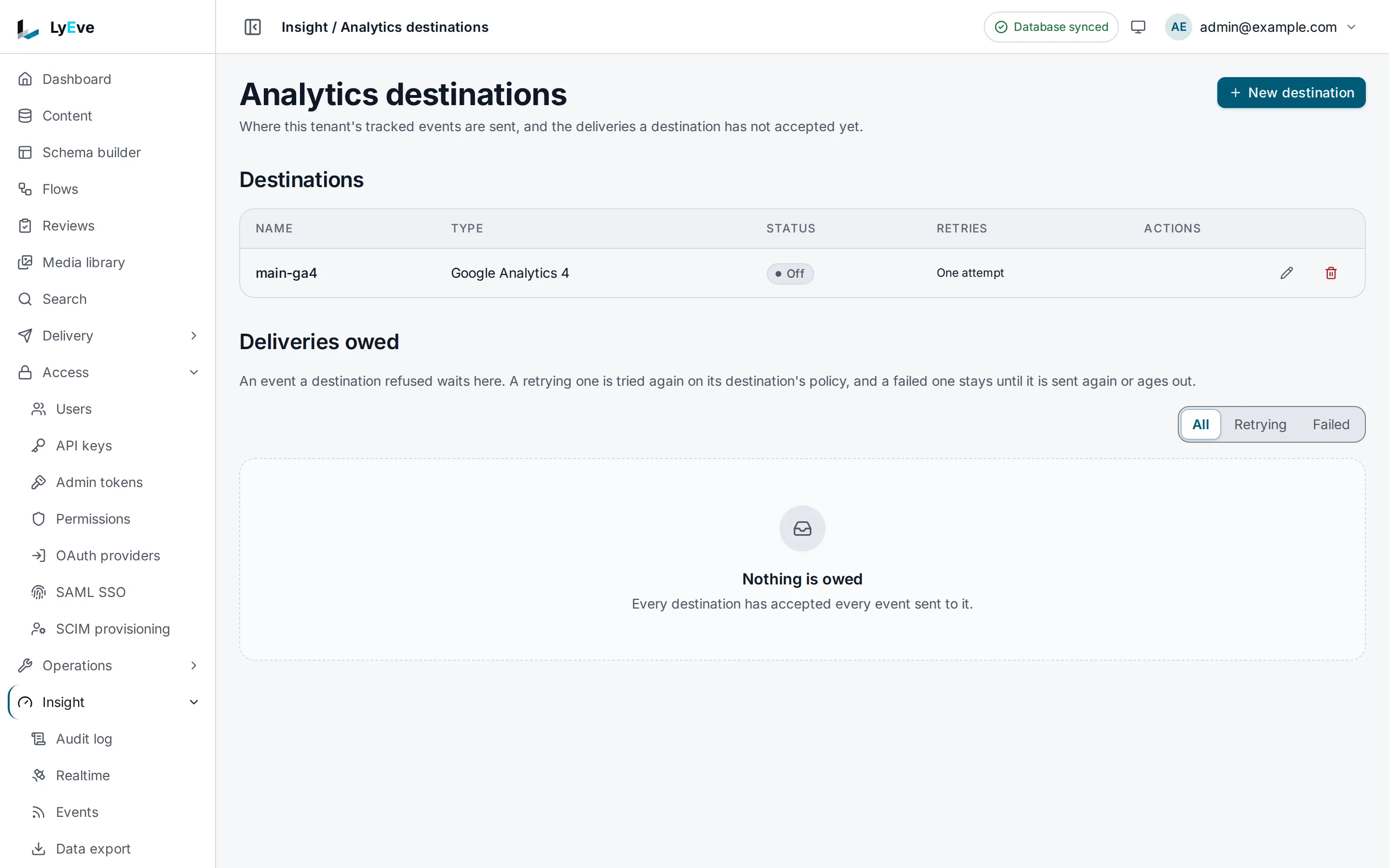
Link to the section In the consoleOpen Insight > Analytics destinations. Destinations lists the services this tenant's events go to, with each one's type, whether it is on and how many attempts a delivery gets. New destination connects a service, and the edit button on a row changes it. A destination that is off is kept and receives nothing. Deliveries owed lists the events a destination refused, narrowed by All, Retrying or Failed.
The daily figures, sending and listing events, the usage across tenants and a person's own export and erasure have no page in the console, so they are API only on v0.25.0.
For the console steps, you are signed in to the console as an admin. For the API
steps, you need an admin token in TOKEN. The
quickstart shows how to get one.
1. Send an event of your own. This is API only on v0.25.0.
curl -X POST http://localhost:3001/api/admin/analytics/events \ -H "Authorization: Bearer $TOKEN" \ -H "Content-Type: application/json" \ -d '{"event_name": "checkout_started", "event_category": "store", "properties": {"cart_value": 49}}'The answer is 201:
{ "id": "7c9fbec4-d3b2-4d06-aa63-2ee70f026940", "tenant_id": "default", "event_name": "checkout_started", "event_category": "store", "properties": { "cart_value": 49 }, "provider_types": null, "processed": false, "created_at": "2026-10-01T09:08:51Z" }2. List the events in that category. This is API only on v0.25.0.
curl "http://localhost:3001/api/admin/analytics/events?category=store&limit=10" \ -H "Authorization: Bearer $TOKEN"The answer is {"data": [...], "total_count": n, "limit": 10, "offset": 0}.
3. Connect a service, switched off for now.
Console v0.28.0
- Open Insight > Analytics destinations and choose New destination.
- Enter
main-ga4in Name and keep Google Analytics 4 as the Type. - Turn On off. It starts on, and an off destination is kept and receives nothing.
- Under Settings, fill in Measurement id and API secret, then choose Create.
Engine API v0.62.0
curl -X POST http://localhost:3001/api/admin/analytics/providers \ -H "Authorization: Bearer $TOKEN" \ -H "Content-Type: application/json" \ -d '{"name": "main-ga4", "type": "ga4", "enabled": false, "config": {"measurement_id": "G-XXXXXXX", "api_secret": "<secret>"}}'The answer is 201 with the saved connection. Its config comes back as
{"redacted": true}, so a secret is never returned.
Saving a connection needs ENCRYPTION_KEY, because its secrets are encrypted at rest.
Without it the answer is 503 with the code analytics.secrets_unavailable.
4. List your connections.
Console v0.28.0
Destinations lists main-ga4 with its type, Off, and One attempt under
Retries. Deliveries owed reads No deliveries owed.
Engine API v0.62.0
curl http://localhost:3001/api/admin/analytics/providers \ -H "Authorization: Bearer $TOKEN"The answer is {"data": [...], "licensed": false}. Each connection in data carries its
id, name, type, enabled, the redacted config and its retry_policy. licensed
says whether this install may use the paid options below.
5. Remove it again.
Console v0.28.0
Choose Delete on the main-ga4 row, then confirm. The dialog says events stop going to
it and its queued deliveries go with it, and the page confirms Deleted main-ga4.
Engine API v0.62.0
Copy the connection's id from step 4 into PROVIDER_ID, then:
curl -X DELETE http://localhost:3001/api/admin/analytics/providers/$PROVIDER_ID \ -H "Authorization: Bearer $TOKEN"The answer is 204.
Compute daily figures
Link to the section Compute daily figuresThe figures for a UTC day are computed for every tenant on their own, within 15 minutes after midnight, or within 15 minutes of a later start when the instance was down at midnight. To compute a day by hand, such as one before the instance ran, call the aggregate route:
curl -X POST http://localhost:3001/api/admin/analytics/aggregate \ -H "Authorization: Bearer $TOKEN" \ -H "Content-Type: application/json" \ -d '{"date": "2026-09-30"}'{ "id": "fc6d4bd7-32cc-4191-8517-b1e1ff72ac01", "tenant_id": "default", "date": "2026-09-30", "dau": 42, "api_calls": null, "storage": 73400320, "new_users": 3, "computed_at": "2026-10-01T00:05:12Z" }api_calls is always null, because nothing collects API calls for these
figures. With no body, the date is today in UTC. Running it again for the same day
replaces that day's row. A super admin can compute one day for every tenant
with POST /api/admin/analytics/aggregate-all.
Read the stored days back, newest first, or the totals over a range:
curl "http://localhost:3001/api/admin/analytics/daily?from=2026-09-01&to=2026-09-30&limit=30" \  -H "Authorization: Bearer $TOKEN"
curl "http://localhost:3001/api/admin/analytics/summary?from=2026-09-01&to=2026-09-30" \ -H "Authorization: Bearer $TOKEN"{ "days": 30, "total_dau": 1260, "total_api_calls": null, "total_storage": 73400320, "total_new_users": 41 }from and to take YYYY-MM-DD. GET /api/admin/analytics/export downloads
the same rows as CSV, or as NDJSON with format=ndjson.
Forward events to an analytics service
Link to the section Forward events to an analytics serviceEach tenant connects its own services. Content events use the names
after_create, after_update and after_delete, with the content type as the
category. Your own events go to every enabled service, or only to the types
you list in provider_types, such as ["segment"].
type | config keys | Free or analytics-pro |
|---|---|---|
ga4 | measurement_id, api_secret, api_url, timeout_seconds | Free |
mixpanel | project_token, api_url, timeout_seconds | Free |
plausible | site_id, api_url, api_token, timeout_seconds | Free |
segment | write_key, api_url, timeout_seconds | Free |
posthog | api_key, api_url, timeout_seconds | analytics-pro |
amplitude | api_key, api_url, timeout_seconds | analytics-pro |
webhook | url, timeout_seconds | analytics-pro |
timeout_secondsdefaults to10.- GA4's
api_urldefaults to the global endpoint. Sethttps://region1.google-analytics.com/mp/collectto keep collection in the EU. - PostHog defaults to
https://us.i.posthog.comand Amplitude tohttps://api2.amplitude.com/2/httpapi. Pointapi_urlat the EU endpoint or at your own PostHog. Both receive the event id as their deduplication key, so a retry that already arrived is dropped there. - A
webhookURL must behttps://. Every address a connection sends to is checked when you save it and again on each delivery, and a private or internal one answers422withthe destination address is not allowed. PUT /api/admin/analytics/providers/{id}changesname,enabled,configorretry_policy.- The secrets in
configare encrypted at rest and never returned. Saving a connection needsENCRYPTION_KEY.
Check that events arrived
Link to the section Check that events arrivedEvery event records its delivery on every install. GET /api/admin/analytics/events/{id} shows processed, which turns true once
every service accepted the event, processed_at, and error, which names each
service still owed the event with its last failure.
GET /api/admin/analytics/deliveries lists the deliveries still owed, newest
first. Each carries the event_id, the provider_id and provider_type, its
status (pending while a retry waits, failed when none is left),
attempts, last_error and next_attempt_at. Filter with ?status=pending
or ?status=failed, and limit goes up to 200. A delivered event leaves no
row. A failed delivery is deleted 30 days after its last attempt, and the
event keeps its record.
Every install deletes tracked events 90 days after they were recorded, with
any delivery still owed for them. Set ANALYTICS_EVENT_RETENTION_DAYS to keep
them longer, or 0 to keep them forever. The daily figures are kept apart and
are not deleted.
Retry and replay failed deliveries
Link to the section Retry and replay failed deliveriesWithout analytics-pro, each event gets one attempt per service. With it, a
connection takes a retry policy. max_attempts counts the first attempt and goes
from 1 to 10. The first retry waits backoff_seconds, from 1 to 3600, and each
later one waits twice as long as the one before, up to an hour.
Give a connection retries.
Console v0.28.0
On Insight > Analytics destinations, choose the edit button on the destination's row.
Stored settings are never shown, so fill in its Settings again. Under Retries, set
Attempts to 5 and First retry after, seconds to 30, then choose Save. The row
then reads 5 attempts, first retry after 30s.
Engine API v0.62.0
Send the policy with PUT /api/admin/analytics/providers/{id}, or on the create:
{"retry_policy": {"max_attempts": 5, "backoff_seconds": 30}}A delivery that runs out of attempts stays in the list as failed until you
replay it.
Replay a failed delivery. A replay sends once, now.
Console v0.28.0
Under Deliveries owed, choose Failed, then Send this delivery again on the delivery's row. The page confirms Delivered when the service accepts it, and the delivery leaves the list.
Engine API v0.62.0
Copy the delivery's id from GET /api/admin/analytics/deliveries?status=failed into
DELIVERY_ID, then:
curl -X POST http://localhost:3001/api/admin/analytics/deliveries/$DELIVERY_ID/replay \ -H "Authorization: Bearer $TOKEN"The answer is {"delivered": true}, or false with the delivery as it stands after the
new failure, its attempts one higher.
Without analytics-pro, creating a PostHog, Amplitude or webhook connection,
setting a retry policy and replaying answer 402 naming
feature:analytics-pro. If the license lapses, every stored connection keeps
delivering and every stored policy keeps retrying. Clearing a policy, sending
back the stored one and every other edit stay free.
Verify a webhook delivery
Link to the section Verify a webhook deliveryThe answer that creates a webhook connection carries its signing_secret
once. Changing the URL, or sending "rotate_secret": true on an update,
answers a new one the same way. Each delivery is a JSON POST of id,
tenant_id, event_name, event_category, properties and created_at,
with these headers:
| Header | Value |
|---|---|
X-Lyeve-Timestamp | Unix seconds when the delivery was sent. |
X-Lyeve-Signature | sha256= and the hex HMAC-SHA256, keyed by the secret, of the timestamp, a . and the raw body. |
X-Lyeve-Event-Id | The event id, the same on every attempt, so you can drop a duplicate. |
Verify the signature over the raw body, and refuse a timestamp more than a few minutes old.
Read usage across tenants
Link to the section Read usage across tenantsA super admin lists usage per tenant with GET /api/admin/analytics/tenants
and reads one tenant with GET /api/admin/analytics/{slug}. These figures are
computed in the background: POST /api/admin/analytics/refresh recomputes them
for every tenant and answers 202.
A signed-in user reads their own tenant's figures on the Content API with
GET /api/v1/analytics. The answer carries tenant_id, plus usage and
activity once figures exist for that tenant. It allows 10 requests a minute
per tenant.
Let users export or erase their data
Link to the section Let users export or erase their dataA signed-in user calls these on the Content API for their own account.
Export your own data
Link to the section Export your own dataAn export is made of sections. A section is the data one feature keeps about
the person, named after that feature, and engine is the account itself. A
section appears only while its feature runs on the install, so a paid feature
adds its section only while the license includes it. The tenant chooses which
sections it offers, as
shown below.
List the sections the tenant offers:
curl http://localhost:3002/api/v1/gdpr/export/sections \ -H "Authorization: Bearer $TOKEN"{"sections": ["analytics", "email", "engine", "magic-link", "schema"]}Then export. With no body the file holds every offered section, and
sections picks some of them:
curl -X POST http://localhost:3002/api/v1/gdpr/export \ -H "Authorization: Bearer $TOKEN" \ -H "Content-Type: application/json" \ -d '{"sections": ["engine", "email"]}' \ -o my-data.ndjsonA section the tenant does not offer is a 400, and so is an empty list. When
the tenant offers no section at all, an export that names none answers 409.
The download is NDJSON, one JSON object per line:
| Field | Meaning |
|---|---|
data_type | What the line holds: user for the account, content, media_metadata and audit_log for the content entries the person created, the files they uploaded and their audit entries, or the name a feature gives its own records, such as outbox or flow_runs. |
section | The section the line belongs to. |
user_id | The account that exported. |
data | The record. |
The account line is in the engine section:
{"data_type": "user", "section": "engine", "user_id": "3e7cc859-1207-4c7c-9af2-363fa5079e0b", "data": {"id": "3e7cc859-1207-4c7c-9af2-363fa5079e0b", "email": "ada@example.com", "roles": ["editor"], "tenant_id": "acme", "disabled": false, "created_at": "2026-03-02T09:14:07Z", "updated_at": "2026-10-20T16:40:31Z"}}roles is a list. The account also carries expires_at when it has an
expiry, and provider_email and provider_seen_at when an identity provider
asserted its address. The password hash is never exported.
The status goes out before the first line, so a failure after that cannot change it. When part of the export failed, the file ends with a line that names the sections missing rows:
{"data_type": "incomplete", "user_id": "3e7cc859-1207-4c7c-9af2-363fa5079e0b", "data": {"sections": ["email"]}}Treat a file that ends this way as partial, and export again once the hour below has passed.
Some features keep data under an email address rather than an account: mail, sign-in links, comments and form submissions, and flow runs. A person's own export keeps out two things that may belong to whoever held the address before them, or to someone else:
- A row found through an address appears only when it was created in or after
the second the account was created. A comment or form submission in a
content type with no
created_atfield is left out, because its age cannot be read. - The IP address of whoever asked for a sign-in link to the person's address
reads
[withheld]. The IP of a sign-in that used a link stays.
A flow run the person may not read on the flow routes keeps only its shape:
which flow ran, when and how it ended, and which node each step ran, marked
"withheld": true, with no input or output. The export a super admin runs from
data protection keeps all
of this.
Limits on an export
Link to the section Limits on an export- Only a signed-in session exports. An API key or an admin token gets
403. - One export of an account runs at a time, and one is delivered an hour. A
request while one runs, or within an hour of the start of the last one
delivered, answers
429withRetry-Afterin seconds. An export that failed before its first line does not start the hour. - A refusal of the role, the sections or the proof described below comes before the export starts, so it never spends the hour.
Choose what the tenant offers and who may export
Link to the section Choose what the tenant offers and who may exportAn admin of the tenant chooses which sections the tenant offers. Every section is offered until one is left out, including a section that appears later when a feature starts running.
Console v0.28.0
Open Settings > Privacy. Under Exporting their own data, What a person may include lists the sections the install can export now, ticked while the tenant offers them. Untick a section and choose Save. A section the tenant left out whose feature is not running now is listed under Also left out, and stays left out.
Engine API v0.62.0
Read the sections, each with whether the tenant offers it, and the sections the tenant left out:
curl http://localhost:3002/api/admin/analytics/gdpr/export-sections \ -H "Authorization: Bearer $TOKEN"{"sections": [{"section": "email", "offered": false}, {"section": "engine", "offered": true}], "excluded": ["email"]}Replace the sections the tenant leaves out with PUT on the same path and
{"excluded": ["email"]}. The answer is the new state. A name that is neither
a section the install can export now nor one the tenant already left out is a
400. Both routes need a signed-in session.
Every role may export its own data until the tenant lists the roles that may. Admins and super admins always may.
Console v0.28.0
On the same page, under Who may export, choose Every role, or choose Chosen roles and tick them under Roles that may export. Then choose Save. With no role ticked, only admins and super admins can export.
Engine API v0.62.0
curl -X PUT http://localhost:3002/api/admin/analytics/gdpr/export-roles \ -H "Authorization: Bearer $TOKEN" \ -H "Content-Type: application/json" \ -d '{"roles": ["editor"]}'The answer is the stored list, sorted, as {"roles": [...]}, and GET on the
same path reads it. An empty list lets every role export. A role is 1 to 64
characters, at most 64 are listed, and duplicates collapse. Both routes need a
signed-in session.
A person whose role is not listed gets 403 on the sections, the export and
the emailed code.
The same page holds what an erasure does with the tenant's form submissions, which data protection describes.
Ask the person to prove it is them
Link to the section Ask the person to prove it is themAn export hands one caller a person's whole history, so a super admin can require proof before it runs, for every tenant on the install. Nothing is required until a super admin ticks something. Every ticked proof is then required.
Console v0.28.0
Open Settings > Privacy requests. Under Before a person exports their own data, tick any of Their password, A code from their authenticator app and A code sent to their email address, then choose Save.
Engine API v0.62.0
curl -X PUT http://localhost:3002/api/admin/analytics/gdpr/export-step-up \ -H "Authorization: Bearer $TOKEN" \ -H "Content-Type: application/json" \ -d '{"factors": ["password", "email"]}'factors takes password, code and email, and an empty list requires
nothing. The answer is the stored list, and GET on the same path reads it.
Any other name is a 400. email on an install that cannot send mail is a
422 with the code step_up_mail_unavailable. Both routes need a signed-in
session.
The person answers in the export's body:
| Ticked | Field | Answer |
|---|---|---|
password | password | The account's password. |
code | mfa_code | A current code from the account's authenticator app. |
email | email_code | The code mailed by POST /api/v1/gdpr/export/step-up/email. |
For the emailed code, ask for it first:
curl -X POST http://localhost:3002/api/v1/gdpr/export/step-up/email \  -H "Authorization: Bearer $TOKEN"
curl -X POST http://localhost:3002/api/v1/gdpr/export \  -H "Authorization: Bearer $TOKEN" \  -H "Content-Type: application/json" \  -d '{"password": "...", "email_code": "482913"}' \  -o my-data.ndjson
The code route answers 204 and mails a six-digit code to the account's own
address. The code works once, for ten minutes. An account gets one code a
minute and five an hour, and past that the route answers 429 with
Retry-After. It answers 409 when the install does not ask for an emailed
code.
A refusal carries error, code, factors where it names any, and
request_id:
| Status | code | Meaning |
|---|---|---|
403 | step_up_required | A ticked proof had no answer. factors names each one missing. |
403 | step_up_password_unavailable, step_up_code_unavailable | The account cannot give that proof: it has no password, for example because it signs in only through an identity provider, it has no authenticator app set up, or the request acts in a tenant other than the account's own. The person asks the tenant's admins for their data. |
403 | step_up_email_unavailable | On the code route: the account has no address to send a code to. |
403 | step_up_failed | An answer was wrong. It names no proof. |
429 | step_up_throttled | Five answers were checked in 15 minutes without a pass, or the account's sign-in or two-factor lockout holds. Wait for Retry-After. |
503 | step_up_mail_unavailable | Email is ticked and the install cannot send mail now. |
A wrong password counts against the account's sign-in lockout, and a wrong authenticator code against its two-factor lockout. The emailed code is spent only when every other answer was right, and five wrong answers to it spend it.
Erase your own data
Link to the section Erase your own dataPOST /api/v1/gdpr/erase answers 202:
{ "erase_id": "5a0f9c2e-1b7d-4e3a-8c6f-2d9e0a4b7c15", "message": "GDPR erasure initiated. Your account is signed out and locked as the erasure starts, and it will be anonymized once the rest of your data is erased. The files you uploaded will be deleted. Content you wrote is kept, with you removed as its author."}Erasure checks for a legal hold first. An account under an active hold gets
409, and a hold check that fails answers 503. Nothing is erased in either
case.
The erasure runs in the background and is the same erasure an admin runs from
data protection: every feature
erases the person's data, and the account is anonymized last. A legal hold
placed after the 202 defers the erasure until the hold is released, and a
run the hold stops is not counted as a failed one.
A run that does not finish is retried. Every 15 minutes the server looks for
unfinished erasures and runs again each one that has waited at least 15
minutes. An erasure runs at most three times, the first run and two retries.
A legal hold check that cannot answer counts as a failed run. After the third
failed run the erasure waits for a super admin to
run it again, and with the
audit log licensed it writes the entry gdpr.erase_incomplete.
Finish an erasure that stopped
Link to the section Finish an erasure that stoppedA super admin lists the erasures that have not finished, across every tenant, oldest first and at most 500:
curl http://localhost:3002/api/admin/analytics/gdpr/erasures \ -H "Authorization: Bearer $TOKEN"The answer is {"erasures": [...]}, and each erasure carries:
| Field | Meaning |
|---|---|
id | The erasure. |
user_id | The account being erased. |
failed_erasers | The parts that failed or never ran on the last run, named by the feature they belong to. When another part failed, the account is among them, because it is anonymized last. |
attempts | The runs so far. An erasure that has not run yet shows 0. |
requested_at | When this run of the erasure was requested. |
Fix what failed, such as a storage provider that was down, then run the erasure again by the account's id:
curl -X POST http://localhost:3002/api/admin/analytics/gdpr/erasures/3e7cc859-1207-4c7c-9af2-363fa5079e0b/rerun \ -H "Authorization: Bearer $TOKEN"It answers 202 with {"erase_id": "..."}, writes the audit entry
gdpr.erase, and runs in the background with three runs again. It answers
404 for an account with no unfinished erasure, and 409 while another run of
that erasure is going.
Settings
Link to the section Settings| Variable | What it does | Default |
|---|---|---|
ANALYTICS_TENANT_RATE_LIMIT | Requests per minute per tenant on GET /api/v1/analytics. A missing, invalid or negative value uses the default. 0 lets one request through a minute. | 10 |
ANALYTICS_FAILED_DELIVERY_RETENTION_DAYS | Days a failed delivery is kept after its last attempt. A value under 1, or one that is not a number, uses the default. | 30 |
ANALYTICS_EVENT_RETENTION_DAYS | Days a tracked event is kept. 0 keeps events forever. A negative value, or one that is not a number, uses the default. | 90 |
ENCRYPTION_KEY | Encrypts the secrets of every connection. Without it, saving a connection answers 503. | unset |
Analytics runs on every install. If you set LYEVE_PLUGINS to choose which
features start, include analytics in it. See
licensing and tiers.
"Admin" means an admin or super admin.
Every analytics route
| Method | Path | Who | Result |
|---|---|---|---|
GET | /api/admin/analytics/daily | Admin | Stored days. Query: from, to, limit. |
GET | /api/admin/analytics/daily/{date} | Admin | One day, or 404. |
GET | /api/admin/analytics/summary | Admin | Totals. Query: from, to. |
POST | /api/admin/analytics/aggregate | Admin | Computes one day for your tenant. 201. |
POST | /api/admin/analytics/aggregate-all | Super admin | Computes one day for every tenant: {"date": "...", "aggregated": 12}. |
GET | /api/admin/analytics/tenants | Super admin | Usage per tenant. Query: sort (slug, name, plan, enabled), order (asc, desc), limit (50), offset. |
GET | /api/admin/analytics/{slug} | Super admin | One tenant's usage and activity. |
POST | /api/admin/analytics/refresh | Super admin | Recomputes per-tenant usage in the background. 202. |
POST | /api/admin/analytics/{slug}/refresh | Super admin | The same for one tenant. 202. |
GET | /api/admin/analytics/export | Admin | Download. Query: format (csv default, or ndjson), from, to. |
GET | /api/admin/analytics/providers | Admin | Your connections, as {"data": [...], "licensed": bool}. |
POST | /api/admin/analytics/providers | Admin | Connect a service. 201. PostHog, Amplitude, webhook and a retry policy need analytics-pro. |
GET, PUT, DELETE | /api/admin/analytics/providers/{id} | Admin | Read, change or remove one. |
GET, POST | /api/admin/analytics/events | Admin | List or send events. List query: category, event, limit. |
GET | /api/admin/analytics/events/{id} | Admin | One event, with its delivery outcome. |
GET | /api/admin/analytics/deliveries | Admin | Deliveries still owed, as {"data": [...], "licensed": bool}. Query: status (pending or failed), limit (at most 200). |
POST | /api/admin/analytics/deliveries/{id}/replay | Admin | Send one delivery again now. Needs analytics-pro. |
GET | /api/admin/analytics/dashboard | Admin | Your tenant's own total_content, total_media and total_users. total_content or total_media is null when the content or media feature is not installed. api_calls_24h is always null. |
GET | /api/v1/analytics | Signed in | Your tenant's usage and activity. |
GET | /api/v1/gdpr/export/sections | Signed-in session | The sections your tenant offers, as {"sections": [...]}. |
POST | /api/v1/gdpr/export | Signed-in session | Your data as NDJSON. Body: sections, and the answers the install's proof asks for. |
POST | /api/v1/gdpr/export/step-up/email | Signed-in session | Mails you a code for the export. 204. |
POST | /api/v1/gdpr/erase | Signed in | Erases your data. 202. |
GET | /api/admin/analytics/gdpr/erasures | Super admin | Erasures that have not finished, as {"erasures": [...]}. |
POST | /api/admin/analytics/gdpr/erasures/{user_id}/rerun | Super admin | Runs one again. 202. |
GET, PUT | /api/admin/analytics/gdpr/export-sections | Admin, signed-in session | The sections the tenant offers, and the ones it leaves out. |
GET, PUT | /api/admin/analytics/gdpr/export-roles | Admin, signed-in session | The roles that may export. Empty means every role. |
GET, PUT | /api/admin/analytics/gdpr/export-step-up | Super admin, signed-in session | What every person proves before exporting, out of password, code and email. |
| Status | Message |
|---|---|
400 | invalid 'from' date, expected YYYY-MM-DD (or 'to', or invalid date, expected YYYY-MM-DD) |
400 | type must be one of: ga4, mixpanel, plausible, segment, posthog, amplitude, webhook |
400 | name is required, name contains invalid characters |
400 | event_name is required |
400 | format must be 'csv' or 'ndjson' |
400 | status must be pending or failed, invalid delivery ID |
402 | payment_required, naming feature:analytics-pro |
403 | super_admin required |
404 | daily metric not found, provider not found, event not found, tenant not found, delivery not found |
400 | invalid user ID on a rerun |
404 | no incomplete erasure for this account on a rerun |
409 | erasure is deferred by a legal hold on this account on POST /api/v1/gdpr/erase |
409 | this erasure is running on a rerun |
400 | a requested section is not offered, choose at least one section on an export |
400 | an excluded section is not known, a factor is not one of password, code and email, a role must be 1 to 64 characters, at most 64 roles may be listed |
403 | this route needs a signed-in session on an export route or an export settings route, for an API key or an admin token |
403 | your role may not export its data |
403 | step_up_required, step_up_password_unavailable, step_up_code_unavailable, step_up_email_unavailable, step_up_failed, as listed above |
409 | this tenant offers no data for export on an export with no sections |
409 | the export does not ask for an emailed code on the code route |
422 | step_up_mail_unavailable when email is ticked on an install that cannot send mail |
429 | an export of this account ran recently, try again later, with Retry-After |
429 | a code was sent recently, try again later, with Retry-After |
429 | step_up_throttled, with Retry-After |
503 | export is temporarily unavailable on an export route, and step_up_mail_unavailable when the install cannot send mail now |
422 | retry_policy.max_attempts must be between 1 and 10, retry_policy.backoff_seconds must be between 1 and 3600 when max_attempts is above 1 |
422 | config.url must be an absolute https:// URL of at most 2048 characters, the destination address is not allowed |
429 | rate limit exceeded (<n> req/min per tenant) on GET /api/v1/analytics |
503 | aggregation failed |
503 | erasure is temporarily unavailable on POST /api/v1/gdpr/erase, when the legal hold check fails, or on a rerun |
503 | provider secrets cannot be stored right now, code analytics.secrets_unavailable, when the instance has no ENCRYPTION_KEY |
Related
Link to the section Related- API analytics: requests, errors and latency per endpoint.
- Usage and quotas: usage against plan limits.
- Audit log: the record daily active users are counted from.