Features
Multi-factor authentication
Included free on every install, with authenticator apps, backup codes and signing in with a passkey already enrolled. Enrolling a passkey and marking one as the backup key need a license with the
mfa-profeature. See pricing.
Multi-factor authentication adds a second step to admin sign-in. After the password, the person enters a code from an authenticator app or uses a passkey, so a stolen password alone does not open the account. Each person turns it on for their own account.
In the console
Link to the section In the consoleEach person turns it on for their own account:
- Open the account menu in the header and choose Two-factor authentication.
- Choose Turn on two-factor authentication.
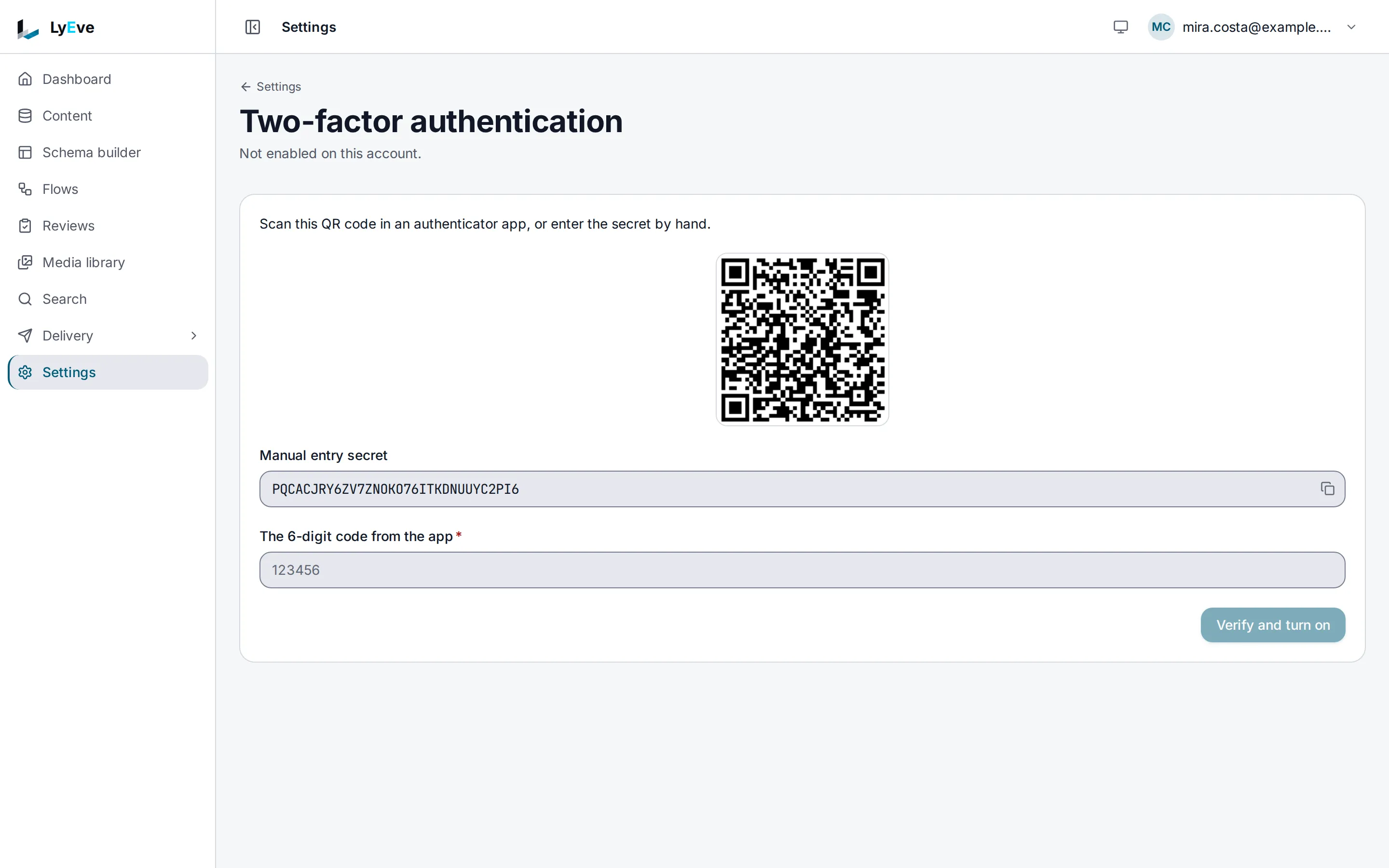
- Scan the QR code with an authenticator app, or copy the Manual entry secret.
- Enter The 6-digit code from the app and choose Verify and turn on.
- Save the eight backup codes, or choose Copy all codes. They are shown once.
To turn it off, enter a current code or a backup code on the same page and choose Turn off.
To move to another authenticator app, enter a current code or a backup code on the same page and choose Replace the authenticator app, then scan the new QR code and verify a code from it. The old key keeps working until you do. An account that holds only a passkey confirms with Confirm with a passkey, or with a code, before it sets up an app.
How it works
Link to the section How it works| Method | Used for |
|---|---|
| TOTP | A six-digit code that changes every 30 seconds. Each code is accepted once, at sign-in as well as when TOTP is turned on or off or the backup codes are replaced. A code already used is refused, so wait for the app to show the next one. |
| Backup codes | Eight single-use codes shown when TOTP is turned on. Each one works once in place of a code. |
| Passkeys and security keys | A second step, a sign-in without a password, or, for a key marked as the backup, a recovery sign-in. Enrolling one needs mfa-pro. |
When an account holds a second factor, a password sign-in does not return a
session, at POST /api/admin/auth/login or at the Content API's
POST /api/v1/auth/token. It returns a challenge:
{ "mfa_required": true, "challenge_token": "eyJhbGciOi...", "mfa_methods": ["totp"]}mfa_methods lists totp for every account, and adds webauthn for an
account that holds a passkey. A code finishes the challenge at
POST /api/admin/auth/mfa-verify, and a passkey finishes it as
Use passkeys shows. Each challenge gives one session,
whichever factor finishes it, and expires five minutes after it is issued. The
session acts in the tenant the password step signed in to, with the roles the
account holds there when the challenge is finished. TOTP secrets are encrypted at rest with the
instance's ENCRYPTION_KEY.
Turn it on
Link to the section Turn it on- TOTP and backup codes need nothing more. For passkeys, run with a license
that carries
mfa-pro. See licensing and tiers. - For passkeys, set
WEBAUTHN_RPIDto the domain the console is served from, andWEBAUTHN_RP_ORIGINSto its origin. Set them before anyone registers a passkey. - Restart the instance.
Each person then turns on an authenticator app in the console, as In the console shows. Passkeys are registered over the API, as Use passkeys shows.
This enrolls an authenticator app, signs in with it and turns it off. Use an account of your own.
Console v0.28.0
- Open the account menu in the header and choose Two-factor authentication, then Turn on two-factor authentication.
- Scan the QR code with an authenticator app, enter The 6-digit code from the app and choose Verify and turn on.
- Save the eight backup codes, or choose Copy all codes, then choose Done.
Engine API v0.62.0
Keep the account's token in TOKEN. The
quickstart shows how to get one.
-
Check the account's state:
Shell curl http://localhost:3001/api/admin/mfa/status \-H "Authorization: Bearer $TOKEN"JSON { "enabled": false, "has_passkeys": false, "passkeys": [] } -
Start enrollment:
Shell curl -X POST http://localhost:3001/api/admin/mfa/totp/setup \-H "Authorization: Bearer $TOKEN"JSON {"provisioning_uri": "otpauth://totp/LyEve:ada@example.com?algorithm=SHA1&digits=6&issuer=LyEve&period=30&secret=NY3NKSCE3CGYD7OHLXACNIGQZXREXM6Y","secret": "NY3NKSCE3CGYD7OHLXACNIGQZXREXM6Y"}Add
secretto an authenticator app, or showprovisioning_urias a QR code. -
Confirm with the code the app shows:
Shell curl -X POST http://localhost:3001/api/admin/mfa/totp/verify \-H "Authorization: Bearer $TOKEN" \-H "Content-Type: application/json" \-d '{"code": "123456"}'JSON { "enabled": true, "backup_codes": ["cee0a58bbf71c80d", "4be04c5798897db9", "..."] }Save the eight backup codes now. A wrong code answers
422withinvalid TOTP code.
Then sign in again. Wait for the app to show a new code first, because the code that turned TOTP on is spent.
Console v0.28.0
Sign out, then sign in with your email and password. The page asks for Two-factor verification. Enter a code from the app, or a backup code, in Authenticator code and choose Verify.
Engine API v0.62.0
-
Sign in with
POST /api/admin/auth/login. The answer is now the challenge shown above. Copychallenge_tokenintoCHALLENGE. -
Finish the sign-in with a code from the app, or with a backup code:
Shell curl -X POST http://localhost:3001/api/admin/auth/mfa-verify \-H "Content-Type: application/json" \-d '{"challenge_token": "'"$CHALLENGE"'", "code": "123456"}'The answer is a normal sign-in, with
tokenandrefresh_token. CopytokenintoTOKEN. Sending the same challenge again answers401withThe MFA challenge has expired. Please log in again.
Turn it off with a current code or a backup code:
Console v0.28.0
On Two-factor authentication, enter the code in the Code field under Turn off and choose Turn off.
Engine API v0.62.0
curl -X POST http://localhost:3001/api/admin/mfa/totp/disable \ -H "Authorization: Bearer $TOKEN" \ -H "Content-Type: application/json" \ -d '{"code": "7cfaca44e9aae775"}'The answer is 204.
Replace the backup codes
Link to the section Replace the backup codesThe console has no screen for this on the current release, so it is an API
call. POST /api/admin/mfa/backup-codes/regenerate with a current code in
{"code": "123456"} replaces all eight with new ones and returns them as
backup_codes. A code from the same 30-second window as the last code that
turning TOTP on or off or replacing backup codes accepted is refused, so wait
for the app to show the next code.
Add or remove a factor
Link to the section Add or remove a factorThe first factor an account enrolls needs only the signed-in session. Once the account holds one (an authenticator app, a backup code or a passkey), setting up an authenticator app, registering a passkey and removing a passkey each need proof of a factor it already holds, in the request body:
{"code": "123456"}: a current code from the authenticator app, or an unused backup code in the same field. A backup code used this way is spent.{"proof_session_id": "<session_id>", "assertion": {...}}: a passkey assertion. Get its challenge fromPOST /api/admin/mfa/proof/begin, which answers asession_idand theoptionsfornavigator.credentials.get(). The challenge proves a factor once and signs nobody in. The route answers404when the account has no passkey.
To replace an authenticator app:
Console v0.28.0
On Two-factor authentication, enter a current code or a backup code in the Code field under Replace the authenticator app and choose Replace the authenticator app. Scan the new QR code and verify a code from it. The page then shows eight new backup codes.
Engine API v0.62.0
Send the proof to POST /api/admin/mfa/totp/setup:
curl -X POST http://localhost:3001/api/admin/mfa/totp/setup \ -H "Authorization: Bearer $TOKEN" \ -H "Content-Type: application/json" \ -d '{"code": "123456"}'The new key replaces the old one once POST /api/admin/mfa/totp/verify
accepts a code from it.
A wrong proof counts toward the same lockout as a wrong code.
Removing a passkey with DELETE /api/admin/mfa/webauthn/credentials/{id} takes
the same body. When that passkey is the last factor the account holds, with no
authenticator app and no backup codes, removing it turns two-factor
authentication off for the account.
A setup or a passkey registration started while the account held no factor
does not finish once the account holds one: start it again with a proof. TOTP
verify then answers 409 with mfa.totp.setup_unproven, and passkey
registration answers 409 with mfa.webauthn.factor_added at the complete
call.
Use passkeys
Link to the section Use passkeysConsole v0.25.0 has no screen to register a passkey or to sign in with one, so
this is done over the API, from a page of your own that calls the browser's
navigator.credentials functions.
Registering a passkey and marking one as the backup key need mfa-pro. Every
sign-in with a passkey stays free, so a passkey enrolled while the license
covered it keeps working after a lapse, through the second step of a password sign-in, passwordless,
cross-device and recovery sign-in alike. Listing, renaming and removing a
passkey, and clearing its backup mark, are free too. Without mfa-pro the
register routes answer
402 with {"error": "payment_required", "plugin": "mfa", "feature": "feature:mfa-pro", "upgrade_url": ""}.
Every WebAuthn route comes in a begin and complete pair:
- Call the
beginroute. It returns asession_idand theoptionsto pass to the browser'snavigator.credentials.create()ornavigator.credentials.get(). - Send the browser's credential as the JSON body of the
completeroute, with?session_id=<session_id>in the query.
Registration takes an optional &name= in the query of the complete call, and
answers 201 with {"registered": true}.
To finish a password sign-in's challenge with a passkey, send
{"challenge_token": "<challenge_token>"} to
POST /api/admin/mfa/webauthn/auth/begin. The complete call,
POST /api/admin/mfa/webauthn/auth/complete, takes both
?challenge_token=<challenge_token>&session_id=<session_id> in the query and
answers {"token": "eyJhbGciOi..."}. Neither call needs a session. A
challenge already finished, by a code or a passkey, answers 401 with
invalid challenge token. Passwordless sign-in answers with a
session:
{ "token": "eyJhbGciOi...", "user_id": "5f0c...", "email": "ada@example.com", "expires_in": 900}The token lives for JWT_EXPIRY_SECS.
GET /api/admin/mfa/webauthn/credentials lists the person's passkeys as
{"data": [...], "limit", "offset", "total_count"}, each with its id,
name, is_backup, created_at and last_used_at, and
GET /api/admin/mfa/status then reads "has_passkeys": true.
Mark a passkey as the backup key with
PUT /api/admin/mfa/webauthn/credentials/{id}/backup and the body
{"is_backup": true}. Recovery sign-in accepts only a backup key, and its
begin call answers 400 no backup security key registered when the person has
none.
A cross-device sign-in starts at
POST /api/admin/auth/webauthn/cross-device/start, which returns a
session_id, a qrcode_url and expires_at. It expires two minutes after it
starts.
Reset someone's MFA
Link to the section Reset someone's MFAThe console has no screen for this on the current release, so it is an API call. A super admin who acts across every tenant can turn off another person's MFA, for example when they lost their phone and their backup codes:
curl -X POST http://localhost:3001/api/admin/mfa/admin-reset \ -H "Authorization: Bearer $TOKEN" \ -H "Content-Type: application/json" \ -d '{"user_id": "5f0c7b1e-1d2a-4c3b-9e8f-0a1b2c3d4e5f", "reason": "Lost device, identity checked by phone"}'{ "disabled": true, "target_user": "5f0c7b1e-1d2a-4c3b-9e8f-0a1b2c3d4e5f" }reason is required and recorded with the reset. The person then enrolls
again.
Settings
Link to the section Settings| Variable | What it does | Default |
|---|---|---|
WEBAUTHN_RPID | The domain passkeys are bound to, such as admin.example.com. | DOMAIN, then localhost |
WEBAUTHN_RP_DISPLAY_NAME | The name an authenticator shows for your instance. | LyEve |
WEBAUTHN_RP_ORIGINS | Comma-separated origins allowed to use passkeys. List a console development server's origin here. | https://<rpid> |
MFA_TOTP_ISSUER | The name shown against the entry in an authenticator app. | the display name |
PUBLIC_URL | Base URL for the cross-device QR code when the request has no Origin header. | https://localhost |
Changing WEBAUTHN_RPID makes every passkey already registered unusable. The
relying party settings take effect at restart. The issuer name and the token
lifetime take effect without one. If you set LYEVE_PLUGINS, include mfa in
it.
The routes under /api/admin/mfa act on the signed-in person and need a
session, apart from the two under /api/admin/mfa/webauthn/auth. An admin
token is refused on all of them. Those two and the routes under
/api/admin/auth/webauthn run before a session exists, so they are public,
each with its own rate limit.
Enrollment, passkeys and sign-in routes
| Method | Path | Who | Purpose |
|---|---|---|---|
GET | /api/admin/mfa/status | signed in | Whether MFA is on, and the person's passkeys |
POST | /api/admin/mfa/totp/setup | signed in | Start TOTP enrollment |
POST | /api/admin/mfa/totp/verify | signed in | Confirm enrollment with a code and get backup codes |
POST | /api/admin/mfa/totp/disable | signed in | Turn TOTP off with a current code or a backup code. 204 |
POST | /api/admin/mfa/backup-codes/regenerate | signed in | Replace the backup codes |
POST | /api/admin/mfa/webauthn/register/begin | signed in | Start registering a passkey |
POST | /api/admin/mfa/webauthn/register/complete | signed in | Finish registering a passkey. 201 |
POST | /api/admin/mfa/proof/begin | signed in | Start a passkey check that proves a factor before one is added or removed |
POST | /api/admin/mfa/webauthn/auth/begin | public | Start finishing a password sign-in's challenge with a passkey |
POST | /api/admin/mfa/webauthn/auth/complete | public | Finish a password sign-in's challenge with a passkey and get a token |
GET | /api/admin/mfa/webauthn/credentials | signed in | List the person's passkeys |
PUT | /api/admin/mfa/webauthn/credentials/{id}/name | signed in | Rename a passkey |
PUT | /api/admin/mfa/webauthn/credentials/{id}/backup | signed in | Mark or unmark a passkey as the backup key |
DELETE | /api/admin/mfa/webauthn/credentials/{id} | signed in | Remove a passkey |
POST | /api/admin/mfa/admin-reset | super_admin | Turn off another person's MFA |
POST | /api/admin/auth/mfa-verify | public | Exchange a challenge and a code for a session |
POST | /api/admin/auth/webauthn/login/begin | public | Start passwordless sign-in |
POST | /api/admin/auth/webauthn/login/complete | public | Finish passwordless sign-in and get a token |
GET | /api/admin/auth/webauthn/conditional | public | Start a sign-in offered through browser autofill |
POST | /api/admin/auth/webauthn/recovery/begin | public | Start a sign-in with the backup security key |
POST | /api/admin/auth/webauthn/recovery/complete | public | Finish a recovery sign-in |
POST | /api/admin/auth/webauthn/cross-device/start | public | Start a cross-device sign-in and get a QR code URL |
GET | /api/admin/auth/webauthn/cross-device/{sessionID}/status | public | Poll a cross-device sign-in |
GET | /api/admin/auth/webauthn/cross-device/{sessionID}/qr | public | Fetch the QR code payload |
POST | /api/admin/auth/webauthn/cross-device/complete | public | Approve a cross-device sign-in from the phone |
Limits and errors
Link to the section Limits and errorsAt the password step (POST /api/admin/auth/login and POST /api/v1/auth/token):
| Status | Message | Cause |
|---|---|---|
503 | Multi-factor authentication is temporarily unavailable. Please try again later., code AUTH_MFA_STORE_ERROR | The account's second factors could not be read. The password is not refused and no session is issued, so try again. |
At sign-in (POST /api/admin/auth/mfa-verify):
| Status | Message | Cause |
|---|---|---|
422 | The provided verification code is invalid. | The code is wrong and is not an unused backup code. A wrong six-digit code counts toward the lockout even while backup codes cannot be read. |
429 | Too many MFA verification attempts. Please log in again to receive a new challenge. | 5 wrong codes for the account within 15 minutes, or 5 tries on one challenge. |
On the routes under /api/admin/mfa:
| Status | Message | Cause |
|---|---|---|
422 | invalid TOTP code or invalid code | The code is wrong or was already used. |
429 | too many verification attempts, try again later | More than 5 code checks in 5 minutes. |
429 | account temporarily locked due to too many failed attempts | 10 failures in a row lock code checks for 30 minutes. |
Adding or removing a factor on an account that already holds one answers these
codes in the code field:
| Status | Code | Cause |
|---|---|---|
400 | mfa.totp.current_code_required | Authenticator setup sent no proof. |
422 | mfa.totp.current_code_invalid | Authenticator setup sent a proof that matches no factor the account holds. |
400 | mfa.webauthn.proof_required | Passkey registration or removal sent no proof. |
422 | mfa.webauthn.proof_invalid | Passkey registration or removal sent a proof that matches no factor the account holds. |
409 | mfa.totp.setup_unproven | The authenticator setup started without proof, before the account held a factor. Start it again. |
409 | mfa.webauthn.factor_added | The passkey registration started without proof, and the account gained a factor before it finished. Start it again. |
Every other error
| Status | Message | Cause |
|---|---|---|
429 | too many setup attempts, try again later | More than 3 setup calls in an hour. |
400 | no pending TOTP enrollment | Verify was called before setup on an account that never started enrollment. After a turn-off, the same call answers 503 with mfa verification error. |
400 | MFA not enabled | Disable or regenerate was called on an account without MFA. |
409 | The authenticator setup changed while this code was checked. Start setup again. | Another setup, verify or turn-off changed the pending key while TOTP verify checked the code. |
401 | The MFA challenge has expired. Please log in again. | The challenge was used already or ran out. |
401 | invalid challenge token | A passkey tried to finish a challenge that was used already, ran out or belongs to another tenant's domain. |
403 | admin-reset requires platform-level super_admin (no tenant scope) | A super admin acting in one tenant called the reset. |
503 | WebAuthn not configured | A passkey route was called while passkeys cannot run. |
402 | payment_required | Registering a passkey, or marking one as the backup key, without mfa-pro. |
404 | no passkey is registered on this account | A passkey proof was started on an account with no passkey. |
503 | failed to delete credential | Removing a passkey failed on the server. Nothing was removed, so try again. |
Troubleshooting
Link to the section Troubleshooting- The browser refuses to create a passkey.
WEBAUTHN_RPIDmust be the console's domain or a parent of it, and the page's origin must be inWEBAUTHN_RP_ORIGINS. - The QR code points at
https://localhost. SetPUBLIC_URLto the instance's public address. - Someone is locked out of every factor. A super admin resets their MFA, and they enroll again.
Related
Link to the section Related- Sign-in options: every way to sign in, side by side.
- Trusted devices: ask for the second step only when a sign-in looks risky.
- Admin tokens: creating one asks for an MFA code when the account has MFA.
- Harden your instance.