Features
GraphQL API
Requires a license with the
graphqlfeature. See pricing.
The GraphQL API serves your content types as one GraphQL schema at
/api/v1/graphql, beside the REST Content API. Every content type gets a list
query, a single-entry query and create, update and delete mutations, and the
schema follows your content types without a restart. A client asks for exactly
the fields it needs, and subscriptions tell it when content changes.
In the console
Link to the section In the consoleOpen Delivery > GraphQL. Endpoints gives the address for queries and mutations and the one for subscriptions, with A first request to copy. Schema lists every root field generated from your content types under Queries, Mutations and Subscriptions, with its arguments and what it does. Persisted queries lists the queries clients may send by hash, each with its Operation, Hash and Query, and buttons to copy the hash, disable the query or delete it. New persisted query registers one.
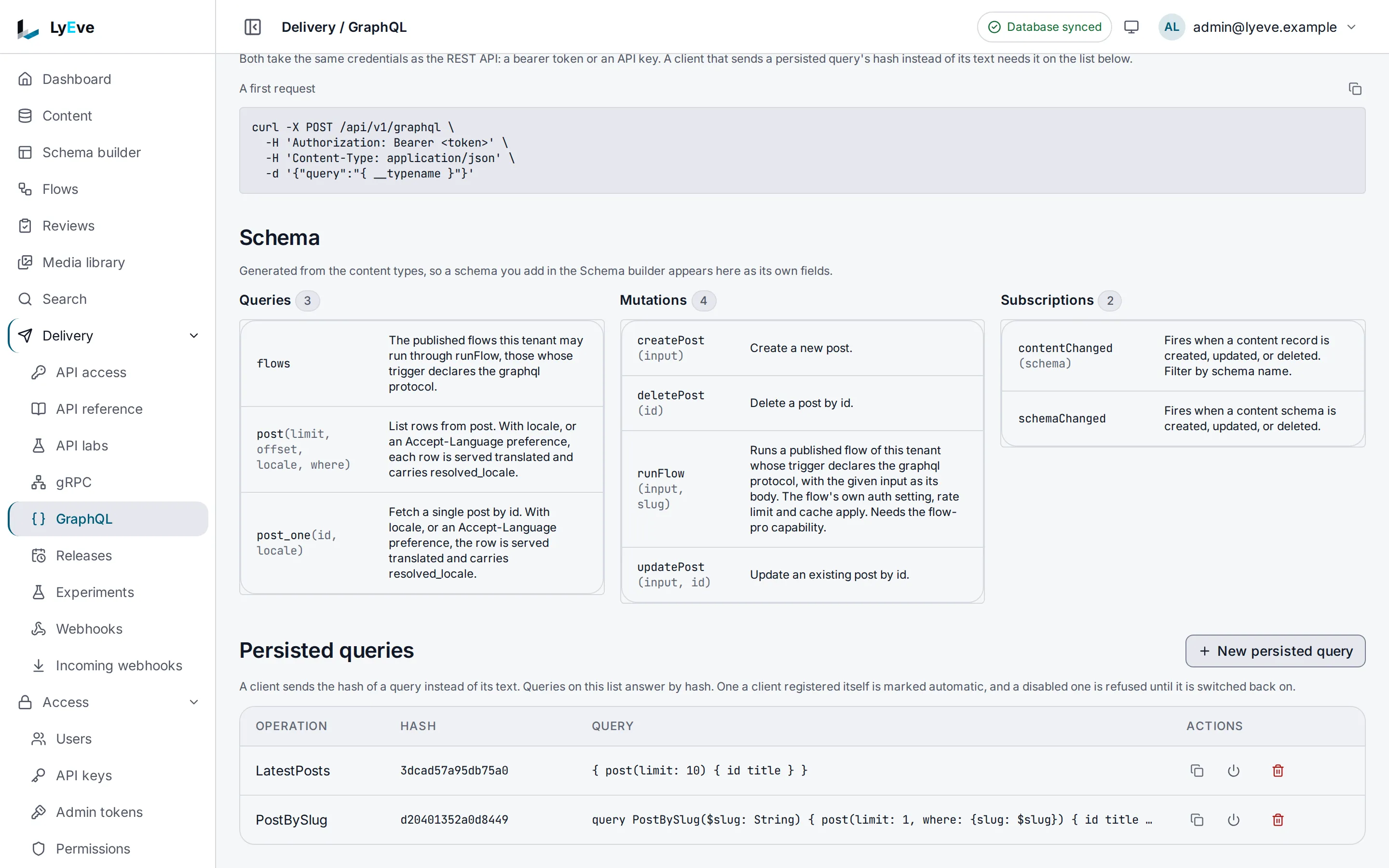
Try it in API labs opens Delivery > API labs, where you choose GraphQL and run a query or a mutation as you. Subscriptions and requests by hash are made by a client, and the persisted query rules are settings.
How the schema is built
Link to the section How the schema is builtThe schema is generated from your content types and rebuilt when one is
created or changed. For a content type named post:
| Field | Arguments | Returns |
|---|---|---|
post | limit (default 50, 1 to 500), offset, where, locale | A list of Post, newest first |
post_one | id, locale | One Post, or null when it does not exist |
createPost | input | The created Post |
updatePost | id, input | The updated Post, or null when it does not exist |
deletePost | id | true when an entry was deleted |
| Content type name | List | Single | Type and mutation suffix |
|---|---|---|---|
post | post | post_one | Post |
articles | articles | article | Articles |
blog-post | blog_post | blog_post_one | BlogPost |
news | news | news_one | News |
The list field is the name with - turned into _. The single field drops a
final s when at least three characters remain and the name does not end in
ss, us, is or ws, and adds _one otherwise. Types and mutations use the
name in PascalCase, never singularized, so articles gives createArticles.
Introspection, or the GraphQL page in LyEve Console, shows the exact
names.
Every type has id and, when the content type keeps them, created_at and
updated_at. Fields map by field_type:
field_type | GraphQL type |
|---|---|
number | Float |
boolean | Boolean |
datetime | DateTime, an RFC 3339 string |
json | JSON, passed through |
uid | ID |
every other type, such as text, rich_text, email, url and media | String |
Every content field is nullable on output, required ones included, because an
access rule can hide any field, and a hidden field reads as null. If you
generate typed clients from the schema, generate them again. A required field
is non-null in a create input unless it declares a default. Every field of
an update input is optional. A belongs_to relation appears as
<field>_id, the related entry's id, and can be filtered. A create or update
input sets it under the same <field>_id, so an entry you read can be written
back as it reads. A relation kept on the other content type, such as
has_many, is not part of an input. Every type also has resolved_locale,
set when the read asked for a locale.
A content type's transports block decides whether GraphQL serves it: r
gives queries only, w mutations only, and off removes the type from the
schema and from subscriptions. See Transports.
You need a content type named post, such as the one in
Create your first content type.
For the console steps, you are signed in to the console as an admin.
For the API steps, you need a token in TOKEN. The
quickstart shows how to get one.
1. Check the endpoint is on.
Console v0.28.0
Open Delivery > GraphQL. Endpoints gives the address for queries and mutations and the one for subscriptions.
Engine API v0.62.0
curl http://localhost:3002/api/v1/graphql -H "Authorization: Bearer $TOKEN"{ "message": "GraphQL endpoint ready. POST a query to this URL.", "plugin": "graphql", "version": "v0.58.0" }2. Create an entry. A mutation needs the editor, admin or
super_admin role.
Console v0.28.0
Open Delivery > API labs and choose GraphQL. Paste this in Query or mutation and choose Send:
mutation { createPost(input: {title: "From GraphQL", slug: "from-graphql"}) { id title } }The console asks Send this mutation? first. Choose Send it.
The answer shows the status and the body with the new entry's id.
Engine API v0.62.0
curl -X POST http://localhost:3002/api/v1/graphql \ -H "Authorization: Bearer $TOKEN" \ -H "Content-Type: application/json" \ -d '{"query": "mutation { createPost(input: {title: \"From GraphQL\", slug: \"from-graphql\"}) { id title } }"}'{ "data": { "createPost": { "id": "6265e2d6-a68e-4c93-b18a-d25f424cd6a8", "title": "From GraphQL" } } }3. Query it with a filter.
Console v0.28.0
In API labs with GraphQL chosen, replace the text in Query or mutation with this query and choose Send:
{ post(limit: 5, where: {slug: "from-graphql"}) { id title } }A query runs without a question.
Engine API v0.62.0
curl -X POST http://localhost:3002/api/v1/graphql \ -H "Authorization: Bearer $TOKEN" \ -H "Content-Type: application/json" \ -d '{"query": "{ post(limit: 5, where: {slug: \"from-graphql\"}) { id title } }"}'{ "data": { "post": [ { "id": "6265e2d6-a68e-4c93-b18a-d25f424cd6a8", "title": "From GraphQL" } ] } }4. Register a query as persisted.
Console v0.28.0
Open Delivery > GraphQL and choose New persisted query. Enter
{ post(limit: 10) { id title } } in Query and LatestPosts in
Operation name, and choose Create. The query is listed under
Persisted queries with its hash. Copy the hash copies it.
Engine API v0.62.0
curl -X POST http://localhost:3001/api/admin/graphql/persisted-queries \ -H "Authorization: Bearer $TOKEN" \ -H "Content-Type: application/json" \ -d '{"query": "{ post(limit: 10) { id title } }", "operation_name": "LatestPosts"}'The persisted-query routes are admin routes, so TOKEN has to be an admin's.
The answer is 201 with query_hash, the SHA-256 of the query text.
5. Run it by hash alone. Only a client sends a hash, so this step is an
API call. Take the hash from Copy the hash in the console or from
query_hash:
curl -X POST http://localhost:3002/api/v1/graphql \ -H "Authorization: Bearer $TOKEN" \ -H "Content-Type: application/json" \ -d '{"extensions": {"persistedQuery": {"version": 1, "sha256Hash": "<query_hash>"}}}'The answer is the same data as sending the text.
Query and filter
Link to the section Query and filterlimitdefaults to 50 and is held between 1 and 500. A negativeoffsetcounts as 0.wherematches fields by equality, combined with AND.idand<field>_idrelations can always be filtered. Media and JSON fields cannot.locale, or anAccept-Languageheader, serves translated fields. See Localization.
A mutation's update input needs at least one field. On a content type with
soft delete, delete sets deleted_at instead of removing the row, and
update answers null for a deleted entry. A content type with no fields of
its own gets no create mutation. Queries
and mutations only reach the caller's tenant.
Creates and updates follow the content type's validation rules, as REST writes
do. A create fills in each field's default first, so a required field with a
default can be left out. An update checks only the fields it sets, and checks a
rule across two fields against the stored entry. A refusal answers
INVALID_INPUT with the same message REST gives, field and rule beside the
code, and every failure under extensions.validation, each with field,
rule, code and message.
To clear a field, send null for it in a variable. A field the input leaves
out keeps its value, and a required field refuses null with INVALID_INPUT.
A null written in the query text is refused as a syntax error, so pass it in
a variable:
curl -X POST http://localhost:3002/api/v1/graphql \ -H "Authorization: Bearer $TOKEN" \ -H "Content-Type: application/json" \ -d '{"query": "mutation($id: ID!, $input: PostUpdateInput!) { updatePost(id: $id, input: $input) { id body } }", "variables": {"id": "8ca037f9-41ce-4b19-9e69-2e1eeab8e2e0", "input": {"body": null}}}'{ "data": { "updatePost": { "body": null, "id": "8ca037f9-41ce-4b19-9e69-2e1eeab8e2e0" } } }Who may call it
Link to the section Who may call itEvery /api/v1/graphql route needs a signed-in caller or an API key, with the
same token you use for REST.
- Mutations need the
editor,adminorsuper_adminrole. An API key needs thegraphql:writescope for a mutation, andgraphql:readfor the route itself. - Introspection is open to admins only by default.
GRAPHQL_INTROSPECTIONchanges that. - The body must be
Content-Type: application/json, or the answer is415. Browser forms cannot send that type, and cross-origin JSON needs a preflight that LyEve refuses, which closes cross-site requests.
Subscribe to changes
Link to the section Subscribe to changesConnect a WebSocket to /api/v1/graphql/ws with the graphql-transport-ws
subprotocol, the protocol of the graphql-ws client library. A connection that
does not offer it is closed with 1008 right after the upgrade.
-
Authenticate the upgrade request itself, with an
Authorizationheader or the session cookie, like any other call, and sendconnection_initwith an empty payload. A client that cannot set a header on the upgrade sends{"Authorization": "Bearer <token>"}as the firstconnection_initpayload instead. The server answersconnection_ack. -
The upgrade needs an
Originheader that is inCORS_ORIGINSor matches the instance's own host, or it is refused with403 origin not allowed. -
The socket carries subscriptions only. A query or a mutation sent over it is refused with an
errormessage whoseextensions.codeisOPERATION_NOT_SUPPORTED. Send those as a POST to/api/v1/graphql. -
One socket runs at most 32 subscriptions at once. One more is refused with an
errormessage whoseextensions.codeisTOO_MANY_SUBSCRIPTIONS, and the others carry on. Complete one before you start another. -
With
GRAPHQL_REQUIRE_PERSISTED=true, a subscription has to be an approved persisted query too. See Lock clients to persisted queries. -
The server answers a
pingwith apongthat carries the same payload, so a client's keep-alive works. -
A subscriber that reads too slowly is dropped, and the server sends
completefor it. Subscribe again to continue. -
When the connection itself is at fault, the server closes the socket with the protocol's code, which the
graphql-wsclient reads:Code Cause 4400A message the protocol does not allow, such as an unknown type.4401A subscribebeforeconnection_ack.4403The server refused connection_init, such as for a token that does not verify.4409A subscribewhoseidis already running.4429A second connection_init.
| Subscription | Fires when | Fields |
|---|---|---|
schemaChanged | A content type is created or changed. | schema, action, timestamp |
contentChanged(schema: "post") | An entry of that type is created, updated or deleted. Leave out schema for every type. | schema, action, recordId, data, timestamp |
data is the stored entry, its system fields included: after the change, or
as it was on a delete. schemaChanged reports every change with the
action value create, and deleting a content type sends nothing.
Lock clients to persisted queries
Link to the section Lock clients to persisted queriesPersisted queries follow the Automatic Persisted Queries protocol: a client
sends extensions.persistedQuery.sha256Hash instead of the text. Each tenant
has its own list.
- An unknown hash answers an error whose
extensions.codeisPERSISTED_QUERY_NOT_FOUND. - With
GRAPHQL_REQUIRE_PERSISTED=true, a request without a hash answersPERSISTED_QUERY_REQUIRED. A hash that is not on the list, or that you turned off, answersPERSISTED_QUERY_NOT_FOUNDeven when the text comes with it. Only approved operations run. - With
GRAPHQL_ALLOW_AUTO_REGISTER=true, a client that sends the hash and the text together adds the query itself, up toGRAPHQL_MAX_AUTO_REGISTEREDper tenant. Keep it off in production. - The same rules hold for subscriptions. Over the WebSocket, put the hash in
the
extensionsof thesubscribepayload, with the text or with an emptyquery.
Persisted query routes
Every persisted-query route needs an admin token.
| Method | Path | Purpose |
|---|---|---|
GET | /api/admin/graphql/persisted-queries | List, with search, limit and offset. Answers {"data", "total", "limit", "offset"}. |
POST | /api/admin/graphql/persisted-queries | Register query, with operation_name and description. Answers 201. |
GET | /api/admin/graphql/persisted-queries/{hash} | One query. |
DELETE | /api/admin/graphql/persisted-queries/{hash} | Remove a query. Answers 204. |
PATCH | /api/admin/graphql/persisted-queries/{hash}/toggle | Turn a query on or off. Answers {"query_hash", "enabled"}. |
These routes need the admin role.
Run flows
Link to the section Run flowsWhen flows run beside GraphQL, the schema gains a runFlow
mutation and a flows query. Neither exists otherwise.
mutation { runFlow(slug: "order-totals", input: { order: 7 }) { runId status headers body }}runFlowstarts a published flow of the caller's tenant whose HTTP trigger listsgraphqlinprotocols, withinputas the trigger body. It answers the run id (empty when the flow's cache answered), the status, the headers and the body.flowslists the flows callable here:slug,name,description,authandinputSchema.- The flow's
authsetting decides who may run it:publicandauthflows answer,adminflows do not. Its rate limit and cache count GraphQL callers apart from REST callers.runFlowdoes not need the editor role, but a document that also selects a content mutation still does. - Starting a flow over GraphQL needs
flow-pro.
A refusal is a GraphQL error whose extensions.code is NOT_FOUND,
PAYMENT_REQUIRED, RATE_LIMITED, LOOP_DETECTED, INVALID_INPUT (input
is not an object) or UNAVAILABLE.
The graphql.query node runs a query against the tenant's own schema from a
flow, with query, variables and operation_name, and outputs
{ data, errors }. It refuses mutations, so writes from a flow go through its
content node. When the schema cannot be read, as while the database is down,
the step fails with the GraphQL schema is unavailable, and the flow can run
again later.
Settings
Link to the section SettingsEach setting can also be written in the configuration file under graphql,
such as graphql.max_query_depth.
| Variable | What it does | Default |
|---|---|---|
GRAPHQL_INTROSPECTION | on, off or admin-only. Another value means admin-only. | admin-only |
GRAPHQL_MAX_QUERY_DEPTH | Deepest allowed nesting | 7 |
GRAPHQL_MAX_QUERY_COST | Highest allowed query cost, where list fields cost more | 1000 |
GRAPHQL_QUERY_TIMEOUT | Longest a query may run, such as 10s | 30s |
GRAPHQL_REQUIRE_PERSISTED | Refuse every query that is not persisted | false |
GRAPHQL_ALLOW_AUTO_REGISTER | Let clients register persisted queries themselves | false |
GRAPHQL_MAX_AUTO_REGISTERED | Most self-registered queries per tenant | 1000 |
CORS_ORIGINS | Origins a browser may open a subscription from | none |
A query may select at most 500 fields, and a request body is at most 256 KiB.
If you set LYEVE_PLUGINS to choose which features start, include graphql.
See Licensing and tiers.
Errors arrive as {"errors": [{"message": "..."}]}.
| Status | Message | Cause |
|---|---|---|
400 | max query depth 7 exceeded: 9 | The query nests too deeply. |
400 | max query cost 1000 exceeded: 1450 | The query costs too much. |
403 | mutation requires editor, admin, or super_admin role | A viewer sent a mutation. |
415 | unsupported media type, expected application/json or multipart/form-data, or Content-Type must be application/json | The body is not application/json. |
A query or mutation that fails on the content itself still answers 200, with
an error whose extensions.code says why. The message never names a table, a
column or the database.
extensions.code | Message | Cause |
|---|---|---|
INVALID_INPUT | The rule's message, such as The field title is required. | A value breaks a validation rule of the content type. |
INVALID_INPUT | a value in the input was refused | The database refused a value, such as a relation to an entry that does not exist. |
INVALID_INPUT | invalid id | An id argument that is not a UUID. |
CONFLICT | the input conflicts with an existing entry | A unique field already holds the value. |
NOT_FOUND | content type not found | The content type has no table, as while it is being deleted. |
UNAVAILABLE | content is unavailable | The database could not be reached. Try again. |
UNAVAILABLE | the entry was saved but could not be read back | The write went through. Read the entry rather than sending the write again. |
Every other error
| Status | Message | Cause |
|---|---|---|
400 | max field count 500 exceeded: 612 | The query selects too many fields. |
400 | introspection requires admin authentication | Introspection by a non-admin in admin-only mode. |
400 | introspection is disabled | Introspection with GRAPHQL_INTROSPECTION=off. |
400 | invalid request body, query is required | The body does not parse, or has no query. |
200 | code PERSISTED_QUERY_REQUIRED | A plain query while persisted queries are required. |
200 | code PERSISTED_QUERY_NOT_FOUND | A hash alone that is unknown or turned off. With persisted queries required, also a hash sent with its text that is not on the list or is turned off. |
200 | code PERSISTED_QUERY_HASH_MISMATCH | A hash sent with a text it is not the hash of. |
404 | The requested endpoint does not exist. | The license does not include graphql, so the feature does not start. |
403 | mutation requires the graphql:write scope | An API key without write scope sent a mutation. |
404 | persisted query not found | A wrong hash on the admin routes. |
Related
Link to the section Related- Content API: the REST version of these queries and mutations.
- Data model: the content types the schema is built from.
- Client libraries:
@lyeve-labs/client-graphqlwraps queries and subscriptions. - Flows: the flows
runFlowstarts.