Features
Object storage
Included free on every install, S3, MinIO, Google Cloud Storage and Azure Blob included.
Object storage decides where your files live. Media uploads, data exports and every other file the instance keeps go through it. Out of the box files go to local disk. Add a provider to send them to Amazon S3, an S3-compatible store, Google Cloud Storage or Azure Blob, and clients can then upload large files straight to the bucket.
In the console
Link to the section In the consoleOpen Settings > Storage. How storage works explains where uploads go, and with no provider the page reads No providers yet: uploads are then written to the engine's own directory. Each provider is a row with Test, Edit, Duplicate and Delete buttons, and a line under the list names the provider new uploads go to. Presigned and multipart uploads have no console screen, so they are API only on v0.25.0.
How it works
Link to the section How it works| Piece | What it does |
|---|---|
| Local disk | The default, under STORAGE_LOCAL_PATH. Used while no provider is configured. |
| Providers | Buckets or containers you add. A tenant with providers of its own uses only those. Other tenants use the instance's providers, the ones configured in the default tenant. |
| Choice per write | A write goes to the healthy provider with the lowest cost_weight above 0. When no provider sets one, the lowest priority wins. Health is checked every 30 seconds. |
| Reads | A read looks in every provider the file may be on. |
| Tenant prefix | Each tenant's files sit under tenant_<slug>/, so tenants never overwrite each other in a shared bucket. |
For the console steps, you are signed in to LyEve Console as a super admin. For the API
steps, you need a super admin token in TOKEN. The
quickstart shows how to get one.
1. See where files go now.
Console v0.28.0
Open Settings > Storage. With no provider configured, the page reads No providers yet and says uploads are written to the engine's own directory.
Engine API v0.62.0
curl http://localhost:3001/api/admin/storage/health \ -H "Authorization: Bearer $TOKEN"{"providers": [{"provider_id": "20d35ec0-bd5c-53a3-8111-b122a0d7ba4e", "provider_type": "local", "provider_name": "local-default", "status": "healthy", "latency_ms": 0.07, "last_check": "2026-10-01T09:17:20Z", "failures": 0}]}With no provider configured, files go to local disk.
2. Ask for a presigned upload. This is API only on v0.25.0. Local disk cannot presign, so
this answers 501 until a bucket is added:
curl -X POST http://localhost:3001/api/admin/storage/presign-upload \ -H "Authorization: Bearer $TOKEN" \ -H "Content-Type: application/json" \ -d '{"key": "videos/intro.mp4", "content_type": "video/mp4", "content_length": 73400320}'3. Add your S3 bucket.
Console v0.28.0
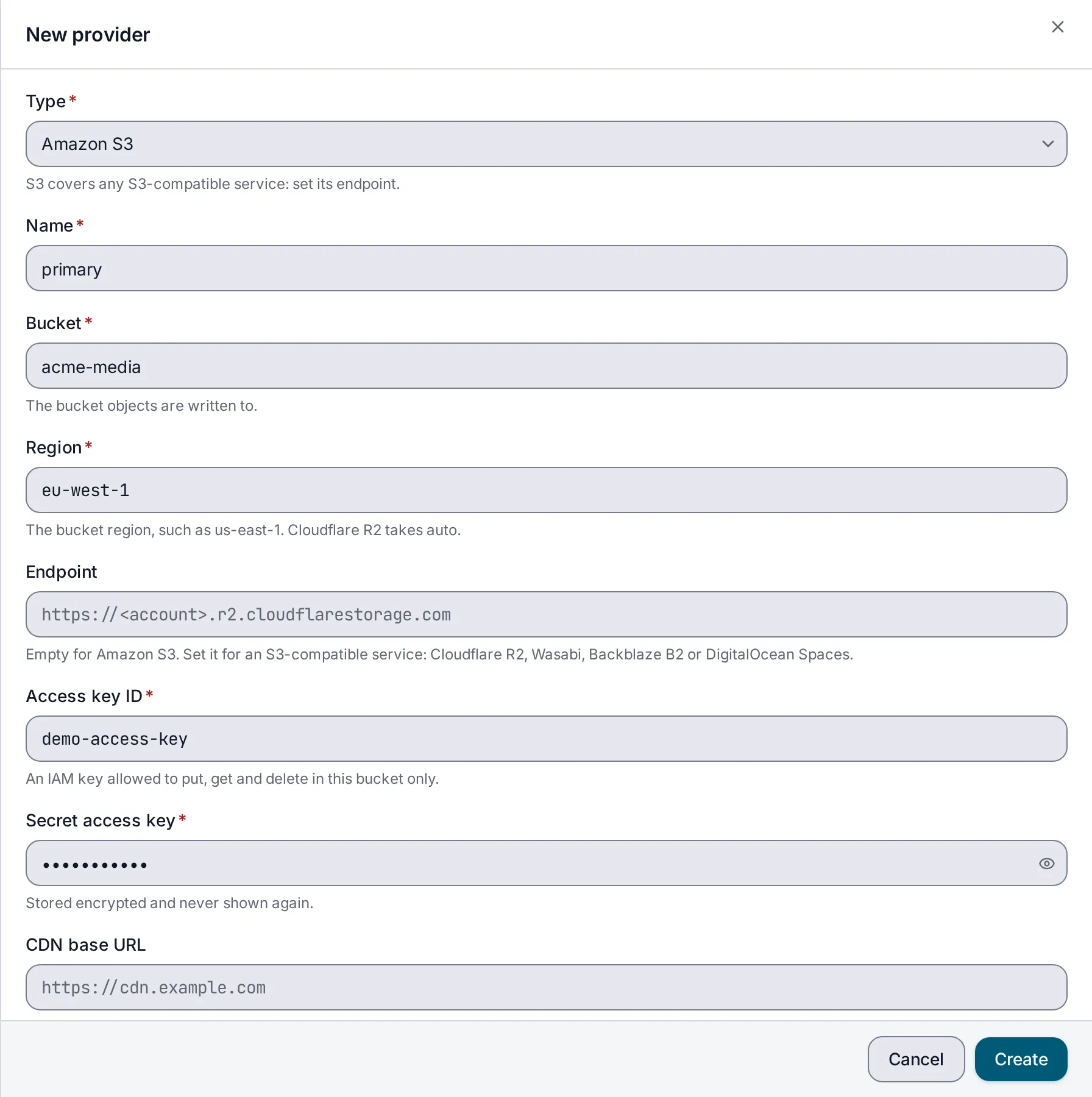
- Choose New provider and keep Amazon S3 as the Type. The other types are Google Cloud Storage, Azure Blob Storage, MinIO and Local directory.
- Enter
primaryin Name, your bucket in Bucket and its region in Region. Leave Endpoint empty for Amazon S3, and set it for an S3-compatible service. - Fill in Access key ID and Secret access key. The secret is stored encrypted and never shown again.
- Keep Use TLS and Enabled on, and choose Create. A lower Priority receives uploads first.
Engine API v0.62.0
curl -X POST http://localhost:3001/api/admin/storage/providers \ -H "Authorization: Bearer $TOKEN" \ -H "Content-Type: application/json" \ -d '{ "name": "primary", "provider_type": "s3", "bucket": "acme-media", "region": "eu-west-1", "access_key": "<access key id>", "secret_key": "<secret access key>", "use_ssl": true, "enabled": true }'The answer is 201 with the provider, without its credentials. A provider saved
over the API is off unless you send "enabled": true. Copy its id into
PROVIDER_ID.
4. Check that the instance can reach it.
Console v0.28.0
Choose Test on the primary row. The page confirms primary answered.
Engine API v0.62.0
curl -X POST http://localhost:3001/api/admin/storage/providers/$PROVIDER_ID/test \ -H "Authorization: Bearer $TOKEN"{"healthy": true, "latency_ms": 41.2, "provider_id": "...", "provider_name": "primary", "provider_type": "s3", "error": ""}When the bucket refuses, healthy is false and error reads
The S3 provider failed its check. Check the region, bucket, endpoint and keys.
5. Repeat step 2. The answer now carries an upload_url on your bucket. Send the file
from the client as Upload from the client shows.
Providers
Link to the section Providers| Field | Meaning | Default |
|---|---|---|
name | Label. | required |
provider_type | s3, minio, gcs, azure_blob or local. | required |
bucket | Bucket or container. | |
region | Region. | |
endpoint | Endpoint URL, for MinIO and other S3-compatible stores. An Azure endpoint takes no query, so no SAS token. Put the account name in access_key and the account key in secret_key, which sign every request. | |
access_key, secret_key | Credentials. Stored encrypted and never returned. On update, leave them out to keep the stored ones. | |
use_ssl | Use TLS. | false |
path_style | Path-style bucket addressing, which MinIO needs. | false |
cdn_base_url | Prefix for public file URLs. | |
cost_weight | Relative cost from 0 to 1. The lowest value above 0 is chosen first, and 0 means not set. | 0 |
priority | Lower is preferred when no provider sets a cost_weight. | 0 |
enabled | Whether the provider is used. | false |
local_public_unsigned | Local providers only. See below. | false |
Only a super admin can add, change or remove a provider. Set ENCRYPTION_KEY
to encrypt stored credentials with a key per tenant. An endpoint that resolves
to a private, loopback, link-local or cloud metadata address is refused, so a
store on your private network cannot be used. A store in the shared address
space 100.64.0.0/10, such as a Tailscale address, is allowed once the instance
starts with LYEVE_OUTBOUND_ALLOW_CGNAT=true, which
opens that range to every tenant.
Keep a tenant's files in its region
Link to the section Keep a tenant's files in its regionA tenant with a region writes only to providers in that region, on every
install. The region comes from the tenant's
data residency assignment when that feature is installed,
so the assignment you make there is the pin. STORAGE_TENANT_REGIONS is the
fallback, for an install without data residency or a tenant its assignment
names no region for:
STORAGE_TENANT_REGIONS="acme=eu-west-1, globex=us-east-1"- Every write the tenant makes, an upload, a presigned or multipart upload or
a listing, goes only to a provider whose
regionequals the pinned one. Among those, the usual choice by cost and priority applies. - When none of the tenant's providers is in the region, the write answers
409withno storage provider is configured in this tenant's data residency region. The local fallback has no region, so it never takes a pinned tenant's files. - When the tenant's assignment cannot be read, the upload answers
503withcannot determine this tenant's data residency regionrather than land anywhere.STORAGE_TENANT_REGIONSis not used in its place, because it may disagree with the assignment. - Reads still try every provider the tenant may use, so a file written before the pin stays readable.
- The assignment and the setting are read on every write, so a change applies to the next one. A tenant neither one names chooses providers as before.
The pin holds whatever the license says, so a lapse never lets a pinned tenant's next file leave its region.
S3-compatible stores
Link to the section S3-compatible storesAny store that speaks the S3 API works through provider_type: "s3" or
"minio":
| Store | endpoint | Notes |
|---|---|---|
| Amazon S3 | Leave it out. | Regional virtual-host addressing. |
| MinIO | Your MinIO host, at a public address. | Set path_style: true. |
| Cloudflare R2 | The R2 account endpoint. | |
| Another S3-compatible store | The store's endpoint. | Any store with an S3 API and keys. |
Upload and download a test file before you rely on a new store.
Start from environment variables
Link to the section Start from environment variablesIf STORAGE_S3_BUCKET is set when the instance starts and finds no providers
at all, it creates a provider named engine-config from the STORAGE_S3_*
settings, so a bucket you were already using keeps receiving files. Without
STORAGE_S3_KEY and STORAGE_S3_SECRET, the machine's own credentials, such as
an instance role, are used. The variables are read on that one start only.
After that, edit the provider.
Local files and signed links
Link to the section Local files and signed linksA file on a local provider is served at
/api/v1/storage/local/{provider}?key=<key>&expires=<time>&sig=<signature>.
The link is signed and expires, after 15 minutes unless the caller asks for
longer, so it works without a sign-in and cannot be edited to reach another
file. An edited or expired link answers 403, and a missing file 404.
Range requests work.
A local provider with local_public_unsigned: true hands out plain
cdn_base_url plus the key instead, with no signature and no expiry. Anyone
with the link can read the file for as long as it exists. Use it only when a
CDN serves the directory anyway. Only a super admin can set it, and only on a
local provider.
Upload from the client
Link to the section Upload from the clientA client uploads straight to S3, MinIO, Google Cloud Storage or Azure Blob with a presigned URL, without sending the file through the instance:
{ "upload_url": "https://acme-media.s3.eu-west-1.amazonaws.com/tenant_acme/videos/intro.mp4?X-Amz-Signature=<signature>", "key": "tenant_acme/videos/intro.mp4", "expires_in": 900}PUT the file to upload_url before it expires, with the same Content-Type
you asked for and the header x-amz-server-side-encryption: AES256. Both are
signed into the URL, so the store refuses a PUT that leaves either out:
curl -X PUT "$UPLOAD_URL" \ -H "Content-Type: video/mp4" \ -H "x-amz-server-side-encryption: AES256" \ --data-binary @intro.mp4Every write the instance makes to an S3 or MinIO store asks for server-side encryption the same way, so the store has to support it. MinIO does once it has a key management key configured, and refuses those writes until then.
content_lengthlocks the URL to that size. It is required unless the operator setsMAX_PRESIGN_UPLOAD_BYTES, which then also caps it.ttl_secondsdefaults to 3600 and is capped byMAX_PRESIGN_UPLOAD_TTL_SECONDS, 15 minutes by default.- Content types a browser would run, such as
text/html, JavaScript, XML andimage/svg+xml, are refused. - With no provider available the route answers
503. A local provider answers501.
For a very large file, use a multipart upload through the instance:
multipart/initwithkeyandcontent_typereturns anupload_idand the prefixedkey.- Each
multipart/partcall sends one part's bytes as the request body, withkey,upload_idandpart_number(1 to 10000) in the query string. The answer carries thepart_number, theetagand thesizeread. multipart/completetakeskey,upload_idand the list ofparts, each with itspart_numberandetag.multipart/abortcancels.
curl -X POST "http://localhost:3001/api/admin/storage/multipart/part?key=tenant_acme/videos/intro.mp4&upload_id=$UPLOAD_ID&part_number=1" \ -H "Authorization: Bearer $TOKEN" \ -H "Content-Type: application/octet-stream" \ --data-binary @intro.mp4.part1{"part_number": 1, "etag": "<etag>", "size": 5242880}A part is at most 5 GiB, or MAX_PRESIGN_UPLOAD_BYTES when the operator sets
it. A larger part answers 413, including a chunked request that runs past
the cap, an empty body answers 400, and a part sent without a Content-Type
header answers 415.
Settings
Link to the section Settings| Variable | What it does | Default |
|---|---|---|
STORAGE_LOCAL_PATH | Directory for local storage. Mount a volume here. | ./uploads |
STORAGE_S3_BUCKET, STORAGE_S3_REGION, STORAGE_S3_ENDPOINT, STORAGE_S3_KEY, STORAGE_S3_SECRET, STORAGE_S3_USE_SSL, STORAGE_S3_FORCE_PATH_STYLE, STORAGE_S3_CDN_BASE_URL | Create the first provider on a start that finds none. The region defaults to us-east-1 and TLS to on. | unset |
ENCRYPTION_KEY | Encrypts stored provider credentials per tenant. | unset |
STORAGE_TENANT_REGIONS | Comma-separated tenant=region pairs that pin each tenant's writes to providers in that region, for a tenant no data residency assignment names a region for. Read on every write. | unset |
MAX_PRESIGN_UPLOAD_BYTES | Largest presigned upload, and largest multipart part when below 5 GiB. 0 makes content_length required and leaves parts at 5 GiB. | 0 |
MAX_PRESIGN_UPLOAD_TTL_SECONDS | Longest presigned upload URL. Longer requests are shortened. | 900 |
MAX_PRESIGN_DOWNLOAD_TTL_SECONDS | Longest signed download link. | 86400 |
STORAGE_LOCAL_SIGNING_SECRET | Key that signs local download links. When unset it is derived from the instance's JWT secret. Set it to rotate local links without ending sessions. | derived |
LYEVE_BASE_URL | Prefix of signed local links. Unset gives a link relative to the site root. | unset |
STORAGE_BASE_URL | Prefix for unsigned local links when a provider has no cdn_base_url. | unset |
While this feature runs, which is the default, STORAGE_DRIVER changes
nothing: the providers decide where files go. If you set LYEVE_PLUGINS to
choose which features start, include storage. See
Licensing and tiers.
Every storage route
| Method | Path | Role | Purpose |
|---|---|---|---|
GET | /api/admin/storage/providers | admin | List providers, paginated. |
POST | /api/admin/storage/providers | super_admin | Add a provider. |
GET | /api/admin/storage/providers/{id} | admin | Fetch one provider. |
PUT | /api/admin/storage/providers/{id} | super_admin | Change a provider. |
DELETE | /api/admin/storage/providers/{id} | super_admin | Remove a provider. |
POST | /api/admin/storage/providers/{id}/test | admin | Check a provider and report its latency. |
GET | /api/admin/storage/health | admin | Health of every provider. |
POST | /api/admin/storage/presign-upload | admin | Get a presigned upload URL. |
POST | /api/admin/storage/multipart/init | admin | Start a multipart upload. |
POST | /api/admin/storage/multipart/part | admin | Upload one part. |
POST | /api/admin/storage/multipart/complete | admin | Finish a multipart upload. |
POST | /api/admin/storage/multipart/abort | admin | Cancel a multipart upload. |
GET, HEAD | /api/v1/storage/local/{provider} | none, the signature is the credential | Download a file from a local provider. |
| Status | Message | Cause |
|---|---|---|
400 | content_length is required (no server-side max configured) | Send content_length, or set MAX_PRESIGN_UPLOAD_BYTES. |
400 | key contains a '.' segment | A presigned or multipart upload named a key with a . segment, such as reports/./q3.pdf. An object already stored under such a key stays readable and removable. |
400 | storage: endpoint SSRF blocked: ... | The endpoint resolves to a private or internal address. |
400 | storage: an Azure endpoint must not carry a SAS token or any other query, so put the account key in the provider's key fields | An azure_blob endpoint holds a ?. Nothing is saved. |
501 | failed to generate presigned upload URL | The chosen provider is local, which cannot presign. |
Every other error
| Status | Message | Cause |
|---|---|---|
400 | name is required or unknown provider type: <type> | A provider field is missing or wrong. |
400 | content type "<type>" is not allowed: executable in browser context | The upload type could run in a browser. |
400 | key and upload_id are required | A part upload left out key or upload_id in the query string. |
400 | part_number must be an integer from 1 to 10000 | The part number is missing or out of range. |
400 | part body is empty | A part upload sent no bytes. |
403 | local_public_unsigned requires super_admin | Only a super admin can make local links public. |
403 | tenant context required for storage operations | The request named no tenant. |
409 | no storage provider is configured in this tenant's data residency region | The tenant is pinned to a region none of its providers is in. |
503 | cannot determine this tenant's data residency region | The tenant's residency assignment could not be read, so the upload is refused. |
413 | part exceeds server-side max <n> bytes | The part is larger than 5 GiB or MAX_PRESIGN_UPLOAD_BYTES. |
501 | failed to upload multipart part | The chosen provider is local, which has no multipart upload. |
Related
Link to the section Related- Media library: upload and manage the files editors work with.
- Data export: exports are written through this storage.
- Scaling: what several replicas share.
- Configuration: every setting.