Features
Message broker events
Requires a license with the
messagebrokerfeature. See pricing.
Every time an entry is created, updated or deleted, LyEve publishes one message to your broker: NATS JetStream, Apache Kafka or RabbitMQ. Your services subscribe to the topics they care about and react, without polling the API and without LyEve calling each of them. A broker outage never slows or fails a content write.
In the console
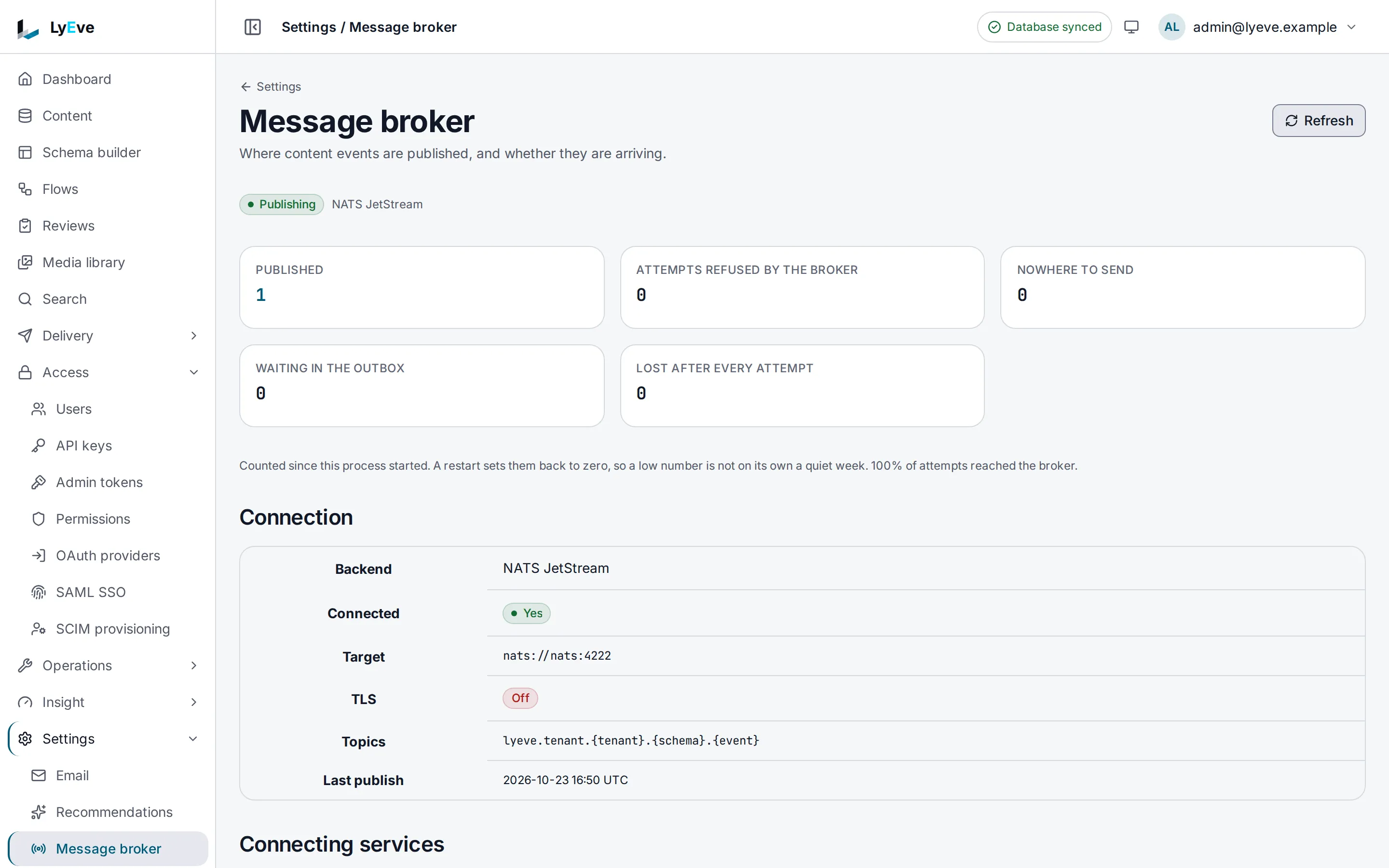
Link to the section In the consoleAs a super admin, open Settings > Message broker. The counters show what was Published, the Attempts refused by the broker, what had Nowhere to send, what is Waiting in the outbox and what was Lost after every attempt, since the process started. Connection gives the Backend, whether it is Connected, the Target, whether TLS is on, the Topics pattern and the Last publish. When no broker is set, Connecting services says that events are discarded. The page only reads the connection. The broker itself is set as Settings describes, and Refresh reads the page again.
How it works
Link to the section How it works| Step | What happens |
|---|---|
| Record | The event is recorded right after the content write is saved, with an event_id. |
| Publish | Within about a second it is published to the broker. Only one replica publishes at a time. |
| Retry | A refused publish is retried after 1 second, then 2, 4 and so on, up to 5 minutes between attempts. |
| Give up | After 300 attempts, about a day of broker outage, the event is marked dead. |
Delivery is at least once from the moment the write is saved:
- Duplicates are possible. A publish whose acknowledgment never arrived is
sent again with the same
event_id. Deduplicate on it. - Order is not guaranteed. The oldest events go first, but a retried event can arrive after a newer one.
- A crash can lose one event, between saving the write and recording it.
- Sent events are kept 24 hours and dead events 7 days. After that, retention is your broker's.
Publishes are acknowledged. NATS waits for JetStream and reconnects without a limit. RabbitMQ waits up to 10 seconds for the broker's confirmation, and a reject or a timeout counts as a failed attempt. Kafka uses an idempotent producer that waits for every in-sync replica.
This uses NATS. For the console steps, you are signed in to LyEve Console
as a super admin. For the API steps, you need a super admin token in TOKEN.
The quickstart shows how to get one. You
also need a NATS server with JetStream and the nats command line tool.
1. Check what the instance publishes to now.
Console v0.28.0
Open Settings > Message broker. With no broker configured,
Connecting services says that events are discarded until EVENT_BUS is
set.
Engine API v0.62.0
curl http://localhost:3001/api/admin/messagebroker/status \ -H "Authorization: Bearer $TOKEN"With no broker configured, backend is empty and connected still reads
true. Events are then discarded, although published still counts them.
2. Point the instance at NATS. Set these in the environment of the instance and restart it:
EVENT_BUS=natsNATS_URL=nats://nats.internal:4222TLS is on by default. For a NATS server without TLS, also set
NATS_TLS=false, or the feature does not start.
When neither the environment nor the configuration file sets these keys, a super admin can save them instead, and the instance connects without a restart:
curl -X PUT http://localhost:3001/api/admin/config \ -H "Authorization: Bearer $TOKEN" \ -H "Content-Type: application/json" \ -d '{"values": {"EVENT_BUS": "nats", "NATS_URL": "nats://nats.internal:4222", "NATS_TLS": "false"}}'The answer lists the keys it took under saved. Once saved, each key shows in
Settings > Configuration with Save beside it. On console v0.25.0 that
page lists only settings that already have a value, so it changes a saved
broker setting but cannot add the first one. The web application firewall
refuses a URL that names a private IP address, so name the broker by its host
name.
3. Subscribe to everything in your tenant (here default) with the
nats tool:
nats sub "lyeve.tenant.default.>"4. Create an entry, such as a post.
Console v0.28.0
Open Content, choose Post, then New entry. Fill in Title and Slug and choose Create.
Engine API v0.62.0
curl -X POST http://localhost:3002/api/v1/content/post \ -H "Authorization: Bearer $TOKEN" \ -H "Content-Type: application/json" \ -d '{"data": {"title": "Broker check", "slug": "broker-check"}}'The subscriber prints a message on lyeve.tenant.default.post.after_create
with the entry in data: its id, its fields and, when the content type has
drafts, its _status. An entry created in the console arrives in the same
shape as one created through the API. On engine v0.56.1 and earlier, an entry
created in the console arrived with the whole stored entry in data and its
fields under data.body.
5. Read the status again.
Console v0.28.0
Choose Refresh. The badge reads Publishing with NATS JetStream, Published has grown, and Connection gives Connected as Yes, the Target and the Last publish.
Engine API v0.62.0
Send the request of step 1 again. backend is nats, connected is true,
and published has grown.
What a message carries
Link to the section What a message carriesEach message is the content event as JSON:
| Field | Value |
|---|---|
event_id | A UUID for this event. A retry sends the same value. |
type | after_create, after_update or after_delete |
schema | The content type |
data | The entry's current fields |
old_data | The previous values, when the event carries them |
record_id | The entry's id |
tenant_id | The owning tenant |
instance_id | The instance that raised the event. Absent on engine v0.56.1 and earlier. |
timestamp | RFC 3339 time of the event. Zero time, 0001-01-01T00:00:00Z, on engine v0.56.1 and earlier. |
source | Where the event came from, when set |
On engine v0.56.1 and earlier, use the time your consumer received the
message instead of timestamp.
The event_id also travels as a transport header, so a consumer can
deduplicate without decoding the body: Nats-Msg-Id and an event_id header
on NATS (JetStream also deduplicates on Nats-Msg-Id within the stream's
duplicate window), an event_id record header on Kafka, and the AMQP
message_id property and an event_id header on RabbitMQ.
A payload over 1 MiB is refused before it reaches the broker.
Subscribe to the right topics
Link to the section Subscribe to the right topicsTopics are named by tenant, content type and event:
lyeve.tenant.{tenant_id}.{schema}.{event_type}An event that carries no tenant goes to lyeve.{schema}.{event_type}.
| Backend | Where an event goes | Subscribe to one tenant |
|---|---|---|
| NATS | Subject lyeve.tenant.{tenant_id}.{schema}.{event_type} on the JetStream stream | lyeve.tenant.acme.> |
| Kafka | Topic {KAFKA_TOPIC_PREFIX}lyeve.tenant.{tenant_id}.{schema}.{event_type}. With the default prefix that is lyeve.lyeve.tenant.acme.product.after_create. | the prefixed topics |
| RabbitMQ | Durable topic exchange lyeve.events, routing key lyeve.tenant.{tenant_id}.{schema}.{event_type} | bind a queue with lyeve.tenant.acme.# |
On RabbitMQ, a message no queue accepts goes to the lyeve.events.dead
exchange and the lyeve.events.dlq queue, which keeps messages for 7 days and
holds at most 10,000.
Check the connection
Link to the section Check the connectionGET /api/admin/messagebroker/status reports the backend and how publishing
has gone since the process started. It needs the super_admin role, and the
counters cover the whole instance, not one tenant.
A status answer and its fields
{ "backend": "nats", "connected": true, "degraded": false, "target": "nats://nats.internal:4222", "stream": "LYEVE_EVENTS", "tls": true, "published": 1284, "failed": 0, "dropped": 0, "last_publish_at": "2026-10-01T09:12:44Z", "outbox": { "enabled": true, "available": true, "pending": 0, "dead": 0, "oldest_pending_age_seconds": 0 }}| Field | Meaning |
|---|---|
backend | nats, kafka, rabbitmq, or empty or noop when nothing is configured |
connected | For Kafka, whether a broker answered within two seconds of this read. For NATS and RabbitMQ, whether a publisher is set up, which reads true with no broker too. |
degraded | The license no longer carries messagebroker, so events are dropped on purpose |
target | Where events go, with credentials removed |
stream, topic_prefix | The NATS stream or the Kafka topic prefix |
tls | Whether TLS is on |
published, failed, dropped | Events handed to the backend, events it refused, and events with nowhere to go |
last_publish_at, last_error | The last publish, and the last refusal with its topic, error and time |
outbox.enabled, outbox.available | Whether events are recorded before they are published, and whether the counts below could be read |
outbox.pending, outbox.dead | Events waiting to be sent, and events that ran out of attempts |
outbox.oldest_pending_at, outbox.oldest_pending_age_seconds | How long the oldest waiting event has waited |
A caller without super_admin gets 403.
Troubleshooting
Link to the section Troubleshootingpendinggrows whilepublishedstands still. The broker is down or refusing events. Readlast_error.publishedgrows but no consumer sees anything.backendis empty ornoop, so events are discarded. SetEVENT_BUS.droppedgrows. The license lapsed (degradedistrue), or an event could not be recorded for sending.- The feature does not start after setting
EVENT_BUS. The value is not one of the four, the backend could not be reached, or a setting is missing, such as half ofNATS_USERandNATS_PASSWORDor SASL credentials for the chosen mechanism. The startup log names it, and the rest of the instance runs. - A broker on a private certificate fails to connect. Set the backend's
*_TLS_CA_FILEto the CA that signed it.
Use it in flows
Link to the section Use it in flowsTwo flow pieces use the same connection, under the flow's tenant
(lyeve.tenant.{tenant}.):
- The Publish a message node (
messagebroker.publish) sends one message with a subject, a payload, optional headers and an optional partition key. The payload is capped at 1 MiB. With no broker configured the run fails. - The Message received trigger (
messagebroker.message) starts a flow when a message arrives on a subject pattern such asorders.>. Without agroup, every replica runs every message. With agroup, the replicas share the messages and each one runs once.
See Flows.
Settings
Link to the section SettingsEach setting is read from the environment first, then the configuration file,
then a value a super admin saved with PUT /api/admin/config or in
Settings > Configuration. A save is accepted only for a key that neither
the environment nor the file sets, unless LYEVE_OVERRIDABLE lists it. A
save in which every key is set that way answers 409. After a save every feature reloads its
settings. The broker reconnects only when its own settings changed, and a
failed reconnect keeps the old connection. Only the settings for the selected
backend apply.
Every setting
| Variable | What it does | Default |
|---|---|---|
EVENT_BUS | noop, nats, kafka or rabbitmq. Empty or noop discards events. | noop |
NATS_URL | NATS server URL | nats://127.0.0.1:4222 |
NATS_STREAM | JetStream stream, created with subjects lyeve.> if it does not exist | LYEVE_EVENTS |
NATS_TOKEN | Static auth token | none |
NATS_USER, NATS_PASSWORD | User and password. Set both or neither. | none |
NATS_NKEY_SEED_FILE | Path to an NKey seed file | none |
NATS_CREDS_FILE | Path to a JWT credentials file | none |
KAFKA_BROKERS | Comma-separated broker list | localhost:9092 |
KAFKA_TOPIC_PREFIX | Prefix added in front of every topic name | lyeve. |
KAFKA_REQUIRED_ACKS | Leave it at all. none and leader stop the feature from starting, because the idempotent producer needs all. | all |
KAFKA_SASL_MECHANISM | plain, scram-sha-256 or scram-sha-512. Empty means no SASL. | none |
KAFKA_SASL_USER, KAFKA_SASL_PASSWORD | SASL credentials, required when a mechanism is set | none |
RABBITMQ_URL | AMQP URL. A URL with the default guest user is refused. | required for rabbitmq |
NATS_TLS, KAFKA_TLS, RABBITMQ_TLS | TLS for that backend, at least TLS 1.2. false turns it off, and a value that is not a boolean keeps it on. | true |
NATS_TLS_CA_FILE, KAFKA_TLS_CA_FILE, RABBITMQ_TLS_CA_FILE | PEM file with the CA that signed the broker's certificate. When set, only that CA is trusted. | system roots |
When more than one NATS credential is set, the first of these wins: the credentials file, the NKey seed file, the token, the user and password, then credentials in the URL.
Certificate verification is never skipped. A CA file that cannot be read is
logged and ignored, and the system roots verify the broker instead, so a broker
on a private certificate then fails to connect. If you set LYEVE_PLUGINS to
choose which features start, include messagebroker. See Licensing and
tiers.
The broker is for your systems. LyEve replicas stay in step with each other whether or not one is configured. See Scaling.
Related
Link to the section Related- Webhooks: signed HTTP calls for the same changes.
- Event replay: publish a past window again.
- Flows: publish or receive broker messages in a flow.
- Tenants: what the tenant segment of a topic means.