Features
Editorial comments
Requires a license with the
content-profeature. See pricing.
Editorial comments let your team talk about an entry where the entry is. A first comment opens a thread, and replies stay under it, one level deep. Resolve a thread when it is settled and reopen it if it is not. Mention a colleague and they get an email.
How it works
Link to the section How it works| Part | What it does |
|---|---|
| Thread | A first comment with no parent_id. It can be resolved and reopened. |
| Reply | A comment whose parent_id is the thread's first comment. A reply to a reply lands in the same thread. |
| Mention | A user id in mentions. Each person mentioned gets an email when email is set up. Without it the comment is still saved and nobody is mailed. |
Threads belong to the entry and are deleted with it. When a person's data is erased, their comments keep the text and lose the author.
Run this on an install whose license carries content-pro. For the console steps, you are
signed in to the console as an admin or super_admin. For the API steps, you need a
token in TOKEN. The quickstart shows how to get one.
Use an entry from Content lifecycle. For the API steps, copy
its id into ENTRY_ID.
1. Open a thread.
Console v0.28.0
Open the entry under Content. The Comments card sits below its fields. Write
Can we shorten the second paragraph? in New thread and choose Comment. The thread
shows under Open, and the card's title counts it.
Engine API v0.62.0
curl -X POST http://localhost:3001/api/admin/content/entries/$ENTRY_ID/comments \ -H "Authorization: Bearer $TOKEN" \ -H "Content-Type: application/json" \ -d '{"body": "Can we shorten the second paragraph?"}'{ "id": "f57403a3-5392-4663-90bb-9554fc919823", "entry_id": "059b65ff-ef7e-4e3a-8ea8-fa543834804a", "author_id": "3e7cc859-1207-4c7c-9af2-363fa5079e0b", "body": "Can we shorten the second paragraph?", "mentions": [], "resolved": false, "created_at": "2026-10-03T15:06:55Z", "updated_at": "2026-10-03T15:06:55Z"}The answer is 201. Copy its id into THREAD_ID.
2. Reply to it.
Console v0.28.0
Choose Reply on the thread, write Done, it is two sentences now. in the Reply box
and choose Reply under it. The reply shows under the thread.
Engine API v0.62.0
curl -X POST http://localhost:3001/api/admin/content/entries/$ENTRY_ID/comments \ -H "Authorization: Bearer $TOKEN" \ -H "Content-Type: application/json" \ -d '{"body": "Done, it is two sentences now.", "parent_id": "'"$THREAD_ID"'"}'3. Resolve the thread.
Console v0.28.0
Choose Resolve on the thread. It leaves Open and shows under Resolved, with Reopen to bring it back.
Engine API v0.62.0
curl -X POST http://localhost:3001/api/admin/content/entries/$ENTRY_ID/comments/$THREAD_ID/resolve \ -H "Authorization: Bearer $TOKEN"The answer is the first comment with "resolved": true, resolved_by and resolved_at.
.../reopen brings it back.
4. List the resolved threads.
Console v0.28.0
Choose Resolved on the Comments card. It lists the thread with its reply.
Engine API v0.62.0
curl "http://localhost:3001/api/admin/content/entries/$ENTRY_ID/comments?state=resolved" \ -H "Authorization: Bearer $TOKEN"The answer is {"data": [...]}, with the thread and its reply under replies.
5. Mention a colleague. Mention an account of your tenant, such as a user you add as in
Manage users. With email
set up, the person gets an email with the subject You were mentioned on "<entry title>".
Console v0.28.0
Write the comment in New thread, pick the person under Mention, and choose Comment.
Engine API v0.62.0
GET /api/admin/users lists the accounts. Copy the person's id into USER_ID, then put it
in mentions:
curl -X POST http://localhost:3001/api/admin/content/entries/$ENTRY_ID/comments \ -H "Authorization: Bearer $TOKEN" \ -H "Content-Type: application/json" \ -d '{"body": "Can you check the claim in the first line?", "mentions": ["'"$USER_ID"'"]}'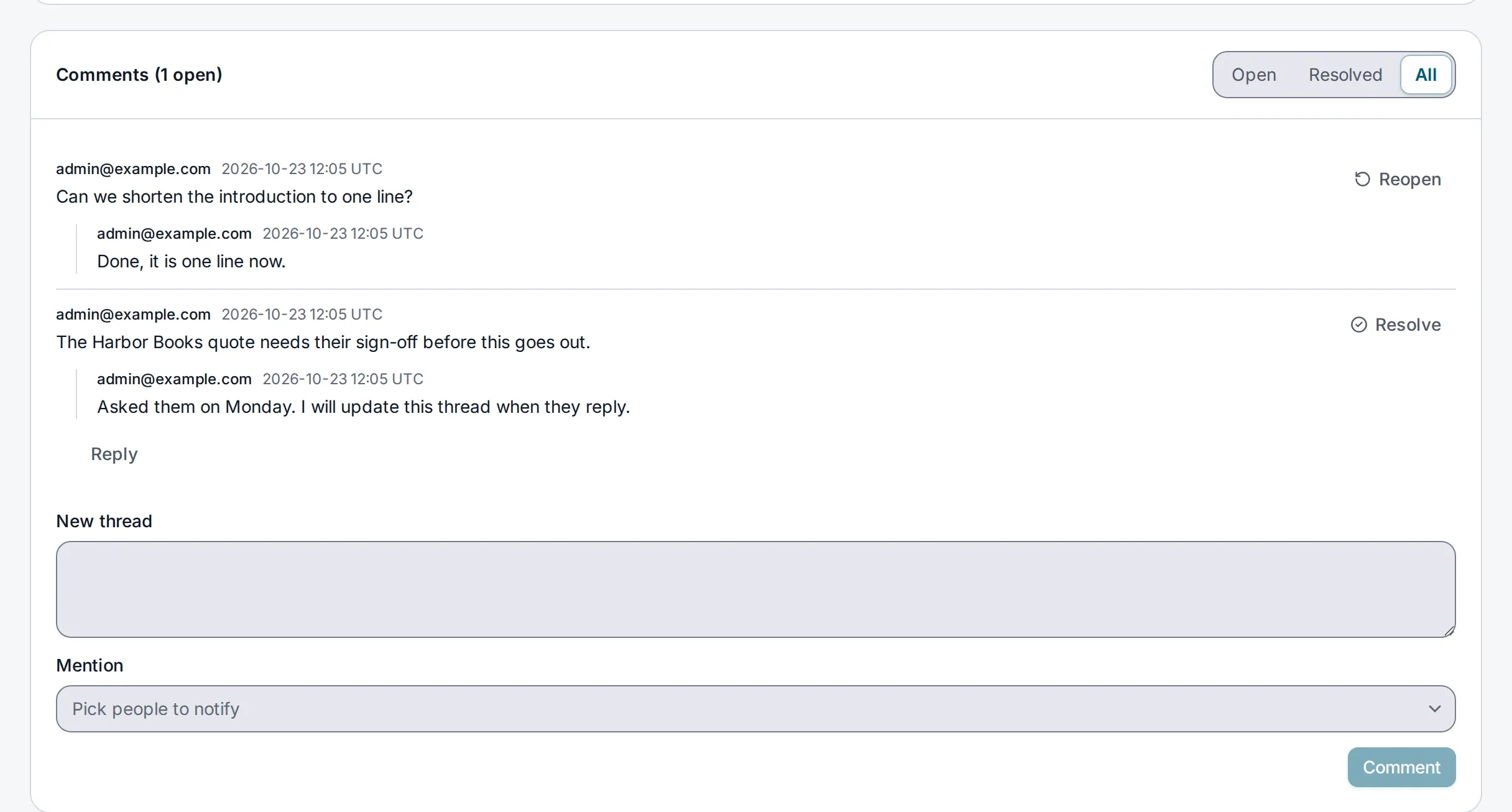
Comment, reply and mention
Link to the section Comment, reply and mention| Field | Meaning |
|---|---|
body | The comment, required, at most 10,000 bytes. |
parent_id | The first comment of the thread to reply to. Leave it out to open a thread. |
mentions | Up to 20 user ids of people in your tenant. |
GET .../comments takes ?state=open, resolved or all, the default. Each
thread comes with its replies, oldest first. .../resolve and .../reopen
work on the first comment of a thread only.
If the license lapses
Link to the section If the license lapsesYour threads stay. Reading, resolving and reopening stay free. Writing a new
comment or a reply needs content-pro again.
Every route needs the admin or super_admin role. An
admin token can list with the content:read grant
and write with content:write.
| Method | Path | Purpose | Needs content-pro |
|---|---|---|---|
GET | /api/admin/content/entries/{id}/comments | The entry's threads. | No |
POST | /api/admin/content/entries/{id}/comments | Open a thread or reply. Answers 201. | Yes |
POST | /api/admin/content/entries/{id}/comments/{commentID}/resolve | Resolve a thread. | No |
POST | /api/admin/content/entries/{id}/comments/{commentID}/reopen | Reopen a thread. | No |
| Status | Message | Cause |
|---|---|---|
400 | invalid JSON body | The body does not parse. |
400 | state must be open, resolved or all | An unknown state. |
400 | a mentioned person has no account here | A mention is not an account of your tenant. |
400 | the comment replied to is not on this entry | parent_id belongs to another entry. |
400 | only the first comment of a thread can be resolved or reopened | Resolve the thread, not a reply. |
402 | payment_required, naming feature:content-pro | Writing a comment without content-pro. |
404 | entry or comment not found | No such entry or comment in your tenant. |
422 | body is required and at most 10000 bytes | Fix the body. |
422 | a comment mentions at most 20 people | Mention fewer people. |
Related
Link to the section Related- Content lifecycle: the entries comments belong to.
- Content releases: the other part of
content-pro. - Editorial review: approvals in stages, with a comment at each decision.
- Content editing: the entry page in the console.