Features
Audit log
Requires a license with the
auditfeature. Streaming the log to an outside sink also needsaudit-pro, which a license withauditdoes not include. See pricing.
The audit log records the actions admins and the instance take: who acted, what they changed, when, and from which address. You can search it, export it as JSON or CSV, send an export to an S3 bucket, and decide how long entries are kept.
How it works
Link to the section How it works- Nothing in the API edits an entry, except a privacy erasure, which anonymizes the subject's personal data in their entries. Entries leave the log only through a super admin prune, a retention policy or the deletion of their tenant.
- Each entry carries a
sequenceand achain_hash, a keyed hash of the entry and the hash stored on the entry before it. - A tenant admin sees only their own tenant, with IP addresses and user agents masked. A super admin sees full values and every tenant.
- A super admin's work on a tenant other than their own, such as creating, cloning, restoring, moving or deleting it, is filed under no tenant. Only a super admin who is not scoped to a tenant sees those entries.
- Actions are named by area and verb, such as
mfa.admin.resetorai.settings.update. Resource types are plain names, such asuser.
A prune, a retention pass and a tenant delete each leave a signed seal for
every entry they remove, and an erasure seals each entry it anonymizes. The
chain stays verifiable through all four, and a super admin checks it with
GET /api/admin/audit-log/verify.
In the console
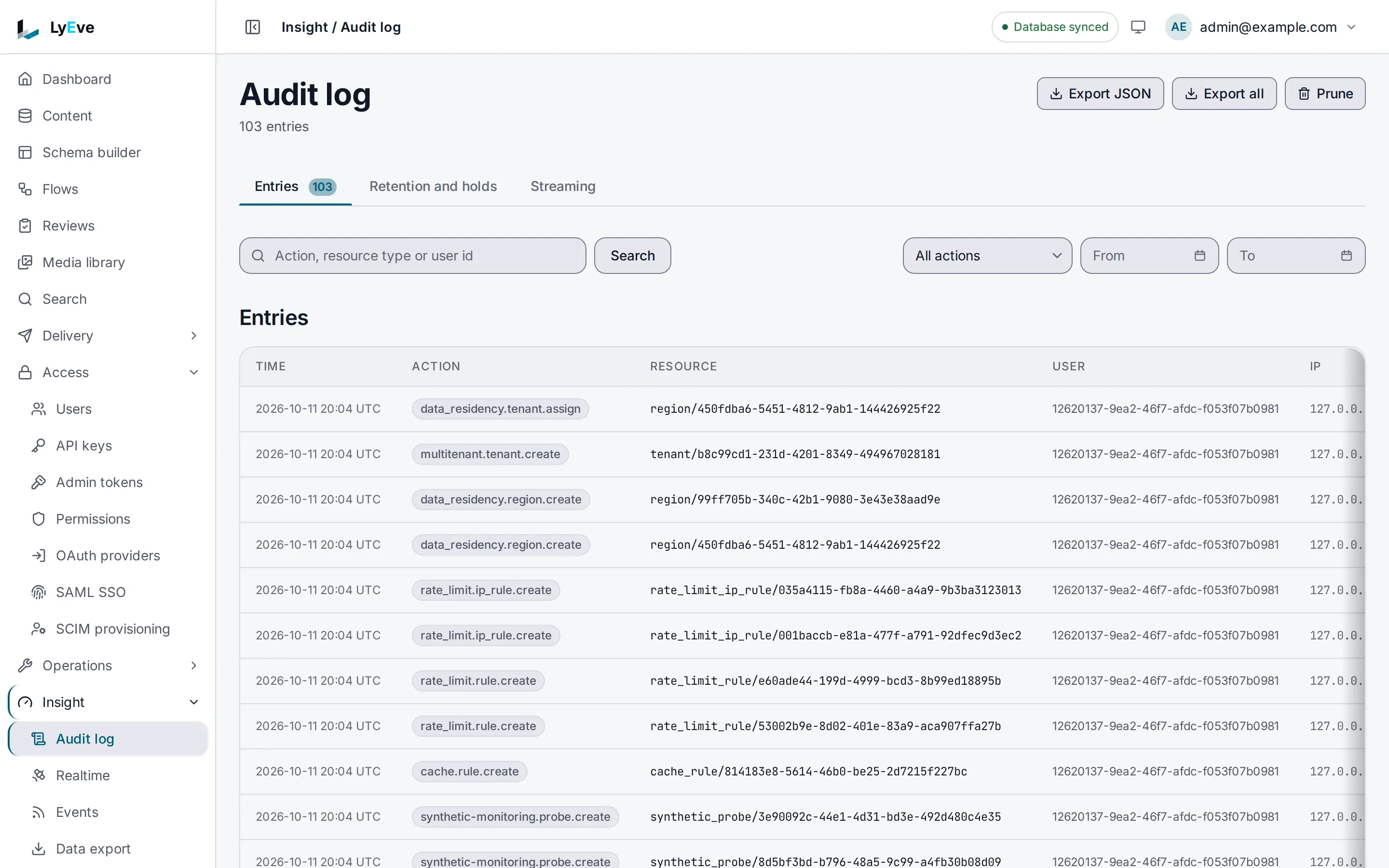
Link to the section In the consoleOpen Insight > Audit log. The Entries tab lists the log, newest first, with the time, action, resource, user and address of each entry. Type an action, resource type or user id in the search box, or pick an action under All actions and a From and To date, then choose Search. A super admin also sees Prune.
Export JSON, and Export all for a super admin, sit beside Prune. Each downloads the log as JSON, under the filter in force.
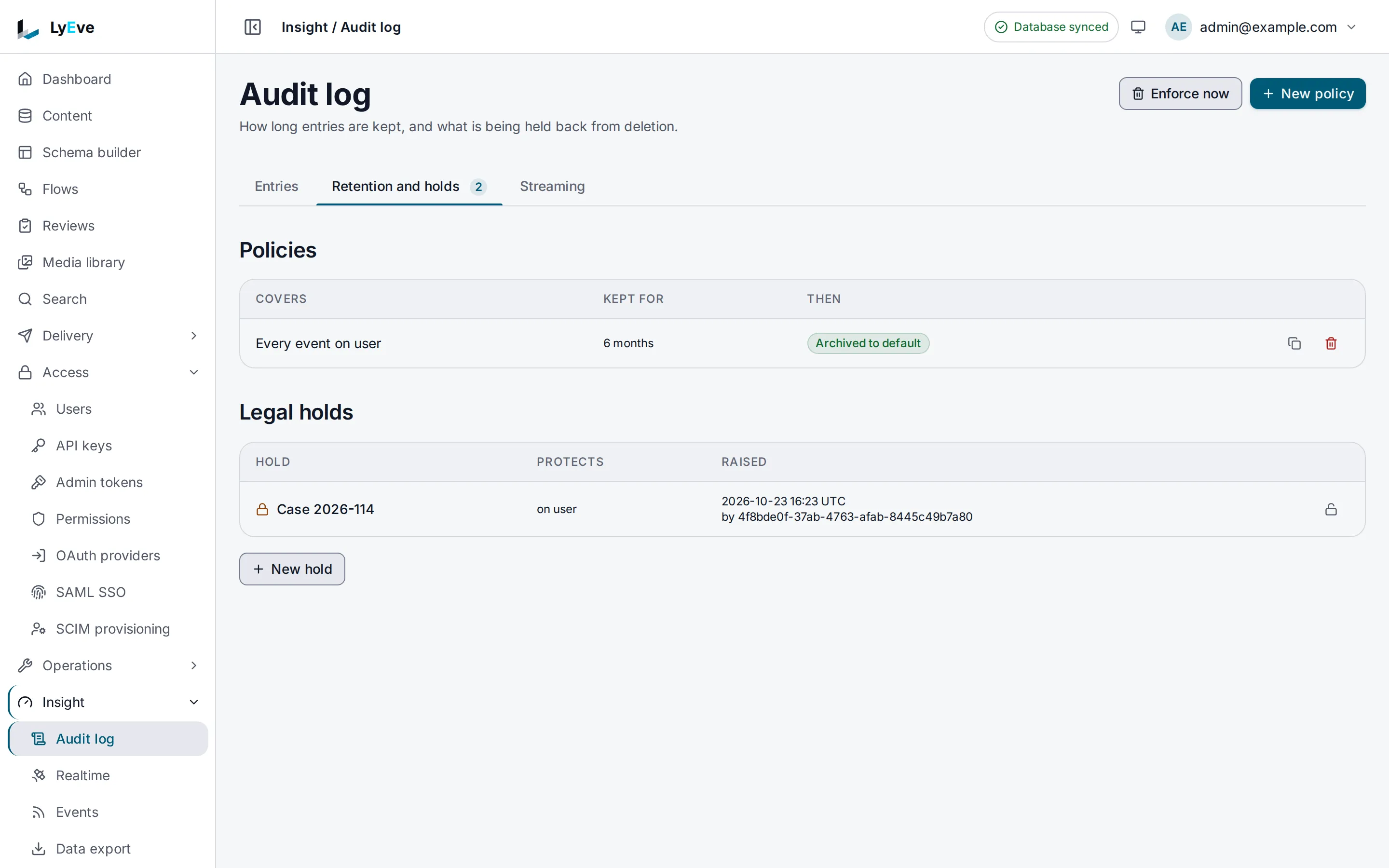
The Retention and holds tab lists the retention Policies and the Legal holds. New policy and New hold add one, the release button on a hold removes it, and Enforce now runs enforcement at once. The Streaming tab holds audit log streaming.
Checking the chain, rehashing it, sending an export to S3 and the compliance export of a hold are done with the API. LyEve Console has no control for them on this release.
Turn it on
Link to the section Turn it on- Install a license that includes
audit. See licensing and tiers. - Set
LYEVE_AUDIT_HMAC_KEYto 64 hex characters. Generate one withopenssl rand -hex 32. A production instance refuses to start without it. Outside production, a missing key logs a warning and the chain is not protected by a secret.
Keep LYEVE_AUDIT_HMAC_KEY stable. Changing it breaks the chain for entries
written before the change, until a rehash given the old
key re-signs it. Without the license, the routes are not served and
answer 404.
This needs a license with audit. Sign in as an admin. The steps read the
schema.create entry that creating the post type in the
quickstart wrote.
Read the newest entries:
Console v0.28.0
Open Insight > Audit log. The Entries tab shows the newest entry on top, with its time, action, resource, user and address. The count of entries is under the title.
Engine API v0.62.0
You need a token in TOKEN. The quickstart shows how to get one.
curl "http://localhost:3001/api/admin/audit-log?limit=1" \ -H "Authorization: Bearer $TOKEN"{ "data": [ { "id": "ae2e0796-abb9-4fe9-a5c7-4d60e0f7966e", "sequence": 1, "tenant_id": "default", "user_id": "caeb8ec2-5c16-4d9d-96dd-a5b1b19f8fd8", "action": "schema.create", "resource_type": "schema", "resource_id": "post", "ip": "172.31.184.5:38982", "user_agent": "curl/8.18.0", "created_at": "2026-10-23T16:53:34.819104Z", "chain_hash": "8fabd4295ac7fadc4520f577fbbb0731f6da13f69c3e24a9bcd0777807ac10ee" } ], "total": 1, "limit": 1, "offset": 0}total holds the number of entries.
Narrow it to actions on content types:
Console v0.28.0
Type schema in the search box and choose Search. The list shows the
schema.create entry with schema/post as its resource. To narrow by one
action instead, pick it under All actions and choose Search.
Engine API v0.62.0
curl "http://localhost:3001/api/admin/audit-log?resource_type=schema&limit=10" \ -H "Authorization: Bearer $TOKEN"The answer holds the schema.create entry with "resource_id": "post".
Download the newest rows as CSV, two at most. The console exports JSON only, so this step
is an API call. If you work in the console, sign in over the API to get a token, as
Turn on drafts and publishing
shows, and keep it in TOKEN:
curl -X POST http://localhost:3001/api/admin/audit-log/export \ -H "Authorization: Bearer $TOKEN" \ -H "Content-Type: application/json" \ -d '{"format": "csv", "limit": 2}'id,user_id,action,resource_type,resource_id,ip,user_agent,tsae2e0796-abb9-4fe9-a5c7-4d60e0f7966e,caeb8ec2-5c16-4d9d-96dd-a5b1b19f8fd8,schema.create,schema,post,***.***.***.5:38982,curl/8.18.0,2026-10-23T16:53:34.819104ZOn an install where creating post is the only entry so far, as here, the file
holds that one row. The address is masked in the export.
List the retention policies. A new install has none:
Console v0.28.0
Open the Retention and holds tab. Policies reads No retention policies yet and Legal holds reads No legal holds yet.
Engine API v0.62.0
curl http://localhost:3001/api/admin/retention-policies \ -H "Authorization: Bearer $TOKEN"{ "data": [], "limit": 50, "offset": 0, "total_count": 0 }Search the log
Link to the section Search the logGET /api/admin/audit-log needs an admin. An
admin token can call it when it holds the
audit:read grant.
| Parameter | Meaning | Default |
|---|---|---|
actor | User id of the actor. | all |
action | Exact action name. | all |
resource_type | Exact resource type. | all |
resource_id | Exact resource id. | all |
from | RFC 3339, inclusive. | none |
to | RFC 3339, exclusive. Must be after from. | none |
tenant_id | One tenant. Super admin only, ignored for anyone else. | your tenant, or every tenant for a super admin |
limit | Page size, at most 500. | 50 |
offset | Rows to skip. | 0 |
The list writes out pending entries before it reads, so an action you just
took is in the result. If some were still queued, the answer carries
"pending_writes": true and total is short.
Export the log
Link to the section Export the log| Request | Who |
|---|---|
POST /api/admin/audit-log/export | An admin. Exports their own tenant. |
POST /api/admin/audit-log/export-all | A super admin. Exports every tenant. |
Both take the same body. Every field is optional except format.
| Field | Meaning | Default |
|---|---|---|
format | json or csv. CSV has a header row. | |
from | RFC 3339, inclusive. | none |
to | RFC 3339, exclusive. Cannot be before from. | none |
action, resource_type | Exact filters. | all |
limit | Rows. 0 means the default. Values above 1,000,000 are capped. | 100000 |
s3 | {"bucket", "key", "region"}. Uploads the export instead of returning it. | none |
IP addresses are masked in both exports, and user agents are cut to the browser or client name and version. A compliance export of a legal hold (below) keeps full values.
A download starts streaming before every row is read. If a row fails midway,
the file ends early and the status is still 200. Compare the row count with
what you expect.
Send an export to S3
Link to the section Send an export to S3Add "s3": {"bucket": "my-audit", "region": "us-east-1"} to the body. The
answer is:
{ "rows_written": 5210, "object_key": "audit-exports/acme/2026/10/01/audit-export.csv", "bucket": "my-audit", "elapsed": "1.84s" }- Objects are encrypted at rest with S3 server-side encryption (
AES256). - On the tenant export the object key is always under
audit-exports/<tenant>/<YYYY/MM/DD>/, and akeyyou send is ignored. Onexport-allthekeyyou send is used. It is required and cannot contain... The format extension is added when the key lacks it. - Credentials come from the standard AWS sources: environment variables, the
shared config file, or the instance role.
regionin the request wins overAWS_REGION.
Prune old entries
Link to the section Prune old entriesA prune deletes entries older than a cutoff in the caller's tenant. It needs a super admin.
Console v0.28.0
On Insight > Audit log, choose Prune. Pick a date under Delete entries older than and choose Delete. Pruned entries cannot be recovered or exported afterwards.
Engine API v0.62.0
curl -X POST http://localhost:3001/api/admin/audit-log/prune \ -H "Authorization: Bearer $TOKEN" \ -H "Content-Type: application/json" \ -d '{"older_than": "2025-01-01T00:00:00Z"}'{ "deleted": 3812 }A cutoff later than now answers 400.
A prune skips every entry a legal hold covers. Each prune records itself as an
audit.prune entry with the cutoff, the count and the first and last sequence
it removed.
Verify the chain
Link to the section Verify the chainGET /api/admin/audit-log/verify walks the whole chain, every tenant's
entries and the seals left by deletions and erasures. It needs a super admin.
curl http://localhost:3001/api/admin/audit-log/verify \ -H "Authorization: Bearer $TOKEN"{ "valid": true, "entries": 3812, "sealed": 140, "broken": 0, "broken_sequences": [] }entries counts the entries read and sealed the positions that verified
through a seal. A broken chain still answers 200, with valid false,
broken holding the number of broken positions and broken_sequences the
first 100 of them. A changed entry breaks every position after it up to the
next seal, so the first broken sequence is where to look.
On an install that pruned, enforced retention, erased a subject or deleted a
user before 0.55.0, verify reports those positions as broken.
POST /api/admin/audit-log/rehash accepts every entry as it stands and
re-signs the seals that still verify. A seal that does not verify stays broken
and is listed in left_broken. After you change LYEVE_AUDIT_HMAC_KEY, send
the old key so the seals signed under it are re-signed under the new one:
curl -X POST http://localhost:3001/api/admin/audit-log/rehash \ -H "Authorization: Bearer $TOKEN" \ -H "Content-Type: application/json" \ -d '{"previous_key": "<the old 64 hex character key>"}'The key serves that one request and is never stored, logged or returned. A
rehash records itself as audit.chain.rehash, naming the positions that were
broken before it ran. A body over 1 KiB answers 413.
Retention policies and legal holds
Link to the section Retention policies and legal holdsA retention policy says how many days entries of an action and resource type are kept, and whether they are archived to your storage backend before they are deleted. A legal hold keeps matching entries past their retention window until the hold is removed.
A license with audit includes these routes. If the license lapses while the
instance runs, they answer 402 and nothing is enforced. A license change
applies without a restart. A privacy erasure of a subject that an active hold
names in filter_resource_id or filter_actor erases nothing and reports the
hold instead, whatever the license says. A hold set in any tenant counts.
Enforcement runs once at start and then every 24 hours. Set
RETENTION_ENFORCE_INTERVAL to a duration such as 6h to change that.
Create a policy that keeps user entries for 180 days and archives them first. A super admin creates policies and holds:
Console v0.28.0
- On Insight > Audit log, open Retention and holds and choose New policy.
- Leave Event type empty, enter
userin Resource type and180in Keep for, in days. - Leave Archive before deleting on, which the form turns on for you.
Enter
defaultin Archive to andaudit-archive/in Path prefix. - Choose Create. The page says Policy created, and the policy reads Every event on user, kept for 6 months, then Archived to default.
Engine API v0.62.0
curl -X POST http://localhost:3001/api/admin/retention-policies \ -H "Authorization: Bearer $TOKEN" \ -H "Content-Type: application/json" \ -d '{"event_type": "", "resource_type": "user", "retention_days": 180, "archival_enabled": true, "archival_path_prefix": "audit-archive/"}'The answer is 201 with the policy, and archival_storage is default.
event_type is the action. An empty event_type or resource_type matches
everything. retention_days defaults to 365 when you leave it out. An
explicit 0 deletes matching entries on the next run.
Each archive is a CSV object under
<archival_path_prefix>/<event_type>/<time>/policy-<id>-<run id>.csv, where
<time> reads like 20261020-030000 in UTC. The run id keeps two runs in the
same second from writing one object.
Create a hold:
Console v0.28.0
On Retention and holds, choose New hold. Enter Case 2026-114 in
Name and user in Resource type, then choose Create. The form
also filters on Action, Resource id and Tenant. A date range or an
actor is set with the API.
Engine API v0.62.0
curl -X POST http://localhost:3001/api/admin/legal-holds \ -H "Authorization: Bearer $TOKEN" \ -H "Content-Type: application/json" \ -d '{"name": "Case 2026-114", "filter_resource_type": "user", "filter_from": "2026-01-01T00:00:00Z"}'Holds filter on filter_action, filter_resource_type, filter_resource_id,
filter_actor, filter_from, filter_to and filter_tenant_id. name is
required. A removed hold keeps protecting its entries for 30 days. A
filter_resource_id that is a UUID is stored in lower case and matches the id
written in lower or upper case.
Run enforcement now:
Console v0.28.0
On Retention and holds, choose Enforce now. The dialog asks Enforce retention now? and warns that it is not a dry run. Choose Delete them. The page reports how many policies ran and how many entries were deleted.
Engine API v0.62.0
curl -X POST http://localhost:3001/api/admin/retention/enforce \ -H "Authorization: Bearer $TOKEN" \ -H "Content-Type: application/json" \ -d '{}'Send {"cleanup_only": true} to delete without archiving. The answer lists
each policy with entries_archived, entries_deleted and elapsed.
Export what a hold preserves. Only the API does this on this release, with a
super admin token in TOKEN. A hold made in the console works the same way.
-
List the holds and copy the hold's
idintoHOLD_ID:Shell HOLD_ID=$(curl -s http://localhost:3001/api/admin/legal-holds \-H "Authorization: Bearer $TOKEN" \| jq -r '.data[] | select(.name == "Case 2026-114") | .id') -
Export it:
Shell curl -X POST http://localhost:3001/api/admin/retention/compliance-export \-H "Authorization: Bearer $TOKEN" \-H "Content-Type: application/json" \-d "{\"legal_hold_id\": \"$HOLD_ID\", \"format\": \"csv\"}" -o hold.csv
The answer is 200 with a CSV file of the entries the hold matches. A hold
that matches no entry yet gives a file with the header line only.
Retention and hold routes
| Method | Path | Who | Purpose |
|---|---|---|---|
GET | /api/admin/retention-policies | Admin | List policies. |
POST | /api/admin/retention-policies | Super admin | Create a policy. |
PUT | /api/admin/retention-policies/{id} | Super admin | Update a policy. |
DELETE | /api/admin/retention-policies/{id} | Super admin | Delete a policy. |
GET | /api/admin/legal-holds | Admin | List holds. |
POST | /api/admin/legal-holds | Super admin | Create a hold. |
DELETE | /api/admin/legal-holds/{id} | Super admin | Remove a hold. |
POST | /api/admin/retention/enforce | Super admin | Run enforcement now. |
POST | /api/admin/retention/compliance-export | Super admin | Export what a hold preserves. |
Stream the log to an outside sink
Link to the section Stream the log to an outside sinkWith audit-pro on the same license as audit, a tenant streams each new
entry to Splunk, Datadog or an HTTPS endpoint of its own, in order and about 10
to 30 seconds after it is written. Streams already set up keep shipping after
audit-pro lapses. See Audit log streaming.
Record and read from a flow
Link to the section Record and read from a flowWith flow-pro, flows can use two audit nodes:
audit.recordwrites one entry to the tenant's log. The actor is the flow unless you give a user id. A test run writes nothing.audit.queryreads a page of the tenant's log, newest first, with the same filters asGET /api/admin/audit-logand the same masking.
Settings
Link to the section Settings| Variable | What it does | Default |
|---|---|---|
LYEVE_AUDIT_HMAC_KEY | Key for the hash chain, exactly 64 hex characters. | Required in production |
RETENTION_ENFORCE_INTERVAL | How often retention policies are enforced. | 24h |
If you set LYEVE_PLUGINS to choose which features start, include audit in
it.
| Method | Path | Who | Purpose |
|---|---|---|---|
GET | /api/admin/audit-log | Admin | Search the log. |
POST | /api/admin/audit-log/export | Admin | Export your tenant. |
POST | /api/admin/audit-log/export-all | Super admin | Export every tenant. |
POST | /api/admin/audit-log/prune | Super admin | Delete entries before a cutoff. |
GET | /api/admin/audit-log/verify | Super admin | Check the hash chain. |
POST | /api/admin/audit-log/rehash | Super admin | Re-sign the chain after a deliberate reset. |
| Status | Message | Cause |
|---|---|---|
400 | invalid filter parameters | A list parameter is malformed, or to is not after from. |
400 | format must be 'json' or 'csv' | Export or compliance export with another format. |
400 | 'to' must be after 'from' | Export range is reversed. |
400 | limit must be >= 0 | Export with a negative limit. |
400 | older_than must be RFC 3339 (e.g. 2024-01-01T00:00:00Z) | Prune cutoff is not a timestamp. |
400 | older_than must not be later than now | Prune cutoff is in the future. |
400 | previous_key must be 64 hexadecimal characters | Rehash with a malformed old key. |
400 | name is required | Legal hold without a name. |
400 | legal_hold_id is required | Compliance export without a hold. |
402 | payment_required | The license lapsed while the instance ran. |
403 | tenant context required for export | Tenant export from a token with no tenant. |
403 | insufficient permissions | A tenant admin called a super admin route, such as prune or export-all. |
422 | s3 bucket is not a valid bucket name | The bucket name breaks S3 naming rules. |
503 | failed to load audit log, s3: upload failed | The database or S3 did not answer. Retry. |
Related
Link to the section Related- Logs: what the instance logged while serving requests.
- Admin tokens: an
audit:readtoken for a script or a SIEM. - Analytics: daily active users, counted from this log.
- Secure your instance: the hardening steps, including the audit key.