Features
Included free on every install, with one SMTP provider and five templates per tenant. More providers, the
apitransport, more than five templates, creating triggers, the delivery dashboard and bounce classification need a license with theemail-profeature. See pricing.Sending over SMTP, templates, bounces and suppressions are stable. The
apitransport is beta.
Email sends the mail LyEve writes, such as password resets, magic links and MFA enrollment, plus templated messages of your own, and tells you what happened to each one. You send through one SMTP relay or a pool of providers with failover, write templates once with translations and your tenant's branding, and read deliveries, bounces, opens and clicks.
How it works
Link to the section How it works| Piece | What it does |
|---|---|
| Relay | One SMTP server from the SMTP_* settings. It exists only when SMTP_HOST is set. |
| Provider pool | A tenant's own providers, tried in priority order (0 first), with an hourly cap each. A tenant with none uses the relay. |
| Templates | MJML compiled to HTML, with per-language translations and the tenant's branding. |
| Suppression list | Addresses that never get mail. Every send checks it. |
| Tracking | Provider webhooks, an open pixel and signed click links record what happened. |
Every send checks the tenant's suppression list. A suppressed address is dropped, a send with nobody left is refused, and if the list cannot be read the send is refused too.
In the console
Link to the section In the consoleOpen Settings > Email. Provider pool lists the tenant's providers.
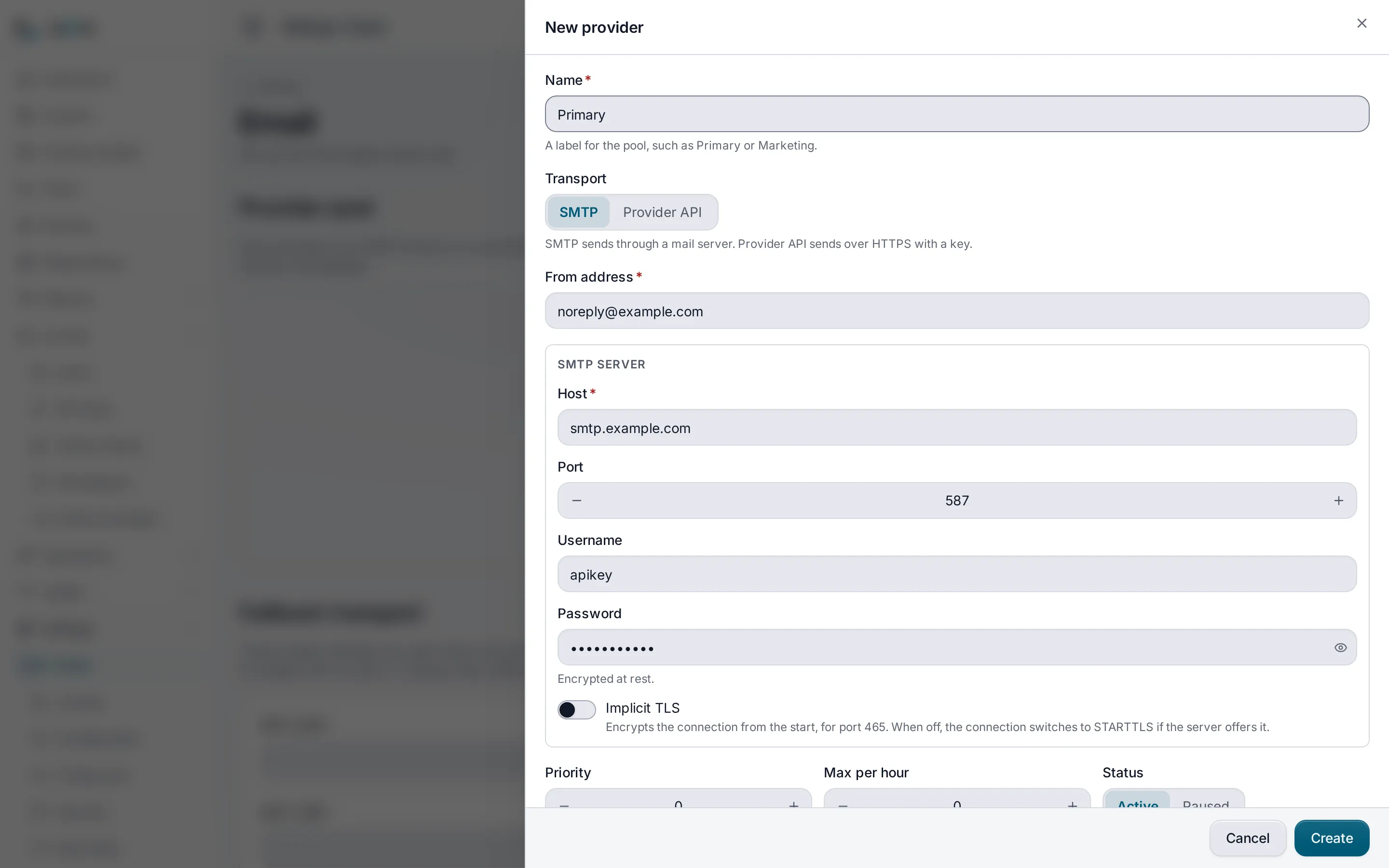
New provider opens a form: pick SMTP or Provider API as the
Transport, fill in the From address and the server or API details,
then set the Priority, Max per hour and Status. A provider saved
here joins the pool at once. Fallback transport, below the pool, holds the
SMTP_* settings used when the pool is empty or every provider fails. The
engine reads those at boot, so a change saved there takes effect at the next
restart.
The Implicit TLS switch on an SMTP provider starts off. Turn it on for a
server that expects TLS from the first byte, usually on port 465. Leave it off
for a relay that starts in plain text, such as one on port 587 or a local mail
catcher. Off, the connection upgrades with STARTTLS when the server offers it.
With it on, sending to such a relay fails with
TLS handshake: first record does not look like a TLS handshake.
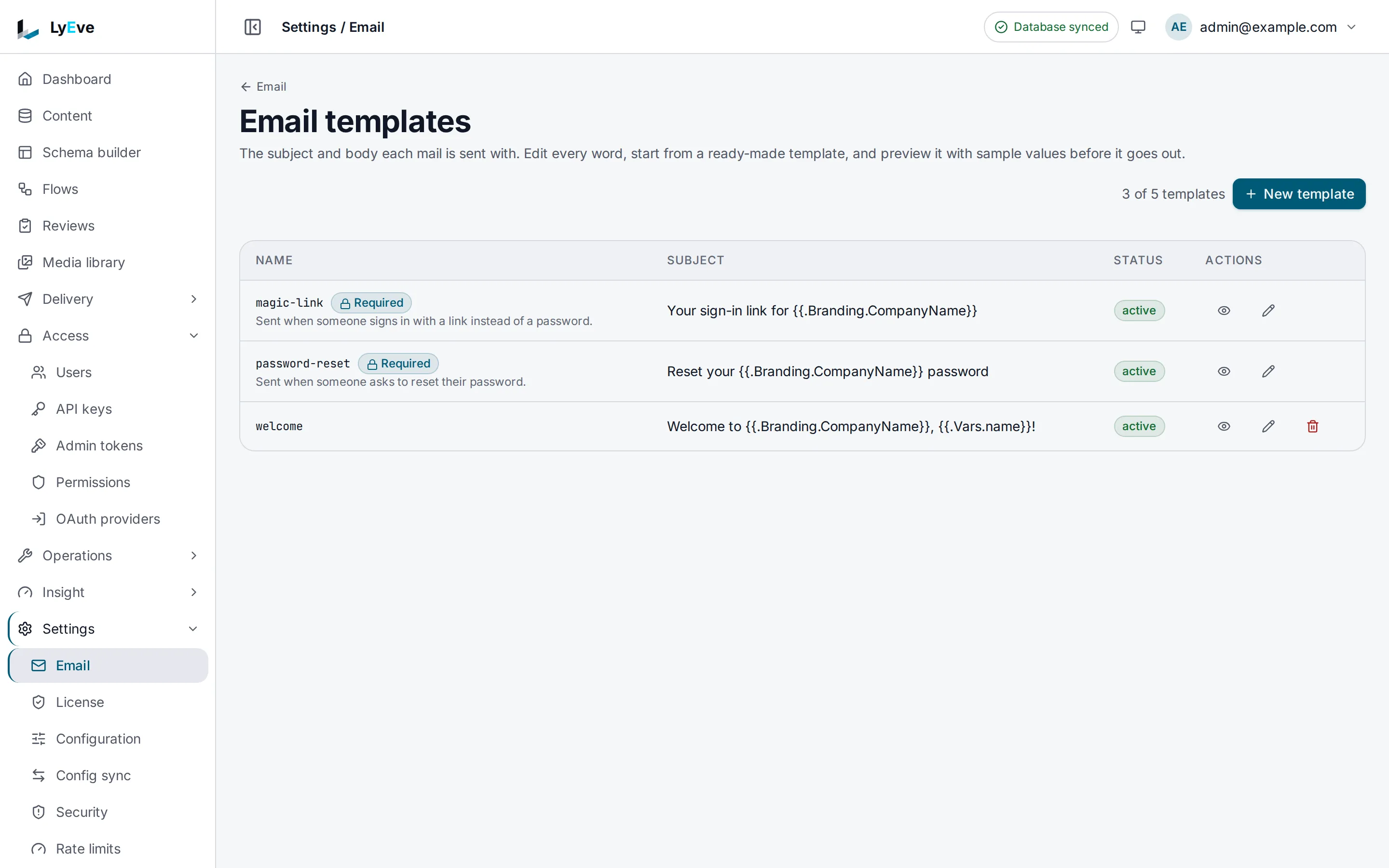
Templates, at the top of the page, opens Email templates: every
template with its subject and status, and how many of the tenant's templates
are in use, such as 3 of 5 templates. New template adds one, and each row
can be previewed and edited. The two templates marked Required cannot be
deleted. Triggers, beside it, holds the
content triggers.
These steps create a template, translate it and preview it, which works on a
free install. For the console steps, you are signed in to LyEve Console.
For the API steps, you need an admin token in TOKEN. The
quickstart shows how to get one.
1. See the built-in bodies you can start from.
Console v0.28.0
Open Settings > Email, choose Templates and then New template. Start from lists A blank template and the five starters. Picking one fills in its name, subject and body.
Engine API v0.62.0
curl http://localhost:3001/api/admin/email-templates/starters \ -H "Authorization: Bearer $TOKEN"Each one carries its key, subject and mjml_source, the two
required templates first. Copy a body you like into
the next step, or write your own.
2. Create a welcome template.
Console v0.28.0
In the New template form, keep A blank template and fill in:
- Name:
welcome - Status: Active
- Subject:
Welcome to {{.Branding.CompanyName}}, {{.Vars.name}}! - Body:
<mjml><mj-body><mj-section><mj-column><mj-text>Hi {{.Vars.name}}, thanks for signing up.</mj-text></mj-column></mj-section></mj-body></mjml>
Choose Create. The template joins the list. Its Preview renders it with
sample values, such as the subject Welcome to LyEve CMS, Ada!.
Engine API v0.62.0
curl -X POST http://localhost:3001/api/admin/email-templates \ -H "Authorization: Bearer $TOKEN" \ -H "Content-Type: application/json" \ -d '{"key": "welcome", "subject": "Welcome to {{.Branding.CompanyName}}, {{.Vars.name}}!", "status": "active", "mjml_source": "<mjml><mj-body><mj-section><mj-column><mj-text>Hi {{.Vars.name}}, thanks for signing up.</mj-text></mj-column></mj-section></mj-body></mjml>"}'The answer is 201 with the template. Copy its id into TEMPLATE_ID. If
the tenant already holds a welcome template, the answer is 409. Read
that one with GET /api/admin/email-templates/key/welcome and use its id.
3. Add a French translation. Only the API holds translations: the template form in console v0.25.0 has no locale. From the console path, get a token for your console account as Sign in shows, and read the template's id first:
TEMPLATE_ID=$(curl -s http://localhost:3001/api/admin/email-templates/key/welcome \ -H "Authorization: Bearer $TOKEN" | jq -r .id)Then add the translation:
curl -X PUT http://localhost:3001/api/admin/email-templates/$TEMPLATE_ID/translations \ -H "Authorization: Bearer $TOKEN" \ -H "Content-Type: application/json" \ -d '{"locale": "fr", "subject": "Bienvenue chez {{.Branding.CompanyName}}, {{.Vars.name}} !", "mjml_source": "<mjml><mj-body><mj-section><mj-column><mj-text>Bonjour {{.Vars.name}}, merci pour votre inscription.</mj-text></mj-column></mj-section></mj-body></mjml>"}'4. Preview it for a Canadian French reader, without sending. The console's Preview uses sample values and no locale, so a preview in a language is an API call on both paths:
curl -X POST http://localhost:3001/api/admin/email-templates/key/welcome/preview \ -H "Authorization: Bearer $TOKEN" \ -H "Content-Type: application/json" \ -d '{"locale": "fr-CA", "vars": {"name": "Ana"}}'{ "subject": "Bienvenue chez LyEve CMS, Ana !", "html": "<!doctype html>...", "template_id": "...", "locale": "fr-CA" }fr-CA has no translation, so the French one is used. The company name
comes from the tenant's branding.
5. See how much room the tenant has left.
Console v0.28.0
Email templates shows the count above the list: 3 of 5 templates. Once
all five are in use, New template is turned off and the page says
Every template slot is in use.
Engine API v0.62.0
curl http://localhost:3001/api/admin/email-templates/limits \ -H "Authorization: Bearer $TOKEN"{ "templates": { "limit": 5, "current": 3 } }With email-pro the limit is 0, which means no ceiling.
On a new tenant the count is 3: the two required templates and welcome.
Free and email-pro
Link to the section Free and email-pro| Free | With email-pro | |
|---|---|---|
| Providers per tenant | 1, on the smtp transport | Unlimited, so priority order and failover work, and the api transport |
| Templates | 5 per tenant under any name, the two required ones included. Each is yours in full: subject, body, translations and branding | Unlimited |
| Triggers | List and delete | Also create and update |
| Tracking | Provider webhooks, opens and clicks are recorded | Also the dashboard, one message's history and the received webhook events |
| Bounces | The suppression list | Also bounce classification, the bounce list and its stats |
The license is read on every request. Nothing stops sending when a license
lapses: providers, templates and triggers you already hold keep delivering, and
every send still checks the suppression list. The relay from the SMTP_*
settings needs no license. A second provider on a free install is refused:
{"error": "cap_exceeded", "cap": "email.providers", "limit": 1, "current": 1, "upgrade_url": "https://app.lyeve.com/pricing?skus=plugin-email-pro&utm_campaign=email.providers&utm_medium=product&utm_source=admin"}A sixth template is refused the same way:
{"error": "cap_exceeded", "cap": "email.templates", "limit": 5, "current": 5, "upgrade_url": "https://app.lyeve.com/pricing?skus=plugin-email-pro&utm_campaign=email.templates&utm_medium=product&utm_source=admin"}A tenant that holds more than five templates when its license lapses keeps every one of them, and they keep sending. Only creating another is refused, until the tenant is back under five.
A paid route or option answers 402 with
{"error": "payment_required", "plugin": "email", "feature": "feature:email-pro", "upgrade_url": ""}.
Send through one relay
Link to the section Send through one relaySet the SMTP_* variables in Settings. A production relay:
SMTP_HOST=smtp.mailprovider.comSMTP_PORT=587SMTP_USER=apikeySMTP_PASS=use-a-secret-managerSMTP_FROM=noreply@example.comSMTP_TLS=falseFor local development, point it at a local mail catcher such as Mailpit. Nothing leaves your machine, and each message shows in its web UI:
SMTP_HOST=localhostSMTP_PORT=1025SMTP_FROM=noreply@example.comSMTP_TLS=falseSMTP_ALLOWED_PRIVATE_NETWORKS=127.0.0.1,::1The relay is checked at every send. Its host is resolved once, and the send
connects to the address it checked. A relay that resolves to loopback or a
private network is refused unless SMTP_ALLOWED_PRIVATE_NETWORKS lists every
address its name resolves to. localhost resolves to both 127.0.0.1 and
::1, so list both. A relay or an API provider host in 100.64.0.0/10, the
range Tailscale hands out, needs no entry when the engine runs with
LYEVE_OUTBOUND_ALLOW_CGNAT=true.
SMTP_TLS=true uses implicit TLS, usually on port 465. Any other value
connects in plain text and upgrades with STARTTLS, and a send to a relay that
does not offer STARTTLS fails. TLS is 1.2 or
later. Line breaks are stripped from From,
To and Subject, so a value cannot add headers. LyEve does not DKIM-sign
mail: your relay or provider does, so publish the SPF, DKIM and DMARC records
it gives you.
Send through a pool of providers
Link to the section Send through a pool of providersA pool of more than one provider needs email-pro. A tenant's pool tries its
providers in priority order, 0 first. A provider
that fails is skipped for the next one, and max_per_hour caps each (0 means
no cap). A new provider takes a growing share of the mail over its first 48
hours, starting at 5%, and the rest goes to the next provider.
The first SMTP provider is free. To add one:
Console v0.28.0
- Open Settings > Email and choose New provider.
- Enter
primaryin Name, keep SMTP as the Transport and enterno-reply@example.comin From address. - Enter your relay's Host,
587in Port, and its Username and Password. Leave Implicit TLS off, because port 587 starts in plain text. - Keep Priority at
0, enter1000in Max per hour, and choose Create.
The SMTP form in console v0.25.0 has no field for webhook_secret, which the
delivery webhook checks, so set that one
over the API.
Engine API v0.62.0
curl -X POST http://localhost:3001/api/admin/email/providers \ -H "Authorization: Bearer $TOKEN" \ -H "Content-Type: application/json" \ -d '{ "name": "primary", "transport": "smtp", "host": "smtp.mailprovider.com", "port": 587, "username": "mailer", "password": "use-a-secret-manager", "from_addr": "no-reply@example.com", "priority": 0, "max_per_hour": 1000, "webhook_secret": "replace-with-a-long-random-secret" }'transport | Sends through | Fields that matter |
|---|---|---|
smtp (default) | An SMTP server, STARTTLS or implicit TLS | host, port, username, password, use_tls |
api | The provider's HTTP API, from a template you write | api_key, api_base_url and the api_* fields below |
name, from_addr, priority, max_per_hour, status and webhook_secret
apply to both. The example host does not resolve, so put your provider's host
in its place before you send it. Passwords, API keys and webhook secrets are never returned: send
a new one on PUT /api/admin/email/providers/{id} to rotate it, or leave it
out to keep it. A host must resolve to a public address unless
SMTP_ALLOWED_PRIVATE_NETWORKS lists every address it resolves to. The same
check runs at every send, and the send connects to the address it checked.
Use any HTTP mail API
Link to the section Use any HTTP mail APIAn api provider describes the provider's send request and how its webhook
reads, so any HTTP mail API works without a release. Creating one, or switching
a provider to api, needs email-pro:
Console v0.28.0
- Open Settings > Email and choose New provider.
- Enter
mail-apiin Name, pick Provider API under Transport and enterno-reply@example.comin From address. - Under Provider API, enter your key in API key,
https://api.mail.example.comin API base URL and/v1/sendin Path. Keep Method at POST. - Choose Add header, and enter
Authorizationin Header andBearer {{api_key}}in Value. - Enter the send request in Body template:
{"from": "{{from}}", "to": {{to}}, "subject": "{{subject}}", "html": "{{html}}", "text": "{{text}}"}. Leave Message id path (optional) empty to keep the engine's own id, or enter the path the provider's answer uses, such asid. - Choose Create.
The list shows the provider as API with its base URL, and under
Delivery webhook the path on this instance to give the provider. Each
message then goes out as a POST to the base URL and path, with the key in
the Authorization header.
Engine API v0.62.0
curl -X POST http://localhost:3001/api/admin/email/providers \ -H "Authorization: Bearer $TOKEN" \ -H "Content-Type: application/json" \ -d '{ "name": "mail-api", "transport": "api", "api_base_url": "https://api.mail.example.com", "api_key": "replace-with-your-key", "api_path": "/v1/send", "api_headers": {"Authorization": "Bearer {{api_key}}"}, "api_body": "{\"from\": \"{{from}}\", \"to\": {{to}}, \"subject\": \"{{subject}}\", \"html\": \"{{html}}\", \"text\": \"{{text}}\"}", "api_message_id_path": "id", "from_addr": "no-reply@example.com", "priority": 1 }'Every api field
| Field | Meaning |
|---|---|
api_base_url | Required. https and a public address, with an optional path. |
api_key | Required. Encrypted at rest and never returned. |
api_method | POST (default), PUT or PATCH. |
api_path | Appended to the base URL. Starts with /, with no query or fragment. |
api_headers | A map. {{api_key}} is replaced by the key at send time, and {{basic:<user>}} by base64(<user>:<key>) for basic auth. A Content-Type of application/x-www-form-urlencoded sends form fields. The default is JSON. |
api_body | Required. A JSON template with {{from}}, {{to}} (an array), {{to_first}}, {{to_objects}}, {{subject}}, {{html}}, {{text}} and {{message_id}}. Each fills a JSON value, so a quote or line break stays inside its string. Inside quotes it fills the string, and bare it fills the whole value. |
api_message_id_path | Dotted path to the message id in the response, such as data.message.id. A number indexes an array. A response without it is a failed send. Empty keeps the engine's own id. |
api_webhook_event_path | Dotted path to the event name in the provider's webhook. |
api_webhook_recipient_path | Dotted path to the recipient, such as data.to.0. |
api_webhook_message_id_path | Dotted path to the provider's message id. |
api_webhook_reason_path | Dotted path to the bounce reason text. |
api_webhook_event_map | Maps the provider's event names to delivered, bounced_hard, bounced_soft, complained or deferred. Unmapped events are ignored. |
A 2xx answer is a sent message. Anything else fails the send, with the status
and the first 512 bytes of the body in the error. Create and update refuse an
api provider whose fields cannot produce a valid request.
Record bounces, opens and clicks
Link to the section Record bounces, opens and clicksRegister these URLs with your provider so its delivery, bounce,
complaint, block and deferred events are recorded. Both are on the Content API and allow 50 requests a second per
address, with bursts of 100. The tenant is always the provider's, never
something in the request.
POST /api/v1/email/webhook/{provider}for SMTP providers. Sign the raw body with the provider'swebhook_secret(HMAC-SHA256) and sendX-Webhook-Signature: t=<unix time>,sha256=<hex>, where the HMAC covers the string<unix time>.<raw body>.{provider}is the provider'sname. A signature older than five minutes is refused, and the same event is recorded once. The plain formssha256=<hex>and<hex>are accepted too, without the replay protection. A wrong signature answers401 webhook signature verification failed.POST /api/v1/email/webhook/api/{provider_id}forapiproviders. Send the provider'swebhook_secretas anX-Webhook-Tokenheader or a?token=parameter. A wrong one answers401 webhook authentication failed.
Sent HTML carries an open pixel at /api/v1/email/o/{message_id}/{recipient},
a 1x1 GIF, and its links pass through
/api/v1/email/c/{message_id}/{recipient}?url=<link>, which records the click
and redirects with 302. A click link is signed, so it cannot be
turned into an open redirect. Both need no credentials and share the webhook
rate limit.
With email-pro, GET /api/admin/email/dashboard returns totals and a daily breakdown: sent,
delivered, opened, unique opens, clicked, unique clicks, bounced, hard and soft
bounces, and complaints. Pass start and end as YYYY-MM-DD, at most 367
days apart, and optionally group_by. GET /api/admin/email/message/{message_id}
shows one message's opens, clicks and webhook events.
Write templates
Link to the section Write templatesTemplates are MJML compiled to HTML. Inside one, {{.Vars.<name>}} is a value
you pass and {{.Branding.<field>}} is the tenant's branding (CompanyName,
LogoURL, PrimaryColor, SecondaryColor, FooterText). The colors default
to #3366FF and #22CC88.
- A tenant holds five templates for free, under any key, the two required
ones included.
email-proremoves the ceiling. statusisdraft,activeorarchived. Only an active template is sent.mjml_sourceholds up to 16 KiB, and the HTML it compiles to up to 60,000 bytes. A subject with a line break is refused with400.- A send picks the requested locale, then its language (
frforfr-CA), thenen, then the base template.
Set the tenant's branding with PUT /api/admin/email-templates/branding and
tenant_id, company_name, logo_url, primary_color, secondary_color and
footer_text. An admin reads and changes only their own tenant's branding.
Required templates
Link to the section Required templatesEvery tenant has a password-reset and a magic-link template.
Password reset and magic link sign-in
send from them, so the mail your users receive carries your wording and your
branding. Edit either one in full: the subject, the whole body and a
translation per language.
Three rules keep those mails working:
- Neither can be deleted (
409) or set to any status butactive(422). - The body, and the body of each translation, must print the template's link.
A save without it answers
422. - The body must compile and render, and the subject cannot be empty.
| Template | Must print | Also available |
|---|---|---|
password-reset | {{.Vars.reset_link}} | {{.Vars.expires_in}}, which is 1 hour, and {{.Vars.email}} |
magic-link | {{.Vars.magic_link}} | {{.Vars.expires_in}}, how long the link works, and {{.Vars.email}} |
If a send cannot use the tenant's copy, because it is missing or cannot be rendered, the built-in version goes out instead. A reset or sign-in link always reaches the person who asked for it.
Starters
Link to the section StartersFive more built-in bodies are ready to copy: welcome, mfa-enrollment,
invoice, weekly-digest and account-deactivation.
GET /api/admin/email-templates/starters lists them after the two required
ones, each with its key, subject and mjml_source. Create a template from
one with POST /api/admin/email-templates and change whatever you like. A
starter takes no room until you create a template from it, and a template you
already hold under one of these keys stays as it is.
Mail when content changes
Link to the section Mail when content changesA trigger sends an active template when content changes, without a flow.
Manage triggers under Settings > Email or through
/api/admin/email/triggers. Creating and updating one needs email-pro.
Listing and deleting are free.
| Field | Meaning |
|---|---|
name | A label. |
event | after_create, after_update or after_delete on an entry, or review.transitioned and review.sla.breached from editorial review. |
schema | The content type to watch, or * for all. |
template_key | An active template of the tenant. |
to_static | Fixed addresses. |
to_field | A field of the entry that holds one more address. |
locale | Which translation to send. Empty sends en. |
enabled | On or off. |
to_static or to_field is required, and together they reach at most 50
addresses. The entry's fields become the template's {{.Vars}}, with event,
schema and record_id added. The mail goes out after the write has
answered, and a failed send is logged without failing the write.
Bounces and suppressions
Link to the section Bounces and suppressionsBounce classification, the bounce list and its stats need email-pro. The
suppression list is free. Only the API manages it: console v0.25.0 has no page
for the suppression list or for bounces. A bounce is classified as hard or soft, with a category such as invalid
mailbox, mailbox full, spam blocked, rate limited, DNS failure or TLS failure,
from an enhanced status code such as 5.1.1, a plain SMTP code or the
diagnostic text. A hard bounce for a recipient problem adds the address to the
suppression list.
curl -X POST http://localhost:3001/api/admin/email/bounces/classify \  -H "Authorization: Bearer $TOKEN" \  -H "Content-Type: application/json" \  -d '{"recipient": "gone@example.com", "smtp_code": "550", "smtp_enhanced": "5.1.1", "raw_message": "550 5.1.1 User unknown"}'
curl -X POST http://localhost:3001/api/admin/email/suppressions \  -H "Authorization: Bearer $TOKEN" \  -H "Content-Type: application/json" \  -d '{"email": "Do-Not-Mail@example.com", "reason": "requested"}'
curl "http://localhost:3001/api/admin/email/suppressions/check?email=do-not-mail@example.com" \  -H "Authorization: Bearer $TOKEN"
Addresses are stored in lower case. Remove one with
DELETE /api/admin/email/suppressions/{email}, percent-encoded if needed.
GET /api/admin/email/bounces/stats counts hard and soft bounces, the last 30
days by default.
Use it in flows
Link to the section Use it in flowsemail.renderrenders a template (by key or id) withvariablesand an optionallocale, and outputs the subject, HTML and text. It sends nothing, and it renders drafts too.email.send_templatetakes the same inputs plusto, then renders and sends. A test run sends nothing.
{"type": "email.send_template", "config": {"template": "welcome", "to": ["{{ input.email }}"], "variables": {"username": "{{ input.name }}"}, "locale": "fr"}}Both run in the flow's tenant and refuse a tenant_id variable. Both need
flow-pro, because they hand mail to any address. See Flows.
Settings
Link to the section SettingsEach setting is read from its environment variable, the configuration file, or the feature's form in the console. The environment variable wins.
| Variable | What it does | Default |
|---|---|---|
SMTP_HOST | Host of the relay. The relay exists only when this is set. | none |
SMTP_PORT | Relay port | 587 |
SMTP_USER, SMTP_PASS | Relay credentials. Leave them out to send unauthenticated. | none |
SMTP_FROM | Default From address, such as noreply@example.com or Name <addr> | none |
SMTP_TLS | Exactly true for implicit TLS, usually on port 465. Any other value uses STARTTLS, and a relay that does not offer it is refused. | false |
SMTP_ALLOWED_PRIVATE_NETWORKS | Comma-separated CIDRs or addresses that the relay and provider hosts may resolve to although they are private. Every address a name resolves to must be listed. An entry that does not parse is dropped. | none |
ENCRYPTION_KEY | Encrypts provider passwords, API keys and webhook secrets at rest | none |
JWT_SECRETS | The first secret signs click links. Without it, a tracked link answers 500. | none |
EMAIL_RETENTION_DAYS | Days kept for sent and failed mail, delivery attempts, webhook events, opens, clicks and bounces. A daily job deletes older rows, and 0 turns it off. | 365 |
If you set LYEVE_PLUGINS to choose which features start, include email.
See Licensing and tiers.
A privacy request exports a person's mail, delivery events, opens and clicks in the tenant, and an erasure request anonymizes them.
All admin routes are on the Admin API and need the admin role.
Every email route
| Method | Path | Purpose |
|---|---|---|
GET, POST | /api/admin/email/providers | List or create providers |
GET, PUT, DELETE | /api/admin/email/providers/{id} | One provider |
GET, POST | /api/admin/email/triggers | List triggers and the events they can watch, or create one |
PUT, DELETE | /api/admin/email/triggers/{id} | Replace or delete a trigger |
POST | /api/admin/email/bounces/classify | Classify and record a bounce |
GET | /api/admin/email/bounces | List bounces (class, category, paginated) |
GET | /api/admin/email/bounces/stats | Bounce counts |
GET, POST | /api/admin/email/suppressions | List or add suppressions |
GET | /api/admin/email/suppressions/check?email= | Whether an address is suppressed |
DELETE | /api/admin/email/suppressions/{email} | Remove a suppression |
GET | /api/admin/email/webhooks | Received webhook events |
GET | /api/admin/email/dashboard | Delivery summary |
GET | /api/admin/email/message/{message_id} | One message |
GET, POST | /api/admin/email-templates | List or create templates |
GET | /api/admin/email-templates/limits | The tenant's template count and ceiling |
GET | /api/admin/email-templates/starters | The built-in bodies to copy from |
GET, PUT, DELETE | /api/admin/email-templates/{id} | One template |
GET | /api/admin/email-templates/key/{key} | A template by key |
POST | /api/admin/email-templates/key/{key}/preview | Render with vars and locale |
PUT | /api/admin/email-templates/{id}/translations | Create or update a translation |
DELETE | /api/admin/email-templates/{id}/translations/{locale} | Delete a translation |
PUT | /api/admin/email-templates/branding | Set branding |
GET, DELETE | /api/admin/email-templates/branding/{tenantID} | Read or delete your tenant's branding |
POST | /api/v1/email/webhook/{provider} | Provider webhook (public) |
POST | /api/v1/email/webhook/api/{provider_id} | api provider webhook (public) |
GET | /api/v1/email/o/{message_id}/{recipient} | Open pixel (public) |
GET | /api/v1/email/c/{message_id}/{recipient} | Click redirect (public) |
| Status | Message | Cause |
|---|---|---|
400 | Invalid SMTP host: ..., Invalid api_base_url: ... | A private or malformed address. |
402 | cap_exceeded | A second provider, or a sixth template, without email-pro. |
402 | payment_required | A route or option that needs email-pro. |
422 | a message naming the field | A trigger names an inactive template, an unknown event or too many addresses. |
422 | a sentence naming what is missing | A required template saved without its link, with an empty subject, with a status other than active, or with a body that does not render. |
Every other error
| Status | Message | Cause |
|---|---|---|
400 | provider name is required, SMTP host is required, From address is required | A provider is missing a field. |
400 | transport must be smtp or api | An unknown transport. |
400 | Invalid API template: ... | The api_* fields cannot produce a request. |
400 | Template key is required, Template subject is required | A template is missing a field. |
400 | subject must not contain line breaks | A line break in a subject. |
400 | email is required, recipient is required | A suppression or bounce is missing its address. |
401 | webhook signature verification failed, webhook authentication failed | A provider webhook did not verify. |
403 | Access denied: tenant mismatch | Branding of another tenant. |
404 | provider not found, Template not found, Translation not found, email trigger not found | A wrong id. |
409 | A template with that key already exists | The tenant already holds a template under that key. |
409 | This template is required: the sign-in mails are sent from it. Edit it instead. | Deleting password-reset or magic-link. |
Related
Link to the section Related- Password reset and magic link sign-in: the mail they send goes through this feature.
- Flows: send templates with conditions and steps.
- Configuration: every setting.