LyEve Core
Validate LyEve tokens (JWKS)
Included free on every install.
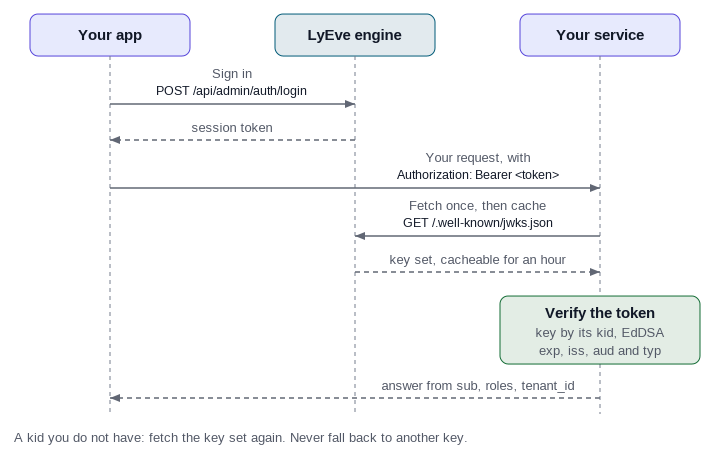
When one of your services sits behind LyEve and needs to trust the caller, it should not call LyEve on every request, and it must never hold the signing secret. LyEve signs session tokens with EdDSA (Ed25519) and publishes the matching public key at a standard JWKS endpoint. Your service fetches the key once, caches it, and verifies tokens itself. This is the pattern OIDC providers use, so a library that validates Google or Auth0 tokens works here too.
Console v0.25.0 has no screen of its own for the key set or for checking a token, so these steps use the engine API.
-
Fetch the key set from the Content API:
Shell curl -i http://localhost:3002/.well-known/jwks.jsonThe answer carries
Cache-Control: public, max-age=3600and one key:JSON {"keys": [{ "kty": "OKP", "crv": "Ed25519", "x": "b64url-of-32-byte-public-key", "use": "sig", "alg": "EdDSA", "kid": "b64url-8-bytes" }]}An answer of
{"keys": []}means the instance signs with HMAC, and its token header in step 3 reads{"alg":"HS256","typ":"JWT"}. See when the key set is empty. -
Sign in and keep the
tokenfrom the answer inTOKEN. The quickstart shows how. -
Read the token's header:
Shell echo "$TOKEN" | cut -d. -f1 | base64 -d 2>/dev/null; echoJSON {"alg":"EdDSA","kid":"b64url-8-bytes","typ":"JWT"}The
kidmatches the key in step 1. -
Verify it in your service with one of the examples below.
The endpoint
Link to the section The endpointGET /.well-known/jwks.json- Public. No authentication.
- Served by the Content API only, on port 3002 by default
(
API_LISTEN_ADDR). The Admin API answers404for this path. - RFC 7517 JWK Set format.
- Cache it for up to an hour, as
Cache-Controlsays, rather than fetching it per request.
| Field | Value | Meaning |
|---|---|---|
kty | OKP | Octet key pair, the RFC 8037 family for Ed25519 |
crv | Ed25519 | The curve |
x | base64url | The raw 32-byte public key |
use | sig | A signature key |
alg | EdDSA | The signing algorithm |
kid | base64url | Key ID. The same key always has the same kid. |
When the key set is empty
Link to the section When the key set is empty{ "keys": [] }An empty set means the instance signs with HMAC instead: JWT_ALG=HS256 is
set, or, outside production, the key file at JWT_KEY_PATH could not be used.
That covers a file that cannot be read or created, does not parse, holds a key
of the wrong length, or holds a public key that does not match its seed. In
production any of these stops the start instead. HMAC
tokens can only be checked with JWT_SECRET, so do not use JWKS validation
against such an instance. See
sign tokens with Ed25519.
What a token holds
Link to the section What a token holds| Claim | Type | Notes |
|---|---|---|
sub | string | User ID (UUID) |
email | string | The user's email. On an install with several tenants, the same address can belong to a different account in each tenant, so identify an account by sub |
roles | string[] | The user's roles in the tenant the session acts in |
tenant_id | string | The tenant. Absent for an account with no tenant, such as the first super admin |
typ | string | session for a normal token, challenge for one waiting on a second factor |
tv | int | Token version. The instance raises it to end every session of an account |
jti | string | A unique ID for the token |
iss | string | Always lyeve-cms |
aud | string[] | Always ["lyeve-api"] |
iat, exp | numeric date | Issued at and expiry. The lifetime is JWT_EXPIRY_SECS, 900 seconds by default |
Three checks matter most to a downstream service:
issmust equallyeve-cmsandaudmust containlyeve-api. Reject anything else, so a token minted for another audience is not replayed against you.typmust besession. Achallengetoken means the person entered a password and has not cleared MFA yet.tenant_idis your isolation boundary. Never trust a tenant value from anywhere but the verified token. See tenants.
A signature check alone cannot see that an account was disabled or signed out
after the token was issued. Keep JWT_EXPIRY_SECS short, so such a token
expires within minutes.
Verify a token
Link to the section Verify a tokenThe steps are the same in any language:
- Fetch the key set once, then cache it for the
max-age. - Read the token's
kidheader and pick the key with thatkid. - Verify the signature with that key, requiring
algEdDSA. - Check
exp,issandaud, and thattypissession. - Read
sub,rolesandtenant_idfrom the verified claims.
If you meet a kid you do not have, fetch the key set again. Never fall back
to another key.
package lyeveauth
import (  "crypto/ed25519"  "encoding/base64"  "encoding/json"  "fmt"  "net/http"
  "github.com/golang-jwt/jwt/v5")
type jwk struct {  Kty, Crv, X, Kid string}
// LoadKeys fetches the JWKS and returns kid -> ed25519 public key.func LoadKeys(jwksURL string) (map[string]ed25519.PublicKey, error) {  resp, err := http.Get(jwksURL)  if err != nil {    return nil, err  }  defer resp.Body.Close()
  var set struct{ Keys []jwk }  if err := json.NewDecoder(resp.Body).Decode(&set); err != nil {    return nil, err  }
  keys := map[string]ed25519.PublicKey{}  for _, k := range set.Keys {    if k.Kty != "OKP" || k.Crv != "Ed25519" {      continue    }    raw, err := base64.RawURLEncoding.DecodeString(k.X)    if err != nil || len(raw) != ed25519.PublicKeySize {      continue    }    keys[k.Kid] = ed25519.PublicKey(raw)  }  return keys, nil}
// Verify parses and validates a LyEve token. Cache keys between calls.func Verify(tokenStr string, keys map[string]ed25519.PublicKey) (jwt.MapClaims, error) {  parser := jwt.NewParser(    jwt.WithValidMethods([]string{"EdDSA"}),    jwt.WithIssuer("lyeve-cms"),    jwt.WithAudience("lyeve-api"),  )  claims := jwt.MapClaims{}  _, err := parser.ParseWithClaims(tokenStr, claims, func(t *jwt.Token) (any, error) {    kid, _ := t.Header["kid"].(string)    key, ok := keys[kid]    if !ok {      return nil, fmt.Errorf("unknown kid %q", kid)    }    return key, nil  })  if err != nil {    return nil, err  }  if claims["typ"] != "session" {    return nil, fmt.Errorf("not a session token")  }  return claims, nil}
WithValidMethods([]string{"EdDSA"}) is the line that matters: it stops a
token from naming none or an HMAC algorithm instead.
Node.js
Link to the section Node.jsThe jose library fetches, caches and picks the key for you:
import { jwtVerify, createRemoteJWKSet } from 'jose';
const JWKS = createRemoteJWKSet(  new URL('https://lyeve.example.com/.well-known/jwks.json'),);
export async function verify(token) {  const { payload } = await jwtVerify(token, JWKS, {    issuer: 'lyeve-cms',    audience: 'lyeve-api',    algorithms: ['EdDSA'],  });  if (payload.typ !== 'session') throw new Error('not a session token');  return payload; // { sub, roles, tenant_id, ... }}
createRemoteJWKSet fetches on first use and fetches again when it meets an
unknown kid.
Key rotation
Link to the section Key rotationThe signing key lives in the file at JWT_KEY_PATH
(/var/lib/lyeve/jwt_key.json by default), and LyEve creates it on first
start when the file is missing. To rotate, replace the file and restart. The
instance verifies with one key at a time, so it refuses every token signed
with the old key, and new tokens carry the new kid. A service that fetches
the key set again on an unknown kid picks up the new key without a change.
A service keeps accepting a token signed with the old key until the token
expires or the service fetches the key set again.
Related
Link to the section Related- Harden your instance: signing, secrets and token lifetimes.
- Roles and permissions: what the roles in a token mean.
- Sign-in options: every way a person gets a token.