How-to guides
Build a flow with the assistant
Requires a license with the
aifeature. See pricing.
Instead of dragging nodes onto the canvas, you can tell the flow editor what you want and get a draft back. This guide builds one flow that way: when a support ticket is created, classify it and email the right team. The assistant drafts against your instance's own node catalog and checks every draft before you see it. It never saves or publishes anything: you accept, save, test and publish, as with a flow you drew by hand.
Before you start
Link to the section Before you start- AI is set up. Your license carries
ai, the tenant's AI switch is on on the Settings tab of Operations > AI, and the tenant has an enabled provider. See AI. - The nodes you ask for are licensed. The example uses
ai.classifyandemail.send, which needflow-proas well. The assistant may draft a node your license does not cover, and then saving the flow answers402. See free and flow-pro. - An email sender is configured, for the example's mail. See email.
- A
ticketscontent type withsubjectandbodyfields. - For the console steps, you are signed in to LyEve Console as an
admin. For the API steps, you need an admin token in
TOKENandjq. The quickstart shows how to get a token.
1. Open the assistant
Link to the section 1. Open the assistantConsole v0.28.0
Open Flows in the console and open a flow, new or existing. The drawer below the canvas has the tabs Test, Runs, Assistant and Guide. Assistant opens with a box headed "Describe the flow" and a note saying what is sent: the flow on the canvas, the node catalog and your prompt, to the provider configured for this tenant.
What the tab says after you press Send tells you what is missing:
| The tab says | What to fix |
|---|---|
| "The assistant is switched off" | The tenant's AI switch is off on the Settings tab of Operations > AI, or the license does not carry ai. |
| "The assistant is not available" | Read the message under it. no enabled AI provider configured means the tenant needs an enabled provider. |
Engine API v0.62.0
The assistant needs the node catalog in every request. Save it to a file:
curl http://localhost:3001/api/admin/flows/catalog/llm \ -H "Authorization: Bearer $TOKEN" -o catalog.mdWith the tenant's AI switch off, the assistant answers 404 with
AI is switched off for this tenant. With no enabled provider, it answers
503 with no enabled AI provider configured.
The web application firewall
skips the catalog field on both assistant routes, so only your prompt or the
flow definition can trip a rule. A URL that names a private IP address, for
example, trips SSRF-004. If the firewall refuses the request with 403 and
request blocked by WAF, read the rule ids on /api/admin/ai/assist/flow in
the violation log, and
add an exception
for each one on the path /api/admin/ai/assist/flow*.
2. Describe the flow
Link to the section 2. Describe the flowSay what starts it, what it reads and what it does. Name your content types, fields and addresses, because the assistant knows the catalog, not your content model:
When a tickets record is created, classify its body as billing, support orsales, then email billing@example.com for billing and support@example.com foreverything else, with the ticket's subject in the email subject.Console v0.28.0
Type it in the box and press Send. The panel shows "Drafting the flow" while the provider answers, then a line with the model, the tokens and the estimated cost of the turn.
Engine API v0.62.0
jq -n --rawfile catalog catalog.md \  --arg prompt "When a tickets record is created, classify its body as billing, support or sales, then email billing@example.com for billing and support@example.com for everything else, with the ticket's subject in the email subject." \  '{prompt: $prompt, catalog: $catalog}' > draft.json
curl -X POST http://localhost:3001/api/admin/ai/assist/flow \  -H "Authorization: Bearer $TOKEN" \  -H "Content-Type: application/json" \  --data-binary @draft.json -o answer.json
answer.json carries definition, the same draft as yaml, problems,
conversation_id, model, tokens and cost.
3. Read the draft
Link to the section 3. Read the draftThe answer is a YAML draft. Yours will differ in names and layout, but it looks like this:
version: 1name: Route new ticketsslug: route-new-ticketstrigger: type: trigger.event config: kind: content schema: tickets event: after_createnodes: - id: classify type: ai.classify position: { x: 120, y: 200 } config: input: "{{ trigger.data.body }}" labels: [billing, support, sales] - id: route type: control.switch position: { x: 400, y: 200 } config: cases: - port: billing when: input.label == 'billing' - id: email_billing type: email.send position: { x: 680, y: 120 } config: to: [billing@example.com] subject: "Billing ticket: {{ trigger.data.subject }}" text: "{{ trigger.data.body }}" - id: email_support type: email.send position: { x: 680, y: 280 } config: to: [support@example.com] subject: "Ticket: {{ trigger.data.subject }}" text: "{{ trigger.data.body }}"edges: - { from: classify, to: route } - { from: route, from_port: billing, to: email_billing } - { from: route, from_port: default, to: email_support }Console v0.28.0
The draft is shown read-only under Draft, beside your prompt. Under it,
the panel either says "This draft has no problems." or lists what is
still wrong. Each line names the node, or flow, with the path to the
setting, then the problem:
email_billing/config/to requiredClicking a line brings that part of the draft into view, and selects the node on the canvas when one with that id is there. Accept stays disabled while a problem remains, and says why.
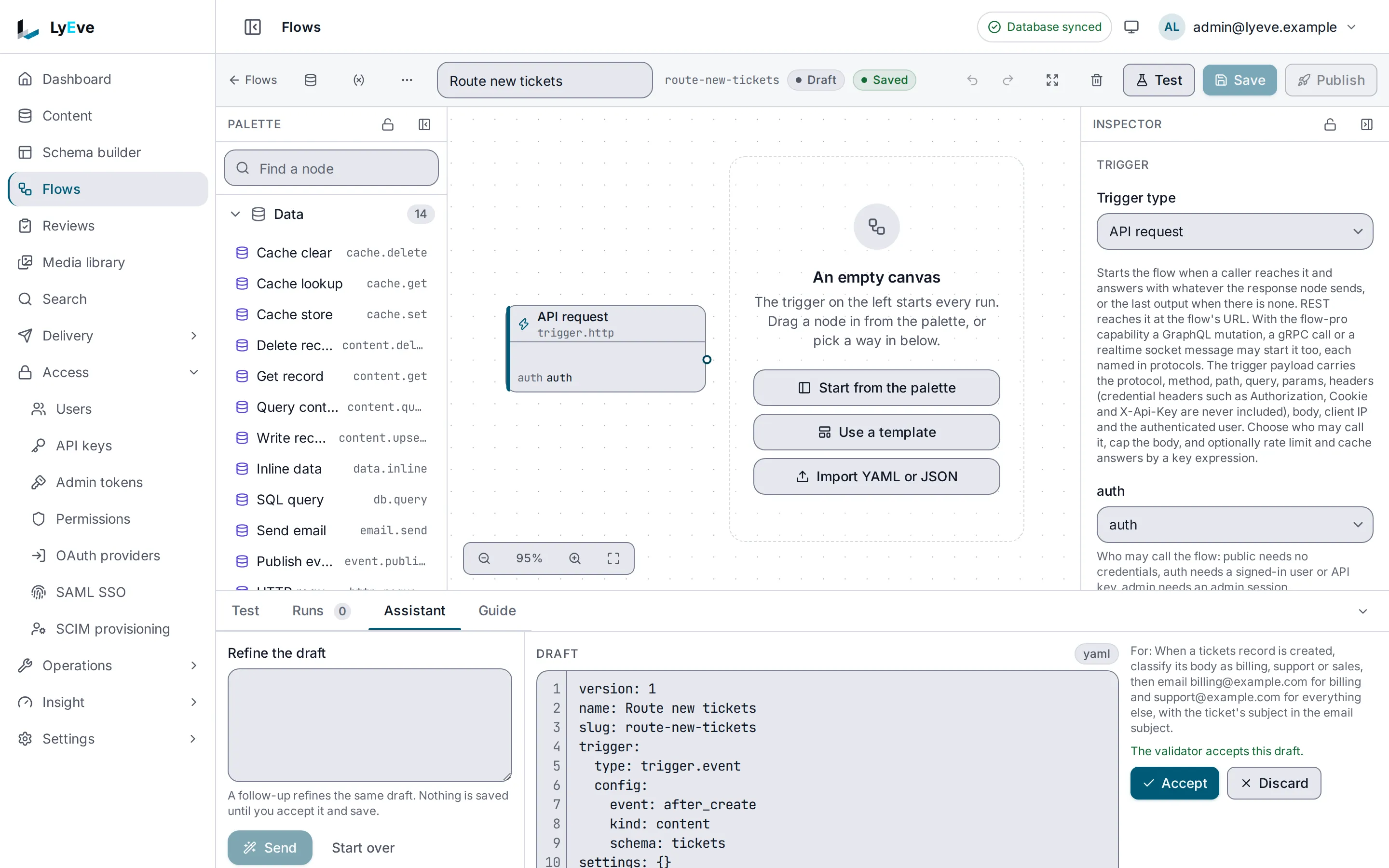
Engine API v0.62.0
Read the draft as YAML:
jq -r .yaml answer.jsonproblems is an empty list when the validator accepts the draft. Otherwise
each entry has node_id, path and message.
The assistant gets one repair pass: the problems go back to the model once, and whatever remains is shown rather than hidden.
4. Accept it
Link to the section 4. Accept itConsole v0.28.0
Press Accept. The draft replaces what is on the canvas, and the editor says "Draft accepted. Save to keep it." The flow keeps its own slug. Nothing is stored until you press Save, and leaving the page without saving drops the draft. Discard closes the draft and the conversation instead.
Engine API v0.62.0
Create the flow as a draft from the answer:
jq '{name: .definition.name, slug: .definition.slug, definition: .definition}' \  answer.json > flow.json
curl -X POST http://localhost:3001/api/admin/flows \  -H "Authorization: Bearer $TOKEN" \  -H "Content-Type: application/json" \  --data-binary @flow.json
The answer is 201 with the new flow.
Then follow the usual path: run a test with a sample trigger payload, and
publish. See Flows. In a test run ai.classify
answers the first label and calls no provider, unless you turn on live side
effects.
5. Refine it
Link to the section 5. Refine itSay what to change rather than describing the flow again:
Also send sales tickets to sales@example.com, and put the label in everyemail subject.Console v0.28.0
After the first answer the box reads "Refine the draft". Type the change and press Send. Each answer is checked the same way and replaces the draft in the panel. The canvas changes only when you accept. Start over clears the conversation.
Engine API v0.62.0
Send the change with the draft as current and the same conversation_id:
jq --rawfile catalog catalog.md \  --arg prompt "Also send sales tickets to sales@example.com, and put the label in every email subject." \  '{prompt: $prompt, catalog: $catalog, current: .definition, conversation_id: .conversation_id}' \  answer.json > refine.json
curl -X POST http://localhost:3001/api/admin/ai/assist/flow \  -H "Authorization: Bearer $TOKEN" \  -H "Content-Type: application/json" \  --data-binary @refine.json -o answer.json
Refining needs the tenant to store transcripts, because the conversation is
kept as one. With storage off, the answer carries no conversation_id, and
each prompt starts fresh from the definition it is sent.
6. Ask about a node or a problem
Link to the section 6. Ask about a node or a problemConsole v0.28.0
- A node. Select it on the canvas and press the wand button in the inspector, "Ask the assistant about this node". The answer appears under "About" and the node's name.
- A problem. Open the problem count in the toolbar, such as 1 problem. "Fix these before publishing" lists each problem with a wand button beside it. Press it to ask the assistant about that problem.
Engine API v0.62.0
Send the definition with a node_id and a question:
jq --rawfile catalog catalog.md \  '{catalog: $catalog, definition: .definition, node_id: "classify", question: "What does this node do?"}' \  answer.json > ask.json
curl -X POST http://localhost:3001/api/admin/ai/assist/flow/explain \  -H "Authorization: Bearer $TOKEN" \  -H "Content-Type: application/json" \  --data-binary @ask.json
The answer carries answer, model, tokens and cost. To ask about a
problem, send problem, with its node_id, path and message, in place
of node_id.
The answer explains what the node does in this flow, or what the problem means and how to fix it. The assistant never changes the canvas for you.
What is recorded, and what is sent
Link to the section What is recorded, and what is sentEvery draft, follow-up and question is part of a transcript of kind
flow_assistant, with the prompt, the answer, the model, the tokens, the
latency and the estimated cost of each turn. Read them on the
Transcripts tab of Operations > AI, or with
GET /api/admin/ai/transcripts?kind=flow_assistant. They follow the
retention, switches and privacy handling on the
AI page.
The request to your provider carries the tenant's flow_assistant prompt, the
node catalog, the definition on the canvas, your prompt, the earlier turns of
the conversation and any problems found in the draft. Content entries,
provider keys and other tenants' flows never go. See
what never leaves your instance.
- The flow catalog for language models: draft flows with a model of your own instead.
- Flow definition format: every node and setting the assistant can use.
- Flow templates: starter flows, among them
comment-moderation, which can useai.classify.