Features
Multi-tenancy
Included free on every install, with the
defaulttenant, domain mapping, the JSON Lines and dump migrate routes, and the cost ledger. Creating more tenants needsmultitenant-provisioning, backup, restore and clone needtenant-backup, the database migrator needsmigration-toolkit, and per-tenant admin branding needsmultitenant-customization. See pricing.
A tenant is one customer, brand or site on a shared instance. Each tenant has
its own content types, entries, media, users, API keys and settings, and a
request in one tenant never reads another tenant's data. A free install runs one
tenant, default. With a license you create as many as your plan allows.
How a request picks its tenant
Link to the section How a request picks its tenant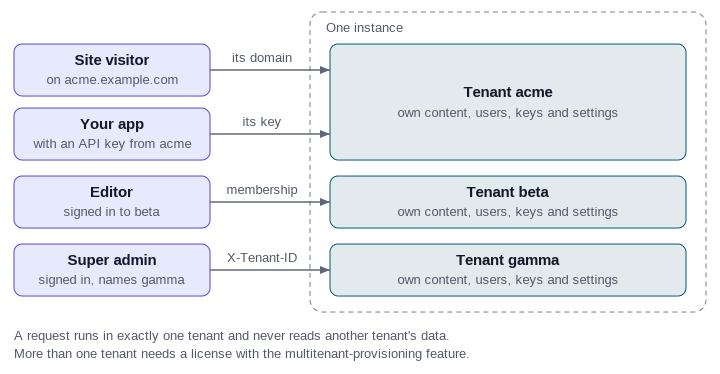
Every request runs in exactly one tenant, decided before it is handled:
| Caller | Tenant the request runs in |
|---|---|
| A signed-in user | Their home tenant, or the tenant they named when signing in, if they hold a membership there. |
| An API key | The tenant the key was created in. |
| An admin token | The tenant the token was issued for. An X-Tenant-ID naming another answers 403. |
| A super admin | Their own tenant, or any tenant they name with X-Tenant-ID. An unknown or disabled slug answers 404 with {"error":"tenant not found"}. |
| A request with no credential | The tenant mapped to the Host header's domain. With one tenant on the install, that tenant. With MULTI_TENANT=true, several tenants and no mapping for the host, 404. |
Only a super admin picks a tenant with X-Tenant-ID. With an admin token, a
header naming another tenant answers 403. From anyone else the header is
ignored, so a client cannot reach another tenant by sending one. Every read
and write is then limited to the resolved tenant.
In the console
Link to the section In the consoleOpen Operations > Tenants. A super admin sees every tenant with a record,
with its slug, name, plan, status and creation date, and the buttons on a row
edit, disable or delete the tenant. Without multitenant-provisioning the page
reads Tenant provisioning and Not enabled on this engine, and has no
New tenant button. The tenant's name opens its page, with Archive,
Features, and its Members with New member.
LyEve Console has no tenant switcher. A super admin creates an account in any
tenant from Access > Users with New user, choosing the tenant under
Tenant. Under Roles, untick viewer, which is ticked already, and tick the
account's role. An account
with a membership in another tenant works in it by entering its slug in
Organization (optional) on the sign-in page, which the console shows when
it runs with SIGN_IN_ORGANIZATION=true. A super admin's own session
stays in its home tenant, so steps 3 to 5 below, which act
inside acme from that session, are API only on v0.25.0.
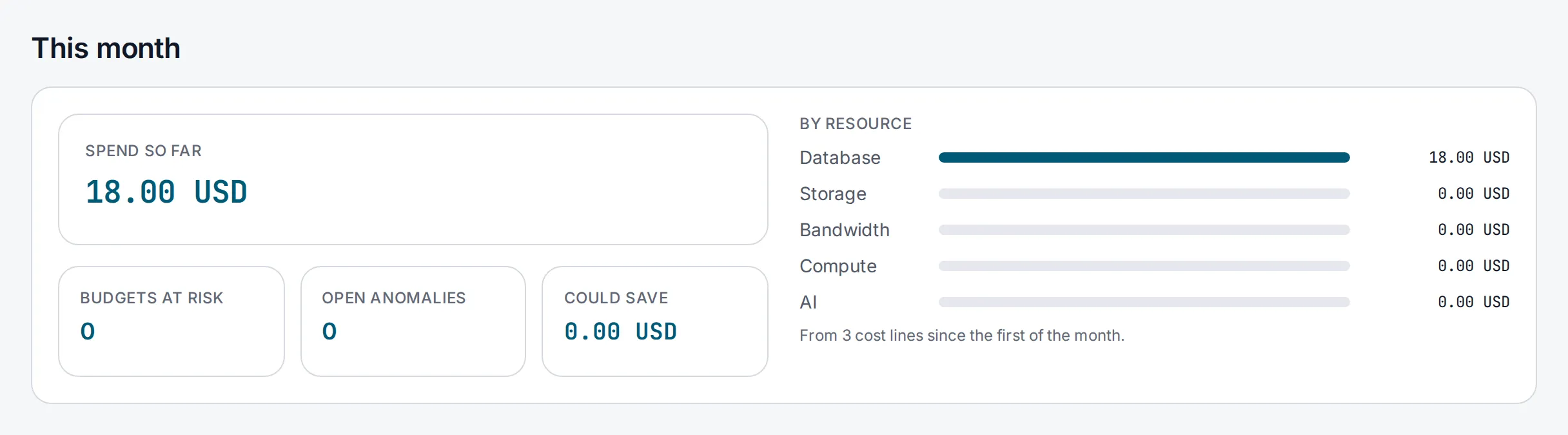
Operations > Tenant costs, which admins open too, shows what the tenant's usage costs this month in total and by resource, then its budgets and prices. Tenant costs has its tasks.
This creates a second tenant, writes an entry into it and shows that the
default tenant cannot see it. Creating a tenant needs a license with
multitenant-provisioning. On a free install, step 2 answers 402. For the
console steps, you are signed in to the console as a super admin. For the
API steps, you need a super admin token in TOKEN. The
quickstart shows how to get one.
1. Check that this install may create tenants.
Console v0.28.0
Open Operations > Tenants. The page has a New tenant button when this install may create tenants, and reads Not enabled on this engine under Tenant provisioning when it may not.
Engine API v0.62.0
curl http://localhost:3001/api/admin/tenants/provisioning \ -H "Authorization: Bearer $TOKEN"{"enabled": true}A free install answers {"enabled": false}.
2. Create the tenant.
Console v0.28.0
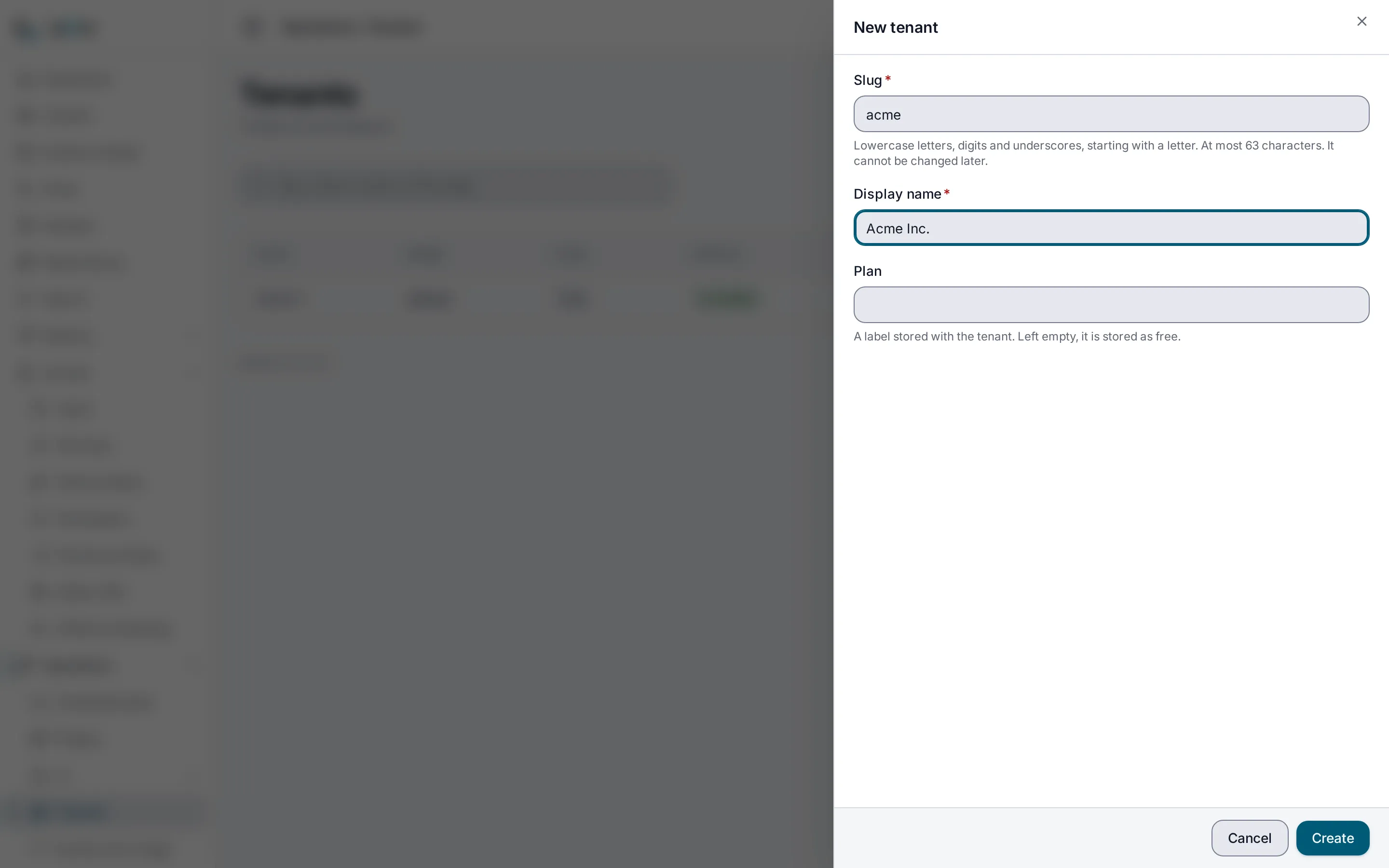
- Choose New tenant.
- Enter
acmein Slug andAcme Inc.in Display name. Leave Plan empty. - Choose Create. The page confirms Created Acme Inc.
Engine API v0.62.0
curl -X POST http://localhost:3001/api/admin/tenants \ -H "Authorization: Bearer $TOKEN" \ -H "Content-Type: application/json" \ -d '{"slug": "acme", "name": "Acme Inc."}'The answer is 201 with the tenant.
{ "id": "3f64a521-1146-481c-aaf8-a3334f505aa3", "slug": "acme", "name": "Acme Inc.", "plan": "free", "enabled": true, "created_at": "2026-10-02T05:05:55.15037Z", "updated_at": "2026-10-02T05:05:55.15037Z", "archived": false}plan defaults to free.
3. Define a content type inside acme. This is API only on v0.25.0 for a super admin's
own session, because the console has no tenant switcher. As a super admin, X-Tenant-ID picks
the tenant:
curl -X POST http://localhost:3001/api/admin/schemas \ -H "Authorization: Bearer $TOKEN" \ -H "X-Tenant-ID: acme" \ -H "Content-Type: application/json" \ -d '{"name": "ticket", "fields": [{"name": "title", "field_type": "text", "required": true}]}'The answer is 200 with the stored definition.
4. Write an entry into acme. This is API only on v0.25.0.
curl -X POST http://localhost:3002/api/v1/content/ticket \ -H "Authorization: Bearer $TOKEN" \ -H "X-Tenant-ID: acme" \ -H "Content-Type: application/json" \ -d '{"data": {"title": "Only in Acme"}}'The answer is 201 with the entry.
5. Read ticket from each tenant. This is API only on v0.25.0.
curl http://localhost:3002/api/v1/content/ticket \  -H "Authorization: Bearer $TOKEN" -H "X-Tenant-ID: acme"
curl http://localhost:3002/api/v1/content/ticket \  -H "Authorization: Bearer $TOKEN" -H "X-Tenant-ID: default"
The first lists the entry. The second answers 404, because the ticket content type exists
only in acme.
6. Open the tenant in the console. In Operations > Tenants, acme is in the
list, and its page shows its members and the features it may use.
Run more than one tenant
Link to the section Run more than one tenantSet MULTI_TENANT=true before you add a second tenant. An account or API key
acts in the tenant it belongs to either way. The setting adds what a public site needs on a shared
instance: a request with no credential on a host that maps to no tenant answers
404 once the install holds several tenants.
With MULTI_TENANT=true, first-run setup creates the default tenant and puts
the first super admin in it. An install that turns the setting on later creates
default itself with POST /api/admin/tenants and the slug default, which
needs no license.
Create and manage tenants
Link to the section Create and manage tenantsTenant routes need the super_admin role. Anyone else gets 403, with
insufficient permissions on the tenant routes and super_admin role required
on the domain and membership routes.
A slug is how every route, header and domain mapping names a tenant:
| Rule | Value |
|---|---|
| Pattern | ^[a-z][a-z0-9_]{0,62}$ |
| First character | A lower-case letter |
| Other characters | Lower-case letters, digits and underscores. No hyphens. |
| Length | 1 to 63 characters |
PUT /api/admin/tenants/{id} changes name, plan or enabled, and fields
you leave out keep their value. A disabled tenant is refused as an
X-Tenant-ID target, and on a public request it no longer counts as a tenant to
serve.
The license sets how many tenants you may hold. Past that, a create answers
402 with tenant quota reached (<n>); upgrade your plan to add more tenants.
If a license lapses, every tenant you already have stays readable, editable,
archivable and deletable. Only creating new ones is refused.
A slug that belonged to a deleted tenant whose rows are still stored answers
409 and names the tables that hold them, so a new tenant never inherits old
data. Purge those rows or choose another slug.
Archive, restore and delete
Link to the section Archive, restore and delete- Archive (
POST /api/admin/tenants/{id}/archive) makes a tenant read-only and keeps its data. Every write to it answers423with{"error":"tenant is archived - read-only"}. Reads still work. - Restore (
POST /api/admin/tenants/{id}/restore) makes it writable again. - Delete (
DELETE /api/admin/tenants/{id}) removes the tenant's rows across every feature, its media records included, in one transaction. The stored files stay in your storage backend for you to remove. If any part fails, nothing is deleted and the tenant stays. The answer is204. There is no undo.
These routes take a signed-in session. An admin token or an API key cannot call them.
Archive a tenant and restore it.
Console v0.28.0
- Open Operations > Tenants and choose the tenant's name.
- Choose Archive. The dialog says reads keep working and every write is refused until the tenant is restored. Confirm it, and the tenant's status reads Archived.
- Choose Restore to make it writable again. It asks no confirmation.
Engine API v0.62.0
Copy the tenant's id from GET /api/admin/tenants into TENANT_ID, then:
curl -X POST http://localhost:3001/api/admin/tenants/$TENANT_ID/archive \ -H "Authorization: Bearer $TOKEN"POST /api/admin/tenants/$TENANT_ID/restore makes it writable again. Both answer 200.
Delete a tenant.
Console v0.28.0
On Operations > Tenants, choose Delete on the tenant's row and confirm in the dialog. The page confirms Deleted with the tenant's name.
Engine API v0.62.0
curl -X DELETE http://localhost:3001/api/admin/tenants/$TENANT_ID \ -H "Authorization: Bearer $TOKEN"The answer is 204.
Archive a tenant if you may need it back. Take a backup first if you need its content after it is gone.
Serve a tenant on its own domain
Link to the section Serve a tenant on its own domainMap a hostname to a tenant, and a request to that host runs in that tenant
without any credential naming it. This is how a public site reaches its own
content on an install with several tenants. A mapping resolves only once it is
verified: send "verified": true when you have already proved control of the
domain, or set it later with PUT. These routes need a super admin, and they
are API only on v0.25.0.
curl -X POST http://localhost:3001/api/admin/tenant-domains \ -H "Authorization: Bearer $TOKEN" \ -H "Content-Type: application/json" \ -d '{"domain": "cms.acme.com", "tenant_id": "acme", "verified": true}'The answer is 201 with the mapping. tenant_id is the tenant's slug, and
domain is a hostname with no scheme and no port. A domain mapped to another
tenant answers 409.
Give an account more than one tenant
Link to the section Give an account more than one tenantAn account belongs to the tenant it was created in, its home tenant. A super admin can grant it roles in other tenants.
Console v0.28.0
- Open Operations > Tenants and choose
acme. - Under Members, choose New member.
- Enter the account's address in Account email. Under Roles in this tenant, viewer starts ticked, and editor and admin are the other choices.
- Choose Create. The account is listed under Members with its role.
Engine API v0.62.0
Copy the account's id from GET /api/admin/users into USER_ID, then:
curl -X PUT http://localhost:3001/api/admin/users/$USER_ID/memberships \ -H "Authorization: Bearer $TOKEN" \ -H "Content-Type: application/json" \ -d '{"tenant_id": "acme", "roles": ["editor"]}'The account then signs in to that tenant by naming it. On the console's sign-in
page, that is the tenant's slug in Organization (optional), which the
console shows when it runs with SIGN_IN_ORGANIZATION=true. Over the API:
curl -X POST http://localhost:3001/api/admin/auth/login \ -H "Content-Type: application/json" \ -d '{"email": "editor@example.com", "password": "<password>", "tenant": "acme"}'Without tenant, a sign-in acts in the home tenant. A tenant the account holds
no membership in answers 401, the same as a wrong password.
POST /api/v1/auth/token takes the same field. A signed-in account lists the
tenants it may act in with GET /api/admin/auth/memberships, which is how a
client builds a tenant switcher.
Granting and revoking need a super admin with a signed-in session.
When the domain a sign-in arrives on is mapped to a tenant, that tenant decides
whose account the address reaches, and tenant in the body cannot point it at
another tenant's account. The field still picks which of the account's own
memberships the session acts in.
An account that a tenant's identity provider, its SCIM directory or a magic link sign-up created belongs to that tenant alone, and the same address can be a different account in each tenant. Each tenant also sets how long such an account may sign in without its provider. See accounts a tenant's provider creates.
Choose what each tenant may use
Link to the section Choose what each tenant may useA super admin can withhold features from one tenant while the rest of the install keeps them, for example to keep a trial customer off the AI features. The license stays the ceiling, and an empty list gives the tenant everything it allows. These routes take a signed-in session.
Console v0.28.0
- Open Operations > Tenants and choose
acme. - Under Features, choose Remove flow on the
flowfeature. - Choose Save. The page confirms that the tenant's next request follows it.
Engine API v0.62.0
curl -X PUT http://localhost:3001/api/admin/tenant-features/acme \ -H "Authorization: Bearer $TOKEN" \ -H "Content-Type: application/json" \ -d '{"withheld": ["flow"]}'The answer lists withheld and known, every feature name the instance can withhold.
A request in acme to a withheld feature then answers 403 with
This feature is not available to this tenant. A name the instance does not
serve answers 422. The list holds features, not paid capabilities: a
capability name such as alerts-pro, flow-pro or rate-limit-pro answers
422 the same way.
Back up, clone and move content
Link to the section Back up, clone and move content- To back up a tenant, restore one, or clone one into a new tenant, see Back up and restore tenants.
- To bring content in from files or other systems, move it between tenants, or move the whole database to another server, see Migrate existing content.
The JSON Lines and portable dump routes under /api/admin/migrate/ are free.
An admin works on their own tenant there, and naming another tenant answers
403. The content types have to exist in the target tenant before an import,
because neither route creates them. An imported record keeps its id when it
can, so relations survive a move.
The database migrator (migration-toolkit) copies a whole database from one
connection string to another, in any pairing of PostgreSQL, MySQL and SQL
Server. It copies tables and rows, not constraints, keys or indexes, runs for at
most 30 minutes per job, and a rollback drops only the tables the job created.
Private, loopback, link-local and cloud metadata addresses are refused unless
MIGRATION_ALLOWED_PRIVATE_NETWORKS lists them.
Tenant costs
Link to the section Tenant costsThe cost ledger records what each tenant consumes, priced, by resource type:
database, storage, bandwidth, compute and ai. Every hour it reads the
instance's own meters and writes one line per meter for the current and the
previous month, updating those lines rather than adding new ones:
- API requests become
compute, and bytes sent becomebandwidth. - The monthly usage snapshot becomes
storage. - AI usage becomes
ai, at the cost recorded per model.
You can also post entries by hand. Until you set a tenant's own price on the
prices routes, these defaults apply, in USD: compute 1.00 per million
requests, bandwidth 0.09 per GiB, storage 0.023 per GiB. database and
ai default to zero.
A budget names a resource type (or all), a period (monthly, quarterly or
annual), an amount and percentage thresholds. When spend crosses a threshold,
the cost.budget.exceeded event fires once per budget, period and threshold, so
a flow can notify someone. Its data carries tenant_id,
budget_id, budget_name, resource_type, period, period_start,
period_end, amount, budget_amount, threshold and currency.
Every cost route needs the admin role and works on the caller's tenant.
Read the meters now and set a budget. For the console steps you are signed in as an
admin, and for the API steps you need an admin token in TOKEN.
Console v0.28.0
- Open Operations > Tenant costs and choose Update costs. The page reports Costs updated, with the cost lines written, the budget events published and the anomalies opened.
- Choose New budget. Enter a Name and an Amount, keep USD as the Currency and Monthly as the Period, and leave Resource at Every resource. Set First day and Last day, keep the Alert thresholds of 50, 80 and 100, and choose Create. The page confirms Budgets saved.
Engine API v0.62.0
curl -X POST http://localhost:3001/api/admin/cost-monitor/aggregate \ -H "Authorization: Bearer $TOKEN"{ "tenant_id": "default", "entries_saved": 2, "budget_events": 0, "anomalies": 0 }Then create the budget. amount is a decimal, sent as a string or a JSON number, and a number keeps the digits you sent:
curl -X POST http://localhost:3001/api/admin/cost-monitor/budgets \ -H "Authorization: Bearer $TOKEN" \ -H "Content-Type: application/json" \ -d '{"name": "Monthly cap", "period": "monthly", "amount": "25.00", "currency": "USD", "alert_thresholds": [50, 80, 100], "period_start": "2026-10-01T00:00:00Z", "period_end": "2026-11-01T00:00:00Z"}'The answer is 201 with the budget and its current_spend.
Brand the console per tenant
Link to the section Brand the console per tenantRequires a license with the
multitenant-customizationfeature. See pricing.
A tenant's admin can make the console their own, under Settings > Customization. Everything is kept per tenant. The same license also gives each tenant its own captcha provider and its own metrics destination.
- Brand. A display name of up to 60 characters in the header and tab title,
an accent color as
#RRGGBB, a welcome line of up to 280 characters, a logo, a PNG, JPEG or WebP of up to 500 KB stored in the media library, and a tab icon. - Menu. Hide entries the team never uses, pin the daily ones at the top, and add links to the team's own tools, each optionally limited to roles. Hiding an entry does not change who may open the page behind it.
- Dashboard. Up to 24 widgets in your order, each a third, half or full row wide and optionally limited to roles. A widget shows only what its viewer could open anyway.
- Pages. Up to 50 pages of your own, each up to 40 blocks, optionally limited to roles. One page can open at the top of the dashboard.
Set the brand. For the console steps you are signed in to the tenant as an admin, and
for the API steps you need that admin's token in TOKEN.
Console v0.28.0
- Open Settings > Customization.
- Under Brand, enter
Acme Studioin Name,#0F766Ein Accent color and a line in Welcome line. - Choose Save under those fields. The page confirms that every page of this tenant's console now carries it, and the sidebar and tab title read Acme Studio.
Logo and Tab icon below each take a file, a library image or an address, with a Save of their own.
Engine API v0.62.0
PUT replaces the whole of brand and menu, so a field you leave out is cleared. Read the
current settings with GET /api/admin/customization first, change them and send them back:
curl -X PUT http://localhost:3001/api/admin/customization \ -H "Authorization: Bearer $TOKEN" \ -H "Content-Type: application/json" \ -d '{"brand": {"name": "Acme Studio", "accent": "#0F766E", "welcome": "Publish before noon on Fridays."}, "menu": {"hidden": [], "pinned": [], "links": []}}'The answer is 200 with the saved settings.
Without the license, reads answer 200 with "entitled": false and the stock
admin, page reads answer 404, and writes answer 402. Saved settings are kept
and apply again when the license returns.
Page blocks and dashboard widgets
| Block | Shows |
|---|---|
markdown | Formatted text, up to 20,000 characters. Raw HTML is not rendered. |
callout | A title and short text in a tone: neutral, brand, success, warn or danger. |
content | The latest 1 to 50 entries of a content type, optionally by status. |
stats | An entry count for each of 1 to 12 content types. |
links | A list of links. |
| Widget | Shows |
|---|---|
entry_counts | Entry counts for 1 to 12 content types, with a recent trend. |
latest_entries | The 1 to 20 most recently changed entries. |
status_breakdown | How many entries are published, draft and archived. |
recent_activity | The latest 1 to 20 audit entries. |
media_usage | Files in the media library, their size and kinds. |
api_usage | Requests, failure rate and latency over 6h, 24h or 7d. Needs API analytics. |
links | A list of links. |
text | Formatted text of up to 20,000 characters. |
Settings
Link to the section Settings| Variable | What it does | Default |
|---|---|---|
MULTI_TENANT | true makes each account and API key act in its own tenant, and lets first-run setup create default. | false |
MIGRATION_ALLOWED_PRIVATE_NETWORKS | Comma-separated CIDR ranges or addresses the database migrator may connect to. It opens them to the migrator and to nothing else. | none |
Tenants run on every install. If you set LYEVE_PLUGINS to choose which
features start, include multitenant. See
Licensing and tiers.
Tenants, domains and memberships
| Method | Path | Purpose |
|---|---|---|
GET | /api/admin/tenants | List tenants by slug, paginated. |
POST | /api/admin/tenants | Create a tenant: slug, name, optional plan. Needs multitenant-provisioning. |
GET | /api/admin/tenants/provisioning | {"enabled": true} when this install may create tenants. |
GET | /api/admin/tenants/{id} | One tenant. |
PUT | /api/admin/tenants/{id} | Change name, plan or enabled. |
DELETE | /api/admin/tenants/{id} | Delete a tenant and its rows. Stored files stay. Session only. |
POST | /api/admin/tenants/{id}/archive | Make a tenant read-only. Session only. |
POST | /api/admin/tenants/{id}/restore | Make an archived tenant writable again. Session only. |
POST | /api/admin/tenants/{id}/cold-archive | Write an archived tenant's record to storage. Session only. |
GET | /api/admin/tenants/{id}/archives | The tenant's cold-storage archives. |
POST | /api/admin/tenants/{id}/archives/{archiveID}/restore | Check a cold-storage archive and make the tenant writable. Session only. |
GET, POST | /api/admin/tenant-domains | List or create domain mappings: domain, tenant_id, verified. |
GET, PUT, DELETE | /api/admin/tenant-domains/{id} | One mapping. PUT takes tenant_id and verified. |
GET | /api/admin/users/{id}/memberships | The tenants an account may act in. Session only. |
PUT | /api/admin/users/{id}/memberships | Grant roles in a tenant: tenant_id, roles. Session only. |
DELETE | /api/admin/users/{id}/memberships/{tenant} | Revoke a tenant. Session only. |
GET | /api/admin/tenant-members/{tenant} | Every account that may act in a tenant. Session only. |
GET, PUT | /api/admin/tenant-features/{tenant} | What is withheld from a tenant: {"withheld": [...]}. Session only. |
GET | /api/admin/auth/memberships | The tenants the signed-in caller may act in. Any role. |
Every route above except the last needs the super_admin role.
Tenant costs
| Method | Path | Purpose |
|---|---|---|
GET, POST | /api/admin/cost-monitor/entries | List entries (resource_type, from, to in RFC 3339, paginated) or add one. A new entry needs resource_type, amount, period_start and period_end, and a missing one is a 400 that names it. |
GET, DELETE | /api/admin/cost-monitor/entries/{id} | One entry. |
GET | /api/admin/cost-monitor/summary | Spend over from and to. |
GET, POST | /api/admin/cost-monitor/budgets | List or create budgets. |
GET, PUT, DELETE | /api/admin/cost-monitor/budgets/{id} | One budget. |
GET | /api/admin/cost-monitor/budgets/alerts | Thresholds crossed. |
GET | /api/admin/cost-monitor/anomalies | Unusual spend, filtered by resource_type, severity and status. |
POST | /api/admin/cost-monitor/anomalies/detect | Look for anomalies now. |
GET, PATCH | /api/admin/cost-monitor/anomalies/{id} | One anomaly, or change its status. |
GET | /api/admin/cost-monitor/recommendations | Ways to save, with the estimated saving. |
POST | /api/admin/cost-monitor/recommendations/generate | Generate recommendations now. |
GET, PATCH | /api/admin/cost-monitor/recommendations/{id} | One recommendation, or change its status. |
GET | /api/admin/cost-monitor/dashboard | This month: spend so far, budgets at risk, open anomalies, top recommendations. |
POST | /api/admin/cost-monitor/aggregate | Read the meters now instead of waiting for the hour. |
GET | /api/admin/cost-monitor/prices | The price of each resource type, and whether it is yours or the default. |
PUT, DELETE | /api/admin/cost-monitor/prices/{resource_type} | Set a price (unit_price, per_units, currency) or go back to the default. |
Admin branding
| Method | Path | Role | Purpose |
|---|---|---|---|
GET | /api/admin/customization | signed in | Brand, menu and pages, filtered to the caller's roles. |
PUT | /api/admin/customization | admin | Save brand, menu and dashboard page. Up to 256 KB. |
GET | /api/admin/customization/pages/{slug} | signed in | One page. |
PUT | /api/admin/customization/pages/{slug} | admin | Create or replace a page. Up to 512 KB. |
DELETE | /api/admin/customization/pages/{slug} | admin | Delete a page. |
GET | /api/admin/customization/dashboard | signed in | The dashboard. "custom": false means the stock one. |
PUT | /api/admin/customization/dashboard | admin | Replace the dashboard, 1 to 24 widgets. Up to 256 KB. |
DELETE | /api/admin/customization/dashboard | admin | Go back to the stock dashboard. |
| Status | Message | Cause |
|---|---|---|
402 | payment_required | Creating a tenant without multitenant-provisioning. |
402 | tenant quota reached (<n>); upgrade your plan to add more tenants | The plan's tenant ceiling is reached. |
404 | tenant not found | An X-Tenant-ID names a slug that is unknown or disabled. |
423 | tenant is archived - read-only | A write to an archived tenant. |
Every tenant and domain error
| Status | Message | Cause |
|---|---|---|
400 | slug and name are required | A create field is missing. |
400 | invalid slug: must be lowercase alphanumeric + underscore, 1-63 chars, starting with a letter | Bad slug. |
400 | domain and tenant_id are required | A mapping field is missing. |
400 | domain must be a hostname, without a scheme or a port | Bad domain. |
400 | no tenant holds that slug | A mapping names an unknown tenant. |
403 | insufficient permissions | A tenant route called without the super_admin role. |
403 | super_admin role required | A domain or membership route called without the super_admin role. |
403 | This feature is not available to this tenant. | The feature is withheld from the caller's tenant. |
404 | tenant not found or domain mapping not found | Unknown id. |
409 | tenant slug already exists | Choose another slug. |
409 | slug "<slug>" still holds data from a deleted tenant in: ... | Purge those rows or choose another slug. |
409 | that domain is already mapped to a tenant | Remove the other mapping first. |
409 | tenant is not archived | Archive the tenant before a cold archive. |
Related
Link to the section Related- Back up and restore tenants: export, restore and clone one tenant.
- Migrate existing content: bring content in, or move a tenant or the whole database.
- Data residency: keep each tenant's writes in its region.
- Roles and permissions: what each role may do inside a tenant.
- Secure your instance: hardening a multi-tenant deployment.