Features
A/B testing
Requires a license with the
ab-testingfeature. See pricing.
An experiment splits your signed-in users between variants and measures which one converts better. Your app asks LyEve which variant a user sees, shows it, and reports when the user does the thing you measure. The results give each variant's conversion rate and a p-value against the control, and can stop the experiment on their own once a winner is clear.
How it works
Link to the section How it works| Part | What it is |
|---|---|
| Experiment | The test, with a status, a significance threshold and a minimum sample size. |
| Variant | One version, with a share of traffic, a config your app reads, and at most one marked as the control. |
| Metric | The event you count, such as signup. Results use the experiment's first metric. |
| Exposure | A user shown a variant. The same user always gets the same variant of an experiment. |
| Conversion | A user who did the metric's event after their exposure. |
Assignment is keyed on the user id in the caller's token, never on anything in the request body. Shares of traffic are each above 0 and at most 100, and the total cannot exceed 100. A total below 100 does not hold anyone out: the remainder goes to the variant created last.
For the console steps, you are signed in to LyEve Console as an admin or super_admin.
For the API steps, you need a token in TOKEN for one. The
quickstart shows how to get one. The same token stands in
for the end user in steps 4 and 5.
1. Create the experiment.
Console v0.28.0
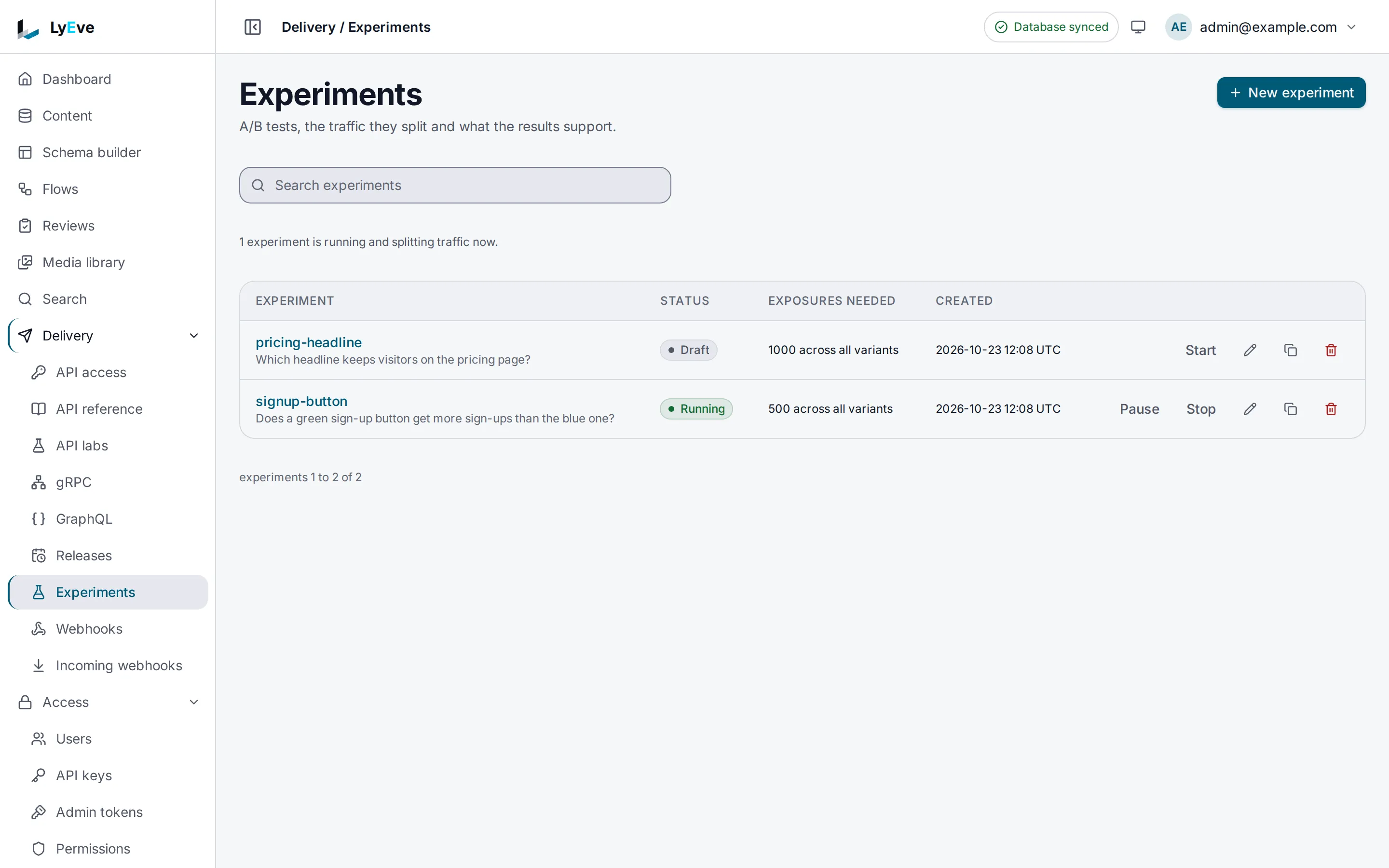
Open Delivery > Experiments and choose New experiment. Enter signup-button in
Name and 500 in Minimum exposures, turn on Stop automatically once significant,
and choose Create. The list shows it as a draft. Open it from there.
Engine API v0.62.0
curl -X POST http://localhost:3001/api/admin/ab/experiments \ -H "Authorization: Bearer $TOKEN" \ -H "Content-Type: application/json" \ -d '{"name": "signup-button", "min_sample_size": 500, "auto_stop_enabled": true}'The answer is 201 with the experiment and "status": "draft". Save its id as EXP.
Confidence level in the console is the significance_threshold below, so 0.95 means a
p-value below 0.05. Minimum exposures counts exposures across all variants together, the
same as min_sample_size.
2. Add a control and a challenger.
Console v0.28.0
On the experiment's page, choose New variant. Enter control in Name, 50 in Share
of traffic, as a percentage and {"color":"blue"} in Config the application reads, tick
This is the control, and choose Create. Add green the same way, with
{"color":"green"} and without the tick.
Engine API v0.62.0
curl -X POST http://localhost:3001/api/admin/ab/experiments/$EXP/variants \  -H "Authorization: Bearer $TOKEN" \  -H "Content-Type: application/json" \  -d '{"name": "control", "traffic_percentage": 50, "is_control": true, "config": "{\"color\":\"blue\"}"}'
curl -X POST http://localhost:3001/api/admin/ab/experiments/$EXP/variants \  -H "Authorization: Bearer $TOKEN" \  -H "Content-Type: application/json" \  -d '{"name": "green", "traffic_percentage": 50, "config": "{\"color\":\"green\"}"}'
Each answers 201 with the variant.
3. Add the metric and start the experiment.
Console v0.28.0
Choose New metric. Enter Signed up in Name and signup in Event name, keep
conversion as the Type, and choose Create. Then go back to Experiments and
choose Start on the experiment's row.
Engine API v0.62.0
curl -X POST http://localhost:3001/api/admin/ab/experiments/$EXP/metrics \  -H "Authorization: Bearer $TOKEN" \  -H "Content-Type: application/json" \  -d '{"name": "Signed up", "event_name": "signup", "metric_type": "conversion"}'
curl -X POST http://localhost:3001/api/admin/ab/experiments/$EXP/start \  -H "Authorization: Bearer $TOKEN"
The start answers 200 with "status": "running".
4. From your app, ask which variant the user sees. Exposures and conversions are API only, because your app sends them with the user's own token:
curl -X POST http://localhost:3002/api/v1/ab/expose \ -H "Authorization: Bearer $TOKEN" \ -H "Content-Type: application/json" \ -d "{\"experiment_id\": \"$EXP\"}"{ "exposure_id": "4f0c2a8e-2b7e-4a51-9a1e-0c7d6b1f3a92", "variant": "green", "variant_id": "b3d1e6f0-8c2a-4e57-9f14-2a6c0d9e7b11", "is_control": false }In the console, the experiment's id is in the address of its page.
5. When the user signs up, report it. value is optional:
curl -X POST http://localhost:3002/api/v1/ab/convert \ -H "Authorization: Bearer $TOKEN" \ -H "Content-Type: application/json" \ -d "{\"experiment_id\": \"$EXP\", \"event_name\": \"signup\"}"The answer is 201 with the conversion. Reporting it again records it once.
6. Read the results.
Console v0.28.0
Open the experiment. Results lists each variant with how many users were Exposed and Converted, its Rate and its Confidence.
Engine API v0.62.0
curl http://localhost:3001/api/admin/ab/experiments/$EXP/results \ -H "Authorization: Bearer $TOKEN"The answer lists each variant with its exposures and conversions, as below.
Read the results
Link to the section Read the results{ "experiment_id": "9a7e3c41-5d2b-4f08-8e6a-1c3b5d7f9a20", "status": "running", "variants": [ {"variant_id": "6e2f8a10-3c4d-4b5e-9f60-7a8b9c0d1e2f", "variant_name": "control", "is_control": true, "sample_size": 812, "conversions": 61, "conversion_rate": 0.0751, "p_value": 1}, {"variant_id": "b3d1e6f0-8c2a-4e57-9f14-2a6c0d9e7b11", "variant_name": "green", "is_control": false, "sample_size": 798, "conversions": 88, "conversion_rate": 0.1103, "p_value": 0.017} ], "winner": "green", "significant": true, "sample_sizes": {"6e2f8a10-3c4d-4b5e-9f60-7a8b9c0d1e2f": 812, "b3d1e6f0-8c2a-4e57-9f14-2a6c0d9e7b11": 798}}p_valueis two-tailed against the control. The control's own is1, and a variant with no exposures yet has none.- A result is
significantonce the exposures across all variants reachmin_sample_sizeand every challenger's p-value clears the threshold. winneris the variant with the highest conversion rate, which can be the control. It is left out until the result is significant.sample_sizesis keyed by variant id.
Run an experiment
Link to the section Run an experimentA new experiment starts as draft. In the console, a draft has Start on its row on
Delivery > Experiments, a running one has Pause and Stop, and a paused one has
Resume and Stop. Stop asks to confirm, because a stopped experiment cannot start
again. Over the API, move it with the routes below:
| Route | Moves it to | From |
|---|---|---|
.../start or .../resume | running | draft or paused |
.../pause | paused | running |
.../stop | stopped | running or paused |
A running experiment with auto-stop on moves to completed the first time
GET .../results finds a significant result. stopped and completed are final. Any other
move, including one to the status the experiment already has, answers 409, such as
experiment cannot be stopped from its current status.
Users can be exposed only while the experiment is running. A conversion is still recorded
while it is paused or stopped, for a user exposed earlier.
These settings go on create or update:
| Field | Meaning | Default |
|---|---|---|
name | Required. | |
description | Free text. | empty |
significance_threshold | The confidence level a result needs, between 0 and 1. 0.95 means a p-value below 0.05. | 0.95 |
min_sample_size | Exposures, across all variants together, before a result can be significant. At least 1. | 1000 |
auto_stop_enabled | Complete the experiment once its results are significant. | false |
Metric types are conversion, count, revenue and custom.
Settings
Link to the section SettingsA/B testing has no settings of its own. If you set LYEVE_PLUGINS to choose which features
start, include ab-testing in it. See licensing and tiers.
The admin routes take an admin of the tenant and a signed-in session, on the Admin API. The
two client routes take any signed-in user, on the Content API. An admin token cannot call
either.
Experiments, variants, metrics and results
| Method | Path | Purpose |
|---|---|---|
GET | /api/admin/ab/experiments | List experiments (limit default 50, max 500, offset), as {"data", "total_count", "limit", "offset"}. |
POST | /api/admin/ab/experiments | Create an experiment. |
GET | /api/admin/ab/experiments/{id} | Get an experiment. |
PUT | /api/admin/ab/experiments/{id} | Update an experiment. |
DELETE | /api/admin/ab/experiments/{id} | Delete an experiment. |
POST | /api/admin/ab/experiments/{id}/start | Move to running. |
POST | /api/admin/ab/experiments/{id}/pause | Move to paused. |
POST | /api/admin/ab/experiments/{id}/resume | Move to running. |
POST | /api/admin/ab/experiments/{id}/stop | Move to stopped. |
GET | /api/admin/ab/experiments/{id}/variants | List variants. |
POST | /api/admin/ab/experiments/{id}/variants | Create a variant. |
PUT | /api/admin/ab/experiments/{id}/variants/{vid} | Update a variant. |
DELETE | /api/admin/ab/experiments/{id}/variants/{vid} | Delete a variant. |
GET | /api/admin/ab/experiments/{id}/metrics | List metrics. |
POST | /api/admin/ab/experiments/{id}/metrics | Create a metric. |
DELETE | /api/admin/ab/experiments/{id}/metrics/{mid} | Delete a metric. |
GET | /api/admin/ab/experiments/{id}/results | Per-variant results and significance. |
POST | /api/v1/ab/expose | Assign the caller a variant and record the exposure. |
POST | /api/v1/ab/convert | Record a metric event for an exposed caller. |
Limits and errors
Link to the section Limits and errorsEach user can call expose and convert 10 times a second, with bursts of 20. Past that the
answer is 429 with a Retry-After header and
{"error": "rate limit exceeded", "message": "too many requests, slow down"}.
Without a license that carries ab-testing, the routes answer 404. A license that lapses
while the instance runs makes them answer 402 payment_required.
Every error these routes return
| Status | Message | Cause |
|---|---|---|
400 | name is required, variant name is required, metric name is required | A required name is missing. |
400 | invalid JSON, invalid experiment_id | The body cannot be read. |
400 | traffic_percentage must be between 0 and 100 | Variant traffic out of range. |
400 | traffic_percentage total would exceed 100% for this experiment | The variants would add up to more than 100. |
400 | invalid metric_type | Not one of the four metric types. |
400 | experiment_id is required, event_name is required | Missing field on expose or convert. |
400 | no metric found for event "<name>" | convert named an event no metric of the experiment tracks. |
400 | {"error": "...", "fields": [...]} | A setting out of range, such as significance_threshold above 1. |
401 | authentication required | expose or convert called without a user token. |
402 | payment_required | The license lapsed while the instance ran. |
404 | experiment not found | Wrong id on an admin route, or an experiment of another tenant. |
404 | failed to assign variant | Wrong experiment id on expose. |
409 | experiment already has a control variant | A second control was added. |
409 | experiment is not running | expose on a draft, paused, stopped or completed experiment. |
409 | user not exposed to experiment | convert before expose for that user. |
409 | experiment cannot be started from its current status, and the same with stopped, paused or resumed | The move is not allowed from the current status. |
409 | experiment status changed concurrently, retry the request | Another request changed the status at the same moment. Retry. |
Exposures and conversions are stored per user id. They are removed with the tenant when it is deleted. A privacy erasure request replaces the user's id in them, so the counts stay and the person is no longer named.
Related
Link to the section Related- Recommendations: entries picked from each reader's activity.
- Analytics: views and visitors.