Features
Access rules
Included free on every install, with rules for up to three roles. More roles need a license with the
rbac-profeature. See pricing.
An access rule says what one role may do with one resource. It names the role, the resource, the actions allowed, and the fields removed from what that role reads. Rules apply to people who sign in, in LyEve Console or with a session token, and to API keys through the roles each key carries. The exception is an admin in the console's content screens, as the fixed answers say.
In the console
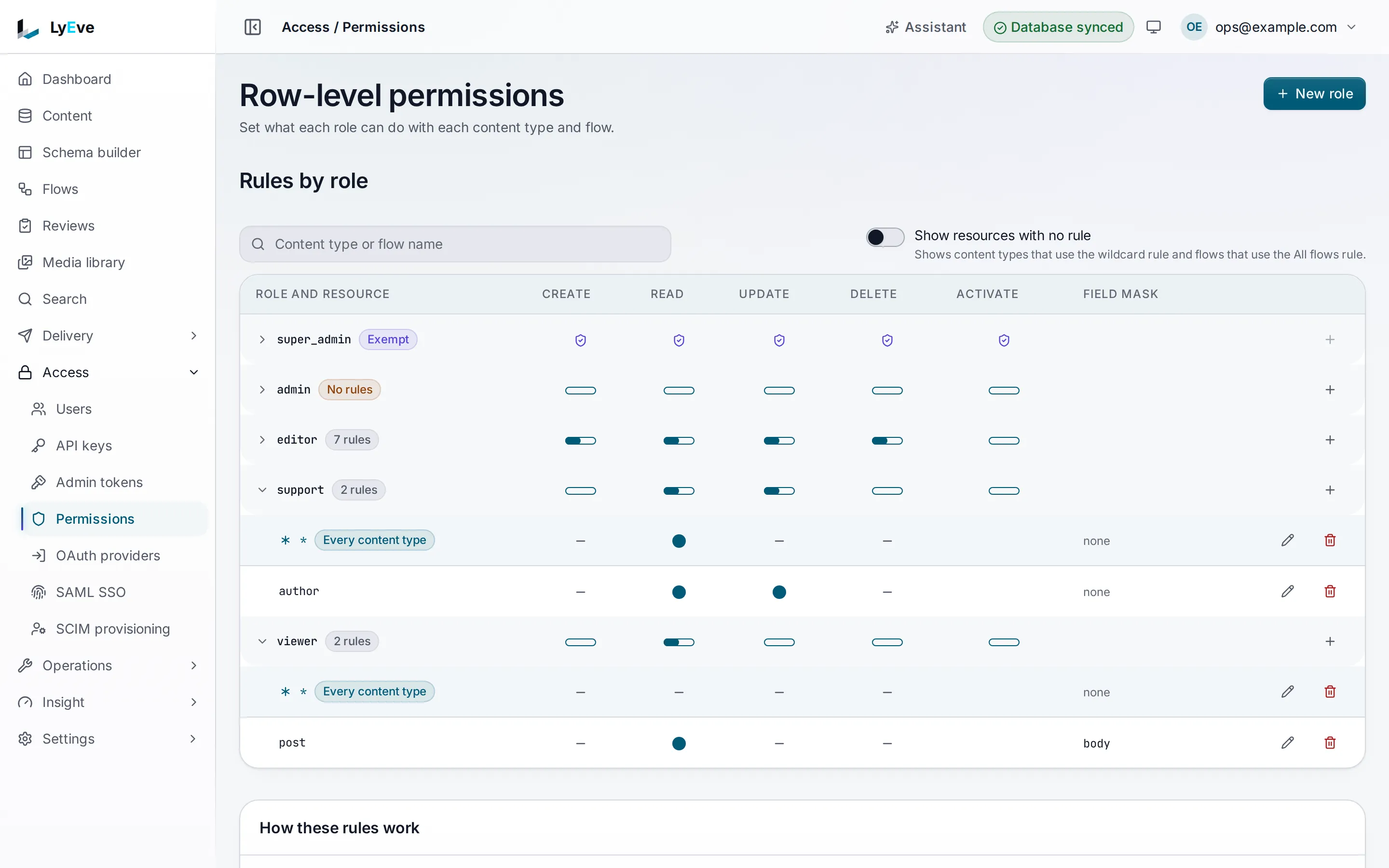
Link to the section In the consoleOpen Access > Permissions. Only a super admin sees the page. Each role is a
row, and expanding it lists its rules: Every content type for the * rule, then
one row per content type or flow. A filled dot is an action the rule allows,
and Field mask lists the fields the role does not read.
- New role adds a role. It starts with no actions anywhere, and it counts toward the role ceiling at once. At the ceiling the page says 3 of 3 roles and offers no New role.
- The plus button on a role's row adds a rule, and the pencil edits one. The rule form has a checkbox per action and a Field mask box for comma-separated field names.
- Show resources with no rule lists the content types and flows a role has no rule for.
How it works
Link to the section How it worksA rule is four fields:
{ "role": "editor", "schema_name": "articles", "actions": ["read", "update"], "field_mask": ["internal_notes"]}| Field | Meaning |
|---|---|
role | The role the rule applies to. Required. |
schema_name | The resource. Required. |
actions | What the role may do: create, read, update, delete, and activate on flows and reviews. |
field_mask | Fields removed from what this role reads. |
The resource is one of:
| Resource | Written as |
|---|---|
| One content type | Its name, such as articles |
| Every content type | * |
| Flows | flows for every flow in the tenant, or flow:<slug> for one |
| Reviews | reviews for every review definition, or review:<slug> for one |
activate publishes, disables, rolls back, runs, tests and invokes a flow, and
moves an entry through a review. On a content type it is refused with 422.
How rules combine
Link to the section How rules combine- Specific beats general. A rule for
articlesreplaces the*rule for that content type. A rule forflow:<slug>replaces theflowsrule for that flow. The*rule never applies to flows or reviews. - An empty action list denies. A rule for
articleswith no actions blocks that role on articles, even when the*rule allows it everywhere else. - Field masks add up. When a specific and a general rule both apply, both masks apply. A user holding two roles has every field hidden that either role hides.
Four answers are fixed:
- A super admin is allowed everything and reads every field.
- An admin is allowed every flow and review until a rule names
adminon that resource. From then on the rule decides. - In the console's content screens, an admin reads and writes every content
type, and no rule or field mask limits an admin there. A rule that names
adminon a content type, and its field mask, apply on the Content API. - Any other role with no rule is refused. Only admins and super admins open the console's content screens, so the rules bind every other role everywhere.
A fresh install has no rules, so on the Content API only super admins read or write content until you write some.
This gives a viewer role the titles of the post content type from the
quickstart, with the body hidden, and
creates an account that holds only that role. viewer has no rights of its
own on the engine, and it is one of the four roles the console's user form
offers. Sign in as a super admin first.
Console v0.28.0
- Open Access > Permissions. If the page says 3 of 3 roles, the instance is at its role ceiling and takes no new role.
- Choose New role, enter
viewerin Role name and choose Create. The role's row appears with an empty Every content type rule. - Choose the plus button on the
viewerrow. In Resource, pickpost. Tick Read, enterbodyin Field mask and choose Create. The row now says 2 rules. - Open Access > Users and choose New user. Enter
viewer@example.comin Email andViewer-Account-2026in Password. Under Roles, untick editor, tick viewer and choose Create.
Engine API v0.62.0
You need a super admin token in TOKEN. The quickstart shows how to get one.
-
Check how many roles may still hold rules:
Shell curl http://localhost:3001/api/admin/permissions/limits \-H "Authorization: Bearer $TOKEN"JSON { "roles": { "limit": 3, "current": 0 } }A
limitof0means no ceiling. -
Write the rule:
Shell curl -X POST http://localhost:3001/api/admin/permissions \-H "Authorization: Bearer $TOKEN" \-H "Content-Type: application/json" \-d '{"role": "viewer", "schema_name": "post", "actions": ["read"], "field_mask": ["body"]}'JSON {"id": "72a42ef6-948b-445b-80df-b315e1480f8f","role": "viewer","schema_name": "post","actions": ["read"],"field_mask": ["body"],"created_at": "2026-10-01T09:30:00Z","tenant_id": ""}The answer is
200. Sending a rule for the same role and resource again replaces it. -
Create an account that holds only the
viewerrole:Shell curl -X POST http://localhost:3001/api/admin/users \-H "Authorization: Bearer $TOKEN" \-H "Content-Type: application/json" \-d '{"email": "viewer@example.com", "password": "Viewer-Account-2026", "roles": ["viewer"]}'The answer is
201with the new user.
Then read posts as that account. Reading content is a Content API call, so both paths end here. Sign in as the account and keep its token:
curl -X POST http://localhost:3001/api/admin/auth/login \ -H "Content-Type: application/json" \ -d '{"email": "viewer@example.com", "password": "Viewer-Account-2026"}'Copy token into VIEWER_TOKEN, then read:
curl http://localhost:3002/api/v1/content/post \ -H "Authorization: Bearer $VIEWER_TOKEN"Every entry comes back with title and without body. A role that no rule
names gets 403 with permission denied instead.
Shut a role out of one content type
Link to the section Shut a role out of one content typeWrite a rule for that content type with no actions. It overrides any * rule
for the same role.
Console v0.28.0
On Access > Permissions, choose the plus button on the role's row and pick the content type in Resource. Leave every action clear and choose Create. Before you create it, the form says This rule blocks the role, and that the role is denied every action on that content type.
Engine API v0.62.0
Send the rule with an empty actions list to POST /api/admin/permissions:
{ "role": "editor", "schema_name": "payroll", "actions": [] }The empty rule needs a * rule or another grant to override. On a role with
none, the console says This rule would do nothing and keeps Create
off.
To open it again, delete the rule or write it again with the actions you want.
Rules and tenants
Link to the section Rules and tenantsA rule on a flow or review belongs to the tenant it was written in. A content
type rule and the * rule apply in every tenant. A tenant's own rule on a
resource takes the place of the shared one.
Renaming a flow keeps its access. Deleting a flow deletes its rules, so a new flow with the same slug starts with none. Deleting a tenant deletes the rules it wrote.
When a change takes effect
Link to the section When a change takes effectA change applies at once on the replica that saved it. Other replicas apply it
when they are told of the change, or at the latest after CACHE_TTL. See
scaling for running more than one replica.
Settings
Link to the section Settings| Variable | What it does | Default |
|---|---|---|
CACHE_TTL | How long a replica keeps rules it has read. 0s reads them on every request. | 60s |
Access rules run on every install. If you set LYEVE_PLUGINS, include
permissions in it. See licensing and tiers.
The role ceiling
Link to the section The role ceilingWithout rbac-pro, the rules a tenant sees may name three different roles, and
a license without rbac-pro does not raise that number. A rule for a fourth
role answers 402:
{ "error": "cap_exceeded", "cap": "rbac.roles", "limit": 3, "current": 3, "upgrade_url": "https://app.lyeve.com/pricing?skus=plugin-rbac-pro&utm_campaign=rbac.roles&utm_medium=product&utm_source=admin" }Editing a rule for a role that already has one is always allowed, because it adds no role. An install already past the ceiling keeps every role it has.
Every route needs a super admin with a signed-in session. An admin token is
refused with 403 This route needs a signed-in session.
Rule routes
| Method | Path | Result |
|---|---|---|
GET | /api/admin/permissions | Every rule your tenant sees. [] when there are none. |
POST | /api/admin/permissions | Creates the rule for that role and resource, or replaces it. 200. |
DELETE | /api/admin/permissions/{id} | 204, or 404 permission not found. |
GET | /api/admin/permissions/limits | The role ceiling and how many roles hold rules. |
| Status | Message | Cause |
|---|---|---|
403 | permission denied | A content request from a role no rule allows. |
402 | cap_exceeded | A new role would pass the role ceiling. |
422 | invalid action: <action> | The action is unknown, or activate on a content type. |
Every error the rule routes return
| Status | Message | Cause |
|---|---|---|
400 | invalid request body | The body is not JSON. |
400 | invalid id | The id in the path is not a UUID. |
402 | cap_exceeded | A new role would pass the role ceiling. |
403 | This route needs a signed-in session. | An admin token called a rule route. |
404 | permission not found | No rule has that id in your tenant. |
422 | role and schema_name are required | A required field is empty. |
422 | invalid resource: a schema name, *, flows, flow:<slug>, reviews or review:<slug> | flow: or review: with no slug, or a slug that is not valid. Any other name is stored as given. |
422 | invalid action: <action> | The action is unknown, or activate on a content type. |
Related
Link to the section Related- Roles and permissions: what each role may do before any rule.
- Flows: which flow route needs which action.
- API keys: what a key's scopes and content types add to its roles.
- Editorial review: the review definitions a rule can name.