

Trusted devices
Requires a license with the
device-fingerprintfeature. See pricing.
This feature watches admin sign-in. It recognizes the device behind each login, scores how risky the login looks, and asks for a second factor when the score is high. It locks out repeated failed attempts, can refuse addresses a reputation provider flags, and keeps a login history admins can review. People mark the browsers they trust, and a trusted browser lowers the score.
In the admin console
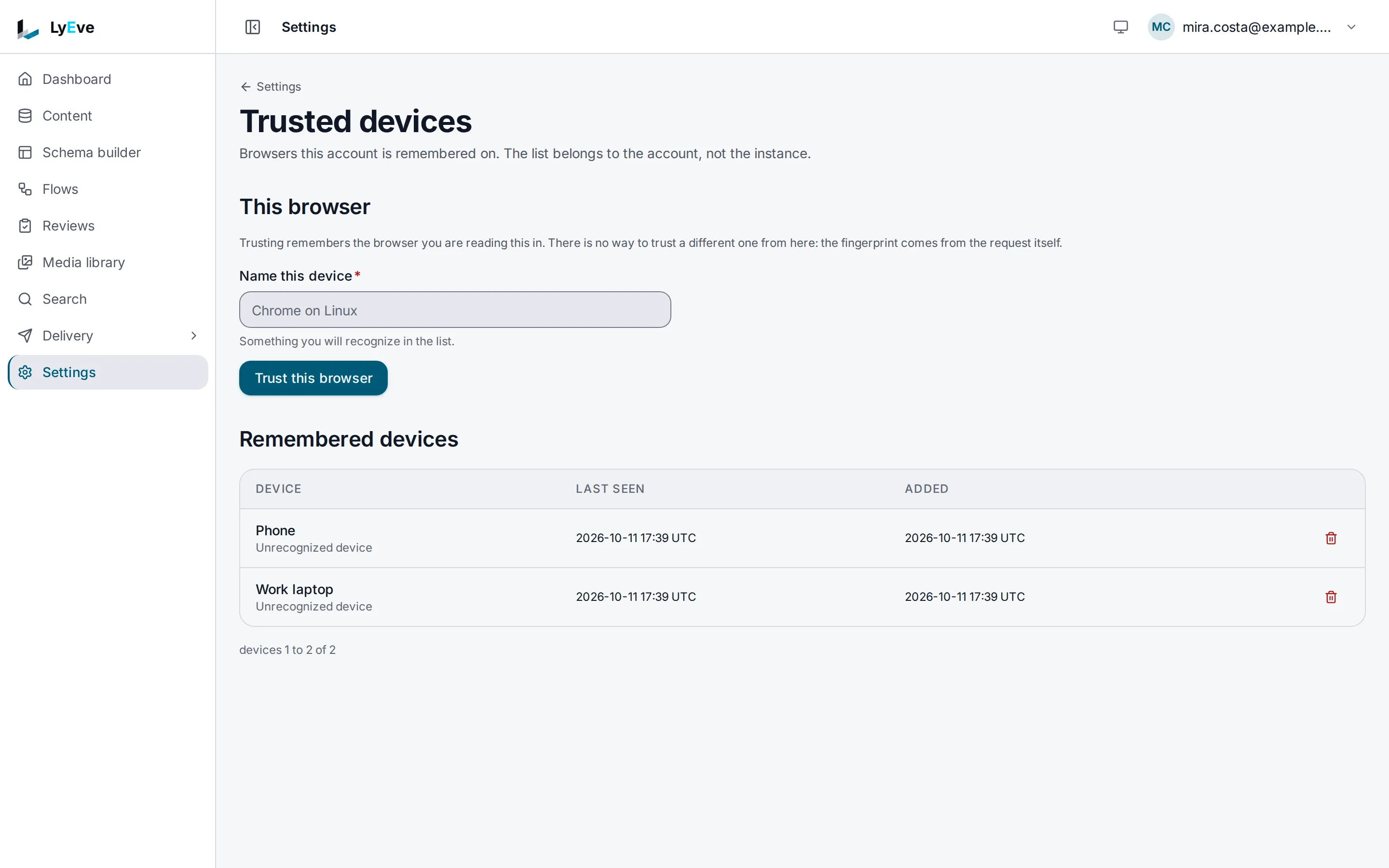
Section titled “In the admin console”Each person manages the browsers their own account trusts. Open the account menu in the header and choose Trusted devices.
- To trust the browser you are using, enter a name in Name this device and choose Trust this browser. Only the browser you are reading the page in can be trusted from here.
- Remembered devices lists every trusted browser with when it was last seen and added. The trash button on a row forgets it.
The console has no screen for login history or blocks. Use the API below for those.
How it works
Section titled “How it works”Every sign-in gets a score from 0 to 100 and a level:
| Level | Score | Effect |
|---|---|---|
low | 0 to 30 | Sign-in proceeds. |
medium | 31 to 60 | A second factor is required. |
high | 61 to 80 | A second factor is required. |
critical | 81 to 100 | A second factor is required, and the instance logs a warning. |
The score rises for a device the person has not used before, a run of recent failed attempts, many different addresses, a switch between IPv4 and IPv6, sign-in outside the person's three busiest hours or during the unusual-hours window, an address the reputation provider reports as a VPN, and when the person has no trusted device at all. A trusted device lowers it. A flagged address, a Tor exit node and an unreadable login history require a second factor whatever the score.
Turn it on
Section titled “Turn it on”- Install a license that includes
device-fingerprint. See licensing and tiers. - Behind a load balancer or reverse proxy, set
TRUSTED_PROXIESto its CIDR ranges. Without it every login appears to come from the proxy. - Restart the instance.
Try it
Section titled “Try it”You need a token in TOKEN. The
quickstart shows how to get one.
-
Trust the browser or machine you are calling from:
Terminal window curl -X POST http://localhost:3001/api/admin/devices/trust \-H "Authorization: Bearer $TOKEN" \-H "Content-Type: application/json" \-d '{"label": "Work laptop"}'{ "device_id": "4c80c9ea-ebbe-4074-9073-d7dae73f89e5", "label": "Work laptop" } -
List your trusted devices:
Terminal window curl http://localhost:3001/api/admin/devices \-H "Authorization: Bearer $TOKEN"{"data": [{ "id": "4c80c9ea-ebbe-4074-9073-d7dae73f89e5", "user_id": "3e7cc859-1207-4c7c-9af2-363fa5079e0b", "label": "Work laptop", "last_seen_at": "2026-10-01T09:30:00Z", "created_at": "2026-10-01T09:30:00Z" }],"limit": 50,"offset": 0,"total_count": 1} -
Read your own login history. Put your user id in
USER_ID:Terminal window curl "http://localhost:3001/api/admin/session-anomaly/history?user_id=$USER_ID&limit=20" \-H "Authorization: Bearer $TOKEN"{"entries": [{ "id": "e6d012b9-2064-4efc-a5c5-a852ba27bbe7", "user_id": "3e7cc859-1207-4c7c-9af2-363fa5079e0b","ip": "203.0.113.7", "user_agent": "Mozilla/5.0", "success": true,"timestamp": "2026-10-01T08:02:10Z", "risk_level": "low", "risk_score": 10,"risk_reason": "10 signals: [no trusted devices configured]" }],"limit": 20,"offset": 0} -
Forget the device again:
Terminal window curl -X DELETE http://localhost:3001/api/admin/devices/4c80c9ea-ebbe-4074-9073-d7dae73f89e5 \-H "Authorization: Bearer $TOKEN"The answer is
204.
Block brute force
Section titled “Block brute force”The guard covers every sign-in route: password login and token, MFA
verification, magic link, OAuth, SAML, WebAuthn and SCIM. It counts refused
attempts (401 and 403) per tenant, address and account. After
brute_force_max_attempts failures within brute_force_window_secs, that
pair is blocked for brute_force_block_secs:
{ "error": "too many failed attempts: account temporarily locked", "code": "BRUTE_FORCE_BLOCKED" }The status is 429.
Refuse flagged addresses
Section titled “Refuse flagged addresses”Set IPREP_PROVIDER=abuseipdb and IPREP_API_KEY to check each sign-in
address with AbuseIPDB. Results are cached for an hour. A flagged address is
refused with 403:
{ "error": "access denied: IP address has been flagged as abusive", "code": "IP_REPUTATION_BLOCKED" }abuseipdb without an API key leaves the gate off.
| Variable | What it does | Default |
|---|---|---|
IPREP_PROVIDER | abuseipdb or none. Any other value turns the gate off. | none |
IPREP_API_KEY | The provider's API key. | empty |
IPREP_BLOCK_ABUSE_CONFIDENCE | Block at or above this abuse confidence. | 90 |
IPREP_BLOCK_TOR | Block Tor exit nodes. false does not turn Tor blocking off. Use ip_rep.block_tor below for that. | on |
IPREP_BLOCK_VPN | Block commercial VPN addresses. | false |
IPREP_FAIL_CLOSED | Refuse the sign-in when the provider cannot be reached. | off, so the sign-in proceeds |
Tune the scoring
Section titled “Tune the scoring”Set DEVICE_FINGERPRINT_CONFIG to a JSON object with any of these keys.
Invalid JSON is logged and the defaults are kept.
DEVICE_FINGERPRINT_CONFIG='{"brute_force_max_attempts": 10, "ip_rep": {"block_tor": false}}'| Key | Meaning | Default |
|---|---|---|
unusual_hour_start, unusual_hour_end | Hours (UTC, 0 to 23) that count as unusual. | 0, 5 |
brute_force_max_attempts | Failures before a block. | 5 |
brute_force_window_secs | Window the failures are counted in. | 900 |
brute_force_block_secs | How long a block lasts. | 1800 |
brute_force_max_states | Address and account pairs tracked at once. | 10000 |
history_retention_days | Age at which the purge route deletes login history. | 90 |
fail_open | Let a login through when its history cannot be read. | false |
ip_rep.block_tor | Block Tor exit nodes. | true |
If you set LYEVE_PLUGINS, include device-fingerprint in it.
Review logins
Section titled “Review logins”An admin who is not a super admin can read only their own history and anomalies.
Device and review routes
| Method | Path | Who | Purpose |
|---|---|---|---|
GET | /api/admin/devices | signed in | Your trusted devices (limit default 50, at most 500, offset). |
POST | /api/admin/devices/trust | signed in | Trust the device making this request. Optional body {"label": "Work laptop"}. |
DELETE | /api/admin/devices/{id} | signed in | Forget a device. 204. |
POST | /api/admin/devices/{id}/untrust | signed in | Same as the DELETE route. |
GET | /api/admin/session-anomaly/history?user_id=<id> | admin | A person's login history, with limit and offset. |
GET | /api/admin/session-anomaly/anomalies?user_id=<id> | admin | Risky logins and device changes found in that history. |
DELETE | /api/admin/session-anomaly/history | super admin | Delete the tenant's history older than history_retention_days. |
GET | /api/admin/session-anomaly/bruteforce/blocks | super admin | Active brute-force blocks in the tenant. |
DELETE | /api/admin/session-anomaly/bruteforce/blocks | super admin | Lift a block. Body {"ip": "203.0.113.7", "user_id": "<id>"}. See the caution above. |
GET | /api/admin/session-anomaly/iprep/cache | admin | Whether the reputation gate started, its provider and cache size. With IPREP_PROVIDER=none it reports "enabled": true and checks nothing. |
POST | /api/admin/session-anomaly/iprep/cache/clear | super admin | Clear the reputation cache. |
Nobody can read or change another person's devices.
With flows, the device_fingerprint.risk node scores a login from
a trigger's payload, so a flow can alert or lock an account on the result. A
privacy erasure request removes the addresses, browsers and device
fingerprints stored for the person.
Errors
Section titled “Errors”| Status | Message | Cause |
|---|---|---|
429 | BRUTE_FORCE_BLOCKED | Too many failed sign-ins. |
403 | IP_REPUTATION_BLOCKED | The sign-in address is flagged. |
404 | The requested endpoint does not exist. | The instance started without a license that includes device-fingerprint. |
402 | payment_required | The license stopped including device-fingerprint while the instance was running. |
Every other error
| Status | Message | Cause |
|---|---|---|
400 | user_id query parameter is required | History or anomalies without user_id. |
400 | invalid user_id format | user_id is not a UUID. |
400 | ip and user_id are required | Unblock without both. |
401 | unauthorized | A device route without a signed-in user. |
403 | access denied: admins can only view their own login history | An admin named another person's history. |
403 | access denied: admins can only view their own anomalies | An admin named another person's anomalies. |
404 | no block found for this ip+user pair | Nothing to unblock. |
404 | IP reputation not enabled | Cache clear while the gate could not start. |
Related
Section titled “Related”- Multi-factor authentication: the second factor a risky sign-in asks for.
- Captcha: a challenge after failed sign-ins.
- Rate limiting: limits on request volume.
- Harden your instance.