Features
Tenant quotas
Requires a license with the
usage-profeature. See pricing.
A tenant quota caps what one tenant may use: requests per month, media storage
and bandwidth per month. A soft quota only warns the tenant's clients. A hard
quota blocks the tenant with 429 once it passes a limit. A tenant reads where
it stands and asks for more, and a super admin approves or denies the request.
Setting a limit is what usage-pro adds. Reading quotas, enforcing the ones
already stored, lifting a block and handling increase requests stay free on
every install.
How it works
Link to the section How it works| Quota | What happens past a limit |
|---|---|
None, or every limit 0 | Nothing. The tenant is unlimited. |
Soft (is_hard_limit off) | Responses carry warning headers. Nothing is refused. |
Hard, without block_on_exceeded | Responses carry X-Quota-Exceeded: true. Nothing is refused. |
Hard, with block_on_exceeded | Responses carry X-Quota-Exceeded: true for the grace period after the first request over a limit, then the tenant is blocked. Every request then answers 429 until the block lifts. |
A block lasts only as long as its cause. Raising or removing the limit lifts
it, and so does usage falling back under the limit, such as the request count
resetting at the start of a month. unblock lifts it by hand. The quota routes
stay open to a blocked tenant, so its admin can still read the quota. If a
quota cannot be checked within two seconds, the request goes through.
A quota is set over a tenant, so a tenant admin reads it and asks for more but
never changes it. Setting, removing and reviewing are for a super admin, and a
tenant admin who tries gets 403 even for their own tenant.
Run this on an install whose license carries usage-pro and multitenant-provisioning. For
the console steps, you are signed in to LyEve Console as a super admin. The API steps
need the super admin's token in TOKEN, and steps 3 to 5 use it in both paths. The
quickstart shows how to get one. A test tenant keeps the
block away from your real traffic.
1. Create a tenant to test on.
Console v0.28.0
Open Operations > Tenants and choose New tenant. Enter quotatest in Slug and
Quota test in Display name, then choose Create. The page confirms
Created Quota test.
Engine API v0.62.0
curl -X POST http://localhost:3001/api/admin/tenants \ -H "Authorization: Bearer $TOKEN" \ -H "Content-Type: application/json" \ -d '{"slug": "quotatest", "name": "Quota test"}'The answer is 201 with the tenant. Copy its id into TENANT_ID.
2. Give it a hard quota of five requests a month.
Console v0.28.0
- Open Operations > Quotas and usage and choose New quota.
- Enter
quotatestin Tenant and5in API calls a month. - Turn on Hard limit and Block the tenant past a limit. A quota blocks only with both on.
- Choose Create.
The page confirms Quota saved for quotatest. The Quotas list shows only the quota of the tenant you are signed in to, so this one does not appear in it.
Engine API v0.62.0
curl -X PUT http://localhost:3001/api/admin/quotas/quotatest \ -H "Authorization: Bearer $TOKEN" \ -H "Content-Type: application/json" \ -d '{"requests_limit": 5, "is_hard_limit": true, "block_on_exceeded": true}'The answer is the quota, with "requests_limit": 5 and "blocked_at": null.
3. Call the Content API seven times as that tenant:
for i in 1 2 3 4 5 6 7; do curl -s -o /dev/null -w "%{http_code} " http://localhost:3002/api/v1/quotas/status \ -H "Authorization: Bearer $TOKEN" -H "X-Tenant-ID: quotatest"doneYou see five 200 answers, then 429 twice. A blocked answer carries
X-Quota-Blocked: true:
{"error": "quota exceeded - tenant is blocked", "tenant": "quotatest", "blocked_at": "2026-10-03T15:03:06Z", "requests_used": 5, "requests_limit": 5}4. Lift the block and the limit together. Lifting a block is API only. The console's quota form in v0.25.0 has no control for it:
curl -X PUT http://localhost:3001/api/admin/quotas/quotatest \ -H "Authorization: Bearer $TOKEN" \ -H "Content-Type: application/json" \ -d '{"unblock": true, "requests_limit": 0}'The tenant is served again. Both changes are free.
5. Ask for more as the tenant, then approve it. A tenant asks over the Content API:
curl -X POST http://localhost:3002/api/v1/quota-requests \ -H "Authorization: Bearer $TOKEN" -H "X-Tenant-ID: quotatest" \ -H "Content-Type: application/json" \ -d '{"requests_limit": 100000, "reason": "Launch traffic in October"}'The answer is 201 with "status": "pending". Copy its id into REQUEST_ID. Approving
this request is API only, because the console's Requests for more lists only the requests
of the tenant you are signed in to:
curl -X POST http://localhost:3001/api/admin/quota-requests/$REQUEST_ID/review \ -H "Authorization: Bearer $TOKEN" \ -H "Content-Type: application/json" \ -d '{"status": "approved"}'The quota now reads "requests_limit": 100000.
6. Delete the test tenant. Its quota and requests go with it.
Console v0.28.0
On Operations > Tenants, choose the delete button on the quotatest row and confirm
Delete in Delete Quota test?.
Engine API v0.62.0
curl -X DELETE http://localhost:3001/api/admin/tenants/$TENANT_ID \ -H "Authorization: Bearer $TOKEN"The answer is 204.
Set a quota
Link to the section Set a quotaConsole v0.28.0
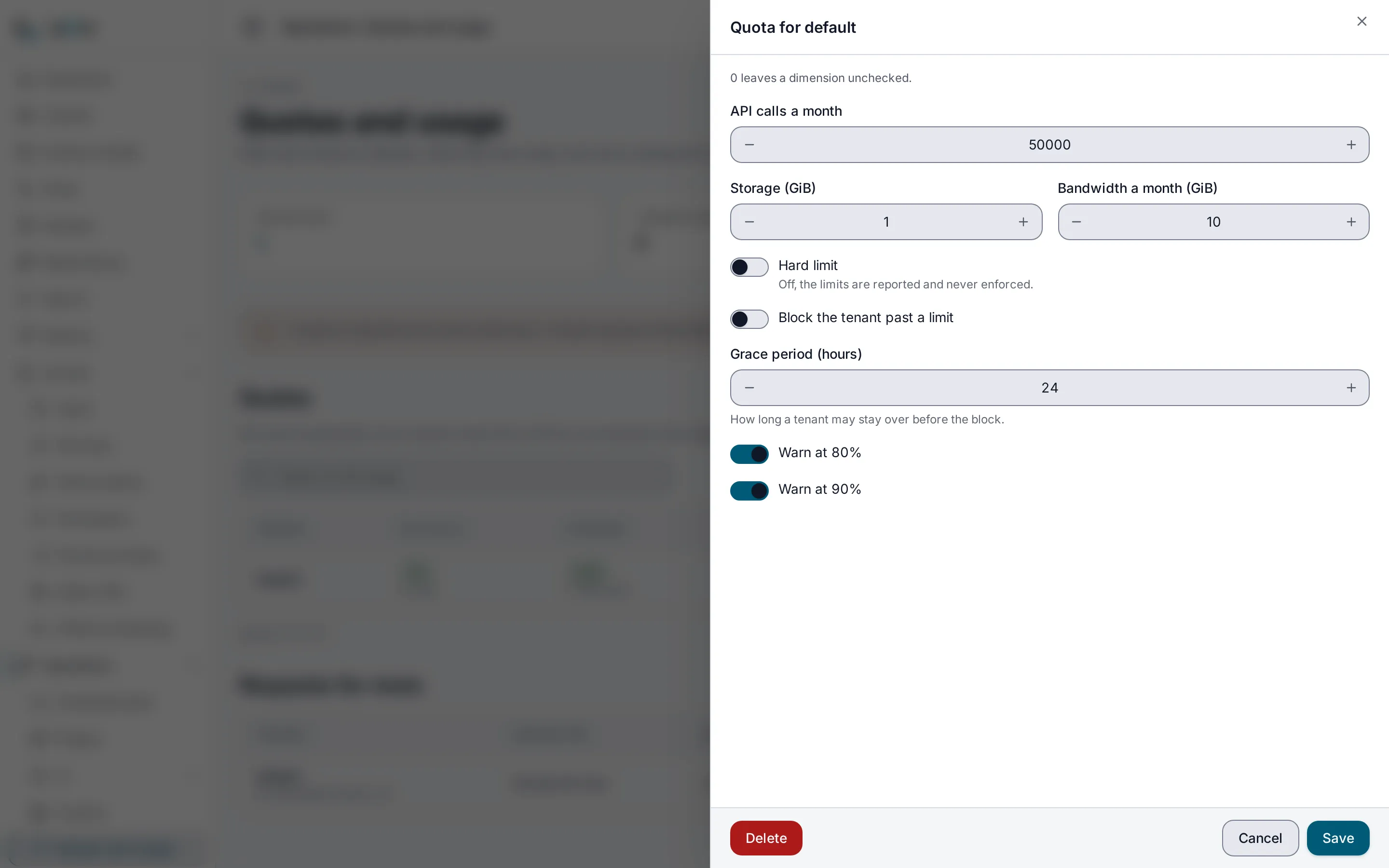
On Operations > Quotas and usage, New quota sets a quota on a tenant by its slug, and the edit button on a row opens the same form:
- API calls a month, Storage (GiB) and Bandwidth a month (GiB).
0leaves that limit unchecked. - Hard limit and Block the tenant past a limit. A quota blocks only with both on. Otherwise the page says the quota is reported and never enforced.
- Grace period (hours), Warn at 80% and Warn at 90%. A blank Grace period
saves
0, and the engine blocks at once whatever the field's hint says.
The edit button and the edit form's Delete work only on the quota of the tenant you are signed in to, because the list shows only that one. The edit form's Delete removes the quota. The list's API calls and Bandwidth columns count requests made with an API key only, as the page says, while a hard limit counts every request the tenant makes.
Engine API v0.62.0
PUT /api/admin/quotas/{tenantID} creates or changes a quota. Fields you leave out keep their
value. The answer is the full quota, with id, tenant_id, every limit, blocked_at and the
timestamps. DELETE /api/admin/quotas/{tenantID} removes it.
| Field | Meaning | Default |
|---|---|---|
requests_limit | Requests per month. 0 is unlimited. | 0 |
storage_bytes_limit | Media storage in bytes. 0 is unlimited. | 0 |
bandwidth_bytes_limit | Bandwidth per month in bytes. 0 is unlimited. | 0 |
is_hard_limit | Whether the quota can block. | false |
block_on_exceeded | Block the tenant once a limit is passed. Takes effect only with is_hard_limit. | false |
warn_at_pct_80, warn_at_pct_90 | Send the warning headers at 80% and 90%. | true |
grace_period_hours | How long a tenant past a hard limit is served, with X-Quota-Exceeded, before it is blocked. | 24 over the API |
unblock | Send true to clear a block. |
| Write | Needs usage-pro |
|---|---|
Set a requests, storage or bandwidth limit to a new value above 0 | Yes |
Turn is_hard_limit or block_on_exceeded on | Yes |
| Approve an increase request that does either | Yes |
| Read quotas, increase requests and a tenant's own status | No |
| File an increase request, or deny one | No |
Delete a quota, clear a limit to 0, turn the hard limit or the block off | No |
Lift a block with unblock | No |
| Change the warning thresholds or the grace period | No |
| Send back the values a quota already holds | No |
Review requests for more
Link to the section Review requests for moreConsole v0.28.0
Requests for more on Operations > Quotas and usage lists what the tenant you are signed in to has asked for, with the reason. The approve button on a request's row asks to confirm, such as Approve more quota for default?, and Approve raises the limits to what the tenant asked for. The deny button sits beside it.
Engine API v0.62.0
GET /api/admin/quota-requests?status=pending lists the requests of the tenant the request
runs as. Review one by its id with {"status": "approved"} or {"status": "denied"}:
curl -X POST http://localhost:3001/api/admin/quota-requests/$REQUEST_ID/review \ -H "Authorization: Bearer $TOKEN" \ -H "Content-Type: application/json" \ -d '{"status": "denied"}'What a client sees
Link to the section What a client seesA tenant with a quota gets these headers on each response:
| Header | When |
|---|---|
X-Quota-Requests-Used, X-Quota-Requests-Limit, X-Quota-Requests-Pct | Always. |
X-Quota-Storage-Used, -Limit, -Pct | A storage limit is set. |
X-Quota-Bandwidth-Used, -Limit, -Pct | A bandwidth limit is set. |
X-Quota-Warning-80, X-Quota-Warning-90 | Any limit has reached that share. |
X-Quota-Exceeded | A limit is passed but the tenant is not blocked. |
X-Quota-Blocked | The tenant is blocked. The answer is 429. |
GET /api/v1/quotas/status answers any signed-in user with their tenant's
usage and state:
{ "tenant_id": "default", "requests_used": 0, "requests_limit": 0, "requests_pct": 0, "storage_bytes_used": 0, "storage_bytes_limit": 0, "storage_bytes_pct": 0, "bandwidth_bytes_used": 0, "bandwidth_bytes_limit": 0, "bandwidth_bytes_pct": 0, "is_blocked": false, "is_warning_80": false, "is_warning_90": false, "is_exceeded": false, "is_hard_limit": false, "grace_period_hours": 24}Check a quota in a flow
Link to the section Check a quota in a flowThe usage.quota_check node reads where the run's tenant stands without using
up any quota. It is free. Its one optional setting, dimension, is any (the
default), requests, storage or bandwidth. The output carries:
ok: true while the tenant is not blocked and the chosen dimension is under its limit.remaining: what is left in that dimension, or null when unlimited. Forany, the limit closest to running out.blocked,exceeded,warning_80andwarning_90.used,limit,remaining,pctandunlimitedfor each ofrequests,storageandbandwidth.
If the node's id is check, branch on {{ nodes.check.output.ok }} before
the work. See flows.
If the license lapses
Link to the section If the license lapsesEvery quota you stored keeps being enforced. A tenant past a hard limit still
gets 429, so a lapse never lifts a limit you set. You can still clear a limit
to 0, lift a block or delete the quota. Setting a new limit needs usage-pro
again.
An admin who names another tenant gets 403 with
cross-tenant access not allowed. A super admin may name any tenant. Deleting
a tenant deletes its quota and increase requests.
Quota and increase request routes
| Method | Path | Who | Purpose |
|---|---|---|---|
GET | /api/admin/quotas | Admin | The quota of the tenant the request runs as, a super admin's included, with limit and offset. Read another tenant's with the route below. |
GET | /api/admin/quotas/{tenantID} | Admin | One tenant's quota. |
PUT | /api/admin/quotas/{tenantID} | Super admin | Create or change a quota. |
DELETE | /api/admin/quotas/{tenantID} | Super admin | Remove a quota, which makes the tenant unlimited. |
GET | /api/v1/quotas/status | Signed in | The caller's tenant's usage and state. |
POST | /api/v1/quota-requests | Signed in | Ask for higher limits for the caller's tenant: requests_limit, storage_bytes_limit, bandwidth_bytes_limit and a required reason. |
GET | /api/admin/quota-requests | Admin | The increase requests of the tenant the request runs as, optionally ?status=pending, approved or denied. |
POST | /api/admin/quota-requests/{id}/review | Super admin | Approve or deny a request: {"status": "approved"} or "denied". |
| Status | Message | Cause |
|---|---|---|
400 | reason is required | An increase request with no reason. |
400 | status must be 'approved' or 'denied' | Bad review status. |
402 | payment_required, naming feature:usage-pro | The write sets a new limit or turns a block on without usage-pro. Nothing is stored. |
403 | cross-tenant access not allowed | An admin named another tenant. |
403 | insufficient permissions or super_admin required | A caller without super_admin set, removed or reviewed a quota. |
404 | tenant not found, quota not found or quota request not found | Unknown id. |
429 | quota exceeded - tenant is blocked | The tenant is past a hard limit. |
Related
Link to the section Related- Usage and quotas: the metering behind every quota, and billing snapshots.
- API key request limits: a monthly limit on one key.
- Tenants: create and manage the tenants quotas apply to.
- Rate limiting: limits per second and per minute.