Features
Media
Included free on every install, with up to 1,000 generated image variants per tenant. More variants need a license with the
media-profeature. See pricing.
The media library holds your images, documents, video and audio. Each upload is checked against the type it claims, its metadata is read, and images get thumbnails. You can search the library by name, size, dimensions or tags, and publish a file at a stable link anyone can load.
In LyEve Console, Media library shows every file in Grid or List view. Media library walks through each task there. Where files are kept, local disk or S3 and other providers, is set on object storage.
How it works
Link to the section How it works| Step | What happens |
|---|---|
| Upload | The file's real type is read from its content and compared with the type it claims. SVG, HTML, JavaScript and XML are refused, and so is any file holding a <script or <html tag. |
| Metadata | Dimensions, and for photos camera data, are read. Camera and location data are removed before the file is stored, unless your operator turns that off. |
| Thumbnails | An image gets small (150 px), medium (480 px) and large (1024 px) thumbnails in WebP. A size is made only when the image is larger than it. |
| Tags | Each file gets a tag for its kind, such as image. You can replace the tags with your own. |
| Scan | Off by default. With ClamAV configured, an infected file is refused. |
| Publish | Off by default. A published file has a public_url anyone can load. |
For the console steps, you are signed in to the console. For the API steps, you need a
token in TOKEN. The quickstart shows how to get one. Any
PNG or JPEG works as hero.png.
1. Upload an image.
Console v0.28.0
Open Media library, choose Upload files and pick hero.png. The page confirms
Uploaded 1 file, and the file appears in the grid. The console sets no folder or alt text
on upload. Step 3 sets them.
Engine API v0.62.0
Upload it into a folder, with alt text:
curl -X POST http://localhost:3001/api/admin/media \ -H "Authorization: Bearer $TOKEN" \ -F "file=@hero.png" \ -F "folder=/blog" \ -F "alt_text=Mountain at sunrise"The answer is 201 with a list of the stored items:
[ { "id": "ad2c0afd-9c21-412a-b47a-d6b9cea033d0", "key": "blog/7ab76082-70d4-463a-b349-03a99324dddd_hero.png", "filename": "hero.png", "content_type": "image/png", "size": 2787, "alt_text": "Mountain at sunrise", "folder": "/blog", "tenant_id": "default", "width": 400, "height": 300, "uploaded_by": "12dd433d-c110-4809-b476-12ef360afe7f", "scan_status": "pending", "scan_result": "virus scanning disabled", "metadata": { "width": 400, "height": 300, "color_depth": 8, "has_alpha": true }, "tags": ["image"], "created_at": "2026-10-02T09:20:09.512818Z", "updated_at": "2026-10-02T09:20:09.512818Z", "url": "/api/v1/storage/local/20d35ec0-bd5c-53a3-8111-b122a0d7ba4e?expires=1791019209&key=...&sig=...", "public": false }]Copy the id into MEDIA_ID. updated_at is when the item last changed. An item stored
before the server recorded it starts at its created_at.
2. Read it back.
Console v0.28.0
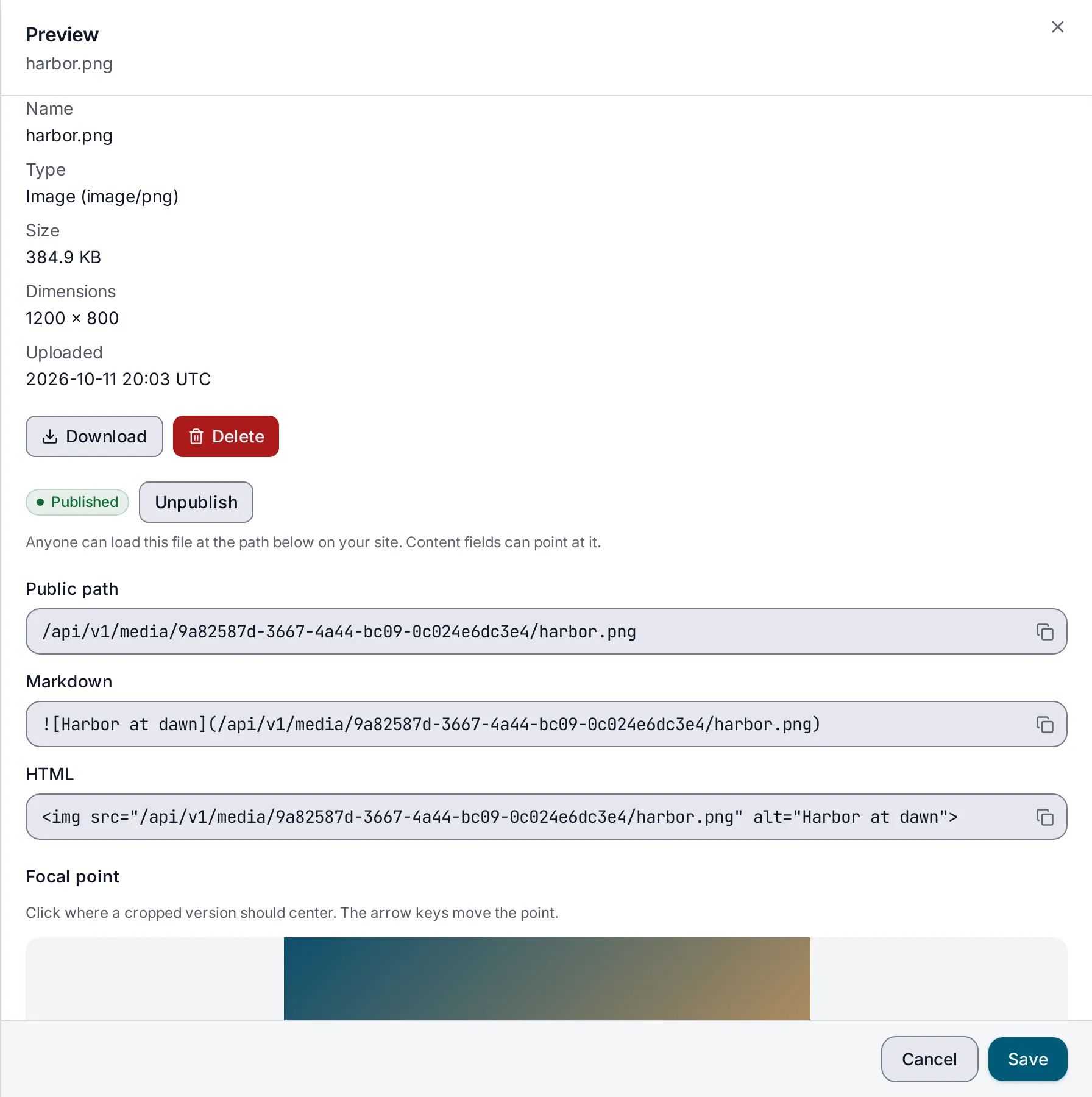
Choose the file to open its Preview. It shows the image with zoom controls, then its Name, Type, Size, Dimensions and Uploaded time, with Download and Delete. A new file is Private: only signed-in operators can open it.
Engine API v0.62.0
curl http://localhost:3001/api/admin/media/$MEDIA_ID \ -H "Authorization: Bearer $TOKEN"The item now lists thumbnails, each with its size (small), width, height and
format (webp). A 400 px image gets small only.
3. Change its details and publish it.
Console v0.28.0
- In the Preview, under Details, enter
Mountain at dawnin Alt text,landscapein Tags and/blogin Folder, then choose Save. - Choose Publish. The preview shows the Published badge beside Unpublish, and the Public path, also written as Markdown and HTML to copy.
Engine API v0.62.0
curl -X PATCH http://localhost:3001/api/admin/media/$MEDIA_ID \ -H "Authorization: Bearer $TOKEN" \ -H "Content-Type: application/json" \ -d '{"alt_text": "Mountain at dawn", "tags": ["landscape"], "public": true}'The answer is the item with "public": true and
"public_url": "/api/v1/media/<id>/hero.png".
4. Load it with no token, as a site would. This is the Content API, whichever way you published the file:
curl -I http://localhost:3002/api/v1/media/$MEDIA_ID/hero.pngThe answer is 200 with Content-Type: image/png, Content-Disposition: inline and
Cache-Control: public, max-age=300.
5. Search the library.
Console v0.28.0
Enter mountain in the File name box and choose Search. The box matches file names,
alt text and tags, so the image you just changed is found.
Engine API v0.62.0
curl -X POST http://localhost:3001/api/admin/media/search \ -H "Authorization: Bearer $TOKEN" \ -H "Content-Type: application/json" \ -d '{"query": "mountain", "kind": "image"}'The answer is {"items": [...], "total": 1}.
Upload files
Link to the section Upload filesSend one or more files as multipart/form-data to POST /api/admin/media. folder and
alt_text are optional form fields. If one file in the request is refused, none of them is
kept.
- A file is limited to
MEDIA_MAX_UPLOAD_BYTES, 100 MiB by default. The whole request is also limited byMAX_BODY_BYTES, 10 MiB by default, so raise both for large files. Past the second, the answer is413. - A folder may use
atoz,0to9,_,-and/. A folder filter matches exactly, so/blogandblogare two folders. Start every folder with/to keep them apart. - The type check compares the kind of file only, so an image that claims to be another image
type passes. A file that claims to be an image and is not is refused with
422.
Use a file in content
Link to the section Use a file in contentA media field holds a string that locates the file. The console stores the file's
public_url, so publish a file before you use it in content. Your site adds its own address in
front of the path, or you can store the full URL of a file hosted elsewhere.
The url in an answer is signed and expires, 24 hours at most. Use it to preview a file right
after an upload, never in content. Reading the item again gives a freshly signed url.
Publish a file
Link to the section Publish a file"public": true on PATCH /api/admin/media/{id} publishes the file at public_url, which is
/api/v1/media/{id}/{filename} on the Content API. Anyone can load it without signing in, and
byte ranges are supported for video.
- PNG, JPEG, GIF, WebP and AVIF images, MP4, WebM and Ogg video, and the common audio types are served for display in the page. Every other type downloads.
- A file that failed its virus scan is never served.
"public": falsetakes the link back. An unpublished file, a missing one and another tenant's all answer404there.
PATCH also changes alt_text, tags and folder. A field you leave out keeps its value,
and tags replaces the tags the file had.
Import from a URL
Link to the section Import from a URLConsole v0.28.0
In Media library, choose Import from URL. Enter the Address and the Alt text,
tick the box to publish the file in the same step if you want, and choose Import. The file
lands in the / folder. Change it under Details afterward.
Engine API v0.62.0
curl -X POST http://localhost:3001/api/admin/media/import \ -H "Authorization: Bearer $TOKEN" \ -H "Content-Type: application/json" \ -d '{"url": "https://example.com/logo.png", "folder": "/brand", "alt_text": "Logo", "public": true}'The answer is 201 with the item.
The file goes through the same checks as an upload.
- Private, loopback, link-local and cloud metadata addresses are refused, after a redirect too. At most three redirects are followed.
- The fetch gives up after 20 seconds.
max_bytes, API only, sets a lower size limit for this one file. - With
"public": true, the file is published in the same call. If publishing fails, nothing is kept. - The address is kept in the item's
metadataassource_url, without its query string.
Search the library
Link to the section Search the libraryThe console's File name box sends query. Every other field below is API only.
POST /api/admin/media/search takes any of these fields and answers {"items": [...], "total": n}, oldest first unless sort_desc is true.
| Field | Matches |
|---|---|
query | Text in the file name, alt text or tags. |
folder | One folder exactly. |
kind | image, video, audio or document. |
content_types | Any of these types, such as ["image/png"]. |
min_size, max_size | Size in bytes. |
min_width, max_width, min_height, max_height | Image dimensions. |
min_duration, max_duration | Length in seconds. |
min_iso, max_iso, camera_make, camera_model | Camera data. Removed on upload by default, so these match only when your operator keeps it. |
min_latitude, max_latitude, min_longitude, max_longitude | Where a photo was taken. Removed on upload by default, like camera data. |
author | The creator in the file's metadata. |
date_from, date_to | Upload date, ISO 8601. |
tags | Any of these tags. |
scan_status | pending, clean, error or unscannable. |
uploaded_by | A user id. |
sort_by | created_at, size, filename, width, height or duration. |
limit, offset | Paging. limit is 50 by default and at most 200. |
GET /api/admin/media lists the library or one folder, 50 at a time by default and at most
500, as {"data": [...], "total_count": n, "limit": l, "offset": o}.
Resize images on request
Link to the section Resize images on requestBesides the three thumbnails, an image can be served at any size, crop and
format from a signed URL, generated on the first request and stored after that.
Setting a focal point with "focal_point": {"x": 0.3, "y": 0.4} on PATCH
decides where a crop centers. Each tenant keeps 1,000 generated variants for
free, and media-pro lifts that ceiling. See
Image transforms.
Scan for viruses
Link to the section Scan for virusesSet MEDIA_VIRUS_SCAN=true and MEDIA_CLAMAV_ADDR to scan every upload with ClamAV. An
infected file is refused with 422. When ClamAV cannot be reached, the file is stored with
scan_status unscannable and is still served if you publish it.
Settings
Link to the section Settings| Variable | What it does | Default |
|---|---|---|
MEDIA_MAX_UPLOAD_BYTES | Largest file accepted. | 104857600 (100 MiB) |
MAX_BODY_BYTES | Largest request body on a route that sets no limit of its own. The upload route sets none, so this caps every upload request. | 10485760 (10 MiB) |
MEDIA_THUMBNAILS | Make thumbnails for images. | true |
MEDIA_THUMBNAIL_FORMAT | webp, avif or jpeg. avif needs the avifenc tool on the server, and falls back to WebP without it. | webp |
MEDIA_THUMBNAIL_QUALITY | Thumbnail quality, from 1 to 100. | 85 |
MEDIA_ENABLE_METADATA | Read EXIF and other metadata. | true |
MEDIA_STRIP_EXIF | Remove camera and location data before a file is stored. | true |
MEDIA_VIRUS_SCAN | Scan uploads with ClamAV. | false |
MEDIA_CLAMAV_ADDR | The ClamAV address, such as clamav:3310. | unset |
MEDIA_CLAMAV_NETWORK | tcp or unix. | tcp |
MEDIA_CLAMAV_TIMEOUT | How long to wait for a scan. | 30s |
Storage settings, such as where local files go and the S3 bucket, are on
object storage. Media runs on every install. If you set LYEVE_PLUGINS to
choose which features start, include media in it. See
licensing and tiers.
The admin routes take admin or super_admin. An admin token
can call them with the media:read grant for reads and media:write for changes.
Media routes
| Method | Path | Result |
|---|---|---|
GET | /api/admin/media | The library, paginated. Query: folder, limit, offset. |
GET | /api/admin/media/{id} | One item with its thumbnails and a freshly signed url. |
GET, HEAD | /api/admin/media/{id}/download | The original file as a download. HEAD answers the size and type only. Byte ranges are supported. |
GET | /api/admin/media/{id}/thumbnails | The item's thumbnails with links. |
POST | /api/admin/media | Upload. 201. |
PATCH | /api/admin/media/{id} | Change alt text, tags or folder, or publish. |
POST | /api/admin/media/{id}/reprocess | Read the metadata and make the thumbnails again. Images only. |
POST | /api/admin/media/import | Import from a URL. 201. |
POST | /api/admin/media/search | Search. |
DELETE | /api/admin/media/{id} | Delete the file, its thumbnails and its record. 204. |
GET | /api/admin/media/{id}/transform | A resized or converted variant. |
POST | /api/admin/media/{id}/transform-url | Sign a link to a variant. |
POST | /api/admin/media/transform-key/rotate | Give the tenant a new signing key, so every link signed with the old one answers 403. super_admin. |
GET, HEAD | /api/v1/media/{id}/{name} | A published file. No sign-in. |
GET, HEAD | /api/v1/media/{id}/transform | A variant through a signed link. No sign-in. |
The ones you meet most:
413Request body exceeds the 10485760 byte limit.when an upload is larger thanMAX_BODY_BYTES.422declared content type "<type>" does not match detected type "<type>"when a file is not what it claims.422SVG uploads are not allowed.
Every error these routes return
| Status | Message |
|---|---|
400 | invalid multipart form, invalid JSON, invalid request body, invalid search body |
400 | request body could not be read when an upload stops partway below the size limit. One that reaches the limit answers 413. |
400 | folder may use a to z, 0 to 9, _, - and / on a change |
400 | not an image on reprocess |
404 | not found, or media not found on reprocess and thumbnails |
413 | Request body exceeds the <n> byte limit. |
409 | no storage provider can accept this upload for this tenant when no storage your operator configured can take a write for the tenant, such as a tenant pinned to a region no provider serves |
416 | invalid range: failed to overlap, as plain text, for a byte range outside the file |
422 | file too large: <size> bytes (max <limit>) |
422 | declared content type "<type>" does not match detected type "<type>", SVG uploads are not allowed, virus detected: <name> |
422 | folder path contains disallowed character: '<c>' on an upload |
422 | On import: url is required, url must be an absolute http or https address, url must not carry a user name or password, that address is private or not allowed, the file is larger than <n> bytes |
422 | storage refused this file, so check its folder, name and size when the object store refuses the file's key or size on an upload or import. A retry fails the same way. |
502 | the file could not be fetched from that address |
503 | storage did not accept the file when storage is down or refuses the write for a reason it does not name |
503 | upload failed, import failed |
Related
Link to the section Related- Media library: the same tasks in the console.
- Object storage: local disk, S3 and other providers.
- Data model: the
mediafield type.