Features
Editorial review
Included free on every install, with one review workflow per tenant. More workflows, escalation, approvals from several reviewers and stages that apply only to some entries need a license with the
review-profeature. See pricing.
Editorial review puts an entry through sign-off before it goes live. You define a review for a content type as an ordered list of stages, each with the role allowed to approve it and an optional deadline. Reviewers approve, reject or ask for changes and leave comments, and the last approval publishes the entry.
In LyEve Console, Reviews holds the definitions and every entry under review, and the Review card on each entry's page moves that entry through its stages.
How it works
Link to the section How it works| Part | What it is |
|---|---|
| Definition | A named review for one content type, with its stages in order and whether the last approval publishes. |
| Stage | One step, with the role that may approve it and an optional deadline. |
| Assignment | One entry under review: its current stage, status, assignee and due time. |
| Transition | An action on an assignment, recorded in its log with the actor and an optional comment. |
An assignment's status is one of draft, pending_review, in_review, changes_requested,
approved, rejected or published. A new one starts as pending_review.
| Action | Effect |
|---|---|
approve | Moves to the next stage. At the last stage, approves the entry and, when the definition has publish_on_approve, publishes it and sets the status to published. |
reject | Rejects the entry. Its content status is left as it was. |
request_changes | Sends the entry back to the first stage for changes. |
publish | Publishes an approved assignment, for a definition with publish_on_approve off. |
unpublish | Takes a published assignment back to approved, and returns the entry to draft. |
publish_on_approve is true unless you turn it off. Publishing changes the entry's status
everywhere, the Content API included, at once.
For the console steps, you are signed in to the console as an admin or
super_admin. For the API steps, you need a token in TOKEN for one. The
quickstart shows how to get one.
1. Create a blog_post content type with draft and publish. Only the API turns on drafts and
publishing. The Schema builder in console v0.25.0 has no switch for them, so run this call
even when you follow the console steps after it.
Turn on drafts and publishing
shows how to get a token with your console account:
curl -X POST http://localhost:3001/api/admin/schemas \ -H "Authorization: Bearer $TOKEN" \ -H "Content-Type: application/json" \ -d '{"name": "blog_post", "with_draft_publish": true, "fields": [{"name": "title", "field_type": "text"}, {"name": "text", "field_type": "text"}]}'2. Create a draft entry in it.
Console v0.28.0
Open Content, pick blog_post and choose New entry. Enter Draft post in Title and
Body. in Text, then choose Create. The list shows the entry as draft. Open it
from there.
Engine API v0.62.0
curl -X POST http://localhost:3001/api/admin/content \ -H "Authorization: Bearer $TOKEN" \ -H "Content-Type: application/json" \ -d '{"schema": "blog_post", "slug": "first", "title": "Draft post", "body": {"text": "Body."}}'Copy the entry's id into ENTRY.
3. Define a review with two stages.
Console v0.28.0
- Open Reviews and choose New definition.
- Enter
Blog reviewin Name andblogin Slug, and pick blog_post in Content type. Publish on approval is on. - Under Stages, in order, enter
Copy editin Stage name,editorin Required role and24in SLA, hours. - Choose New stage, and enter
Legalin Stage name andlegalin Required role. - Choose Create.
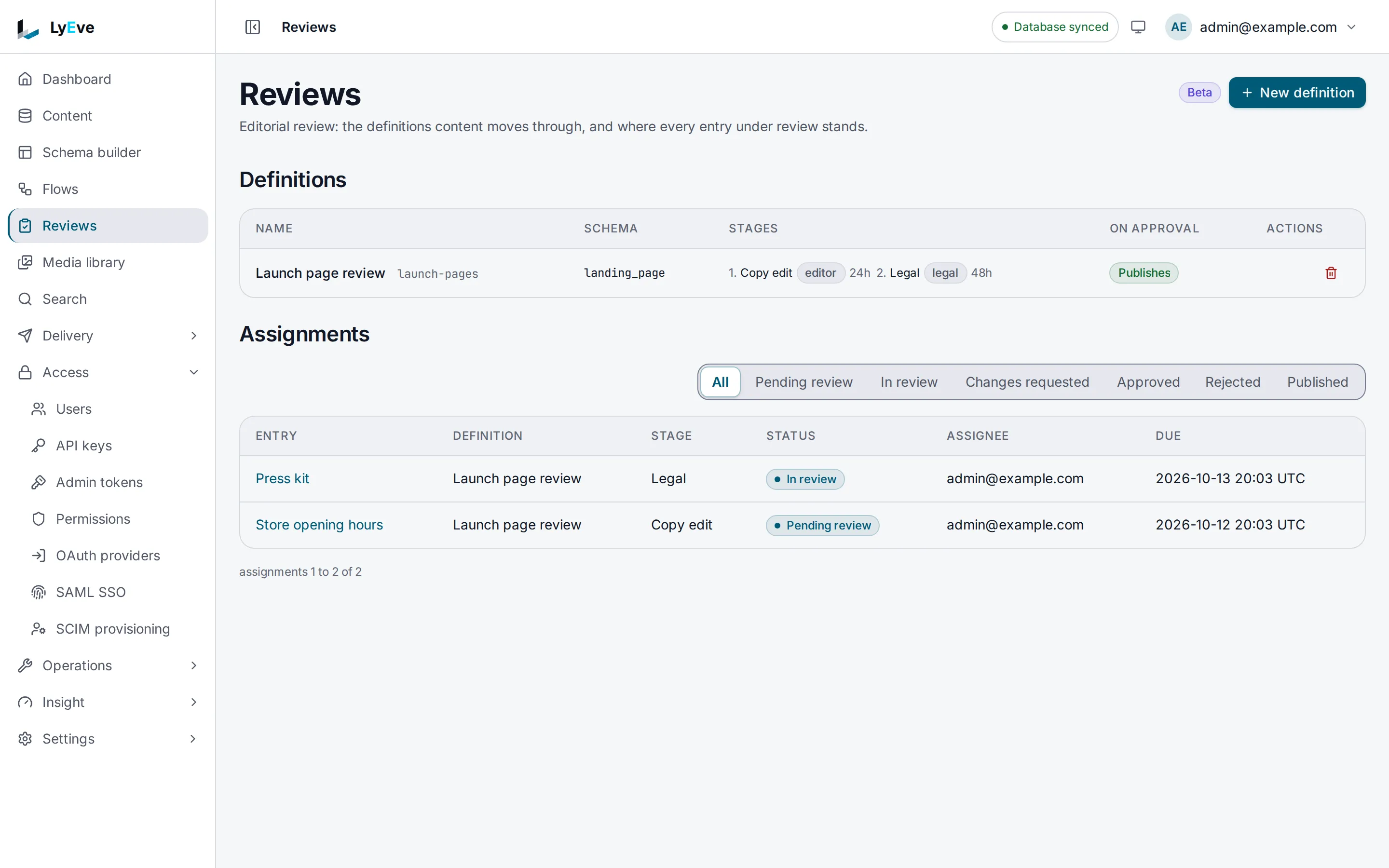
Definitions lists the review with its content type, its stages in order and Publishes under On approval.
Engine API v0.62.0
curl -X POST http://localhost:3001/api/admin/review/definitions \ -H "Authorization: Bearer $TOKEN" \ -H "Content-Type: application/json" \ -d '{ "name": "Blog review", "slug": "blog", "content_schema": "blog_post", "stages": [ {"name": "Copy edit", "required_role": "editor", "sla_duration_seconds": 86400}, {"name": "Legal", "required_role": "legal"} ] }'The answer is 201 with the definition and "publish_on_approve": true. Copy its id into
DEF.
4. Put the entry into review, assigned to yourself.
Console v0.28.0
Open the entry. Its Review card shows Not under review.
- Pick Blog review in Definition.
- Keep Assignee, which starts as you. Someone who may not list the accounts types a
user id instead. More assignees, for a stage that needs several approvals, needs
review-pro. - Choose Start review.
The card shows Stage 1 of 2: Copy edit, the status Pending review, the assignee and the time it is due, one day out. Reviews lists the entry under Assignments, and the tabs above it filter by status.
Engine API v0.62.0
curl -X POST http://localhost:3001/api/admin/review/assignments \ -H "Authorization: Bearer $TOKEN" \ -H "Content-Type: application/json" \ -d "{\"entry_id\": \"$ENTRY\", \"definition_id\": \"$DEF\", \"assignee_id\": \"<your user id>\"}"The answer is 201 with "status": "pending_review" and a due_at one day out. Copy its
id into ASSIGNMENT.
5. Approve the first stage.
Console v0.28.0
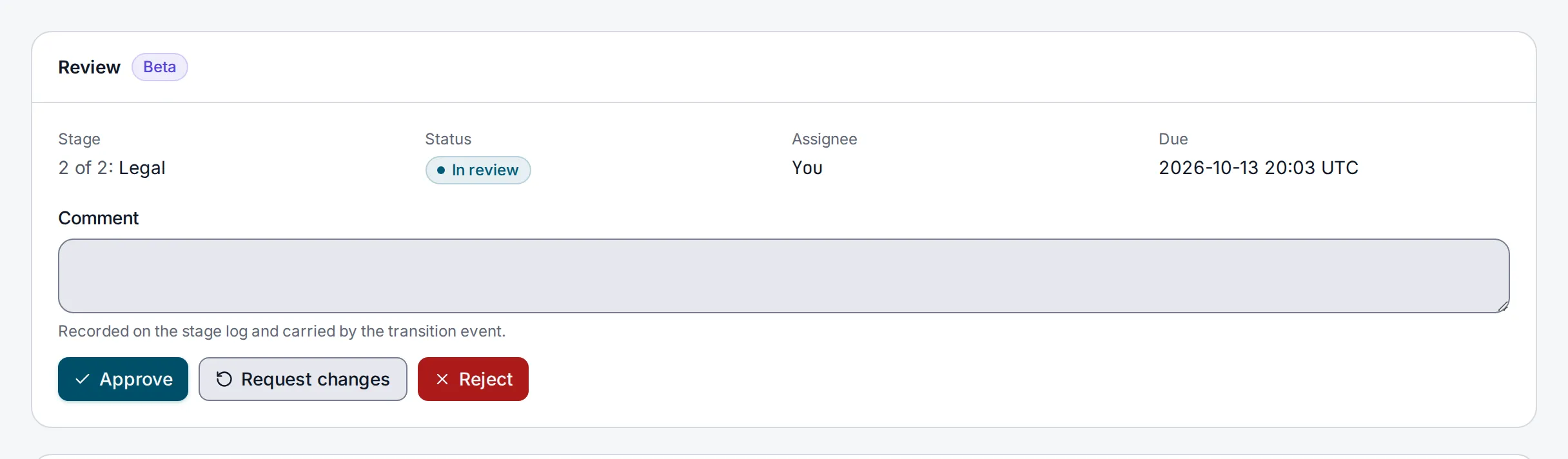
In the Review card, enter Copy is clean. in Comment and choose Approve. The card
moves to Stage 2 of 2: Legal with the status In review, and still offers Approve,
Request changes and Reject.
Engine API v0.62.0
curl -X POST http://localhost:3001/api/admin/review/assignments/$ASSIGNMENT/transition \ -H "Authorization: Bearer $TOKEN" \ -H "Content-Type: application/json" \ -d '{"action": "approve", "comment": "Copy is clean."}'{ "id": "5e2c9b7a-1f3d-4a6e-8b0c-7d9e2f4a1c63", "entry_id": "0f8d3a1c-6b2e-4c7f-9a5d-3e1b8c4f2a90", "definition_id": "8a4e1d2c-3b5f-4e6a-9c7d-1f2e3a4b5c6d", "current_stage_id": "2b7c9e1a-4d3f-4a8b-b6c5-9e8d7f6a5b4c", "assignee_id": "c3d4e5f6-a7b8-4c9d-8e0f-1a2b3c4d5e6f", "assigned_by": "c3d4e5f6-a7b8-4c9d-8e0f-1a2b3c4d5e6f", "assigned_at": "2026-10-01T12:00:00Z", "status": "in_review", "overdue": false, "created_at": "2026-10-01T12:00:00Z", "updated_at": "2026-10-01T12:05:00Z"}6. Approve the last stage.
Console v0.28.0
Choose Approve again. The card's Status reads Published and the card offers
Unpublish. The status at the top of the entry reads published.
Engine API v0.62.0
Send the same request again. The second stage is the last, so the answer has
"status": "published".
The entry is published.
7. Read the log. The log is API only. The console in v0.25.0 shows the current stage and status, not the transitions before them:
curl http://localhost:3001/api/admin/review/assignments/$ASSIGNMENT/logs \ -H "Authorization: Bearer $TOKEN"Each transition is listed with its action, actor_id and comment.
Who may act
Link to the section Who may actReviews follow the same rules as the rest of the instance, set on the Permissions page or through access rules. Two resources name reviews:
reviews: every review definition in the tenant.review:<slug>: one definition, by its slug.
A rule grants read to see assignments, logs and comments, and activate to make a
transition. A rule for one definition wins over the rule for reviews.
- A super admin is always allowed.
- An admin is allowed until a rule names
adminfor the resource, so an install with no rules works for admins out of the box. - Any other role needs a rule.
approve, reject and request_changes also need the stage's required_role, or the admin
or super_admin role. A refusal answers 403, such as
permission denied: stage requires role legal. Creating definitions, starting an assignment
and reassigning need admin or super_admin.
Set deadlines
Link to the section Set deadlinesA stage's sla_duration_seconds, at most 864000 (ten days), sets the assignment's due_at
when the entry enters the stage. Once it passes and the assignment is still open, the
assignment gets overdue_at, its overdue flag turns true, and review.sla.breached is
published once for that stage. A transition clears the mark.
GET /api/admin/review/assignments/{id}/sla shows the time spent in each stage against its
deadline.
Define a review
Link to the section Define a reviewA definition takes name, slug, content_schema, publish_on_approve and stages. The
slug is a lower-case letter followed by up to 39 lower-case letters, digits, hyphens or
underscores, made from the name when you leave it out. A slug already taken answers 409.
content_schema is default when you leave it out. PUT changes name or
publish_on_approve, or replaces the stages. The slug never changes.
Every install holds one definition per tenant, with as many stages as it needs. At the
ceiling the console turns New definition off and shows
No more workflows on this instance. Over the API, a second one answers 402:
{"error": "cap_exceeded", "cap": "review.workflows", "limit": 1, "current": 1, "upgrade_url": ""}Deleting a definition frees its place. GET /api/admin/review/definitions carries licensed
and limits, as {"workflows": {"limit": 1, "current": 1}}, where limit is null when
there is no ceiling.
Escalate, ask for several approvals, and skip stages
Link to the section Escalate, ask for several approvals, and skip stagesWith review-pro, a tenant holds any number of definitions, and each stage can take three
more settings. The console's New definition form shows them on each stage as
Escalate to, Approvals needed and Condition field.
| Stage setting | What it does |
|---|---|
escalate_to_user_id or escalate_to_role | When the stage misses its deadline, hands the assignment to that person, or lets anyone with that role act on the stage. Needs sla_duration_seconds. Set one, never both. |
quorum | The number of approvals the stage needs, from the people assigned to it. 0 or 1 is a single approval. |
condition | A test on one field of the entry. A stage whose test is false is skipped. |
{ "name": "Legal review", "required_role": "legal", "sla_duration_seconds": 86400, "escalate_to_role": "legal-lead", "quorum": 2, "condition": {"field": "category", "op": "equals", "value": "legal"}}- Escalation. The deadline check, every five minutes, hands the assignment over once per
visit to the stage, records an
escalateentry in the log and publishesreview.escalated. Moving to another stage ends it. - Quorum. Name the reviewers in
assignee_idswhen you start the assignment, at least as many as the largest quorum, or the start answers422. Each assignee approves once. The approval that reaches the quorum moves the assignment on. Until then it stays on the stage, andreview.transitionedcarriesapprovalsandapprovals_needed. A rejection or a request for changes ends the visit and drops the approvals collected. Every assignment read, the list, one assignment and an entry's current assignment, carriesassignee_ids, the current stage'sapprovalsand itsrequired_approvals, so you can show progress without reading the definition. - Conditions.
opisequals,not_equals,in(withvalues, up to 100) orexists. A value is a string, a number or a boolean. The test runs when the assignment would enter the stage. A field the entry does not have reads as absent. An approval that skips every stage left approves the entry, and a start that skips every stage answers409.review.transitionedlists the skipped stages inskipped_stage_ids.
For example, a legal stage that two people approve. Both reviewers here are admins. An admin
may act on any review until a rule says otherwise, but on a quorum stage only the assignees
may approve. Anyone else gets 403 only an assignee may approve a quorum stage.
Console v0.28.0
- Open Reviews and choose New definition. Enter
Legal sign-offin Name and pickblog_postin Content type. - On the stage, enter
Legalin Stage name,editorin Required role and2in Approvals needed, then choose Create. The page says Definition created., and the definition's row shows 2 approvals. - Open a draft
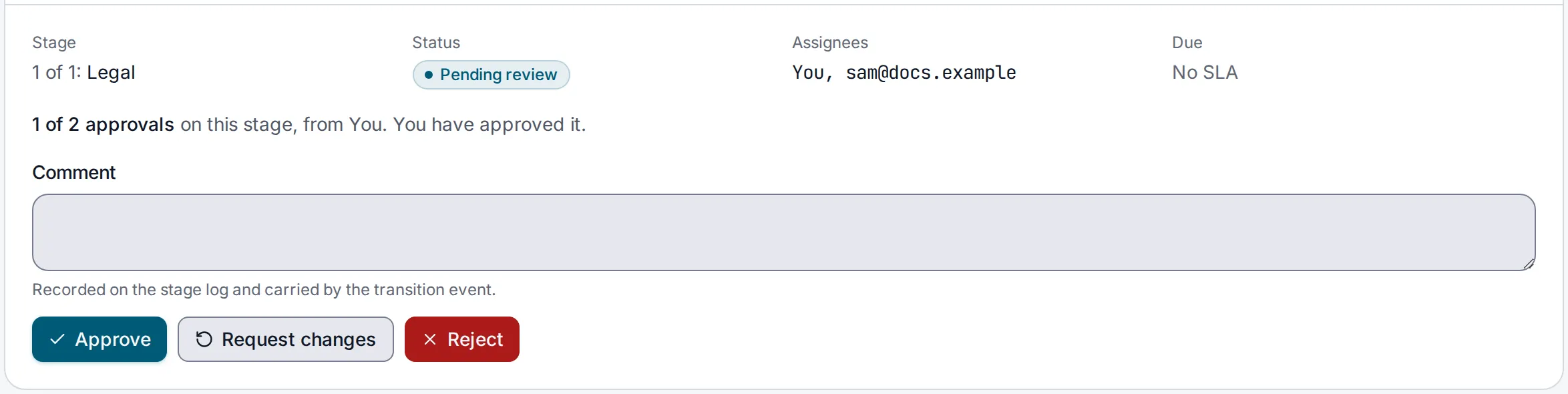
blog_postentry. In its Review card, pick Legal sign-off in Definition, keep yourself in Assignee, pick the second admin in More assignees, and choose Start review. The card says 0 of 2 approvals on this stage. - Choose Approve. The card says 1 of 2 approvals on this stage, from You., and the entry stays in review.
- The second admin opens the entry and chooses Approve. The quorum is reached, the status turns Published, and Unpublish appears. On console v0.25.0, when the first approval came from a super admin, who belongs to no tenant, the second admin's card names that reviewer by the first characters of their id.
Engine API v0.62.0
curl -X POST http://localhost:3001/api/admin/review/definitions \ -H "Authorization: Bearer $TOKEN" \ -H "Content-Type: application/json" \ -d '{"name": "Legal sign-off", "content_schema": "blog_post", "stages": [{"name": "Legal", "required_role": "editor", "quorum": 2}]}'The answer is 201 with the new definition. Copy its id into DEF, which still holds the
one from step 3.
The entry from step 2 is published by now, so create another draft and copy its id into
ENTRY:
curl -X POST http://localhost:3001/api/admin/content \ -H "Authorization: Bearer $TOKEN" \ -H "Content-Type: application/json" \ -d '{"schema": "blog_post", "slug": "legal", "title": "Legal post", "body": {"text": "Body."}}'Read your own id, and copy id from the answer into ME:
curl http://localhost:3001/api/admin/auth/me \ -H "Authorization: Bearer $TOKEN"In a second terminal, sign in as the second admin. Their token lasts 15 minutes, so finish the steps below within that time or sign in again:
curl -X POST http://localhost:3001/api/admin/auth/login \ -H "Content-Type: application/json" \ -d '{"email": "reviewer@example.com", "password": "Second-Reviewer-2026"}'In that terminal, copy token from the answer into TOKEN. Back in the first terminal, copy
user.id from the same answer into SECOND, and start the assignment with both reviewers:
curl -X POST http://localhost:3001/api/admin/review/assignments \ -H "Authorization: Bearer $TOKEN" \ -H "Content-Type: application/json" \ -d "{\"entry_id\": \"$ENTRY\", \"definition_id\": \"$DEF\", \"assignee_id\": \"$ME\", \"assignee_ids\": [\"$SECOND\"]}"The answer is 201 with both ids in assignee_ids and "required_approvals": 2. Copy its
id into ASSIGNMENT in both terminals. With only one assignee it answers 422
a quorum stage needs more approvals than the assignment names assignees.
Approve from the first terminal:
curl -X POST http://localhost:3001/api/admin/review/assignments/$ASSIGNMENT/transition \ -H "Authorization: Bearer $TOKEN" \ -H "Content-Type: application/json" \ -d '{"action": "approve", "comment": "Cleared by legal."}'The answer is 200 with the status still pending_review and your id in approvals. Run
the same call in the second terminal. It reaches the quorum, and the status turns
published.
Without review-pro, a definition create or update that sets any of these answers 402
naming feature:review-pro. If the license lapses, every definition keeps running as it is:
stored escalations still escalate, quorums still count and conditions still route. An update
that sends a stage's stored settings back unchanged, matched by the stage's name, stays free,
and so do clearing a setting and deleting a definition.
In a flow
Link to the section In a flowThe review.transition node moves an entry's current assignment, the same way the transition
route does.
| Setting | Purpose |
|---|---|
entry_id | Required. The entry, usually {{ trigger.record_id }}. |
action | Required. approve, reject, request_changes, publish or unpublish. |
comment | Optional. Recorded in the log. |
actor_id | Optional. The user the transition is recorded against. |
It outputs assignment_id, entry_id, definition_id, definition_slug, content_schema,
action, from_stage, stage, status, assignee_id, due_at and dry_run. A test run
reports the transition without making it. An entry with no assignment, or an action its status
does not allow, fails the step.
Three events can start a flow. All appear in GET /api/admin/flows/event-types.
review.transitioned fires on every transition, including the node's. It carries tenant_id,
definition_id, definition_slug, content_schema, entry_id, assignment_id, action,
from_stage_id, from_stage, to_stage_id, to_stage, from_status, to_status,
actor_id, assignee_id and comment, plus skipped_stage_ids when a condition skipped
stages, and approvals and approvals_needed when a quorum stage recorded an approval without
moving.
review.sla.breached fires once per stage when an assignment becomes overdue there. It
carries tenant_id, definition_id, definition_slug, content_schema, entry_id,
assignment_id, stage_id, stage, assignee_id, status, due_at and overdue_at.
review.escalated fires right after it when the stage names an escalation. It carries
tenant_id, definition_id, definition_slug, content_schema, entry_id,
assignment_id, stage_id, stage, from_assignee_id, assignee_id, escalated_role
(empty for a person) and escalated_at.
Settings
Link to the section SettingsEditorial review has no settings of its own. It runs on every install. If you set
LYEVE_PLUGINS to choose which features start, include review in it. See
licensing and tiers.
Deleting a tenant deletes its reviews. A privacy erasure request removes the person's identity from assignments, logs and comments.
Every route takes a signed-in session. An admin token cannot call them.
Definitions, assignments, logs and comments
| Method | Path | Role | Purpose |
|---|---|---|---|
GET | /api/admin/review/definitions | admin | List definitions, paginated, with licensed and limits. Filter with ?content_schema=. |
POST | /api/admin/review/definitions | admin | Create a definition with its stages. Past one per tenant, needs review-pro. |
GET | /api/admin/review/definitions/{id} | admin | A definition with its stages, as {"definition", "stages"}. |
PUT | /api/admin/review/definitions/{id} | admin | Change name or publish_on_approve, or replace the stages. |
DELETE | /api/admin/review/definitions/{id} | admin | Delete a definition and its assignments. |
POST | /api/admin/review/assignments | admin | Put an entry into review: entry_id, definition_id, assignee_id, and assignee_ids for a quorum stage. |
GET | /api/admin/review/assignments | read rule | List assignments, paginated, each with assignee_ids, approvals and required_approvals. Filter with ?assignee_id= and ?status=. |
GET | /api/admin/review/assignments/{id} | read rule | One assignment, with assignee_ids, the current stage's approvals and its required_approvals. |
GET | /api/admin/review/entries/{entryID}/assignment | read rule | The entry's current assignment, with assignee_ids, approvals and required_approvals. |
POST | /api/admin/review/assignments/{id}/transition | activate rule | Make a transition: action, optional comment. |
POST | /api/admin/review/assignments/{id}/reassign | admin | Give the assignment to someone else: assignee_id. |
GET | /api/admin/review/assignments/{id}/logs | read rule | The assignment's transitions. |
GET | /api/admin/review/assignments/{id}/sla | read rule | Time spent in each stage against its deadline. |
POST | /api/admin/review/entries/{entryID}/stages/{stageID}/comments | read rule | Comment on an entry at a stage: body. |
GET | /api/admin/review/entries/{entryID}/comments | read rule | The entry's comments. Filter with ?stage_id=. |
Every error these routes return
| Status | Message | Cause |
|---|---|---|
400 | name is required or at least one stage is required | The definition is incomplete. |
400 | slug must be a letter followed by up to 39 letters, digits, hyphens or underscores | Bad slug, including one with capitals. |
400 | action must be approve, reject, request_changes, publish or unpublish | Unknown action. |
400 | comment body is required | A comment with no body. |
400 | failed to transition assignment | The last approval on a content type without draft and publish. |
400 | invalid assignee_id, invalid assignee_ids | An assignee is not a valid id. |
400 | A message naming the stage setting, such as condition op must be equals, not_equals, in or exists | A stage setting is malformed. |
402 | cap_exceeded with "cap": "review.workflows" | A second definition without review-pro. |
402 | payment_required, naming feature:review-pro | Escalation, a quorum or a condition without review-pro. |
403 | A message naming the action and resource, or the stage's role | No rule or stage role admits the caller. |
403 | only an assignee may approve a quorum stage | The caller is not one of the stage's reviewers. |
409 | failed to create review definition | The slug is taken. |
409 | definition has no stages | The definition cannot take assignments. |
409 | no stage of the definition applies to the entry | Every stage's condition skipped the entry. |
409 | you have already approved this stage | A second approval from the same reviewer. |
422 | a quorum stage needs more approvals than the assignment names assignees | Fewer assignees than the stage's quorum. |
409 | failed to transition assignment | The action does not fit the status, such as publish on an assignment that is not approved, or any stage action on a finished one. |
Related
Link to the section Related- Content lifecycle: statuses, revisions and scheduling.
- Access rules: how rules combine.
- Flows: act on review events.