Features
Request capture
Included free on every install, replay and diff included, with every request kept for 24 hours. Capture rules, retention up to 30 days and saved replay sets need a license with the
request-capture-profeature. See pricing.
Request capture records each request to the Admin API and the Content API, with its response, for 24 hours. You can see exactly what a client sent and what it got back, compare a failing call with a working one, and send a call again after a fix.
What is recorded
Link to the section What is recorded| Kept | Left out or masked |
|---|---|
| Method, URL, status, duration in milliseconds, tenant. | Credential headers such as Authorization and X-Api-Key, stored as [REDACTED]. |
| Request and response headers. | Sensitive values in JSON, XML, form and plain-text bodies, redacted before they are stored. |
| The request body, up to 64 KiB, so the capture can be replayed. | The bodies of routes that carry a credential, such as a password or a secret shown once. |
| The response body, up to 64 KiB, when the status is 400 or above, or when a capture rule chose the request. | The response body of an answer below 400 that no capture rule chose. |
Captures expire after 24 hours, or after the retention of the capture rule that kept them, and are deleted within ten minutes of expiring. A replay keeps the lifetime of the capture it replays. Capturing never slows a request down. Captures are written in batches, so a capture shows in the list within two seconds of its request. Under heavy load some captures are dropped rather than queued, and the server log counts them.
A tenant's enabled capture rule keeps both bodies for every request it captures.
Deleting a tenant deletes its captures. A privacy erasure request for a person deletes the captures that name them.
In LyEve Console, request capture is under Insight > Observability > Request capture.
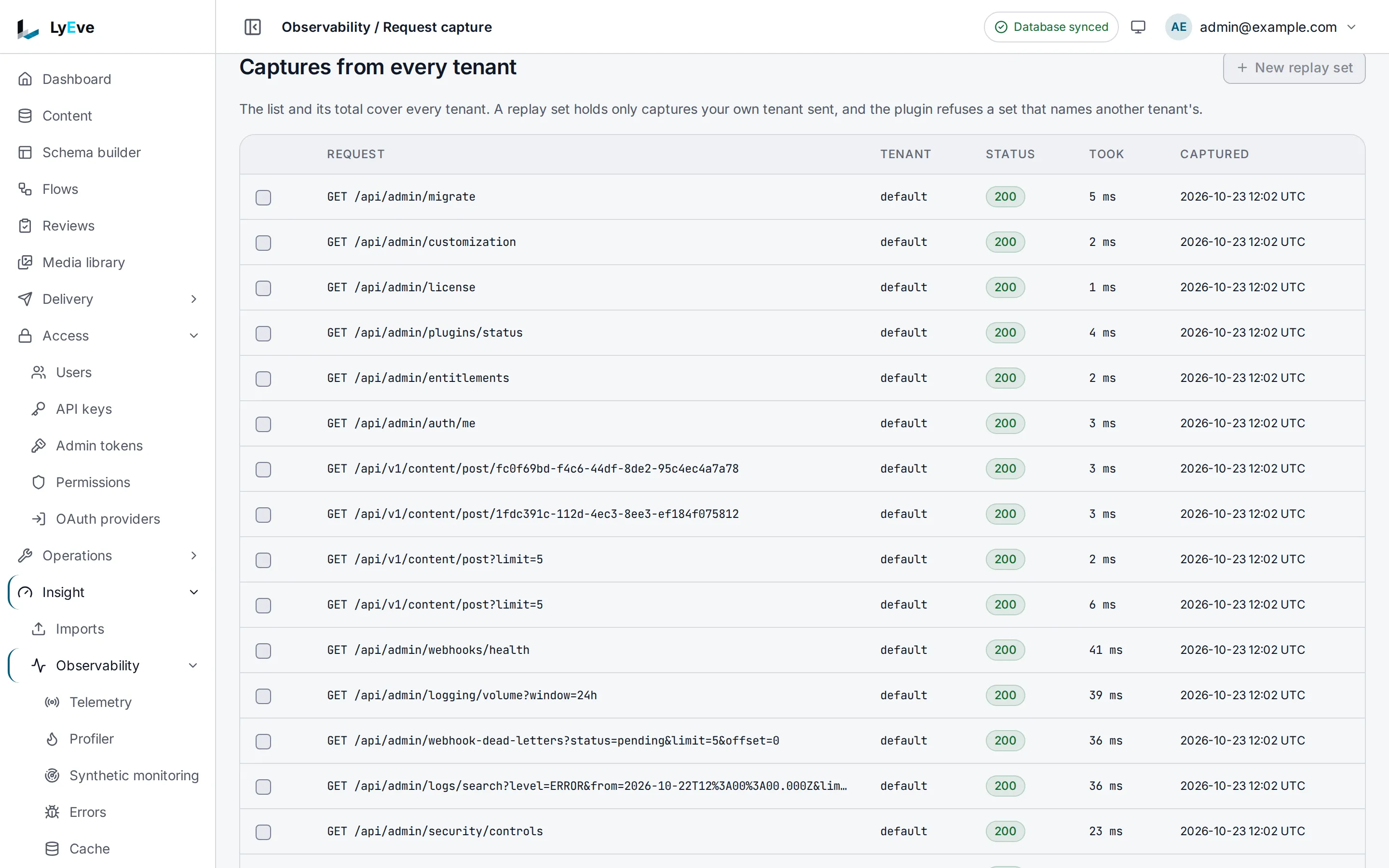
- Captures from every tenant lists the newest requests with their Tenant, Status, how long each Took and when it was Captured. The list and its total cover every tenant.
- Capture rules lists each rule's route, method, sample, how long its captures are kept and its state. New rule adds one.
- Replay sets lists the saved sets. Select captures and press New replay set to save them as a set.
Without the request-capture-pro feature, the page says that capture rules and replay sets
are not included, and New rule and New replay set are turned off. Reading one capture in full, replaying it on its own and comparing
two captures are done with the API on v0.25.0.
For the console step, you are signed in to the console as a super admin. Every other
step is an API call, so you need an admin token in TOKEN. The
quickstart shows how to get one.
1. List the latest captures.
Console v0.28.0
Open Insight > Observability > Request capture. Captures from every tenant lists each request with its method and path, its tenant, its status, how long it took and when it was captured, newest first.
Engine API v0.62.0
Narrow the list to GET requests:
curl "http://localhost:3001/api/admin/request-captures?method=GET&limit=2" \ -H "Authorization: Bearer $TOKEN"{ "data": [ { "id": "56cea807-47e3-413d-beca-28f6128a172e", "captured_at": "2026-10-01T09:14:36Z", "method": "GET", "url": "/api/admin/logging/levels", "request_headers": { "Authorization": ["[REDACTED]"], "User-Agent": ["curl/8.18.0"] }, "status_code": 200, "response_headers": { "Content-Type": ["application/json"] }, "duration_ms": 1.548, "tenant_id": "default", "ttl_seconds": 86400 } ], "total_count": 247, "limit": 2, "offset": 0}The rest of the steps are API only on v0.25.0. They need a capture id, which the console list
does not show, so take one from the API list above: copy an id into CAPTURE_ID.
2. Fetch that one capture in full:
curl http://localhost:3001/api/admin/request-captures/$CAPTURE_ID \ -H "Authorization: Bearer $TOKEN"3. Replay it. A GET needs only confirm_replay:
curl -X POST http://localhost:3001/api/admin/request-captures/$CAPTURE_ID/replay \ -H "Authorization: Bearer $TOKEN" \ -H "Content-Type: application/json" \ -d '{"confirm_replay": true}'The answer holds original, replay and diff. The replay is stored as a new capture, and its
id is replay.id. Copy it into REPLAY_ID.
4. Compare the two:
curl http://localhost:3001/api/admin/request-captures/$CAPTURE_ID/diff/$REPLAY_ID \ -H "Authorization: Bearer $TOKEN"{ "id1": "56cea807-47e3-413d-beca-28f6128a172e", "id2": "aa51f554-ab7a-4aca-8e89-a762fb626029", "status_match": true, "status_code1": 200, "status_code2": 200, "duration1_ms": 1.548, "duration2_ms": 1.344, "body_compared": false }body_compared is false, because the capture is a 200 that no rule chose,
so it holds no response body. The diff in the replay's answer carries
"body_compared": false for the same reason. An unchanged answer carries
neither body_diff nor headers_diff, as here. Read a diff
describes all three.
5. Delete the replay when you are done. The answer is 204:
curl -X DELETE http://localhost:3001/api/admin/request-captures/$REPLAY_ID \ -H "Authorization: Bearer $TOKEN"Replay a call safely
Link to the section Replay a call safelyA replay sends the stored request again, with your own Authorization and
X-Api-Key in place of the redacted ones. You confirm that with
"confirm_replay": true. Replaying a POST, PUT, PATCH or DELETE
changes data again, so it also needs "confirm_mutating": true.
A capture of a call to this instance is replayed to the engine itself, never
to the host a request header names. A path under /api/admin goes to the admin
listener and every other path to the API listener, so behind a proxy the replay
skips the proxy. A redirect in the answer is recorded as the replay's result
and is not followed.
Your credentials go to this engine only. A capture whose request line named an
outside host is replayed there without Authorization or X-Api-Key.
A super admin's replay of another tenant's capture runs in that tenant. A
capture that belongs to no tenant cannot be replayed and answers 422.
override_url sends the request to a different path. It must keep the
original scheme and host.
Read a diff
Link to the section Read a diffstatus_match says whether the two statuses agree. body_compared is true
when the response bodies were compared. A diff of two stored captures compares
them only when both hold a response body. The diff in a replay's answer
compares them whenever the capture it repeats holds a response body, because a
replay keeps the answer it got, so a replay that comes back empty where the
capture held a body reads as changed.
body_diff is a line diff of the response bodies, and appears only when they
were compared and differ. headers_diff lists the response headers that
differ, sorted by name, and appears only when the two captures differ.
A replay is read the way its original was stored. It does not forward
Accept-Encoding, so the answer comes back uncompressed, and its body is
redacted and re-encoded the same way before the two are compared. A JSON
answer whose keys come back in another order reads as unchanged.
headers_diff skips the headers that change on every request:
Date,X-Request-Id,X-Response-Time,Retry-AfterandX-Csp-Nonce.ETag, because the body comparison already catches a real change.- The quota and rate limit counters.
- The transport headers:
Content-Length,Content-Encoding,Transfer-Encoding,Connection,Keep-Alive,ViaandAlt-Svc.
The nonce inside a Content-Security-Policy is masked before the two are
compared, so a change to the rest of the policy still shows.
Choose what is captured
Link to the section Choose what is capturedCapture rules need request-capture-pro. Without rules, every request is captured and kept 24 hours. Once a tenant has
at least one enabled rule, it captures only the requests a rule matches, and
the first matching rule, oldest first, decides how long each is kept.
Console v0.28.0
- Open Insight > Observability > Request capture and choose New rule.
- Enter
/api/v1/content/orders/**in Route and pickPOSTin Method. - Enter
50in Sample, as a percentage, pick7 daysin Kept for, and keep Apply this rule on. - Choose Create. Capture rules lists the rule with its route,
POST,50%,7 daysand Capturing.
Engine API v0.62.0
curl -X POST http://localhost:3001/api/admin/request-captures/rules \ -H "Authorization: Bearer $TOKEN" \ -H "Content-Type: application/json" \ -d '{"route_pattern": "/api/v1/content/orders/**", "method": "POST", "sample_rate": 0.5, "retention_seconds": 604800}'| Field | Meaning | Default |
|---|---|---|
route_pattern | An absolute path. A segment is literal, a glob such as report-*, * or {name} for any one segment, or ** as the last segment for everything below it. /api/v1/** also matches /api/v1. Required. | |
method | GET, POST, PUT, PATCH, DELETE, HEAD, OPTIONS or *. | * |
sample_rate | The share of matching requests to keep, from 0 to 1. | 1 |
retention_seconds | How long a capture is kept, from 3600 (one hour) to 2592000 (30 days). | 86400 |
enabled | Whether the rule applies. | true |
The answer is 201 with the rule. PATCH /api/admin/request-captures/rules/{id}
changes the fields you send, and DELETE removes the rule. A change reaches
every replica within 30 seconds.
If the license lapses, enabled rules keep applying with their retention.
Turning a rule off, editing a rule that is off and deleting a rule stay free.
Creating a rule, turning one on and changing one that is on answer 402.
Replay a set of captures
Link to the section Replay a set of capturesCreating a set needs request-capture-pro. A replay set is a named list of up to 50 of your captures, replayed together
in order with each replay compared against its original.
Console v0.28.0
- Open Insight > Observability > Request capture. Under Captures from every tenant,
tick the box on each capture the set should hold, such as a
GETof/api/admin/logging/levels. Tick only captures from your own tenant, because a set takes only captures the current tenant holds. - Choose New replay set from 1, the count of captures you ticked, enter
settings smokein Name, and choose Create. Replay sets lists it. - Choose Replay on the set's row, then Replay in the dialog that asks Replay settings smoke?.
The page says Replayed settings smoke and 1 of 1 returned the same response as when captured., and lists each call with Same or what changed, its status and its time then and now.
Engine API v0.62.0
curl -X POST http://localhost:3001/api/admin/request-captures/sets \ -H "Authorization: Bearer $TOKEN" \ -H "Content-Type: application/json" \ -d '{"name": "checkout smoke", "capture_ids": ["'"$CAPTURE_ID"'"]}'The answer is 201 with the set. Copy its id into SET_ID, and replay it:
curl -X POST http://localhost:3001/api/admin/request-captures/sets/$SET_ID/replay \ -H "Authorization: Bearer $TOKEN" \ -H "Content-Type: application/json" \ -d '{"confirm_replay": true}'The replay answers set_id and results, one per capture with its
capture_id, the captured method and path, and either the replay_id and diff, or an error such as
capture not found, it may have expired. A set that holds a write needs
"confirm_mutating": true as well. A capture that expired since is reported
and the rest still run, so keep the captures a set depends on with a rule
whose retention outlasts it.
A set's name is unique in its tenant. Listing, reading, replaying and deleting sets stay free after a lapse, and deleting a set leaves its captures.
Who can see captures
Link to the section Who can see capturesEvery route needs an admin or super admin. An admin sees only their own
tenant's captures. A super admin may pass ?tenant_id=<tenant> to the list to
read one tenant, or ?tenant_id=* to read every tenant. An admin who names
another tenant gets 403.
The capture list, the rule list and the set list each carry licensed, which
says whether this install may create rules and sets.
Settings
Link to the section SettingsThere is nothing to configure. Request capture runs on every install. If you
set LYEVE_PLUGINS to choose which features start, include request-capture
in it. See licensing and tiers.
| Method | Path | Purpose |
|---|---|---|
GET | /api/admin/request-captures | List captures, newest first, with limit and offset. Filter with ?method=. |
GET | /api/admin/request-captures/{id} | Fetch one capture. |
DELETE | /api/admin/request-captures/{id} | Delete one capture. Answers 204. |
POST | /api/admin/request-captures/{id}/replay | Send the captured request again and compare the result. |
GET | /api/admin/request-captures/{id1}/diff/{id2} | Compare two captures. |
POST | /api/admin/request-captures/prune | Delete every expired capture now. Super admin only. |
GET | /api/admin/request-captures/rules | Your tenant's capture rules, oldest first, and licensed. |
POST | /api/admin/request-captures/rules | Create a rule. 201. Needs request-capture-pro. |
PATCH | /api/admin/request-captures/rules/{id} | Change a rule. Needs request-capture-pro unless the rule ends up off. |
DELETE | /api/admin/request-captures/rules/{id} | Delete a rule. 204. |
GET | /api/admin/request-captures/sets | Your tenant's replay sets, newest first, and licensed. |
POST | /api/admin/request-captures/sets | Create a set: name and capture_ids. 201. Needs request-capture-pro. |
GET | /api/admin/request-captures/sets/{id} | One set. |
DELETE | /api/admin/request-captures/sets/{id} | Delete a set and keep its captures. 204. |
POST | /api/admin/request-captures/sets/{id}/replay | Replay every capture in the set. |
| Status | Message | Cause |
|---|---|---|
400 | override_url must have the same scheme and host as the original capture | The override points somewhere else. |
403 | tenant_id mismatch | An admin named another tenant. |
402 | payment_required, naming feature:request-capture-pro | Creating a rule or a set, or turning on or changing an enabled rule, without the license. |
403 | super_admin required | An admin called prune. |
404 | capture record not found | Unknown id, or another tenant's capture. |
404 | capture rule not found, replay set not found | Unknown id, or another tenant's rule or set. |
409 | failed to create replay set | Your tenant already has a set with that name. |
422 | a capture with no tenant cannot be replayed, because the replay would run in your own tenant | A super admin replayed a capture that belongs to no tenant. |
422 | route_pattern must be an absolute path such as /api/v1/orders/{id} or /api/v1/** | The pattern does not parse. route_pattern may use ** only as its last segment is the same cause. |
422 | sample_rate must be between 0 and 1, retention_seconds must be between 3600 (one hour) and 2592000 (30 days), method must be one of GET, POST, PUT, PATCH, DELETE, HEAD, OPTIONS or * | A rule field is out of range. |
422 | name must be 1 to 255 characters, capture_ids must hold 1 to 50 captures, every capture id must name a capture this tenant holds | A set is not valid. |
428 | replay requires confirm_replay: true, which acknowledges auth header substitution, code request_capture.confirm_replay | confirm_replay is missing. |
428 | replaying a POST request requires confirm_mutating: true, code request_capture.confirm_writes | The capture changes data and confirm_mutating is missing. |
428 | the set holds a write, so replaying it requires confirm_mutating: true, code request_capture.confirm_writes | A set replay without confirm_mutating. |
502 | replay could not reach the target | The replayed request failed to connect. |
Related
Link to the section Related- Logs: every line a request wrote.
- Request profiling: which routes are slow.
- PII masking: keep personal data out of what is stored.