Features
Content releases
Requires a license with the
content-profeature. See pricing.
A release is a named set of entries that change together. Use one for a launch:
the new product pages go live and the old ones go back to draft in one action.
Mark each entry publish or unpublish, then publish the release now or
schedule it for a set time. If any entry fails, every entry is put back where
it was.
How it works
Link to the section How it worksA release changes its entries in two stages:
| Stage | What happens |
|---|---|
| In the console and the Admin API | Every entry changes status in one transaction. Either all of them show the new status or none does. |
| In what the Content API and GraphQL serve | The entries follow one at a time, usually within seconds. During that window a reader can see some entries of the release changed and others not yet. |
- If an entry fails in the second stage, every entry is put back where it was,
in the console and the Admin API and in what the APIs serve. The release is marked
failedwith the reason, and you can fix it and publish again. - An entry someone changed again after the release started is left as they left it.
- If the instance stops partway, the release finishes going out a few minutes after it starts again.
- Each entry that changes gets an audit entry, and a revision when content history is on for its content type. It sends the same event a single publish sends, so webhooks, flows and search see every entry.
A release moves through these states:
| Status | Meaning |
|---|---|
draft | Being built. Entries can be added and removed. |
scheduled | Goes out at scheduled_at. |
publishing | Going out now. |
published | Every entry changed. Each item carries its previous_status and its outcome. |
failed | Nothing changed. The release carries the reason. |
canceled | Canceled before it went out. |
Run this on an install whose license carries content-pro. For the console steps, you are
signed in to LyEve Console as an admin or super_admin. For the API steps, you need a
token in TOKEN. The quickstart shows how to get one.
Create two draft entries first, as in Content lifecycle. For
the API steps, copy their ids into PAGE_A and PAGE_B.
1. Build a release that publishes both.
Console v0.28.0
- Open Delivery > Releases and choose New release.
- Enter
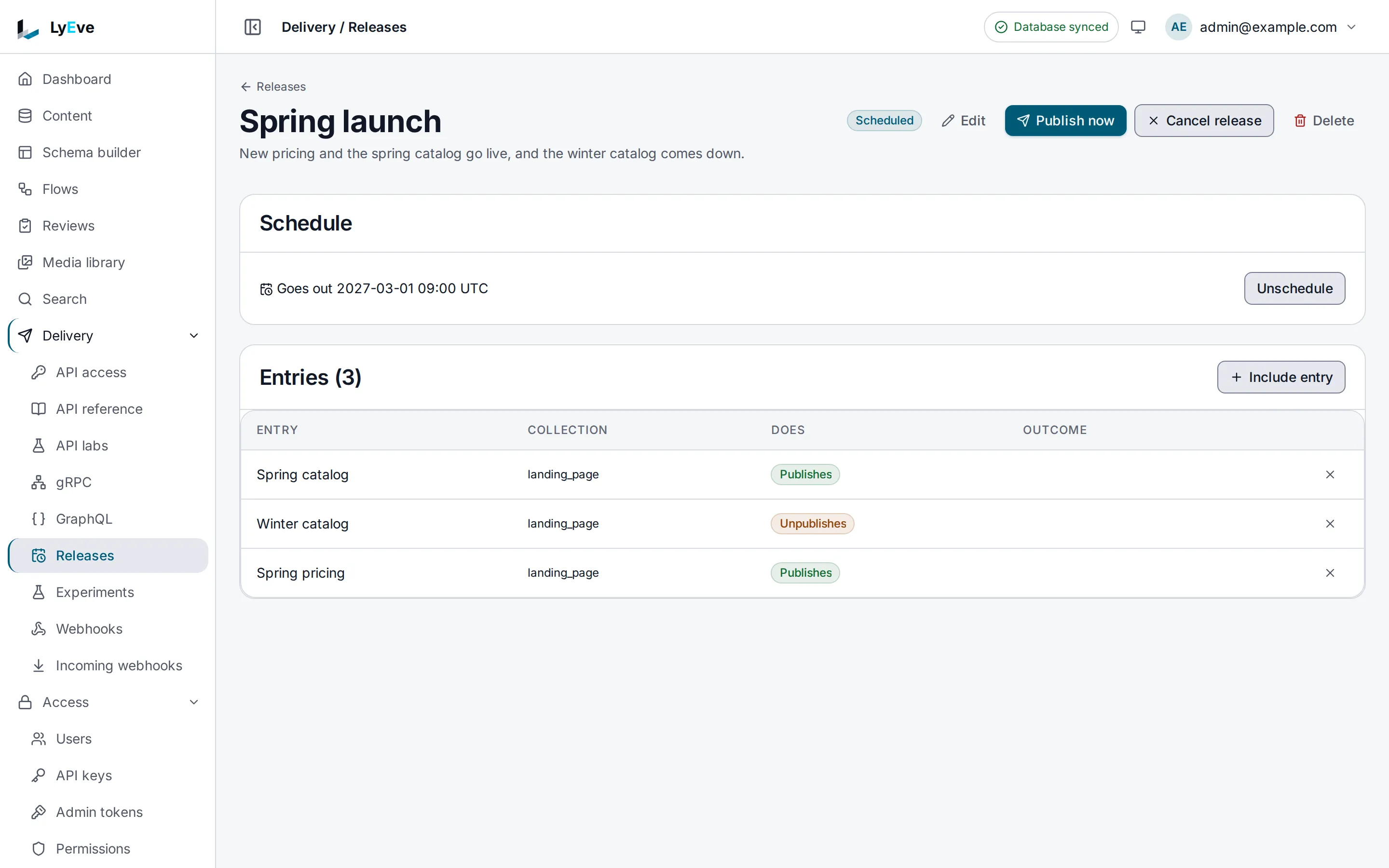
Spring launchin Name and choose Create. The release's page opens. - Choose Include entry. Pick the first entry under Entry, keep Publish it under When the release publishes, and choose Include. The page confirms Entry added to the release.
- Include the second entry the same way.
Entries (2) lists both, and the Does column reads Publishes.
Engine API v0.62.0
curl -X POST http://localhost:3001/api/admin/content/releases \ -H "Authorization: Bearer $TOKEN" \ -H "Content-Type: application/json" \ -d '{"name": "Spring launch", "items": [{"entry_id": "'"$PAGE_A"'", "action": "publish"}, {"entry_id": "'"$PAGE_B"'", "action": "publish"}]}'The answer is 201 with "status": "draft" and "item_count": 2. Copy its id into
RELEASE_ID.
2. Publish it now.
Console v0.28.0
Choose Publish now and confirm. The page reads Release published.
Engine API v0.62.0
curl -X POST http://localhost:3001/api/admin/content/releases/$RELEASE_ID/publish \ -H "Authorization: Bearer $TOKEN"The answer is the release with "status": "published", and each item reports
"previous_status": "draft" and "outcome": "applied". Both entries now read
"status": "published" on GET /api/admin/content/{id}.
3. Build and publish a second release that takes the first entry down.
Console v0.28.0
Create a release named Retire page A. Choose Include entry, pick the first entry, choose
Unpublish it and choose Include. Then choose Publish now and confirm.
Engine API v0.62.0
curl -X POST http://localhost:3001/api/admin/content/releases \ -H "Authorization: Bearer $TOKEN" \ -H "Content-Type: application/json" \ -d '{"name": "Retire page A", "items": [{"entry_id": "'"$PAGE_A"'", "action": "unpublish"}]}'Publish it with .../publish as in step 2.
The first entry is a draft again and leaves the Content API list.
4. See a conflict. Build two more releases that each hold the second entry. Schedule one of them, then look at the other.
Console v0.28.0
- Create two releases as in step 1, and include the second entry in each.
- On one of the two releases, pick a date and a time under Publish at and choose Schedule. The card shows when it goes out, in UTC, with Unschedule beside it.
- Open the other release. Its Conflicts card says that a conflict stops the release, with Open the other release. Publish now and Schedule stay off until you take the entry out of one of them.
Engine API v0.62.0
Create the two releases. Run this twice, and copy each answer's id into OTHER_RELEASE_ID
and THIRD_RELEASE_ID:
curl -X POST http://localhost:3001/api/admin/content/releases \ -H "Authorization: Bearer $TOKEN" \ -H "Content-Type: application/json" \ -d '{"name": "Page B release", "items": [{"entry_id": "'"$PAGE_B"'", "action": "publish"}]}'Schedule the first:
curl -X POST http://localhost:3001/api/admin/content/releases/$OTHER_RELEASE_ID/schedule \ -H "Authorization: Bearer $TOKEN" \ -H "Content-Type: application/json" \ -d '{"publish_at": "2027-11-01T09:00:00Z"}'Then read the second one's conflicts:
curl http://localhost:3001/api/admin/content/releases/$THIRD_RELEASE_ID/conflicts \ -H "Authorization: Bearer $TOKEN"{"data": [{"entry_id": "059b65ff-...", "kind": "other_release", "at": "2027-11-01T09:00:00Z", "release_id": "68dee079-...", "detail": "another scheduled release moves the entry"}]}Scheduling or publishing that release answers 409 until you take the entry out of one of
them.
Build a release
Link to the section Build a releasename is required, at most 255 characters, and description is optional. A release holds up
to 500 entries.
Console v0.28.0
Include entry offers the most recently changed entries, by collection, and finds one by title, slug or ID. An older entry is added from its own page: the entry's Release card takes a Release and When it goes out, then Add to release. The remove button on an entry's row takes it out, and the page confirms Entry removed from the release. To change what an entry does, remove it and include it again. Edit changes the Name and the Description.
Engine API v0.62.0
items is optional on the create. Add an entry later, or change the action of one already in
the release:
curl -X POST http://localhost:3001/api/admin/content/releases/$RELEASE_ID/items \ -H "Authorization: Bearer $TOKEN" \ -H "Content-Type: application/json" \ -d '{"entry_id": "'"$ANOTHER"'", "action": "publish"}'DELETE .../items/{entryID} takes an entry out, and PUT .../{id} changes name or
description.
Entries can change only while the release is a draft or scheduled.
Schedule it
Link to the section Schedule itConsole v0.28.0
Under Schedule, pick a date and a time in Publish at and choose Schedule. Unschedule returns the release to draft, and Cancel release cancels it before it goes out.
Engine API v0.62.0
curl -X POST http://localhost:3001/api/admin/content/releases/$RELEASE_ID/schedule \ -H "Authorization: Bearer $TOKEN" \ -H "Content-Type: application/json" \ -d '{"publish_at": "2027-11-01T09:00:00Z"}'The release reports the time as scheduled_at. DELETE .../schedule returns a scheduled
release to draft, and .../cancel cancels it before it goes out.
The time must be in the future.
Conflicts
Link to the section ConflictsBefore a release is scheduled or published, it is checked against anything else that would move its entries. Each one is a conflict:
kind | Meaning |
|---|---|
entry_schedule | The entry has its own publish or unpublish date. |
scheduled_transition | A scheduled status change is pending on the entry. |
other_release | Another scheduled release holds the same entry. |
entry_missing | The entry was deleted after it was added. It is skipped and does not block. |
Any conflict but entry_missing refuses the request with 409:
{ "error": "the release has conflicts with other schedules", "conflicts": [ {"entry_id": "...", "kind": "other_release", "at": "2027-11-01T09:00:00Z", "release_id": "...", "detail": "another scheduled release moves the entry"} ]}GET .../conflicts lists them at any time, so you can clear them first.
If the license lapses
Link to the section If the license lapsesReading, canceling and deleting releases stay free, so a lapse never locks you
out of releases you already have. A release you scheduled while licensed still
goes out at its time. Building, changing, scheduling and publishing need
content-pro again.
Every route needs the admin or super_admin role. An
admin token can call the read routes with the
content:read grant and the others with content:write.
Release routes
| Method | Path | Purpose | Needs content-pro |
|---|---|---|---|
GET | /api/admin/content/releases | List releases, newest first. Filter with ?status=, page with limit and offset. | No |
POST | /api/admin/content/releases | Create a release. Answers 201. | Yes |
GET | /api/admin/content/releases/{id} | A release with its entries. | No |
PUT | /api/admin/content/releases/{id} | Change name or description. | Yes |
DELETE | /api/admin/content/releases/{id} | Delete a release. Its entries keep their status. Answers 204. | No |
POST | /api/admin/content/releases/{id}/items | Add an entry or change its action. | Yes |
DELETE | /api/admin/content/releases/{id}/items/{entryID} | Take an entry out. | Yes |
GET | /api/admin/content/releases/{id}/conflicts | What else would move the entries. | No |
POST | /api/admin/content/releases/{id}/schedule | Schedule it. | Yes |
DELETE | /api/admin/content/releases/{id}/schedule | Return it to draft. | Yes |
POST | /api/admin/content/releases/{id}/publish | Publish it now. | Yes |
POST | /api/admin/content/releases/{id}/cancel | Cancel it before it goes out. | No |
The ones you are most likely to meet:
409withconflictswhen another schedule would move an entry. See Conflicts.400withthe release has no entrieswhen you publish an empty release.402when the license does not carrycontent-pro.
Every error the release routes return
| Status | Message | Cause |
|---|---|---|
400 | invalid JSON body | The body does not parse. |
400 | unknown release status | ?status= names no status above. |
400 | publish_at is required, publish_at must be in the future | The schedule time is missing or has passed. |
400 | the release has no entries | Add an entry before you publish or schedule. |
400 | a release holds at most 500 entries | Split it into two releases. |
400 | an entry in the release does not exist | Check the entry_id. |
402 | payment_required, naming feature:content-pro | A write that needs content-pro. |
404 | release not found | No release with that id in your tenant. |
409 | the release has conflicts with other schedules | See Conflicts. |
409 | the release has already gone out or was canceled | Only a draft or scheduled release changes. |
409 | the release is being published | Wait for it to finish. |
422 | name is required and at most 255 characters | Fix the name. |
422 | each item needs an entry_id and an action of publish or unpublish | An item in a create is incomplete. |
422 | entry_id and an action of publish or unpublish are required | The item you add is incomplete. |
422 | an entry appears twice in the release | List each entry once. |
503 | the release could not be published and every entry was put back | Every entry is back where it was. Read the reason on the release and publish again. |
The 402 body in full:
{"error": "payment_required", "plugin": "content", "feature": "feature:content-pro", "upgrade_url": ""}Related
Link to the section Related- Content lifecycle: statuses, revisions and one entry's own schedule.
- Editorial comments: the other part of
content-pro. - Drafts and publishing: releases in the console.
- Webhooks: hear about each entry a release changes.