Features
Schema changes
Included free on every install. The schema canvas and saving presets of your own need a license with the
schema-profeature, and moving configuration between instances needsconfig-sync. See pricing.
A content type changes while your site keeps serving it. You send the new definition, and LyEve changes only what differs, so existing entries keep their values. Before anything runs, you can see the exact database statements a change would make. A removal never runs by accident: the data stays until a super admin applies it.
What a content type holds, its fields, field types and relations, is explained on the data model page.
How it works
Link to the section How it worksEach save compares the new definition with the stored one and acts on the difference:
| You change | What happens |
|---|---|
| Add a field | Applied at once. Existing entries have no value for it. |
Turn required, unique or indexed on or off | Applied at once. |
| Change a field's type | Applied at once when every stored value converts exactly. A change that would alter stored values is refused, and nothing changes. When no conversion keeps the values, such as a number to a boolean, the save answers 422 and advises you to add a new field of the new type and copy the values into it. When some entries hold a value the new type would not store exactly, such as abc in a text field made a number, the save answers 409 with how many of your entries hold one. Change those values, or add a new field and copy. When the content type holds more than 100,000 entries, counting those of every tenant that defines its name, the save answers 409 too, because the change cannot run inside a save. |
Make a field rich_text | Applied at once. About 30 seconds later the values the field already holds, in entries and in their translations, are cleaned of unsafe markup in the background. A repair that fails is tried again later. GET /api/admin/content/rich-text-repairs and GET /api/admin/localization/rich-text-repairs list the repairs that have not finished, with attempts, next_attempt_at and the reason the last attempt failed in last_error. |
Remove a field, or turn off with_soft_delete or with_draft_publish | Queued. The data stays until a super admin applies it. |
| Rename a field or the content type | Use the rename routes below. A definition that just uses the new name is read as one field added and one removed. |
This adds a field to a content type, removes another, and applies the removal. Applying it
takes a super_admin. For the console steps, sign in to LyEve Console as one. For the
API steps, you need a token in TOKEN for one. The
quickstart shows how to get one.
1. Create a note content type with a color field.
Console v0.28.0
- Open Schema builder and choose New schema.
- Enter
Notein Display name andnotein Machine name. - Choose Add field, name it
title, keep the typetextand tick Req. - Choose Add field and name it
color. - Choose Save.
Your first content type goes through the editor in more detail.
Engine API v0.62.0
curl -X POST http://localhost:3001/api/admin/schemas \ -H "Authorization: Bearer $TOKEN" \ -H "Content-Type: application/json" \ -d '{"name": "note", "display_name": "Note", "fields": [{"name": "title", "field_type": "text", "required": true}, {"name": "color", "field_type": "text"}]}'The answer is 200 with the stored definition, which now starts with the id field every
content type gets.
2. Preview a change that adds pinned and drops color. Nothing is changed yet.
Console v0.28.0
- With Note open in the editor, choose Add field, name it
pinnedand pickbooleanas its type. - Choose the remove button at the end of the
colorrow. - Choose Preview DDL.
Each statement shows the SQL a save would run, with its Down SQL below it. The drop of
color carries Queued: the save queues it, and it runs only when a super admin applies
it. Choose Close when you have read them.
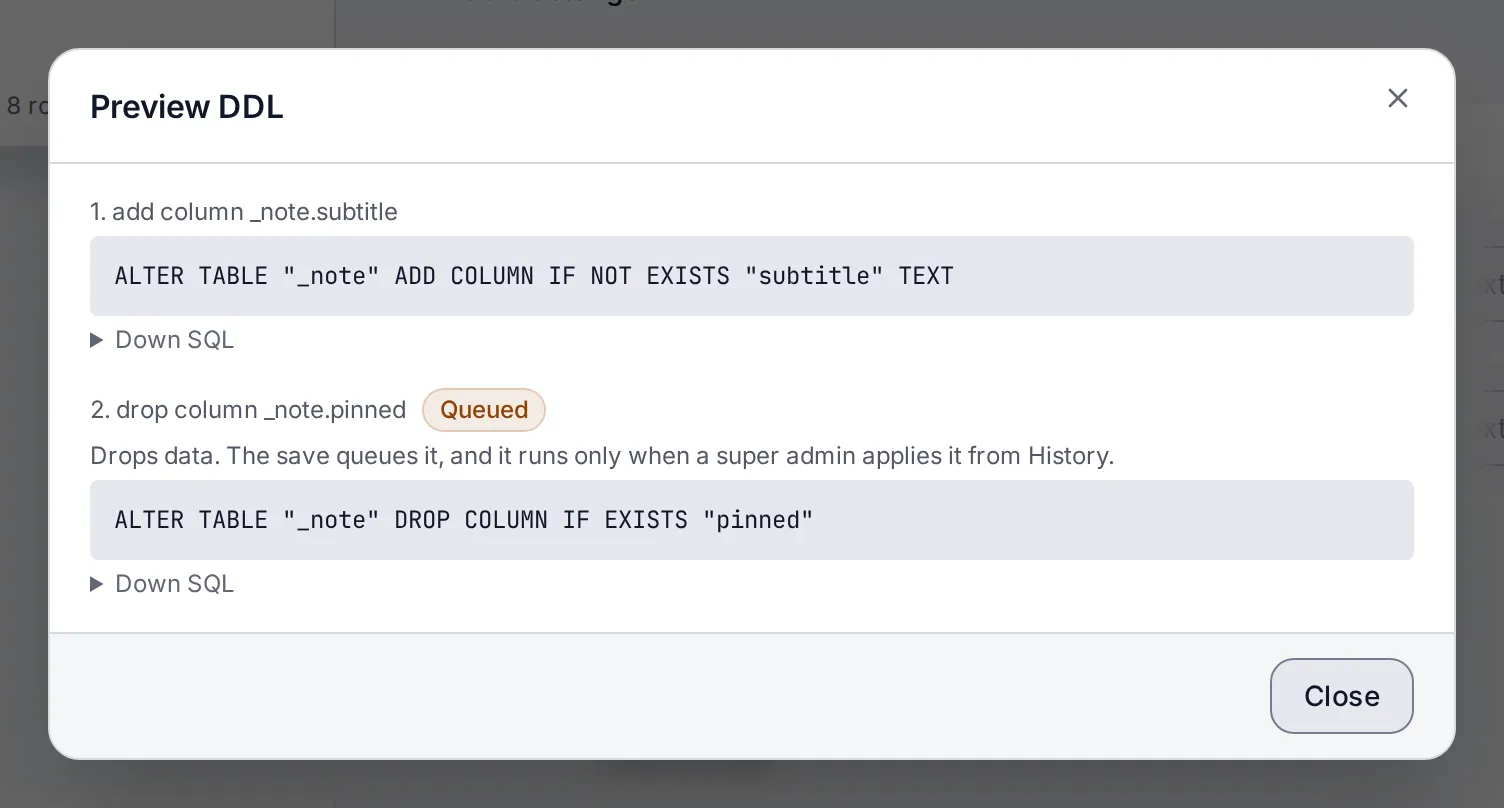
Engine API v0.62.0
curl -X POST http://localhost:3001/api/admin/schemas/note/preview-ddl \ -H "Authorization: Bearer $TOKEN" \ -H "Content-Type: application/json" \ -d '{"display_name": "Note", "fields": [{"name": "title", "field_type": "text", "required": true}, {"name": "pinned", "field_type": "boolean"}]}'{ "statements": [ { "description": "add column _note.pinned", "sql": "ALTER TABLE \"_note\" ADD COLUMN IF NOT EXISTS \"pinned\" BOOLEAN", "down_sql": "ALTER TABLE \"_note\" DROP COLUMN IF EXISTS \"pinned\"" }, { "description": "drop column _note.color", "sql": "ALTER TABLE \"_note\" DROP COLUMN IF EXISTS \"color\"", "down_sql": "-- no safe undo for drop of _note.color", "destructive": true } ]}"destructive": true marks a statement the save queues instead of running.
The SQL is written for your database, PostgreSQL here.
3. Save the change.
Console v0.28.0
Choose Save. A save that removes a field asks first: the dialog says the column and its data stay in the table until the queued change is applied. Choose Save in it.
Engine API v0.62.0
Send the same definition with its name:
curl -X POST http://localhost:3001/api/admin/schemas \ -H "Authorization: Bearer $TOKEN" \ -H "Content-Type: application/json" \ -d '{"name": "note", "display_name": "Note", "fields": [{"name": "title", "field_type": "text", "required": true}, {"name": "pinned", "field_type": "boolean"}]}'pinned exists now. color and its values are still stored.
4. See what is queued.
Console v0.28.0
Open History at the foot of the editor. It lists the statements recorded for the content type, newest first, and 1 queued change above them with an Apply button. After a page load, the top of every console page shows the count, such as 1 pending migration.
Engine API v0.62.0
curl http://localhost:3001/api/admin/schemas/note/history \ -H "Authorization: Bearer $TOKEN"The answer lists each statement with its state (applied, pending or failed), and
"pending": 1.
5. Apply the removal.
Console v0.28.0
In History, choose Apply. The dialog says how many rows the table holds and that the dropped column's data is gone for every tenant that defines the content type. Choose Apply in it. The statement then reads Applied.
Engine API v0.62.0
curl -X POST http://localhost:3001/api/admin/schemas/note/apply-pending \ -H "Authorization: Bearer $TOKEN"{ "applied": 1, "canceled": 0 }Preview a change
Link to the section Preview a changeTwo routes answer the statements a definition would run, and change nothing:
POST /api/admin/schemas/{name}/preview-ddlmarks each queued statement with"destructive": true. The Schema builder reads this one.POST /api/admin/schemas/{name}/previewanswers the same statements without the mark.
Each statement has a description, its sql, and a down_sql that undoes it where that is
possible. The name in the path wins over a name in the body.
Save a change
Link to the section Save a changePOST /api/admin/schemas creates a content type or updates the one with the same name. It
takes admin or super_admin. Without a condition it replaces a content type of that name,
so send one of two headers to make it refuse instead:
If-None-Match: *creates only. A name that already has a content type answers412with the codeSCHEMA_EXISTS.If-Match: "<version>"updates only the definition at that version. Every read answers itsversion, andGET /api/admin/schemas/{name}also sends it asETag. A content type saved since that read, or one that does not exist, answers412with the codeSCHEMA_VERSION_MISMATCH.If-Match: *matches any version of a content type that exists.
A refused save changes nothing. The Schema builder sends one of the two on every save.
PUT /api/admin/schemas/{name} replaces the definition of a content type that exists and
answers 404 for one that does not. It takes super_admin and ignores both headers. A
definition it refuses answers 400 with the reason, where POST answers 422.
Both answer 200 with the stored definition, and every save is recorded in the
audit log.
Rename a content type or a field
Link to the section Rename a content type or a fieldConsole v0.28.0
To rename a field, open the content type in Schema builder, change the field's name in its row and choose Save. The dialog that follows names the rename, such as Renames pinned to starred. The data moves with it. Choose Save in it.
To rename the content type, choose Rename beside Machine name, enter the New machine name and choose Rename.
Engine API v0.62.0
curl -X PUT http://localhost:3001/api/admin/schemas/note/fields/pinned/rename \ -H "Authorization: Bearer $TOKEN" \ -H "Content-Type: application/json" \ -d '{"new_name": "starred"}'{ "schema": "note", "old_field": "pinned", "new_field": "starred" }PUT /api/admin/schemas/{name}/rename with {"new_name": "memo"} renames the content type
and answers its stored definition.
A renamed content type's Content API path moves to the new name, and the entries stored there
move with it. A name another content type already uses answers 409.
A rename that stops before it finishes holds both names. Until it ends, a save, a rename or a
delete of either name answers 409 and says the rename has not finished. Running the same
rename again, or restarting the service, finishes it. To go back instead, send
DELETE /api/admin/schemas/{name}/rename with either name. The content type and its entries
return to the old name, and the answer is its definition. A name no unfinished rename of your
tenant holds answers 404.
Apply removals
Link to the section Apply removalsA removal waits in a queue until a super admin applies it, because it changes stored data for every tenant that defines a content type of that name. A queued removal whose field a definition uses again is canceled instead of run.
| To | Call |
|---|---|
| See one content type's statements and what is queued | GET /api/admin/schemas/{name}/history |
| Apply one content type's queue | POST /api/admin/schemas/{name}/apply-pending |
| See every queued statement, by content type | GET /api/admin/migrate |
| Apply every queue | POST /api/admin/migrate/apply, or POST /api/admin/schemas/migrate, which also answers a message |
In the console, History applies one content type's queue after a confirmation, as in step 5 above. The count at the top of every console page, such as 1 pending migration, is a button too.
Delete a content type
Link to the section Delete a content typeConsole v0.28.0
Open the content type in Schema builder and choose the delete button beside Save. The dialog says how many rows go with it. Choose Delete.
Engine API v0.62.0
DELETE /api/admin/schemas/{name} removes the definition and your tenant's entries, and
answers 204. Deleting a content type that does not exist also answers 204.
Keeping the entries is API only. Add ?content=soft to the delete to keep the entries the console wrote (their title, slug and body) marked deleted instead, so a content type you
create again under the same name can take them back. The rows the Content API serves go either
way.
Work on the schema canvas
Link to the section Work on the schema canvasThe Schema builder has two views, List and Canvas. The list editor is free on every
install and builds every field type and every relation. The canvas needs a license with the schema-pro feature. It draws each content type as a box
and each relation as a line between two boxes, so you see the whole model at once.
On the canvas you can:
- Edit a content type. Pick its box, and the same editor the list view shows opens beside the diagram.
- Add a field. Start it from the box it belongs to.
- Add a relation. Draw it from one box to the content type it points at.
- Arrange the diagram. Drag the boxes where you want them, as below.
Without schema-pro, choosing Canvas shows what the canvas does and that it comes with
Schema Pro, and the list editor works as before. If a license lapses, the saved layout stays.
The canvas opens in the same arrangement once the license is back.
To arrange the diagram:
Console v0.28.0
Open Schema builder and pick Canvas beside List. Drag a box by its title to where you want it. The layout saves a moment after you stop, and every admin of the tenant opens the same diagram, after a reload too.
Engine API v0.62.0
PUT /api/admin/schemas/canvas-layout replaces the saved layout, up to 256 KiB, keyed by
content type name, and answers 402 without schema-pro:
curl -X PUT http://localhost:3001/api/admin/schemas/canvas-layout \ -H "Authorization: Bearer $TOKEN" \ -H "Content-Type: application/json" \ -d '{"positions": {"article": {"x": 120, "y": 40}, "author": {"x": 420, "y": 40}}}'The answer is 200 with the stored layout, its updated_at and updated_by, and
licensed.
GET on the same path reads the saved layout on any install, the one a console drag saved
included. Its answer also carries licensed, which says whether this install has
schema-pro. schema-pro is in beta, so the layout's fields can still change before it is
marked stable.
Move configuration between instances
Link to the section Move configuration between instancesWith a license that carries config-sync, a super admin exports this instance's content
types, flows, access rules, webhooks and a few settings as one bundle sealed with a
passphrase, compares it with another instance, dry runs it and applies it there. See
Promote configuration. Moving one content type at a time stays
free, as described in Keep the content model and flows in Git.
PUT /api/admin/schemas/{name} and POST /api/admin/schemas/migrate share a budget of ten
calls per tenant in any five minutes. Past it the answer is 429 with a Retry-After
header:
{ "error": "schema mutation rate limit exceeded", "retry_after": 120 }When two replicas apply a change to the same content type at once, one answers 503 with
Retry-After: 1. Send the request again.
Settings
Link to the section SettingsSchema changes have no settings of their own. They run on every install. If you set
LYEVE_PLUGINS to choose which features start, include schema in it. See
licensing and tiers.
GET /api/admin/schemas, GET /api/admin/schemas/{name} and its stats also accept an
admin token with the schemas:read grant. Every other route
takes a signed-in session.
Content type routes
| Method | Path | Role | Purpose |
|---|---|---|---|
GET | /api/admin/schemas | signed in | List content types. |
GET | /api/admin/schemas/{name} | signed in | One content type. |
GET | /api/admin/schemas/{name}/stats | signed in | Your tenant's entry count, as rows, and last_updated. |
POST | /api/admin/schemas | admin | Create or update a content type. |
PUT | /api/admin/schemas/{name} | super_admin | Replace a content type's definition. |
DELETE | /api/admin/schemas/{name} | admin | Delete a content type and its entries. ?content=soft keeps the entries. |
PUT | /api/admin/schemas/{name}/rename | admin | Rename a content type. Body: new_name. |
DELETE | /api/admin/schemas/{name}/rename | admin | Abandon a rename that stopped partway. {name} is either name. |
PUT | /api/admin/schemas/{name}/fields/{field}/rename | admin | Rename a field and keep its data. Body: new_name. |
POST | /api/admin/schemas/{name}/preview-ddl | admin | The statements a definition would run, with queued ones marked. |
POST | /api/admin/schemas/{name}/preview | admin | The same statements, unmarked. |
GET | /api/admin/schemas/{name}/history | super_admin | The statements recorded for a content type, newest first, and how many are pending. |
POST | /api/admin/schemas/{name}/apply-pending | super_admin | Apply one content type's queue. |
GET | /api/admin/migrate | super_admin | Every queued statement, by content type. |
POST | /api/admin/migrate/apply | super_admin | Apply every queue. |
POST | /api/admin/schemas/migrate | super_admin | Apply every queue and report the count. |
GET, PUT | /api/admin/schemas/canvas-layout | admin | Read or save the canvas layout. Saving needs schema-pro. |
POST | /api/admin/config-sync/export, .../diff, .../apply | super_admin | Export, compare or apply a configuration bundle. Needs config-sync. See Promote configuration. |
GET | /api/v1/schemas, /api/v1/schemas/{name} | signed in | Read content types from the Content API. The list holds only the types the caller may read, and a read of any other answers 403. |
The two you meet most:
422with the reason, such as an invalid name or an unknownfield_type, whenPOST /api/admin/schemasrefuses a definition. Nothing changes.429schema mutation rate limit exceededpast ten changes in five minutes.
Every error these routes return
| Status | Message | Cause |
|---|---|---|
400 | invalid JSON | The body is not JSON. |
400 | The reason the definition was refused | PUT with an invalid field or option. |
402 | payment_required | Saving the canvas layout needs schema-pro, or a configuration bundle route needs config-sync. |
404 | schema not found or field not found in schema | Unknown name. |
404 | no unfinished rename of this schema | An abandon names a content type no unfinished rename of your tenant holds. |
404 | the rename of this schema ended before it could be abandoned: it finished, or another request abandoned it | The rename ended while the abandon waited. |
409 | a schema with that name already exists | A rename onto a name in use. |
409 | A message that starts a rename of this schema and says it has not finished | A save, rename or delete of a name an unfinished rename holds. Run the rename again, or abandon it. |
409 | the rename cannot be abandoned: a schema of another tenant holds its old name | Another tenant created a content type under the old name. |
409 | another schema shares this table and defines it differently: ... | Another tenant's content type of the same name stores the field as another type, or with a name that differs only in case. |
412 | a content type of this name already exists, and this write was sent to create one only, code SCHEMA_EXISTS | POST with If-None-Match: * names a content type that exists. |
412 | the content type changed since the version this write was sent with: read it again and make the change on what it holds now, code SCHEMA_VERSION_MISMATCH | POST or a field rename with If-Match names a version the content type is no longer at. |
413 | layout too large | The canvas layout is over 256 KiB. |
422 | invalid schema: ... | POST with an invalid name, field or option. |
422 | schema migration failed | The database refused the change, such as stored values that do not convert to a new field type. Nothing changes. |
422 | new_name is required or new_name must differ from current name | Bad rename body. |
422 | content must be hard or soft | Bad content on delete. |
429 | schema mutation rate limit exceeded | Over ten changes in five minutes. |
503 | another instance is applying DDL for this schema; retry in 1s | Another replica is changing the same content type. Retry. |
503 | a lock on this schema's tables is held elsewhere: retry in a few seconds | An abandon waited on a lock another session holds. Retry after the Retry-After seconds. |
503 | A static message | The database could not be reached. |
Related
Link to the section Related- Data model: fields, field types and relations.
- Schema presets: ready-made content types in one call.
- Content type portability: export, import and keep definitions in your repository.
- Your first content type: build one step by step.