Features
Bulk import
Included free on every install, every format included. Saved mapping templates and the date, split and lookup transforms need a license with the
content-profeature. See pricing.
Bulk import turns a file into entries. You map the file's columns onto the fields of one content type, check every row with a dry run, then import. Each row becomes an entry exactly as if it had been created in LyEve Console, with a revision when content history is on for the type. Every row's outcome is kept, rejected rows download as CSV, and a finished import can be rolled back.
In the console, imports are under Insight > Imports. New import opens a wizard in three steps, Source, Map and Check, and History lists every import with what it created, updated, skipped and rejected.
How it works
Link to the section How it works| Step | What happens |
|---|---|
| Read | The file comes from an upload, base64 in file_data, or from source_url. Its format is taken from source_format or detected. |
| Map | Each mapping sends one column to one field, with an optional conversion, default and transform. |
| Check | Every row is checked against the mappings and the content type's rules. A dry run stops here. |
| Write | Each row is created, updated or skipped, in the background. New entries are drafts unless you map entry.status. |
| Review | Each row's outcome is kept. Rejected rows download as CSV, and the import can be rolled back. |
You need a content type post with a title text field and a body rich text field.
Your first content type builds one. The file is
one row, title,body then Hello,First post.
For the console steps, you are signed in to the console as an admin or
super_admin, and the file is saved as posts.csv:
title,bodyHello,First postFor the API steps, you need a token in TOKEN for one. The
quickstart shows how to get one. The API takes the file
base64-encoded:
FD=dGl0bGUsYm9keQpIZWxsbyxGaXJzdCBwb3N0Cg==1. Describe the file before you map it. Nothing is stored.
Console v0.28.0
- Open Insight > Imports and choose New import.
- Under Source, keep Upload a file and add
posts.csvunder File. - Pick post in Content type, and keep Format at Read it from the file.
- Choose Read the file.
The Map step opens with 1 row of CSV from posts.csv and the row as a table.
Engine API v0.62.0
curl -X POST http://localhost:3001/api/admin/imports/preview \ -H "Authorization: Bearer $TOKEN" \ -H "Content-Type: application/json" \ -d "{\"source_name\": \"posts.csv\", \"file_data\": \"$FD\"}"{"source_format": "csv", "source_name": "posts.csv", "columns": ["title", "body"], "rows": [{"body": "First post", "title": "Hello"}], "total_rows": 1, "errors": [], "export": false, "schemas": {}}2. Check every row against the mappings.
Console v0.28.0
- In Map, check the Column in the file for each field. The console guesses them from
the column names, here
titlefor Entry title and title, andbodyfor body. - Under When an entry already exists, keep Create only, and keep Key field at No key: every row is a new entry.
- Choose Dry run.
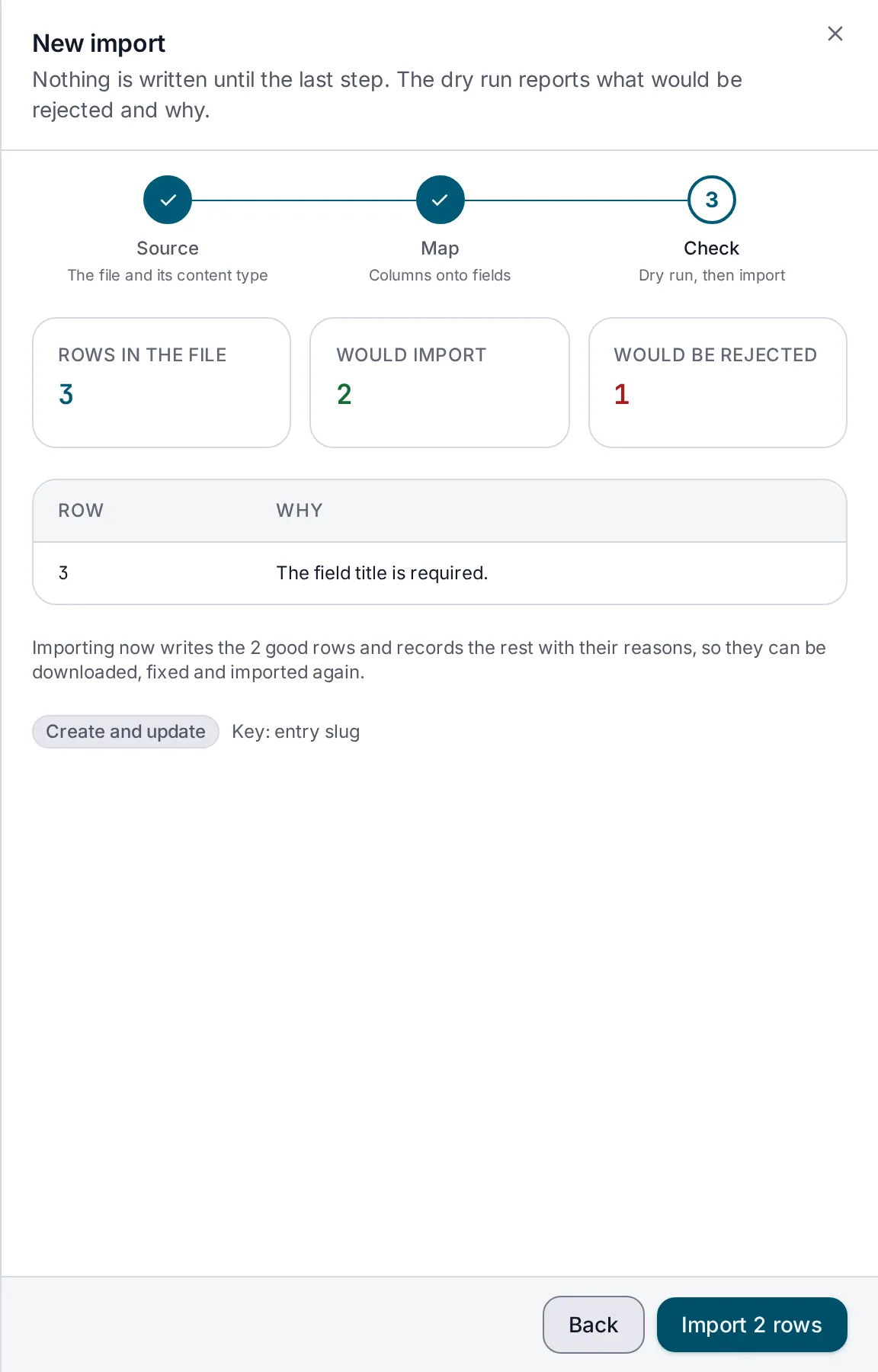
The Check step shows Rows in the file, Would import and Would be rejected, here 1, 1 and 0, with Every row passes. A rejected row is listed with its reason.
Engine API v0.62.0
curl -X POST http://localhost:3001/api/admin/imports/validate \ -H "Authorization: Bearer $TOKEN" \ -H "Content-Type: application/json" \ -d "{\"content_type\": \"post\", \"source_name\": \"posts.csv\", \"file_data\": \"$FD\", \"field_mappings\": [{\"source_field\": \"title\", \"target_field\": \"title\", \"required\": true, \"transform\": \"trim\"}, {\"source_field\": \"body\", \"target_field\": \"body\"}]}"{ "total_rows": 1, "valid_rows": 1, "error_rows": 0, "errors": [] }3. Start the import.
Console v0.28.0
Choose the import button, which names the count, here Import 1 row. The page confirms Import of posts.csv started, and the import appears at the top of History.
Engine API v0.62.0
Send the same body plus "source_format": "csv" and "mode": "create" to
POST http://localhost:3001/api/admin/imports. The answer is 201 with the job and
"status": "pending". Copy its id into JOB.
4. Check its progress.
Console v0.28.0
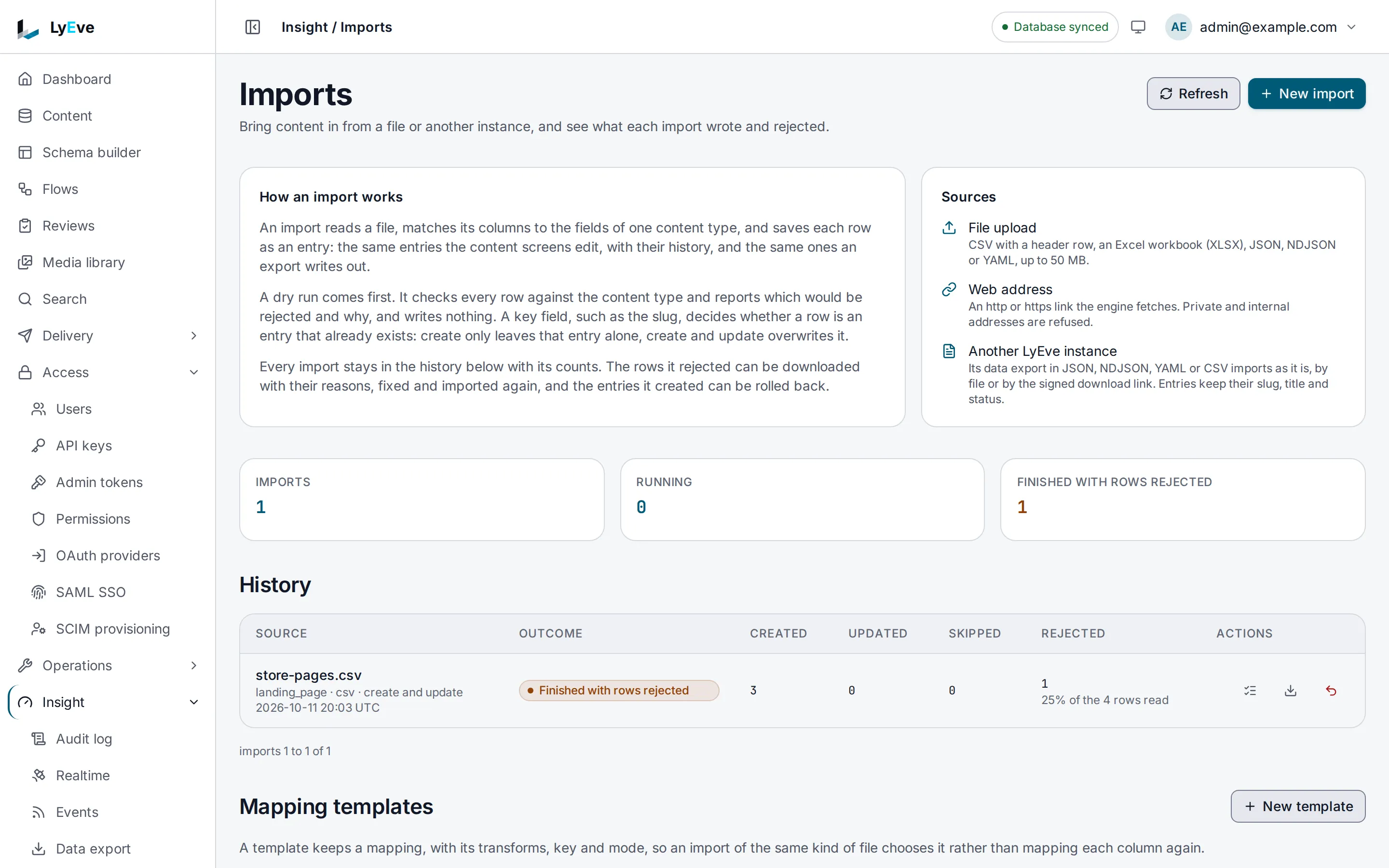
History lists the import with its outcome, here Every row imported, and how many rows it created, updated, skipped and rejected. Refresh reads it again. The rows button on its line lists each row's outcome. For an import that rejected rows, a download button gives them as CSV.
Engine API v0.62.0
curl http://localhost:3001/api/admin/imports/$JOB \ -H "Authorization: Bearer $TOKEN"Within a moment the job shows "status": "completed" and "inserted_rows": 1.
GET .../imports/$JOB/rows lists the row with "status": "inserted" and its entry_id.
5. Roll it back.
Console v0.28.0
Choose the roll back button on the import's line in History. The dialog says how many entries it deletes, and that entries it updated keep the imported values. Choose Roll back. The outcome then reads Rolled back.
Engine API v0.62.0
curl -X POST http://localhost:3001/api/admin/imports/$JOB/rollback \ -H "Authorization: Bearer $TOKEN"{ "removed": 1, "status": "rolled_back" }Formats
Link to the section Formatssource_format | What it reads |
|---|---|
csv | A header row, then one row per entry. |
json | An array of objects, a single object, or a file from data export. |
ndjson | One object per line. A line that is not an object is rejected in its place. |
yaml | A list of maps, a single map, or a file from data export. |
xlsx | An Excel workbook. The first sheet, or the one sheet names, with a header row. |
A workbook's cells come back as the sheet shows them. A header cell left empty is named by
its column letter, such as C, and empty rows are skipped. Name another sheet with
"sheet": "Products" beside file_data. The preview of a workbook lists every sheet it
holds under sheets, so you can pick another one.
Leave source_format out and it is detected from the file name, the URL path, the response
content type, and then the first bytes.
A data export file imports as it is. Each entry becomes a row with its fields plus schema,
slug, title, status, id, published_at, created_at and updated_at. When the file
holds several content types, only the rows of content_type are imported.
- 100,000 rows per import. Split a larger file into several imports.
- 50 MiB per file, 52,428,800 bytes, uploaded or read from
source_url. A file over 50 MiB lists what each case answers. - A CSV file or a workbook sheet is read up to 1,024 columns and 5,000,000 cells, its width
times its rows. A wider or larger file answers
400before any row is imported. In a workbook, empty cells after a row's last value do not count toward its width. JSON, NDJSON and YAML rows hold only their own keys, so the size limit bounds them. The400for a file that is too wide carries the codebulk_import.too_many_columns, and one with too many cellsbulk_import.too_many_cells, beside the message. Every other parse failure carriesbad_request. - A
source_urlmust be an absolutehttporhttpsaddress. Private, loopback and link-local addresses are refused, after a redirect too. The fetch gives up after 60 seconds and follows at most three redirects. The job keeps the address without its query string, so a signed link's signature is not stored. - An import for any tenant but the default one holds a database connection of its own while it
runs. On an install whose
DATABASE_MAX_CONNECTIONSis below 4 (the default is 25), such an import answers409and nothing is imported. A running import that cannot confirm its tenant still exists ends failed withthe import could not confirm its tenant.
A file over 50 MiB
Link to the section A file over 50 MiBAn uploaded file travels base64-encoded inside the request, so POST /api/admin/imports,
/api/admin/imports/validate and /api/admin/imports/preview accept a request of up to
70,953,644 bytes: a 50 MiB file once encoded, plus 1 MiB for the rest of the body.
MAX_BODY_BYTES and MAX_JSON_BODY_BYTES do not change that figure. The engine checks the
request's size before the import reads any of it. A file of 50.75 MiB or more always makes
the request too large.
| The file | Status | Message |
|---|---|---|
| Uploaded, in a request over 70,953,644 bytes | 413 | Request body exceeds the 70953644 byte limit. |
| Uploaded, over 50 MiB once decoded, in a request of 70,953,644 bytes or less | 413 | decoded file exceeds maximum size of 52428800 bytes |
Uploaded in a chunked request, without Content-Length, over 70,953,644 bytes | 413 | request body too large |
Read from source_url, over 50 MiB | 422 | the file is larger than 52428800 bytes |
Each 413 carries the code payload_too_large. Nothing is imported. Split the file and
import the parts.
Map fields
Link to the section Map fieldsEach entry in field_mappings maps one source column to one target:
| Key | Meaning |
|---|---|
source_field | The column in the file. Required. |
target_field | A field of the content type, or entry.slug, entry.title or entry.status. Required. |
data_type | Converts the value: string (or text), number, integer (or int), float (or decimal), boolean (or bool), json. |
default_value | Used when the row has no value. |
required | Rejects a row with no value. |
transform | trim, lowercase or uppercase on every install. date, split or lookup with content-pro. |
transform_options | The settings of a date, split or lookup transform, below. |
entry.statustakesdraft,publishedorarchived. Without it, new entries are drafts, and the Content API serves a draft only to a caller who may read drafts, as the data model page explains.- A missing title is taken from a
titlefield, then from the slug. - A missing slug is made from the title, with a short suffix when that slug is taken.
- Every row is checked against the content type's rules.
Parse dates, split lists and look values up
Link to the section Parse dates, split lists and look values upWith content-pro, three more transforms reshape a value before it is stored:
transform | transform_options | What it does |
|---|---|---|
date | layout, the format of the cell, and output_layout, the format to store, RFC 3339 when empty. Both are written as the reference time 2006-01-02 15:04:05. | "layout": "02/01/2006" reads 31/12/2026. |
split | separator, at most 16 bytes. | Turns red; green into a list, each part trimmed and empty ones dropped. Each part takes the mapping's data_type. |
lookup | map, up to 1,000 pairs, and an optional default. | Replaces a value with the one the map gives it. A value the map lacks takes default, or rejects the row when there is none. |
{"source_field": "Country", "target_field": "region", "transform": "lookup", "transform_options": {"map": {"FR": "eu", "DE": "eu", "US": "na"}, "default": "other"}}An unknown transform answers 400. A request that names a paid transform without
content-pro answers 402 naming feature:content-pro.
Save a mapping as a template
Link to the section Save a mapping as a templateWith content-pro, a tenant saves its mappings under a name, with the content type, the key
field and the mode. This saves the mapping of the posts.csv file above.
Console v0.28.0
- Open Insight > Imports. Under Mapping templates, choose New template.
- Enter
weekly-postsin Name and pickpostin Content type. - Under When an entry already exists, pick Create and update, then Entry slug in Key field.
- Enter
titlein Column in the file and picktitlein Field. Choose Add column, enterbodyand pickbody. - Choose Create.
The page confirms Created weekly-posts, and the list shows the template with its content type, its columns and Update it, key entry.slug. To use it, pick it in Mapping template on the wizard's first step. The mapping step then says Mapped from the template weekly-posts.
Engine API v0.62.0
curl -X POST http://localhost:3001/api/admin/imports/templates \ -H "Authorization: Bearer $TOKEN" \ -H "Content-Type: application/json" \ -d '{"name": "weekly-posts", "content_type": "post", "upsert_key": "entry.slug", "mode": "upsert", "field_mappings": [{"source_field": "title", "target_field": "title"}, {"source_field": "body", "target_field": "body"}]}'The answer is 201 with the template. An import or a dry run then names it with
"template_id" and may leave out content_type and field_mappings. What the request leaves
out comes from the template, and the request's own field_mappings win when it sends them.
A saved template keeps working after the license lapses, and listing, reading and deleting
templates stay free. Saving or changing one needs content-pro, and a name already in use in
the tenant answers 409.
Create or update
Link to the section Create or updateupsert_key names the field that finds an existing entry: entry.slug or a field of the
content type. mode says what happens when a row matches:
mode | A row that matches an existing entry |
|---|---|
create | Is skipped with the reason exists. Without a key, every row is created. |
upsert | Updates that entry. Fields the row does not name keep their values. Needs a key. |
With a key and no mode, the import is an upsert.
Check, cancel and undo
Link to the section Check, cancel and undo"dry_run": trueonPOST /api/admin/imports, orPOST /api/admin/imports/validatewith the same body, checks every row and writes nothing. Validate answers each rejected row with a code:mapping_error,validation_errororparse_error.- A job moves through
pendingandrunningand ends ascompleted,completed_with_errors,failed,canceledorrolled_back.POST .../cancelstops one that has not finished and answers{"status": "canceling"}. POST .../rollbackdeletes the entries acompletedorcompleted_with_errorsjob created. Entries it updated keep the imported values.GET .../rejecteddownloads the rejected rows as<source>-rejected.csv: row number, error code and reason, then the row's columns.
Settings
Link to the section SettingsBulk import has no settings of its own. It runs on every install. If you set LYEVE_PLUGINS
to choose which features start, include bulk-import in it. See
licensing and tiers.
Every route takes an admin or super_admin and a signed-in session. An admin token cannot
call them. {id} is the job id.
Import routes
| Method | Path | Result |
|---|---|---|
POST | /api/admin/imports | Starts an import. 201. |
GET | /api/admin/imports | Your tenant's jobs, as {"jobs", "total_count", "offset", "limit"}. limit is 50 by default. |
GET | /api/admin/imports/{id} | One job, with its mappings. |
GET | /api/admin/imports/{id}/rows | Each row's outcome, paginated. Filter with ?status=errored, inserted, updated or skipped. |
GET | /api/admin/imports/{id}/rejected | Rejected rows as CSV. |
POST | /api/admin/imports/{id}/cancel | Stops a job that has not finished. |
POST | /api/admin/imports/{id}/rollback | Deletes the entries the job created and marks it rolled_back. |
POST | /api/admin/imports/validate | Dry run. Writes nothing. |
POST | /api/admin/imports/preview | Describes a file, with sheets for a workbook. Writes nothing. |
GET | /api/admin/imports/templates | Your tenant's mapping templates, with licensed. |
POST | /api/admin/imports/templates | Save a template: name, field_mappings, and optionally content_type, upsert_key and mode. Needs content-pro. |
GET | /api/admin/imports/templates/{templateID} | One template. |
PUT | /api/admin/imports/templates/{templateID} | Replace a template. Needs content-pro. |
DELETE | /api/admin/imports/templates/{templateID} | Delete a template. |
Every error these routes return
| Status | Message |
|---|---|
400 | invalid JSON |
400 | file_data or source_url is required, send file_data or source_url, not both |
400 | file_data is not valid base64 |
400 | failed to parse file: ..., including row count exceeds maximum of 100000 rows, the file has more than 1024 columns, the sheet holds more than 5000000 cells and the workbook has no sheet named "<name>" |
400 | source_field '<x>' not found in data. Available: ... |
400 | field_mappings or template_id is required |
400 | field_mappings[<column>]: transform must be one of trim, lowercase, uppercase, date, split or lookup, or a message naming the missing option, such as the date transform needs transform_options.layout |
402 | payment_required, naming feature:content-pro, for a paid transform or a template write |
404 | mapping template not found |
409 | a mapping template with that name already exists |
422 | template_id names no mapping template of this tenant |
400 | dry-run jobs cannot be rolled back |
404 | import job not found |
409 | job is already <status> on cancel |
409 | only completed jobs can be rolled back (current status: <status>) |
409 | imports for a tenant need DATABASE_MAX_CONNECTIONS of at least 4 |
413 | Request body exceeds the 70953644 byte limit., for a request over 70,953,644 bytes |
413 | decoded file exceeds maximum size of 52428800 bytes |
413 | request body too large, for a chunked request that runs past 70,953,644 bytes |
422 | content_type is not a defined content schema |
422 | target_field is not a field of this content type: <field> |
422 | an upsert needs upsert_key, the field that finds the entry to update |
422 | upsert_key must be entry.slug or a field of this content type |
422 | source_url must be an absolute http or https address |
422 | the address could not be reached; private and internal addresses are refused, the address took too long to answer, the address answered <code> <text>, the file is larger than 52428800 bytes |
Related
Link to the section Related- Data export: write entries to a file that imports back.
- Migrate existing content: which tool fits which move.
- Content lifecycle: what an imported entry is.
- Migrate WordPress posts and pages: a guide on the blog that turns a WordPress export into JSON and loads it with bulk import.