Features
PII masking
Requires a license with the
pii-maskfeature. See pricing.
PII masking replaces personal data with a placeholder before it leaves the
instance, so ada@example.com in a response becomes [redacted-email]. It
masks log lines too, and keeps a log of who received a response that carried
personal data. What is stored stays as it was written. Only what goes out is
masked.
How it works
Link to the section How it worksEvery response body from the Content API (/api/v1/*) and the Admin API passes
through the rules, in priority order, lowest first. Each match is replaced.
When a signed-in caller receives a response that matched, the access log
records the caller and the kinds of data it held. Log messages and their string
fields go through the built-in rules before they are written. Your own rules
apply to responses only.
| Rule | Replaced with | Priority |
|---|---|---|
TOKEN | [redacted-token] | 5 |
EMAIL | [redacted-email] | 10 |
PHONE | [redacted-phone] | 20 |
IP | [redacted-ip], for IPv4 and IPv6 addresses | 30 |
CREDIT_CARD | [redacted-cc], only for numbers that start with a card issuer's prefix and pass the Luhn check | 40 |
SSN | [redacted-ssn] | 50 |
The IP rule masks an IPv4 address such as 203.0.113.7, and an IPv6 address
in any of the forms it is written in:
- Full or compressed, such as
2001:db8::7, in either case. - The loopback address
::1. - An IPv4 address mapped into IPv6, such as
::ffff:203.0.113.7, which is replaced whole. - An address with a zone, such as
fe80::1%eth0.
A port or a prefix length stays. [2001:db8::7]:8080 reads
[redacted-ip]:8080, as 203.0.113.7:8080 does, and 10.0.0.0/24 reads
[redacted-ip]/24. Times, timestamps, UUIDs, MAC addresses and code such as
std::vector are left alone, and so is ::, which names no address. Log lines
are masked the same way.
Bodies of type JSON, XML, form data, JavaScript and any text/* type are
scanned. Server-sent event streams and binary bodies pass through.
Some Admin API paths return real values, because LyEve Console needs them to do
its job: /api/admin/auth, /api/admin/users, /api/admin/invitations,
/api/admin/gdpr, /api/admin/api-keys and /api/admin/admin-tokens. Reads on
those paths are still recorded in the access log.
A super admin reads five more answers in full: the audit log, the content activity log, legal holds, the compliance export of a legal hold and a tenant's member list. Each of those reads is recorded in the access log, and everyone else gets them masked.
Admin API answers that hold configuration or text the product ships are sent as written and are not recorded, because none of it is personal data. These are:
- Instance settings, configuration bundles and listen addresses.
- Address allow and deny lists, and the firewall's settings, rules and exemptions.
- The settings of webhooks, incoming webhooks, flows, email, logging, alerts, storage, AI providers, metrics export, probes and scheduled jobs.
- The Prometheus metrics scrapes.
- Where the audit log is streamed.
- This feature's own page, so the presets read with their descriptions as written.
- The API description and the sign-in provider templates.
What those features record about people stays masked: webhook deliveries, flow runs, firewall violations, probe results and job runs.
On the Content API, SCIM provisioning under /api/v1/scim is the one
exception. Masking leaves those answers as written, because the identity
provider reads back the people it provisioned, and a masked address would read
as a changed user on its next sync. Those reads are not recorded in the access
log, because the provider signs in with a SCIM token rather than an account.
On every other masked path, no role sees unmasked output.
Matching is by pattern and cannot catch every form of personal data. Keep personal data out of fields that do not need it.
In the console
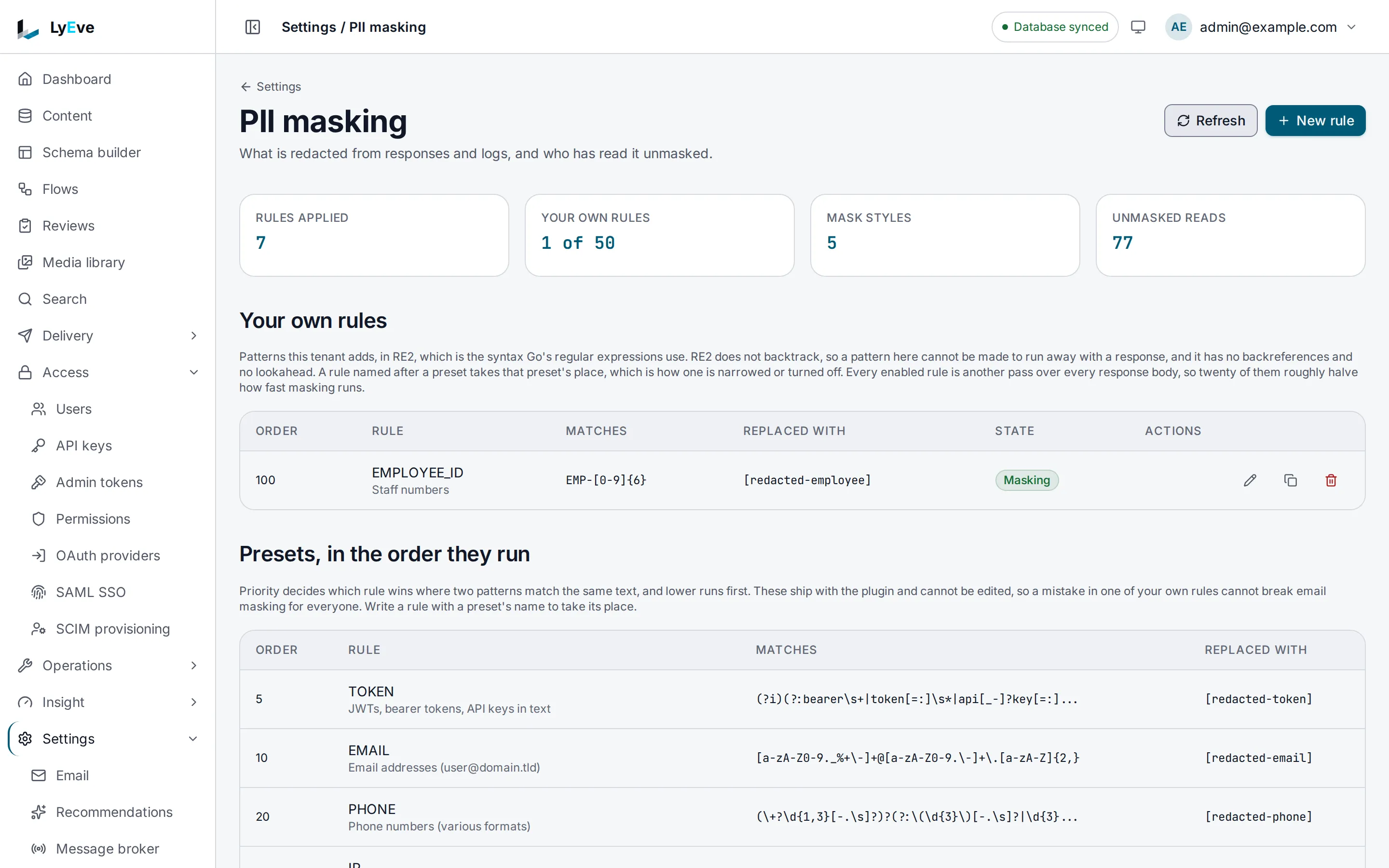
Link to the section In the consoleOpen Settings > PII masking. Your own rules lists the tenant's patterns with their order, replacement and state, and each row has buttons to edit, duplicate and delete it. Presets, in the order they run lists the built-in rules, which cannot be edited. New rule opens a form with Name, Description, Pattern, Replaced with, Priority and a Masking switch. Its Try it box runs the pattern on a Sample with Run it, and stores nothing. Unmasked reads, lower on the page, is the access log.
This adds a rule for staff numbers and watches it mask a response. You need a
content type to write to, such as the post type from the
quickstart. Sign in as an admin or
super_admin.
Test the pattern on a sample. Nothing is saved:
Console v0.28.0
- Open Settings > PII masking and choose New rule.
- Enter
EMPLOYEE_IDin Name,EMP-[0-9]{6}in Pattern and[redacted-employee]in Replaced with. - Under Try it, enter
Owner EMP-004211 approvedin Sample and choose Run it. The form says 1 match. and shows Owner [redacted-employee] approved under What a reader would get.
Engine API v0.62.0
You need a token in TOKEN. The quickstart shows how to get one.
curl -X POST http://localhost:3001/api/admin/pii/rules/test \ -H "Authorization: Bearer $TOKEN" \ -H "Content-Type: application/json" \ -d '{"pattern": "EMP-[0-9]{6}", "replacement": "[redacted-employee]", "sample": "Owner EMP-004211 approved"}'{"valid": true, "matches": ["EMP-004211"], "count": 1, "masked": "Owner [redacted-employee] approved"}A pattern that is not valid answers 200 with "valid": false and an
error.
Save it as a rule. A rule is off until you turn it on.
Console v0.28.0
On Settings > PII masking, choose New rule. Enter EMPLOYEE_ID in
Name, Staff numbers in Description, EMP-[0-9]{6} in Pattern and
[redacted-employee] in Replaced with. Turn Masking on and choose
Create. The rule shows under Your own rules.
Engine API v0.62.0
curl -X POST http://localhost:3001/api/admin/pii/rules \ -H "Authorization: Bearer $TOKEN" \ -H "Content-Type: application/json" \ -d '{"name": "EMPLOYEE_ID", "description": "Staff numbers", "pattern": "EMP-[0-9]{6}", "replacement": "[redacted-employee]", "enabled": true}'The answer is 201 with the rule, its id and "priority": 100. Copy the
id into RULE_ID.
Write an entry that carries a staff number. This is the same on both paths. If
you work in the console, sign in over the API to get a token, as
Turn on drafts and publishing
shows, and keep it in TOKEN:
curl -X POST http://localhost:3002/api/v1/content/post \ -H "Authorization: Bearer $TOKEN" \ -H "Content-Type: application/json" \ -d '{"data": {"title": "Approved by EMP-004211"}}'The entry is stored as written, but the answer already reads
"title": "Approved by [redacted-employee]". Every later read is masked the
same way.
See the access log:
Console v0.28.0
On Settings > PII masking, Unmasked reads lists the newest reads first, with when, the Kind, such as EMPLOYEE_ID, and the reader's Role. Most read on this page counts each kind.
Engine API v0.62.0
curl "http://localhost:3001/api/admin/pii/access-log?limit=5" \ -H "Authorization: Bearer $TOKEN"The newest entry names you as viewer_user_id, your role, and
"pii_type": "EMPLOYEE_ID". total_count holds the number of entries.
Remove the rule:
Console v0.28.0
On Settings > PII masking, choose the delete button on the EMPLOYEE_ID row. The dialog asks Delete rule EMPLOYEE_ID. Choose Delete, and the page says Deleted.
Engine API v0.62.0
curl -X DELETE http://localhost:3001/api/admin/pii/rules/$RULE_ID \ -H "Authorization: Bearer $TOKEN"The answer is 204.
Add your own rules
Link to the section Add your own rulesA tenant can hold up to 50 enabled rules of its own. A custom rule runs after
the built-in rules unless you give it a lower priority. A custom rule with the
same name as a built-in rule replaces it, so a disabled rule named EMAIL turns
email masking off for that tenant. A saved rule applies to the next response,
with no restart.
| Field | Rule | Default |
|---|---|---|
name | Required, up to 255 characters | none |
description | Optional | empty |
pattern | Required, an RE2 regular expression up to 512 characters. It must not match the empty string | none |
replacement | Required, up to 255 characters | none |
priority | Lower runs first. 0 or missing means the default, and a negative number is refused | 100 |
enabled | Whether the rule runs | false |
RE2 runs in linear time, so no pattern can stall a response. PUT replaces a
rule, so send every field.
Read the access log
Link to the section Read the access logGET /api/admin/pii/access-log takes limit (default 50, at most 500) and
offset. Each entry carries viewer_user_id, viewer_role, pii_type (one
rule name, or several joined by commas), accessed_at and tenant_id. An admin
sees their own tenant. A super admin sees every tenant.
A super admin's read is filed under the tenant the request names: the tenant
in the member list's path, or the tenant_id filter on the audit log or on
GET /api/admin/content/activity/all. Every other
read by a super admin is filed under no tenant, so a tenant's admins never
learn whose personal data a super admin read.
Entries older than PII_MASK_RETENTION_DAYS are deleted every hour. Deleting a
tenant deletes its entries.
Settings
Link to the section Settings| Variable | What it does | Default |
|---|---|---|
PII_MASK_RETENTION_DAYS | Days the access log keeps an entry. 0 or less keeps entries forever. | 90 |
If you set LYEVE_PLUGINS, include pii-mask. See
Licensing and tiers.
All routes need the admin role and act on the caller's tenant.
Rules and access log
| Method | Path | Purpose |
|---|---|---|
GET | /api/admin/pii/rules | The built-in rules (presets), the tenant's own (custom) and the limits. |
POST | /api/admin/pii/rules | Add a rule. |
POST | /api/admin/pii/rules/test | Try a pattern on a sample of up to 4096 characters. |
PUT | /api/admin/pii/rules/{id} | Replace a rule. Send every field. |
DELETE | /api/admin/pii/rules/{id} | Remove a rule. Answers 204. |
GET | /api/admin/pii/access-log | Who received responses that carried personal data. |
| Status | Message | Cause |
|---|---|---|
422 | invalid rule: pattern does not compile as RE2: ... | The pattern is not valid RE2. |
422 | invalid rule: pattern matches the empty string, which would redact every response | The pattern would match everywhere. |
422 | this tenant already has the maximum number of enabled rules | 50 rules are already enabled. |
Every error
| Status | Message | Cause |
|---|---|---|
422 | sample is longer than 4096 characters | The test sample is too long. |
400 | body must be a JSON object describing one rule | The body is not JSON or has unknown fields. |
404 | failed to update the rule or failed to delete the rule | No rule with that id in this tenant. |
402 | payment_required | The license no longer carries pii-mask. |
Related
Link to the section Related- Logs: where the masked log lines go.
- Audit log: who changed what, beside who read what.
- Data protection: masking in a vendor review.