Features
Localization
Included free on every install, with two locales per tenant, your default locale included. More locales need a license with the
localization-profeature. See pricing.
Localization keeps a translation of each entry per locale, beside the entry written in your default language. When your site reads content with a locale, LyEve serves the best translation it has, falls back along a chain you choose, and says which locale it used. When the source changes, the translations that carried the changed field are marked out of date.
How it works
Link to the section How it works| Part | What it is |
|---|---|
| Source entry | The entry as written, in your default locale. Its slug, content type and status belong to it alone. |
| Translation | One per entry and locale: a title, the translated field values, and meta. It replaces only the fields it carries. |
| Localized field | A field of the content type marked "localized": true. These are the fields an editor is offered and that completeness counts. |
| Locale settings | The tenant's default locale, the locales editors translate into, and the fallback chain. |
A read with a locale tries, in order:
- The requested locale, such as
fr-CA. - Its language alone,
fr. - Each locale of the tenant's
fallback_chain, in order. - The tenant's default locale,
enuntil you set another.
If none has a translation, the source fields come back unchanged and resolved_locale is the
default locale. A French translation with a title and no body serves the French title and the
source body. The id, content type, slug, status, timestamps and authors are never replaced.
For the console steps, you are signed in to LyEve Console as an admin or
super_admin. For the API steps, you need a token in TOKEN for one. The
quickstart shows how to get one.
1. Turn on French beside English.
Console v0.28.0
- Open Settings > Locales. Default locale is
enuntil you change it. - Under Enabled locales, enter
frin Add locale and choose Add locale. - Choose Save. The page confirms Locales saved.
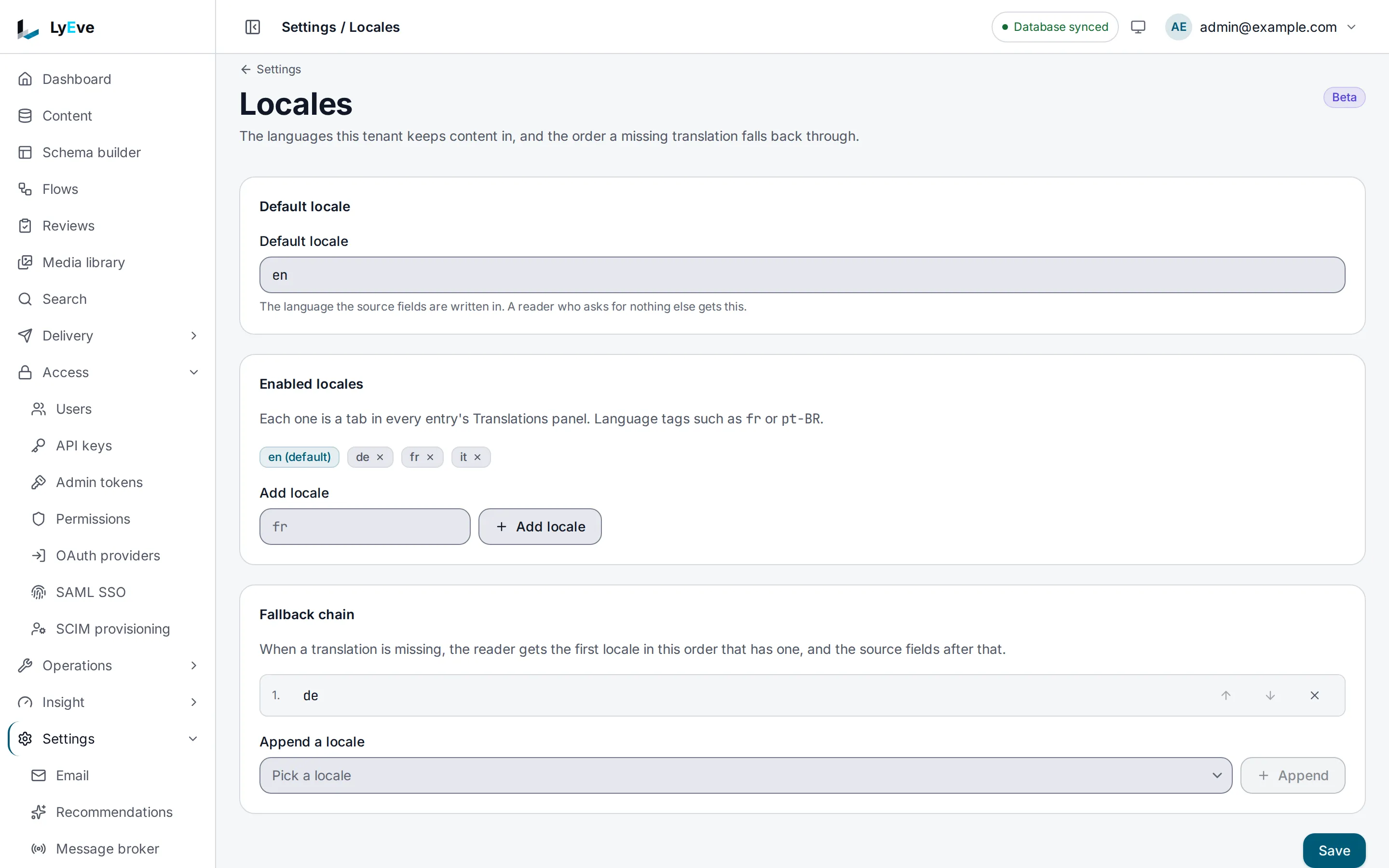
Engine API v0.62.0
curl -X PUT http://localhost:3001/api/admin/localization/locales \ -H "Authorization: Bearer $TOKEN" \ -H "Content-Type: application/json" \ -d '{"default_locale": "en", "enabled_locales": ["en", "fr"], "fallback_chain": []}'The answer is 200 with the same settings.
2. Create a content type with two translated fields.
Console v0.28.0
- Open Schema builder and choose New schema.
- Enter
Newsin Display name andnewsin Machine name. - Choose Add field, name it
titleand tick its i18n box, Translated per locale. - Choose Add field, name it
textand tick its i18n box. - Choose Save.
Engine API v0.62.0
curl -X POST http://localhost:3001/api/admin/schemas \ -H "Authorization: Bearer $TOKEN" \ -H "Content-Type: application/json" \ -d '{"name": "news", "fields": [{"name": "title", "field_type": "text", "localized": true}, {"name": "text", "field_type": "text", "localized": true}]}'3. Write an entry in English.
Console v0.28.0
Open Content, pick news and choose New entry. Enter Hello in Title and
First article. in Text, then choose Create. Choose the entry's title in the list to
open it.
Engine API v0.62.0
curl -X POST http://localhost:3001/api/admin/content \ -H "Authorization: Bearer $TOKEN" \ -H "Content-Type: application/json" \ -d '{"schema": "news", "slug": "hello-article", "title": "Hello", "body": {"text": "First article."}, "status": "published"}'Copy the entry's id into ENTRY. The console shows it under the title.
4. Add the French translation.
Console v0.28.0
On the entry's page, the Translations card has a tab for each enabled locale other than the default.
- Open the fr tab. It reads Not started and 0 of 2 fields written.
- Enter
Bonjourin TITLE andPremier article.in TEXT, then choose Save. The translation is now a Draft. - Choose Mark translated.
An empty field names the locale a reader gets instead.
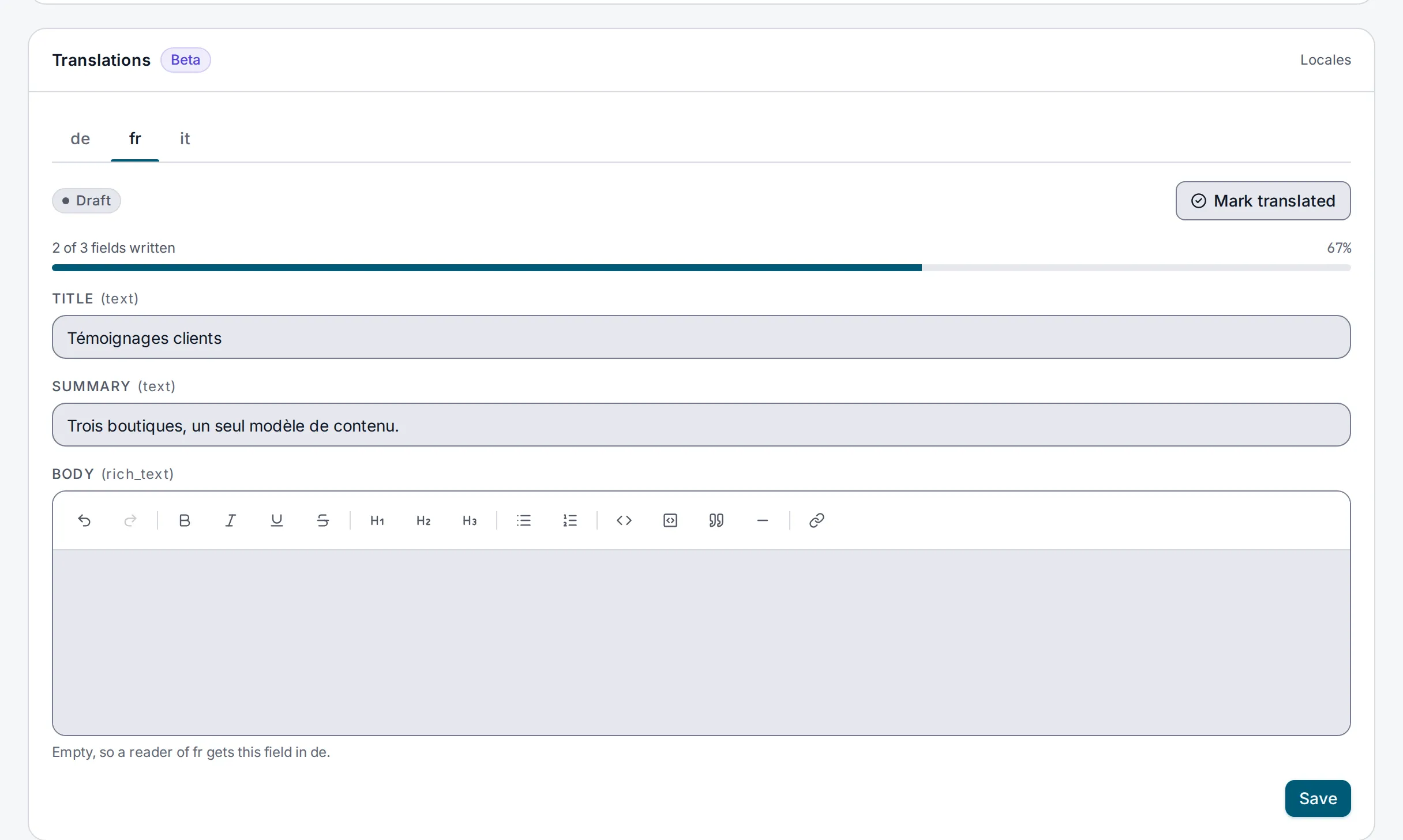
Engine API v0.62.0
curl -X POST http://localhost:3001/api/admin/content/$ENTRY/translations \ -H "Authorization: Bearer $TOKEN" \ -H "Content-Type: application/json" \ -d '{"locale": "fr", "title": "Bonjour", "body": {"title": "Bonjour", "text": "Premier article."}, "translation_status": "translated"}'The answer is 201 with the translation's locale, title, body and
translation_status.
5. Read the entry as a Canadian French reader would. This is a Content API read, the
call your site makes, whichever way you wrote the entry. It needs a token in TOKEN.
Turn on drafts and publishing
shows how to get one with your console account:
curl "http://localhost:3002/api/v1/content/news/$ENTRY?locale=fr-CA" \ -H "Authorization: Bearer $TOKEN"{ "id": "8c2b6f10-3d4e-4a57-9b81-0c2d3e4f5a67", "data": { "title": "Bonjour", "text": "Premier article." }, "created_at": "2026-10-02T09:30:00Z", "updated_at": "2026-10-02T09:30:00Z", "resolved_locale": "fr"}There is no fr-CA translation, so the French one is served.
6. See how far each locale has got.
Console v0.28.0
The fr tab shows the translation's status, Translated, and its progress, 2 of 2 fields written.
Engine API v0.62.0
curl "http://localhost:3001/api/admin/content/$ENTRY/translations?schema=news" \ -H "Authorization: Bearer $TOKEN"The answer lists the translations, the localized_fields, and a completeness entry per
locale with done, total and missing. Here done is 2 of 2 and missing is empty.
A translated field counts once it is in body, which is why step 4 sends the title there as
well as beside it.
Mark which fields are translated
Link to the section Mark which fields are translatedIn the Schema builder, tick the field's i18n box, Translated per locale. Over the API,
add "localized": true to a field in the content type. Only text, rich_text and url
fields can be localized, and never a unique one. The console turns the box off for every
other field, and a content type that tries over the API answers 422,
such as field_type "number" cannot be localized (allowed: rich_text, text, url). Marking a
field changes no stored data. It decides which fields the console's Translations card
offers and what completeness counts.
Read content in a locale
Link to the section Read content in a localeThese reads take a locale:
| Route | What is translated |
|---|---|
GET /api/v1/content/{schema} and .../cursor | Each entry of the page. |
GET /api/v1/content/{schema}/{id} | The entry. |
GET /api/admin/content, /api/admin/content/{id} and /api/admin/content/slug/{slug} | The same, on the Admin API. |
The locale comes from ?locale= when present, otherwise from the Accept-Language header,
taking the language with the highest q value. ?locale= must be a language tag such as
fr, pt-BR or zh-Hant-TW, or the read answers 400 invalid query parameter: locale. The
header is never refused, and * alone means no preference. With no locale, the entry is served
as written and has no resolved_locale.
Entries on one page can have different resolved_locale values. Responses carry
Vary: Accept-Language, so a shared cache never serves one reader's language to the next. If
the translations cannot be read, the request fails with 503 rather than serving the source
under the locale you asked for.
Set your locales
Link to the section Set your localesA tenant holds two locales for free, and localization-pro lifts the ceiling.
The count is every enabled locale plus every locale a translation already uses,
with the default locale included, so a free tenant publishes in its default
language and one more. Only a write that adds a locale is refused: a locale
settings change, a new translation or a bulk import. A tenant past the ceiling
after a license lapses keeps every locale and translation, and can still update,
delete, export and resolve them.
{"error": "cap_exceeded", "cap": "localization.locales", "limit": 2, "current": 2, "upgrade_url": ""}Every other part of localization is free.
Console v0.28.0
Open Settings > Locales. Set the Default locale, add each language under Enabled locales with Add locale, build the Fallback chain in order with Append, then choose Save. A locale past the ceiling shows No more locales on this engine with the count, and nothing is saved.
Engine API v0.62.0
Read and change the locale settings with GET and PUT /api/admin/localization/locales.
A write past the ceiling answers the 402 above.
The settings:
| Setting | Meaning | Default |
|---|---|---|
default_locale | The last stop of every fallback, and the locale used when a read names none. Must be one of enabled_locales. | en |
enabled_locales | The locales editors translate into. Cannot be empty, and no code may appear twice. | The locales the tenant already has translations in, plus en |
fallback_chain | Locales tried after the requested locale and its language, before the default. Each must be enabled. | empty |
Manage translations
Link to the section Manage translationsIn the console, each tab of an entry's Translations card writes the translation for its locale, as in step 4. Deleting a translation, the field-by-field view below and the bulk export and import are API only.
POST /api/admin/content/{id}/translations creates one. locale and title are required, and
translation_status is draft (the default), translated or outdated. A second translation
in the same locale answers 409. PUT .../translations/{locale} changes only the fields you
send, and DELETE removes one.
To see, field by field, where a reader's value comes from:
curl "http://localhost:3001/api/admin/content/$ENTRY/translations/fr-CA/resolved?schema=news" \ -H "Authorization: Bearer $TOKEN"{ "locale": "fr-CA", "chain": ["fr-CA", "fr", "en"], "fields": [ {"field": "text", "from": "fr", "source": false}, {"field": "title", "from": "", "source": true} ]}This route reads the fields in each translation's body. A title held only in the
translation's title is reported as coming from the source, although reads serve it.
For a translation agency, POST /api/admin/translations/bulk-export takes
{"entry_ids": [...], "locales": [...]}, at most 200 entries, and answers
{"localizations": [...], "count": n}. POST /api/admin/translations/bulk-import takes
{"localizations": [...]} and answers {"imported": n}.
Keep translations current
Link to the section Keep translations currentWhen an entry is updated and a field a translation carries changes, every translation that
carried that field is marked outdated. A status change or a slug edit leaves translations
alone. An editor sees the status in the Translations card and clears it with Mark
translated, or over the API by updating the translation with
"translation_status": "translated".
Resolve an entry without signing in
Link to the section Resolve an entry without signing inGET /api/v1/localization/resolve?entry_id=<id>&locale=fr-CA, or POST with
{"entry_id", "locale"}, resolves one entry with no credential, on the tenant's own host. It
runs on the general public limit, 50 requests a second per address with bursts of 100 unless
PUBLIC_RATE_LIMIT_GLOBAL changes it. A site that resolves a locale on every page load can
give the route a limit of its own. The answer carries the source
entry without its fields, requested_locale, resolved_locale, fallback_chain,
translation_status and the resolved title, body and meta. When the entry has no translation at all, title is empty and
body is {}. An empty locale means en.
The localization.resolve node reads an entry in a locale. It is free.
| Setting | Meaning |
|---|---|
entry_id | Required. Usually {{ trigger.record_id }}. |
locale | Such as fr-CA. Empty means the default locale. |
schema | Optional. An entry of another content type fails the step. |
It outputs entry_id, schema, requested_locale, resolved_locale and fields. A missing
translation falls back. A missing entry fails the step.
The event localization.translation.updated fires when a translation is created, updated,
deleted, imported or marked outdated. Subscribe with an event trigger of kind: system and
name: localization.translation.updated. trigger.data has tenant_id, schema, entry_id,
locale and status (draft, translated, outdated or deleted).
Settings
Link to the section SettingsLocalization has no settings of its own. If you set LYEVE_PLUGINS to choose which features
start, include localization in it. See licensing and tiers.
The admin routes take an admin or super_admin and a signed-in session. An admin token
cannot call them.
Translation and locale routes
| Method | Path | Purpose |
|---|---|---|
GET, POST | /api/admin/content/{id}/translations | List or create translations. ?schema= adds completeness. |
GET, PUT, DELETE | /api/admin/content/{id}/translations/{locale} | One translation. |
GET | /api/admin/content/{id}/translations/{locale}/resolved | Where each field comes from. Needs schema. |
POST | /api/admin/translations/bulk-import | Import translations. |
POST | /api/admin/translations/bulk-export | Export translations. |
GET, PUT | /api/admin/localization/locales | Locale settings. |
GET | /api/admin/localization/rich-text-repairs | Translation repairs that have not finished, after a field became rich_text: content_type, field, attempts, last_error, next_attempt_at. |
GET, POST | /api/v1/localization/resolve | Resolve one entry, with no credential. |
A write that would add a third locale without localization-pro answers 402
cap_exceeded, with the ceiling in limit and the locales the tenant holds in current.
Every error these routes return
| Status | Message | Cause |
|---|---|---|
400 | invalid query parameter: locale | ?locale= is not a language tag. |
400 | locale is required, title is required | A translation is missing a field. |
400 | entry_id is required, entry_id query parameter is required, invalid entry_id | Resolve without a valid entry id. |
400 | localizations array is required and must not be empty | Empty bulk import. |
400 | name the schema the entry belongs to | The resolved-fields route without schema. |
400 | A message naming the problem | Locale settings that break a rule above. |
402 | cap_exceeded | The write would add a locale past the free ceiling. |
404 | translation not found, content not found | Wrong id or locale. |
409 | translation already exists for this locale | Use PUT to change it. |
503 | localization unavailable | The translations could not be read during a content read. |
Related
Link to the section Related- Data model: content types and fields.
- Content editing: the Translations card in the console.
- Flow definition format: every node, including
localization.resolve.