Features
Content lifecycle
Included free on every install, with revisions kept for the content types you choose and the last 30 days of them readable. Older revisions, content releases and editorial comment threads need a license with the
content-profeature. See pricing.
LyEve Console's Content screens and the Admin API work on the same entries. Both create and edit entries and move them between draft and published. When content history is on for the content type, they keep a numbered revision of every change so you can roll back. Over the API an entry can also be archived, compared with an earlier revision, publish and archive itself at times you set, and link to other entries.
How it works
Link to the section How it worksAn entry on this API has a few fields of its own beside the content type's field values:
| Field | What it holds |
|---|---|
schema | The content type the entry belongs to. |
title, slug | Required. A slug is unique across your tenant, not only within one content type. |
body | The content type's field values. They are checked against its rules on every write. |
meta | Any JSON you want to keep beside the entry. |
status | draft, published or archived. A new entry is a draft unless you say otherwise. |
current_rev | The entry's version number. It moves on every change, whether history is on or not. |
published_at | When the entry was published. A publish in the console or with the Admin API sets it again, and a release, a rollback or a Content API publish keeps an earlier time. |
scheduled_publish_at, scheduled_unpublish_at, timezone | Its schedule, when one is set. |
The status holds on the Content API too, where only a caller who may read drafts sees an entry that is not published. See the data model.
What statuses and revisions mean is explained on the data model
page. Every route takes the admin or super_admin role. An
admin token can call the read routes with the content:read
grant and the write routes with content:write.
This creates a draft, publishes it, rolls it back and schedules it. For the console steps,
you are signed in to the console. For the API steps, you need a token in TOKEN. The
quickstart shows how to get one.
1. Create a story content type with draft and publish. Only the API turns on drafts and
publishing. The Schema builder in console v0.25.0 has no switch for them, so run this call
even when you follow the console steps after it.
Turn on drafts and publishing
shows how to get a token with your console account:
curl -X POST http://localhost:3001/api/admin/schemas \ -H "Authorization: Bearer $TOKEN" \ -H "Content-Type: application/json" \ -d '{"name": "story", "with_draft_publish": true, "fields": [{"name": "title", "field_type": "text", "required": true}, {"name": "body", "field_type": "rich_text"}]}'2. Keep history for the story type. History is off on a new install, so without this
step the entry keeps no revisions.
Console v0.28.0
Open Settings > Content history. Under History, set Keep versions for to Selected types, tick story in Content types that keep history, and choose Save.
Engine API v0.62.0
curl -X PUT http://localhost:3001/api/admin/content/history/settings \ -H "Authorization: Bearer $TOKEN" \ -H "Content-Type: application/json" \ -d '{"history_mode": "selected", "schemas": ["story"]}'The settings routes need the token from a sign-in. An admin token cannot change them.
3. Create an entry.
Console v0.28.0
- Open Content and pick story.
- Choose New entry.
- Enter
Helloin Title andFirst story.in Body, then choose Create.
The list shows the entry as a draft, with a slug made from its title. Choose its title to
open it.
Engine API v0.62.0
The content type requires title, so it goes in body as well as beside it:
curl -X POST http://localhost:3001/api/admin/content \ -H "Authorization: Bearer $TOKEN" \ -H "Content-Type: application/json" \ -d '{"schema": "story", "slug": "hello", "title": "Hello", "body": {"title": "Hello", "body": "<p>First story.</p>"}}'{ "id": "9585eff4-7423-45a0-a82f-ea246bf7cdfd", "schema": "story", "tenant_id": "default", "slug": "hello", "title": "Hello", "body": { "title": "Hello", "body": "<p>First story.</p>" }, "meta": {}, "status": "draft", "timezone": "UTC", "created_by": "f1b49902-1ab9-44d3-91f4-e3d9c98cffe7", "updated_by": "f1b49902-1ab9-44d3-91f4-e3d9c98cffe7", "current_rev": 1, "created_at": "2026-10-23T11:24:59.017672858Z", "updated_at": "2026-10-23T11:24:59.017672858Z"}Copy its id into ENTRY_ID.
4. Publish it.
Console v0.28.0
On the entry's page, choose Publish. The badge at the top reads published, Unpublish
takes the place of Publish, and History (2) counts the revisions.
Engine API v0.62.0
Publish it with a note for the history:
curl -X PUT http://localhost:3001/api/admin/content/$ENTRY_ID \ -H "Authorization: Bearer $TOKEN" \ -H "Content-Type: application/json" \ -d '{"status": "published", "change_note": "First release"}'The answer is 200 with "status": "published", a published_at time and
"current_rev": 2.
5. List the revisions.
Console v0.28.0
Choose History (2). The Revision history panel opens beside the entry and lists each revision, newest first, by the time it was saved and the fields it holds.
Engine API v0.62.0
curl http://localhost:3001/api/admin/content/$ENTRY_ID/revisions \ -H "Authorization: Bearer $TOKEN"You see revision 2 with the note First release and revision 1 with the note
initial revision, newest first.
6. Roll back to the first revision.
Console v0.28.0
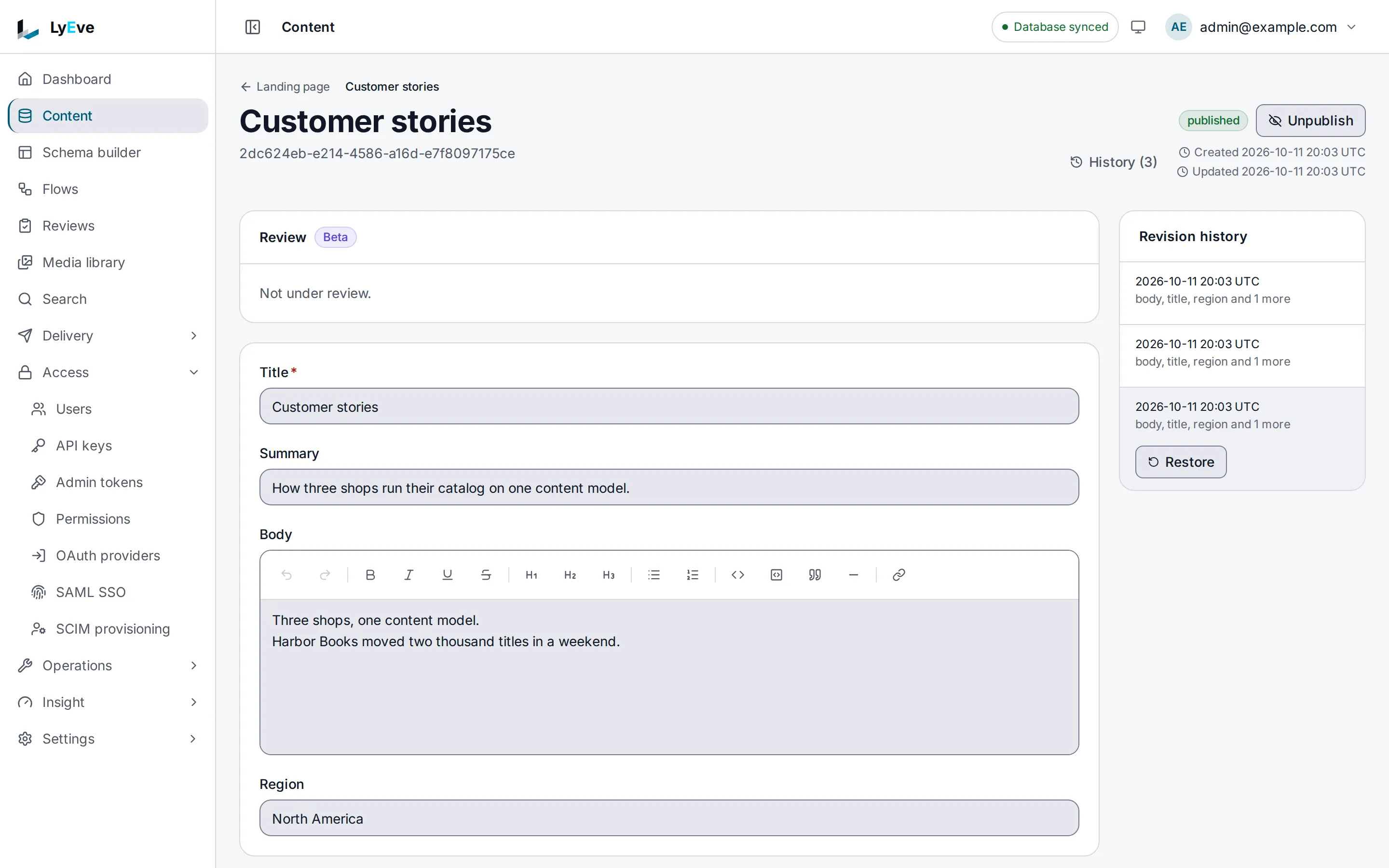
In Revision history, choose the oldest revision, then Restore. The entry takes that
revision's fields and status, so it is a draft again, and History (3) counts the restore
as a new revision.
Engine API v0.62.0
curl -X POST http://localhost:3001/api/admin/content/$ENTRY_ID/rollback \ -H "Authorization: Bearer $TOKEN" \ -H "Content-Type: application/json" \ -d '{"to_revision": 1}'{ "message": "rolled back to revision 1", "new_revision": { "id": "b0465eb5-55ae-43cf-b8fe-80f5c58200cc", "entry_id": "9585eff4-7423-45a0-a82f-ea246bf7cdfd", "tenant_id": "default", "revision_num": 3, "title": "Hello", "body": { "title": "Hello", "body": "<p>First story.</p>" }, "meta": {}, "status": "draft", "change_note": "rolled back to revision 1", "created_by": "f1b49902-1ab9-44d3-91f4-e3d9c98cffe7", "created_at": "2026-10-23T11:25:15.651009706Z" }}7. Schedule it to publish and then archive. Schedules are API only. The console has no schedule control in v0.25.0:
curl -X PUT http://localhost:3001/api/admin/content/$ENTRY_ID/entry-schedule \ -H "Authorization: Bearer $TOKEN" \ -H "Content-Type: application/json" \ -d '{"scheduled_publish_at": "2027-11-01T09:00:00+01:00", "scheduled_unpublish_at": "2027-12-01T09:00:00+01:00", "timezone": "Europe/Paris"}'The answer is the entry with scheduled_publish_at and scheduled_unpublish_at stored in
UTC.
Drafts and publishing walks through the console steps with more detail.
Find and read entries
Link to the section Find and read entriesConsole v0.28.0
Open Content and pick a content type. The list shows each entry's title, body, status and creation date, newest first. All, Draft, Published and Archived filter it by status. Choose a title to open the entry.
Engine API v0.62.0
GET /api/admin/content lists entries, newest change first, 50 at a time by default and at
most 500. Narrow it with ?schema=story and ?status=published, and page with limit and
offset:
curl "http://localhost:3001/api/admin/content?schema=story&limit=2" \ -H "Authorization: Bearer $TOKEN"{ "data": [ { "id": "9585eff4-7423-45a0-a82f-ea246bf7cdfd", "schema": "story", "slug": "hello", "title": "Hello", "status": "draft", "current_rev": 3 }, { "id": "200e7e4b-2037-46be-8516-bf3f1243a494", "schema": "story", "slug": "third", "title": "Third story", "status": "draft", "current_rev": 1 } ], "limit": 2, "offset": 0, "total_count": 3}Each item in data is a whole entry with the fields listed under
How it works, shortened here to a few of them. total_count counts every
entry that matches the filters, not only the ones on this page, so a call with limit=1 tells
you how many there are. This
route filters by content type and status only: filters[...] answers 400 and points you to
the Content API, which filters by field.
Read one entry by id with GET /api/admin/content/{id}, or by slug with
GET /api/admin/content/slug/{slug}.
With localization, each read on the Admin API takes ?locale=fr and
answers the translated fields.
Edit, publish and archive
Link to the section Edit, publish and archiveConsole v0.28.0
Open the entry, change its fields and choose Save. Each save is a new revision, and the console goes back to the list. Publish and Unpublish at the top of the entry change its status. To delete an entry, choose the delete button on its row in the list and confirm with Delete. Its revisions and translations are deleted too.
Engine API v0.62.0
PUT /api/admin/content/{id} changes only the top-level fields you send, so
{"status": "published"} leaves the title and body as they are. A body you send replaces
the whole body, so send every field value, not only the one that changed. When history is on
for the content type, every write that changes something saves a new revision, and a write that
changes nothing saves none. Send change_note to describe it. The note is updated when you
leave it out.
Publishing, unpublishing and archiving are changes of status on the same route:
| To | Send |
|---|---|
| Publish | {"status": "published"} |
| Take back to draft | {"status": "draft"} |
| Archive | {"status": "archived"} |
You can also create an entry as published by sending "status": "published" on the create.
DELETE /api/admin/content/{id} removes the entry and all its revisions, and answers 204.
Archiving and change notes are API only. The console in v0.25.0 has no archive control, and its saves record no note.
Compare and roll back revisions
Link to the section Compare and roll back revisionsIn the console, History lists the revisions and Restore rolls back to the one you choose, as in step 6 above. Comparing two revisions is API only:
| Method | Path | Result |
|---|---|---|
GET | /api/admin/content/{id}/revisions | The revisions you can read, newest first, with limit and offset. |
GET | /api/admin/content/{id}/revisions/{number} | One revision: its title, body, meta, status and change note. |
GET | /api/admin/content/{id}/diff?from=1&to=3 | The fields that changed between two revisions, with their old and new values, as text in diff. |
POST | /api/admin/content/{id}/rollback | {"to_revision": 2}. The entry takes that revision's title, body, meta and status, saved as a new revision when history is on. |
How far back you can read
Link to the section How far back you can readRevisions are kept for as long as your retention says, and
forever when you set none. Without content-pro, you list, read,
compare and roll back to the revisions of the last 30 days, plus the newest
revision of each entry whatever its age, so a page nobody has touched in a year
still shows its current state. The list says what it left out:
{"data": [...], "total_count": 4, "limit": 50, "offset": 0, "hidden_older": 12, "window_days": 30}hidden_older counts the older revisions, and total_count counts only the
ones you can page through. Reading, comparing or rolling back to an older
revision answers 402 naming feature:content-pro and writes nothing. The
Content API's revision list and restore follow the same window.
With content-pro, hidden_older is 0, window_days is null, and every
revision reads at once, however old. A license that lapses deletes nothing,
and the older history comes back with it.
Schedule a publish or an archive
Link to the section Schedule a publish or an archiveSchedules are API only. The console in v0.25.0 has no schedule control.
PUT /api/admin/content/{id}/entry-schedule sets scheduled_publish_at,
scheduled_unpublish_at, or both, with an optional timezone:
- Times are RFC 3339 and must be in the future.
timezoneis an IANA name such asEurope/Paris, kept with the schedule for display. - At
scheduled_publish_ata draft becomes published. Atscheduled_unpublish_ata published entry becomes archived. - Due changes are applied every 30 seconds, so an entry can change up to 30 seconds after its time.
DELETE on the same path clears the schedule.
GET /api/admin/content/{id}/preview?at=2027-11-02T00:00:00Z answers the status the entry
will have at that moment, as effective_status, with will_publish and will_unpublish.
GET /api/admin/content/scheduled lists every entry with a schedule.
To queue one change on its own, POST /api/admin/content/{id}/schedule takes
{"target_status": "published", "publish_at": "2027-11-01T08:00:00Z"}, where target_status
is published or archived. GET /api/admin/content/{id}/schedules lists them, and
DELETE /api/admin/content/{id}/schedules/{schedule_id} cancels one.
Link entries to each other
Link to the section Link entries to each otherLinks are API only. The console in v0.25.0 has no control for them.
A relationship links two entries directly, without a relation field in the content type. Use it for links an editor decides case by case, such as "see also". For links every entry of a type has, such as a post's author, use a relation field.
curl -X POST http://localhost:3001/api/admin/content/$ENTRY_ID/relationships \ -H "Authorization: Bearer $TOKEN" \ -H "Content-Type: application/json" \ -d '{"target_id": "<another entry id>", "field_name": "see_also", "rel_type": "many_to_many", "cascade_policy": "none"}'| Field | Values |
|---|---|
target_id | The linked entry. Required. |
field_name | The name of the link. Required. |
rel_type | one_to_one, one_to_many or many_to_many. |
bidirectional | true to make the link visible from both ends. |
cascade_policy | none, or cascade to delete the target when the source is deleted. |
sort_order | Position among links with the same name. |
GET /api/admin/content/{id}/relationships lists the links from an entry, filtered with
?field=. .../relationships/reverse lists the links to it, and .../graph?depth=3 answers
the linked entries as nodes and edges, up to depth steps.
See who changed an entry
Link to the section See who changed an entryThe console's Revision history shows when each revision was saved. Insight > Content activity lists who changed which entry, with the action, the source and the fields it touched.
GET /api/admin/content/{id}/audit lists every change to the entry, newest first, while the
content activity log is on. Each item names the action (created, updated, published,
unpublished, deleted, rollback, scheduled_publish or scheduled_unpublish), the
actor_id, the revision_num when history recorded one, the source of the write and the
names of the fields that changed. A change of status records published when the entry
was not published before, and updated otherwise, so archiving and unpublishing record
updated. A release that takes a published entry to another status
records unpublished. A delete reads deleted on
this route and on the activity log, including one recorded before content history. Items
recorded before content history carry a diff of the edit. For newer ones, compare two
revisions with the diff route above. Content history
covers the activity log across entries, and the instance-wide record is the
audit log.
Publish many entries at once
Link to the section Publish many entries at onceWith a license that carries content-pro, a release groups up to 500 entries
that publish or unpublish together, now or at a set time, and puts every entry
back if any fails. A release scheduled while the license covered it still goes
out after a lapse. See Content releases.
Discuss an entry
Link to the section Discuss an entryWith content-pro, editors can also keep comment threads on an entry, reply,
resolve and reopen them, and mention colleagues by email. Reading, resolving
and reopening stay free after a lapse. See
Editorial comments.
Settings
Link to the section SettingsWhich content types keep revisions, and for how long, is set under
content history. Content lifecycle runs on every install. If you set
LYEVE_PLUGINS to choose which features start, include content in it. See
licensing and tiers.
Entries, revisions, schedules, relationships and history
| Method | Path | Purpose | Grant |
|---|---|---|---|
GET | /api/admin/content | List entries. ?schema=, ?status=, limit, offset. | content:read |
GET | /api/admin/content/rich-text-repairs | Rich text repairs that have not finished, after a field became rich_text: content_type, field, phase (entries or table), attempts, last_error, next_attempt_at. See Schema changes. | content:read |
POST | /api/admin/content | Create an entry. | content:write |
GET | /api/admin/content/{id} | One entry. | content:read |
GET | /api/admin/content/slug/{slug} | One entry by slug. | content:read |
PUT | /api/admin/content/{id} | Change an entry, and save a revision when history is on. | content:write |
DELETE | /api/admin/content/{id} | Delete an entry and its revisions. | content:write |
GET | /api/admin/content/{id}/revisions | Revisions, newest first. | content:read |
GET | /api/admin/content/{id}/revisions/{number} | One revision. | content:read |
GET | /api/admin/content/{id}/diff | Compare two revisions: from, to. | content:read |
POST | /api/admin/content/{id}/rollback | Restore a revision: to_revision. | content:write |
PUT, DELETE | /api/admin/content/{id}/entry-schedule | Set or clear the publish and archive times. | content:write |
GET | /api/admin/content/{id}/preview | The status at a moment: at. | content:read |
GET | /api/admin/content/scheduled | Entries with a schedule. | content:read |
POST | /api/admin/content/{id}/schedule | Queue one change of status. | content:write |
GET | /api/admin/content/{id}/schedules | Queued changes. | content:read |
DELETE | /api/admin/content/{id}/schedules/{schedule_id} | Cancel a queued change. | content:write |
GET | /api/admin/content/{id}/audit | Every change to the entry. | content:read |
GET, POST | /api/admin/content/{id}/relationships | List or add links from the entry. | read or write |
GET | /api/admin/content/{id}/relationships/reverse | Links to the entry. | content:read |
GET, PUT, DELETE | /api/admin/content/{id}/relationships/{rel_id} | Read, change or remove one link. PUT changes cascade_policy and sort_order. | read or write |
GET | /api/admin/content/{id}/graph | Linked entries as a graph: depth. | content:read |
The ones you meet most:
400slug is requiredortitle is requiredon a create.409when the slug is taken. The message names the content type that holds it, such asslug is already taken by content type "page"; a slug is unique per tenant, not per content type.422with anerrorslist whenbodybreaks the content type's rules, such as a required field left out.
Every error these routes return
| Status | Message |
|---|---|
400 | invalid JSON body |
400 | slug is required, title is required, slug must not contain control characters, slug must not contain a percent sign |
400 | field filters are not supported on this route; ... |
400 | from and to query params required (positive integers) |
400 | invalid revision number, to_revision must be positive |
402 | payment_required, naming feature:content-pro, for a revision older than 30 days without content-pro |
400 | target_status is required, publish_at is required, publish_at must be in the future, target_status must be published or archived |
400 | at least one of scheduled_publish_at or scheduled_unpublish_at is required |
400 | scheduled_publish_at must be in the future, scheduled_unpublish_at must be in the future |
400 | invalid timezone: <name> |
400 | `at` query parameter is required (ISO 8601 timestamp) |
400 | target_id is required, field_name is required, invalid target_id |
404 | content not found, revision not found, relationship not found, schedule not found or already fired |
404 | failed to set entry schedule, failed to clear entry schedule, for an entry that does not exist |
409 | slug is already taken by another entry of this content type, or by another content type as above |
422 | An errors list naming each field that breaks the content type's rules |
The release and comment errors are on Content releases and Editorial comments.
Related
Link to the section Related- Drafts and publishing: the same lifecycle in the console.
- Content history: which content types keep revisions, retention and the activity log.
- Data model: statuses, revisions and the Content API.
- Editorial review: stages and approval before publishing.
- Bulk import: create many entries from a file.