Features
Scheduled jobs
Included free on every install, with email alerts for a failing job. Slack, Discord, PagerDuty and webhook alerts need a license with the
alerts-profeature. See pricing.
A scheduled job calls a URL of yours on a timetable. On each tick it sends a
POST with a JSON body you choose, and it records whether the call worked, how
long it took and what went wrong. Jobs belong to a tenant, and on several
replicas each tick fires once, never once per replica.
Scheduled job or flow
Link to the section Scheduled job or flowBoth run on a cron schedule. Choose by what has to happen on each tick.
| Scheduled job | Flow with a cron trigger | |
|---|---|---|
| What a tick does | One POST to one URL with a fixed JSON body | Any steps: read and write entries, branch, loop, call outside APIs, send email |
| Calling a URL outside the instance | Free | Needs the flow-pro feature for the http.request node |
| Retries | Built in, see What a run does | Set on each request node with retries |
| Time zone | The server's time zone | Any IANA zone you name, UTC by default |
| Schedule | Five fields, or six with seconds, at most once a minute | Five or six fields, or a descriptor such as @hourly |
| What a run records | Status, HTTP status code, duration, error | Every step's input, output, timing and error |
| Counts toward the free limit of 20 flows | No | Yes |
Pick a scheduled job when your own service does the work and only needs to be told when. Pick a flow when the work is in LyEve's content or needs several steps. See flows.
In the console
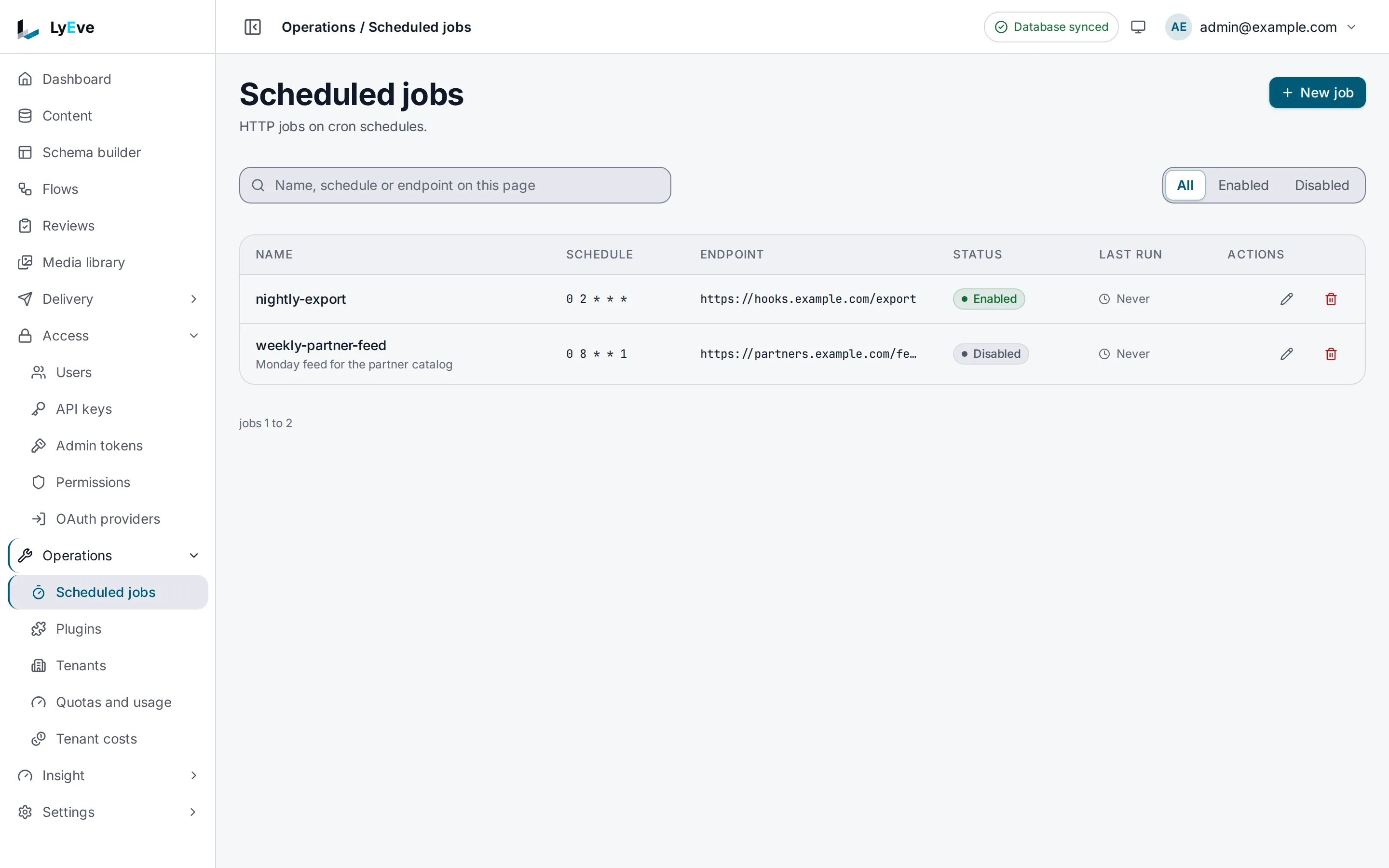
Link to the section In the consoleAs a super admin, open Operations > Scheduled jobs. Each job is listed with its schedule, endpoint, status and last run, and Enabled and Disabled narrow the list. The buttons on a row edit or delete the job. New job asks for a Name, a Description, a Cron schedule, an Endpoint URL and a JSON payload (optional), and Enabled runs the job on its schedule. The same form takes the alert channels and Alert after this many failures in a row.
For the console steps, you are signed in to LyEve Console as a super admin.
For the API steps, you need an admin token in TOKEN. The
quickstart shows how to get one.
Replace the endpoint with a URL of yours that accepts a POST, such as a
request inspector, so you can watch the calls arrive.
1. Create a job that runs every day at 02:00.
Console v0.28.0
- Open Operations > Scheduled jobs and choose New job.
- Enter
nightly-exportin Name,0 2 * * *in Cron schedule and your URL in Endpoint URL. - Enter
{"format": "csv"}in JSON payload (optional), keep Enabled on and choose Create.
The job joins the list as Enabled.
Engine API v0.62.0
curl -X POST http://localhost:3001/api/admin/cron/jobs \ -H "Authorization: Bearer $TOKEN" \ -H "Content-Type: application/json" \ -d '{ "name": "nightly-export", "schedule": "0 2 * * *", "endpoint": "https://hooks.example.com/export", "payload": {"format": "csv"} }'The answer is 201 with the job:
{ "id": "3c0a5f9e-8d21-4b7e-9f13-6a2d4c8e1b07", "tenant_id": "default", "name": "nightly-export", "schedule": "0 2 * * *", "endpoint": "https://hooks.example.com/export", "payload": {"format": "csv"}, "enabled": true, "created_at": "2026-10-01T10:00:00Z", "updated_at": "2026-10-01T10:00:00Z", "consecutive_failures": 0}2. Run it now instead of waiting for 02:00. Only the API runs a job on demand: console v0.25.0 has no button for it. From either path, find the job's id and trigger it. From the console path, get a token for your console account as Sign in shows:
JOB_ID=$(curl -s http://localhost:3001/api/admin/cron/jobs \  -H "Authorization: Bearer $TOKEN" \  | jq -r '.data[] | select(.name == "nightly-export") | .id')
curl -X POST http://localhost:3001/api/admin/cron/jobs/$JOB_ID/trigger \  -H "Authorization: Bearer $TOKEN"
The answer is 202 with {"message": "job triggered"}. The call runs in the
background, and your endpoint receives {"format": "csv"}.
3. Read the run.
Console v0.28.0
Reload Operations > Scheduled jobs. Last run shows when the job ran, with a check for a run that worked and a cross for one that failed. Console v0.25.0 shows no status code or error.
Engine API v0.62.0
curl http://localhost:3001/api/admin/cron/jobs/$JOB_ID/history \ -H "Authorization: Bearer $TOKEN"[ { "id": "a41e7c2d-0b9f-4e35-8c6a-2f1d9e7b5c30", "job_id": "3c0a5f9e-8d21-4b7e-9f13-6a2d4c8e1b07", "tenant_id": "default", "status": "ok", "status_code": 200, "duration_ms": 184, "started_at": "2026-10-01T10:01:00Z", "finished_at": "2026-10-01T10:01:00Z" }]A call that failed has "status": "error" and an error_message such as
endpoint returned 405.
4. Pause the schedule.
Console v0.28.0
Choose Edit on the job's row, turn Enabled off and choose Save. The row reads Disabled. Turn Enabled on again to resume it.
Engine API v0.62.0
curl -X POST http://localhost:3001/api/admin/cron/jobs/$JOB_ID/disable \ -H "Authorization: Bearer $TOKEN"The answer is the job with "enabled": false. /enable turns it back on.
Write a schedule
Link to the section Write a scheduleA five-field expression is minute hour day-of-month month day-of-week:
| Expression | Runs |
|---|---|
0 2 * * * | Every day at 02:00 |
*/15 * * * * | Every 15 minutes |
0 9 * * 1 | Every Monday at 09:00 |
0 0 1 * * | At midnight on the first of each month |
A six-field expression adds seconds in front, such as 30 0 9 * * * for 09:00:30
every day. A schedule that would fire more than once a minute is refused.
Times are read in the server's time zone.
What a run does
Link to the section What a run doesEach run sends POST <endpoint> with Content-Type: application/json and the
payload as the body, or an empty body when the job has no payload.
- An answer below
400marks the runokand records the status code. - An answer of
400or above, or a call that never connects, marks the runerror. The reason is inerror_message, such asendpoint returned 404. - A connection failure, a
429or a5xxis retried up to three times, waiting longer each time. - Each attempt times out after 30 seconds, and a run gives up after 60.
- A call to a private, loopback or link-local address fails, so point jobs at a public address.
The job itself carries last_run_at and last_status once it has run, and
consecutive_failures, the failed runs since its last success. Run history is
kept for 30 days, and deleting a job deletes its history at once.
React when a run fails
Link to the section React when a run failsOn every install, each failed run publishes the cron.job.failed event. A
flow with an event trigger of kind: system and that name can
act on it, for example to open a ticket. The event's data holds job_id,
job_name, tenant_id, execution_id, status_code (0 when the endpoint
gave no answer), error, attempt (the run's place in the current streak of
failures, 1 for the first) and time (RFC 3339).
Get told when a job keeps failing
Link to the section Get told when a job keeps failingA job can email people once it fails a number of runs in a row, and send a
recovery notice when it works again, on every install. With alerts-pro it
can also post to Slack or Discord, open a PagerDuty incident or call a signed
webhook. The alerts object goes in the job's body. Channels set while a
license covered them keep firing after it lapses. See Alerts.
Change or remove a job
Link to the section Change or remove a jobPUT /api/admin/cron/jobs/{id} replaces the job, so send name, schedule,
endpoint and payload every time. A PUT that leaves out enabled turns
the job on, and one that leaves out alerts keeps the stored channels.
DELETE removes the job and its history and answers 204. The schedule
changes as soon as the call returns, on every replica.
In the console, Edit on a job's row opens its form, and Delete asks to confirm, because the job's run history goes with it.
The ones you are most likely to meet:
409when another job in the tenant already has thatname.422withinvalid cron expression: <reason>when the schedule does not parse.422when the schedule fires more than once a minute.413when the payload is over 64 KiB.
Every error the job routes return
| Status | Message | Cause |
|---|---|---|
400 | invalid JSON | The body is not JSON, or has a field the job does not take. |
400 | invalid input | name, schedule or endpoint is missing. |
402 | payment_required | Adding or changing a Slack, Discord, PagerDuty or webhook channel without alerts-pro. See Alerts. |
404 | failed to get cron job | No job with that id in your tenant. |
409 | failed to create job | Another job in the tenant has that name. |
413 | payload exceeds maximum size: payload is <n> bytes, maximum is 65536 bytes | The payload is over 64 KiB. |
422 | invalid cron expression: <reason> | The schedule does not parse. |
422 | schedule interval <interval> is below minimum 1m0s; sub-minute dispatch is not allowed | The schedule fires more than once a minute. |
422 | endpoint must be an absolute http:// or https:// URL | The endpoint is relative or uses another scheme. |
422 | endpoint must include a host | The endpoint has no host. |
422 | invalid alerts: ... or invalid alert channels: ..., such as invalid alerts: failure_threshold must be between 1 and 100 | An alerts value breaks a rule on Alerts. The message names the field. |
503 | alert channels other than email cannot be stored right now | A Slack, Discord, PagerDuty or webhook channel on an instance without ENCRYPTION_KEY. |
Settings
Link to the section SettingsScheduled jobs have no settings of their own. If you set LYEVE_PLUGINS to
choose which features start, include cron in it. See
licensing and tiers.
The /api/admin/cron/jobs routes need the admin or super_admin role. An
admin token with the jobs:read or jobs:write
grant can call them too.
Job routes
| Method | Path | Purpose |
|---|---|---|
GET | /api/admin/cron/jobs | The tenant's jobs as {"data": [...], "total_count": n, "limit": l, "offset": o}. limit defaults to 50, at most 500. |
GET | /api/admin/cron/jobs/{id} | One job. |
POST | /api/admin/cron/jobs | Create a job: name, schedule, endpoint, optional description, payload, enabled (default true) and alerts. Answers 201. |
PUT | /api/admin/cron/jobs/{id} | Replace a job. Send every field. |
DELETE | /api/admin/cron/jobs/{id} | Delete a job and its history. Answers 204. |
POST | /api/admin/cron/jobs/{id}/trigger | Run the job now. Answers 202. |
POST | /api/admin/cron/jobs/{id}/enable | Turn the schedule on. |
POST | /api/admin/cron/jobs/{id}/disable | Turn the schedule off. |
GET | /api/admin/cron/jobs/{id}/history | The job's runs as a list, paginated with limit and offset. |
The instance also serves /api/admin/jobs and /api/admin/jobs/{id} with
GET, POST, PUT and DELETE, for super admins only. There the list is a
plain array, PUT changes only the fields you send, and a missing field
answers 400 with name, schedule, and endpoint are required.
Related
Link to the section Related- Flows: scheduled work that runs inside LyEve, step by step.
- Webhooks: a call to your URL when content changes.
- Admin tokens: call the job routes from a script.