Features
Realtime
Requires a license with the
realtimefeature. See pricing.
Realtime pushes a notice to connected browsers and apps the moment content changes, so a page updates without polling. A client subscribes to topics over Server-Sent Events (SSE) or a WebSocket, and receives only its own tenant's events. A client that reconnects picks up the events it missed.
In the console
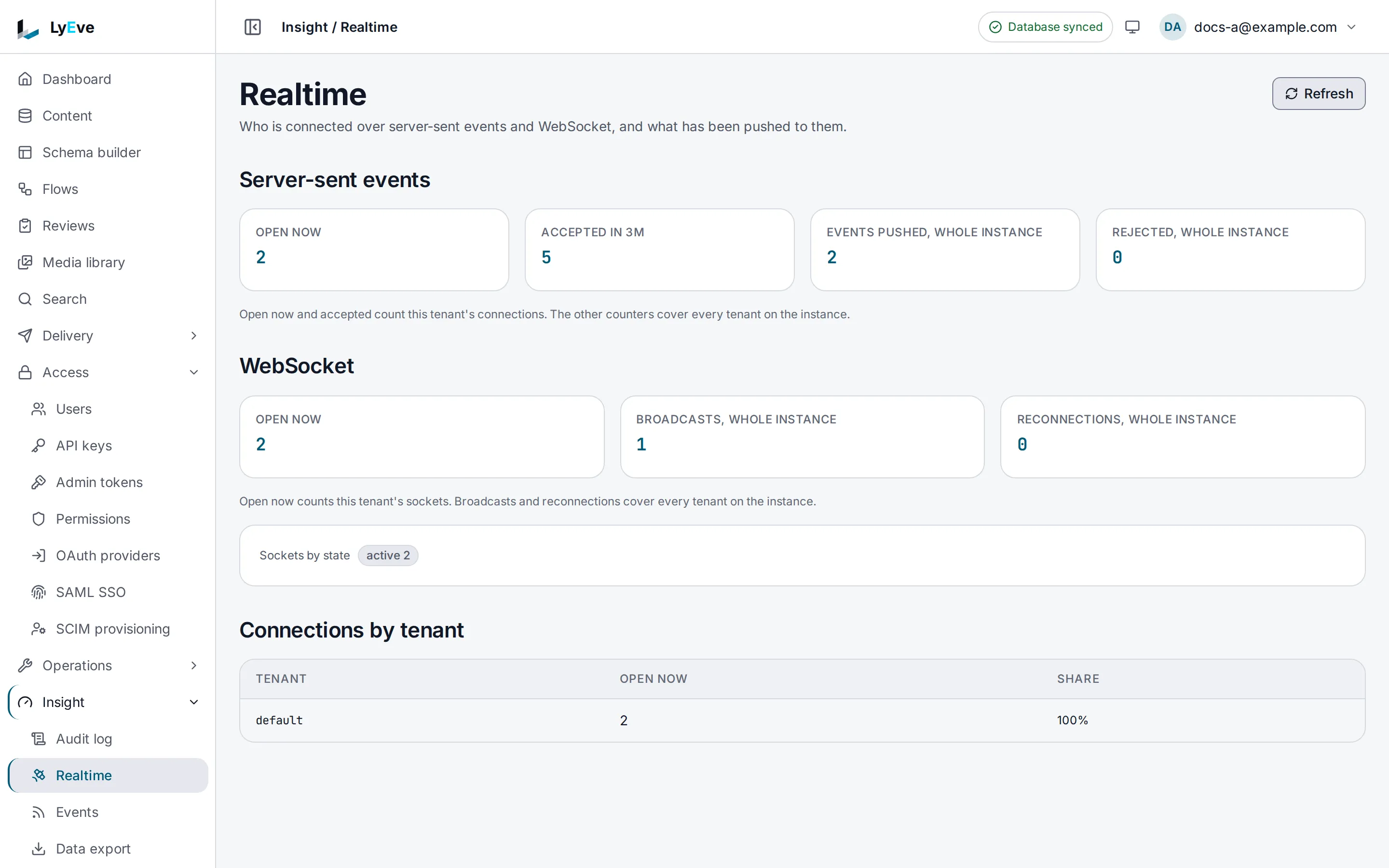
Link to the section In the consoleOpen Insight > Realtime to see who is connected right now. Server-sent events counts the streams Open now and those accepted recently, the Events pushed and the Rejected ones. WebSocket counts the sockets Open now, the Broadcasts and the Reconnections, and Sockets by state splits the open ones. Connections by tenant lists each tenant holding a stream open, with its share. Refresh reads the counts again.
Delivery > API labs opens a socket and shows what arrives, as Try it shows. Console v0.25.0 has no screen to broadcast or to list who is online, so those sections use the engine API.
How it works
Link to the section How it works| Piece | What it does |
|---|---|
| Topic | A name a client subscribes to, such as content:article. An SSE stream keeps the first 32. |
| SSE | GET /api/v1/realtime/events, a one-way stream. Browsers reconnect on their own. |
| WebSocket | /api/v1/ws/connect, both ways: events in, flow runs and their answers over the same socket. |
| Replay | Each topic keeps its last 256 events in memory. A client that reconnects with Last-Event-ID gets what it missed. |
| Topic | Carries |
|---|---|
content:<schema> | Creates, updates and deletes of entries of that content type, such as content:article |
schema:changed | A content type was created or changed. Deleting one sends nothing here. |
presence | Users joining and leaving the list of who is online |
* | Every event of the tenant. The default when no topic is given. |
| any other name | Messages a flow or a broadcast publishes |
A content event carries a notice, not the entry. Read the fields through the Content API when you need them:
{ "action": "update", "record_id": "8f14e45f-ea2c-4b1d-9f3a-2c1b0e7d6a55", "schema": "article" }action is create, update or delete.
When a token or API key carries scopes, an SSE stream checks each topic against
them. Every content:<schema> topic needs content:read, schema:changed
needs schema:read, another topic needs read on the part before its colon,
and * needs *:read. A topic the scopes do not cover is dropped, and a
stream left with none answers 403. An API key with scopes also needs
realtime:read to open a stream and ws:read to open a WebSocket.
Every connection must come from an allowed origin: its Origin header must be
in CORS_ORIGINS or match the instance's own host. Browsers send it on every
WebSocket and on a stream opened from another origin. An SSE stream opened
from a page on the instance's own origin carries none. Engine v0.58.0 serves a
stream with no Origin unless the browser's Sec-Fetch-Site header says it
came from another site, so the instance's own pages and a server-side client
need not set one. A stream from another site with no Origin is refused with
403 origin not allowed.
You need a content type named post, such as the one in
Create your first content type.
Console v0.28.0
-
Open Delivery > API labs and choose Streams. Choose WebSocket, enter
content:postin Topics and choose Connect. The state reads open, and anackline arrives. Choose WebSocket, because the Server-sent events choice answers The stream was refused on these releases. -
In a second tab, open Content, pick post and choose New entry. Enter
Realtime checkin Title andrealtime-checkin Slug, and choose Create.The API labs tab lists the event under What arrives, with the topic
content:postand the payload{"action":"create","record_id":"...","schema":"post"}.
Engine API v0.62.0
You need a token in TOKEN. The quickstart
shows how to get one.
-
Open a stream on the topic of
post. TheOriginheader names the instance's own host:Shell curl -N "http://localhost:3002/api/v1/realtime/events?topic=content:post" \-H "Origin: http://localhost:3002" \-H "Authorization: Bearer $TOKEN"The stream opens with a
:okcomment line and stays open. -
In a second terminal, sign in again and set
TOKEN, then create an entry:Shell curl -X POST http://localhost:3002/api/v1/content/post \-H "Authorization: Bearer $TOKEN" \-H "Content-Type: application/json" \-d '{"data": {"title": "Realtime check", "slug": "realtime-check"}}'The first terminal prints:
id: 4event: content:postdata: {"action":"create","record_id":"2e8580e8-7ec8-4209-9971-48971f12d9e3","schema":"post"} -
While the stream is open, list who is online:
Shell curl "http://localhost:3002/api/v1/realtime/presence?limit=20" \-H "Authorization: Bearer $TOKEN"You are on the list, with
connection_count: 1. The list counts SSE streams, and LyEve Console has no screen for it.
Server-Sent Events
Link to the section Server-Sent EventsGET /api/v1/realtime/events, with topic repeated for each topic. The
event field of each message is the topic, and its id is what a reconnect
sends back as Last-Event-ID. A comment line keeps the stream open every 10
seconds, which is inside the usual idle timeout of a proxy in front of the
instance.
On engine v0.58.0 a page served from the instance's own origin can hold such a stream with its session. From another origin the Content API does not allow credentials, so a page there uses a WebSocket. A server, or a client that sets its own headers, can use SSE from anywhere.
WebSocket
Link to the section WebSocketConnect to /api/v1/ws/connect, with topic in the query as for SSE. A
browser cannot set an Authorization header on a WebSocket, so it sends the
credential as a subprotocol:
const ws = new WebSocket( "wss://lyeve.example.com/api/v1/ws/connect?topic=content:article", ["lyeve.v1", `lyeve.bearer.${token}`],);ws.onmessage = (e) => { const msg = JSON.parse(e.data); console.log(msg.type, msg.topic, msg.data);};The server answers with the lyeve.v1 subprotocol. The subprotocol carries a
session token, not an API key. A client that can set headers sends
Authorization: Bearer <token> or X-API-Key: <key>, with an Origin,
instead. A ?token= parameter is ignored, because
query strings end up in proxy logs and browser history.
Every message is JSON of the shape {"type", "topic", "id", "data", "ts"},
and topic is left out of messages that are not events. The first has the
type ack, and its data names the connection (conn_id) and its
topics. Events have the type event. Send Last-Event-ID on reconnect to
replay what you missed.
The server pings every 30 seconds and closes the socket when no pong arrives within 10 seconds, or when nothing is read for 120 seconds. A client message is at most 64 KB.
Run a flow over the socket
Link to the section Run a flow over the socketA client runs a published flow of its tenant and reads the answer on the same socket:
{"type": "flow.run", "ref": "r1", "slug": "order-totals", "input": {"order": 7}}{"type": "flow.result", "id": 0, "data": {"ref": "r1", "slug": "order-totals", "run_id": "...", "status": 200, "body": {"total": 42}}, "ts": "..."}ref comes back, cut at 128 characters, so you can match answers to
requests. input must be an object or absent. The flow's HTTP trigger must
list realtime in its protocols, and its auth setting decides whether this
caller may run it: public and auth flows answer, admin flows do not. The
flow's rate limit and cache apply. Starting a flow this way needs the
flow-pro capability.
Runs on one socket are served one at a time, in order. A refusal comes back as
an error message whose data carries the ref, a code and a message:
| Code | Meaning |
|---|---|
NOT_FOUND | No published flow has that slug, its trigger does not list realtime, or its auth setting excludes the caller |
PAYMENT_REQUIRED | The license does not carry flow-pro |
RATE_LIMITED | The flow's rate limit refused the call |
LOOP_DETECTED | The call would nest flows too deep |
BAD_REQUEST | input is not an object |
UNAVAILABLE | The flow could not run |
BUSY | Eight runs are already waiting on this socket |
Any other message a client sends is ignored.
Broadcast to a tenant
Link to the section Broadcast to a tenantcurl -X POST http://localhost:3002/api/v1/ws/broadcast \ -H "Authorization: Bearer $TOKEN" \ -H "Content-Type: application/json" \ -d '{"topic": "maintenance", "payload": {"message": "Publishing pauses at 18:00 UTC"}}'{ "connections_reached": 12, "total_connections": 40 }With a topic, sockets subscribed to it receive the message. Without one,
every socket of the tenant does. connections_reached counts the tenant's
topic subscriptions, whatever topic you named, so a socket on two topics counts
twice. total_connections is the number of sockets open on this instance, in
every tenant. The body is at most 64 KB. Broadcast needs the
admin role and reaches WebSocket clients only.
Show who is online
Link to the section Show who is onlineA signed-in user is on the presence list while they hold an SSE stream open.
Each join and leave is published on the presence topic. Keep a user listed
with a heartbeat at least every 60 seconds, because a user without one drops
off:
curl -X POST http://localhost:3002/api/v1/realtime/presence/heartbeat \ -H "Authorization: Bearer $TOKEN"The heartbeat answers {"status": "ok"}. GET /api/v1/realtime/presence
lists the users, paginated:
{ "data": [ { "user_id": "5f0c7b1e-1d2a-4c3b-9e8f-0a1b2c3d4e5f", "email": "ada@example.com", "connected_at": "2026-10-01T09:00:00Z", "last_heartbeat_at": "2026-10-01T09:14:30Z", "connection_count": 2 } ], "total_count": 1, "limit": 20, "offset": 0}The list is a Content API answer, so with PII masking on,
each email reads [redacted-email].
Publish from a flow
Link to the section Publish from a flowThe realtime.publish node sends one event to a topic in the run's tenant.
Subscribers to that topic and to * receive it like any other event, with an
id they can replay from. Its config is topic (required, at most 255
characters, no line breaks) and payload (an object of at most 64 KB as JSON):
{"type": "realtime.publish", "config": {"topic": "orders:paid", "payload": {"order_id": "{{ input.id }}"}}}The event is not stored, and webhooks and other flows do not see it. It reaches
clients on the instance that ran the flow only, even with REALTIME_BACKEND
set. A test run publishes nothing. See Flows.
Settings
Link to the section Settings| Variable | What it does | Default |
|---|---|---|
CORS_ORIGINS | Origins a browser may connect from, comma-separated | none |
REALTIME_BACKEND | Set redis so an event reaches clients on every instance behind a load balancer. Read from the environment only. | unset, so events stay on one instance |
REALTIME_REDIS_URL | The Redis for realtime | REDIS_URL |
REDIS_URL | The Redis the instances already share | redis://localhost:6379/0 |
When the Redis cannot be reached, each instance keeps delivering its own events
and retries the connection in the background. If you set LYEVE_PLUGINS to
choose which features start, include realtime. See
Licensing and tiers and
Scaling.
| Method | Path | Role | Purpose |
|---|---|---|---|
GET | /api/v1/realtime/events | signed in | Open an SSE stream |
GET | /api/v1/ws/connect | signed in | Open a WebSocket |
POST | /api/v1/ws/broadcast | admin | Send a message to the tenant's sockets |
GET | /api/v1/realtime/presence | signed in | List online users, paginated |
POST | /api/v1/realtime/presence/heartbeat | signed in | Keep the caller on the list |
GET | /api/admin/realtime/metrics | admin | SSE connection counts for the tenant |
GET | /api/admin/ws/metrics | admin | WebSocket connection counts for the tenant |
GET | /api/admin/realtime/metrics/platform | super_admin | SSE connection counts for every tenant |
The metrics routes return the connections accepted since the counters started, the active connections, connections by tenant, events dispatched, reconnections, rejected connections and when the counters started. The SSE metrics add heartbeats sent. The WebSocket metrics add idle connections, broadcasts, pings and pongs.
Limits and errors
Link to the section Limits and errors| Limit | Value |
|---|---|
| SSE streams per tenant | 1000 |
| SSE streams per client address | 100 |
| WebSockets per tenant | 1000 |
| Topics per connection | 32 |
| Replayed events per topic | 256 |
| WebSocket message and broadcast body | 64 KB |
| Status | Message | Cause |
|---|---|---|
403 | origin not allowed | The Origin header is not in CORS_ORIGINS and not the instance's host. It is missing on a WebSocket, or on an SSE stream the browser marks as coming from another site |
403 | insufficient scope for requested topics | The token's scopes cover none of the requested SSE topics |
403 | insufficient scope | An API key with scopes lacks realtime:read or ws:read |
400 | invalid topic parameter: ... | A topic is empty, too long or holds a line break |
429 | max connections (1000) reached for tenant "acme" | The tenant is at its connection limit |
413 | broadcast payload exceeds maximum size | A broadcast body is over 64 KB |
400 | payload is required | A broadcast had no payload |
Related
Link to the section Related- Webhooks: signed calls to your servers for the same changes.
- GraphQL API: the
contentChangedsubscription. - Client libraries:
@lyeve-labs/client-realtimewraps both transports. - Flows: run flows over the socket and publish to topics.