Features
Rate limiting
Included free on every install. Custom rules, changes to the sign-in protections, a tenant's own global limit, a public route's own limit, address allow and deny lists and the refusal history need a license with the
rate-limit-profeature. See pricing.
Rate limiting answers 429 Too Many Requests when a client sends more
requests than a limit allows. It keeps one client from crowding out the
others and slows down password guessing. Every install enforces the sign-in
protections, and a super admin can turn on one global limit.
How it works
Link to the section How it works| Kind | What it is | Without rate-limit-pro |
|---|---|---|
| Global | One rate and burst per client address, over every request to every tenant. Ships turned off at 50 per second with a burst of 100. | A super admin turns it on and changes it. |
| Protection | The built-in limits on sign-in, password reset, magic links and MFA. | Enforced at the shipped values. |
| Custom | Your own rule for an endpoint pattern, tenant or role. | Cannot be created or edited. |
| Tenant global | One tenant's own rate and burst per client address, over every request to that tenant. | Cannot be set. |
| Address lists | Per-tenant allow and deny entries, each an address or a range. | Cannot be added. |
| Public route | A limit of its own on a public route that runs on the general public limit, such as locale resolve, search or media reads. | Cannot be set. The route keeps the general public limit. |
A request must pass every limit that matches it. There is no switch that turns limiting off. To relax a limit, change the rule.
If the license lapses, everything you already stored keeps being enforced: custom rules, the tenant limit and the address entries. You can still list and delete them, but not create or edit one. Refusals keep being counted, and reading them needs the license again.
In the console
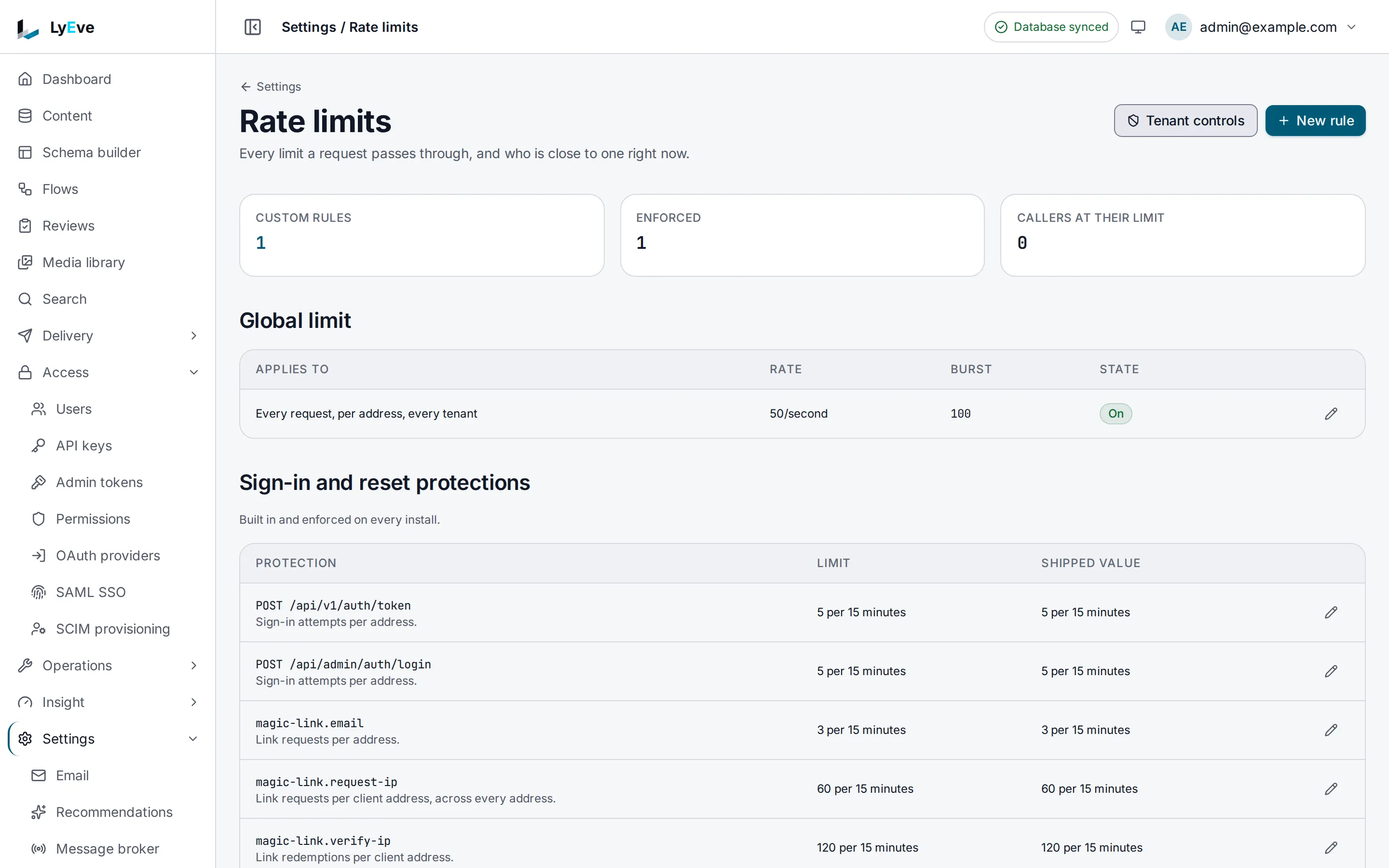
Link to the section In the consoleOpen Settings > Rate limits. The page counts the custom rules, the enforced rules and the callers at their limit. Below the counts are the Global limit, the Sign-in and reset protections, the Custom rules and the Engine limits, which come from the environment and change only there. The edit button on a row changes that limit, and New rule adds a custom rule. Right now lists the callers close to a limit.
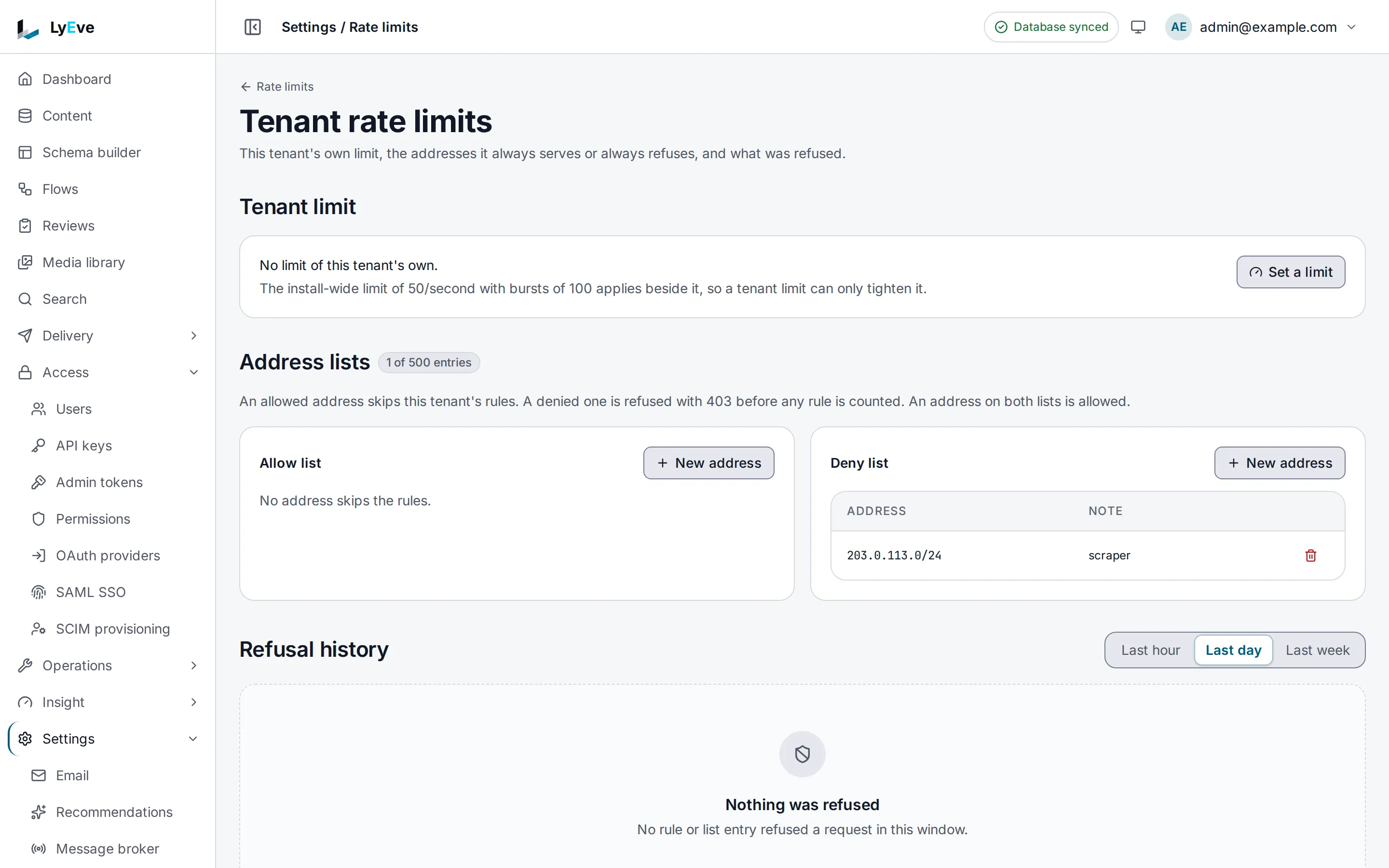
Tenant controls opens Tenant rate limits. Set a limit gives the tenant a limit of its own. The Allow list and Deny list each take entries through New address. Refusal history counts what was refused in the Last hour, Last day or Last week.
For the console steps, you are signed in to LyEve Console as a super admin. For the API
steps, you need a super admin token in TOKEN. The
quickstart shows how to get one.
1. See every limit in force.
Console v0.28.0
Open Settings > Rate limits. The Global limit row reads Off at 50 per second with a burst of 100 on a fresh install. Sign-in and reset protections lists each protection with its current and shipped value, and Engine limits the per-route limits on public routes.
Engine API v0.62.0
curl http://localhost:3001/api/admin/rate-limits/overview \ -H "Authorization: Bearer $TOKEN"The answer holds custom_licensed, the global rule ("enabled": false on a fresh
install), the protections with their current and shipped values, and the engine limits
on public routes. An admin who is not a super admin sees empty protections and engine
lists.
2. Watch the headers on any call. This is a plain request, the same whichever path you follow:
curl -i -X POST http://localhost:3001/api/admin/auth/login \ -H "Content-Type: application/json" -d '{}'A limited route answers with RateLimit-Limit, RateLimit-Remaining, RateLimit-Reset
and RateLimit-Policy, and the same values as X-RateLimit-*.
3. Turn on the global limit. Only a super admin may do this.
Console v0.28.0
Choose Edit the global limit. Keep 50 in Requests per second and 100 in
Burst, turn on Enforce the global limit, and choose Save. The page confirms
Global limit saved., and the row reads On.
Engine API v0.62.0
curl -X PUT http://localhost:3001/api/admin/rate-limits/global \ -H "Authorization: Bearer $TOKEN" \ -H "Content-Type: application/json" \ -d '{"rate": 50, "burst": 100, "enabled": true}'The answer is the global rule with "enforced": true.
4. With rate-limit-pro, hold anonymous readers to 2 requests per second. Without the
license the console has no New rule button, and the API answers 402 with
payment_required.
Console v0.28.0
- Choose New rule.
- Enter
GET /api/v1/*in Endpoint, or choose it under Pick a route. Leave Tenant empty, and enteranonymousin Role. - Keep Per address under Count. Enter
2in Requests per second and10in Burst, and keep Enforce this rule on. - Choose Create. The page confirms Created with the endpoint, and Custom rules lists it for Signed-out callers, per address.
Engine API v0.62.0
curl -X POST http://localhost:3001/api/admin/rate-limits \ -H "Authorization: Bearer $TOKEN" \ -H "Content-Type: application/json" \ -d '{"endpoint": "GET /api/v1/*", "rate": 2, "burst": 10, "role": "anonymous"}'{ "id": "0b9f6c1e-6f43-4c1a-9d0e-2a7c5f3e8b11", "endpoint": "GET /api/v1/*", "rate": 2, "burst": 10, "enabled": true, "kind": "custom", "role": "anonymous", "key_by": "ip", "created_at": "2026-10-01T09:00:00Z", "updated_at": "2026-10-01T09:00:00Z", "enforced": true}The answer is 201. A super admin's rule with no tenant_id applies to every tenant, so
the answer carries none.
An anonymous client that sends more than ten requests at once to a Content API route then
gets 429 until its allowance refills.
The sign-in protections
Link to the section The sign-in protectionsThe two sign-in routes allow 5 attempts per client address every 15 minutes:
POST /api/v1/auth/tokenPOST /api/admin/auth/login
These routes also carry a per-route limit of 5 per second with a burst of 10.
Both apply, and the protection is the stricter. PUBLIC_RATE_LIMITS moves
the per-route limit, not the protection.
Apart from these limits, every install refuses an account's password sign-in once it has 5 failures within 15 minutes, until that window ends. A correct password does not clear the failures before it. The refusal looks the same as a wrong password, and no setting changes it.
Other features add their own protections:
| Name | Default | Counts |
|---|---|---|
password-reset.email | 1 per 5 minutes | Reset mails per address |
password-reset.ip | 10 per minute | Reset requests per client address |
magic-link.email | 3 per 15 minutes | Link requests per address |
magic-link.request-ip | 60 per 15 minutes | Link requests per client address |
magic-link.verify-ip | 120 per 15 minutes | Link redemptions per client address |
mfa.verify | 5 per 5 minutes | Code checks per user |
mfa.setup | 3 per hour | Authenticator setups per user |
With rate-limit-pro, a super admin changes a protection and can put it back
to its shipped value. Putting it back needs no license.
Console v0.28.0
- On Settings > Rate limits, choose Edit password-reset.email.
- Enter
2in Requests and keep5in Window in minutes, then choose Save. The page confirms Protection saved., and the row reads Changed beside the shipped 1 per 5 minutes. - To put it back, choose Reset password-reset.email to its shipped value, then Reset in the dialog.
Engine API v0.62.0
curl -X PUT http://localhost:3001/api/admin/rate-limits/protections \ -H "Authorization: Bearer $TOKEN" \ -H "Content-Type: application/json" \ -d '{"name": "password-reset.email", "requests": 2, "window_seconds": 300}'requests is 1 to 100000 and window_seconds 1 to 86400. The answer is 204.
POST /api/admin/rate-limits/protections/reset with {"name": "password-reset.email"}
puts it back.
Write a custom rule
Link to the section Write a custom rule| Field | Meaning | Default |
|---|---|---|
endpoint | * for every request, or METHOD /path. The method is * or one of GET, HEAD, POST, PUT, PATCH, DELETE, OPTIONS. A path segment may be a {name} placeholder matching one segment, and the last segment may be * for everything below it. Examples: GET /api/v1/content/{schema}/{id}, * /api/v1/*. | required |
rate | Requests per second, more than zero. | required |
burst | Bucket size, at least 1. | required |
enabled | Whether the rule applies. | true |
tenant_id | A super admin may name a tenant, or leave it empty for every tenant. Anyone else's rule is filed under their own tenant. | every tenant for a super admin, the caller's tenant for anyone else |
role | Empty for every caller, a role name to match callers holding it, or anonymous for callers who are not signed in. | empty |
key_by | ip counts each client address. user counts each signed-in account across every address it uses, and falls back to the address for a caller who is not signed in. | ip |
A change to a rule reaches every replica within about ten seconds.
Give a tenant its own limit
Link to the section Give a tenant its own limitWith rate-limit-pro, each tenant can set one global limit of its own.
Console v0.28.0
- On Settings > Rate limits, choose Tenant controls.
- On Tenant rate limits, choose Set a limit.
- Enter
20in Rate, requests per second and40in Burst, keep Enforce this limit on, and choose Save. The page confirms Tenant limit saved.
Engine API v0.62.0
curl -X PUT http://localhost:3001/api/admin/rate-limits/tenant-global \ -H "Authorization: Bearer $TOKEN" \ -H "Content-Type: application/json" \ -d '{"rate": 20, "burst": 40, "enabled": true}'The tenant limit applies beside the install-wide global limit, and a request
has to pass both, so the stricter one always wins. An install-wide limit that
a super admin turns on or lowers later reaches every tenant at once. A tenant
admin who saves a value looser than an enabled install-wide limit gets 403,
because it would never take effect.
GET on the same path answers tenant_global (or null), the
install_global limit beside it, and licensed. DELETE removes the tenant
limit and stays free.
Give a public route its own limit
Link to the section Give a public route its own limitThe public routes that need no sign-in each run on one of two limits. Sign-in,
token and other credential routes have a limit of their own. Every other
public route, such as locale resolve, search and media reads, shares the
general public limit: 50 requests a second per address with a burst of 100,
set by PUBLIC_RATE_LIMIT_GLOBAL.
With rate-limit-pro, a super admin gives one of those routes a limit of its
own, higher or lower than the general one. This is API only on v0.25.0:
curl -X PUT http://localhost:3001/api/admin/rate-limits/public-routes \ -H "Authorization: Bearer $TOKEN" \ -H "Content-Type: application/json" \ -d '{"endpoint": "GET /api/v1/localization/resolve", "requests": 600, "window_seconds": 1}'The limit replaces the general one on that route, and requests to it no longer
count against the general limit. A HEAD request follows its GET route.
Every replica picks a change up within ten seconds. A route under /auth, or
one with a limit of its own, answers 422: only PUBLIC_RATE_LIMITS moves
those.
GET on the same path answers licensed, the general limit, each route on
it with its custom limit or null, any stored limit that no longer applies
under inactive, and also_applies: the limits a request to the route still
has to pass, such as RATE_LIMIT_RPS and the global limit. A raise above one
of those is capped by it. POST /api/admin/rate-limits/public-routes/reset
with {"endpoint": ...} puts a route back on the general limit and needs no
license. A stored limit keeps applying if the license lapses.
Block or allow addresses
Link to the section Block or allow addressesWith rate-limit-pro, each tenant keeps allow and deny entries, each an
address or a CIDR range, up to 500 per tenant.
Console v0.28.0
- On Tenant rate limits, choose New address.
- Choose Deny under List, enter
203.0.113.0/24in Address or range andscraperin Note. - Choose Create. The page confirms Added 203.0.113.0/24 to the deny list.
Engine API v0.62.0
curl -X POST http://localhost:3001/api/admin/rate-limits/ip-rules \ -H "Authorization: Bearer $TOKEN" \ -H "Content-Type: application/json" \ -d '{"cidr": "203.0.113.0/24", "list": "deny", "note": "scraper"}'The answer is 201 with the entry.
- A deny entry answers
403withrequests from this address are not allowedto the tenant's requests from that range, except a super admin's. - An allow entry wins over a deny entry. It also exempts the address from the tenant's own rules and its tenant limit, never from the install-wide global limit or the sign-in protections.
- An entry that would deny the address you are calling from answers
409, so you cannot lock yourself out. A super admin's entry is saved anyway, because a deny entry never refuses a super admin.
The three 409 refusals carry a code beside the message, as
{"error": "...", "code": "rate_limit.self_lockout"}, so a client can tell
them apart without reading the text: rate_limit.self_lockout,
rate_limit.list_full and rate_limit.duplicate_entry.
GET /api/admin/rate-limits/ip-rules answers the rules with licensed and
limits, as {"entries": {"limit": 500, "current": 12}}. DELETE /api/admin/rate-limits/ip-rules/{id} removes one
and stays free.
See what was refused
Link to the section See what was refusedEvery install counts refused requests per tenant, per rule or address entry,
and per minute, and keeps seven days of them. No address is stored. Each
refusal a tenant's request meets is counted under that tenant, whichever limit
refused it: its own rules and address entries, the sign-in protections, and
the install-wide global limit as kind global. The limit shared through Redis
is counted as kind global with the rule id shared. Reading
them needs rate-limit-pro.
Console v0.28.0
On Tenant rate limits, Refusal history counts what was refused in the Last hour, Last day or Last week, with the rule or entry that refused it.
Engine API v0.62.0
curl "http://localhost:3001/api/admin/rate-limits/history?hours=24" \ -H "Authorization: Bearer $TOKEN"The answer carries hours, total_refused and minutes, newest first and at
most 5,000, each with minute, rule_id, kind, endpoint and refused.
hours goes from 1 to 168 and defaults to 24. The route reads the caller's own
tenant. A super admin reads another tenant's history by naming it in the
X-Tenant-ID header.
What a limited client sees
Link to the section What a limited client seesA refused request answers 429 with Retry-After in seconds:
{ "error": "rate limit exceeded", "remaining": 0, "limit": 5, "reset_at": "2026-10-01T09:15:00Z" }RateLimit-Policy is <burst>;w=1. The headers appear only on a request that
some rule matched.
Settings
Link to the section Settings| Variable | What it does | Default |
|---|---|---|
TRUSTED_PROXIES | Comma-separated CIDR ranges allowed to set X-Forwarded-For. Empty ignores the header and counts the connecting address. | empty |
RATE_LIMIT_RPS | A per-address ceiling for every request, set at start. 0 turns it off, which production refuses. | 0 |
RATE_LIMIT_BURST | Burst for that ceiling. | twice RATE_LIMIT_RPS |
RATE_LIMIT_PER_TENANT | true counts that ceiling per tenant and address. | false |
RATE_LIMIT_BACKEND | redis also counts the ceiling in Redis, shared by every replica. Needs RATE_LIMIT_RPS above 0. | memory |
RATE_LIMIT_REDIS_URL | Redis for the shared count. Falls back to REDIS_URL, then redis://localhost:6379/0. | unset |
PUBLIC_RATE_LIMITS | Overrides the per-route limits on public routes. | unset |
PUBLIC_RATE_LIMIT_GLOBAL | The general public limit, per address over every public route with no limit of its own, as rate:burst. Raise it where many callers share one address, such as a proxy or a CDN. | 50:100 |
The shared Redis count is free on every install, and its burst defaults to
RATE_LIMIT_RPS. Without it, each replica keeps its own counters. If you set
LYEVE_PLUGINS, include rate-limit in it.
Every route needs the admin or super_admin role.
Rate limit routes
| Method | Path | Purpose | Also needs |
|---|---|---|---|
GET | /api/admin/rate-limits | List rules, paginated with limit and offset. ?kind=global, protection, custom or tenant_global narrows the list. | |
POST | /api/admin/rate-limits | Create a custom rule. 201. | rate-limit-pro |
GET | /api/admin/rate-limits/overview | The license state, the global limit, and for a super admin the protections and the per-route limits. | |
PUT | /api/admin/rate-limits/global | Set the global limit: rate, burst, enabled. | super admin |
PUT | /api/admin/rate-limits/protections | Change a protection: name, requests, window_seconds. | super admin and rate-limit-pro |
POST | /api/admin/rate-limits/protections/reset | Return a protection to its shipped value: name. | super admin |
GET | /api/admin/rate-limits/status | Live counters for the caller's tenant, with client addresses redacted. A super admin may pass ?tenant=. | |
GET | /api/admin/rate-limits/{id} | Fetch one rule. | |
PUT | /api/admin/rate-limits/{id} | Update a custom rule. | rate-limit-pro |
DELETE | /api/admin/rate-limits/{id} | Delete a custom rule. 204. | |
GET | /api/admin/rate-limits/tenant-global | The tenant's own limit, the install-wide one and licensed. | |
PUT | /api/admin/rate-limits/tenant-global | Set the tenant's limit: rate, burst, enabled. | rate-limit-pro |
DELETE | /api/admin/rate-limits/tenant-global | Remove the tenant's limit. | |
GET | /api/admin/rate-limits/ip-rules | The tenant's address entries, licensed and limits.entries. | |
POST | /api/admin/rate-limits/ip-rules | Add cidr to list (allow or deny), with an optional note. 201. | rate-limit-pro |
DELETE | /api/admin/rate-limits/ip-rules/{id} | Remove an address entry. | |
GET | /api/admin/rate-limits/history | Refused requests for your tenant. Query: hours. | rate-limit-pro |
GET | /api/admin/rate-limits/public-routes | The general public limit, the routes on it with their own limits, and the limits beside them. | super admin |
PUT | /api/admin/rate-limits/public-routes | Give a route on the general limit its own: endpoint, requests, window_seconds. 204. | super admin and rate-limit-pro |
POST | /api/admin/rate-limits/public-routes/reset | Put a route back on the general limit: endpoint. 204, or 404 when it had none. | super admin |
| Status | Message | Cause |
|---|---|---|
429 | rate limit exceeded | A limit refused the request. |
402 | payment_required | The write needs rate-limit-pro. |
400 | endpoint must be "*" or "METHOD /path", where a segment may be {name} and the last may be * | The pattern is not one the matcher accepts. |
Every other error
| Status | Message | Cause |
|---|---|---|
400 | rate must be positive or burst must be positive | A value is zero or negative. |
400 | key_by must be "ip" or "user" | Unknown key_by. |
400 | role must be 1 to 64 letters, digits or _ . : - | The role name has other characters. |
400 | requests must be between 1 and 100000 | A protection value is out of range. |
400 | window_seconds must be between 1 and 86400 | A protection window is out of range. |
403 | super_admin required to change the global limit | An admin tried to change the global limit. |
403 | super_admin required to change an auth limit | An admin tried to change or reset a protection. |
403 | super_admin required to name another tenant | An admin passed ?tenant= to the status route. |
403 | super_admin required to read the public route limits or super_admin required to change a public route limit | An admin called a public route limit route. |
422 | only a public route on the general limit takes a limit of its own: a route with its own limit is moved by PUBLIC_RATE_LIMITS | The route has a limit of its own, sits under /auth, or is not served. |
404 | rate-limit rule not found or no such protection | Unknown id or name. |
409 | the global limit is changed through /api/admin/rate-limits/global | PUT or DELETE on the global limit through /{id}. |
409 | a built-in protection is changed through /api/admin/rate-limits/protections | PUT or DELETE on a protection through /{id}. |
409 | a tenant's global limit is changed through /api/admin/rate-limits/tenant-global | PUT or DELETE on a tenant limit through /{id}. |
400 | cidr must be an address or a CIDR range, list must be "allow" or "deny", note contains invalid characters | An address entry is malformed. |
400 | hours must be between 1 and 168 | The history range is out of bounds. |
400 | the history is read for the request's own tenant | ?tenant= on the history route. |
403 | a tenant limit may not be looser than the install-wide limit | A tenant admin's limit would never take effect. |
403 | requests from this address are not allowed | A deny entry refused the request. |
404 | address entry not found, tenant not found | Unknown entry, or a tenant the install does not hold. |
409 | that range is already on the list, code rate_limit.duplicate_entry | The range is already listed. |
409 | a tenant holds at most 500 address entries, code rate_limit.list_full | The tenant is full. |
409 | this entry would refuse the address you are calling from, code rate_limit.self_lockout | A deny entry that would lock you out. |
Related
Link to the section Related- Captcha: a challenge after repeated failed sign-ins.
- Web application firewall: block attack payloads.
- Harden your instance: the production settings.
- Scaling: shared counters across replicas.