Features
Event replay
Requires a license with the
eventsfeature. See pricing.
Event replay keeps a log of every entry created, updated or deleted, with its fields. When a system downstream missed changes, you pick a start time and LyEve publishes the logged events again, so the webhooks, flows and other listeners that react to changes run as if the events had just happened.
In the console
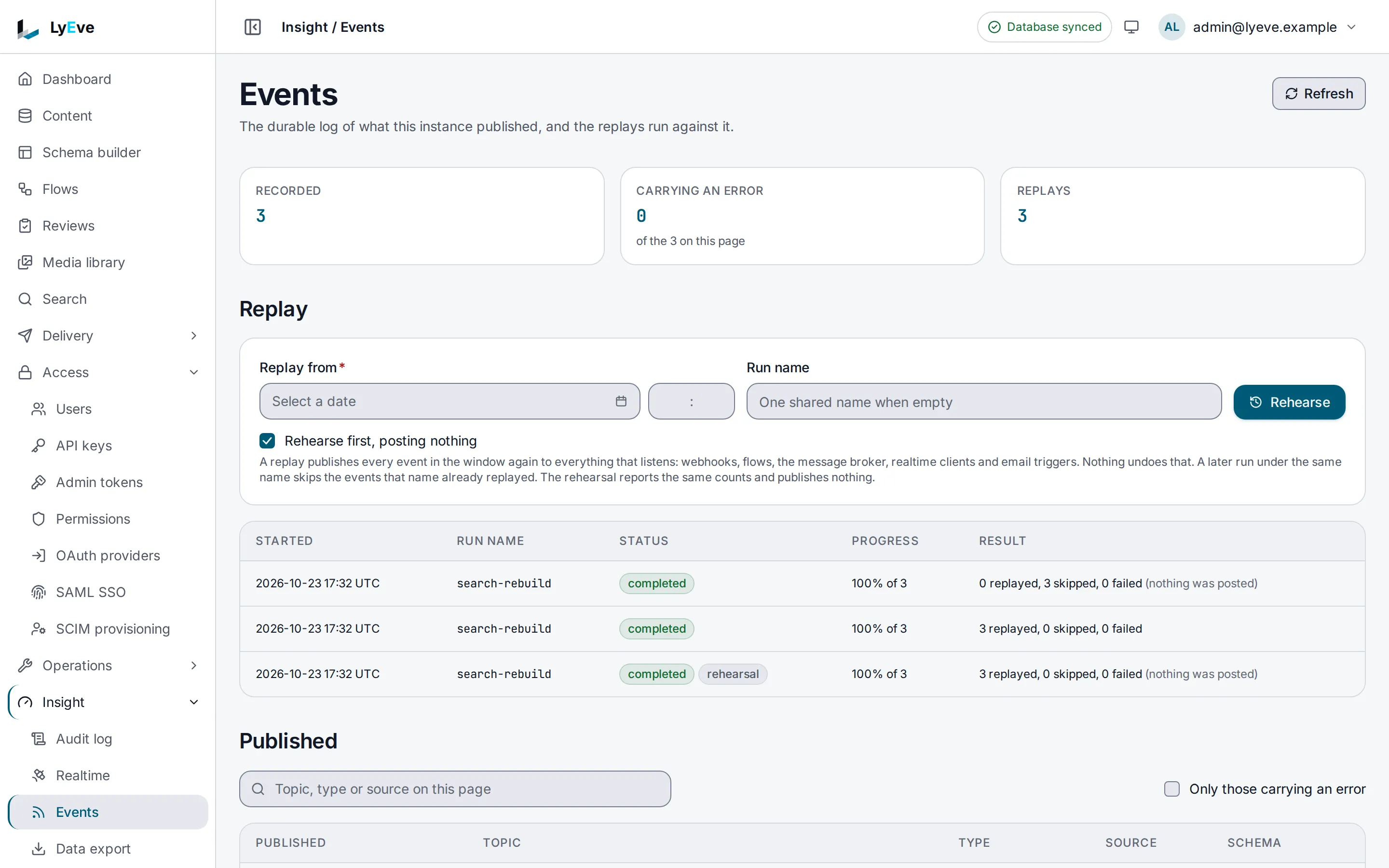
Link to the section In the consoleOpen Insight > Events. Recorded, With errors and Replays count the log and the runs.
-
Under Replay, set Replay from and give the run a name in Run name. Left empty, the run takes one shared name, listed as Shared name. The field empties after each run. The name decides only what a later run skips. A run for real reaches every listener, whatever its name.
-
Leave Rehearse without publishing ticked and choose Rehearse. The run counts the events in the window and posts nothing.
-
Untick it to send the events for real. The button then reads Replay.
Each run is listed with its run name, status, progress and result, and a rehearsal is marked rehearsal. Published lists the log, with a search and Only events with errors.
How it works
Link to the section How it works| Part | What it does |
|---|---|
| Log | Every create, update and delete is stored from the moment the feature runs, with its fields, content type, tenant and time. Content type changes are logged too, under the name sys_schemas. Nothing earlier can be replayed. |
| Replay run | Takes the logged events from a start time, oldest first, and publishes each one again in the tenant it came from. |
| Run name | The handler you give a run is a name. A later run under the same name skips every event that name already replayed. |
A replay publishes to everything that listens to content changes: webhooks, flows, message broker events, realtime clients and the email triggers. It does not write the events back into the log, so a second replay does not see copies.
For the console steps, you are signed in to LyEve Console as an admin.
For the API steps, you need an admin token in TOKEN. The
quickstart shows how to get one.
1. Read the newest entries of the log.
Console v0.28.0
Open Insight > Events. Published lists the log, newest first, with each event's topic, type, source and content type.
Engine API v0.62.0
curl "http://localhost:3001/api/admin/events?limit=1" \ -H "Authorization: Bearer $TOKEN"{ "data": [ { "id": "0aeee191-ca98-4750-bdac-006c2cb843c0", "source": "hookbus", "topic": "cms.tenant.default.post.after_update", "schema_name": "post", "event_type": "after_update", "payload": { "_status": "published", "body": null, "id": "8ca037f9-41ce-4b19-9e69-2e1eeab8e2e0", "slug": "from-graphql", "title": "From GraphQL" }, "published_at": "2026-10-23T17:31:49.650288Z", "tenant_id": "default" } ], "limit": 1, "offset": 0, "total_count": 3}total_count is the number of events in the log, three here.
Pick a time from before the outage as your start time.
2. Count what a replay from that time would send, without sending it.
Console v0.28.0
Under Replay, pick the day in Replay from and type the hour and
minute beside it. Type search-rebuild in Run name. Leave
Rehearse without publishing ticked and choose Rehearse.
Engine API v0.62.0
curl -i -X POST http://localhost:3001/api/admin/events/replay \ -H "Authorization: Bearer $TOKEN" \ -H "Content-Type: application/json" \ -d '{"since": "2026-10-23T17:02:00Z", "handler": "search-rebuild", "dry_run": true}'The answer is 202 with a Location header,
/api/admin/events/replay/<run_id>, and the run with status: running.
Copy run_id into RUN_ID.
3. Read the run.
Console v0.28.0
The run is listed under the form with its Started time, Run name, Status, Progress and Result. A rehearsal is marked rehearsal, and its result ends with (nothing was posted).
Engine API v0.62.0
curl http://localhost:3001/api/admin/events/replay/$RUN_ID \ -H "Authorization: Bearer $TOKEN"{ "run_id": "fa452e96-b601-4f41-aade-ff26bca25585", "status": "completed", "handler": "search-rebuild", "since": "2026-10-23T17:02:00Z", "dry_run": true, "tenant_id": "default", "total_events": 3, "replayed": 3, "skipped": 0, "failed": 0, "started_at": "2026-10-23T17:32:17.02261Z", "completed_at": "2026-10-23T17:32:17.034785Z"}A rehearsal marks nothing as replayed, so the real run that follows still sends the whole window.
4. Send the window for real. The run publishes every event, and your listeners react. A webhook watching the content type gets a delivery for each one.
Console v0.28.0
The form empties Run name after each run, so type search-rebuild again.
Untick Rehearse without publishing. The button now reads Replay.
Choose it. The result reads 3 replayed, 0 skipped, 0 failed.
Engine API v0.62.0
Send the request of step 2 without "dry_run": true.
5. Send it once more. The new run reports the events as skipped, because
search-rebuild already replayed them.
Console v0.28.0
Type search-rebuild in Run name and choose Replay again. The result
reads 0 replayed, 3 skipped, 0 failed.
Engine API v0.62.0
Send the request of step 4 again. The run reports "replayed": 0 and
"skipped": 3.
Start a replay
Link to the section Start a replayThe API takes these fields. The console sets since, handler and dry_run
from the form, and replays its own tenant.
| Field | Meaning | Default |
|---|---|---|
since | Required. RFC 3339. Events published at or after it are replayed. | |
handler | A name for the run. Events this name already replayed are skipped. | one shared name |
limit | Most events in this run. Larger values are cut to 10000. | 1000 |
dry_run | Count what would be replayed without publishing anything. | false |
tenant_id | Another tenant to replay. Super admin only: a tenant admin's tenant_id is ignored, and the run replays their own tenant. | your tenant |
all_tenants | true replays every tenant. Super admin only, and never with tenant_id. | false |
status moves from running to completed, or to failed when any event
failed to publish. A run gets 30 minutes. One replay runs at a time per
tenant. A second start while one runs answers
409 a replay is already in progress.
A replayed event carries the fields the log stored, which are the entry's
values after the change. A replayed after_update has no old_data.
GET /api/admin/events/replay lists past runs, paginated like the log.
Read the log
Link to the section Read the logGET /api/admin/events lists events newest first. limit defaults to 50 and
is at most 500, with offset for paging. A tenant admin sees their own tenant,
and a super admin sees every tenant.
Prune the log
Link to the section Prune the logEvents older than 90 days are deleted every hour. To delete sooner, call the API. The console has no prune control.
A prune with no tenant_id prunes your own tenant, for a super admin too. A
super admin prunes every tenant only with "all_tenants": true, and the answer
then reads "tenant_id": "".
curl -X POST http://localhost:3001/api/admin/events/prune \ -H "Authorization: Bearer $TOKEN" \ -H "Content-Type: application/json" \ -d '{"days": 30, "tenant_id": "default"}'{ "days": 30, "deleted": 0, "tenant_id": "default" }deleted counts the events removed, none here because every event was newer
than 30 days. days defaults to 90. A tenant admin prunes only their own
tenant, and naming another tenant answers them 403. Only a super admin names
another tenant with tenant_id, and for a super admin a tenant_id that names
no tenant answers 422, on a prune and on a replay. A super admin whose session
acts in no tenant sends tenant_id or all_tenants, or the prune or replay
answers 400.
Use it in flows
Link to the section Use it in flows- The
events.publishnode stores one event of your own, such asorder.paid, in the log under the run's tenant. Later replays include it. It is not published live, so webhooks do not see it until a replay sends it. - The
events.receivedtrigger starts a flow when an event is stored, filtered by event (such asafter_create,order.paidor*), content type and topic. A replay never starts it, because a replay stores nothing.
See Flows.
Privacy
Link to the section PrivacyLogged fields can hold personal data. A tenant's events go when the tenant is deleted, and a privacy erasure request empties the fields of every logged event that mentions the person.
Settings
Link to the section SettingsThe feature has no settings of its own. If you set LYEVE_PLUGINS to choose
which features start, include events. See
Licensing and tiers.
All routes are on the Admin API and need the admin role.
| Method | Path | Purpose |
|---|---|---|
GET | /api/admin/events | List logged events |
POST | /api/admin/events/replay | Start a replay. Answers 202. |
GET | /api/admin/events/replay | List replay runs |
GET | /api/admin/events/replay/{id} | One run's progress |
POST | /api/admin/events/prune | Delete old events |
| Status | Message | Cause |
|---|---|---|
400 | since is required (ISO 8601 timestamp) | A replay without since. |
400 | since must be a valid RFC 3339 timestamp | since does not parse, such as a bare date. |
400 | invalid request parameter | A bad limit or offset. |
404 | The requested endpoint does not exist. | The license does not include events, so the feature does not start. |
400 | set tenant_id or all_tenants, not both | A replay or prune sent both. |
400 | tenant_id must name a tenant | A super admin sent a tenant_id of only spaces. |
400 | set tenant_id, or all_tenants to replay every tenant, set tenant_id, or all_tenants to prune every tenant | A super admin whose session acts in no tenant sent neither field. |
403 | cannot prune other tenants | A tenant admin named another tenant. |
403 | only a super admin may replay every tenant, only a super admin may prune every tenant | A tenant admin sent all_tenants. |
422 | tenant_id names no tenant | A super admin named a tenant that does not exist. |
404 | replay run not found | A wrong run id. |
409 | a replay is already in progress | Another replay is running. Wait for it. |
Related
Link to the section Related- Add a webhook: recover a missed window for a receiver, step by step.
- Webhooks: retry or replay one delivery.
- Message broker events: a stream your consumers read live.