Features
Promote configuration
Requires a license with the
config-syncfeature. See pricing.
Build on staging, then make production match it in one step. An export writes an instance's configuration to one bundle file: content types, flows, access rules, webhooks and a short list of settings. Apply that file on another instance and it creates, updates and, if you ask, deletes until the two match. Before anything is written you can compare the bundle with the target and dry run the apply. Content entries, media and users stay where they are.
Before you start
Link to the section Before you start- Both instances need a license that carries
config-sync. Export, compare and apply each check it. - Sign in as a
super_admin. These routes take a signed-in session only: an admin token is refused with403and an API key cannot call the Admin API. An apply writes access rules, which is why a token may not. - If you set
LYEVE_PLUGINS, keepschemain it, andflow,permissionsandwebhookfor the sections they hold. An instance exports only the sections it runs, and refuses a section it has nothing to apply to.
This exports an instance, compares the file with the same instance, and dry runs it, so no
bundle is applied. Step 3 creates a webhook and step 5 deletes it, so the instance ends as it
started. Run it on an install whose license carries config-sync. For the console
steps, you are signed in to LyEve Console as a super admin. For the API steps, you need
the super admin's token in TOKEN. The quickstart shows
how to get one. The API steps use jq to build the request bodies.
1. Export the configuration with a passphrase.
Console v0.28.0
Open Settings > Config sync. Under Export this instance, enter a Passphrase and
choose Export. The page says The bundle is ready. Choose the download link under it
to save the bundle as lyeve-config-<date>.json.
Engine API v0.62.0
curl -X POST http://localhost:3001/api/admin/config-sync/export \ -H "Authorization: Bearer $TOKEN" \ -H "Content-Type: application/json" \ -d '{"passphrase": "a long passphrase from your secret store"}' \ -o bundle.jsonjq '{format, version, sections: (.sections | keys)}' bundle.json{ "format": "lyeve-config", "version": 2, "sections": ["flows", "permissions", "schemas", "settings", "webhooks"] }2. Compare the file with the instance.
Console v0.28.0
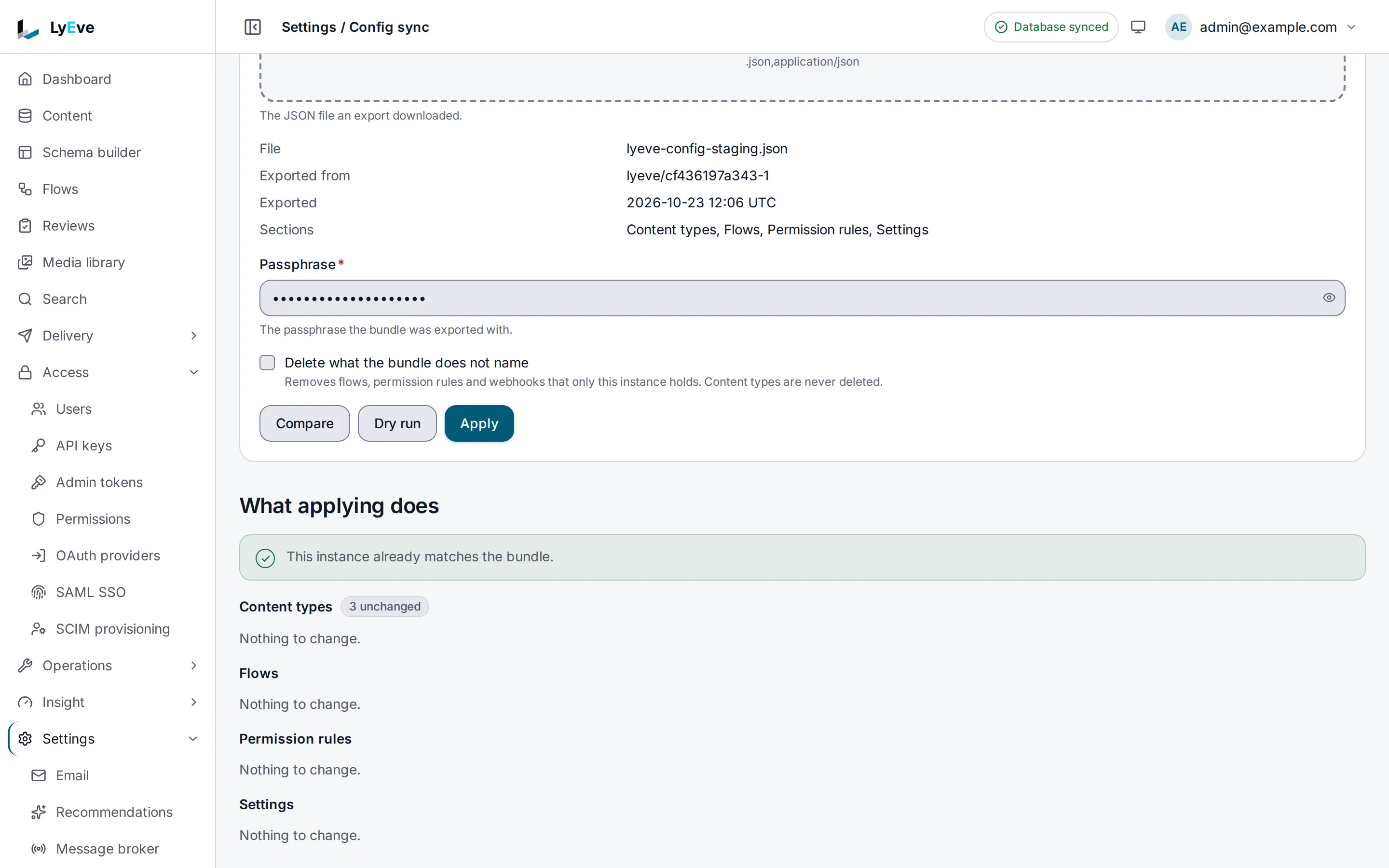
- Under Apply a bundle, choose the file in Bundle file. The page shows the file, where it was exported from, when, and which sections it holds.
- Enter the same Passphrase.
- Choose Compare.
Engine API v0.62.0
Wrap the file in a compare request:
jq -n --slurpfile b bundle.json \ '{passphrase: "a long passphrase from your secret store", bundle: $b[0]}' > plan.jsoncurl -X POST http://localhost:3001/api/admin/config-sync/diff \ -H "Authorization: Bearer $TOKEN" \ -H "Content-Type: application/json" \ -d @plan.jsonThe answer lists every section, with "changes": 0 and "problems": 0.
The instance already matches its own export, so nothing changes. In the console, the plan under What applying does lists each section with how many items it creates, updates, deletes and leaves unchanged, and a row for each item that changes, with the fields an update touches. A problem stops the apply, and the plan names the item.
3. Add something the bundle does not name, then compare with prune. Create a webhook
called extra, as on Webhooks, then compare again.
Console v0.28.0
Tick Delete items not in the bundle and choose Compare. Under Webhooks, the
plan lists outbound:extra with the change Delete.
Engine API v0.62.0
jq '. + {prune: true}' plan.json > prune.jsoncurl -X POST http://localhost:3001/api/admin/config-sync/diff \ -H "Authorization: Bearer $TOKEN" \ -H "Content-Type: application/json" \ -d @prune.jsonThe webhooks section lists {"key": "outbound:extra", "action": "delete"} and
"changes": 1.
Without prune the plan lists nothing, because an apply only creates and updates by default.
4. Dry run the apply.
Console v0.28.0
Untick Delete items not in the bundle, which is still ticked from step 3, and choose Dry run. The page shows Dry run: what applying would do and Nothing was written., with the plan from step 2.
Engine API v0.62.0
jq '. + {dry_run: true}' plan.json > dry.jsoncurl -X POST http://localhost:3001/api/admin/config-sync/apply \ -H "Authorization: Bearer $TOKEN" \ -H "Content-Type: application/json" \ -d @dry.jsonThe answer carries the plan with "applied": false and "dry_run": true. Nothing was
written.
5. Delete the webhook extra.
Console v0.28.0
Open Delivery > Webhooks, choose the delete button on the extra row, and confirm
Delete in Delete webhook extra.
Engine API v0.62.0
GET /api/admin/webhooks lists the webhooks. Copy the id of extra into WEBHOOK_ID,
then:
curl -X DELETE http://localhost:3001/api/admin/webhooks/$WEBHOOK_ID \ -H "Authorization: Bearer $TOKEN"The answer is 204.
Apply a bundle
Link to the section Apply a bundleOn the target instance, compare the bundle first, then apply it.
Console v0.28.0
- Under Apply a bundle, choose the Bundle file and enter its Passphrase.
- Tick Delete items not in the bundle if the target should lose what only it holds. See Deleting what the bundle does not name.
- Choose Apply, then Apply again in Apply this bundle? to confirm.
The page says Applied. This instance now matches the bundle.
Engine API v0.62.0
Send the compare request to the apply route, with prune if the target should lose what only
it holds:
curl -X POST http://localhost:3001/api/admin/config-sync/apply \ -H "Authorization: Bearer $TOKEN" \ -H "Content-Type: application/json" \ -d @prune.jsonThe answer has "applied": true, the plan, and the sections it wrote.
What a bundle carries
Link to the section What a bundle carries| Section | What moves | Named in a plan as |
|---|---|---|
| Content types | Every content type and its fields, in the order they depend on each other. | the content type's name |
| Flows | Each flow's definition. It arrives as a draft, and the version already published on the target keeps running until you publish the new one. | the flow's slug |
| Access rules | Each rule a role holds on a resource. | editor on articles |
| Webhooks | Outbound webhooks with their options, and incoming webhooks. Signing secrets and header values travel sealed. | outbound:<name>, incoming:<name> |
| Settings | The settings below, when they were saved in the console. | the setting's name |
The settings a bundle carries are the ones that should be the same on every instance of a project:
| Setting | What it sets |
|---|---|
CORS_ALLOW_HEADERS, CORS_ALLOW_METHODS, CORS_EXPOSE_HEADERS, CORS_MAX_AGE | What a browser may send and read across origins |
JWT_EXPIRY_SECS | How long a session token lives |
MAX_BODY_BYTES, MAX_JSON_BODY_BYTES | How large a request body may be |
PUBLIC_RATE_LIMITS, PUBLIC_RATE_LIMIT_GLOBAL, RATE_LIMIT_RPS | How hard the public routes are limited |
A setting the target takes from its environment or its configuration file belongs to that deployment. The bundle cannot change it, and the plan lists it as a problem. Leave it out of the console on one side or the other.
What it leaves out
Link to the section What it leaves out- Content entries, revisions and media.
- Users and the roles each one holds, API keys and admin tokens.
- Tenants, the license and the audit log.
- Every setting not in the table above, including allowed origins, URLs, database and cache addresses, and every credential.
How secrets travel
Link to the section How secrets travelYou choose a passphrase of at least 12 characters when you export. It seals every webhook signing secret and every outbound header value in the file, so a bearer token an endpoint expects never sits in the file in clear text. The passphrase is not stored in the file.
Give the same passphrase on the target. A wrong one is refused before any section is read. On apply, each secret is opened and stored under the target instance's own encryption, so the two instances never share a key.
The passphrase also keys a check over every section, so a file edited after it
was exported is refused before anything is planned. The file's sealing object
names the method, PBKDF2-SHA256 with 600,000 iterations and AES-256-GCM, and
the salt.
Anyone holding both the file and the passphrase can read every webhook secret
in it. Keep the passphrase in a secret store, apart from the file, and keep
the file out of public places. Every export is recorded in the
audit log as config_sync.export, and every apply as
config_sync.apply, or config_sync.apply_partial when it stopped part way.
From the command line
Link to the section From the command linelyevectl config pull, config diff and config push do the same from a
terminal or a CI job. Sign in to each instance first, since these routes need
a session:
lyevectl login --admin-url https://staging.example.comlyevectl login --admin-url https://production.example.comGive the passphrase with --passphrase or LYEVE_CONFIG_PASSPHRASE:
export LYEVE_CONFIG_PASSPHRASE='a long passphrase from your secret store'
# Write the staging configuration to a file (default lyeve-config.json).lyevectl config pull staging.json --admin-url https://staging.example.com
# What would change on production.lyevectl config diff staging.json --admin-url https://production.example.com
# Every check an apply runs, and nothing written.lyevectl config push staging.json --admin-url https://production.example.com --dry-run
# Apply it.lyevectl config push staging.json --admin-url https://production.example.com| Command | Flags |
|---|---|
config pull [file] | --section exports only the named section, repeat it for more: schemas, flows, permissions, webhooks, settings |
config diff [file] | --prune lists what the target holds and the file does not name as deletions. --json prints the plan as JSON |
config push [file] | --dry-run prints the plan and writes nothing. --prune deletes what the file does not name. --json prints the result as JSON |
Each takes the usual connection flags, such as --admin-url and --tenant.
lyevectl config validate still checks the local environment, as
lyevectl validate does.
The exit code is meant for a pipeline:
| Exit | config diff | config push |
|---|---|---|
0 | The target already matches | Applied, or nothing to apply |
1 | There are changes, none refused | |
2 | The target would refuse the bundle. Each reason is listed | Refused before anything was written |
3 | No plan could be made: the file is unreadable, the passphrase does not open it, or the instance did not answer | The file could not be read, or a write failed part way |
A gate that fails a release when production has drifted from staging:
lyevectl config diff staging.json --admin-url https://production.example.comcase $? in 0) echo "in sync" ;; 1) lyevectl config push staging.json --admin-url https://production.example.com ;; *) exit 1 ;;esacOver the API
Link to the section Over the APIAll three routes take a JSON body and answer JSON.
| Method | Path | Body |
|---|---|---|
POST | /api/admin/config-sync/export | passphrase, and optional sections, a list of section names. Answers the bundle |
POST | /api/admin/config-sync/diff | passphrase, bundle and optional prune. Answers the plan and writes nothing |
POST | /api/admin/config-sync/apply | passphrase, bundle, optional prune and optional dry_run |
An export request is limited to 16 KiB. A compare or apply request, bundle included, is limited to 8 MiB.
curl -X POST https://staging.example.com/api/admin/config-sync/export \  -H "Authorization: Bearer $SESSION" \  -H "Content-Type: application/json" \  -d '{"passphrase": "'"$LYEVE_CONFIG_PASSPHRASE"'"}' \  -o staging.json
jq -n --slurpfile b staging.json --arg p "$LYEVE_CONFIG_PASSPHRASE" \  '{passphrase: $p, bundle: $b[0], dry_run: true}' |curl -X POST https://production.example.com/api/admin/config-sync/apply \  -H "Authorization: Bearer $SESSION_PROD" \  -H "Content-Type: application/json" \  -d @-
$SESSION is the token POST /api/admin/auth/login returns for a
super_admin.
What a plan and an apply answer
A plan names every section in the bundle:
{ "sections": { "schemas": { "changes": [ {"key": "articles", "action": "update"}, {"key": "legacy", "action": "unchanged", "note": "only on this instance, and kept: config sync never drops a content type"} ], "ddl": {"articles": ["ALTER TABLE ..."]} }, "flows": { "changes": [{"key": "notify-editors", "action": "create"}], "problems": [{"key": "sync-crm", "message": "uses a trigger or node that needs flow-pro on this instance", "feature": "feature:flow-pro"}] } }, "changes": 2, "problems": 1}action is create, update, delete or unchanged, and changes counts
everything that is not unchanged. When a license limit is the cause, a
problem's feature names the feature that would lift it, as
feature:<name>.
An apply answers the plan with what it wrote:
{ "applied": true, "plan": {"sections": {}, "changes": 2, "problems": 0}, "schemas_applied": ["articles"], "sections_applied": ["flows", "permissions", "settings", "webhooks"]}With dry_run, the answer carries the plan, applied is false and
dry_run is true.
How an apply runs
Link to the section How an apply runs- Every section is planned first. If any section lists a problem, the apply
answers
422with the plan and writes nothing. - Content types are written next, one at a time in the order they depend on each other. Each one is kept as soon as it is written.
- Every other section is written together. If one of them fails, none of them changes.
If step 2 or 3 fails, the answer says where it stopped and what it kept:
{ "applied": false, "plan": {"sections": {}, "changes": 5, "problems": 0}, "schemas_applied": ["articles"], "not_applied": ["flows", "permissions", "settings", "webhooks"], "failed": { "section": "flows", "key": "notify-editors", "message": "the section could not be written, so every section in this step was rolled back" }}schemas_applied lists the content types that were written and stay.
not_applied lists the sections left as they were. The console and
lyevectl config push show the same. Fix the cause and apply the same bundle
again: what already matches is left alone.
Deleting what the bundle does not name
Link to the section Deleting what the bundle does not nameBy default an apply only creates and updates. With prune, or Delete what
the bundle does not name in the console, the target also deletes the flows,
access rules and webhooks the bundle does not name, in the sections the bundle
carries. A section the bundle leaves out is not touched.
Content types are never deleted, because deleting one deletes its content and
a bundle carries none to put back. A content type only the target holds is
listed as unchanged with a note saying it was kept.
Limits on the target
Link to the section Limits on the targetThe target's own license decides what it can take. A bundle from an instance with more features is planned against the target's limits, and each one it exceeds is a problem that names the feature:
- More flows than the free limit, or a flow with a trigger or node that needs
it, needs
flow-pro. - Access rules held by more roles than the free tier allows need
rbac-pro. - A payload template, a filter or a retry policy on an outbound webhook, any
incoming webhook, and more outbound webhooks than the free limit need
webhook-pro.
The target also checks each webhook URL as it would on a create, and a URL it may not call is a problem.
If the license lapses
Link to the section If the license lapsesExport, compare and apply all answer 402 without config-sync. Nothing an
apply wrote is undone, and moving one content type or one flow at a time keeps
working.
The ones you are most likely to meet:
422withthe passphrase does not open this bundle: use the passphrase the bundle was exported with.422with the plan when it lists a problem. Nothing was written.402when the license does not carryconfig-sync.
Every error the three routes return
| Status | Message | Cause |
|---|---|---|
400 | a passphrase of at least 12 characters seals the bundle's secrets | The export passphrase is too short. |
400 | body must be a JSON object with a passphrase | The export body does not parse. |
400 | body must be a JSON object with a passphrase and a bundle | The compare or apply body does not parse. |
400 | no bundle in the request body | Send the file's contents as bundle. |
400 | unknown section: <name> | An export named a section this instance does not have. |
402 | payment_required, naming feature:config-sync | The license does not carry config-sync. |
403 | This route needs a signed-in session. | An admin token called the route. Sign in as a person. |
409 | The apply answer, with failed | A section refused a write part way. See How an apply runs. |
413 | the bundle is too large | The request passed 8 MiB. Export fewer sections with sections and apply them one at a time. |
422 | not a configuration bundle | The file is something else, such as a content type export. |
422 | bundle version 3 is not one this instance reads (it reads 2) | The bundle came from a newer release. Upgrade the target first. |
422 | bundle version 1 carries no integrity check, so this instance refuses it. Export it again from the source instance | The bundle came from an older release. Export it again. |
422 | the passphrase does not open this bundle | Use the passphrase the bundle was exported with. |
422 | the bundle's sealing is not readable | The file was changed or cut short. Export it again. |
422 | the bundle was changed after it was exported, or its MAC is missing, so it is refused | A section was edited after export. Export it again. |
422 | The apply answer, with problems | The plan lists at least one problem. Nothing was written. |
503 | The apply answer, with failed | The database failed part way. Apply again once it answers. |
503 | failed to plan the bundle | The target could not read its own configuration. Try again. |
The 402 body in full:
{"error": "payment_required", "plugin": "schema", "feature": "feature:config-sync", "upgrade_url": ""}Related
Link to the section Related- Schema changes: change one content type, with a preview.
- Keep the content model and flows in Git: move one content type or one flow at a time, free.
- Flows: what a flow bundle carries, and publishing it after an apply.
- Webhooks: the webhooks a bundle moves.