Features
Usage and quotas
Included free on every install. Setting a tenant's quota limits, or turning a hard limit or blocking on, needs a license with the
usage-profeature. See pricing.
Usage and quotas counts what each tenant and each API key uses and keeps monthly records you can bill from. It is also what enforces the limits you put on a tenant or a key. Metering, every read, snapshots and exports are free.
How it works
Link to the section How it works| Part | What it does |
|---|---|
| Metering | Counts requests and bytes for each API key per calendar month (UTC), and reports each tenant's API calls, bandwidth, storage, content entries and media files. |
| Snapshots | Records each tenant's usage for a month, for billing. |
| Tenant quotas | Hold a tenant to monthly request, storage and bandwidth limits. Setting a limit needs usage-pro. See Tenant quotas. |
| Per-key limits | Hold one API key to a monthly request count. Setting one needs apikey-pro. See API key request limits. |
Every quota and key limit already stored is enforced on every install, even after a license lapses. Clearing a limit, lifting a block and handling increase requests are free too.
In the console
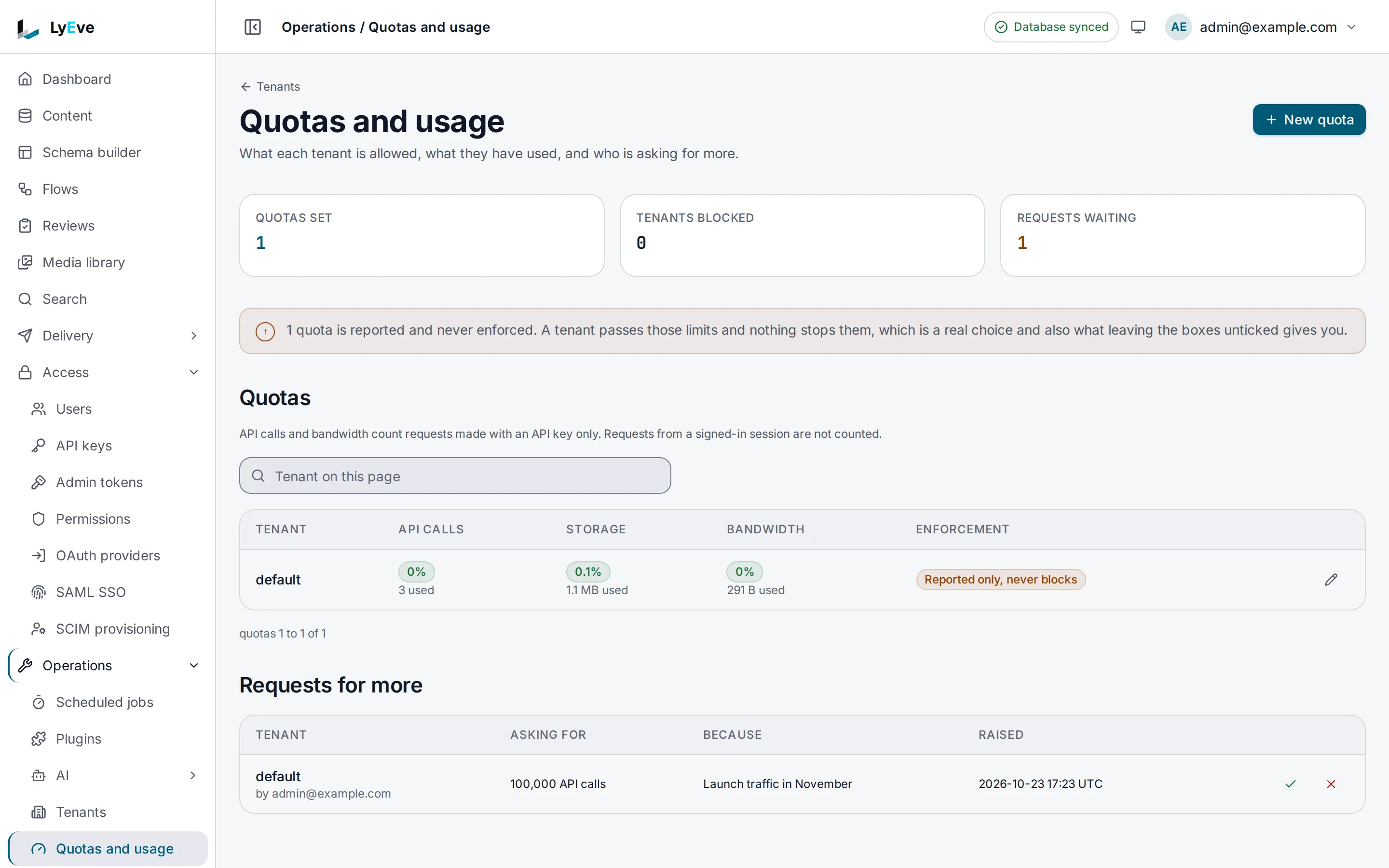
Link to the section In the consoleOpen Operations > Quotas and usage as a super admin. The Quotas table lists each tenant that has a quota, with its API calls, storage and bandwidth used and the share of each limit. API calls and bandwidth count requests made with an API key only, and requests from a signed-in session are not counted. Requests for more lists the increases tenants have asked for. The page has no snapshot or export, so take those through the API below. Setting a quota is on Tenant quotas.
For LyEve Console step, you are signed in to the console as a super admin. For the API
steps, you need a super admin token in TOKEN. The
quickstart shows how to get one.
1. Read every tenant's usage this month.
Console v0.28.0
Open Operations > Quotas and usage. Each row of the Quotas table gives a tenant's API calls, storage and bandwidth used this month, such as 3 used and 291 B used, beside its limit or No limit set. A tenant appears there once it has a quota.
Engine API v0.62.0
curl "http://localhost:3001/api/admin/usage/tenants?period=2026-10" \ -H "Authorization: Bearer $TOKEN"[{ "tenant_id": "default", "billing_period": "2026-10", "api_calls": 0, "storage_bytes": 0, "bandwidth_bytes": 0, "content_count": 1, "media_count": 0, "requests_used": 12 }]Every tenant is listed, with zeros for a tenant that has used nothing, so a new install lists
its default tenant.
api_calls and bandwidth_bytes count requests made with API keys. requests_used counts every request the quota counted this month, signed-in
ones included, and the request limit is enforced against it.
2. Write this month's snapshot for every active tenant. This is API only on console 0.28.0.
curl -X POST "http://localhost:3001/api/admin/usage/snapshot?period=2026-10" \ -H "Authorization: Bearer $TOKEN"{ "snapshots_created": 1 }Running it again for the same month replaces that month's snapshot.
3. Export every tenant's usage as CSV. This is API only on console 0.28.0.
curl "http://localhost:3001/api/admin/usage/export?from=2026-10&to=2026-10&format=csv" \ -H "Authorization: Bearer $TOKEN"tenant_id,billing_period,api_calls,storage_bytes,bandwidth_bytes,content_count,media_countdefault,2026-10,0,0,0,1,0Read one tenant or one key
Link to the section Read one tenant or one keyGET /api/admin/usage/tenant/{id}?period=YYYY-MM reads one tenant, and an
admin may read only their own tenant. GET /api/admin/usage/api-key/{id}
reads one key's requests, bytes_in and bytes_out for a month.
The tenant route and GET /api/admin/usage/snapshots/{id} answer for a tenant
that holds nothing yet, with zero counts and an empty list. An unknown tenant
answers 404 with tenant not found. Both reads are API only for a super admin
reading one tenant. An admin's Quotas and usage page shows their own tenant's usage once
the tenant has a quota.
Quotas and key limits
Link to the section Quotas and key limitsA tenant quota caps a tenant's requests, storage and bandwidth, warns at 80%
and 90%, and can block the tenant with 429. Setting one needs usage-pro.
Reading quotas, the /api/v1/quotas/status route, increase requests and the
usage.quota_check flow node are free. All of it is on
Tenant quotas.
A key's monthly request limit answers 429 once the key reaches it. Setting a
first limit or raising one needs apikey-pro. See
API key request limits.
Settings
Link to the section SettingsThere are no environment variables. Quotas are stored in the database. Usage
and quotas runs on every install. If you set LYEVE_PLUGINS to choose which
features start, include usage in it. Without it, nothing is metered and no
quota or key limit is enforced. See
licensing and tiers.
Deleting a tenant deletes its snapshots, quota and increase requests.
An admin who names another tenant gets 403 with
cross-tenant access not allowed. A super admin may name any tenant.
Usage routes
| Method | Path | Who | Purpose |
|---|---|---|---|
GET | /api/admin/usage/tenant/{id} | Admin | One tenant's usage for ?period=YYYY-MM, default the current month. An admin may read only their own tenant. |
GET | /api/admin/usage/api-key/{id} | Admin | One API key's usage for ?period=YYYY-MM. |
GET | /api/admin/usage/tenants | Super admin | Every active tenant's usage for ?period=YYYY-MM. |
GET | /api/admin/usage/snapshots/{id} | Admin | A tenant's monthly snapshots, optionally ?from=YYYY-MM&to=YYYY-MM. |
POST | /api/admin/usage/snapshot | Super admin | Write the snapshot of ?period=YYYY-MM for every active tenant. |
GET | /api/admin/usage/export | Super admin | Every tenant's usage over ?from= and ?to=, as ?format=json (default) or csv. |
The quota and increase request routes are listed on Tenant quotas.
| Status | Message | Cause |
|---|---|---|
400 | period must be YYYY-MM | Bad period. |
400 | from/to must be YYYY-MM or from must not be after to | Bad export range. |
403 | cross-tenant access not allowed | An admin named another tenant. |
404 | tenant not found or api key not found | Unknown id. |
429 | quota exceeded - tenant is blocked | The tenant is past a hard quota. See Tenant quotas. |
429 | monthly request limit (<n>) exceeded | An API key passed its monthly limit. See API key request limits. |
Related
Link to the section Related- Tenant quotas: request, storage and bandwidth limits per tenant.
- API key request limits: a monthly limit on one key.
- API keys: the keys that usage is metered by.
- Analytics: daily figures per tenant.